
S01E02 · Steering Models Through Context: MEGA lesson
MEGA’s written lesson on shaping agent behavior and reducing cognitive load through context, harness settings, memory, skills, tools, and subagents. The lesson video is presented by Theo Browne and saved separately.
textMEGA · hq.mega.dev · Saved Nov 19, 2026
mega course, context engineering, agent skills, agent orchestration, agent memory
Written lesson S01E02 of the MEGA.dev course, by MEGA. Agenda: Settings · Context · Processing · Skills · Tools · Subagents. Its lesson video is presented by Theo Browne and saved separately. (MEGA Student HQ, needs a login.)
S01E02 · Steering Models Through Context
We already know that the quality of an LLM’s output depends heavily on the context available to it: what’s already in its working memory and what it can access easily. But there’s another side to the coin: how much context we hold in our heads when working with agents.
Outline
- Harness: what the agent sees, AGENTS.md, memory, configuration, extensions, hooks, self-improvement
- Context: context management, context limits, harness optimizations, attention, instruction following, missing context, short threads, smart zone
- Skills: name and description, selection, scope, length, router skills, principles, dynamic resources, semantic anchors, self-steering, generation
- Tools: native and custom, discovery, requests, prompt injection, results, large results, hints, errors
- Subagents: tools, forks, settings, templates, skills vs. subagents, workers, orchestration
An agent needs time to finish its task. So we spin up another one, and another. Suddenly we're constantly switching between agents, making lots of decisions, trying to stay up to date with what's happening. This quickly drains all our energy, so we start accepting whatever the agents suggest. And since they lack context and a good understanding of what we're building, we quickly end up with slop. We then spend even more time trying to fix it, but that rarely works. So we get frustrated and often go back to our old ways of building software.
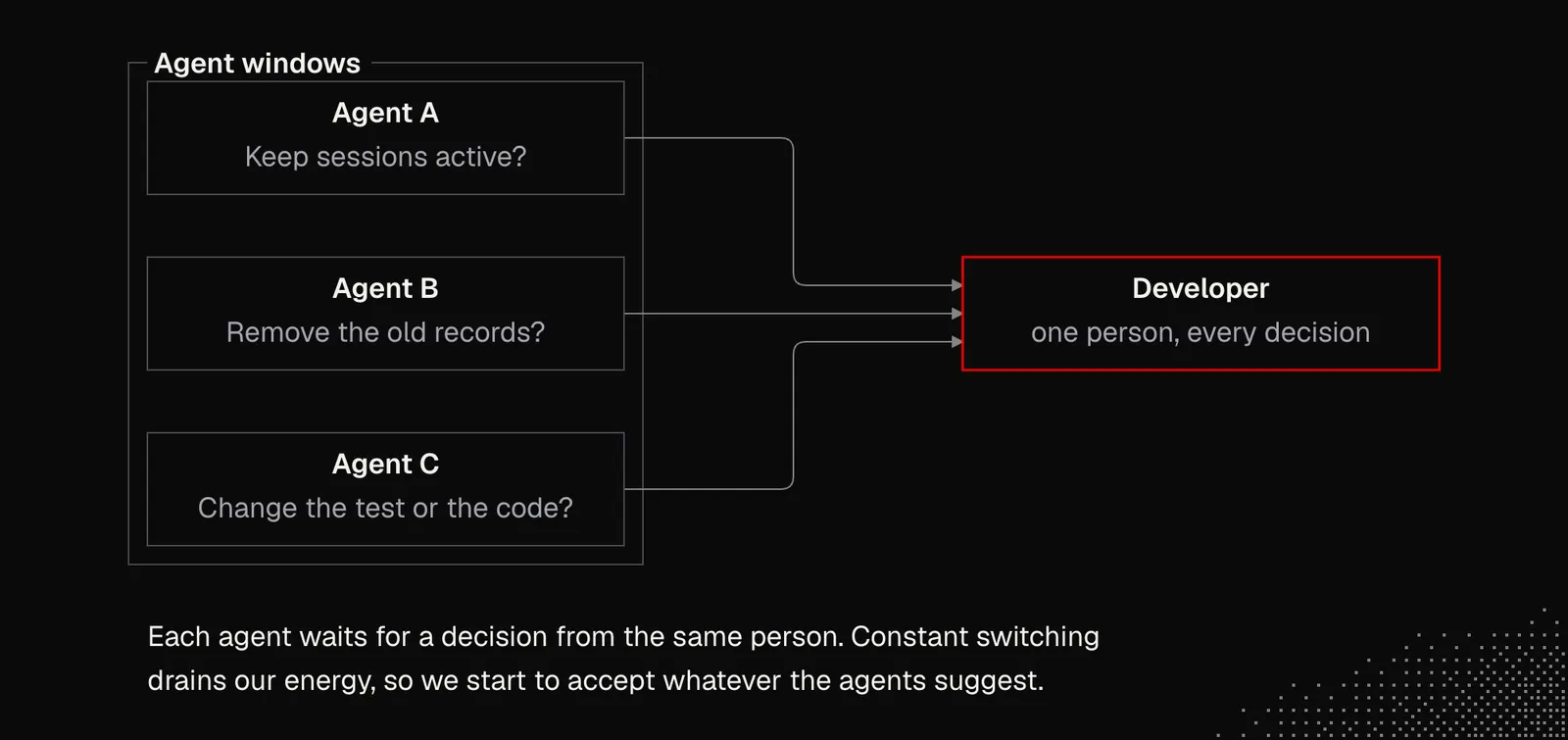
Thinking about autonomous development and delivering quality software with it sounds silly in this context. That's why today we'll deeply understand context, mechanics and patterns that may help us get much better results while reducing cognitive load. With a better understanding of context, we can focus on things that matter.
Harness Personalization
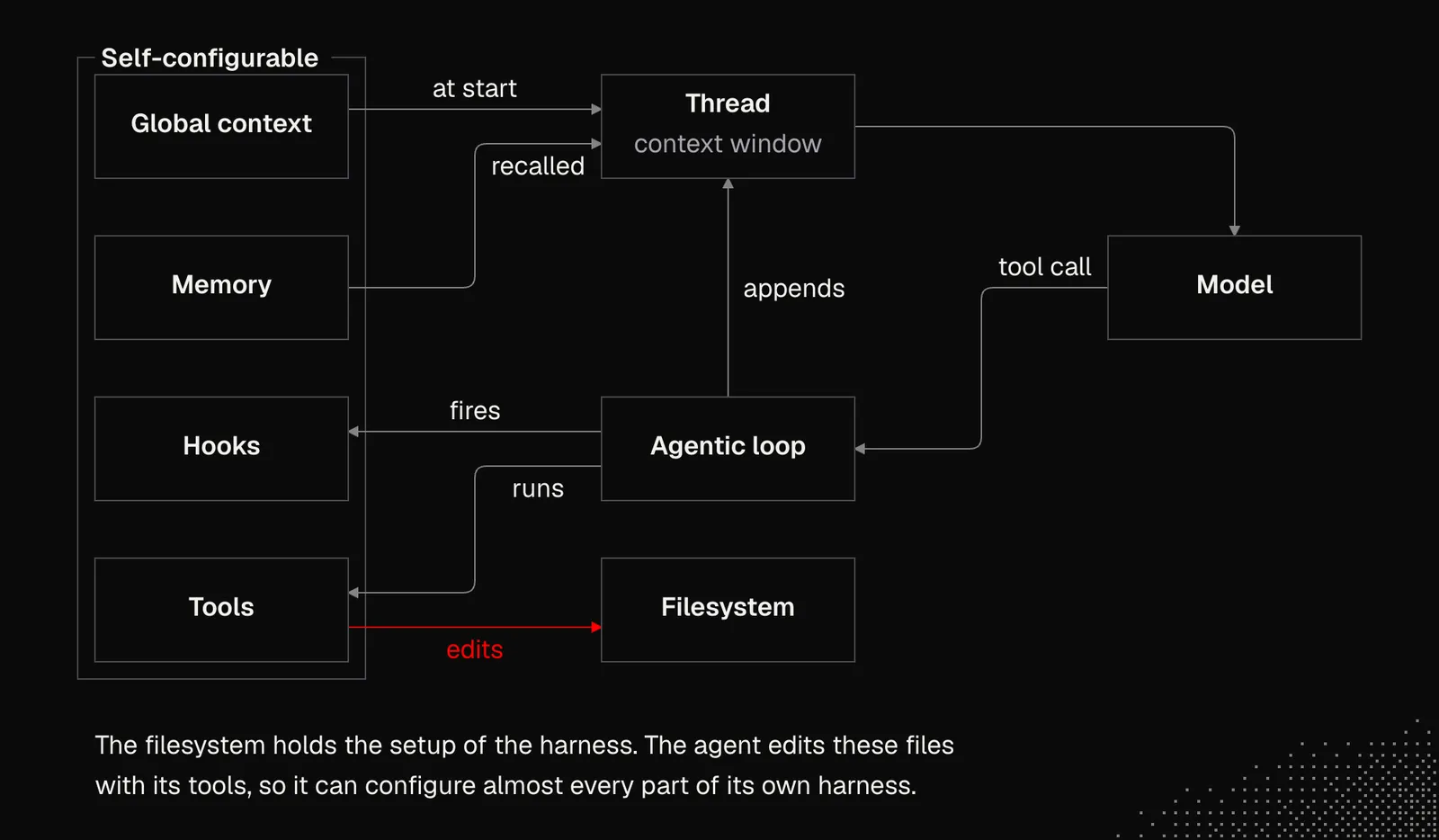
Since LLMs know nothing about us and our project when a session starts, we want them to automatically get at least a general understanding of our context. Most harnesses currently support an AGENTS.md file that is loaded at the beginning of each conversation. More broadly, we can think of the filesystem and text files as primitives for context management. Text files are often used to manage sessions and store most harness settings. Because agents can edit these files, they can also change their own settings.
It's good to know that a harness often does much more than inject a single file. The model needs some way to learn about everything up front so it can navigate the available features and understand its environment.
Below is a simplified visualization of what Claude Code sees: a system prompt, environment details, MEMORY.md, loaded and deferred tools, skills, agents, and dynamic reminders injected during the interaction.
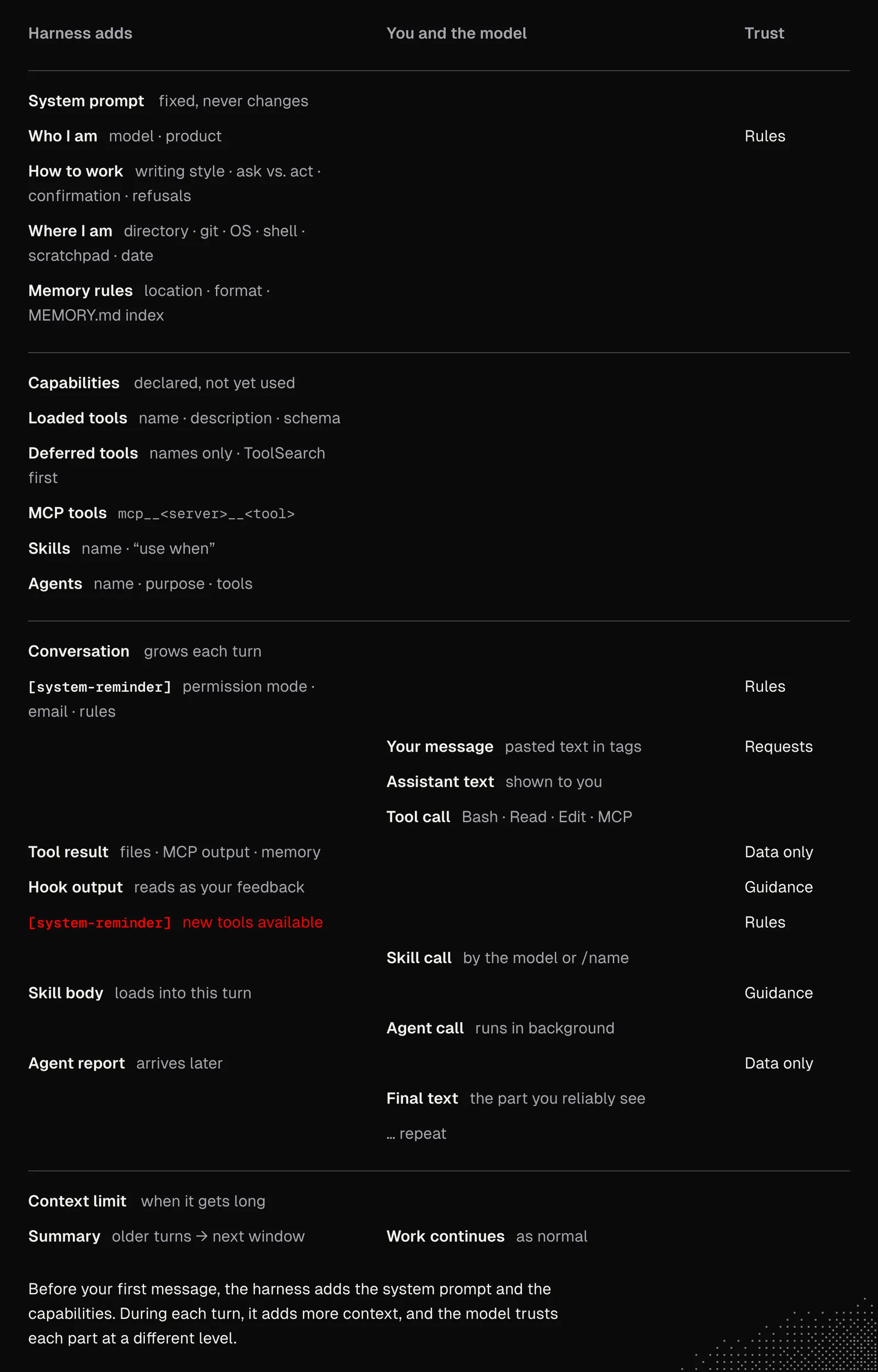
The visualization above clearly tells us that there are a lot of things going on under the hood. What's important is that this is not secret knowledge and we may simply ask the agent to explain to us the way it sees our interaction. This helps us shape our workflow and even improve it over time. But first things first.
Most harnesses and agentic tools let us configure the following:
- Core File: AGENTS.md is often injected at the beginning of an interaction. It provides general context and a useful overview, and can point to other documents that explain modules or features that can’t be inferred from the code alone. It may also include preferences, such as conventions and project-specific rules. It’s worth keeping in mind that AGENTS.md guides agents but doesn’t guarantee they’ll follow every rule.
- Memory: It can be implemented in many ways. Even a single agent may have multiple ways to store different kinds of memories that remain accessible across threads. Memories are often extracted automatically during an interaction or when we explicitly ask for them.
- Configuration: Most harnesses aim to be self-configurable, so agents themselves have access to the settings and documentation. This means we can chat with the agent about itself and figure out the best settings for us. At some point, the agent may also decide which settings are best for a given task, and adjust accordingly. This is something worth keeping in mind, as it makes our workflow more dynamic than ever before.
- Knowledge Base: This is often a collection of files that isn’t closely tied to a harness. It contains information about a product and the processes around it, helping an agent do its work and make better decisions. It can also be useful to users, their agents, and other team members, especially if we use Astro or Next to turn the documents into a website.
- Skills, as mentioned, are folders that contain a SKILL.md file and optional scripts explaining a specific process to agents. They’re loaded during interactions and are one of the most flexible ways to shape agent behavior to fit your preferences. Since skills are often just files, they can also refer to other skills, which an agent may then decide to load. And lastly, we may have “skills for creating skills,” so agents can “learn” dynamically.
- CLI / MCP: Those we'll cover later, but both extend the agent's capabilities to interact with the external world.
Beyond that, some harnesses allow us to manage their instances and also build extensions that can attach our logic to nearly every part of the interaction, thanks to hooks. And the best part is that AI can build them for us. But despite that, we still need to know what can be built and when we really need anything beyond the default setup.
Note: Not every harness can configure itself, so if possible, try switching to a tool such as Pi, OpenCode, Claude Code, or another harness that gives you that option.
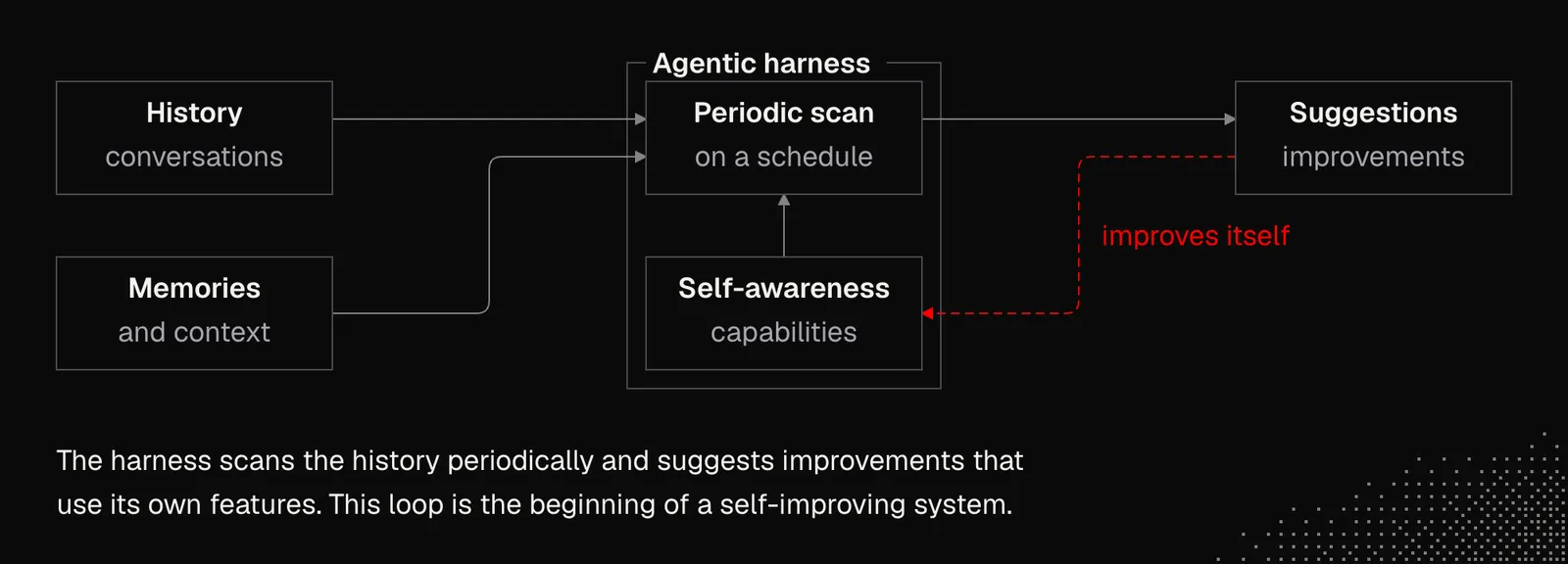
With all this in mind, we may want to use what we learned in the previous lesson to talk with our agent about how we can improve our workflow. To make this even more personalized, we can ask the agent to review our recent conversation history to better understand how we work. What’s more, we can automate the process by asking the agent to periodically scan our history and suggest what we could do better using the available features. Our role will be to avoid making the system too complicated. In fact, we need to make it as simple as possible.
When we think about it, it's the beginning of a self-improving system. As our understanding grows, this will move toward autonomy and simple but powerful mechanics that improve as models get better.
How does the context work?
One of the most important things to understand about the context is that even if the information exists in a context, it does not mean it will be used. And that goes even further, because initially a given instruction may be respected by the agent, but later on it will sometimes be ignored and the model will come back to its original behavior.
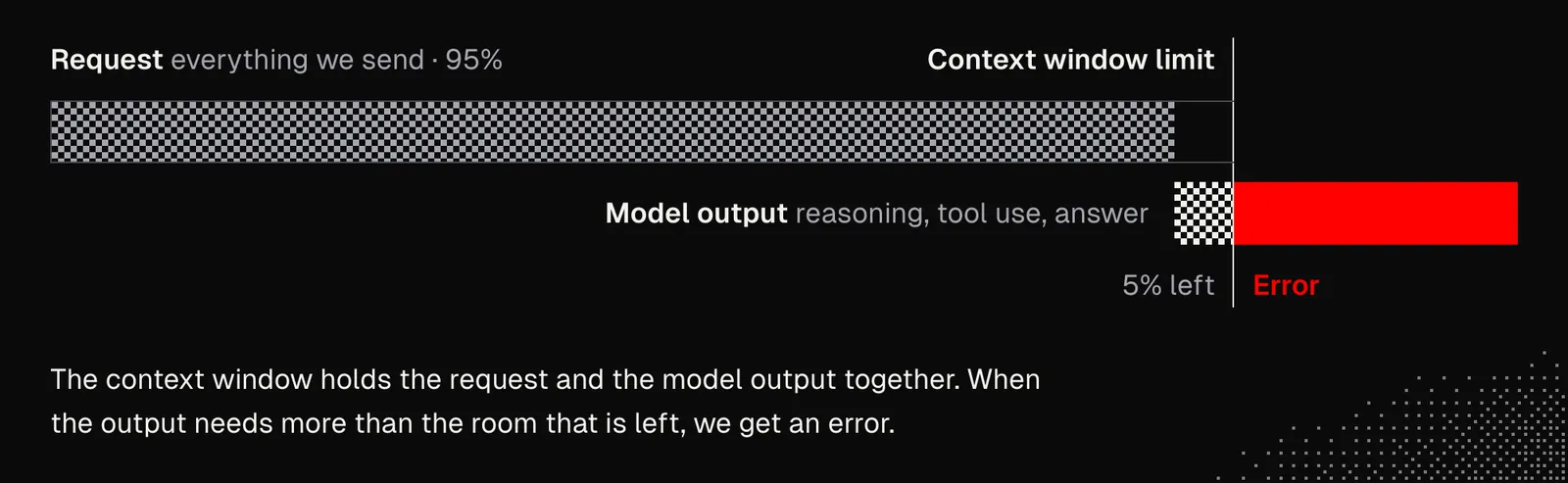
We know that LLMs have context window limits that include everything we send to a model as well as everything the model generates. In other words, if our request uses 95% of the available context window and the model’s reasoning, tool use, or answer exceeds the remaining 5%, we’ll get an error. Harnesses are doing their best to keep us away from this error, but that's not all, as they're also trying to optimize the token usage to reduce costs and improve performance. This easily leads to a situation where we expect that something is available to a model, while in practice, it's not.
Knowing this, we could say AI is useless, because even when we specify what we want, we still can’t be sure it will follow our instructions. At the same time, we know that working with AI isn’t about certainty, but about increasing our chances of getting the results we need.
Unlike code, prompts are not executed line by line, and even if we specify conditions or rules in them, models won't behave like a compiler. Exactly how models process context, especially what happens internally, is not fully understood and is a subject of research (for example, Mapping the mind of a large language model).
The illustration below shows that the issues may be related to:
- Attention: a model's ability to understand context and the relationships between concepts, rules, facts, instructions, etc.
- Instruction following: a model's ability to follow instructions from the system, a developer, or the user.
- Context issues: some information may be stripped out or hidden from a model due to harness logic or technical issues.
- Missing context: like a human, an agent may struggle to understand a task or deliver the expected results if some information was never provided to the model.
- Understanding the general context: A model may interpret concepts or entities differently, struggle with details in an image or audio, or encounter “silent issues” when accessing the contents of a website or document.
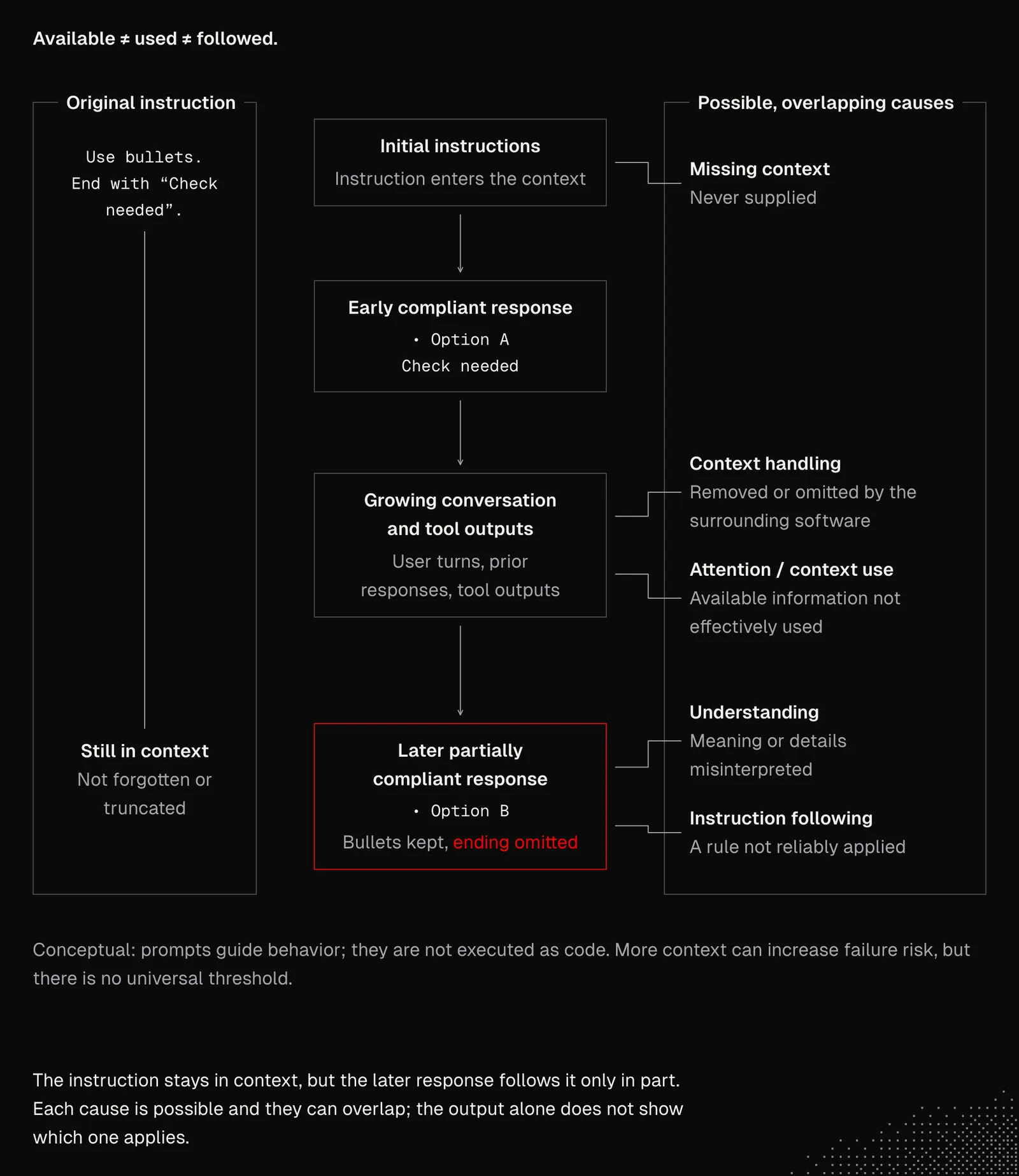
It's now clear there are many potential reasons why an agent may not understand what we say. But the biggest issue here is that most of those things are out of our control, but not all of them.
A rule of thumb for now is to keep the conversation as short as possible. This may sound a bit irritating today, since it means passing the same context over and over, but soon it will become much easier to do.
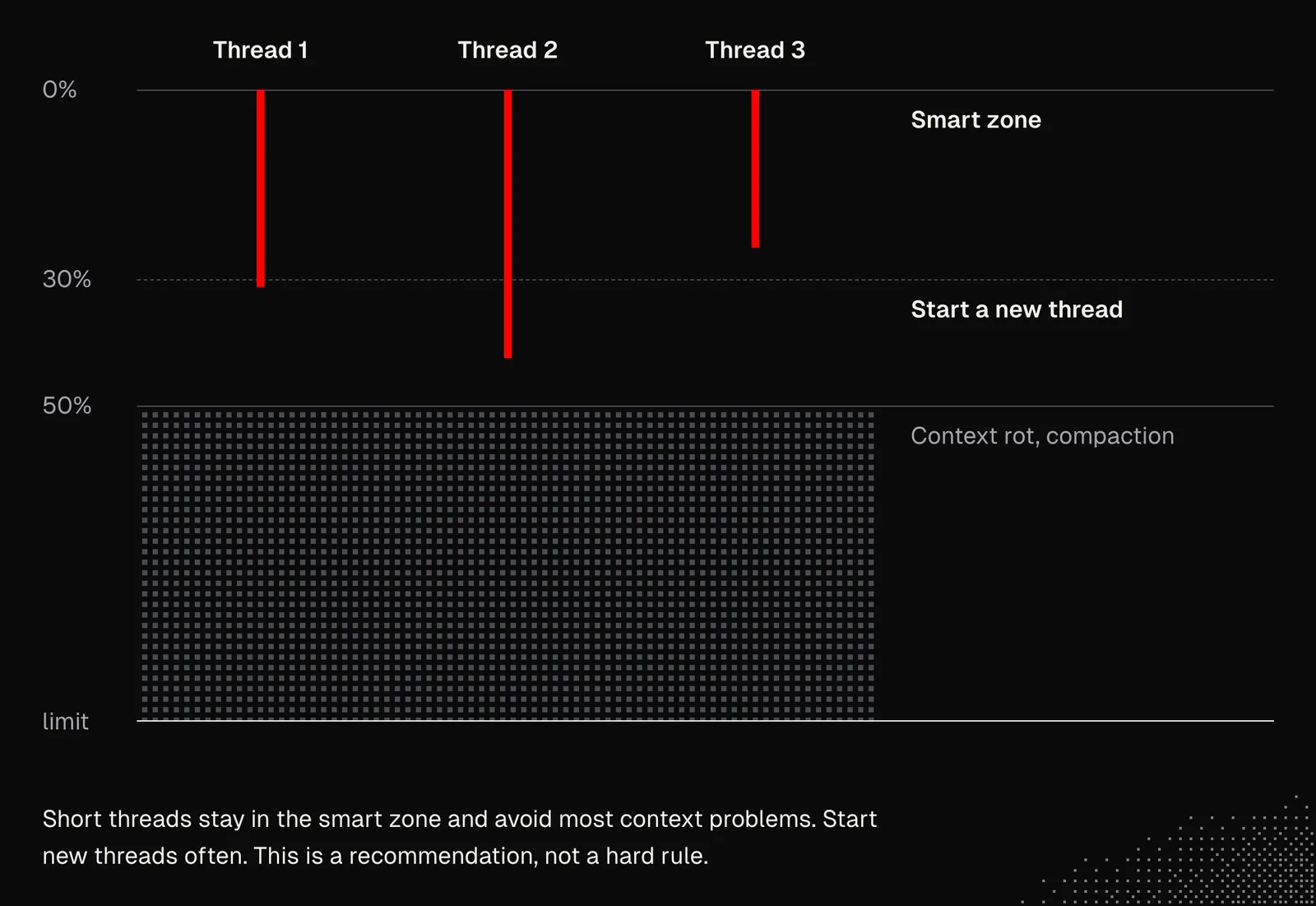
It may often seem counterintuitive to start new conversations, especially when we consider that an agent has to rediscover the context. In many cases, an agent has to explore the project for a while before it can start a single task. But there are many ways to make this easier - skills are one of them.
Designing and generating skills
We already know that a skill is just a Markdown file loaded into context by a user or an agent, and that it may include additional scripts. We can find many examples on skills.sh and some great tips at agentskills.io, but when choosing them or creating our own from scratch, we should keep in mind what we know about language models and harnesses.
WARNING: Check skills before you install them. See How Some Malicious AI Skills Hide Instructions from Reviewers.
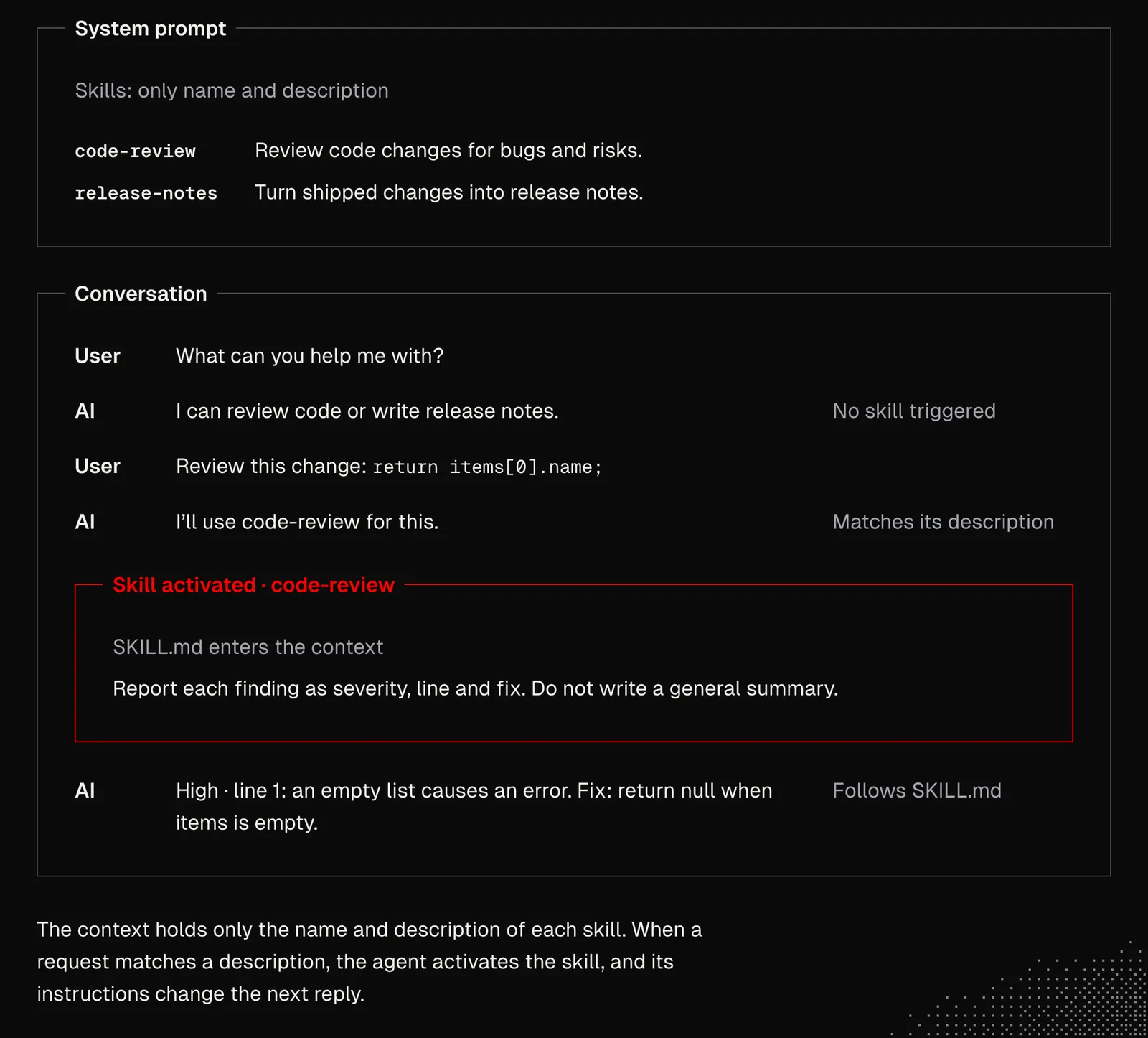
Name and Description: these are the most important elements of a skill because an agent uses them to decide when to use that skill. Getting this right is tricky, as names can easily overlap or be misunderstood depending on the context. The best approach is to start simple. For example, the skill below is straightforward, easy to remember, and easy for the agent to pick.
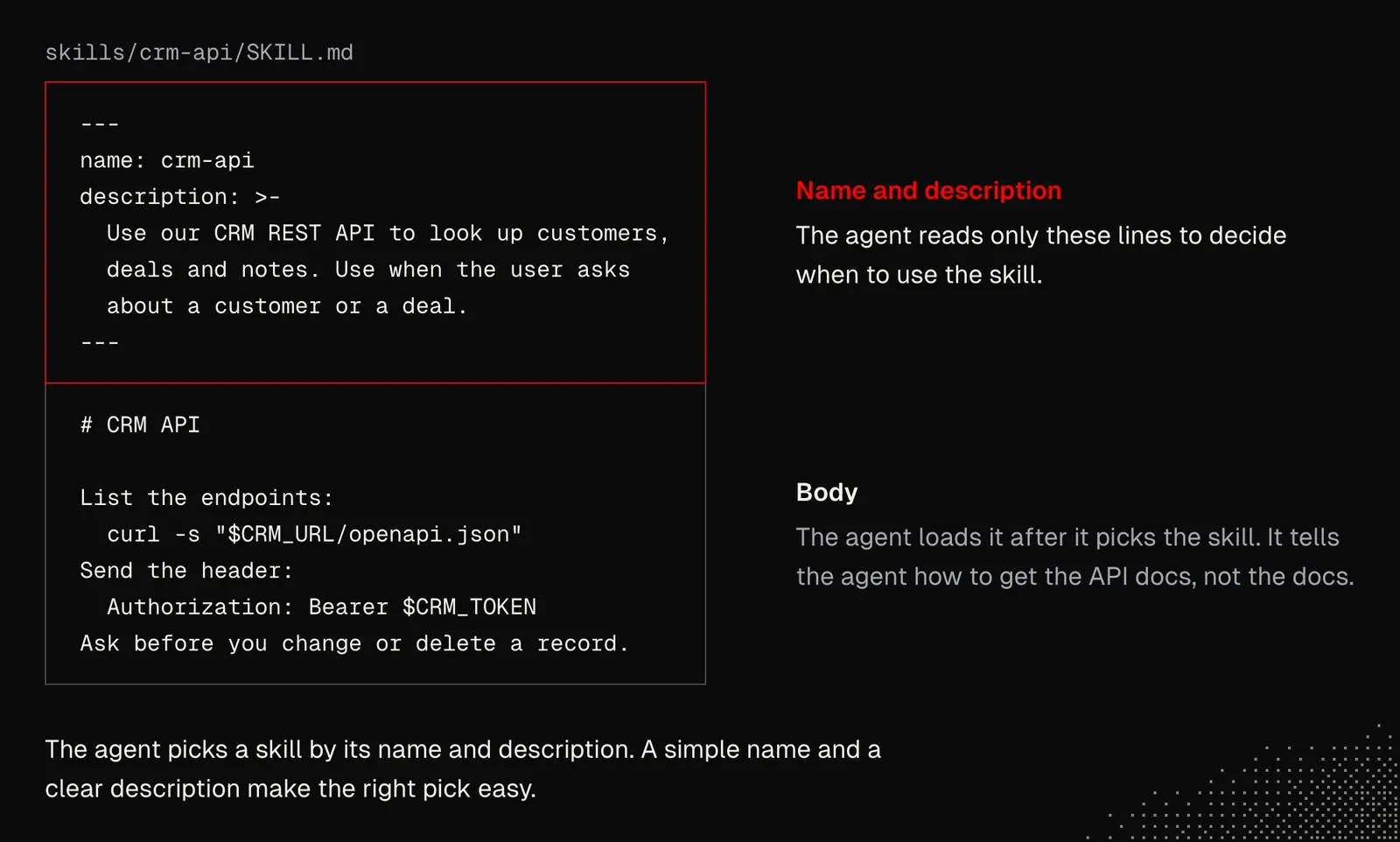
Many harnesses can now configure themselves, so whenever we see that a skill isn't triggering or is being picked when it shouldn't be, we can ask the agent to refine its description. All we need is a habit or a schedule that gets the agent to scan conversation history to see whether any skills need to be improved or new ones created.
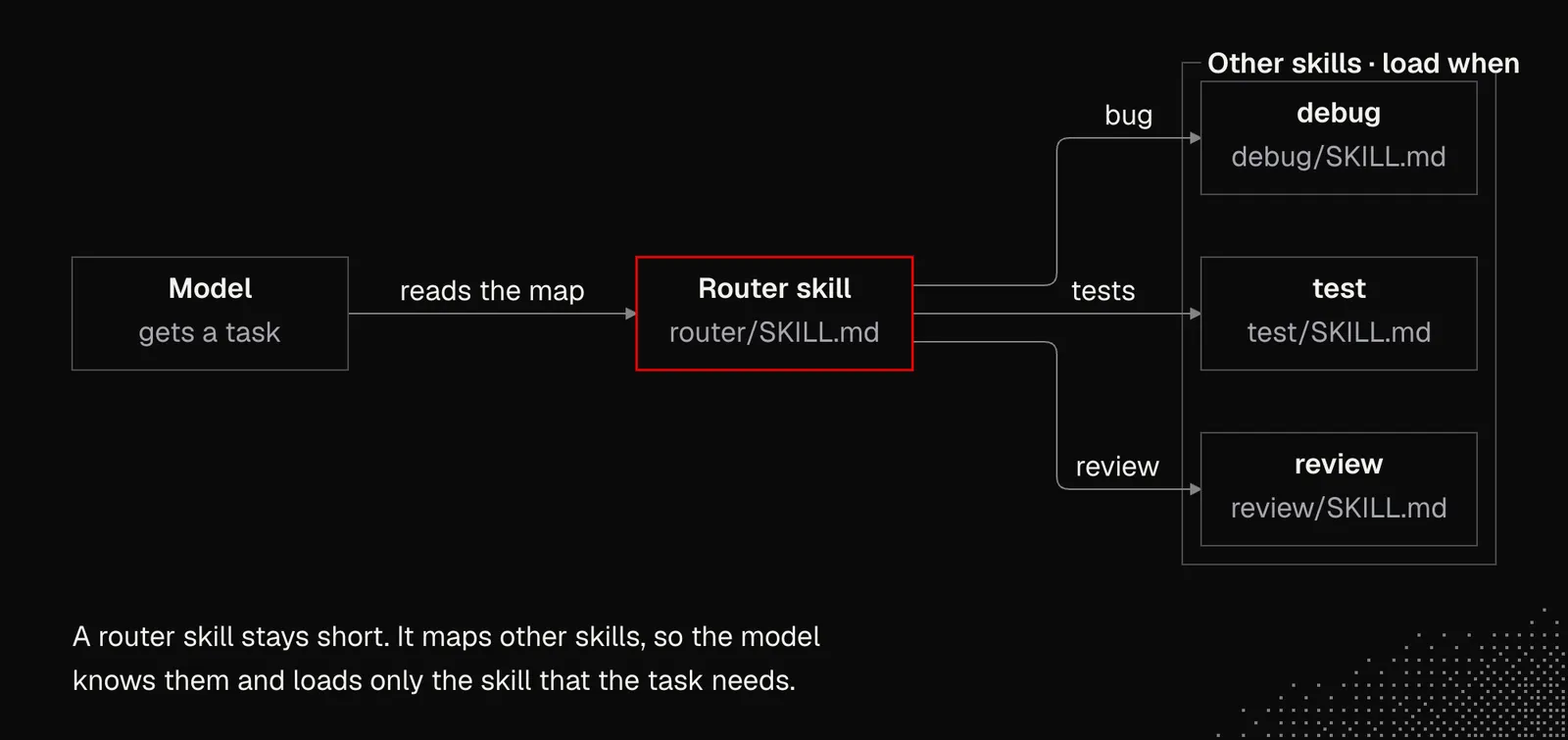
Length: Many skills we find online are long and complex. The chance that any model will follow all their instructions is close to zero. Some of the best skills are short and extremely clear about their purpose. And if there's a need to cover something more complex, we may use router skills that refer to other skills. A good example of this is ask-matt.
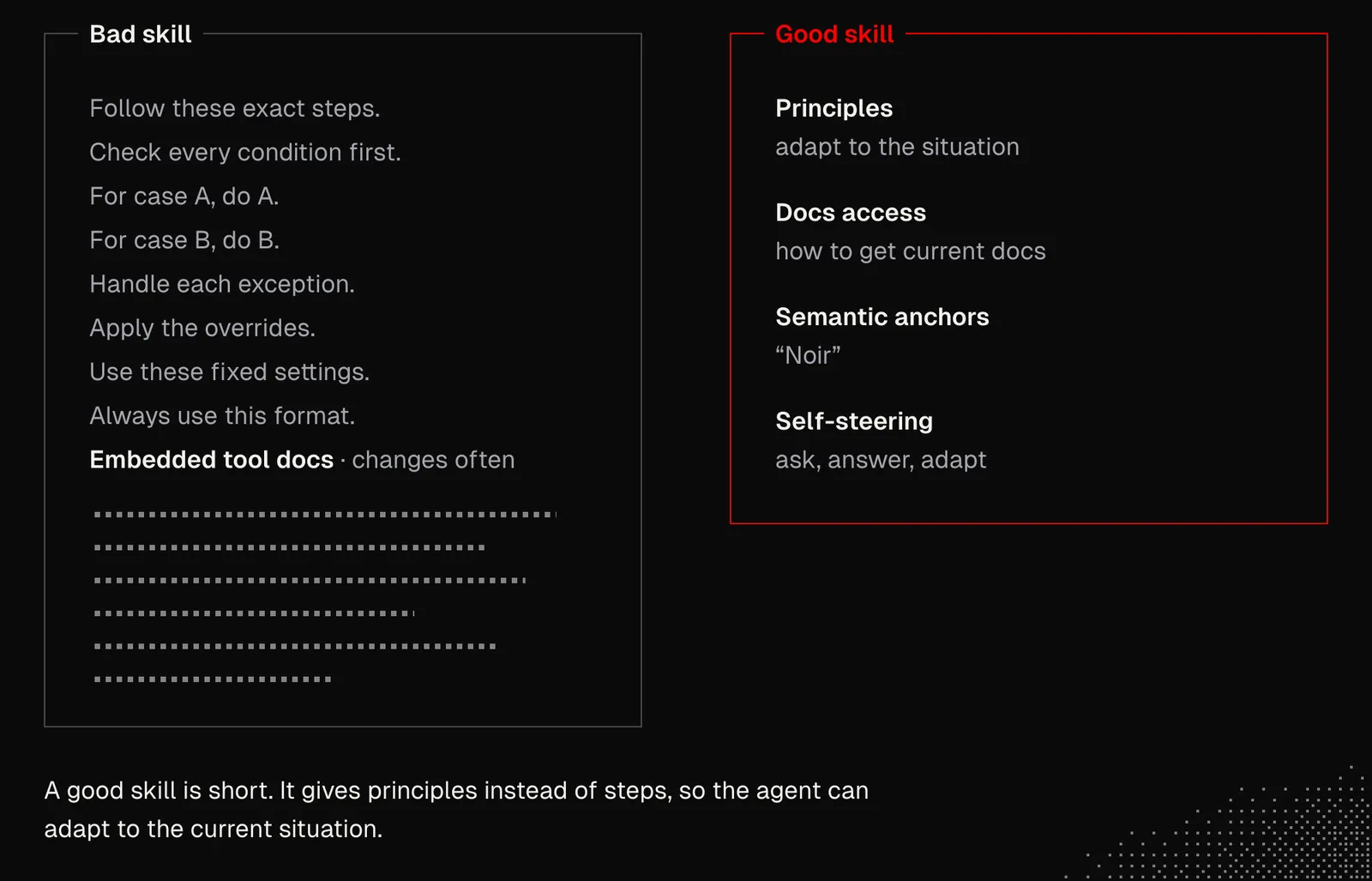
Guidance: while the concept of a skill may suggest a need for detailed instructions, in the case of models this often hurts more than it helps, for several reasons:
- Complex instructions will likely be ignored or misunderstood
- Too much guidance will hurt model performance as it reduces flexibility
- Managing long skills is much harder, even when LLMs can help us with it
- Longer instructions are more likely to include content that has to change over time
- A long skill may distract the agent from the task at hand
On the other hand, we may want to:
- Build generalized skills that don't tell the agent what to do, but give it principles and a "way of thinking" it can use to adapt dynamically to the current situation.
- Refer to dynamic resources and tools. For example, instead of building a skill that contains a tool's documentation, tell the agent how to easily access that documentation.
- Look for semantic anchors: words that carry deep meaning or evoke associations and concepts. For example, "Noir" evokes a cluster of stylistic associations: shadows, cynicism, moral ambiguity.
- Build skills that let the model steer itself by asking questions and answering them to build better context.
LLMs are getting good at crafting skills, but they still struggle with compression, generalization and simplification. At the same time, they're super useful for phrasing. Beyond that, creating a good skill requires understanding its purpose and context.
It's clear, then, that shaping a good skill requires an iterative approach that has to involve us, although at some point we may shape a process where the model will find the best form of a skill.
One example is a skill I created for myself, skill-shaper, which can be considered a meta-skill for iteratively shaping new skills. It may not be perfectly suited to your needs, but it may still be good inspiration, or even a starting point, for shaping your own. In this case, the process looks like this:
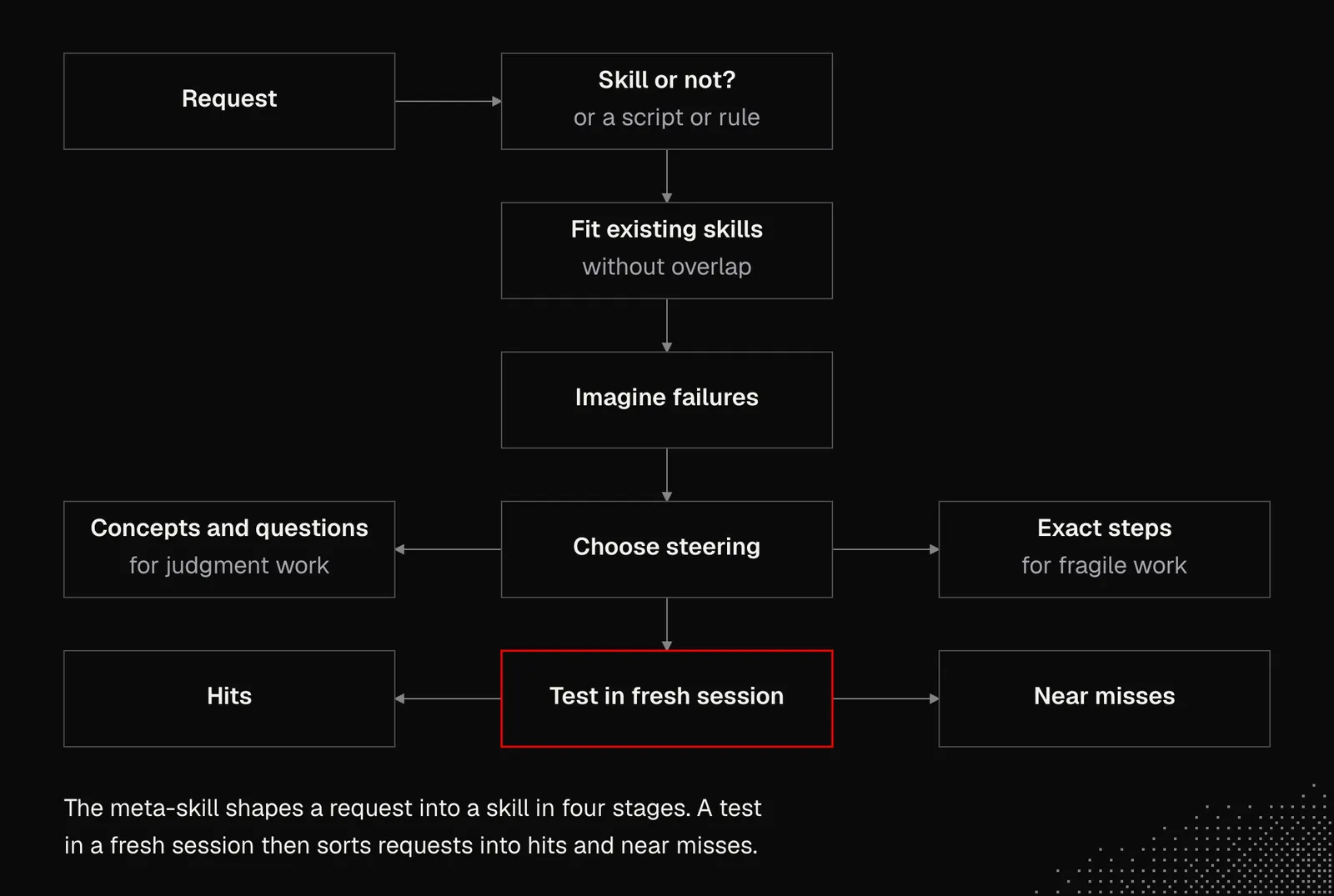
To summarize this part:
- It's worth asking your harness a few questions about the mechanics behind skills and agents. Each harness may implement them slightly differently, and while the general idea stays the same, some of the details may be useful.
- Both skills and agents can be defined globally or locally (per project). There are many skills available online, but it's worth iterating on them to tailor them to our needs.
- Working with skills and agents is mostly a matter of habit, but they shouldn't be overcomplicated. That said, shaping them may involve us, and in many cases it should, but agents can also handle it themselves.
Tool use under the hood
At this point we know that LLMs can write structured responses, but also that they're really good at writing code. We use both to let them interact with the environment. While the exact mechanics behind it will be discussed in the upcoming lessons, for now we need to understand a few things:
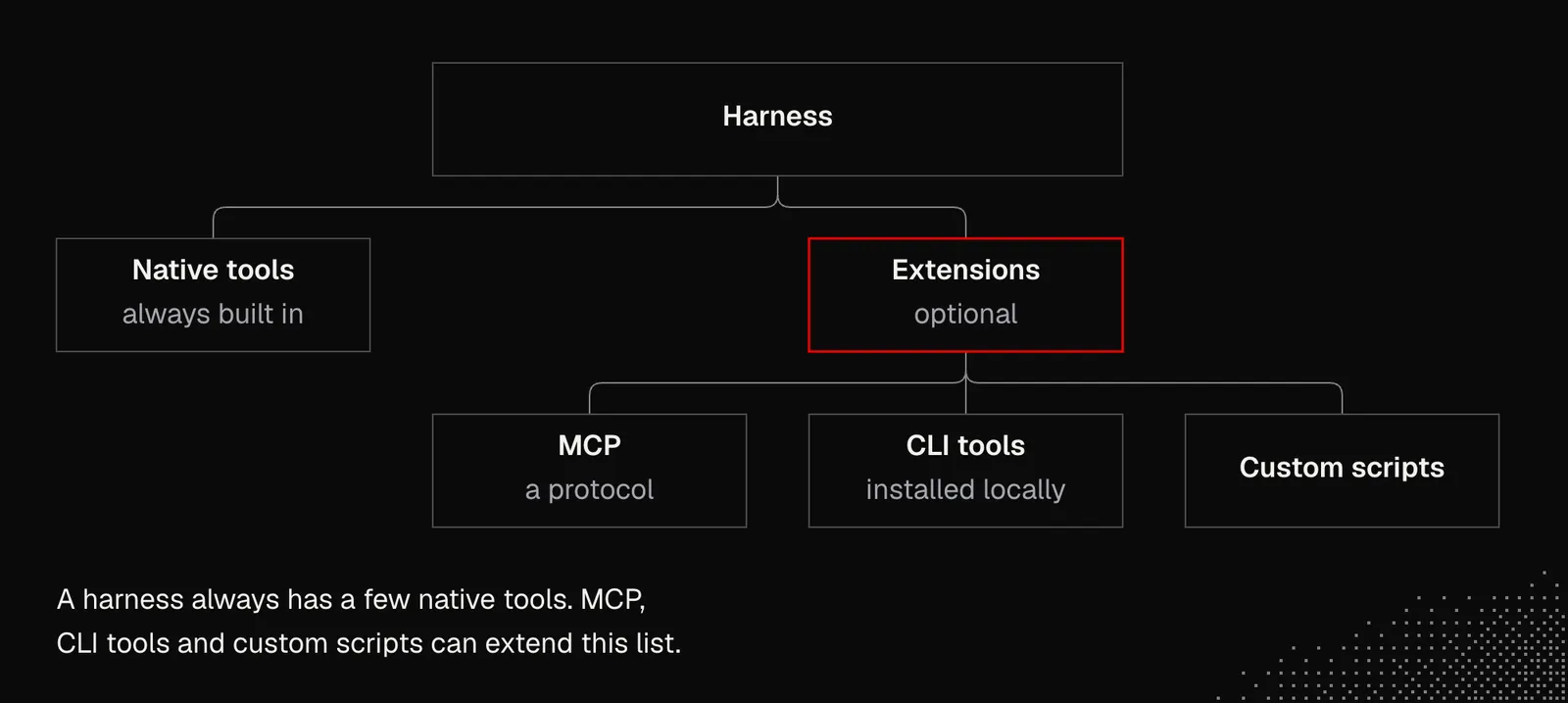
Native and Custom: A harness always has a few built-in tools, but the list may be expanded with either MCP (Model Context Protocol - we'll discuss this later) or CLI tools installed locally on a device.
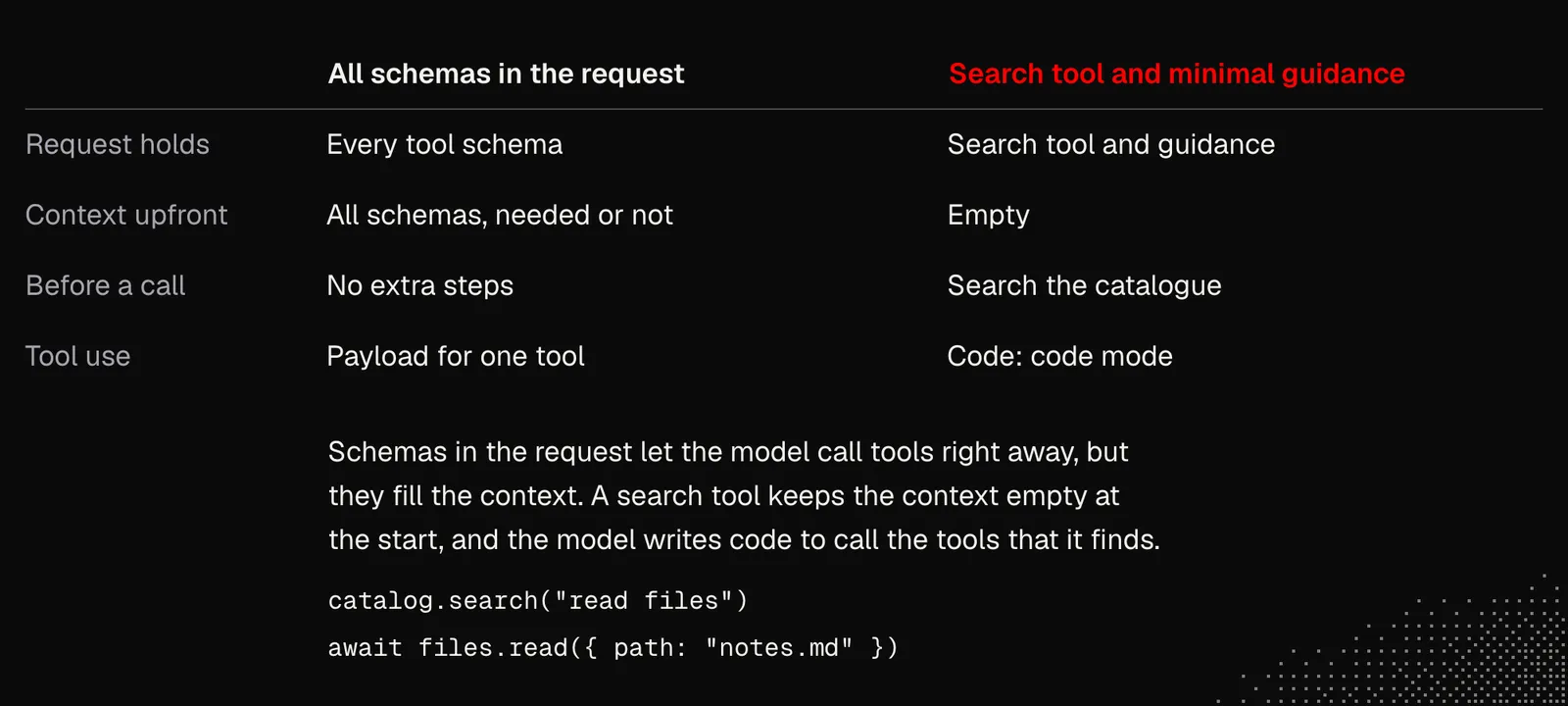
Discovery: As with skills, agents need to be aware of the available tools. This can be done either by exposing the JSON schema for every tool or by giving agents a tool to search for available tools (this requires some basic guidance on how to explore the catalog).
The first scenario lets the agent use the tools right away, but their schemas are included in the context even if they're not needed. The second scenario, on the other hand, keeps tool schemas out of the initial context but requires additional steps to discover tools before calling them
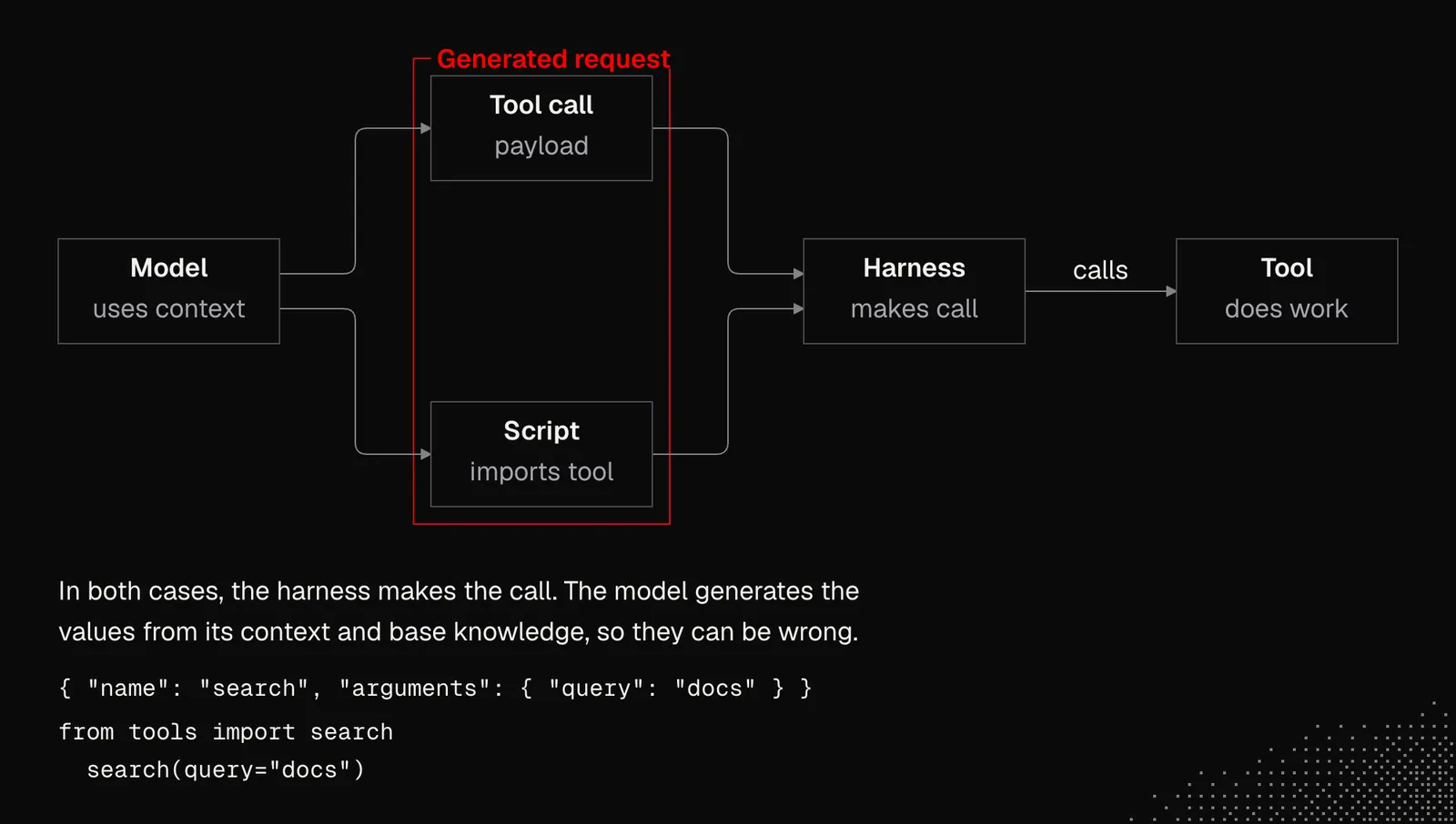
Request: The LLM's role is to specify which tool to use and generate a payload for it. The model may request calls to multiple tools, even in parallel. While the shape of the request is defined by schemas and is often very strict and programmatically verified, the values are generated based on the context and the model's base knowledge.
WARNING: models can make mistakes or be tricked into extracting data from one tool and exposing it through another. This is related to prompt injection, which remains an open problem. All models are still vulnerable, as Pliny the Liberator shows on his profile.
Response: After a model delivers a payload, a harness executes it and returns a result to the model so it can decide what to do next. We need to be aware, though, that whatever comes back from a tool becomes part of the context, so it affects the model's behavior. The only exception is when the result is too big and the harness writes it to a file. In that case, the agent may read only part of it.
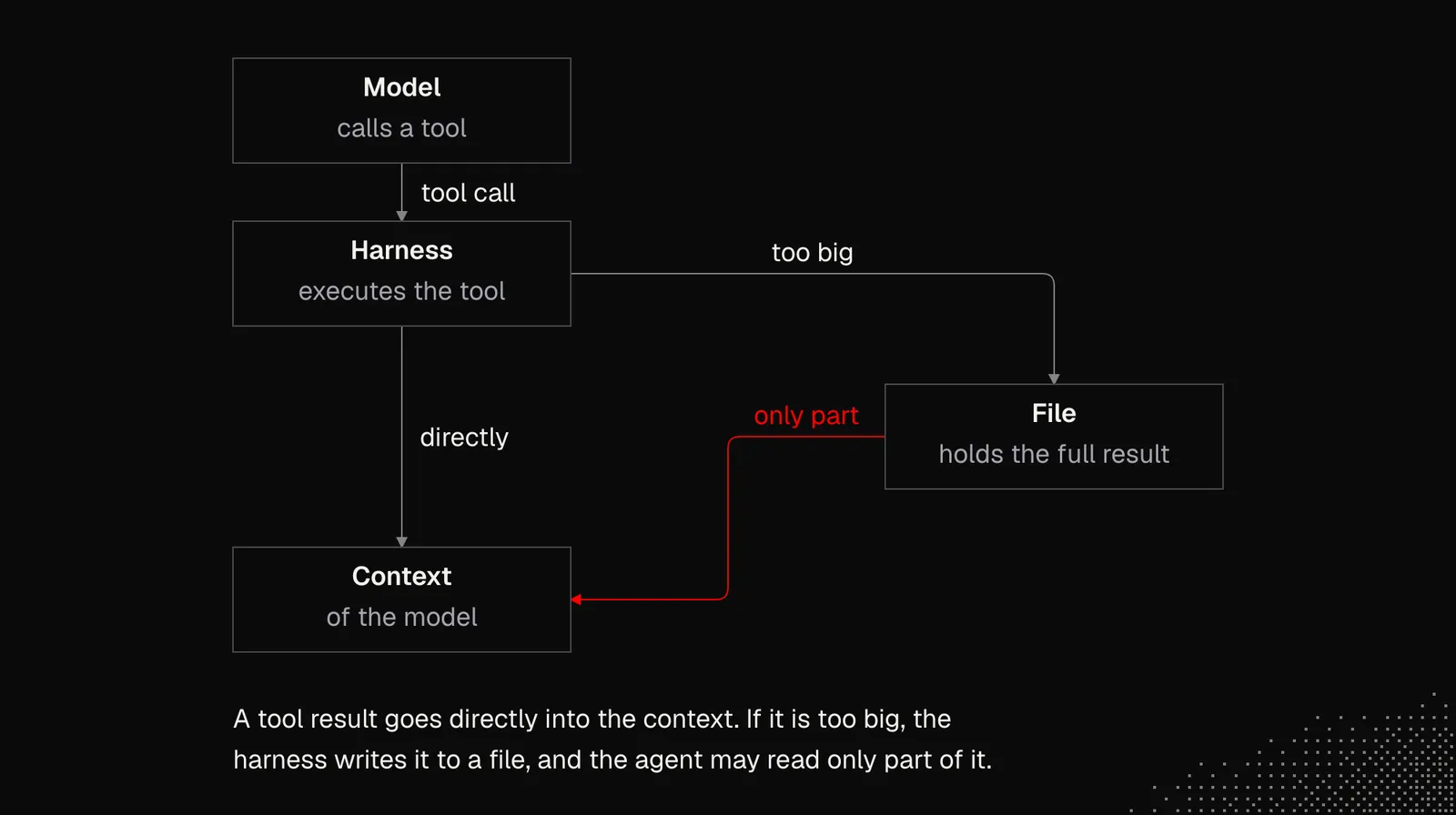
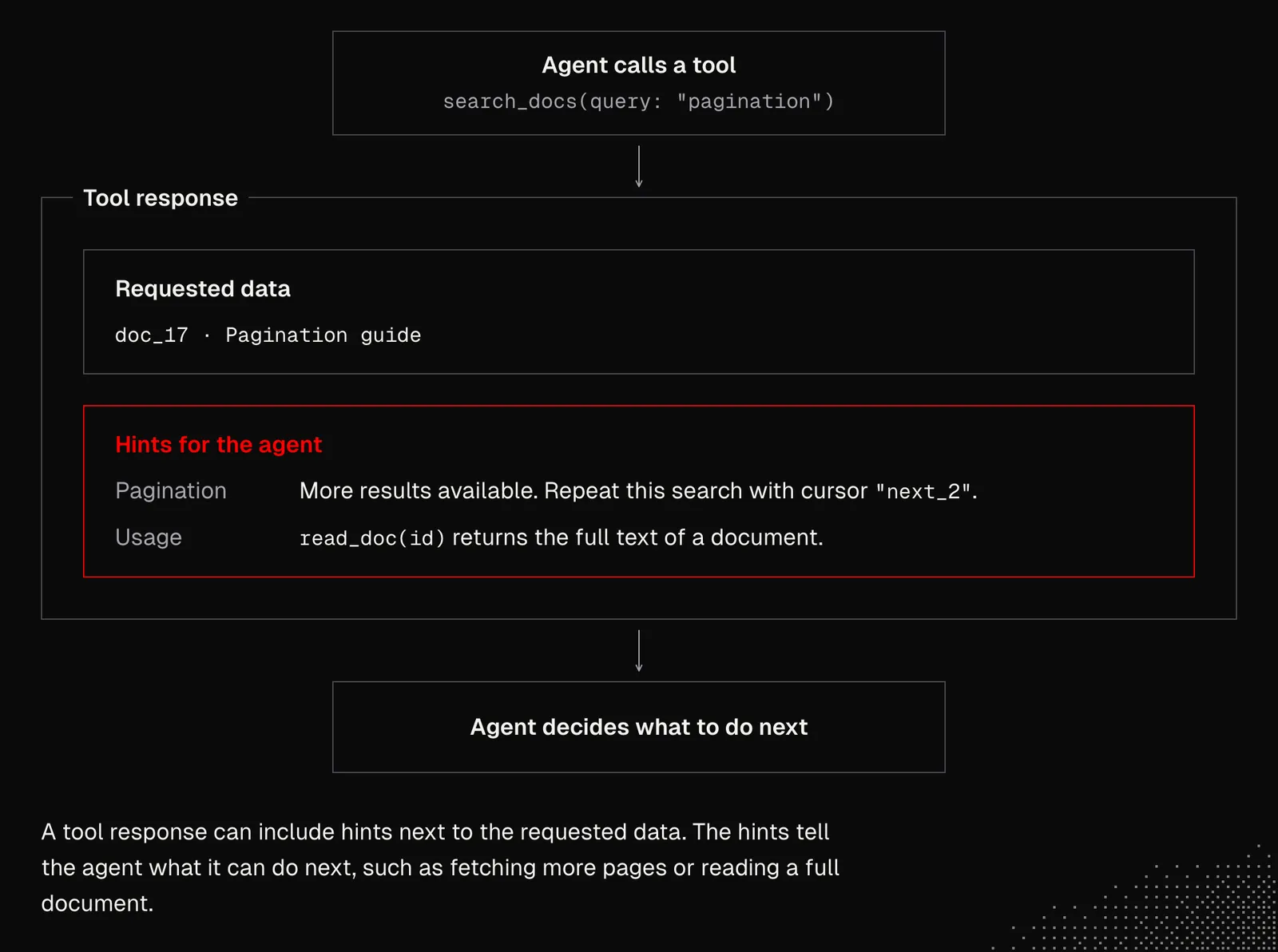
Looking at the request and response flow above, we may notice many similarities to typical interactions with the APIs we’ve been building for years. But the most important change here is that the model decides what to call and how. Because of this, we may want responses to include not only the requested data, but also some hints about what to do next.
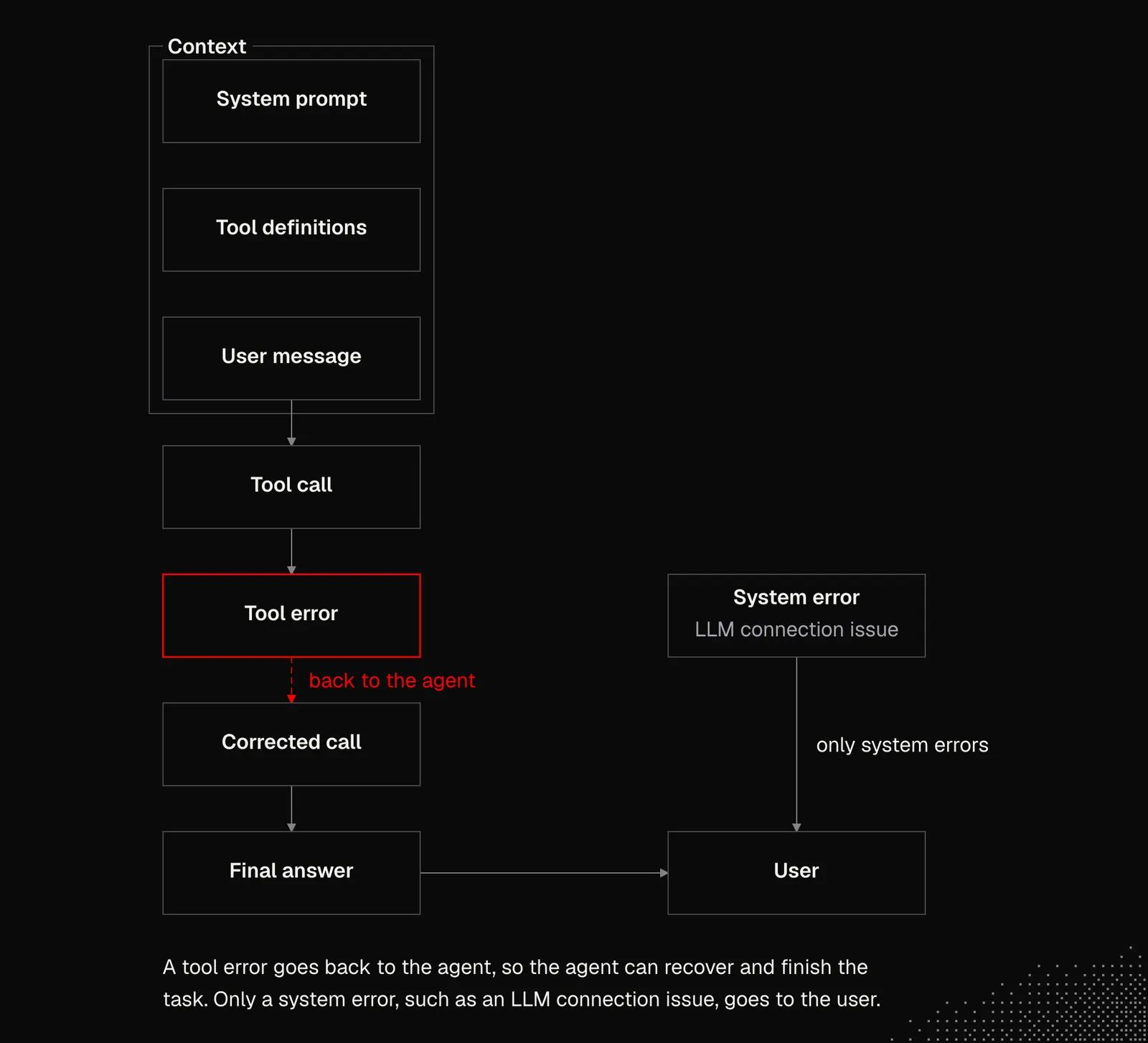
Errors: If something goes wrong, the harness shouldn't always throw an exception. Instead, it should feed the error details back to a model. This way, the agent can recover from the error or ask the user for help.
To summarize, all we need to know for now is:
- Agents need to know which tools and capabilities are available. This requires either providing tool schemas upfront or letting agents discover them.
- Agents now often rely on programmatic tool use. In other words, they write code to interact with the environment through available capabilities or directly through an API.
- Base knowledge and available context affect how tools are chosen. While request payloads may be verified, models can hallucinate values that, in extreme cases, may lead to data leaks or security incidents.
- Tool responses may include additional hints that help the agent recover from errors, better explore available data, or decide what to do next.
Subagents and Workers
Despite growing context windows, for many reasons, we may prefer keeping the interactions short and, above all, focused on a task. Both may be achieved in many ways, and the most important ones are:
Subagents: many harnesses let an agent to spawn another agent on the fly or call an existing one. Such an agent may fork the existing thread, or receive a new one. A subagent may also get different settings (such as reasoning level, or a model).
From a technical point of view, a subagent is one of the native tools: it can be called, and its response is injected into the context.
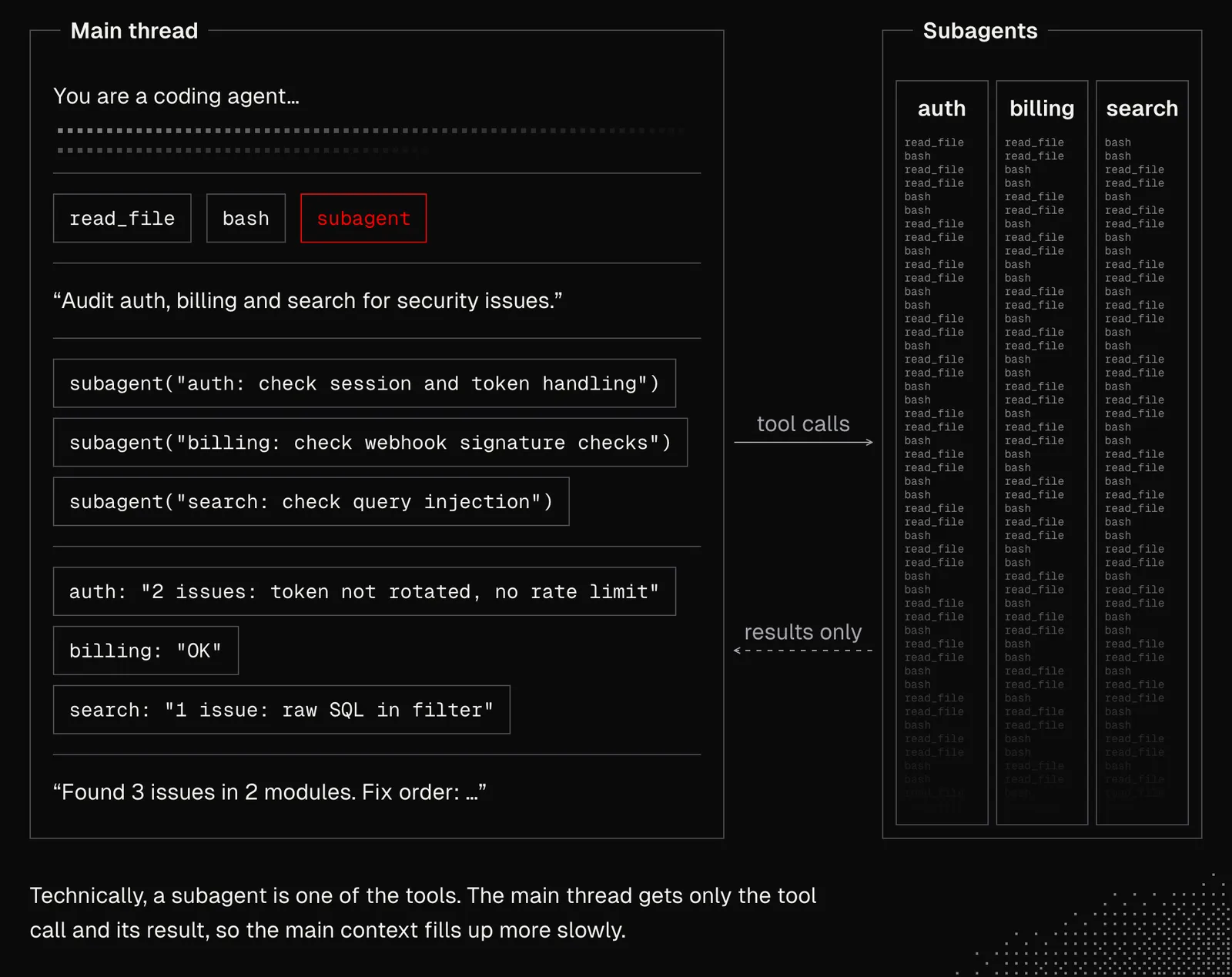
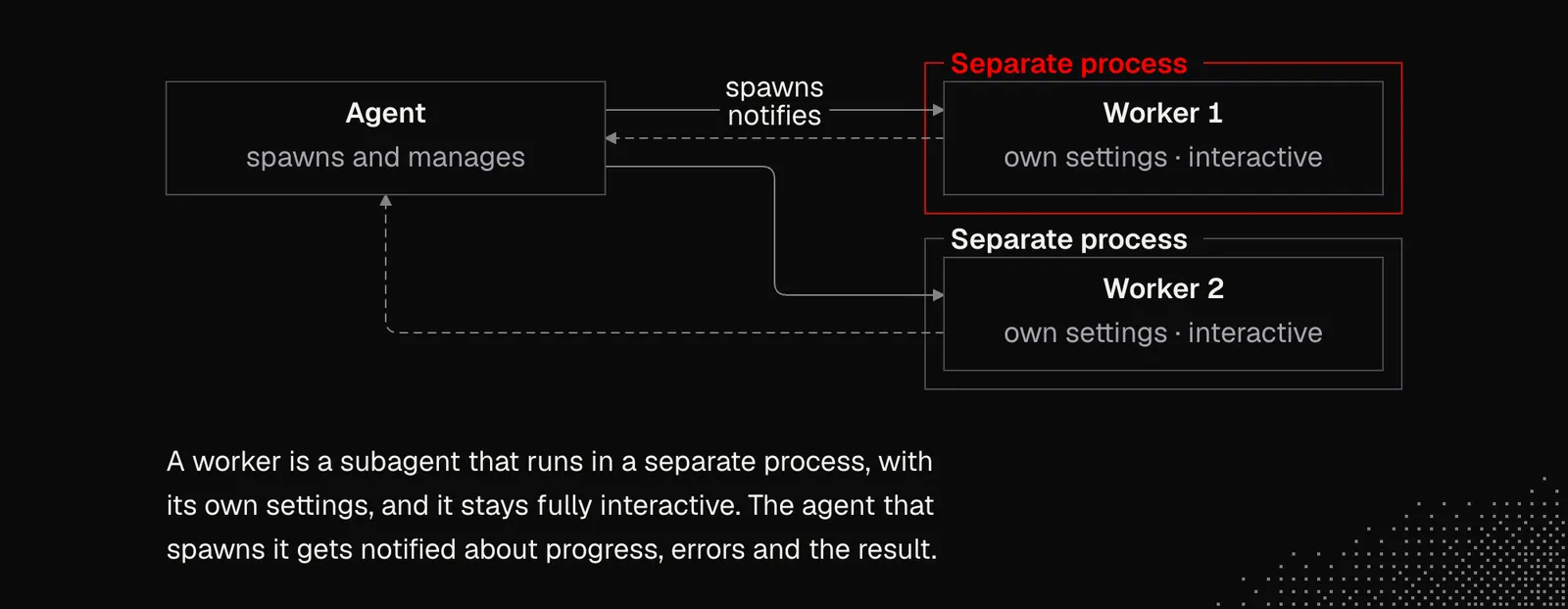
Workers: by definition, a worker is also a subagent, but it runs in a separate process, like a second Claude Code tab. It's spawned and managed by another agent, which is also notified when the task is finished. A worker can also be triggered by a deterministic event, such as a schedule or a webhook.
Both subagents and workers can be called based on existing templates - but this depends on the harness we're using. For example, Claude Code / Codex / Pi support such an option either out of the box or through extensions.
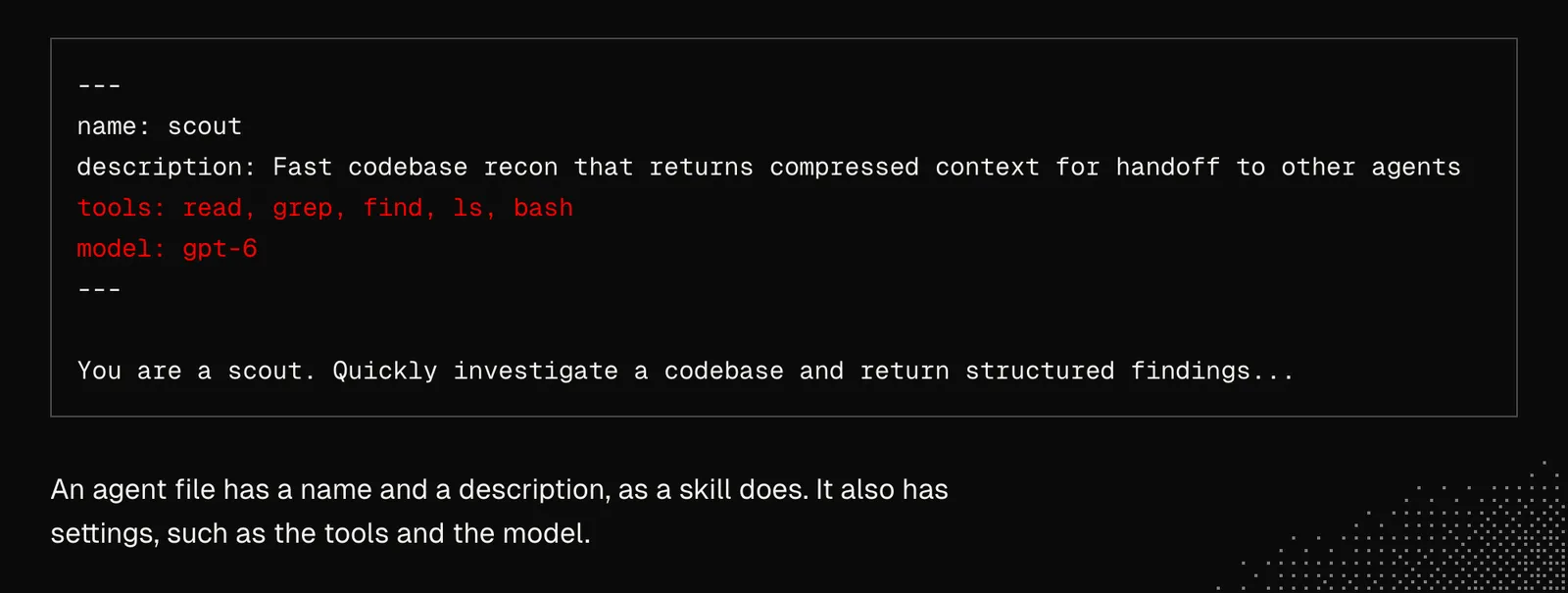
Now, we could say that skills and agents are technically similar, since both are usually plain text files (md or toml), and both are often presented to a model as a list of names and descriptions. Additionally, agent files include settings such as available tools, permissions, or the model.
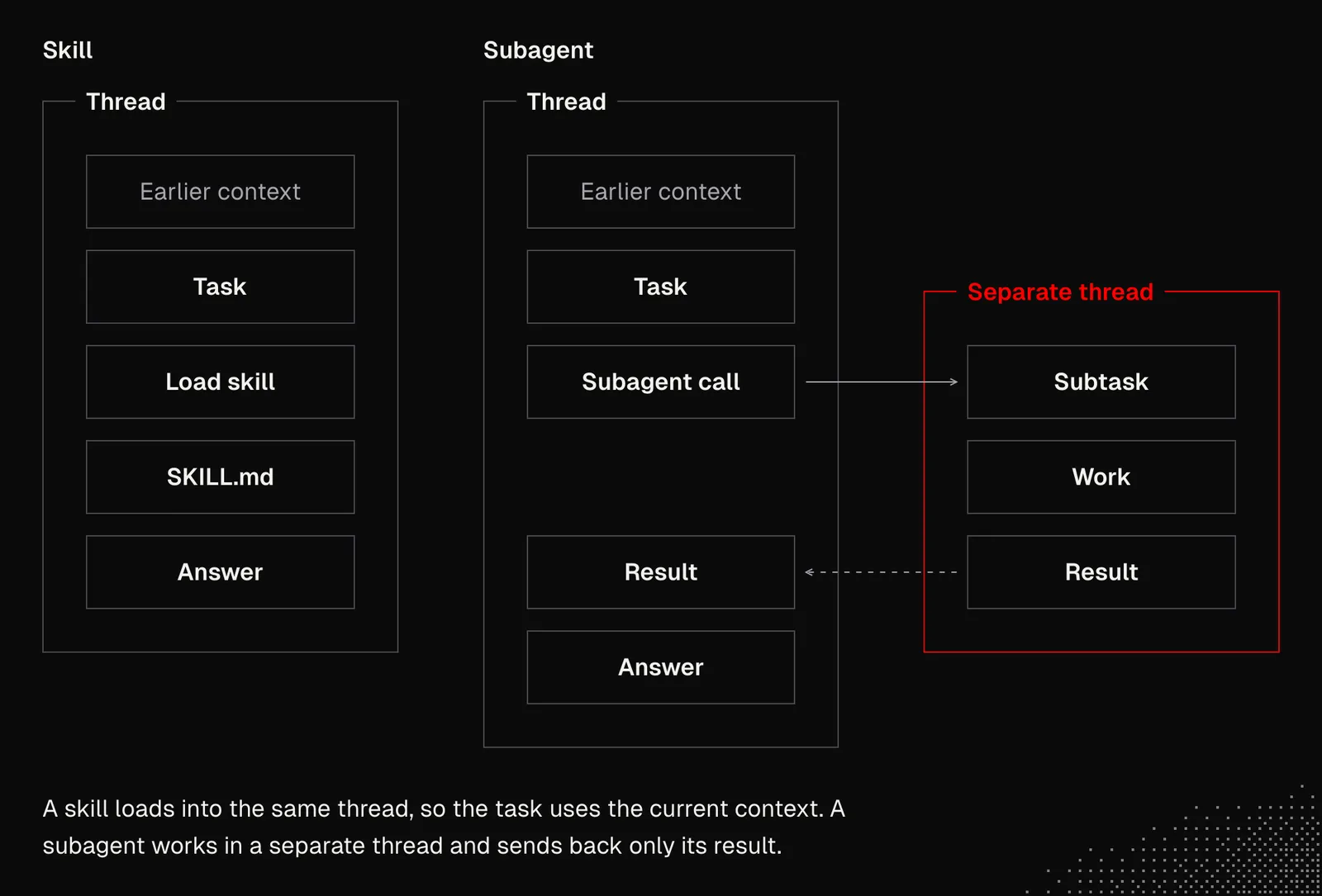
The difference here is that skills are useful when we need to do something in the same thread because the task needs the current context, while agents are useful when we need to do something in a separate thread.
Soon we'll learn more about advanced (yet still simple) workflows with workers, but for now, we may keep in mind that:
- subagents are just tools, special ones, but from the model's perspective they're tools
- subagents / workers may be predefined or dynamic
- subagents / workers are mostly about managing context, focus and efficiency
- subagents / workers may be orchestrated by a human, but also by other agents or scripts
- the easiest way to start with subagents is to ask a model to solve a task by creating subagents dynamically and splitting the task into smaller steps
Takeaways
At this point, it should be clear that managing context is one of the most important aspects of working with agents and we need to learn as much as possible about it. At the same time we need to keep in mind that AI is increasingly better at managing context. Our role is to let agents choose effective ways to manage context and support them when needed, especially on long-running tasks. We should keep the system simple and remain open to new approaches. For example, we may need to replace our context-management strategies after a couple of months.
Either way, we need to understand what's going on behind the scenes, so we can make better decisions. And the most important thing we can do is to build and experiment even with the craziest ideas.