
S01E03 · Building Knowledge Systems: MEGA lesson
MEGA’s lesson explores knowledge bases designed for agents, including their formats, retrieval, context, and maintenance. It discusses ideas from Andrej Karpathy’s personal knowledge base and using components, artifacts, and skills to guide agent-generated content.
textMEGA · hq.mega.dev · Saved Nov 19, 2026
mega course, llm knowledge bases, context engineering, agent memory, agent skills
Written lesson S01E03 of the MEGA.dev course, by MEGA. Agenda: Files · Style Guide · Specifications · Tasks · Library · Research. Its lesson video is presented by Theo Browne and saved separately. (MEGA Student HQ, needs a login.)
S01E03 · Building Knowledge Systems
Knowledge bases aren't anything new, but their importance and role are changing as agents become the primary users (and maintainers) of them. This makes us reconsider everything we know about building them, from their purpose to their tooling, structure and management.
Let's begin!
Outline
- Formats: Markdown, HTML, mdx and svx, components, levels of depth, artifacts and skills
- Agent-first bases: agents vs. humans, bridges to existing tools, the LLM builds and maintains
- Retrieval: grep and ripgrep, semantic search, relevance vs. similarity, decision models, hybrid search
- Reaching context: global context, project context, metadata, structure the agent chooses
- Self-management: single inbox, boards, templates, schedules, events
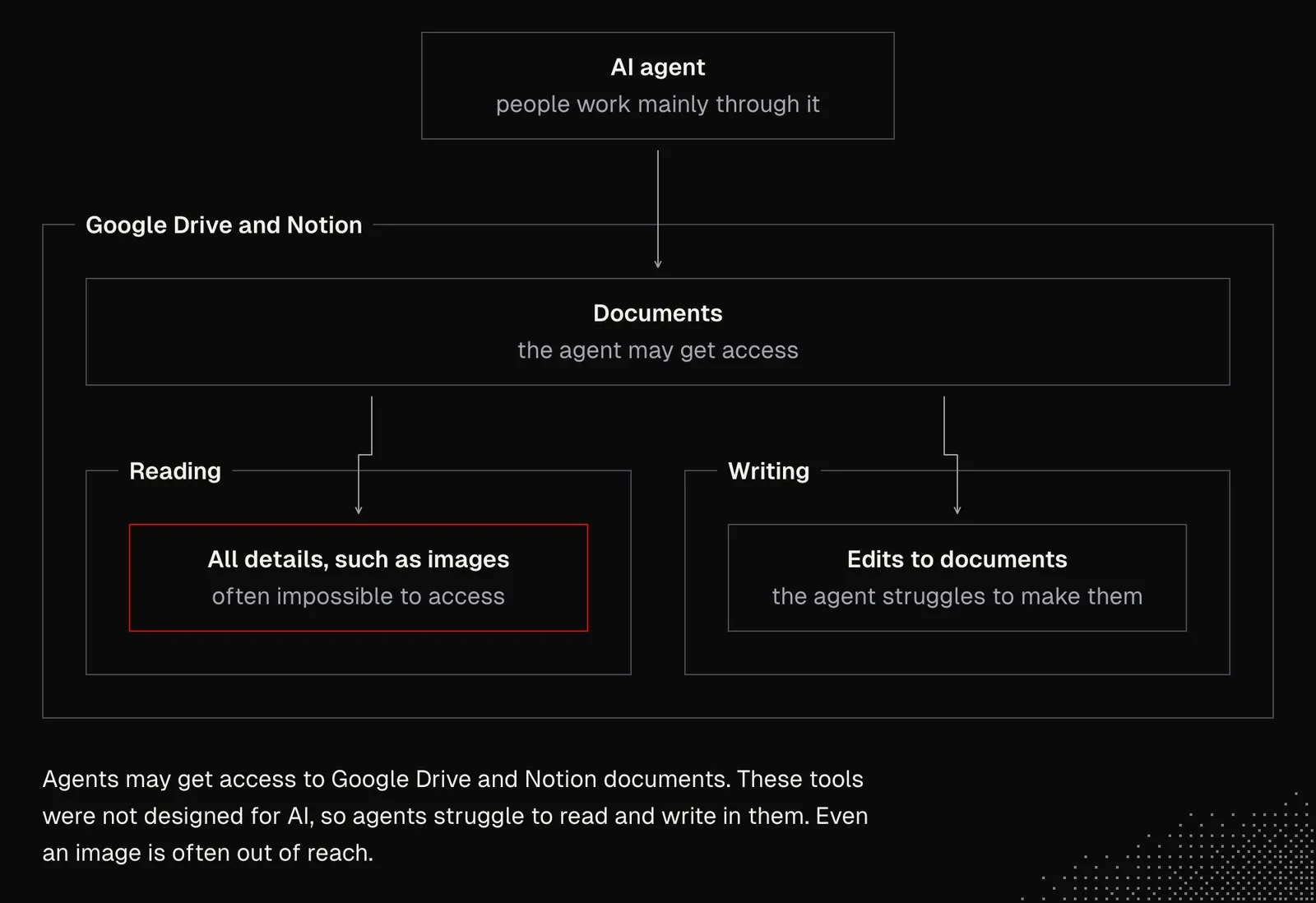
Back in the day, tools like Google Drive or Notion were totally fine because their editors and collaboration features were great, and in many cases they still are. But now that more and more people work mainly with their agents, tools that weren't designed with AI in mind struggle to give those agents easy access for both reading and writing. For example, even something as simple as accessing an image is often impossible.
Text Files and Cloud Platforms
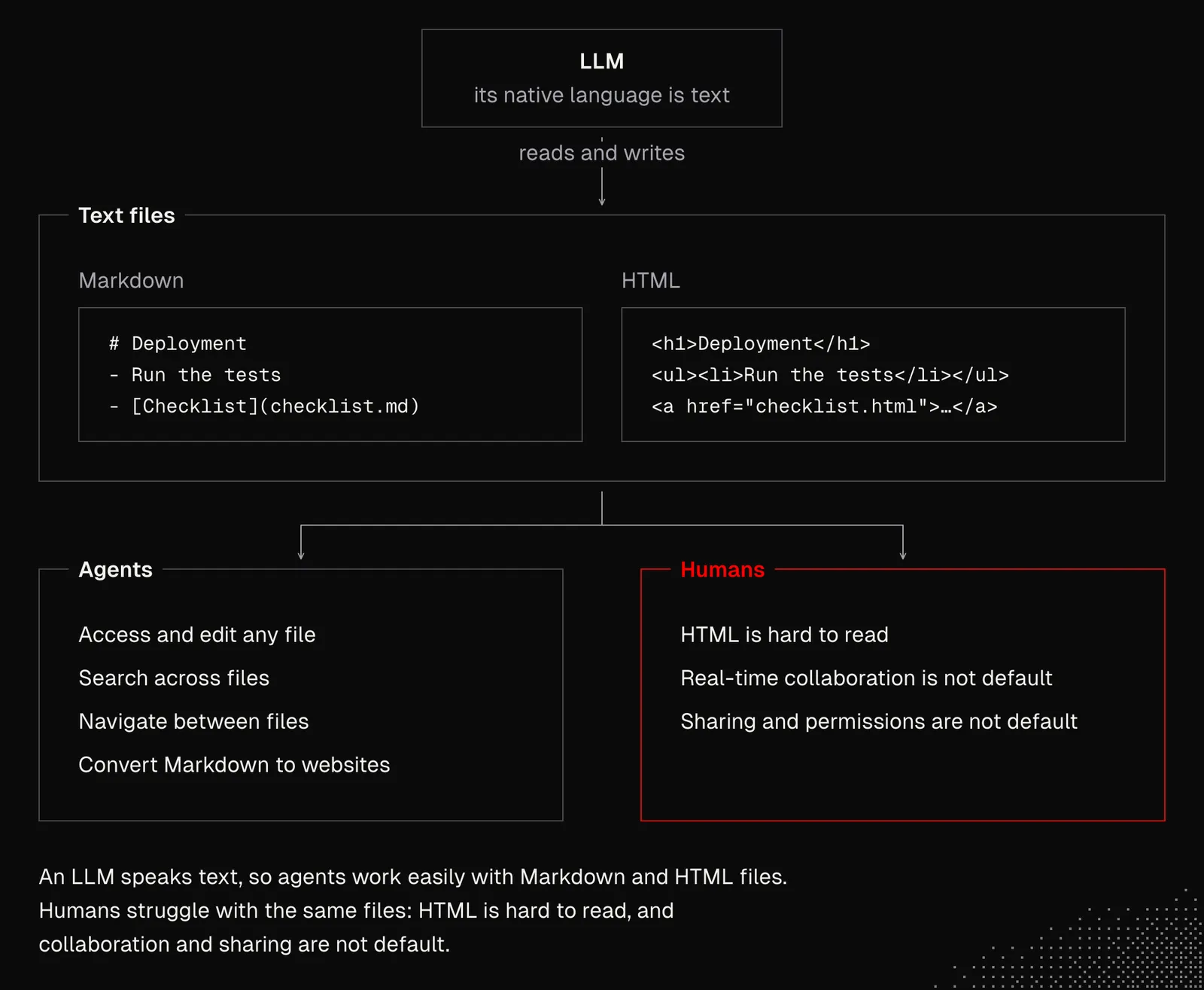
Since LLMs' native "language" is text, Markdown and HTML got incredibly popular, despite all their limitations. Agents can easily access and manage them, and Markdown can be easily converted to other formats and even websites using Astro or Next. In practice, however, we often need permission management, real-time collaboration and many features that have been with us for years in tools such as Notion or Google Docs.
Obviously, there are some tools that aim to give us both. Some are existing tools converting themselves into AI-native ones, although agents still can't access all their features. Others are new AI-native tools that lack important features. The decision isn't easy.
Let's consider the following:
- Agents are getting more popular even among non-technical people
- The knowledge reaches humans through an agent, rather than directly
- Documents are managed and consumed by agents, rarely by humans
- Agents can process a large number of documents quickly
- In many cases, we don't need documents, only the outcome
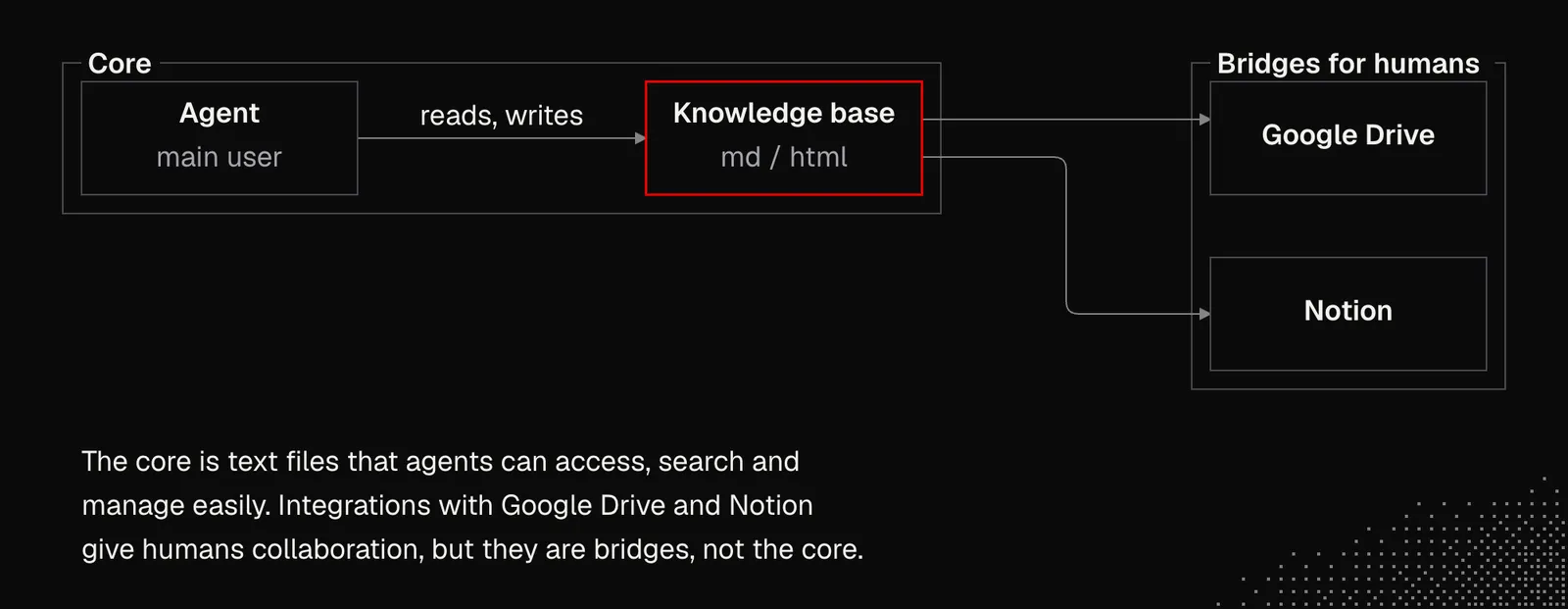
These points are not true for most organizations today, but that's changing quite fast, which means we may want a knowledge base built for agents, not humans. For now, some bridges may be useful, but not as the core of the entire system.
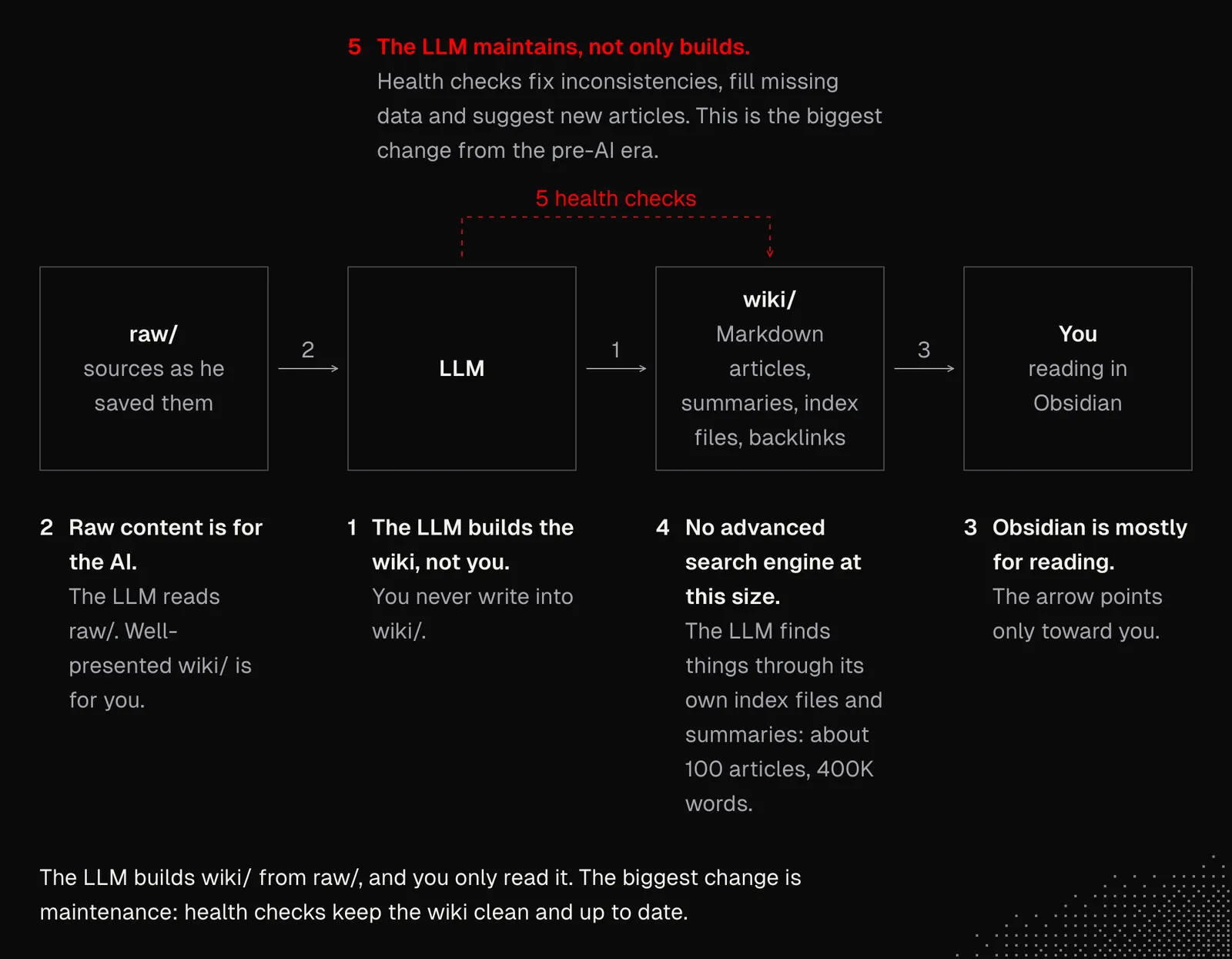
A few months ago, Andrej Karpathy wrote about his personal knowledge base, and there are some lessons we may get from it, regardless of the purpose of our wiki. Namely:
- The LLM is the one that builds the wiki, not the human.
- Raw content is for AI; well-presented content is for you.
- Markdown editors (such as Obsidian) are still useful, but mostly to read the content.
- For small, personal knowledge bases, there's no need for advanced search engines.
- The LLM can help not only with building but first and foremost with maintaining, and this is one of the biggest changes since the "pre-AI" era; maintenance helps keep the knowledge base clean and up to date.
Beyond Markdown
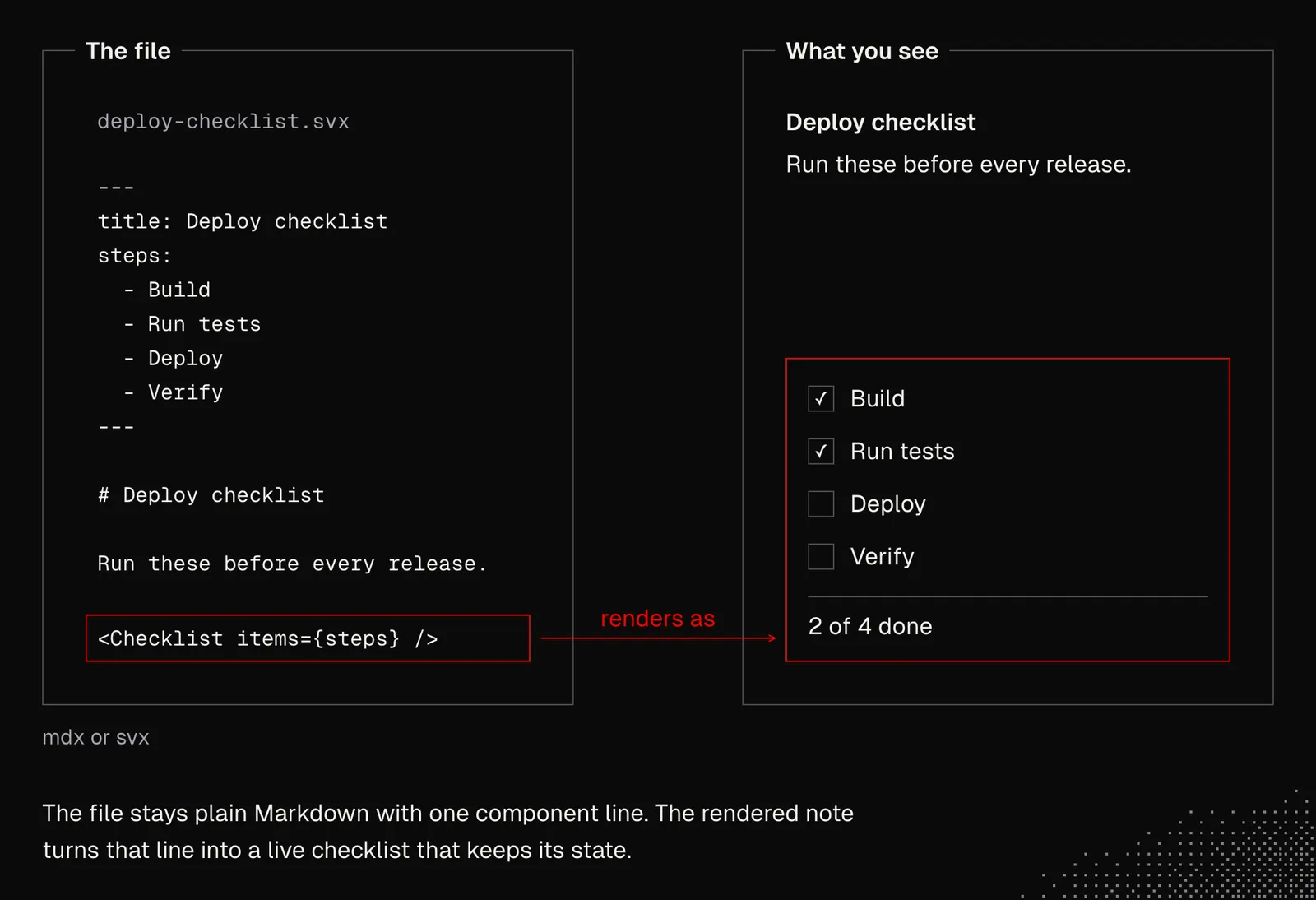
Markdown and HTML are not the only formats we can use for knowledge bases. There are also mdx and svx, which let us use components within markdown files. This way, we balance file readability with interactivity and, depending on our needs, even state!
Below is an example of an .svx file whose source stays simple, while its rendered version includes a functional checklist. And since components come into play here, they can be reused across many files.
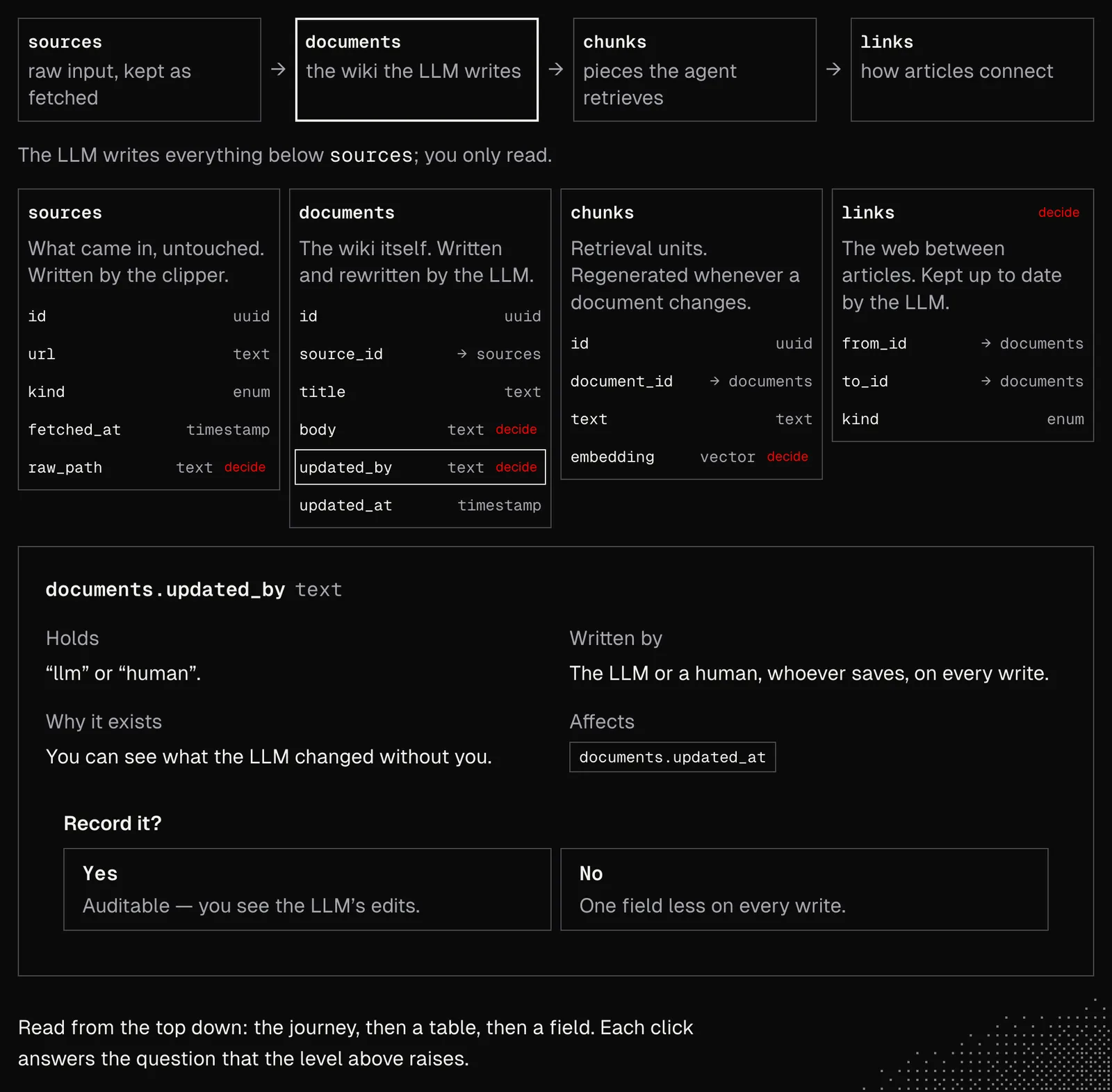
This becomes especially useful for complex ideas that need to be presented from a broad perspective first, with the option to dig into the details without having to scroll through a wall of text.
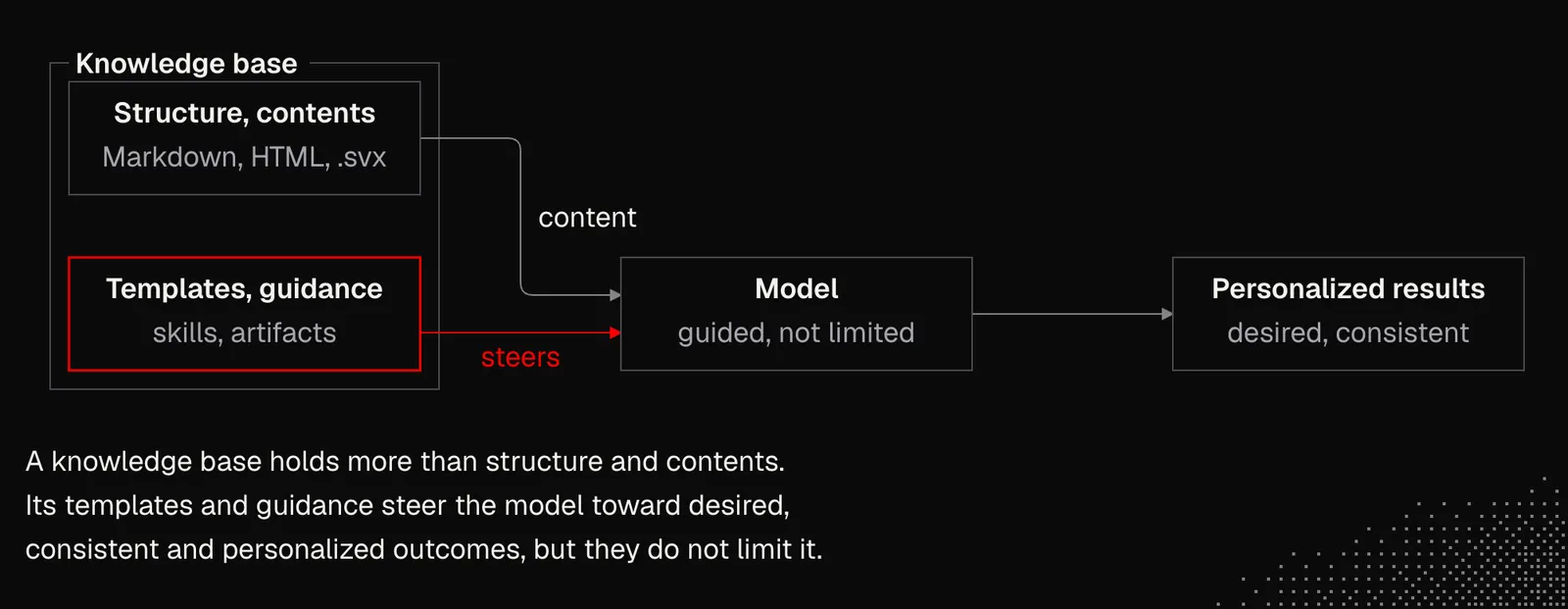
Agents can use .svx quite easily these days, but it's worth spending some time on a setup that makes it even easier for them. You can find an example in the skills repository, where the explainer skill isn't just a prompt. It also includes templates and logic that make it easier for the agent to prepare consistent visualizations. A skill like this works best with state-of-the-art (SOTA) models.
The explainer skill may serve as inspiration for generating skills in different specialized areas: issue explainers, activity reports, high-level architectural decisions, etc., all personalized to the projects we're working on. The conclusion here is that artifacts and skills may become part of your knowledge base and they should guide a model toward results that meet our needs without limiting its options.
Purpose of the knowledge bases
Knowledge systems such as internal wikis were built for many reasons: document organization, employee onboarding, or improving communication and processes. Their main users were humans, so we could assume they had at least a general understanding of the wider context, which helped them use the system.
For agents, this works slightly differently: models can read and understand documents faster than humans, but the way they access and perceive them can easily lead to mistakes, despite their intelligence. Let's consider the following example:
- The agent is asked about the deployment process
- It searches the knowledge base and reaches a few notes that look complete
- But the agent never reaches the note that explains the context needed to understand the bigger picture
- As a result, we've got a hallucinated answer or a poorly implemented feature
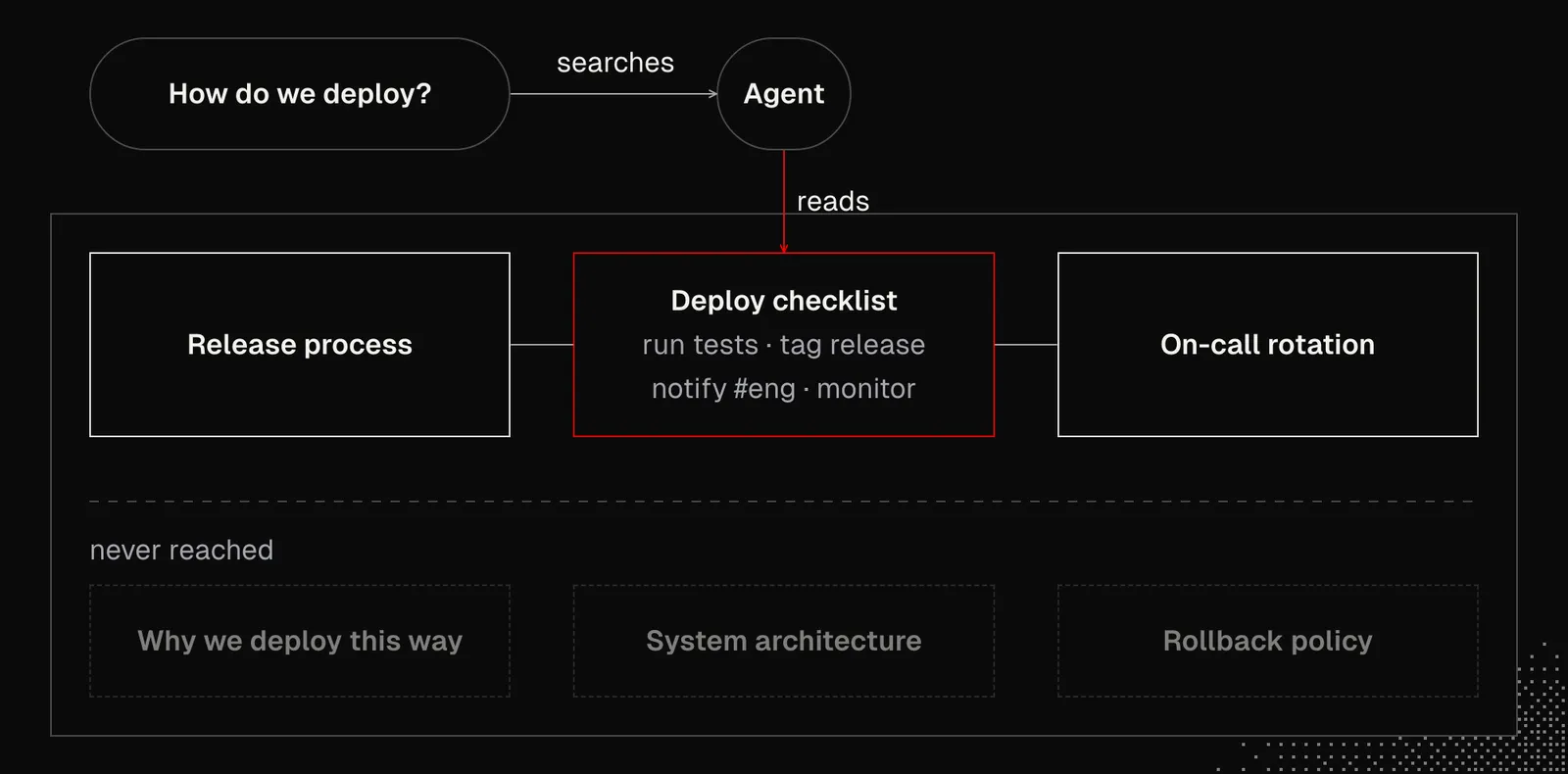
Scenarios like that are very common, and there is no solution that guarantees success. But as I mentioned in the previous lessons, working with LLMs is not about certainty but about increasing the odds of getting the results we want.
First, we need to understand how the agent reaches the context. It does this through search tools used in agentic logic, so the retrieval process may take many turns. Let's break this down:
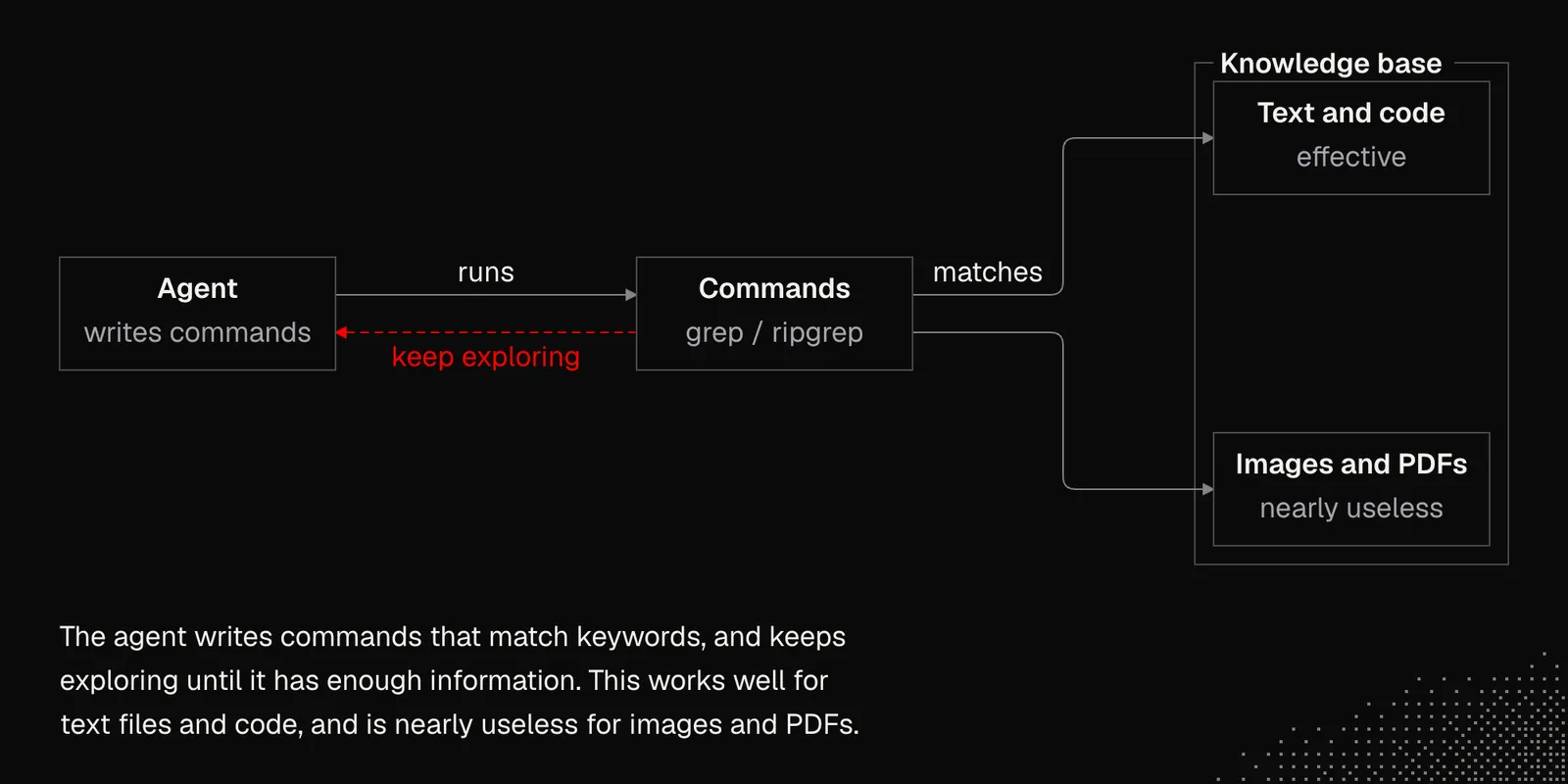
bash / grep / ripgrep: agents navigate files by writing scripts and/or commands, trying to match keywords related to the available context. Even if they don't match all the relevant files on the first try, they can keep exploring until the model decides it has enough information or that there's no information available. This type of search is highly effective when we're dealing only with text files and codebases, but it's nearly useless for images, PDF documents and similar.
Semantic Search: there are embedding models specialized in describing the meaning of the content using a list of numbers (a vector). This way we can index existing documents to get their embeddings. Then, whenever we want to search for something, we send the query to the embedding model to get its meaning and then compare the vectors to determine which documents are similar to the query in terms of meaning.
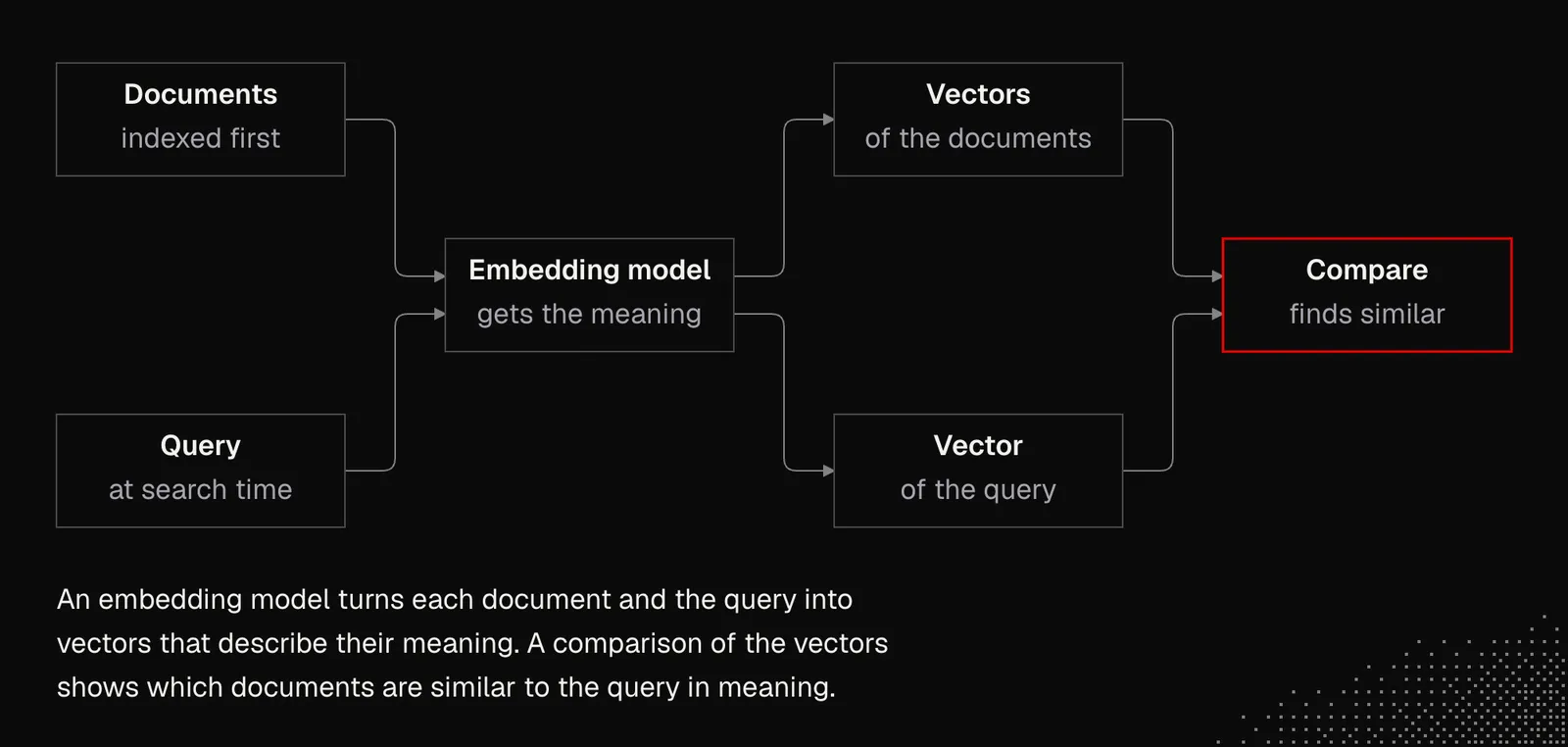
While semantic search increases the chance of finding documents that pattern-based search can't match with regex patterns, it also adds complexity because it requires indexing.
Moreover, embedding models have context limits, so long documents have to be split into fragments. They also have a knowledge cutoff, so they may have a different understanding of some concepts or simply not be aware of them. On the other hand, multimodal embeddings can handle image search.
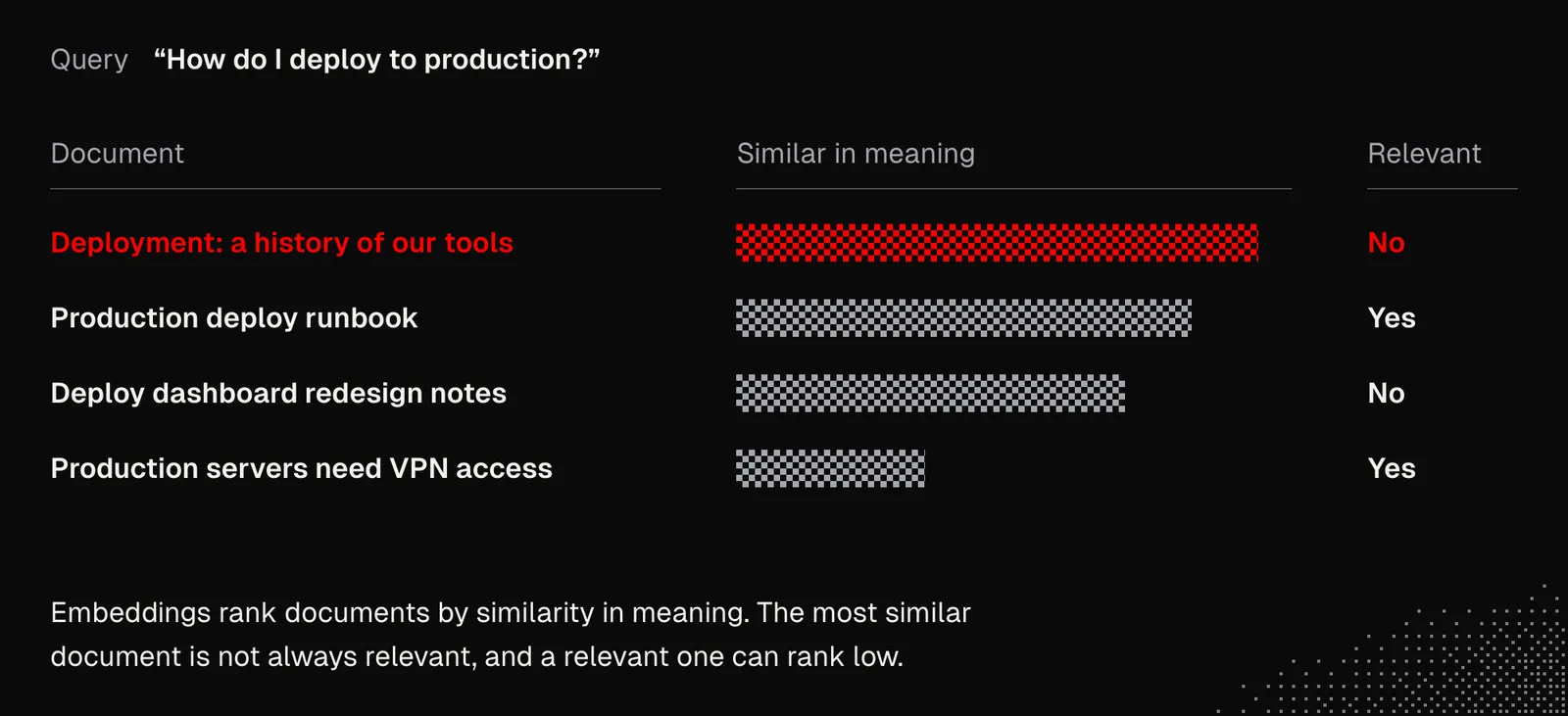
But first and foremost, we need to understand that embeddings let us find content that is 'similar in meaning', which isn't necessarily the same as 'relevant'.
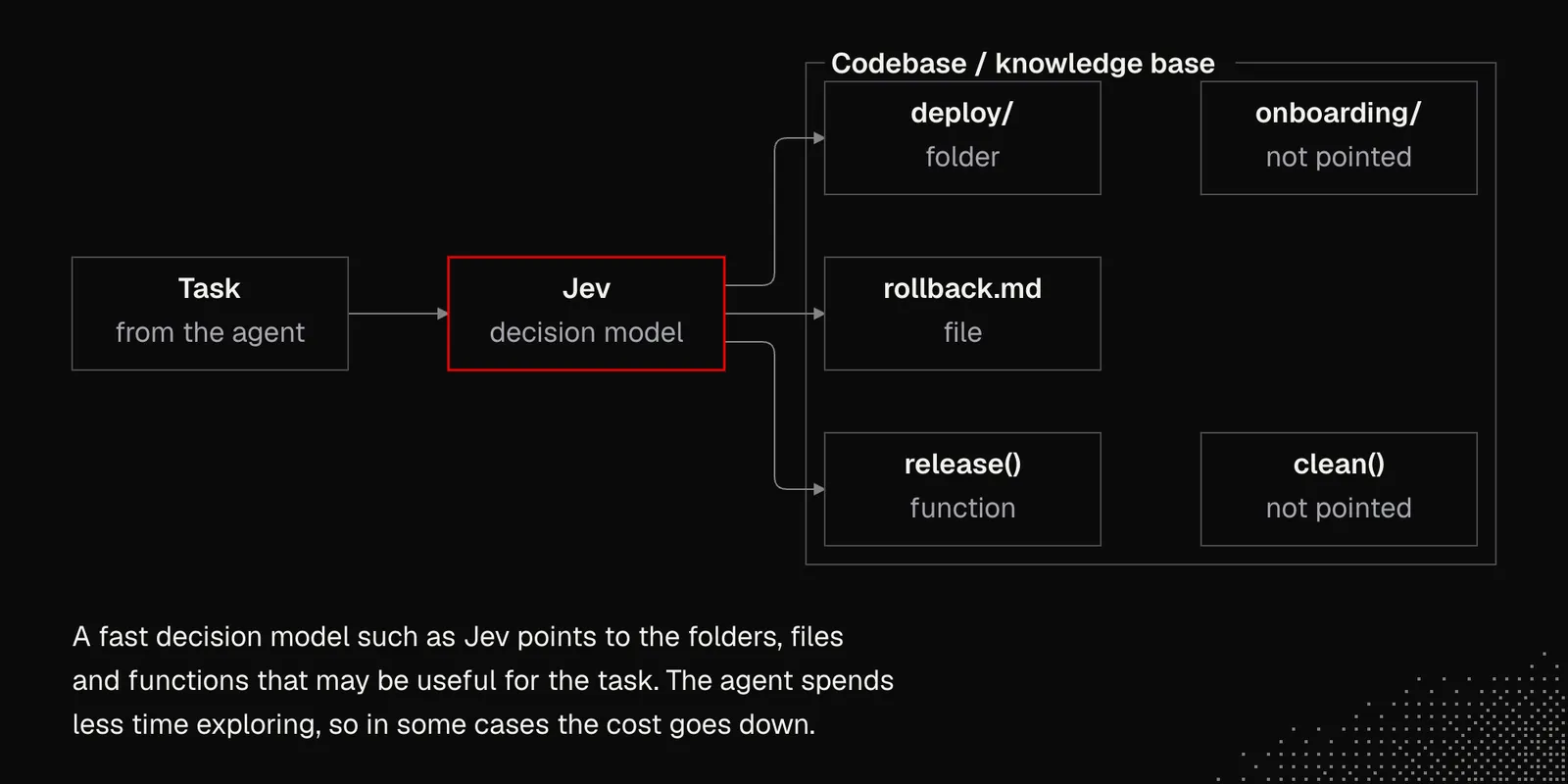
Decision Models: fast decision models may also be helpful in searching and navigating files in a codebase or file system. One of the examples is jevgrep that in some cases visibly reduces costs, as the agent spends less time exploring the codebase and / or knowledge base.
Hybrid Search: Lastly, we have hybrid search. It's the most complex approach, but it often gives the best results, because documents that weren't matched by pattern-based search may still be caught by similarity search.
Besides search tools, we should consider additional kinds of context that help agents reach the knowledge they need. These include:
- global context: files that live beyond a given project, containing information about the current system, environment, existing projects, installed tools, and general principles
- project context: files that describe the project but also its vision, feature map, styleguide or even business aspects - in other words, information that may help an agent understand the broad context.
- metadata: categories, tags, sources and other metadata may also increase the chance of getting the correct results. It's worth taking a look at the Open Knowledge Format, which is still just Markdown with YAML frontmatter, but also tells agents where a note came from, how much they can trust it and whether it's still up to date.
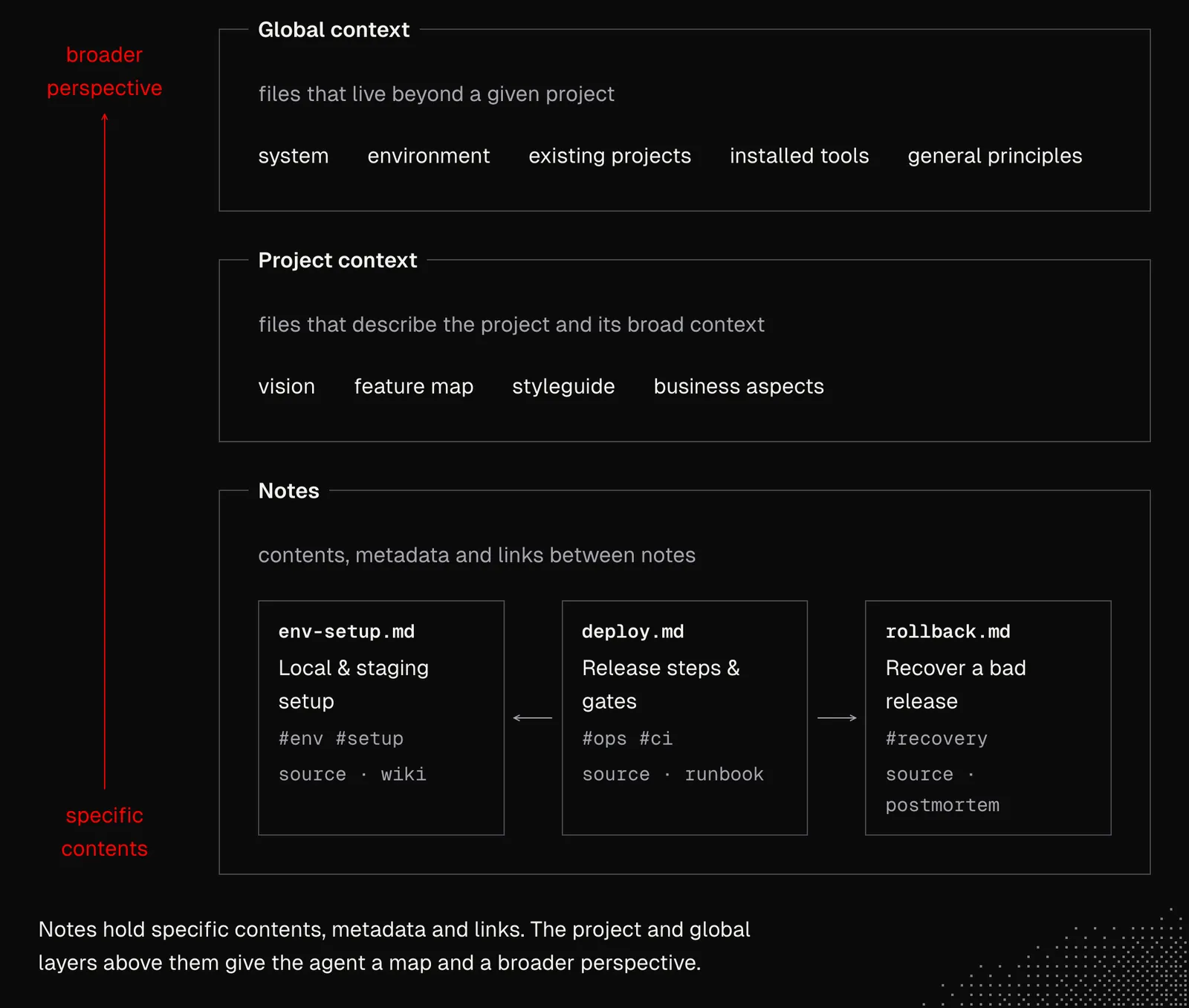
Now we might start thinking about the structure for folders, categories, tags, and templates, and instinctively try to build it ourselves to "stay in control". But the truth is that agents will be responsible for managing documents, so it's a good idea to let them figure out the structure on their own and, if needed, steer the process to take our specific needs into account. We may even decide to use the tools we don't know yet, as AI may easily onboard us. A good example may be neo4j.
There is no single answer to the question of how to make a perfect knowledge base. But this is a very well-known problem and there are many approaches models are familiar with - even a simple question about popular strategies gives us this:
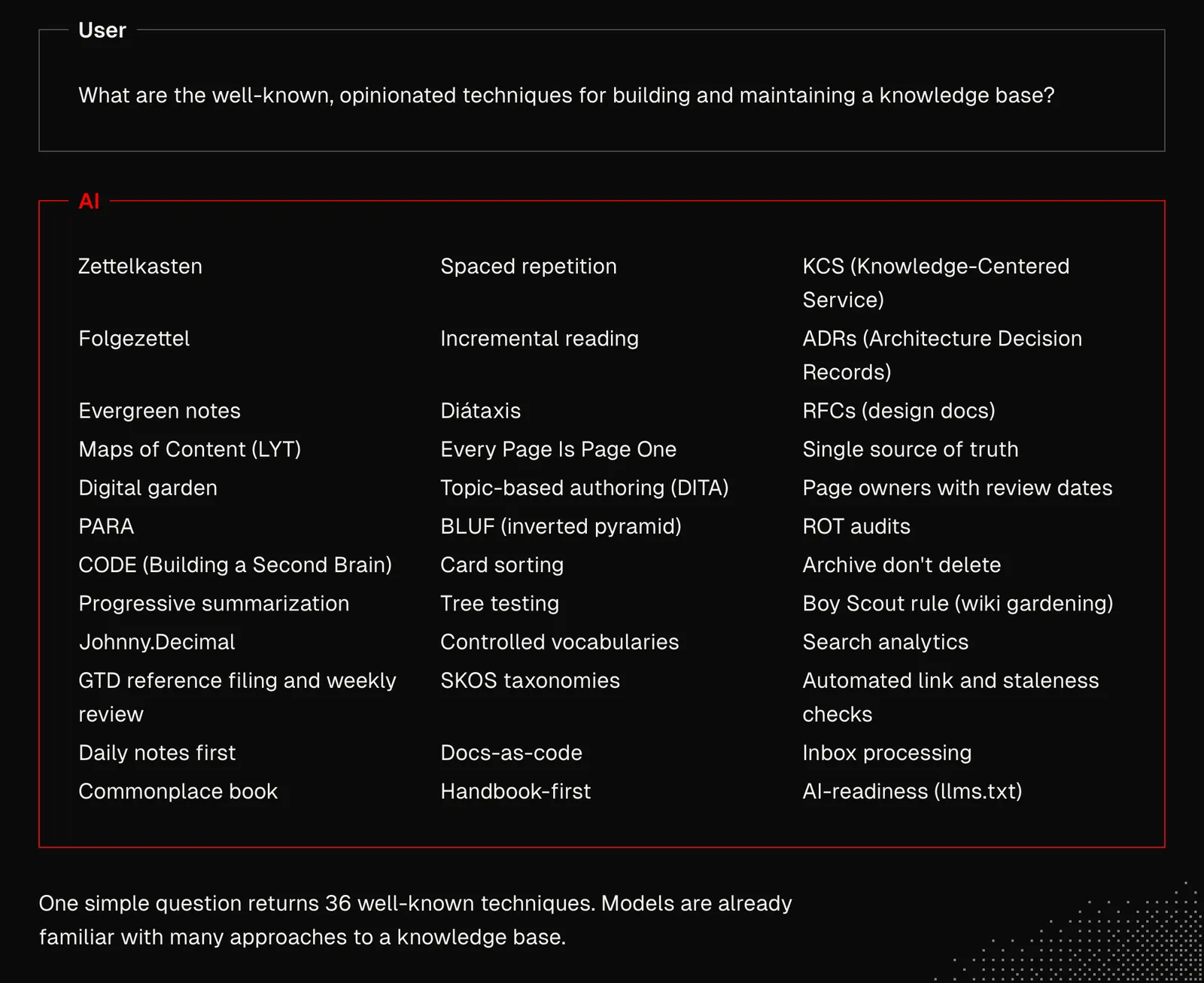
Now, given that models think while generating tokens and that what's in the context affects what gets generated, we need to make sure this knowledge appears in the conversation, either by including it in our messages or by asking the model for it.
While discussing these knowledge-base techniques may help us understand them better, what we're after is not building the system ourselves but shaping the environment in which agents build a knowledge base.
One example could be the knowledge skill, which aims to build a knowledge base structure in a generalized way:
- Define purpose: a few questions we need to ask ourselves about the knowledge base.
- Build context: the agent has to figure out the most useful methods and general rules.
- Initialize structure: the agent has to iterate on the initial structure and the relationships between documents, trying a few different approaches.
- Initialize templates: the shape of the documents has to be set, not necessarily as a list of strict sections, but rather as general instructions for choosing the best structure for a given note.
- Write instructions: at this point, the agent has to create a skill for working with the knowledge base.
- Test it: using subagents or separate sessions, the agent has to use the skill, see how the knowledge base behaves, and figure out together with us what can be improved.
An important thing to realize here is that, given the initial requirements, the process above can be carried out automatically until the LLM decides it's ready. And an even more important one is that the process can run automatically as the knowledge base grows, to improve its shape. And while modifying a knowledge base with thousands of notes won't be easy even for AI, it can still do way more than we're able to do without it.
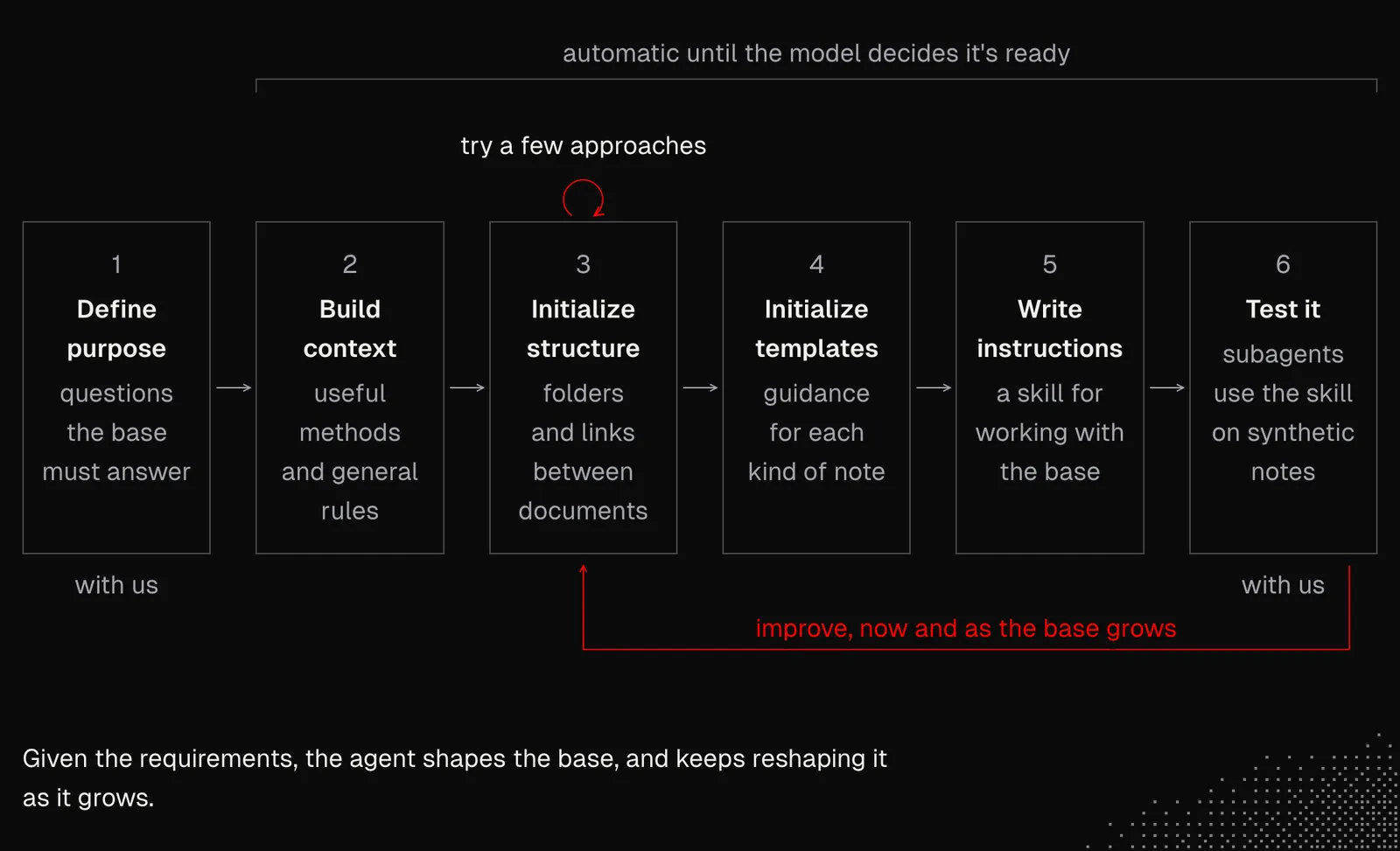
A similar approach can be used with nearly anything that can somehow be verified, so the feedback loop lets the agents improve their work. In this particular case there is no strict verification, although models are great at assessing the quality of structures. But they also need a clear definition of what "good enough" is.
Self-management
Before ChatGPT, knowledge bases could be partially maintained by automations that pulled in data from external services or took care of archiving old notes. These automations could get pretty advanced, although building the logic was difficult. Now even connecting a knowledge base to Claude Code (or any other agent) feels like magic. The only problem is that it's mostly reactive, so we need to be involved in the actions. But as programmers, we already know we can make it proactive.
While the mechanics that unlock ambient, durable agents will be covered in the second week of MEGA, even at this point we can consider the following:
Single Entry Point: every single piece of information we want to add to the knowledge base should arrive through a single entry point, such as an inbox. From there agents can pick it up and reliably organize and connect it with existing knowledge.
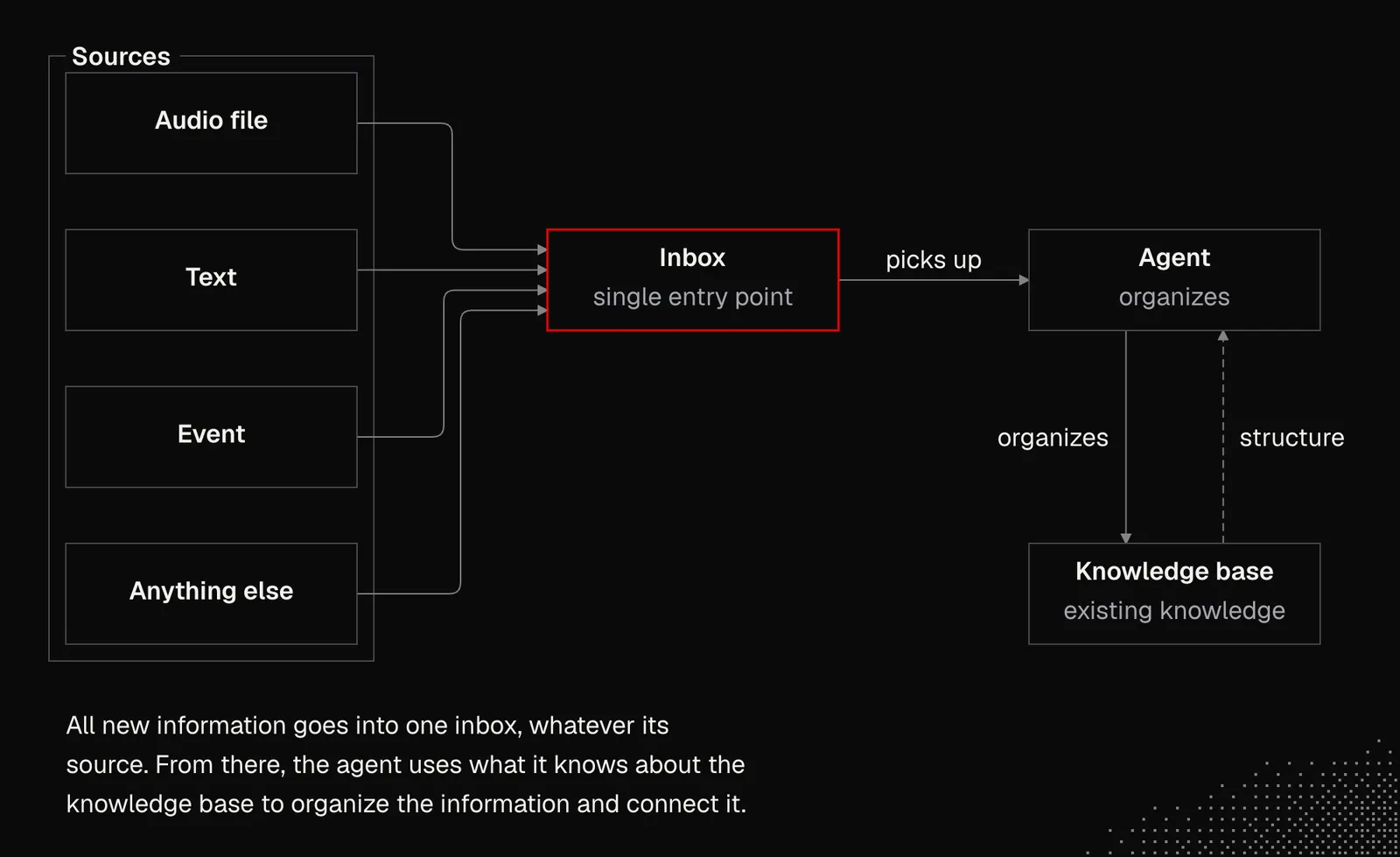
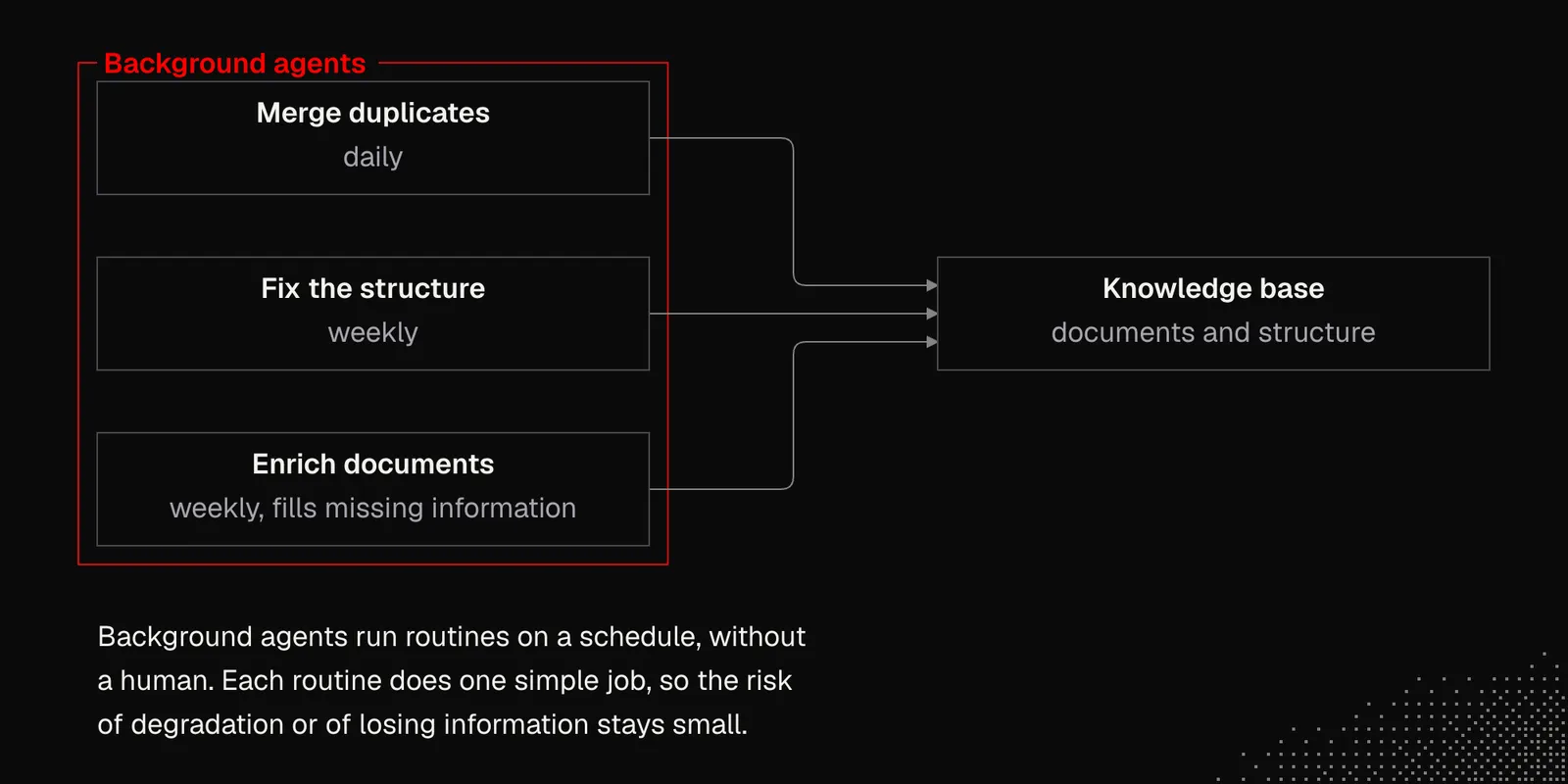
Schedules: daily or weekly cleanup or synchronization may positively affect the overall health of a knowledge base. The biggest challenge, though, lies in building routines that will be entirely autonomous but also straightforward, so the risk of degrading the knowledge base or losing information is minimal.
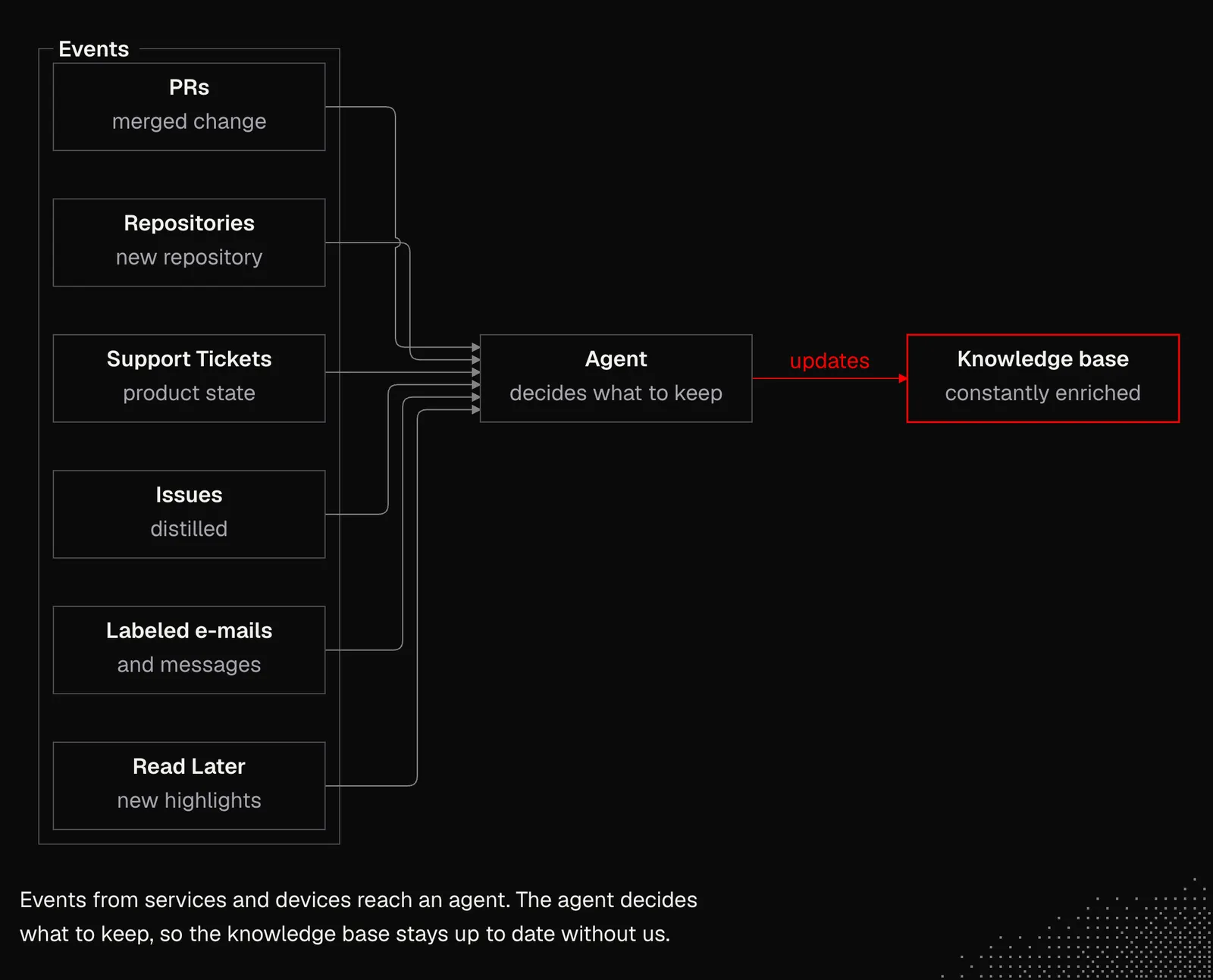
Events: since knowledge bases are now built mainly for agents, treating humans as the only source of information is limiting. It's worth looking at services and their APIs, because they may expose webhooks we can set up to observe them for changes. We can do the same with devices and local daemons running on our Mac or PC. Some examples:
- PRs: any merged change is a potential reason to update the knowledge base, and agents may be responsible for deciding what's worth keeping and what's not.
- Repositories: a new repository on our account likely means we have a new project our agent needs to know about. It should be added to the global context automatically, so the information is already there the moment the agent is asked about it.
- Support Tickets: while the knowledge base isn't necessarily the right place for the issues themselves, it can be updated with the overall state of the product and the most important things users talk about.
- Issues: as with support tickets, issue trackers contain knowledge that shouldn't be copied to the knowledge base but can be distilled to enrich the broader context of a project and its features.
- Labeled e-mails and messages: we don't need agents to read all our messages, but the ones that are automatically labeled can be forwarded to the agent, and their contents can land in the knowledge base as documents.
- Read Later: new bookmarks or highlights can automatically land in the knowledge base and be linked to existing information.
Broader context
Agents' understanding is limited to what's already in their context. And even if we have a knowledge base, they can see only what's currently in it, which means they lose track of what came before and what's coming next.
And while a git repository may come to mind, we're talking more about a list of implemented, active, planned and archived features. This way, an agent walking into the "tasks" folder immediately knows not only the narrow context of their task, but also the broader context that helps them make good decisions.
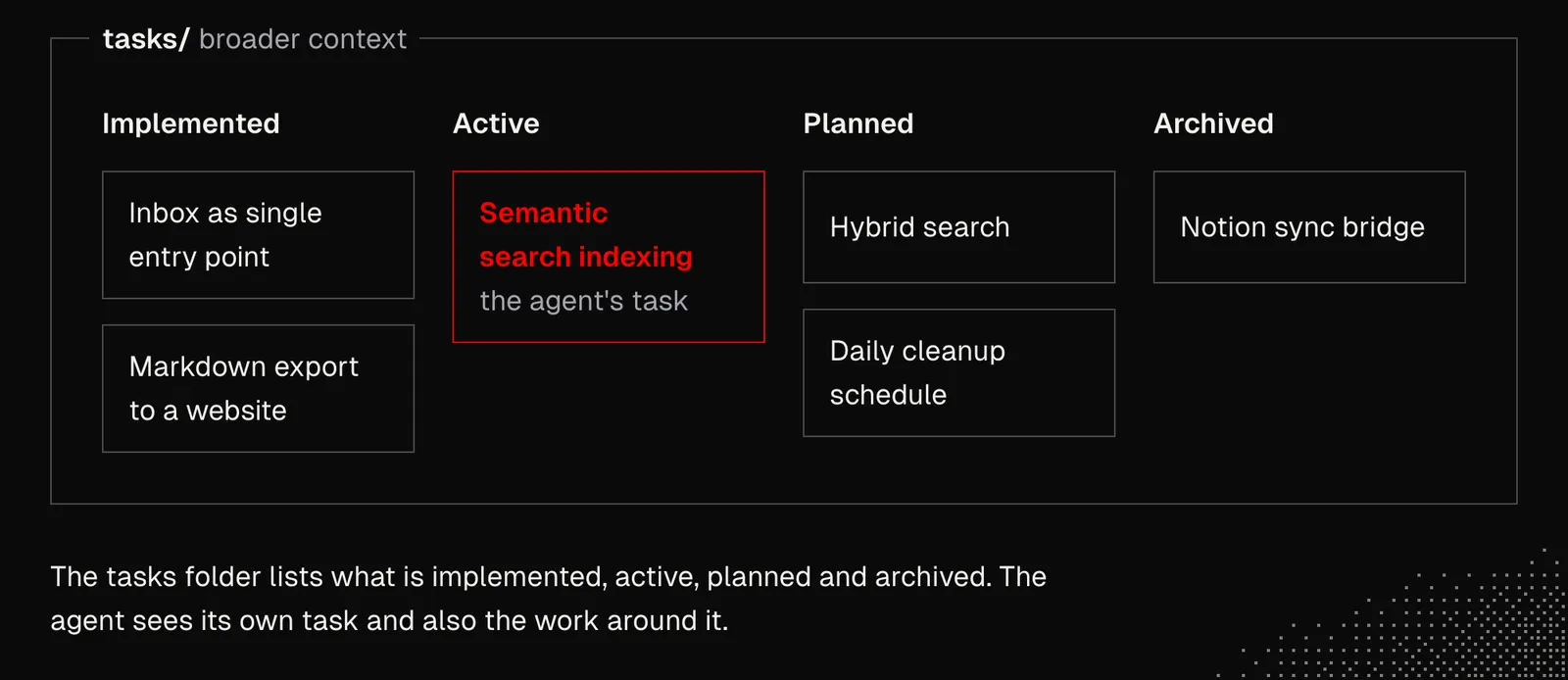
A Kanban board doesn't sound like much of a discovery, but in practice it's extremely useful for agents because it helps them better understand the context. This helps not only during the implementation phase, but also when agents shape requirements and ADRs (Architecture Decision Records) or any other details of upcoming features.
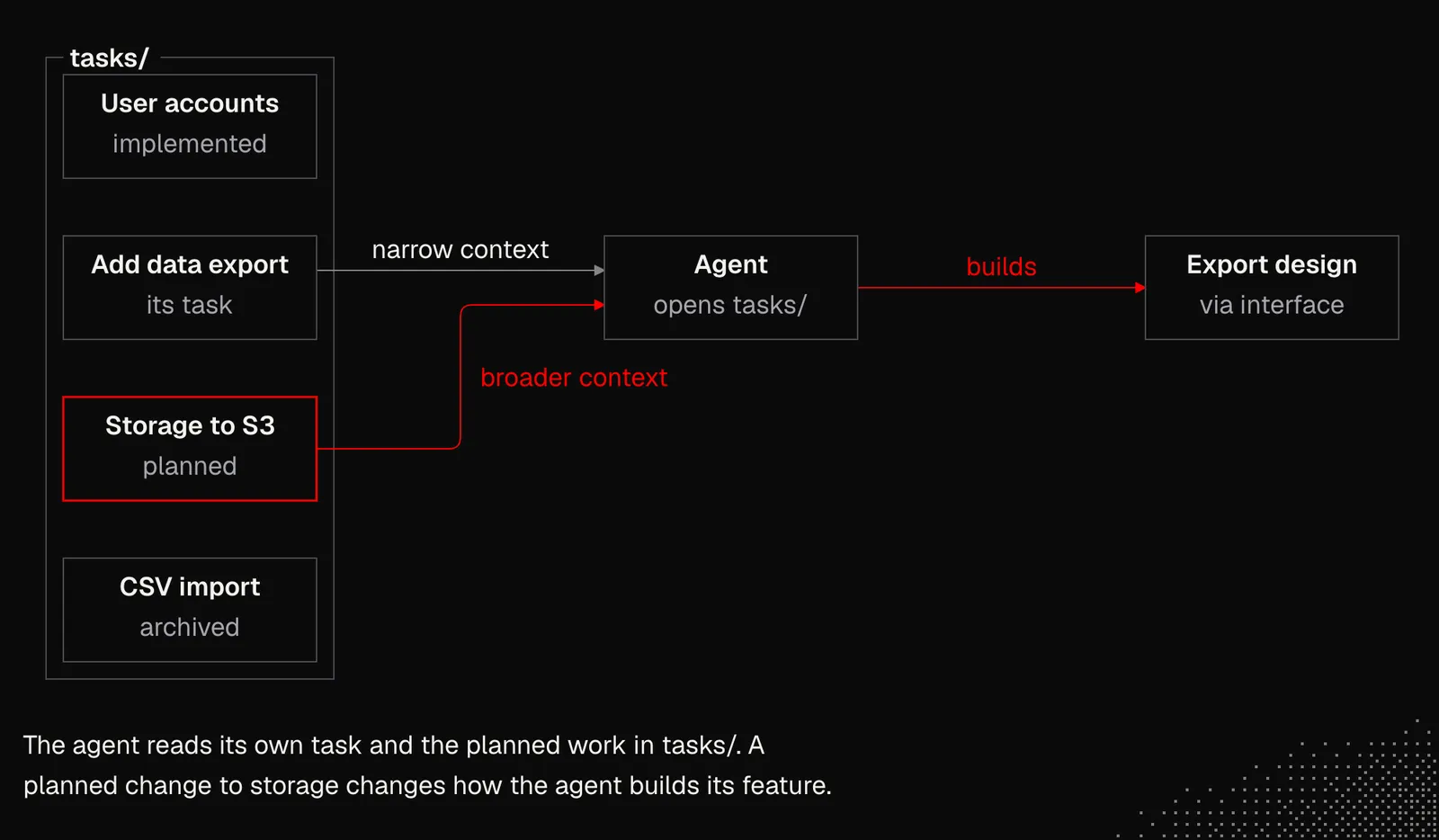
An example
Let's say we want a personal knowledge base, strictly for us and our "personal AGI agent" that has broad context about us, our work, and our personal life. It aims to become our "second brain", a concept that's been widely known for years, but now managed entirely by an agent. To make it useful, we need to set a couple of rules:
- Availability: the agent has to reach it easily, whether it runs in the cloud, on our Mac or PC, or on a mobile device (phone, watch or any other wearable). Because of this, the knowledge base has to live remotely, and if it's filesystem-based, it can be synced with our computer using tools like
mutagen sync. - Source of truth: the knowledge base should be the source of truth for its own notes, without two-way synchronization; information already well maintained in external services should stay there, but the agent should be aware of what can be found there.
- Self-evolving: it has to grow nearly autonomously, without us needing to verify or change anything by looking at the files. Any interaction with us has to be proxied through the agent(s).
- Simplicity: a knowledge base can easily become a separate system, but so far the best path has been to keep it simple and rely solely on growing agents' and harnesses' capabilities instead of fighting their flaws.
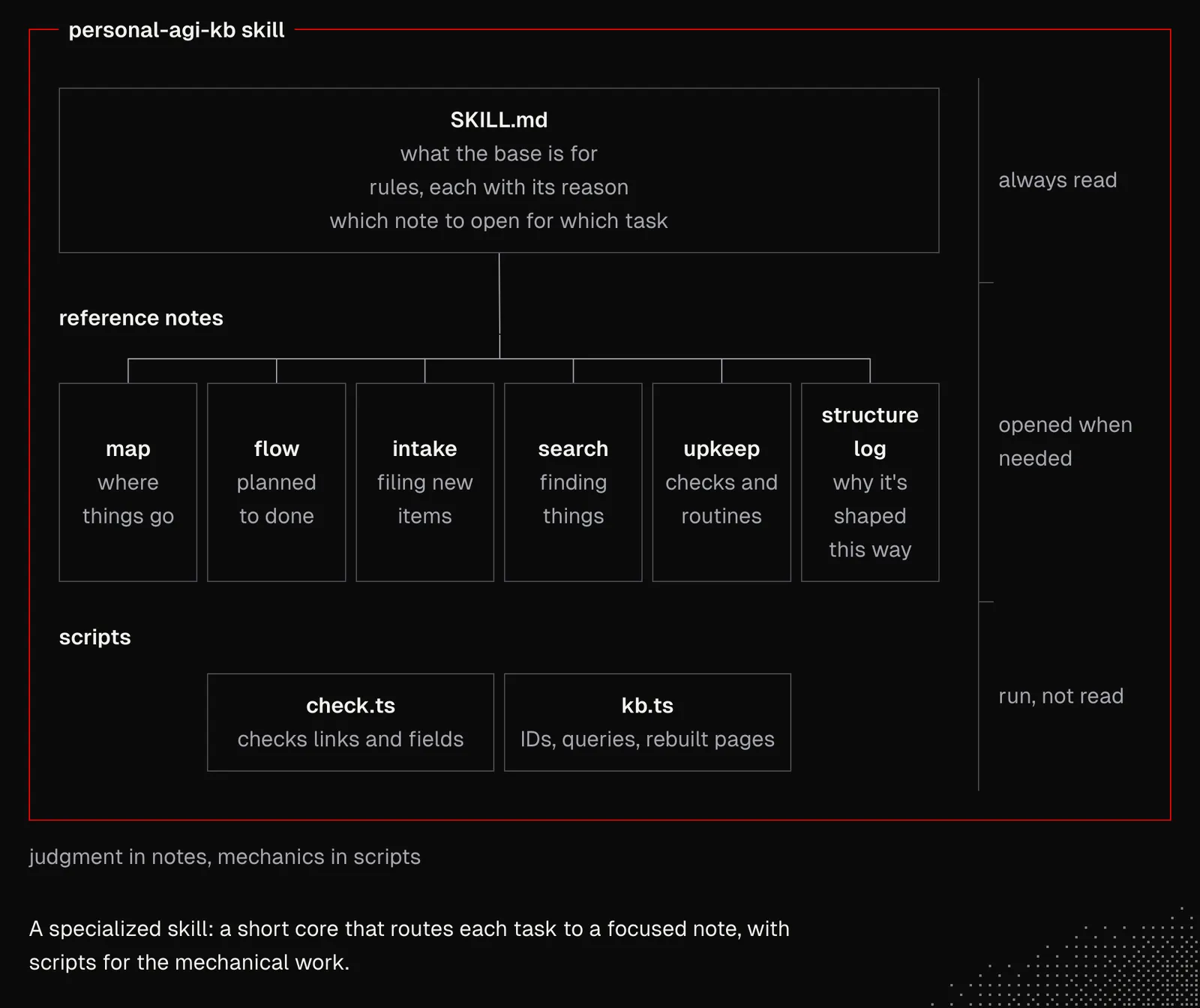
There may be more rules, depending on our needs. And then we may want to use the knowledge skill mentioned above to give an initial shape to the knowledge base and to the skill for managing it. The generated skill is presented below.
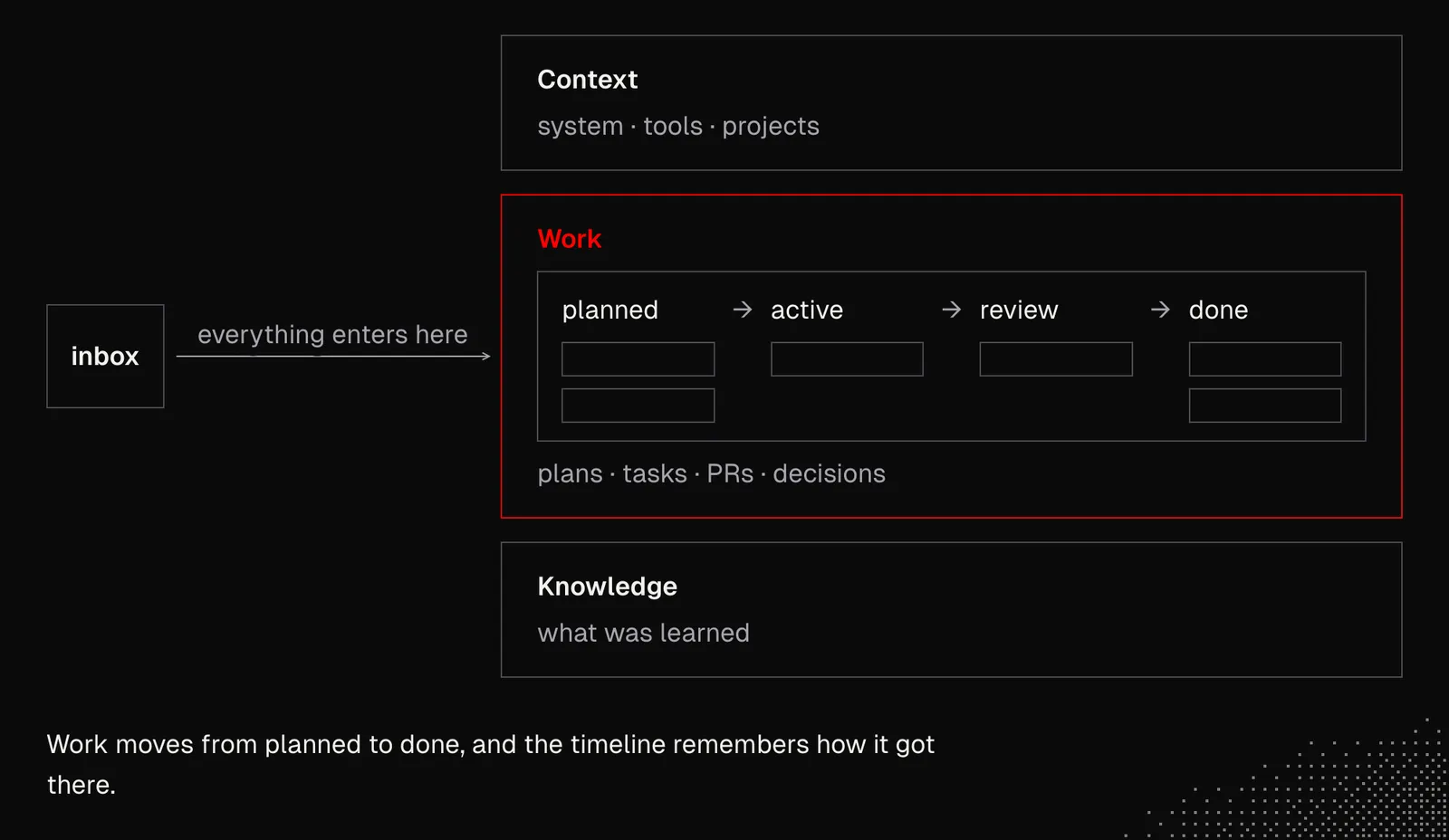
And below we have a general structure of the "personal AGI knowledge base", which covers our general context, what we've learned and information about our work activities. In practice, the structure will be refined as new information comes in, and it's not just about growing it but shaping it to our needs.
Takeaway
Even with AI, knowledge bases are "easy to start and hard to master", but that shouldn't stop us from starting. And a personal knowledge base is one of the best things we can try, because it will help us explore many possibilities, but also run into issues, not only on the AI side but also in the environment around it, since many apps and services simply aren't ready for the AI era yet.