
S01E04 · Working with AI Harnesses: MEGA lesson
MEGA's lesson on choosing and configuring AI coding-agent harnesses, including multiprovider setups, self-managing agents, and workflows for teams.
textMEGA · hq.mega.dev · Saved Nov 19, 2026
mega course, coding agents, agent infrastructure, agent orchestration, company harness
Written lesson S01E04 of the MEGA.dev course, by MEGA. Agenda: Harnesses · Interfaces · Settings · Workflows · Teamwork · Product. Its lesson video is presented by Theo Browne and saved separately. (MEGA Student HQ, needs a login.)
S01E04 · Working with AI Harnesses
Each of us works with AI harnesses in a different way. Some of us prefer zero-config workflows, while others have incredibly complex setups. No matter which side you're on, we may pause a little and look around to see if there is anything we could do differently today.
- Harnesses: CLI and UI harnesses, multiple providers, core and critical features, harness-agnostic setup, native capabilities
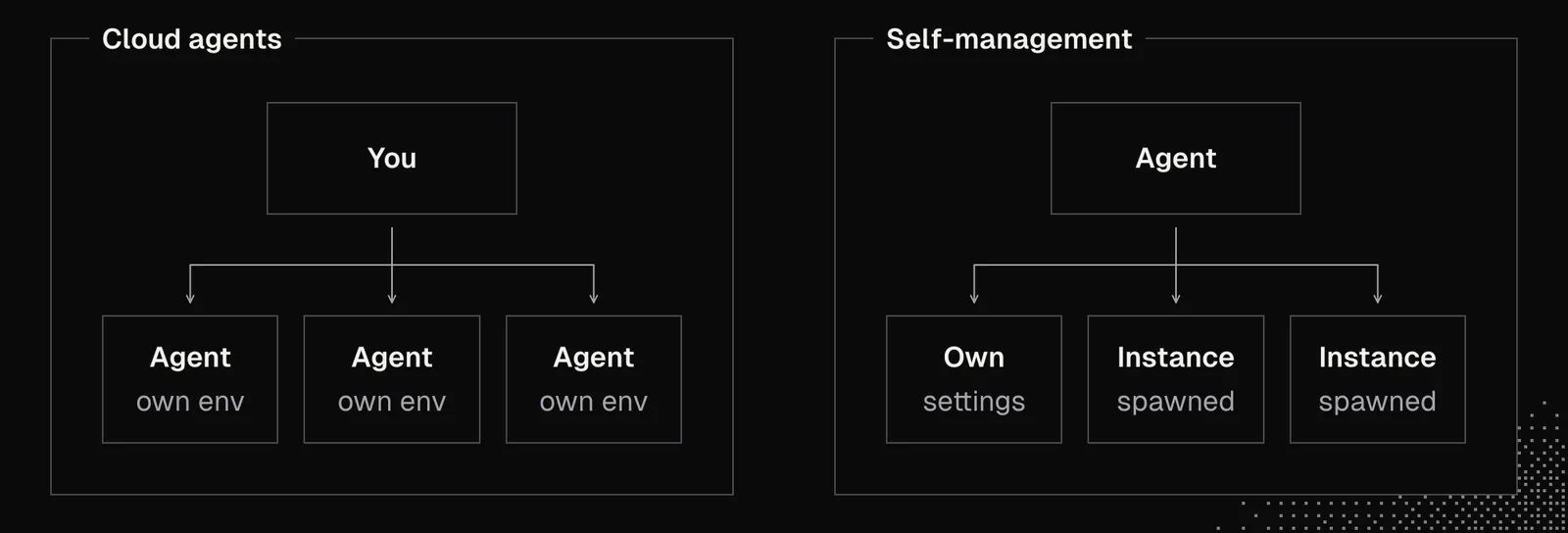
- Self-management: self-configuring agents, extensions, spawning workers, background sessions
- Multi-agent setup: coordinator and workers, steering, files as messages, worktrees, global rules, vision and styleguide
- Settings: model choice and routing, reasoning effort, cost per task, privacy boundaries
- Teamwork: shared skills, internal knowledge base, AI-friendly tool stack
- Automation: repository agents, enriched issues, automatic reviews, small fixes, up-to-date docs
It’s quite tricky to find the right setup because there are so many options available. New features, workflows, and tools also appear every week, making it feel impossible to keep up. The secret is that we don’t really have to chase every shiny object in sight, although that doesn’t mean we should ignore what’s new entirely. We just need a good system. That means making a few good decisions about our environment, not just in a programming context, creating a harness-agnostic setup, and working on our mindset.
Let's see what that system involves.
Harnesses
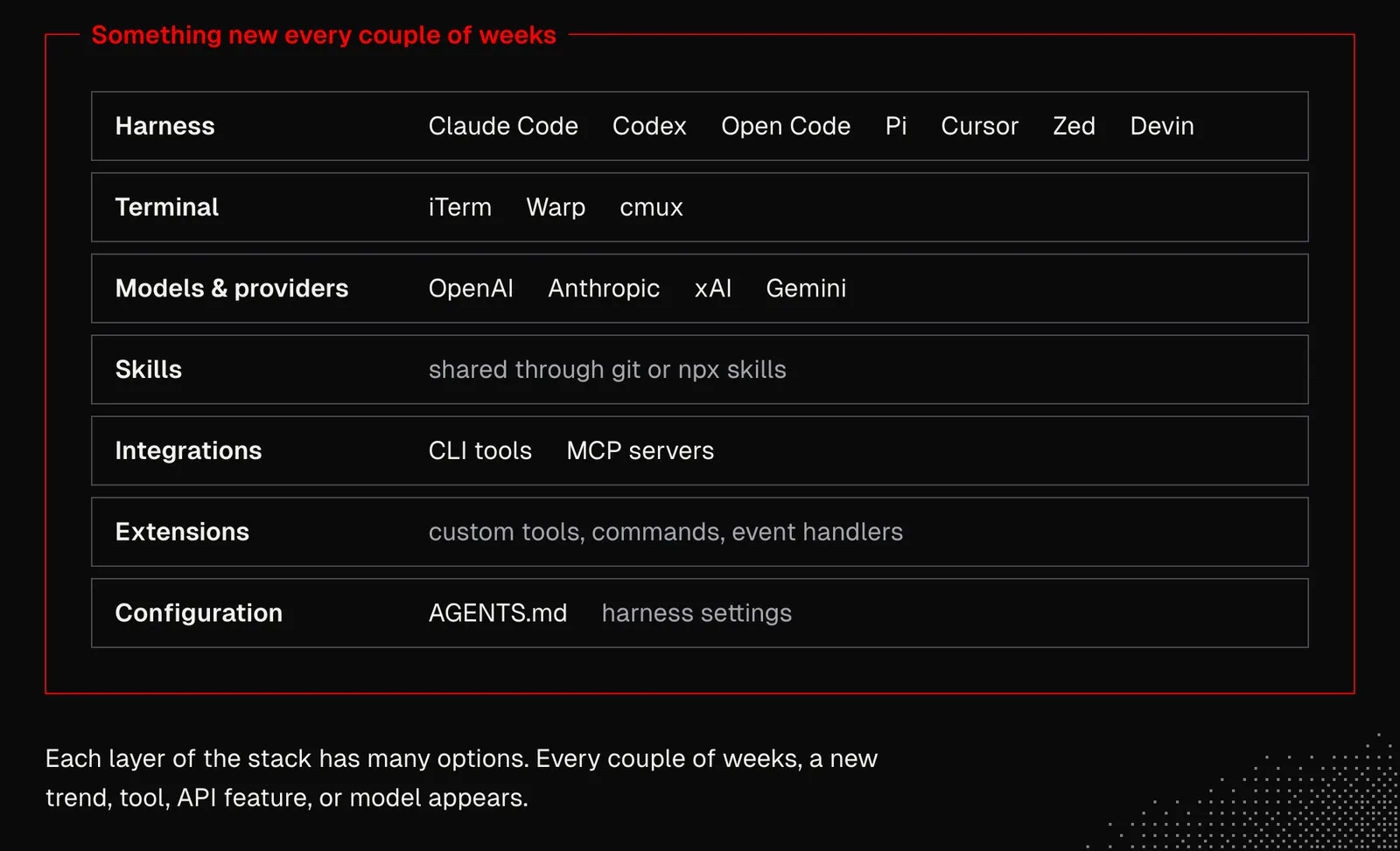
Looking at the available options, we can find many CLI harnesses, such as Codex, Claude Code, OpenCode, Pi, DeepSeek Harness, Grok Build; UI harnesses, such as Cursor, Zed, and Devin; as well as apps like t3code, humanlayer, and superset or agents such as Hermes Agent, Grok Bot or Dots.
Besides the harness, we need to choose a terminal, such as iTerm, Warp, or cmux, and models from OpenAI, Anthropic, xAI, or other providers. We also need to consider using skills and integrations, including CLI and MCP tools, and finally take care of the harness configuration.
That’s a lot, right?
And it gets even more complicated when we consider that every couple of weeks, there’s a new trend, groundbreaking tool, API feature, or model.
Now, the good news is, when we understand some general principles, this will get much easier. Those principles are:
Source: set up your social media feeds (especially X and YouTube) so you get news from the big labs, the official accounts of the tools mentioned above, and the people behind them. At the same time, try to avoid accounts that fuel the hype, as they cover topics that are hot right now but will be forgotten in a week or two. In fact, being a bit behind is a good thing. Only when something sticks around for more than a month (or a bit longer) is it a sign that it may be worth a look.
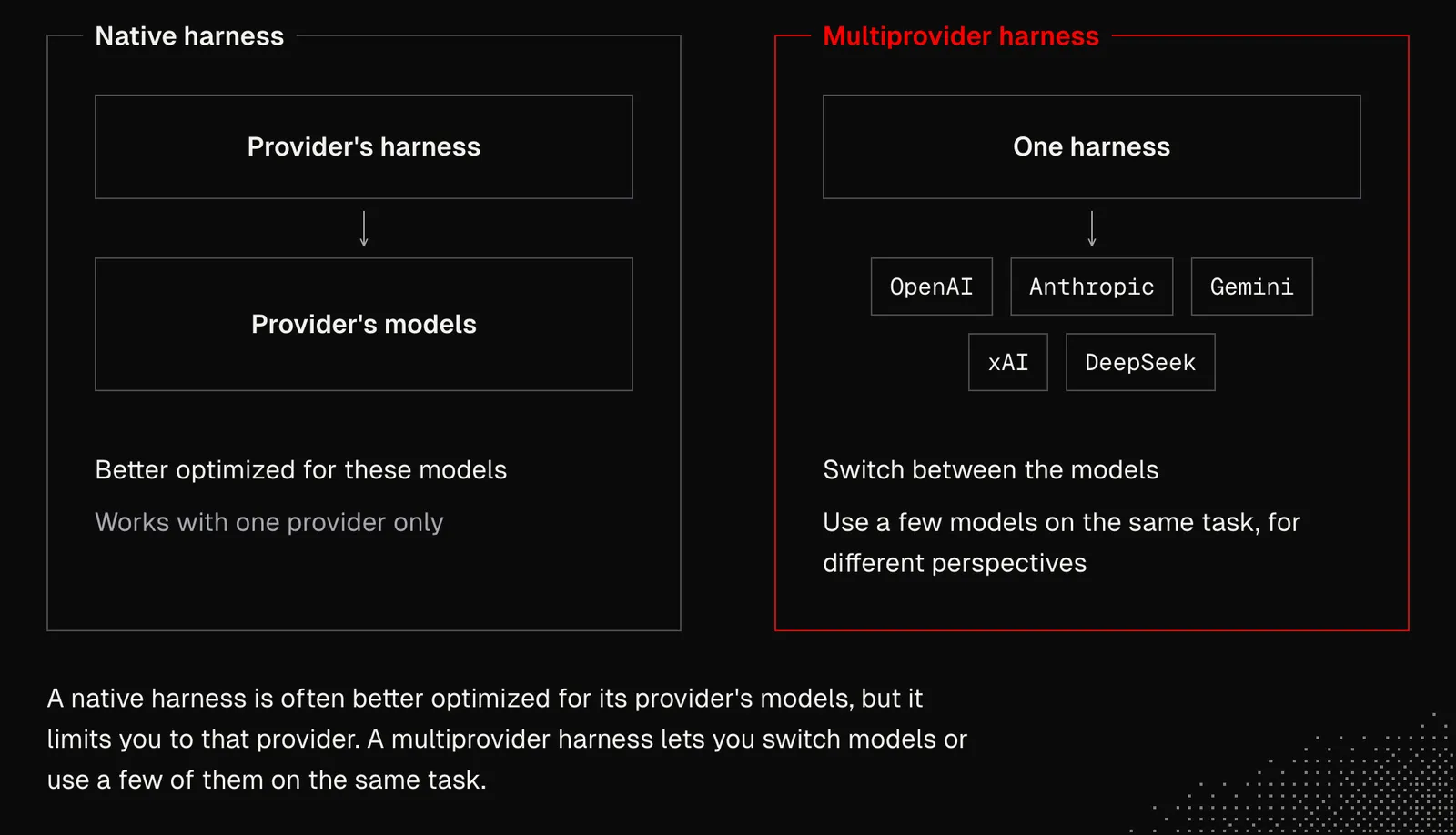
Multiprovider: if possible, pick a harness that supports the top providers (OpenAI/Anthropic/xAI/DeepSeek etc.) so that switching between models or using a few of them for the same task is easy - and that can often be very useful, since different models are, in a way, like different people with unique perspectives. The tradeoff is that providers' native harnesses are often better optimized for their own models.
Core Features: All harnesses implement a similar set of features, such as MCP, skills, or subagents. When a new feature gains traction, it gets adopted quickly, so switching tools for a single feature isn't necessary.
Critical Features: From time to time, new tools appear that bring so much value it's simply worth switching. Good examples are self-management (agents that configure themselves and manage separate instances) or cloud agents. Things like that bring huge unlocks we shouldn't wait for, and after MEGA, all the knowledge will help us recognize such features. When that happens, we should be ready to switch the harness easily.
Harness-Agnostic Setup: Wherever possible, we should prefer configurations that are easy to move between harnesses. Things like agents, skills, CLI tools, or MCPs are good examples, although reauthorizing multiple services can be annoying. Kody, an open-source project built by Kent, is a good example of how a setup can move between harnesses with almost no configuration needed.
Native Capabilities: The trickiest part about working with agents and building them is the fact that models' capabilities get better fast, and if we build logic around an agent (it may even be a skill with heavy guidance), we may end up with a setup that degrades the model's performance without a clear sign of who's to blame. A good example here is a publication titled Context Language Models suggesting that LLMs are better at context management than the best strategies we have so far.
Knowing all this, we can get to the point where we stay up to date easily without needing to rush after everything that appears on the horizon. And with time we'll notice that the fundamentals of generative AI and AI agents don't change every week, and understanding them makes it easier for us to determine what's potentially important and what's not. If the value of those fundamentals isn't clear yet, it will be before MEGA ends.
Until then, let's take a look at this:
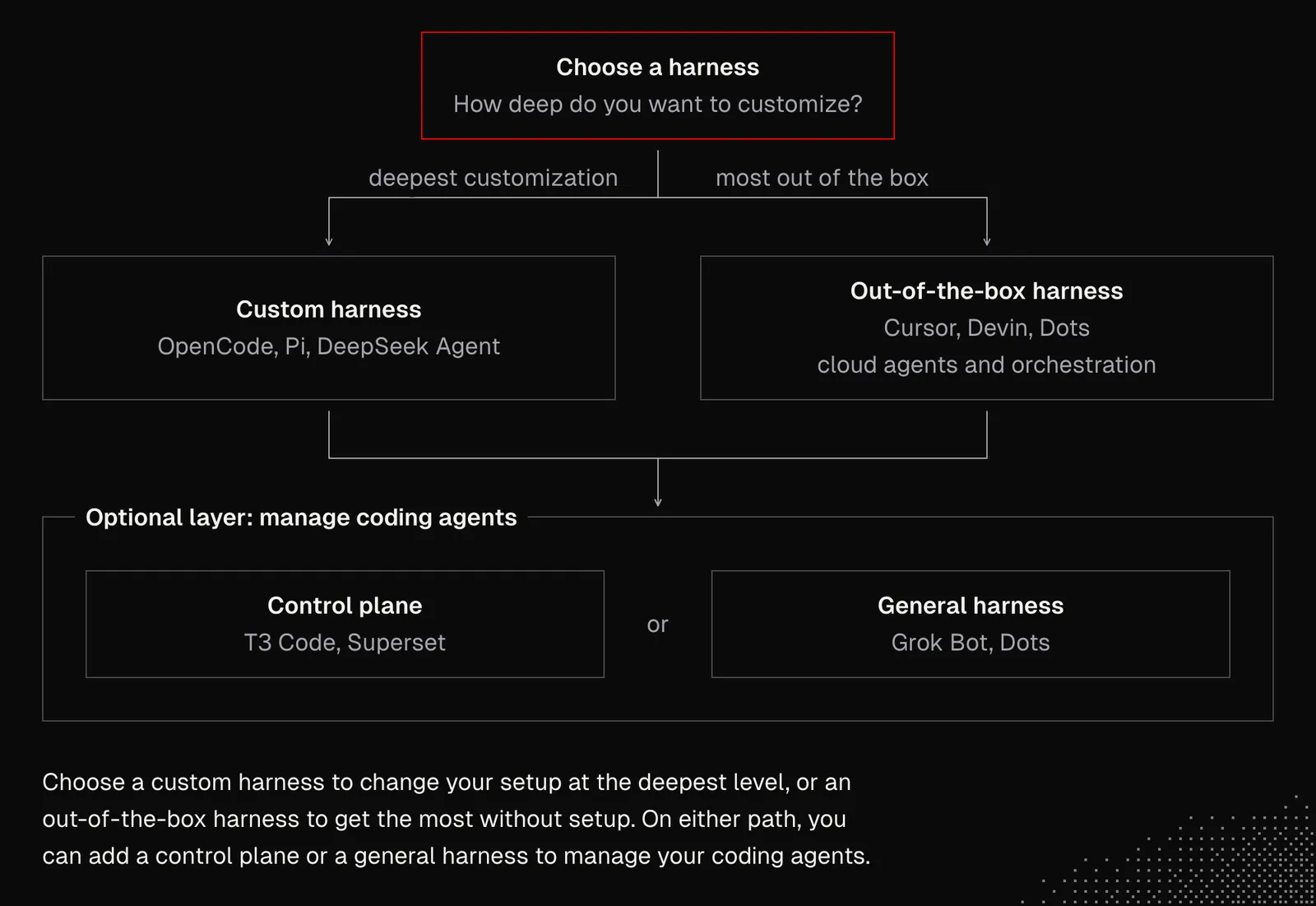
- Harnesses such as OpenCode, Pi, DeepSeek Agent are the best choice for those who want to customize their setup at the deepest level.
- Harnesses such as Cursor, Devin, Dots are the best choice for those who want as much as possible out of the box, including cloud agents and orchestration.
- Tools like T3 Code let you manage multiple harnesses from a single interface and add features none of them offer alone, such as starting Codex subagents from a Claude Code thread.
Now, let's say we pick Pi as our main harness, as this will show us how things work under the hood and also unlock the most advanced workflows, as Pi can be used not only as a coding agent (that can manage itself and its instances) but also as the core of a custom agent.
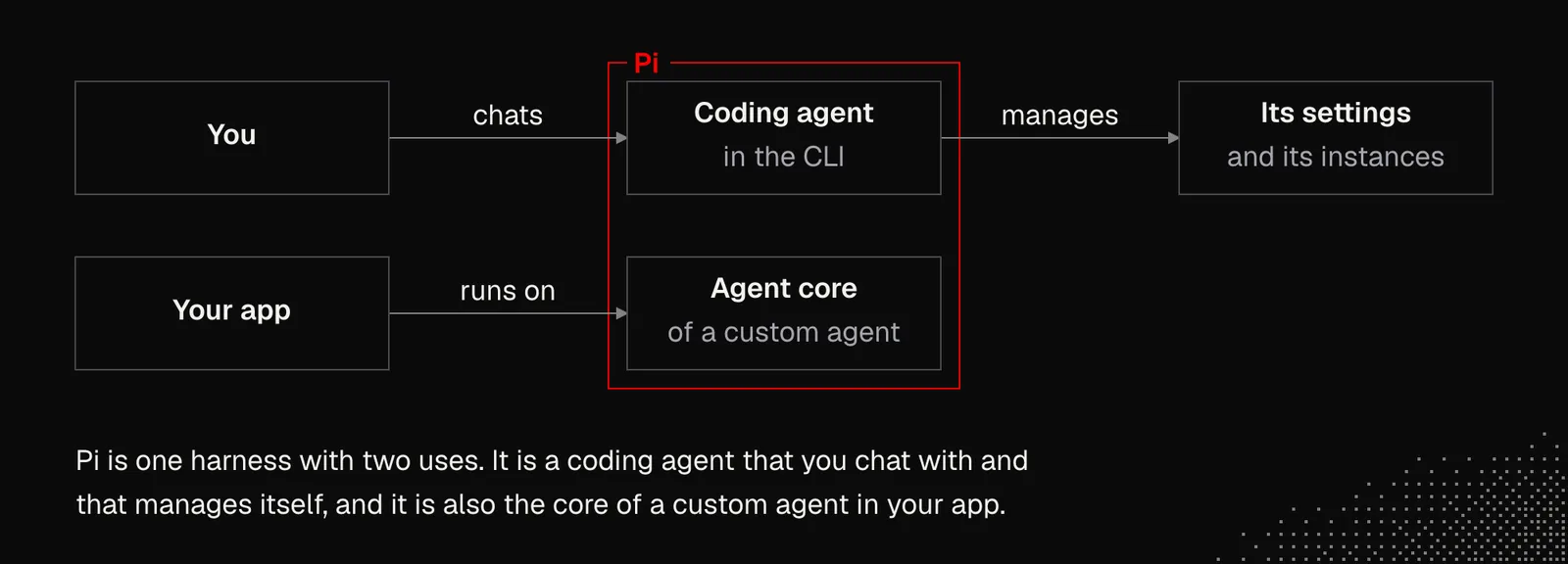
Another component we'll need is Herdr, which allows us to easily manage Pi instances and keep them alive even after we close the terminal. That's an important step toward durable agents that will be ready to tackle long-horizon tasks. Combining Pi with Herdr has one more advantage: they can both manage themselves almost entirely. This means that instead of configuring them ourselves, we can chat with agents about the available settings and figure out the best setup for our needs together.
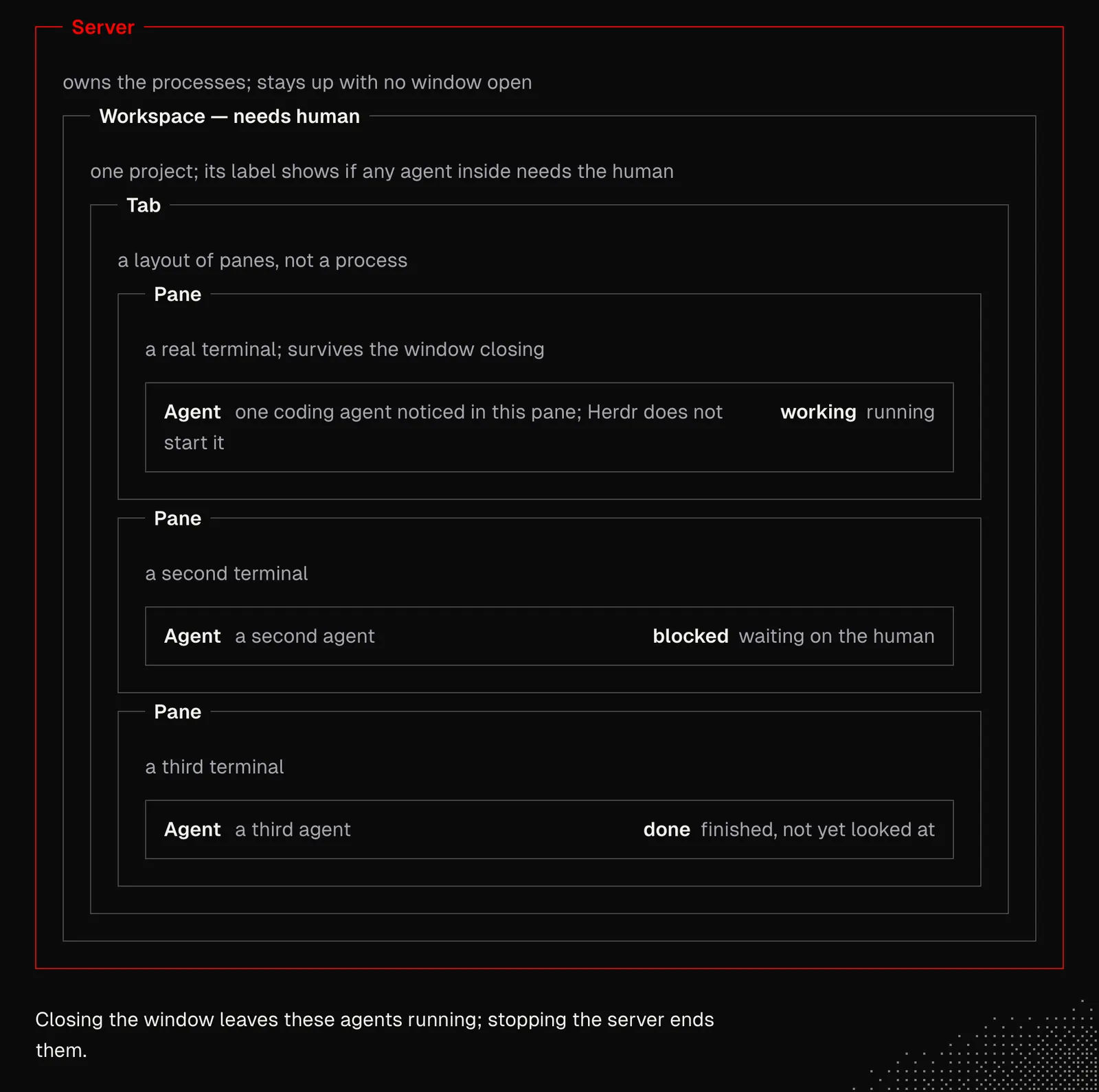
Tools such as Herdr aren't only about the way we display threads with agents, but also how agents can manage their own work. For example:
- An agent can be asked to spawn another agent
- An agent can be asked to tell another agent about something
- An agent can be asked to organize workspaces, tabs and panes
- An agent can be asked to change nearly every setting
- An agent can be asked to look through the history and suggest changes to our workflow
Both Pi and Herdr expose documentation that agents can read, so we can start simple by asking them to read it and suggest some initial settings we might want to use. Self-configuration is also one of the most important aspects of generative apps and agents.
It's also worth trying to start Herdr, run Pi inside it, and ask the agent to create a new Hello World tab with a simple hello message for the agent. We'll see how the agent:
- Explores the environment it's in
- Opens a new tab in Herdr
- Starts a new Pi instance
- Sends a prompt to it
- Waits for the worker to finish and reads its result
We're talking about spawning a worker that technically works much like a subagent, except the worker is fully interactive, can be customized in any way, can have its own hooks, and can be started in the background in response to an external event. This way a single agent can orchestrate many workers that survive even if the terminal is closed, because they live inside Herdr.
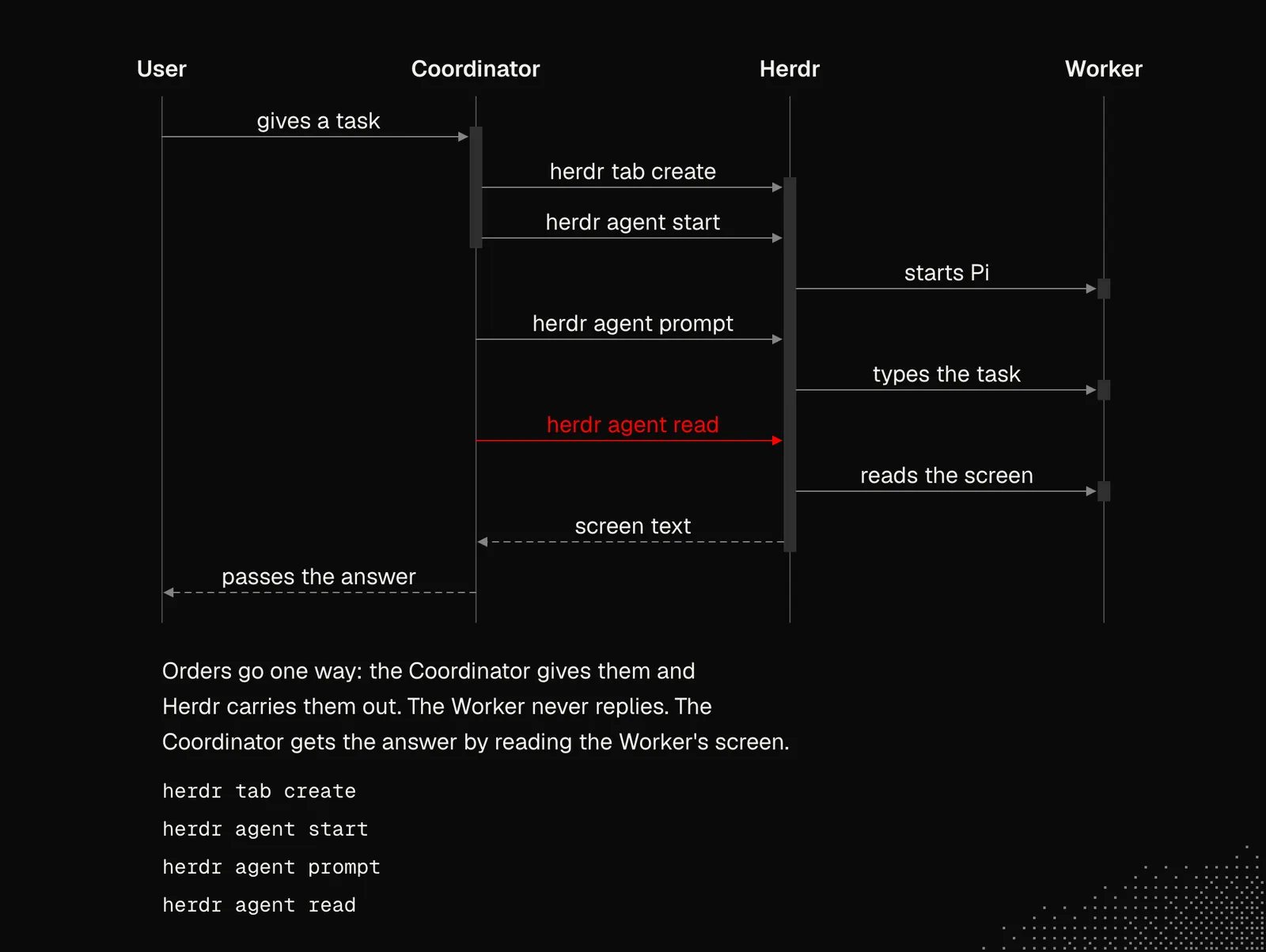
Agents that manage themselves this way unlock the path toward autonomy. But even if we don't choose that path, this approach may still be useful for setting up workflows that improve the quality of our app through UI / UX / Performance / Security checks or various cleanups coordinated in the background.
There's a catch, though: spawning workers isn't all we need. We also need the following:
- Agents need a way to exchange information with each other
- Agents that coordinate other agents have to be notified about the work of the agents they coordinate
- The system needs a knowledge base to keep track of what's done and what's planned
- Agents have to understand the broader vision for the project and follow general rules
- Human involvement has to be considered, but also limited in many ways
- Agents need sandboxes and mechanisms that prevent them from doing things we don't want
- At some point, agents may need their own VPS or physical device
- Agents need their own accounts and everything else required to interact with the app
- System interactions may involve hooks that support agents at various stages
- The system has to be useful within a team, where each member has their own agents
- In some cases, the system has to be monitored and evaluated so it can improve itself
That's a lot. But we'll cover nearly every aspect of it in the upcoming lessons. Meanwhile, let's take a broad look at what we can do with Pi and Herdr to make the agents manage themselves.
First, we need to understand that the Pi harness can help us create its extensions that can modify its behavior at a low level, including lifecycle modifications, custom tools, commands, shortcuts, event handlers, prompt manipulation and many, many more.
Second, Herdr takes care of everything around the agent. Each Worker gets its own tab opened in the background, so the current conversation with the Coordinator stays interactive and you can step into any Worker at any time. Herdr also reports whether a Worker is still alive, shows which one has stalled and closes the tab once the job is done.
Together, they give us an extremely powerful tool we can modify to fit our needs, although it's worth keeping the setup as simple as possible and well generalized.
How a harness is configured still largely depends on the project, the way we work, and what we expect from the agents. Because of this, we'll look at a project that a couple of teams have already adopted, so there's a chance anyone can find some value in it.
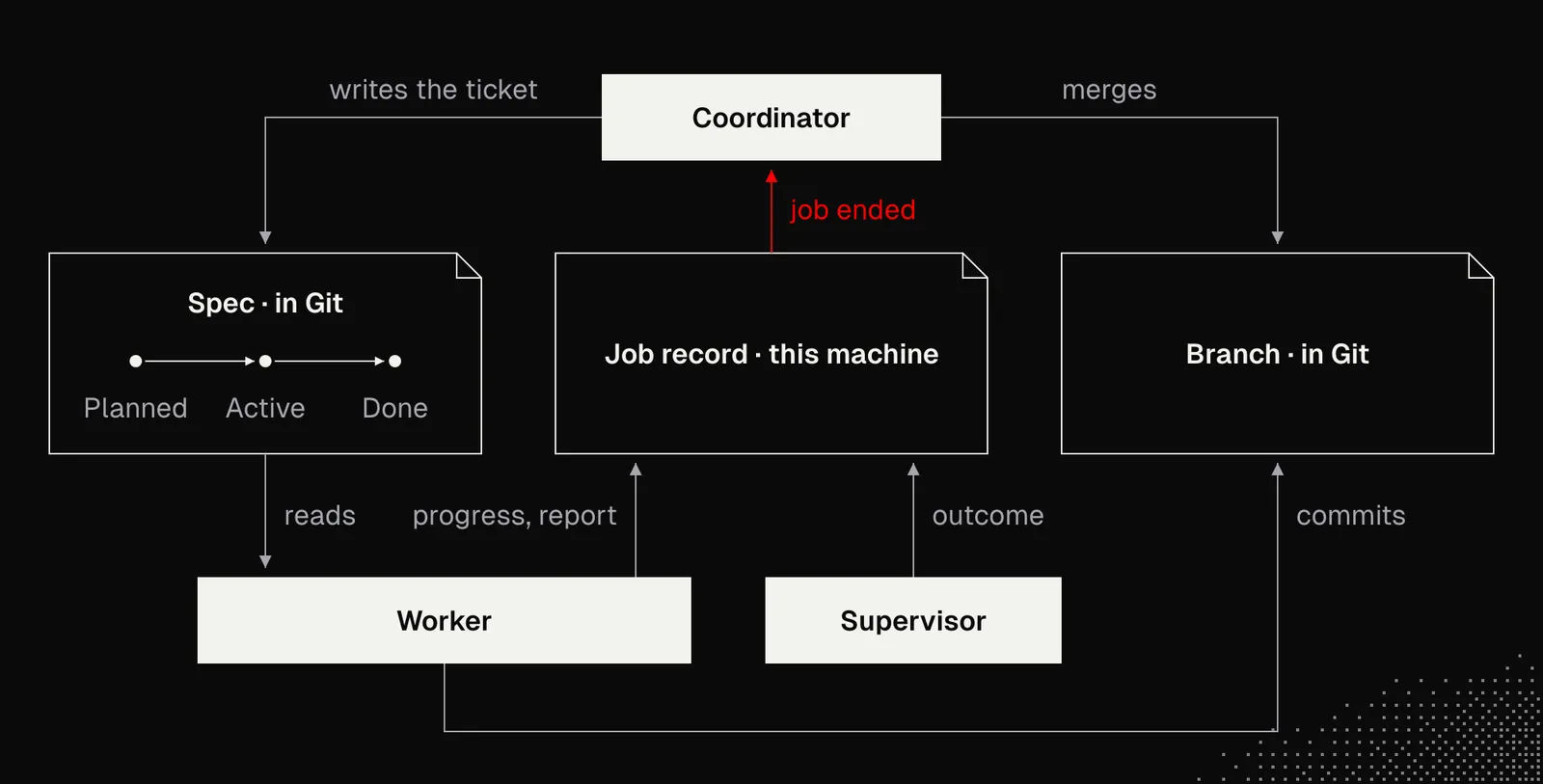
Below is a visualization of a structure where Pi instances (Coordinator / Worker) don't talk to each other directly. Instead, everything goes through files (everyone can read), and simple Supervisor logic watches each Worker and records how its job ended (even after a crash). The Coordinator is subscribed to its Workers, gets notified when they finish, and can steer them along the way. Each run is tracked in the job folder, while the task itself lives in the features folder.
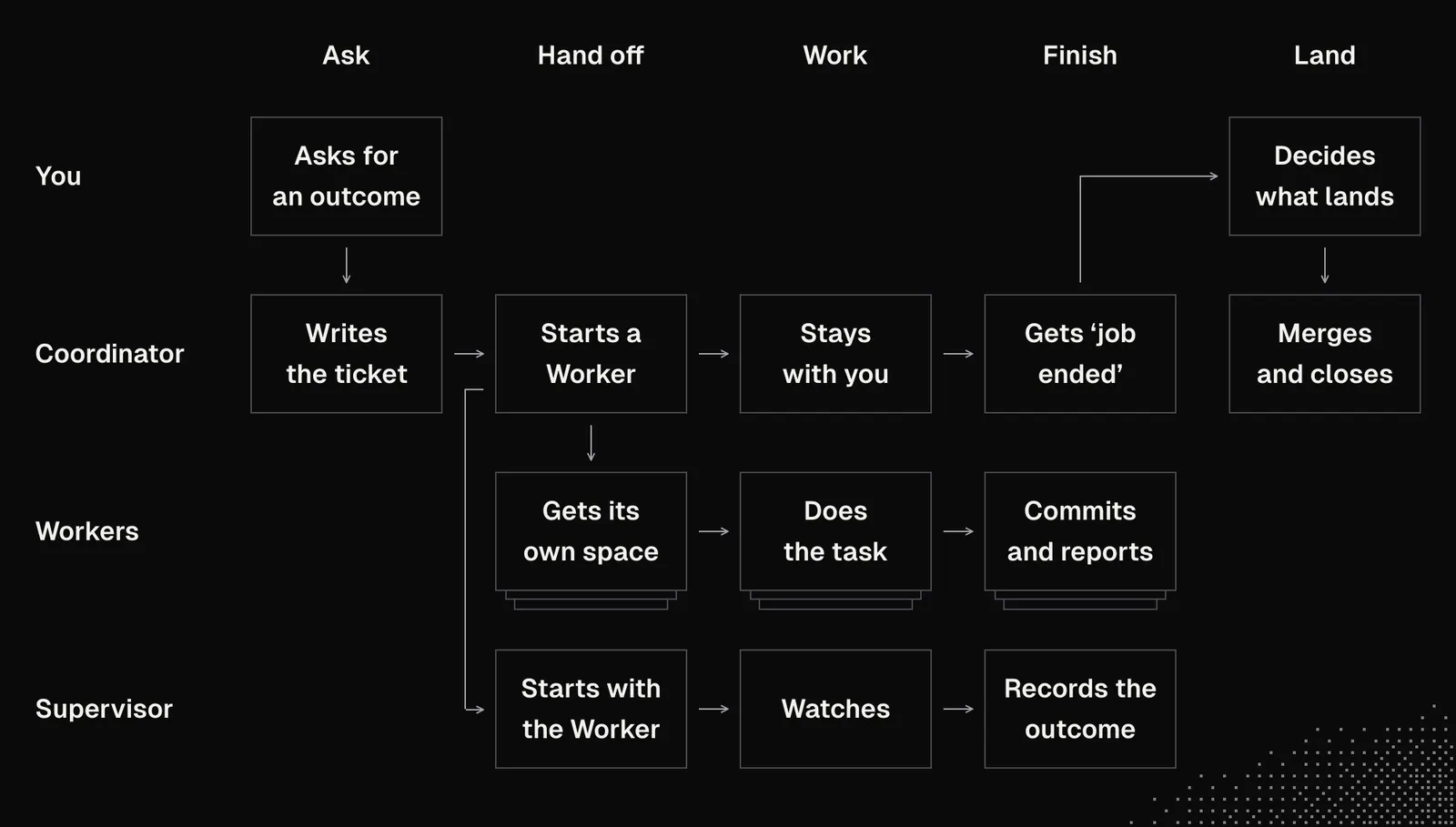
All of this was achieved mostly with plain text files, git and text instructions, with minimal scripting. There is no database, no message queue, no gates and no frameworks. There's only a small command line tool that connects the following parts:
- git worktrees give each Worker its own copy of the code and its own branch, so Workers don't interfere with each other
- Herdr gives each Worker its own tab, and the Supervisor uses herdr to check whether the Worker is still alive
- Pi extensions work inside the agents. In the Coordinator, an extension watches the job folders and adds a message to the chat when a job ends. In the Worker, an extension delivers the Coordinator's corrections between tool calls and gives the agent a tool for its final report.
- text files hold both the global rules and the feature-specific task. An extension adds the global files (the vision, the styleguide and the board) to every prompt, so all agents follow the same rules. The task for each feature stays in its ticket, and the Worker reads it when it starts. In general, that's pretty much what we discussed in the lesson S01E03.
Code does only the things that text cannot do reliably: start a job, watch it, record the result and send the notification. Everything else is text that the agents read, for example what to build, how to write it and when to ask for a review.
The source code for this project (as of this writing) is available here. It's worth discussing its structure with an agent and playing with it a bit, or even applying it to your own project. To apply it, you can:
- Running
limen init - Shaping
vision.mdandstyleguide.mdtogether with an agent - Installing Pi & Herdr
- Opening Pi and asking it to implement something
The vision file contains a general product description and the direction the product is heading. It may also include a map of features that points to separate files with general descriptions of the most important modules, etc. The styleguide contains the rules we want the agent to follow when writing code. It differs from AGENTS.md in that it's injected into the context more often, to remind the model about it. Because of that, both files have to be well crafted and very concise.
Note: this project works on macOS and Linux, but some features, such as one part related to agent recovery, are supported only on macOS.
Settings
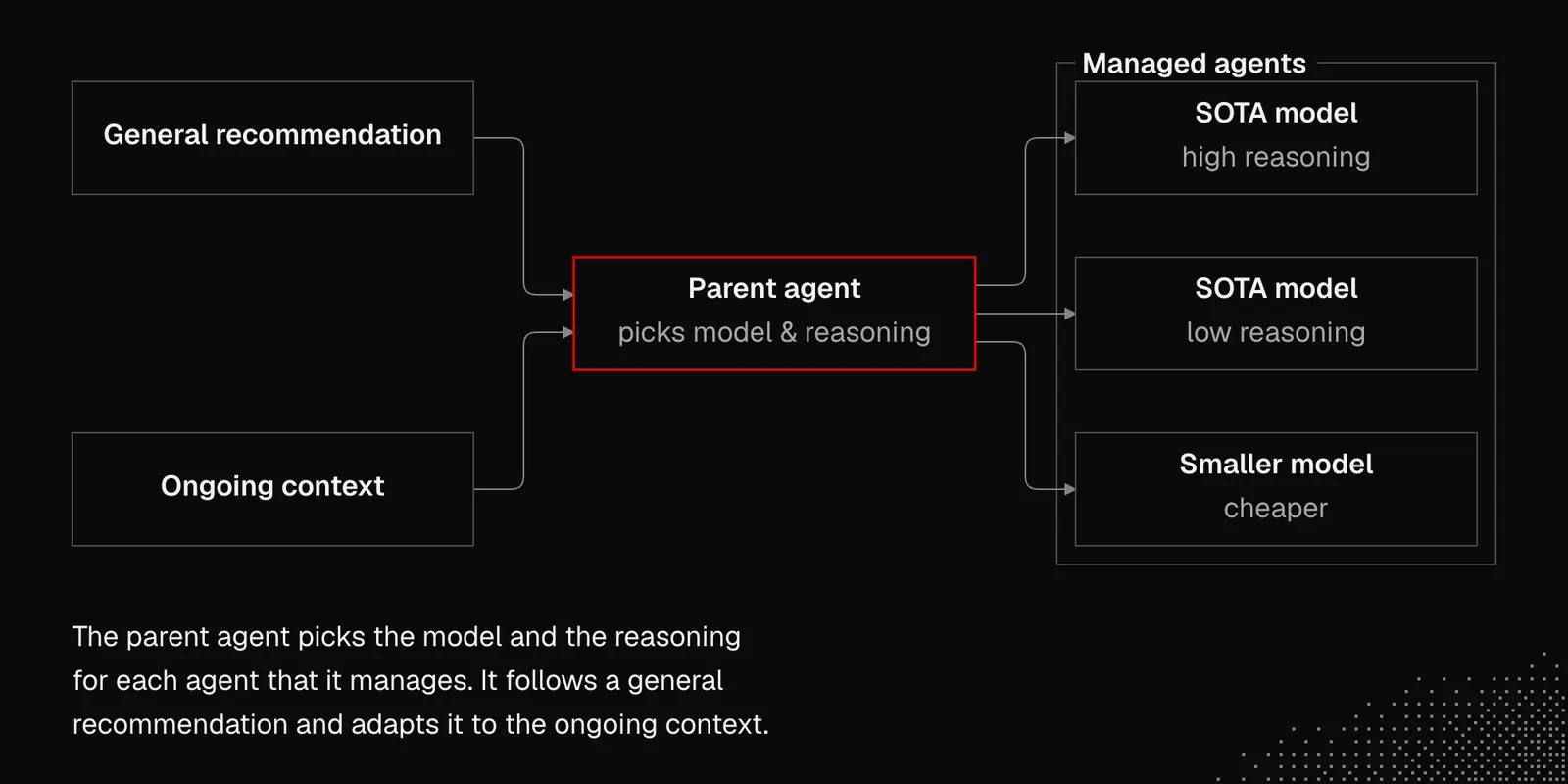
Once we have good control over the harness and agents, so that we don't have to manage each of them separately, things like switching between providers or model routing become much easier, because all we need to do is set a few recommendations for the agent that manages the others.
Choosing a model largely depends on our preferences and budget. When possible, it's best to work with state-of-the-art (SOTA) models, meaning the best ones available at any given moment. To reduce costs, we can use lower reasoning effort for easier tasks, or switch to a separate, smaller and cheaper model.
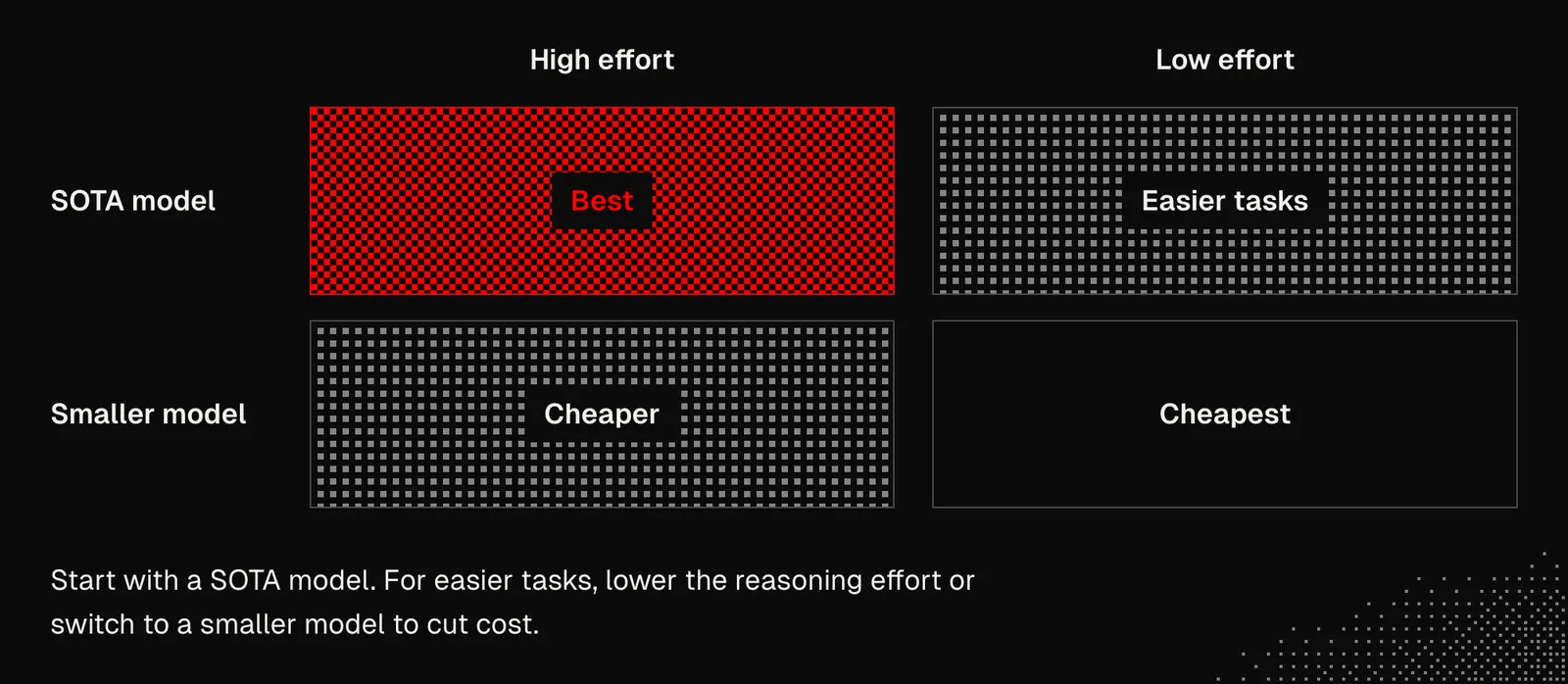
Unfortunately, there's no clear rule for which reasoning level to use, because it depends on the model, the task, and our harness. Benchmarks can be useful, but only for establishing a baseline. We still have to check which reasoning level works best for our tasks in practice.
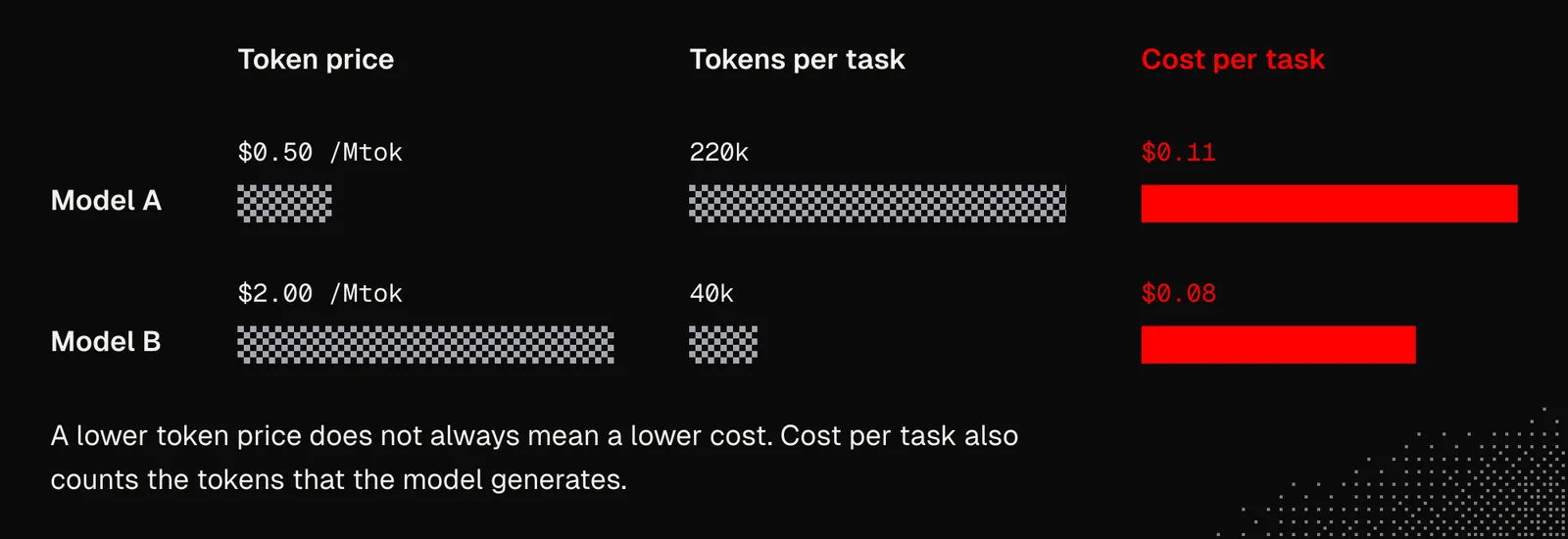
Note: token price alone is not enough to determine model costs, because some models generate many more reasoning tokens or need more time to solve a task. slopalytics provides a Cost Per Task metric, which is more accurate.
It's worth noting that many workflows, such as multi-agent collaboration, have become much more efficient since roughly Opus 4.8, which wasn't that long ago. So if we try the workflows discussed here with older models or open-source models such as the latest Qwen, we may find they can't handle the tasks this way.
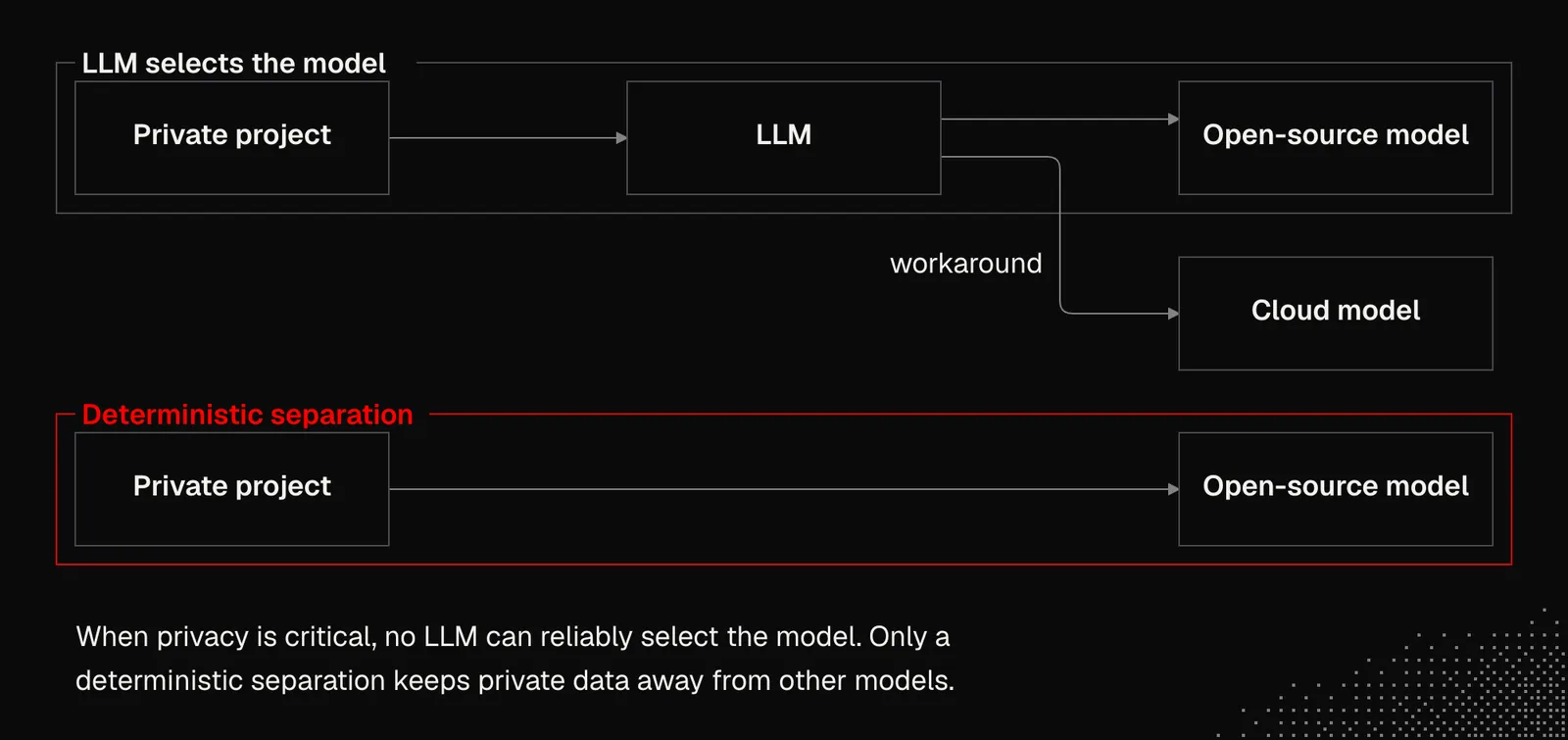
In some cases, we may need to use open-source models for certain projects, or even for specific features of the projects we're working on. Although open-source models are outside the scope of MEGA (there's a useful introduction in LLMs 101: A Practical Guide), it's worth keeping in mind that when privacy is critical, no LLM can reliably select a model. We need a clear, deterministic separation, because current models are very clever at getting around even strong boundaries.
Teamwork
Working with agents in a team of people isn't obvious, and right now there are no clear answers about how to do it right. That's why we need to use our understanding of generative AI and the available tools to build workflows that serve us best and evolve with us.
There are a few things we can look at:
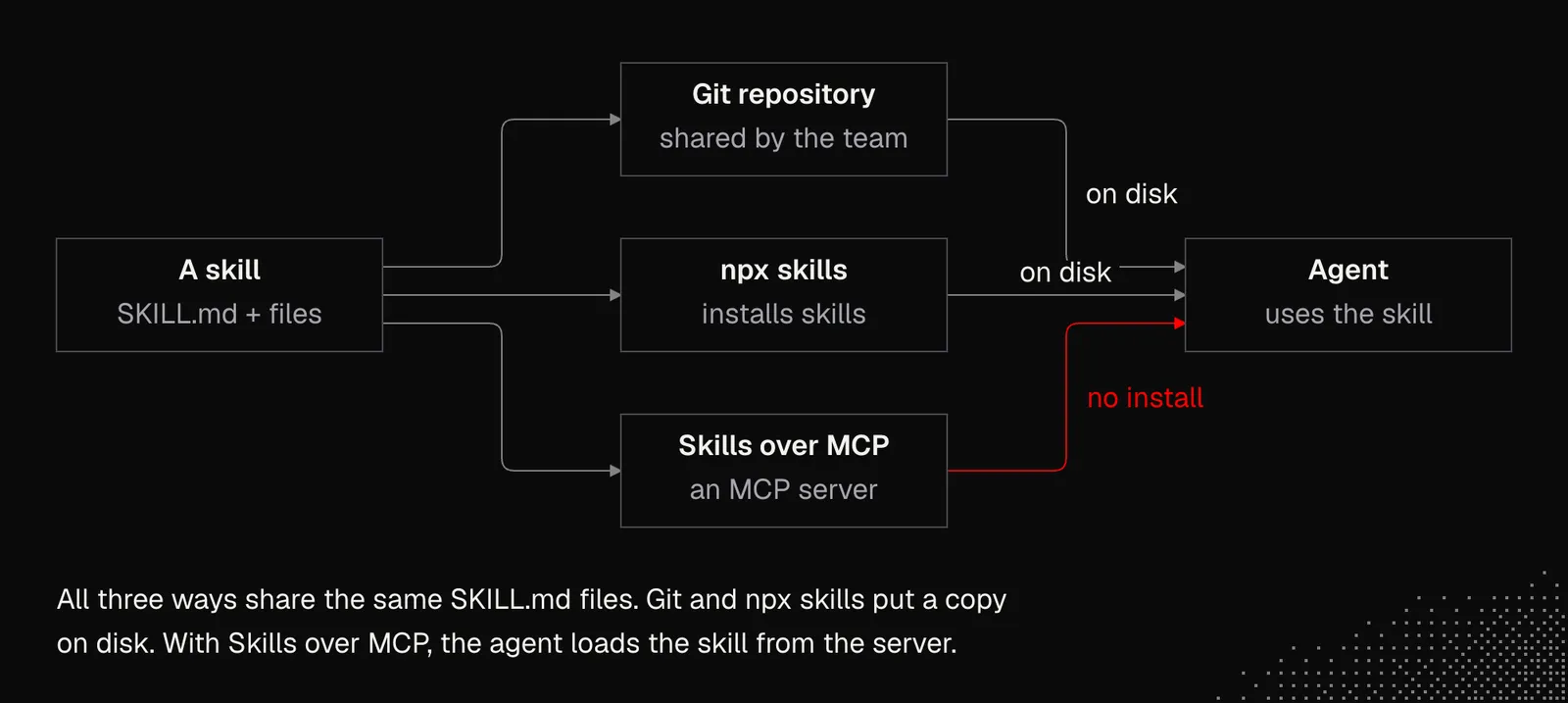
Shared resources: AGENTS.md and the skills we discussed in S01E02 are the first things we need to have in place. Then we need an easy way to share them with the team, either through a git repository, npx skills or an internal MCP server, which we'll discuss in upcoming lessons. In any case, we need to ensure the skills are shared and are easy to keep up to date.
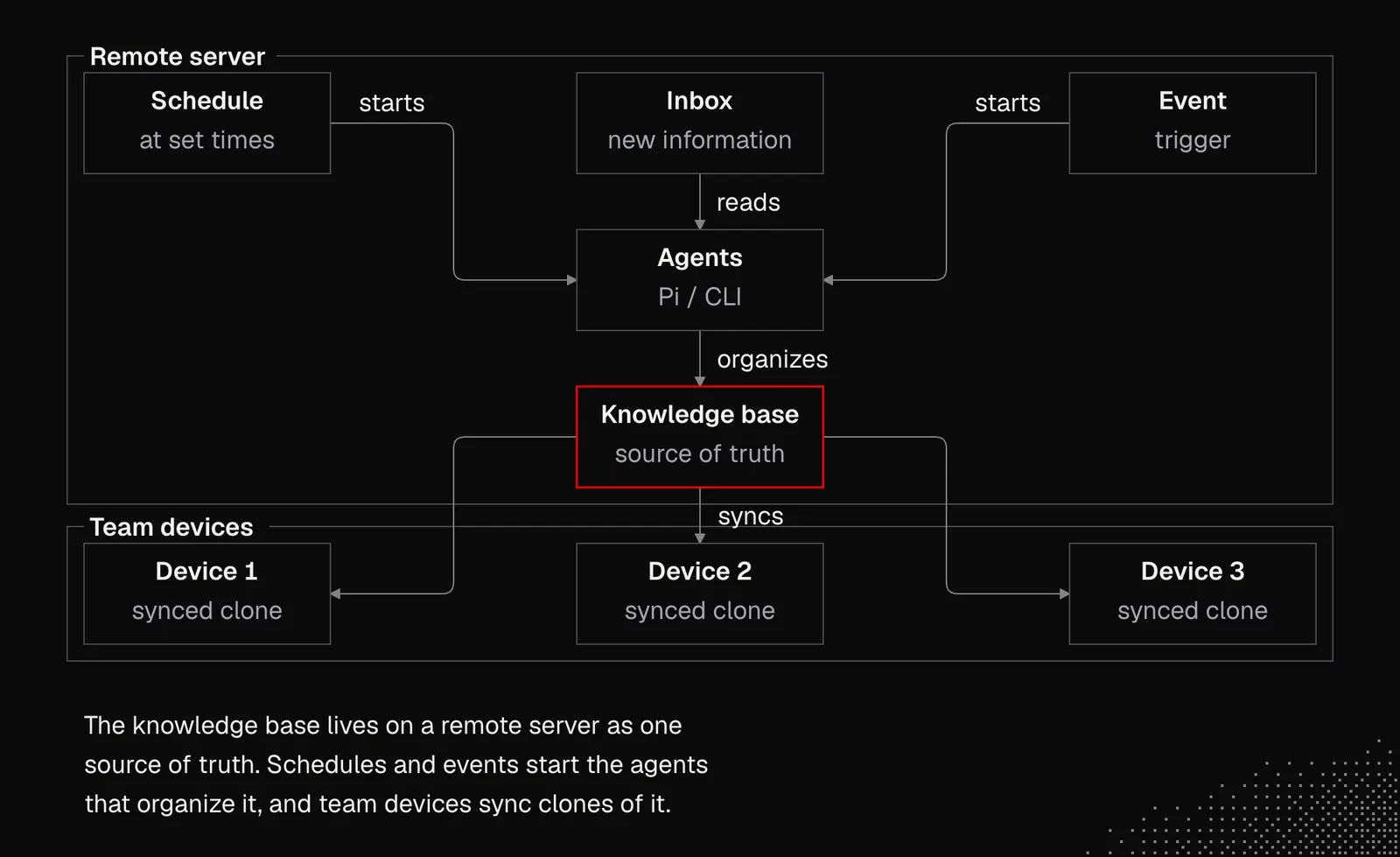
Internal knowledge base: Like skills, a knowledge base can have its own API and be available to agents through a CLI or MCP. The documents can live on a remote server and be managed by an agent that organizes incoming information and makes changes requested by team members or an administrator. This setup also opens a clear path to scheduled workflows that keep the documents well organized and up to date.
AI-friendly tool stack: The tools we use in a company directly define how much we can do with AI. This includes not only the harness, but also the tech stack we use to build apps, and even the services, platforms and tools we use beyond development, such as CRMs, design tools, customer platforms, etc.
For example, here's the list of tools we use on the MEGA team to build our products and workflows:
- Observability and product telemetry: PostHog, Axiom
- Build, storage, and remote reach: Vercel, Minio, Depot, Cloudflare + Alchemy, Tailscale, UploadThing
- Agent surfaces and harnesses: Pi, Herdr, Moshi, OpenRouter
- Typed app substrate: XState, Effect, oxlint, mdsvex
- Auth and backend: Clerk, Convex
- Work the agent can write: Linear, Stripe, Resend, Attio
- Design: Paper, Figma
Not everything on the list will be useful for everyone, obviously, but some of it will be. The list itself can also be a source of inspiration for finding new tools and refreshing your current tech stack.
Automated workflows: And finally, we have automated workflows that run almost entirely in the background. The most popular examples are agents that integrate with GitHub, such as Claude Code, Cursor, Devin, and CodeRabbit. In practice, this means you can call these agents in GitHub comments and Pull Requests, and events in the repository can trigger them too. We can use them to:
- keep documentation, a knowledge base, or even the entire website up to date
- convert an issue into a pull request enriched with the necessary context
- review pull requests as soon as they're created and leave a brief comment
- autonomously fix small bugs and publish the changes
- detect issues in code and dependencies
- assign pull requests to the person responsible for a given feature
- gather data from external systems or even from people
- handle routine tasks such as cleaning up dead code
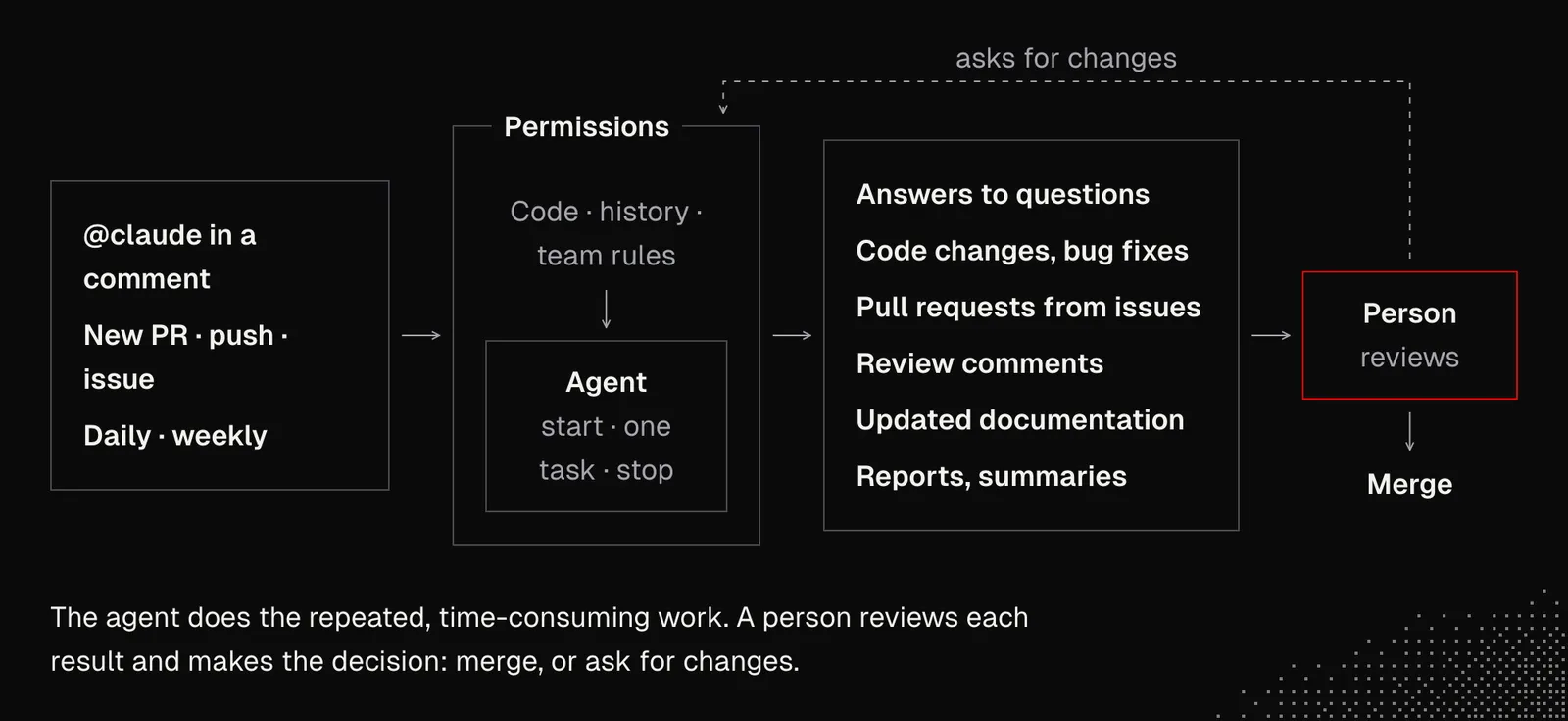
AI can now generate and monitor such workflows, and periodically suggest improvements.
Automated workflows can be pushed even further, because the Pi and Herdr setup we discussed can also be moved to a VPS and connected to GitHub. But we'll discuss this in later lessons.
Takeaways
The most important thing about working with an AI harness is that we can use AI to build and manage the setup, but we still need to keep it as simple as possible so we can iterate on it fast. Also, even though we discussed a setup with Pi and Herdr, that doesn't mean using Cursor, Claude Code or any other harness is a bad idea. Everything depends on our context, and we need to decide wisely what's useful and what's not for us.
If you take away a single thing from this lesson, let it be this: play with this repository, chat about it with an AI agent, and try to extract some ideas or modify it to fit your needs.