
S02E01 · Agentic Primitives: MEGA lesson
MEGA explains the mechanics and responsibilities of agent harnesses, covering agent loops, instructions, context and memory, tools, persistence, permissions, and configuration. The lesson video is presented by Angie Jones and saved separately.
textMEGA · hq.mega.dev · Saved Nov 19, 2026
mega course, agent orchestration, agent infrastructure, context engineering, agent permissions
Written lesson S02E01 of the MEGA.dev course, by MEGA. Agenda: Agent Loop · Instructions · Context and Memory · Tools. Its lesson video is presented by Angie Jones and saved separately. (MEGA Student HQ, needs a login.)
S02E01 · Agentic Primitives
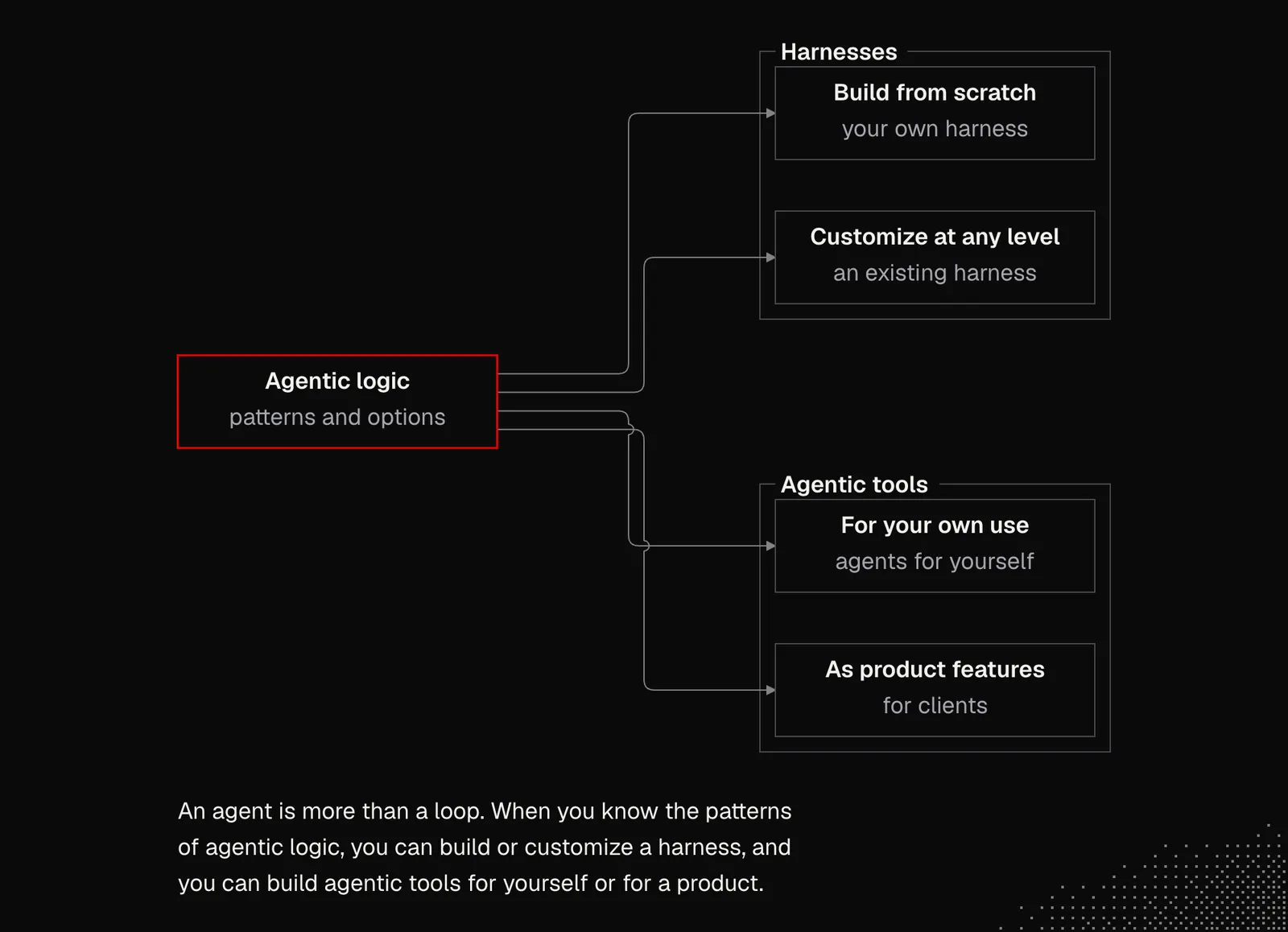
This week, we'll dive deeper into agentic logic and its underlying mechanics. This knowledge will give us what we need to either create a harness from scratch or customize a harness at any level. It's one of the most important parts of the entire MEGA, because everything else we're going to build, both for ourselves and for our clients, builds on it.
Outline
- Agent Loop: model calls, tool execution, results, state, stopping conditions, runtime responsibilities
- Instructions: purpose, responsibilities, profiles, configuration, behavioral guidance, enforced boundaries
- Context and Memory: messages, metadata, attachments, environmental awareness, persistence, retrieval, context injection, prompt caching
- Tools: available actions, function calling, Bash, browser use, code execution, filesystems, permissions, sandboxing
It's worth noting that today AI can build agentic loops without "any" issues. There are also incredible open-source projects, such as Pi (the same Pi as the harness we know) and Goose, that implement the loop in an elegant way, and many other projects rely on this exact package. But agents aren't just about the loop. We can roughly visualize it like this:
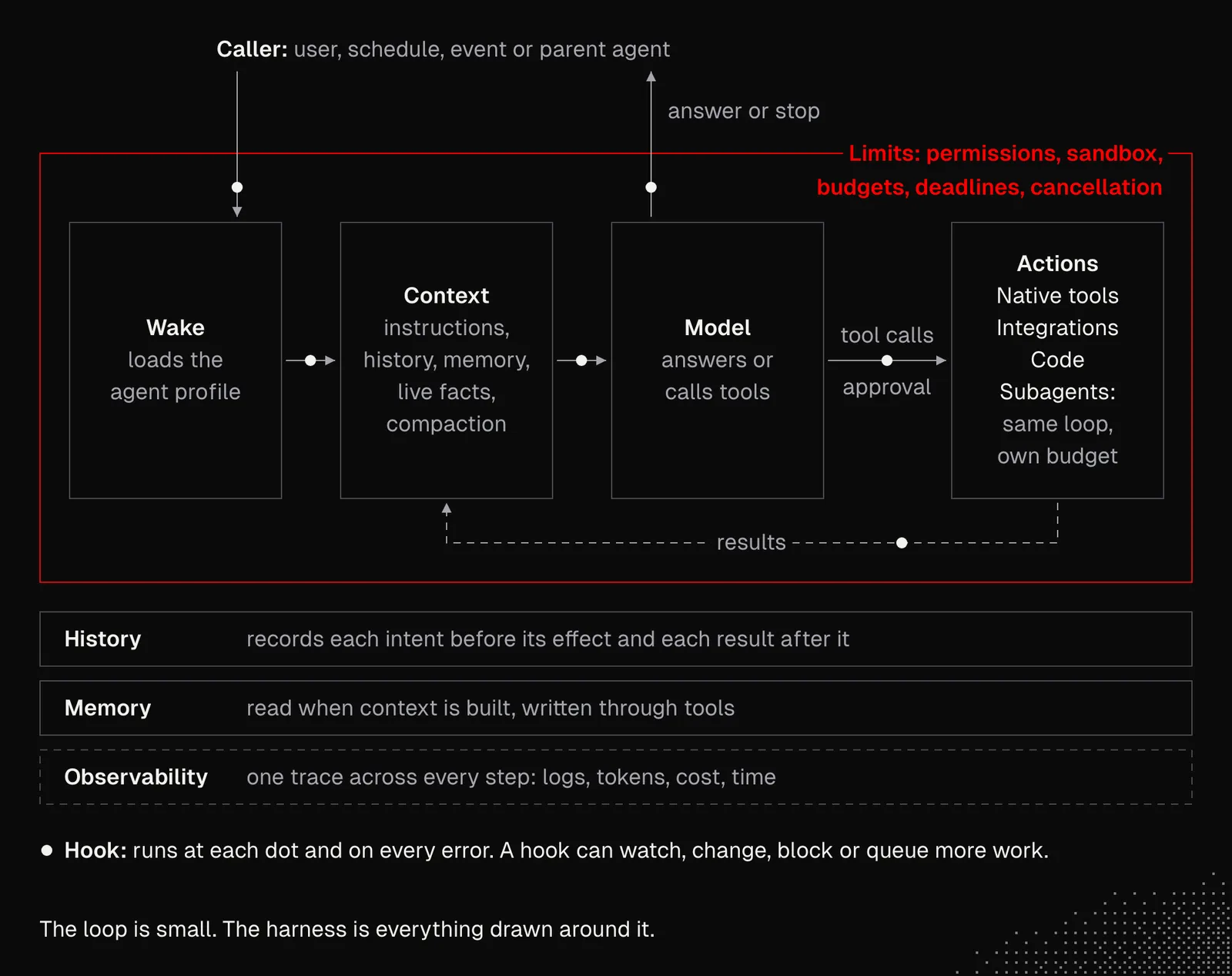
There are many architectures and patterns we can use to build and extend agentic harnesses, and the goal is not to build all of them but to know what options we have and where to look, and when. And once you feel comfortable with them, you may want to break some rules and look for better patterns and implementations for your own use cases.
Agentic Loop
We already know that agents, at their core, are loops that keep working until the LLM decides not to use any tools and instead returns text and finishes the task. Between iterations we can manipulate context, settings and trigger logic we need. Sounds simple because it is.
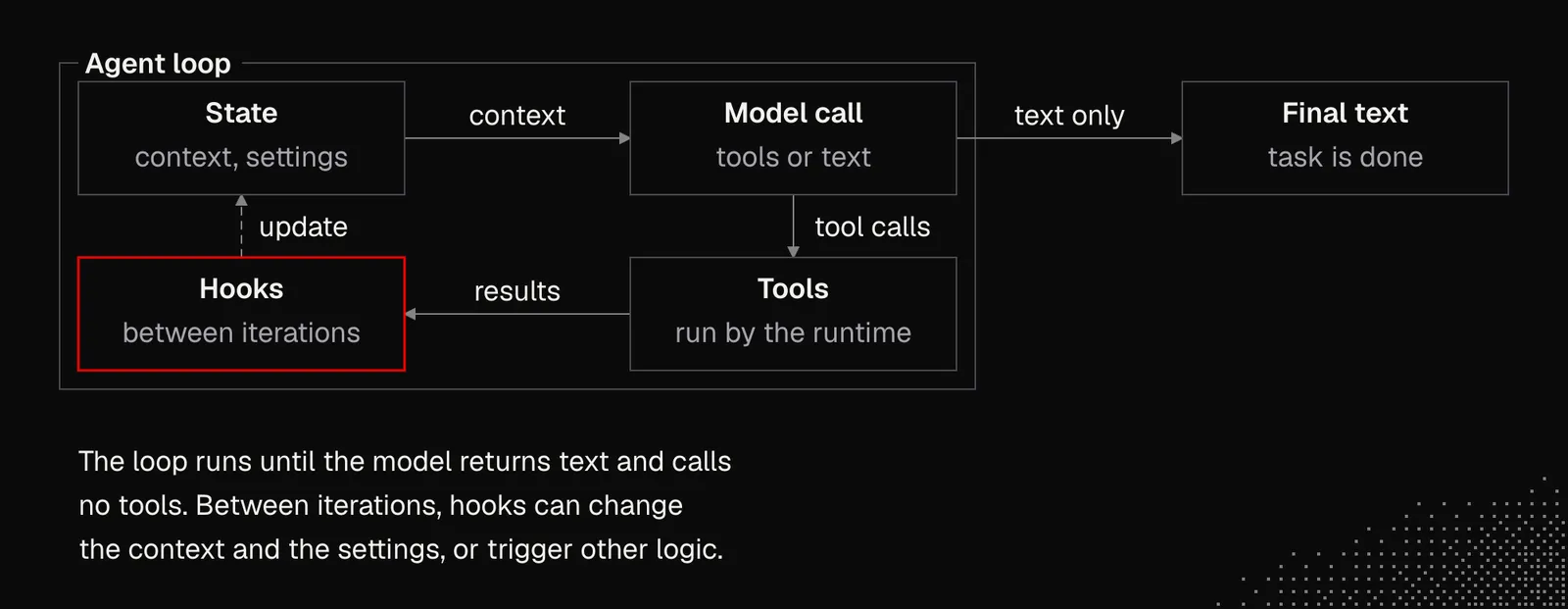
The components are:
- State: holds the thread, context, configuration and loop variables
- Model: handles interaction with the LLM provider's API (for example, OpenAI)
- Tools: a list of schemas the model uses, and callbacks the loop triggers when a tool is chosen
- Hooks: a list of callbacks that handle observability or actions such as compaction or file processing
A naive implementation of this is shown below. Pi agent fully implements the same mechanics and shows how powerful this logic is: we can use Pi for coding, but we can also connect it to any tools and get a general-purpose agent or at least its initial version.
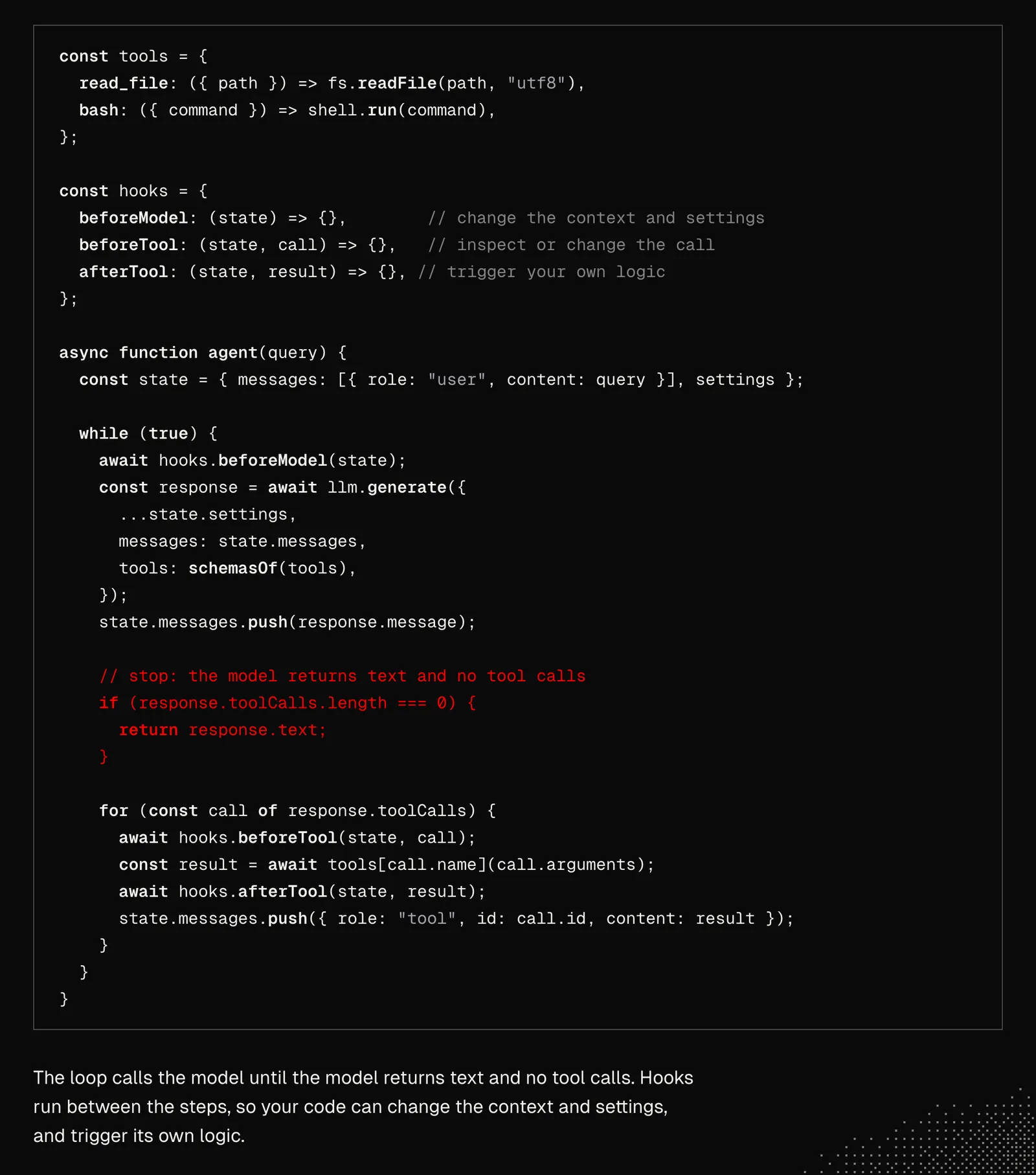
The logic above is extremely flexible, especially if the agent gets a tool to write and execute code and a filesystem. In practice, many things prevent the agent from working reliably, especially on long-horizon tasks. Even a single API issue may break such an agent. And in practice, there are many more traps related to memory, long context handling, authorized actions, or internal and external bugs, timeouts, etc. We face many of these issues every day when working with coding agents: we see them get stuck, fail to do something, or drift because of missing information, and so on.
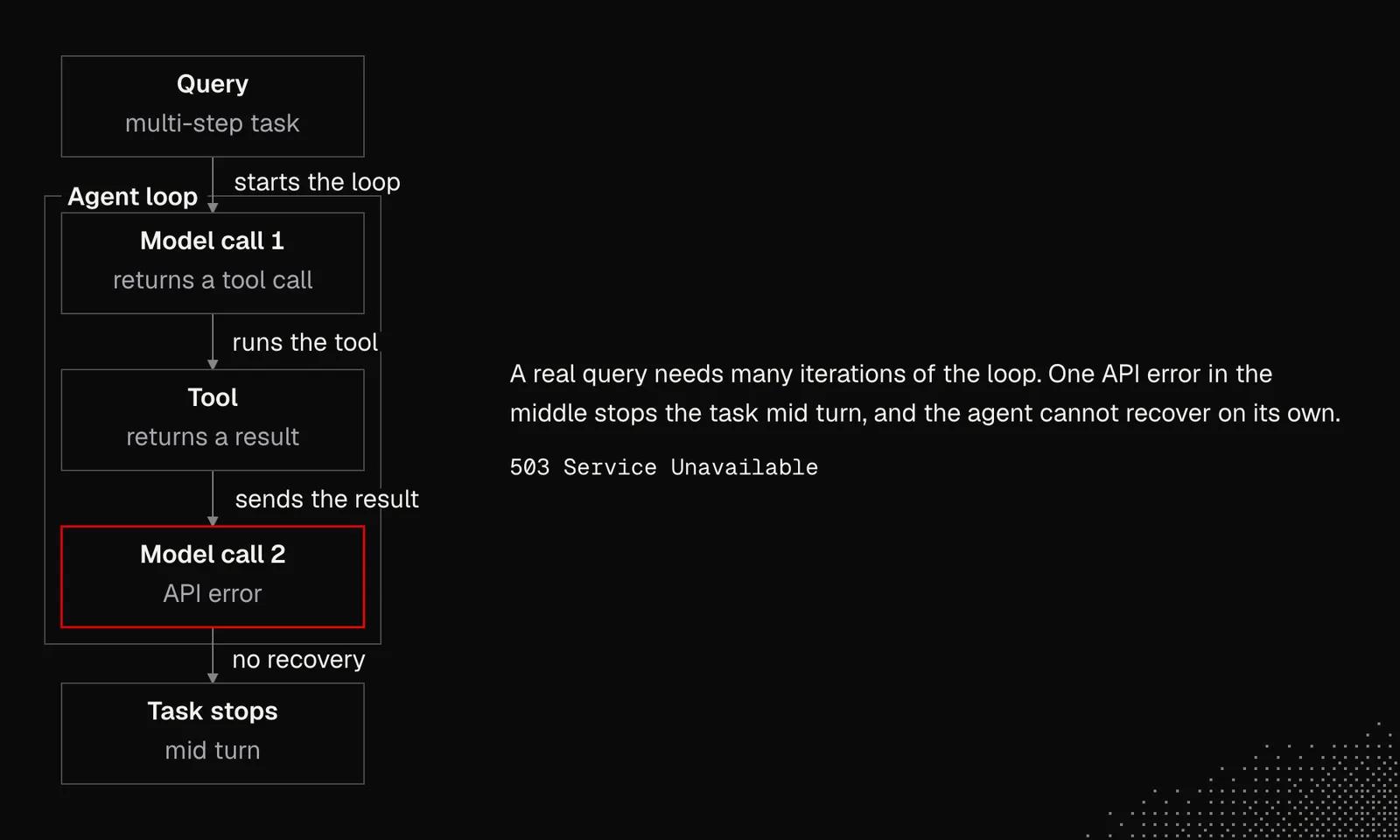
Harnesses such as Claude Code or Codex aim to address as many of these issues as possible, so the agents can recover from most errors on their own. And those are not the only responsibilities they need to handle.
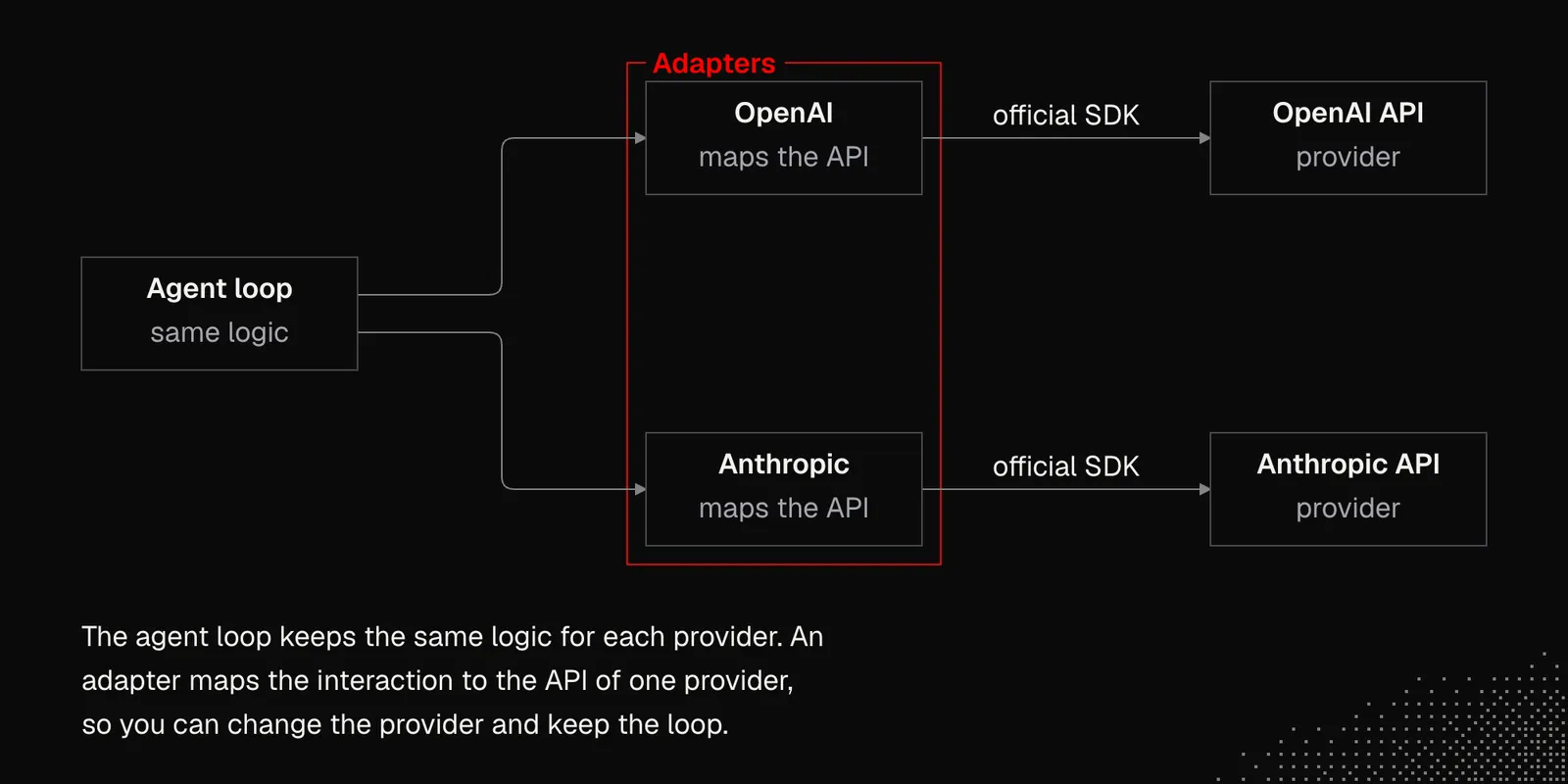
Connection: Agents need to connect to LLMs, often from more than one provider. This requires adapters and interaction mapping because providers’ APIs may differ. There are many libraries that support many providers out of the box (for example: AI SDK), but it's often recommended to use official SDKs to avoid unnecessary abstractions.
Threads and sessions:
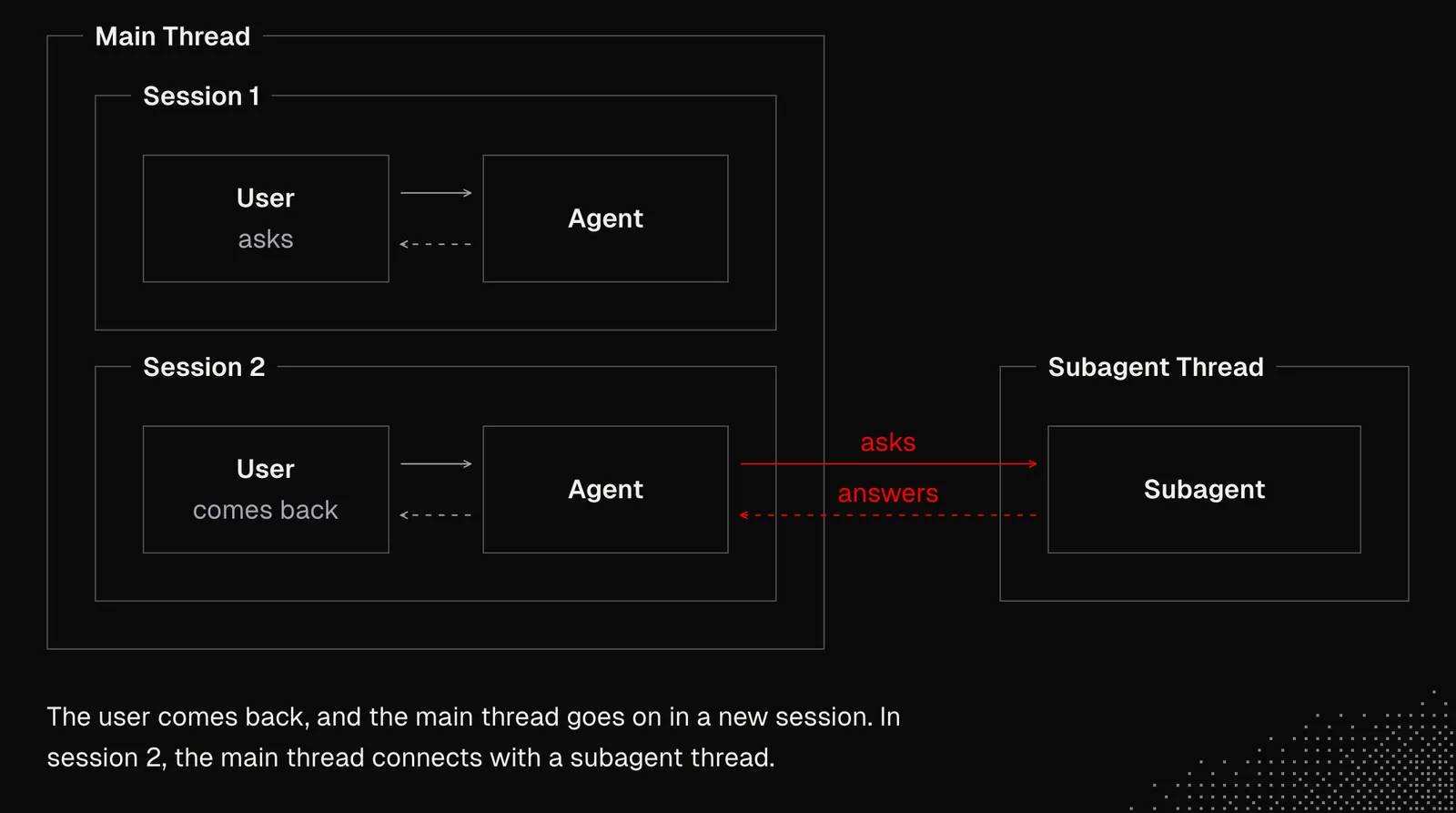
Interactions with an agent are recorded in a thread that can span multiple sessions and involve more than one agent (subagents). Such history is often stored in text files agents can easily read using bash or any other tool allowing them to interact with the filesystem. It's important to note that not every harness supports subagents and easy access to threads.
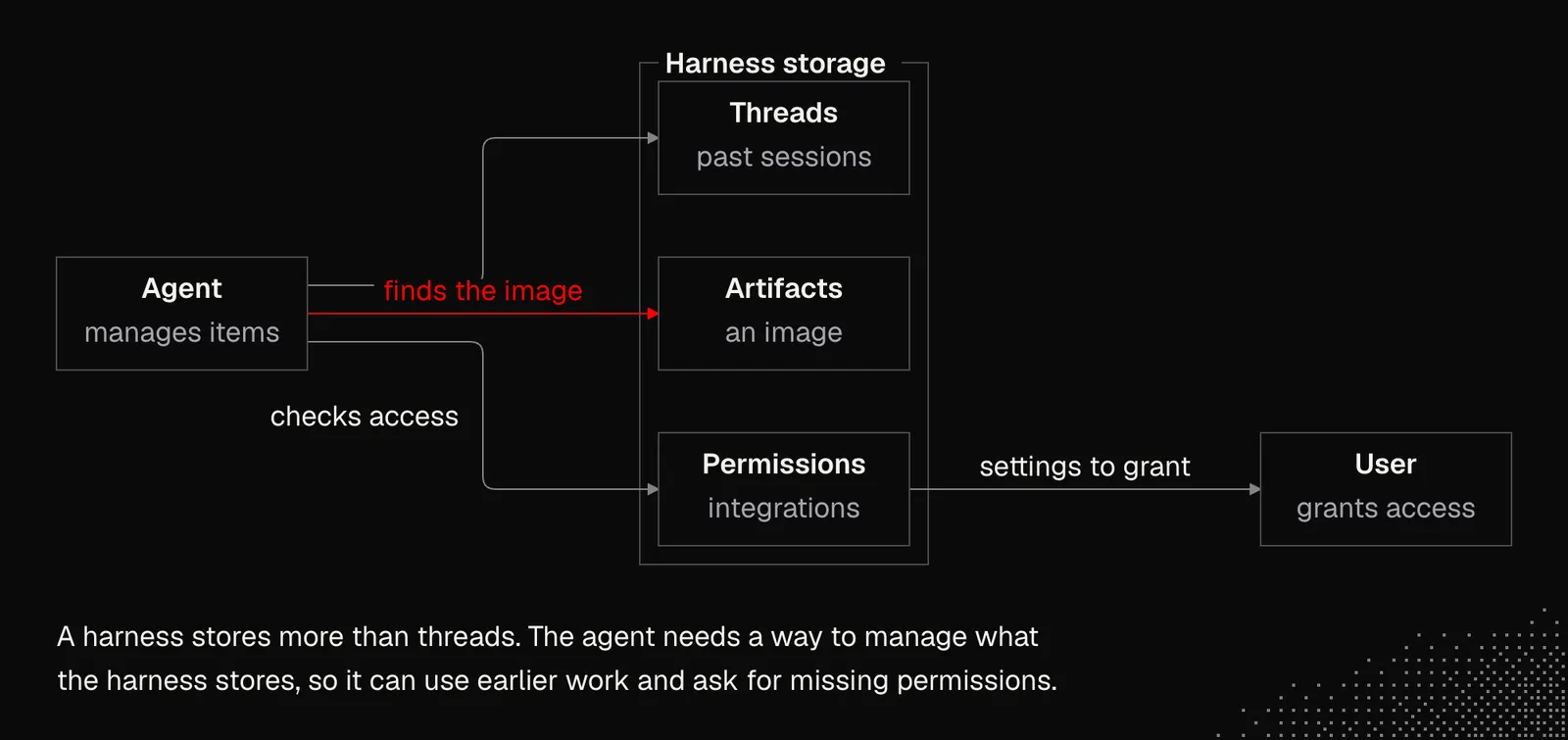
Persistence: Threads aren't the only thing a harness needs to store. There are also attachments, generated artifacts, scripts, skills, permissions, connections, integrations, custom tools and more. From a programmer's perspective, there's nothing interesting about that until we consider that agents need a way to manage all of this.
For example, generated images or artifacts should be available to the agent so it can handle follow up tasks about them. Or if a given integration requires additional permission, the agent should be able to show us the settings where we can grant it permission.
There's a catch with all this, and it's about going beyond the context of a single user. We've gotten used to agents freely interacting with the filesystem on our Mac or PC. But once we go beyond that, so agents can work for our team or for users in production, things get much harder without sandboxes and proper permission management.
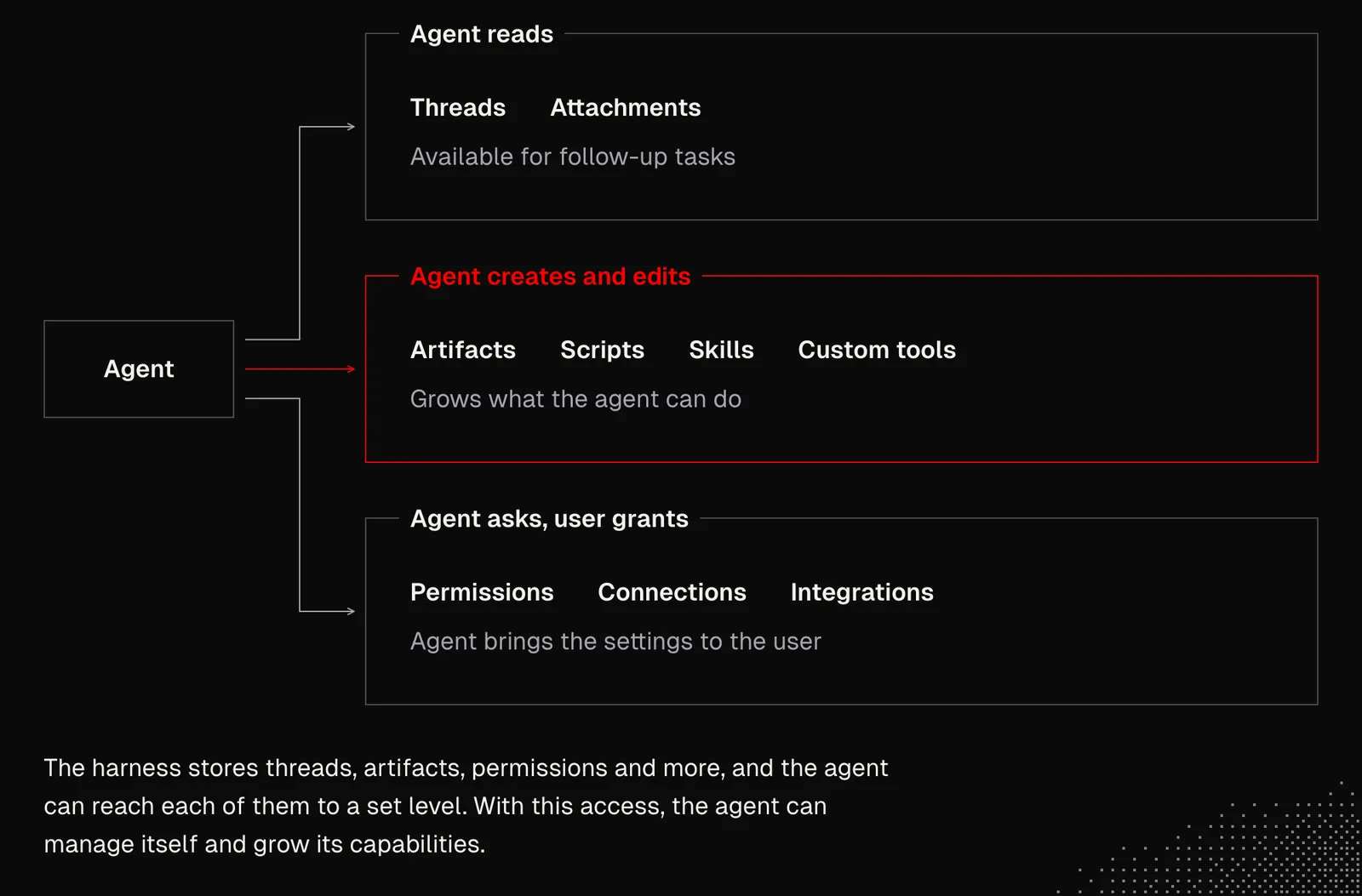
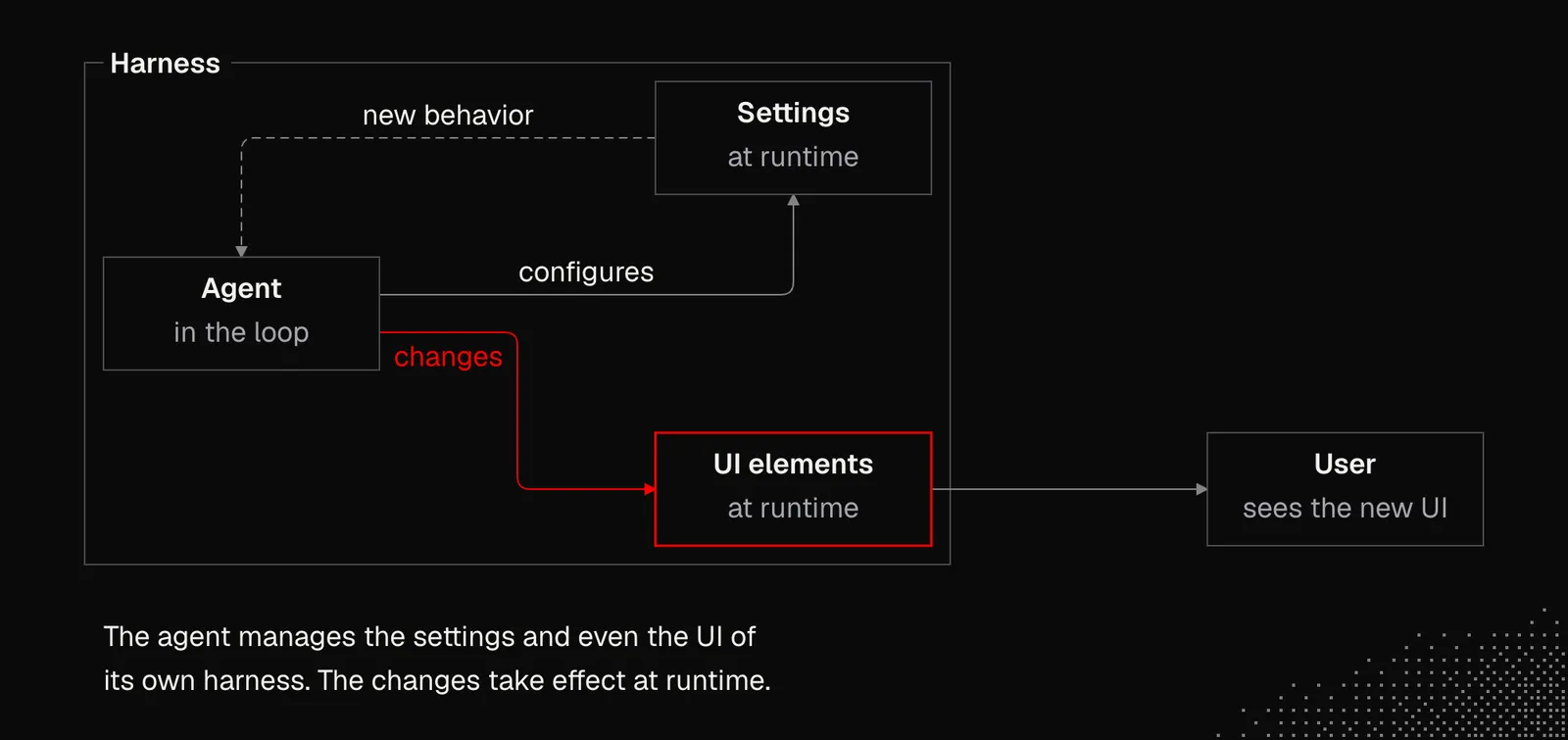
Configuration: Harnesses such as Claude Code can configure themselves. All AI-native apps are starting to follow the same pattern and push it further, so any settings and even UI elements can be managed at runtime. Examples include OpenCode and DeepSeek Harness. The latter follows the path of self-evolving software and the "everything is a plugin" idea.
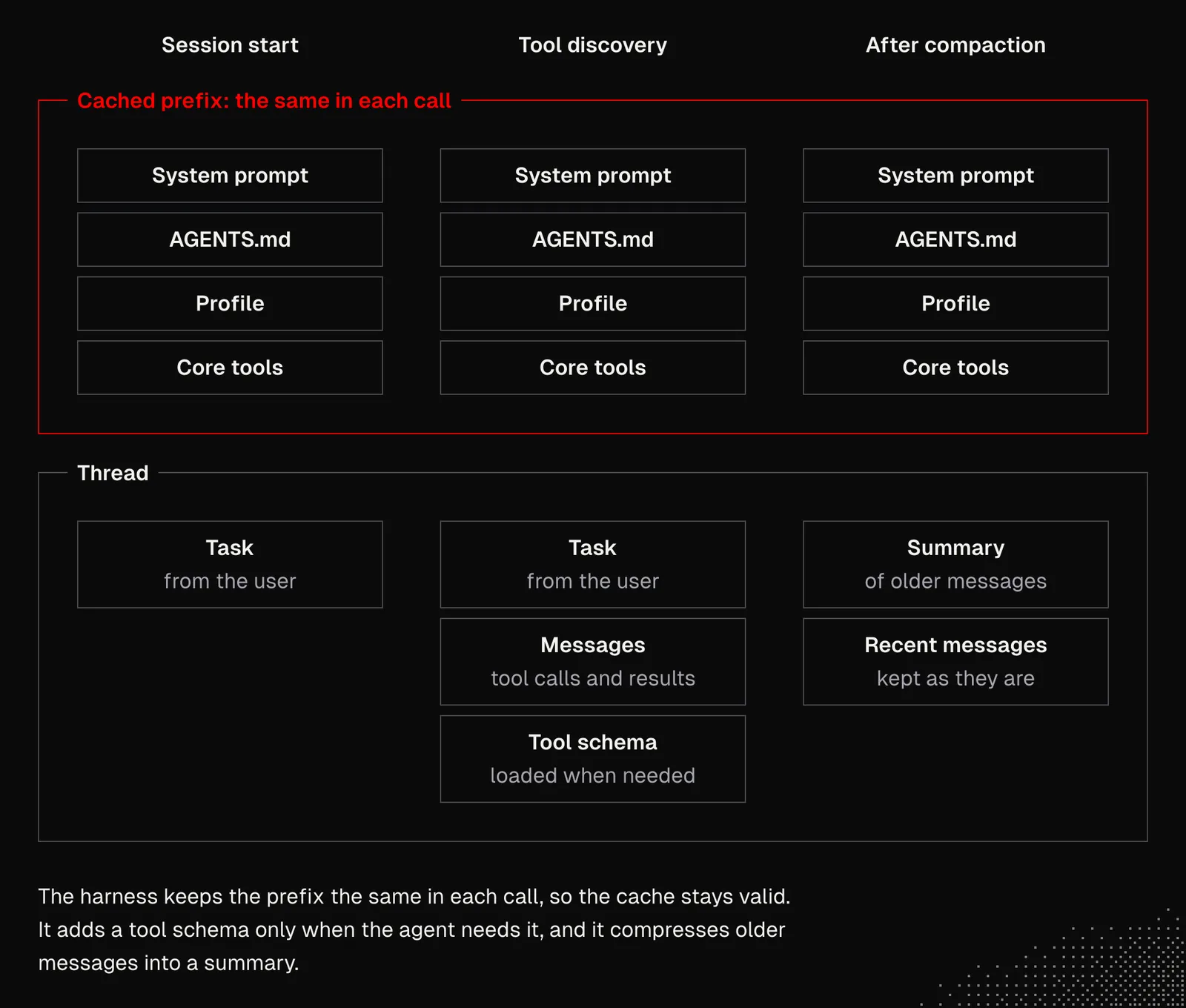
Context: Harnesses take care of the context window in many ways. This includes a clear explanation of the current environment and how to navigate it. The tricky part is managing the prefix-based context cache, which reduces costs and latency, but only if the existing context stays the same. Also, a harness can't load everything upfront, so the agent has to discover anything that isn't critical when it needs it. At the same time, the context has to be compressed to avoid overflowing the window.
Tools: Last week we learned that tools can be used by the model either through Function Calling or Code Mode. The first one requires a schema to be loaded into the context and calls are separate (but can be performed in parallel). Their results are appended to the thread, so the model can decide about the next step. This works for simple interactions but is very inefficient for complex workflows. That's why modern agents write code that can chain tools and can keep results in variables rather than adding every result to the context.
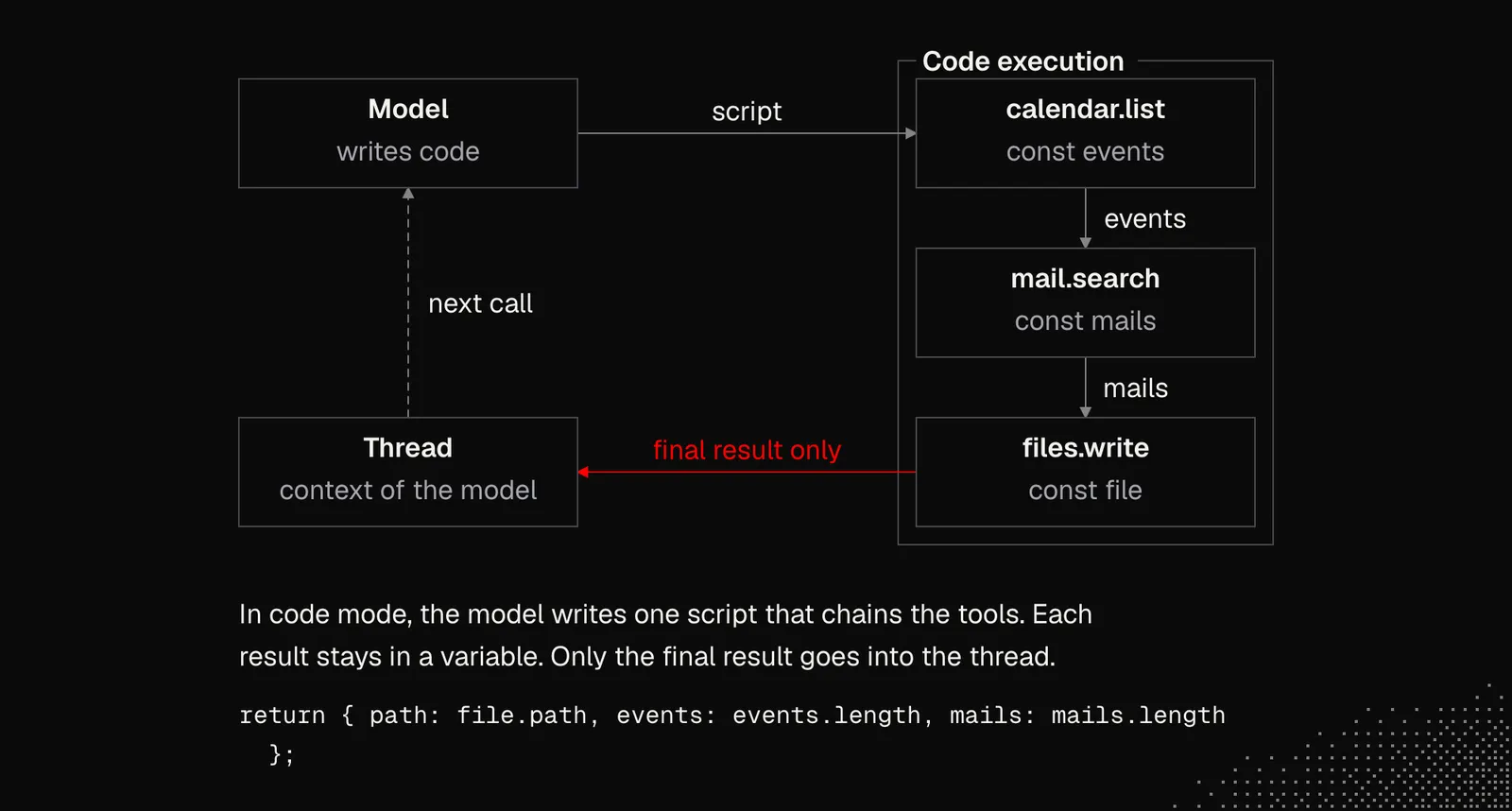
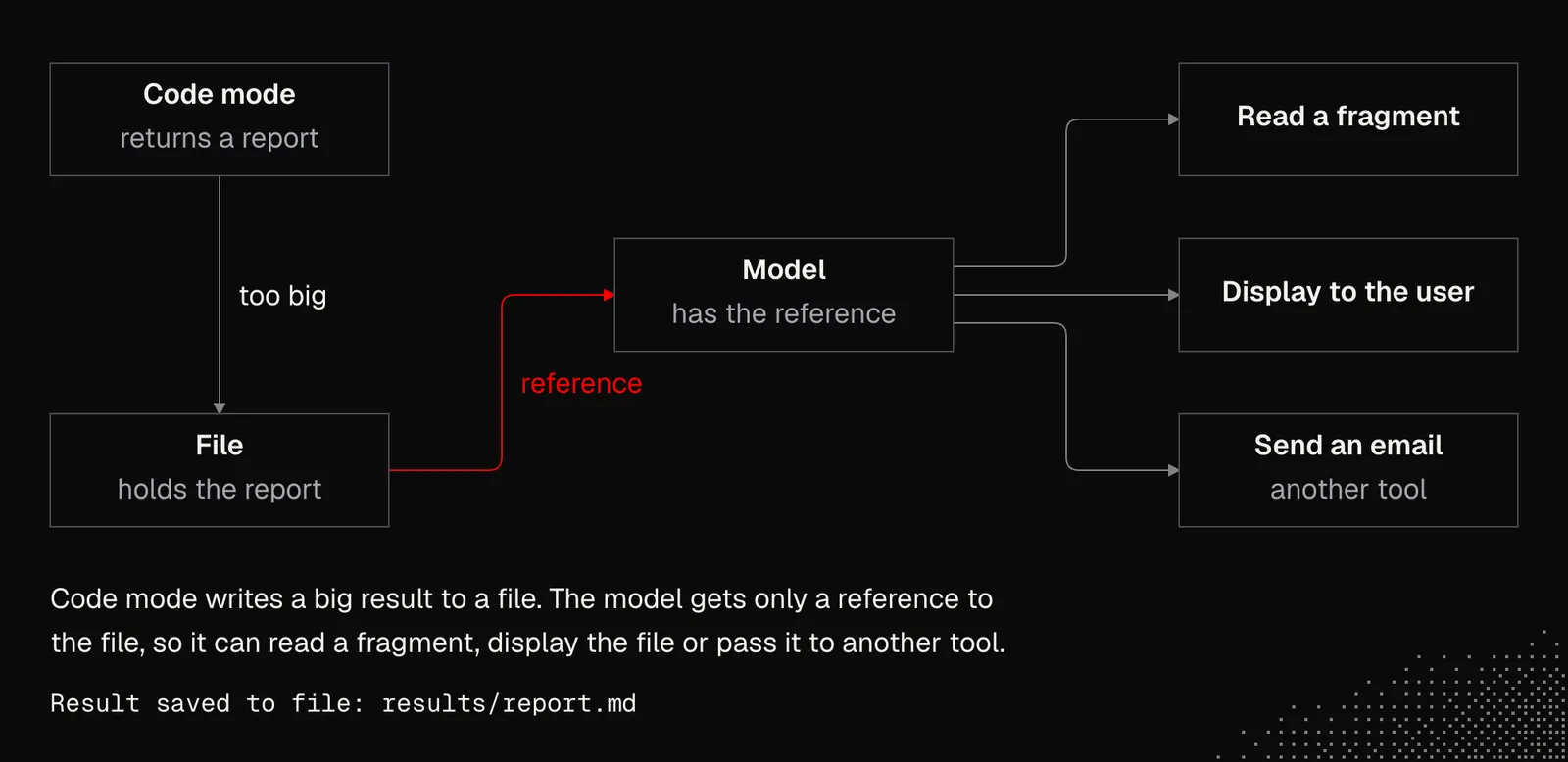
Sometimes a task executed in code mode may return a large chunk of data, such as an entire report. Instead of adding its contents to the context (which may exceed the limit), the results may be dropped into a file and the model may receive a reference to it, so the agent may read its fragment, display it to the user or pass to another tool.
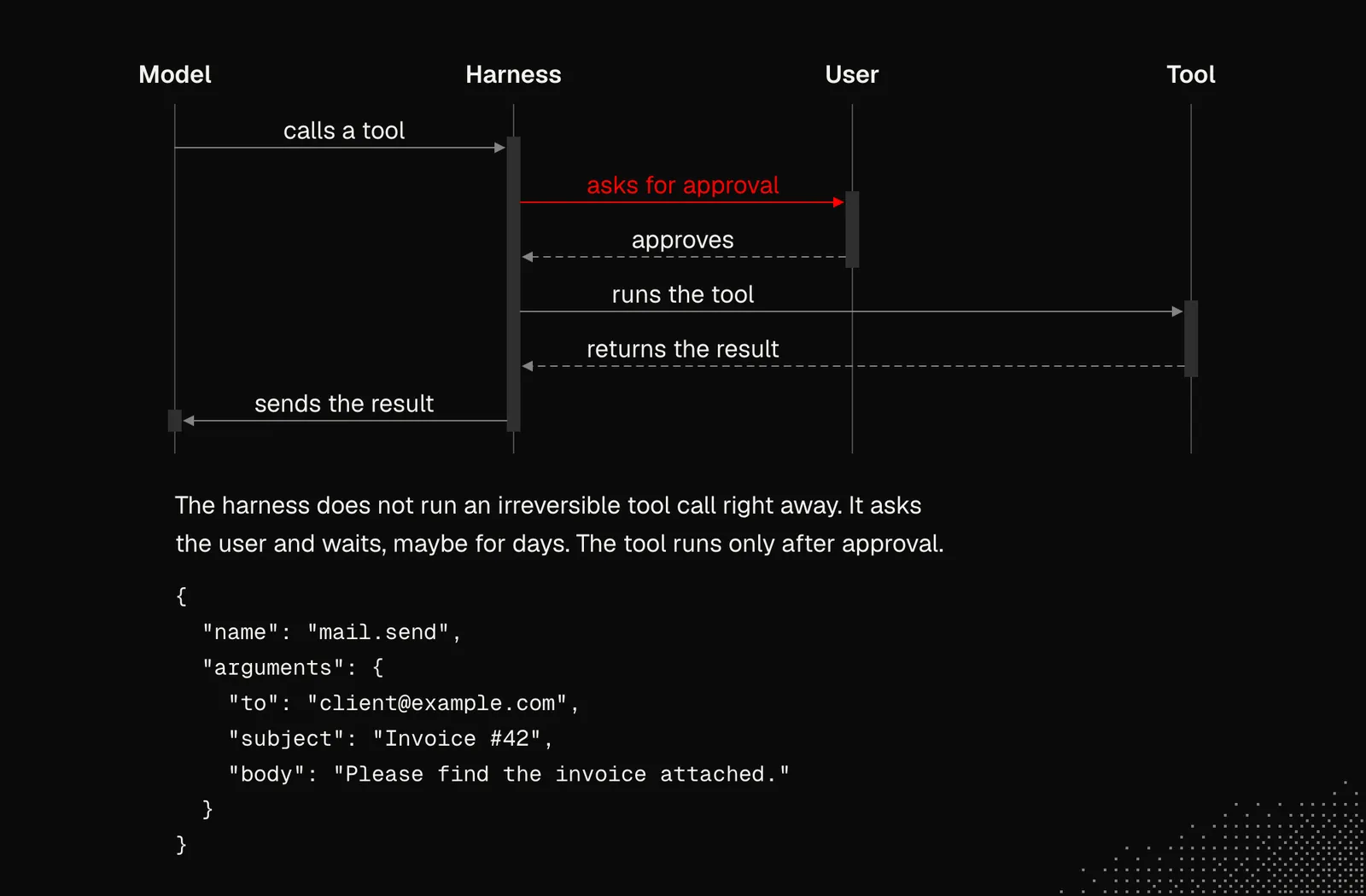
And lastly, the harness is responsible for getting approvals from the user before executing actions that are irreversible or require permission for other reasons. Waiting for the user may even take days, and this has to be handled properly.
All these components can be considered the core of the harness logic. Together, they give a good picture of why an agent is not just a loop: it needs many mechanisms that make interaction with the environment possible.
If this knowledge feels redundant for someone who won't build their own agent, let's consider this:
- we can't have an extremely long AGENTS.md, because the model will ignore most of it, and latency and cost will increase until it gets cached.
- skills also need to be short and sometimes needs to be reactivated many times due to context compaction
- if possible, we should pay attention to keeping the thread as short as possible or at least keeping the agent specialized in certain tasks
- we can expect that an agent will find what's needed to perform a task, but we should make it easier for them and we need to keep in mind this information may be lost due to compression or simply ignored by the model.
Those are just examples of conclusions that come directly from the mechanics of the harness and the agents themselves. And as we soon find out, in practice there are more elements such as routines, schedules, events, webhooks and more.
Personality and Environmental Awareness
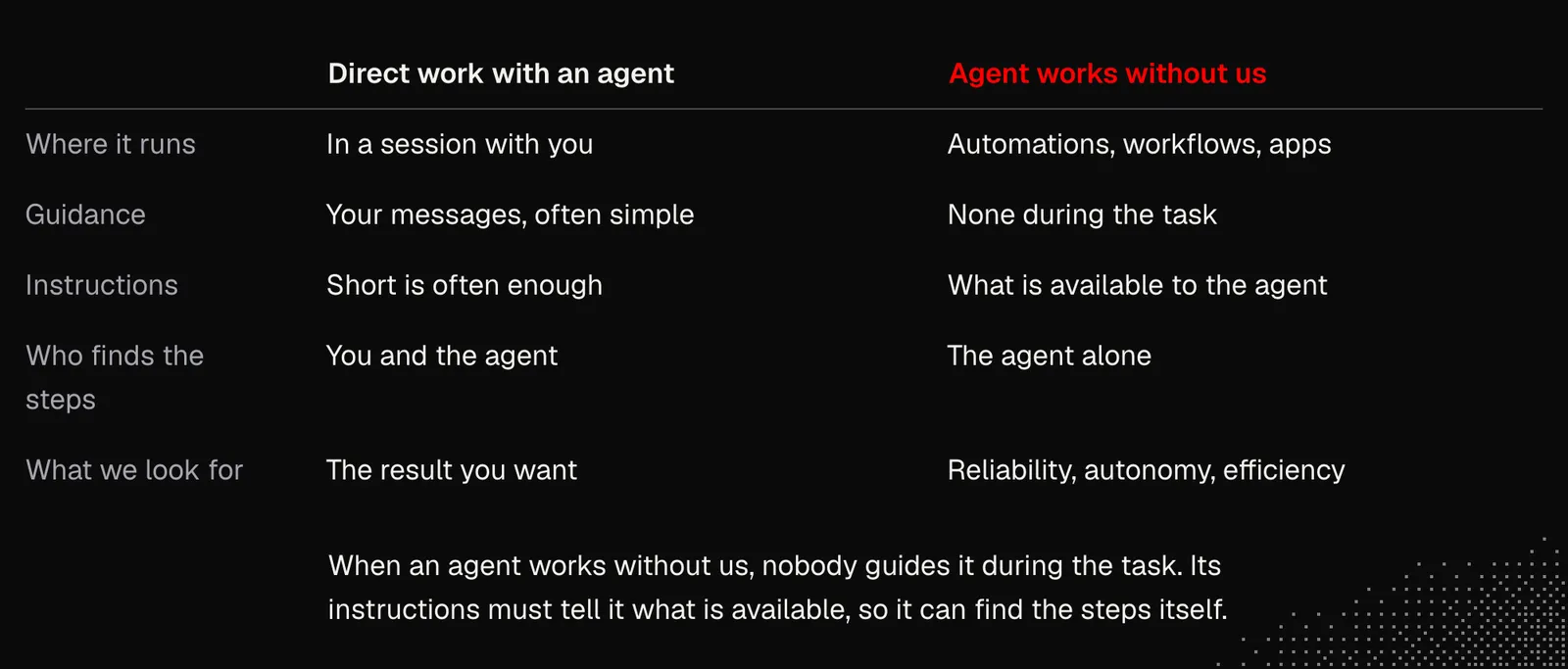
Models are getting more intelligent, and this may lead us to conclude that agents don't need our guidance. To some extent, that's true. We can see it every day when we work with agents as users, because the simplest messages are often enough to get the results we want. We can also read that Claude Code had 80% of its system prompt removed for the latest models and start to believe that writing clear instructions is not only becoming irrelevant but can even degrade model performance.
The perspective changes here when we start thinking about having our agents work without us: in automations, background workflows and the custom agentic logic we'll need in our apps. In these cases, we look for reliability, autonomy and high efficiency and to achieve this we need clear instructions that will tell the agent what's available to them, and let it figure out what needs to be done to finish the task.
To learn more about the value of good instructions, we may want to explore the system prompts of popular harnesses, which are available on Pliny the Liberator's GitHub. Examples include the prompt for GPT-6 Sol and Claude Opus 5.5 (this one includes more than just the system prompt). There are also official guides from Anthropic and OpenAI, for example Prompting Opus 5.5 or Rethinking skills and prompts for GPT-6.
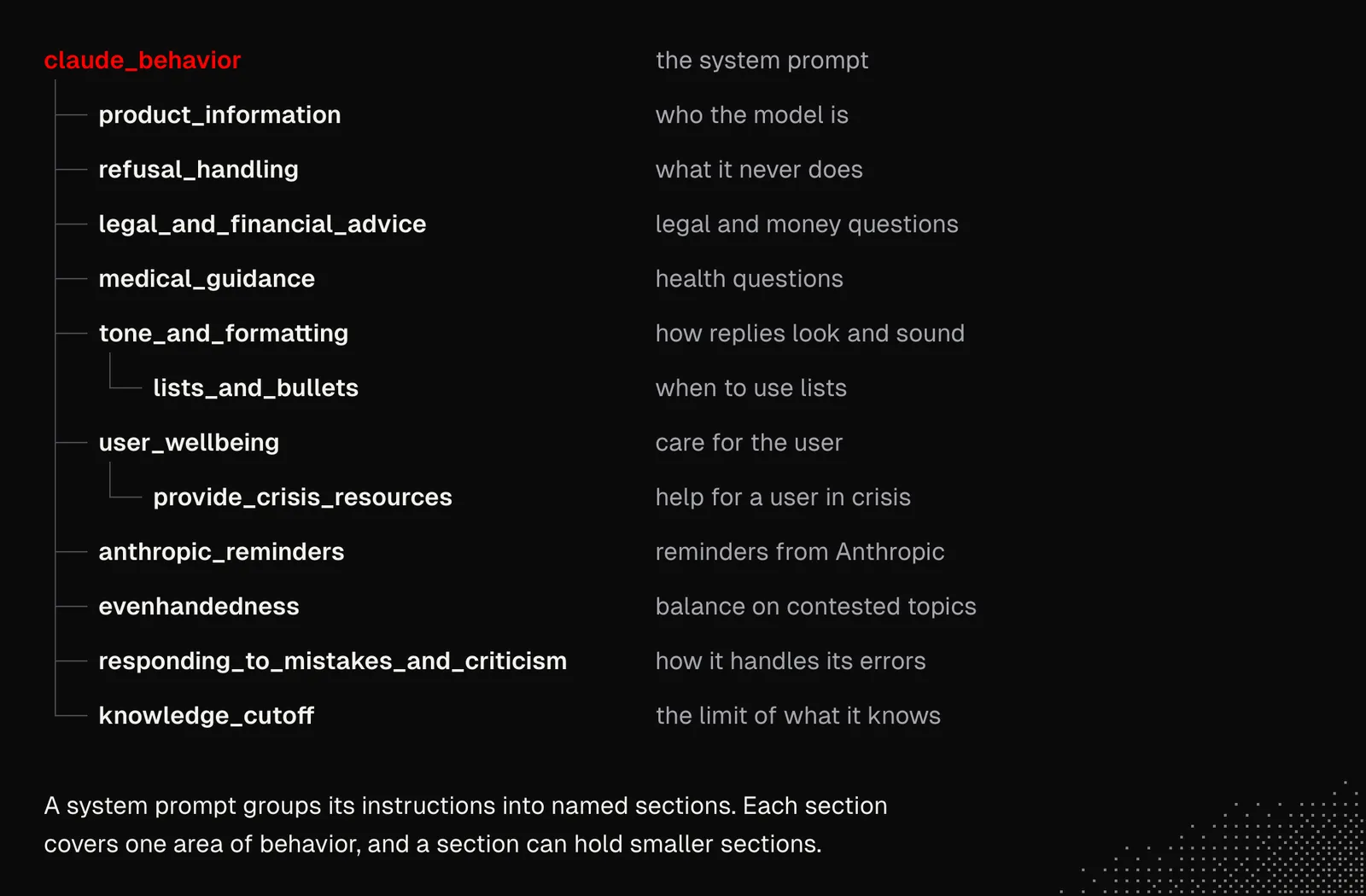
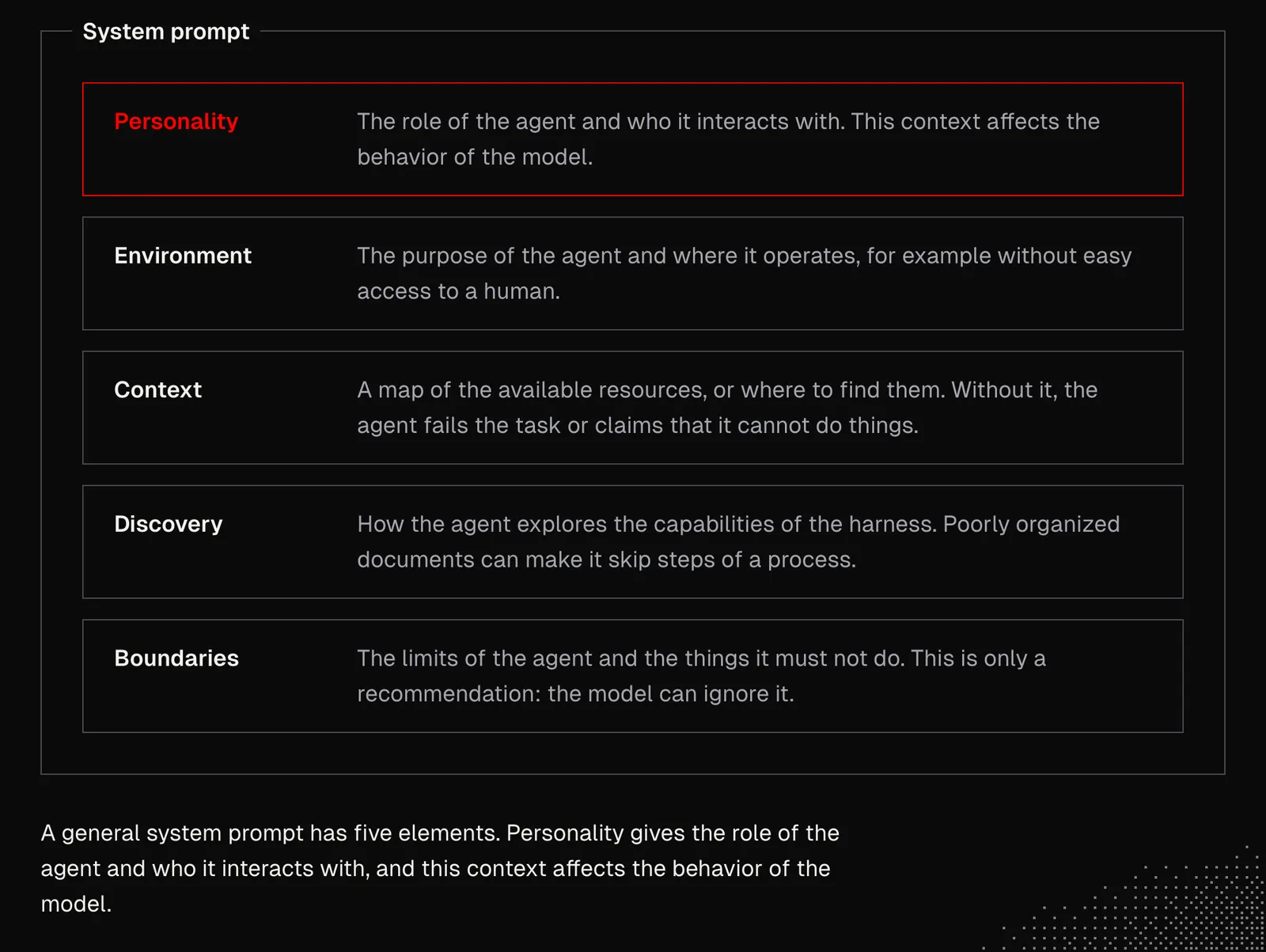
Below is the structure of Claude's system prompt for Haiku 5.5, and at first glance it's clear that harnesses set a solid system prompt so users can speak with agents more naturally. And the moment we start creating our own agentic tools and automations, we become the ones who need to craft that prompt.
The good news is that there's no need to write the prompt by hand. The prompts we're going to use will often be much simpler than the ones in Claude or ChatGPT, unless we create general-purpose agents. That said, we still need to know what to expect from the prompt and what the most important principles of Prompt Engineering are.
Personality: that's the basic information about the agent’s role and whom it interacts with, as such context affects the model's behavior. Environment: essential information about the agent's purpose and the environment, such as the fact that the agent is operating without easy access to a human. Context: a map of available resources, or at least information about where to find them, has to be presented to the agent; otherwise it will fail to finish the task or mistakenly claim it can't do things it was supposed to do. Discovery: similar to context, the agent needs to know how to explore harness capabilities to use them properly. For example, the agent may perform some process and skip part of its steps because of poor organization of the documents that describe it. Boundaries: the agent has to know its own limitations and things it is not allowed to do. At this point we know this is only a recommendation because technically the model may ignore these instructions.
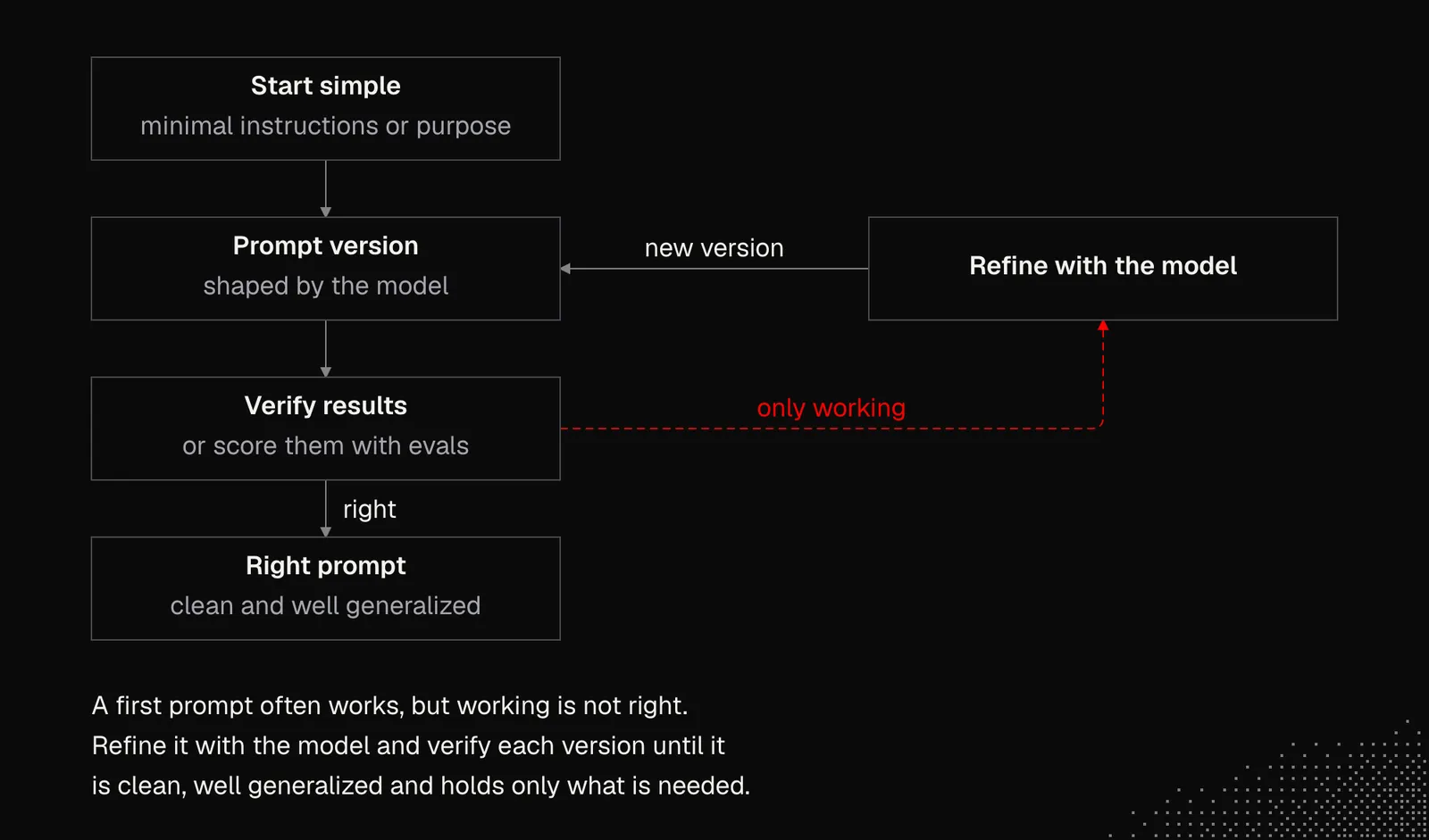
To begin crafting a good system prompt, we can start simple: write minimal instructions, or describe the prompt's general purpose and let the model shape the first version, since LLMs have gotten really good at prompt engineering. The chances of getting it working on the first try are high, but our goal is to make this right. This means the instruction is clean, well generalized and contains things that are really needed. And to achieve this we need an iterative approach with a clear way to verify the results or at least score them using evals.
Probably the single best piece of advice about prompting comes from the Latent Space Activation repository. It's nearly 4 years old, but it's still relevant. It says that prompting is roughly about getting the model to recall relevant knowledge and problem-solving methods and bring them into the conversation before it answers. And that is something we need to always keep in mind, even despite the fact reasoning in Large Reasoning Models aims to address this exact thing.
Context and Memory
Given all the context management issues we discussed last week, it should be obvious that managing context well is a critical part of any harness. Last week, we learned how language models handle context and how we can build a knowledge base. Now, let's take a closer look at how agents can memorize things.
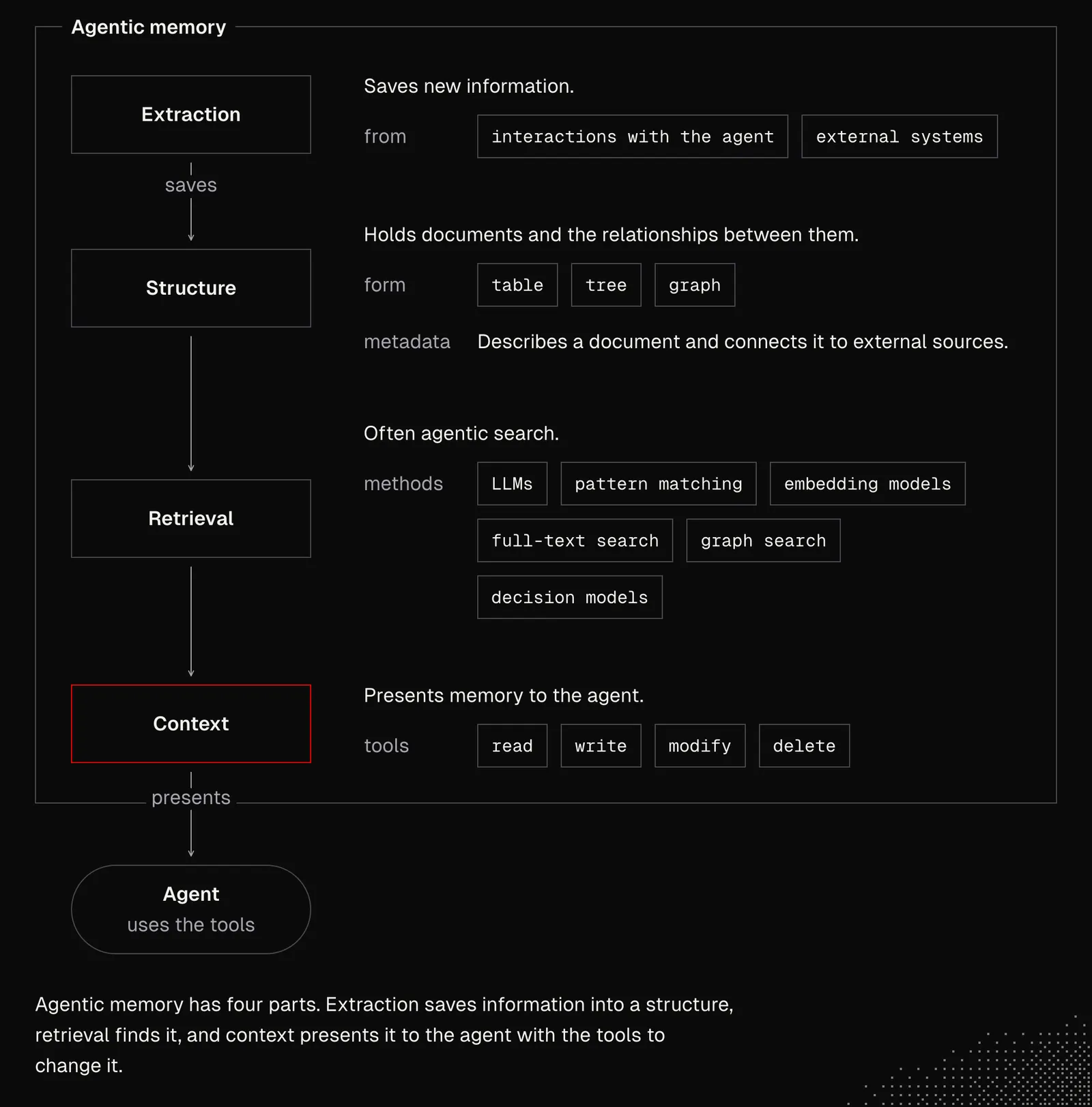
Agentic memory can be boiled down to four things:
- structure: this can be a table, tree or graph that contains documents and the relationships between them. Documents may include metadata that describes them and connects them to external sources.
- extraction: these are actions related to saving new information, either from interactions with the agent or from data coming from external systems.
- retrieval: this is often agentic search that uses LLMs, pattern matching, embedding models, full-text search, graph search and decision models.
- context: this is about how memory is presented to the agent and the set of tools that let it read, write, modify and delete memory.
Memory is one of the most requested features by users, but there are no established standards or patterns for implementing it. And if we dig down into the details, we may notice that most harnesses handle memory in a naive way, only to make an impression that the agent remembers something, but there are exceptions.
Memorizing comes down to extracting data from the ongoing thread, either through an additional LLM request that runs in the background or through explicit tool calls. Memories are often extracted as user / client profile updates, where facts fight for attention, or as separate documents that are categorized and connected to existing memories.
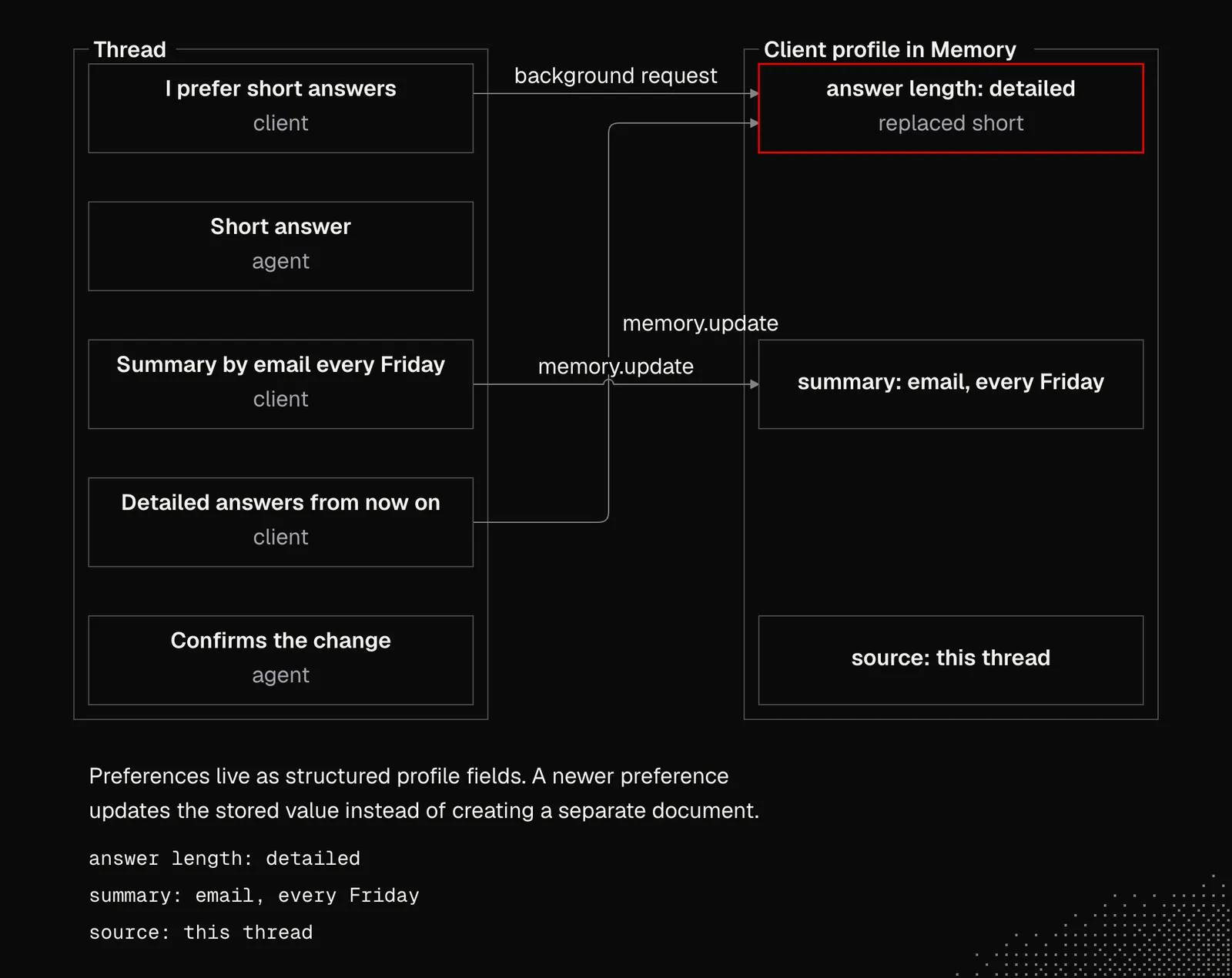
The challenge here is connecting existing memories when some of them may contradict or override others. It's also quite tricky to properly connect ambiguous information, such as facts about two different people with the same name, because the agent may struggle to tell which person we're talking about. That's why people experiment with confidence scores or temporary notes until the ambiguity is resolved. Storing memories also comes with other problems: duplication, but also updating and keeping track of what has changed over time.
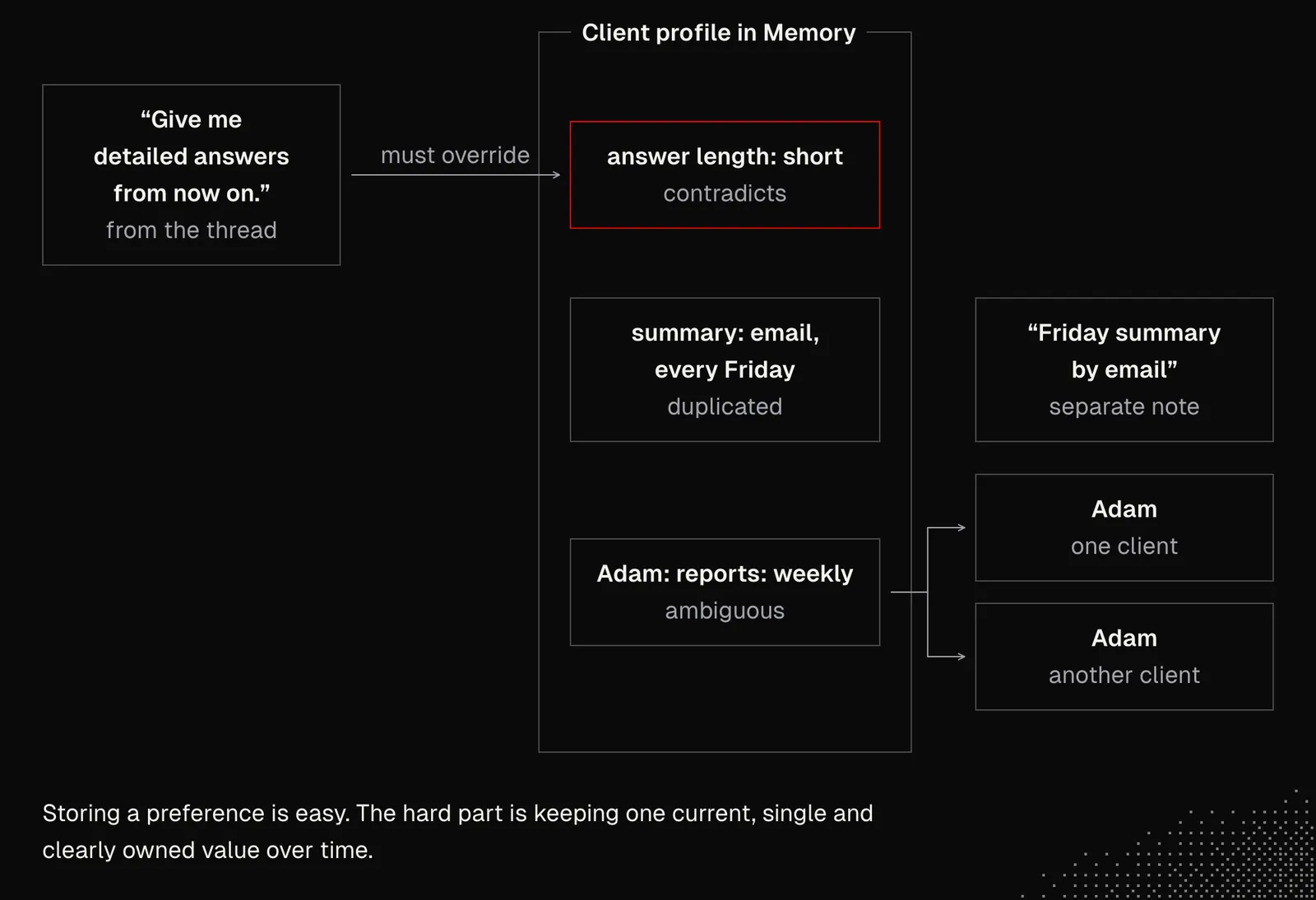
Most of these problems aren't solved yet, partly because of the cost of background processing, but also because the whole process is so complex. And that's just one side of the coin, because the agent also needs to somehow recall existing memories, which is even more complicated.
Recalling done right is hard, because it has to be fast, contextual and efficient. A harness has to consider the ongoing thread and quickly match documents the model will use to generate a personalized answer. This often cannot be done based on messages alone, so we need a global context in the form of a user profile / client or some kind of a map.
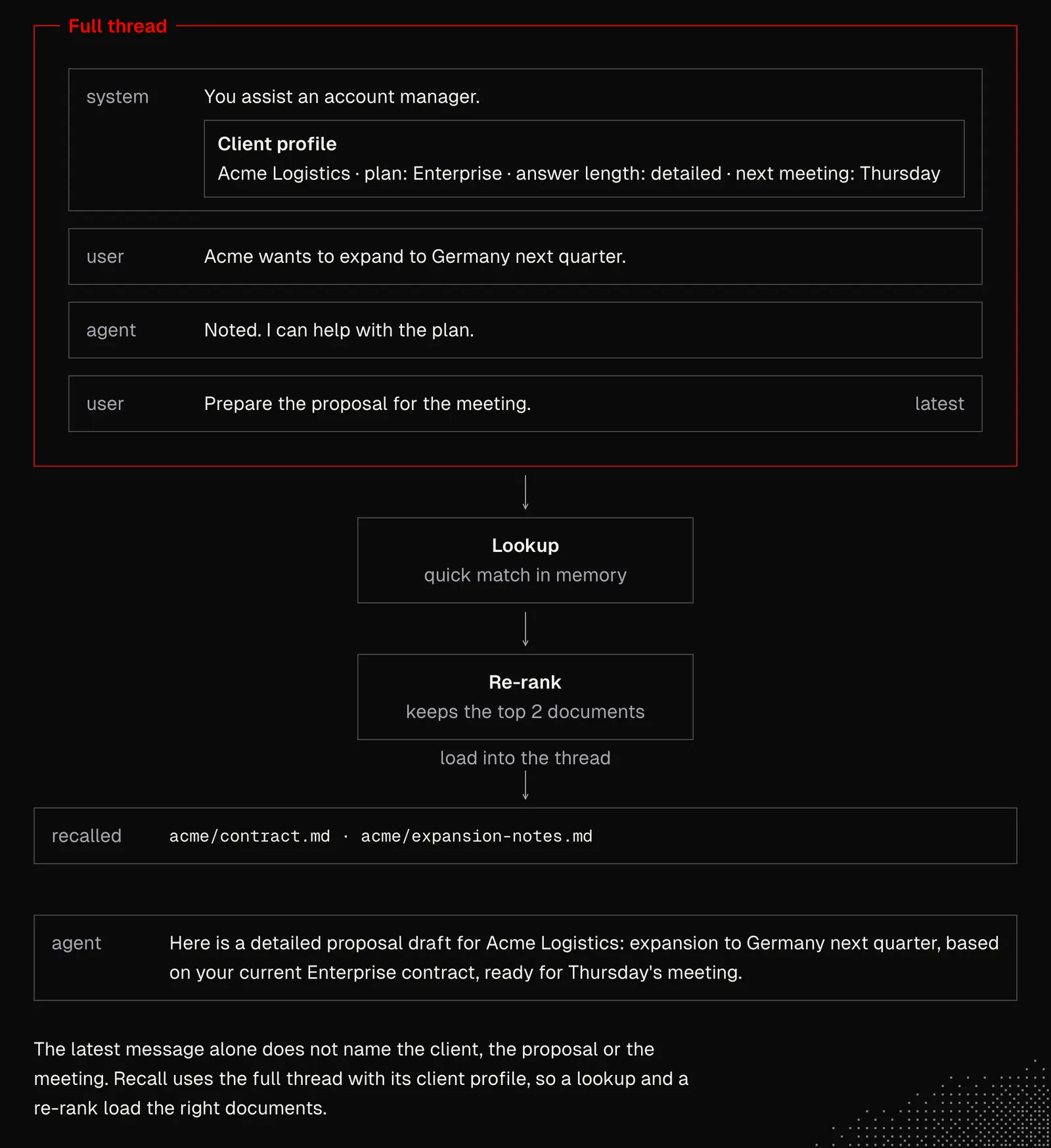
Things get more complicated when we consider everything we learned so far about agentic loops and language models. There are plenty of projects that aim to address agentic memory, such as mem0, supermemory hindsight. Most of these projects are open source, so we can use them to learn a lot by chatting with agents about their source code.
Below is a brief overview of the retrieval mechanics used by Hindsight, which we can connect to our harness. We may also build our own tools. Good sources of inspiration for that are Joel Hooks' write-up How I Built an Observation Pipeline So My AI Remembers Yesterday and John's lamarck.
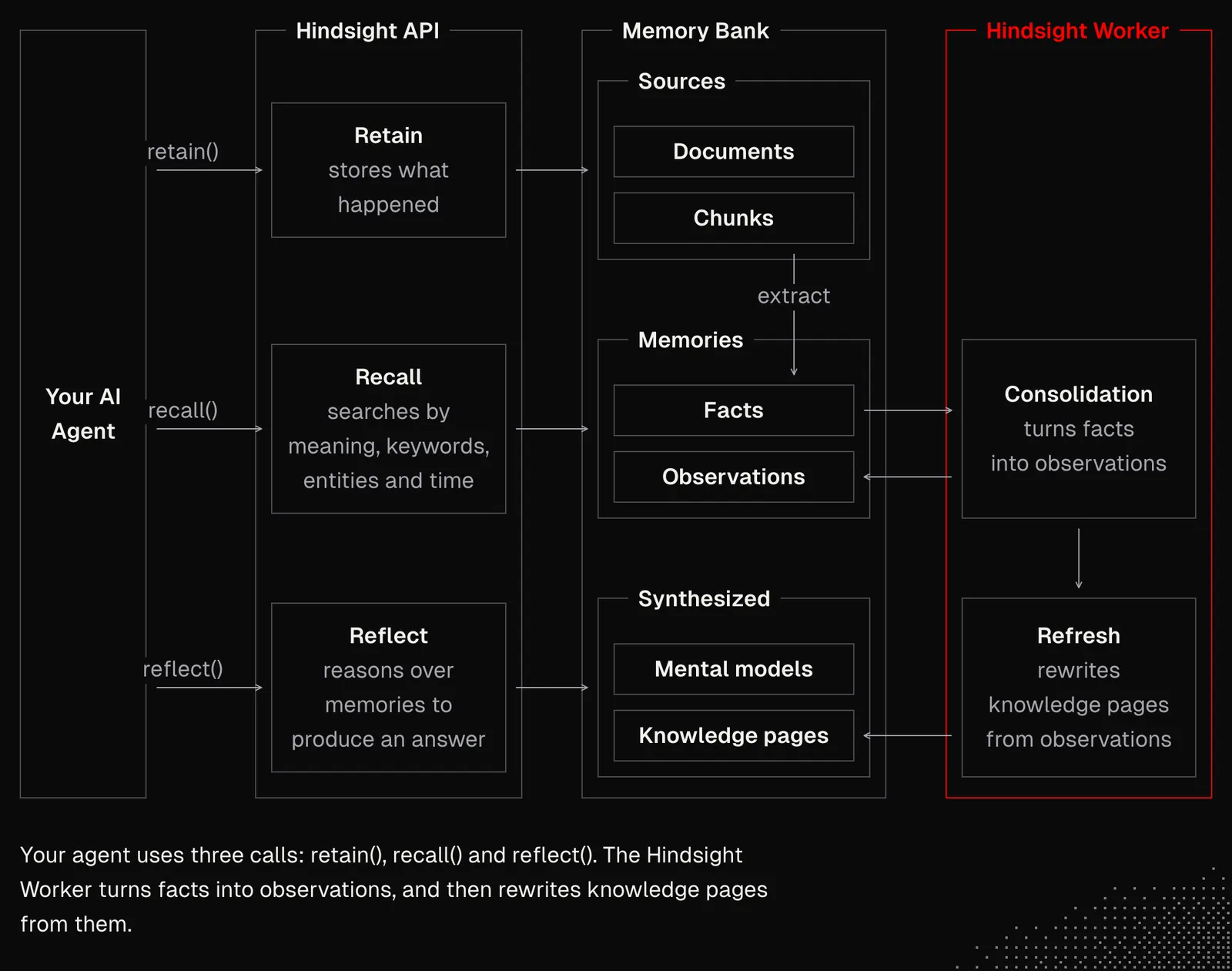
Eventually, we may expect leading AI tools to figure out agentic memory that's much more accurate than what we have today. But there may still be scenarios where memory fully personalized for our use case is necessary.
Tools
Letting an agent interact with the outside world can be implemented in many ways. In general, we know the agent needs to be aware of its capabilities and able to use them together to accomplish the task in as few steps as possible, while maintaining its context so it doesn’t get sidetracked from the job it’s doing. There are a few challenges with this:
Awareness: the agent has to be aware of its capabilities, without having them all loaded into a context. But some capabilities may need to be available to the agent right away and we need to decide which.
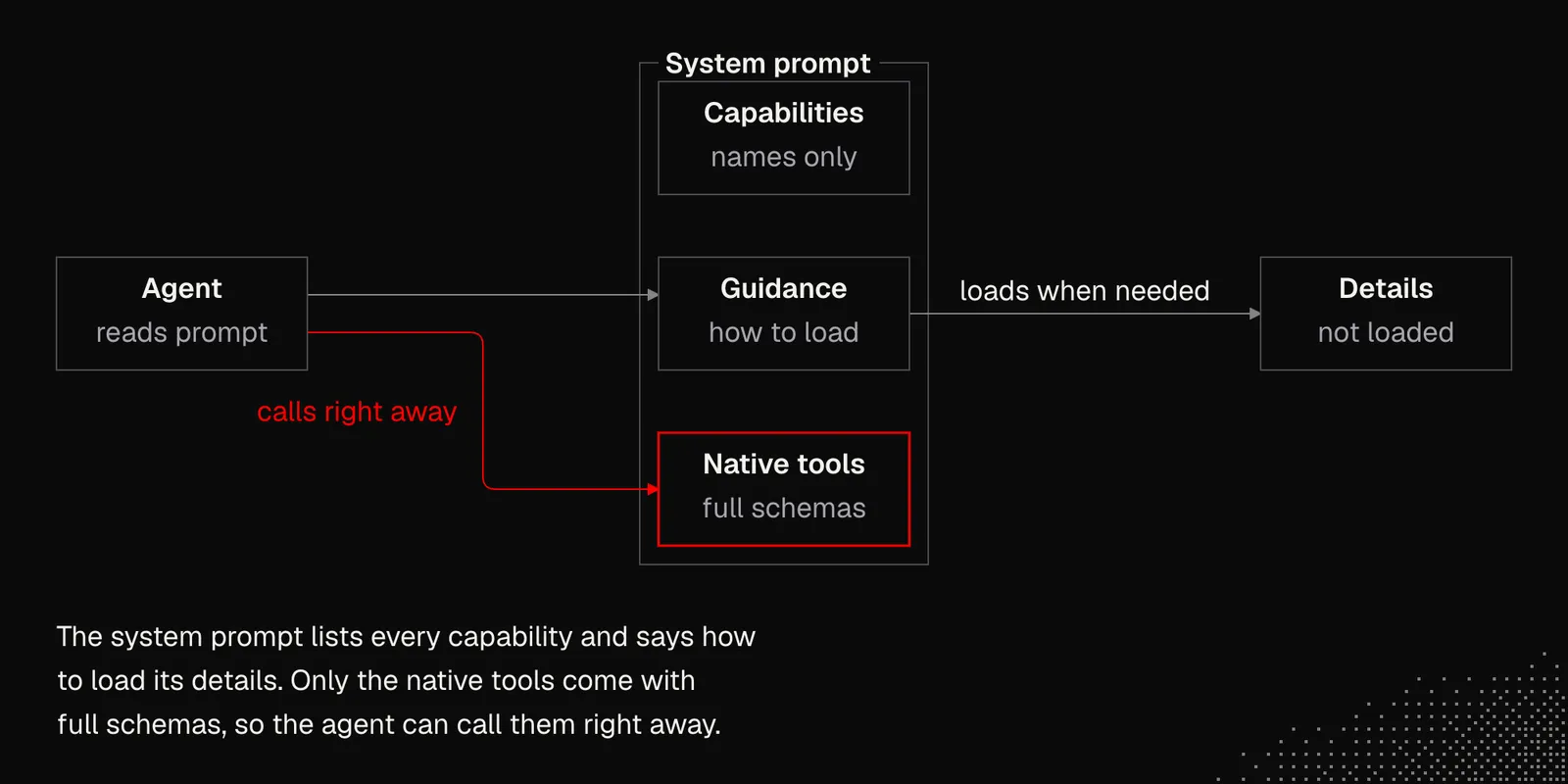
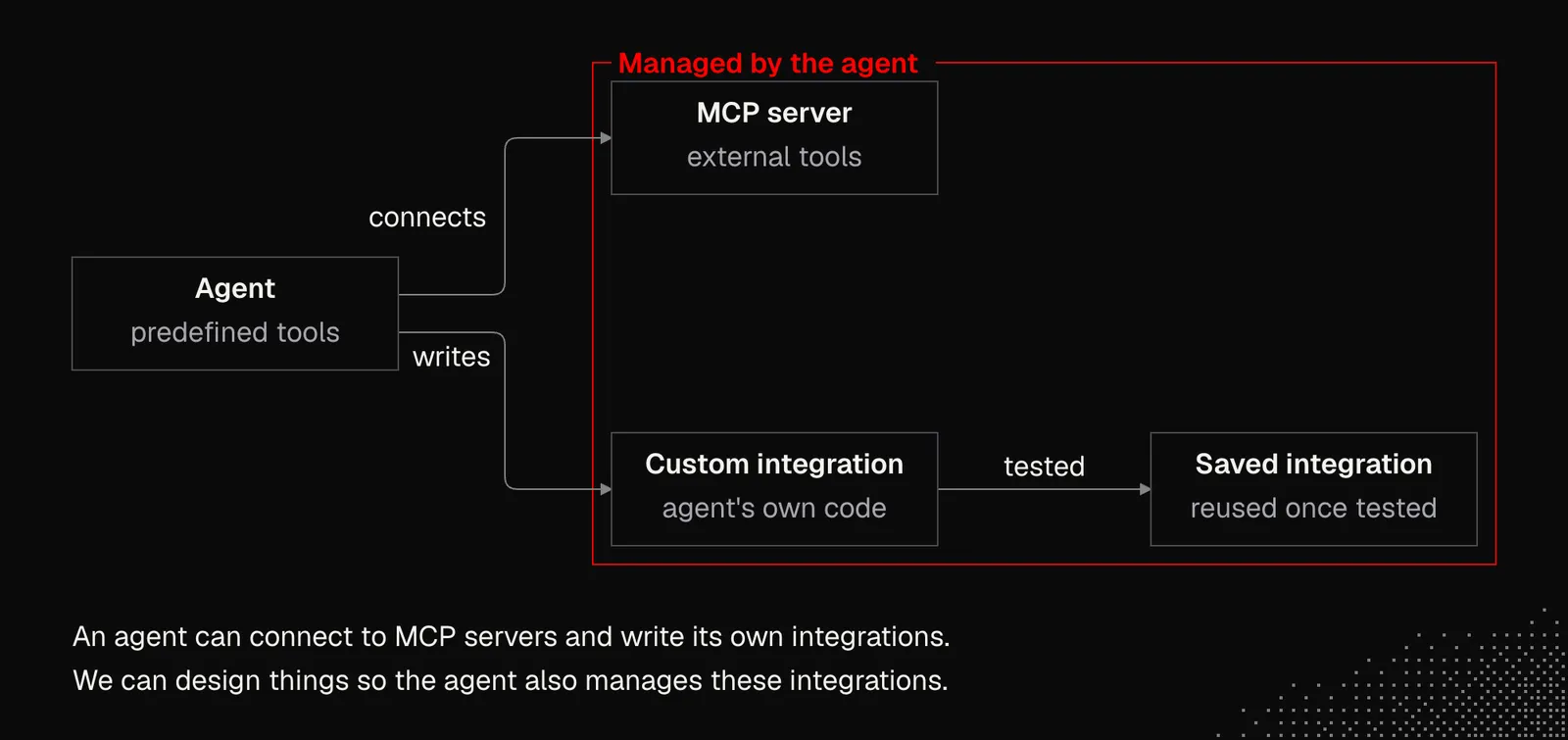
Management: an agent may have a predefined set of tools, but it may also be able to integrate with new ones through the Model Context Protocol, which we’ll cover this week, or by writing its own custom integrations, which can be saved and reused once tested. In both cases, we may want to design things so the agent can manage its own integrations.
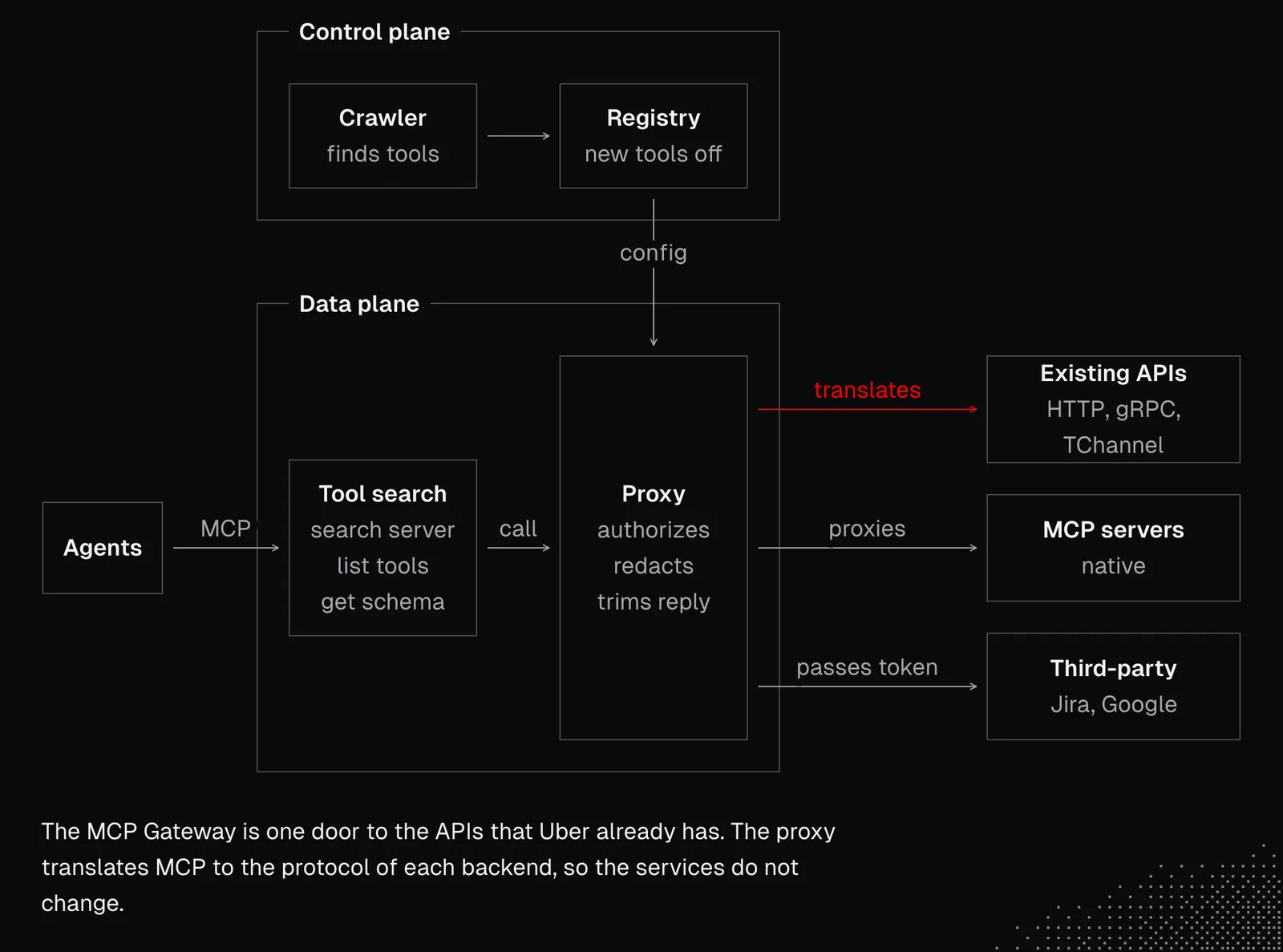
- Discovery: tools may be available as built-in catalog agent can explore using dedicated search tool we give them, or tools may have a form of files the agent explores using Bash. The first option gives us much more control while the second is extremely flexible as the agent can natively manage its capabilities (which can be good and bad). But if we need to get tools at scale, we need to figure out a gateway such as one Uber made to manage 8000+ tools, their authorization and permissions. Another example is an open-sourced Treg.
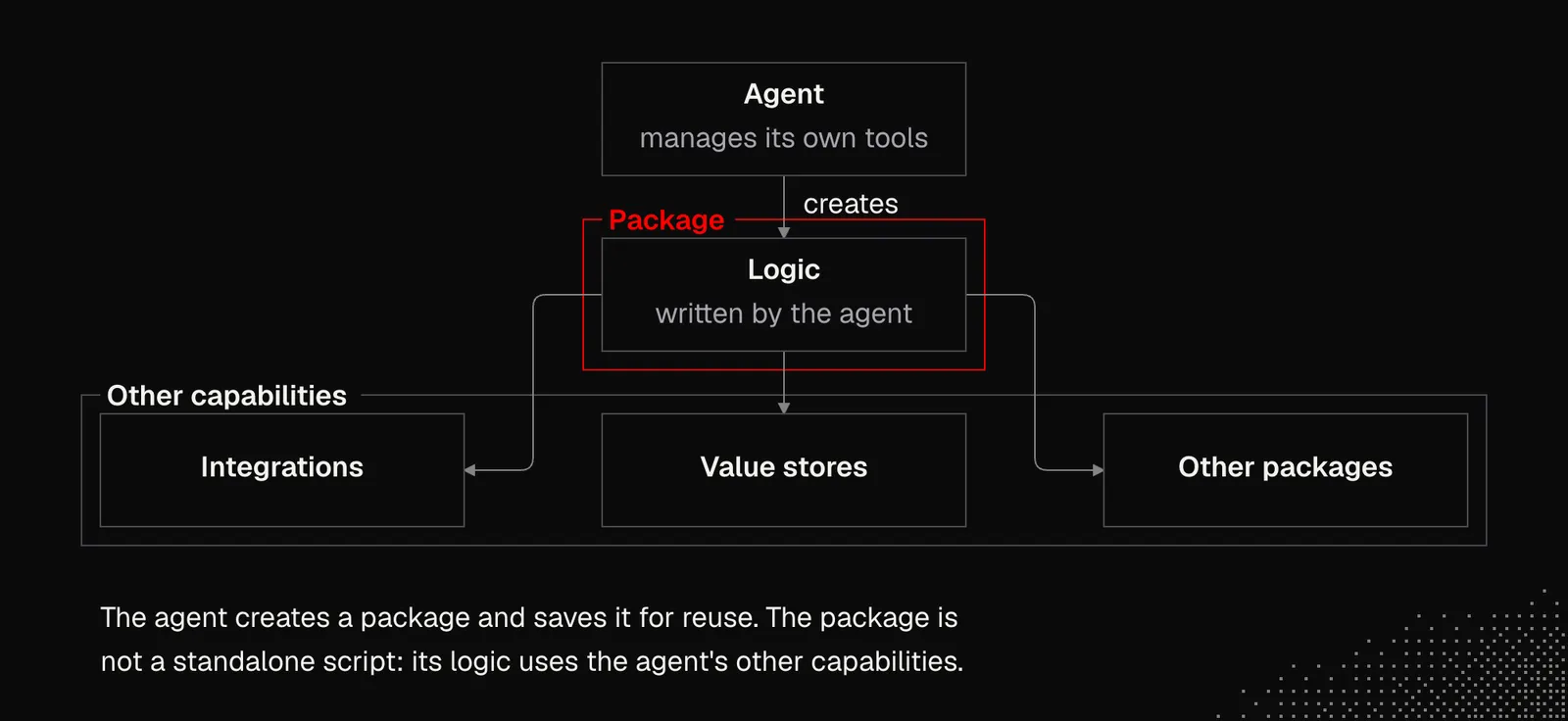
- Reusability: we know that skills may contain scripts the agent can reuse to avoid repeating the same task manually. The same applies to tools if we let the agent manage them. But it's not only about making an agent create tools, but also connect this with its other capabilities, such as available integrations, value stores or other packages.
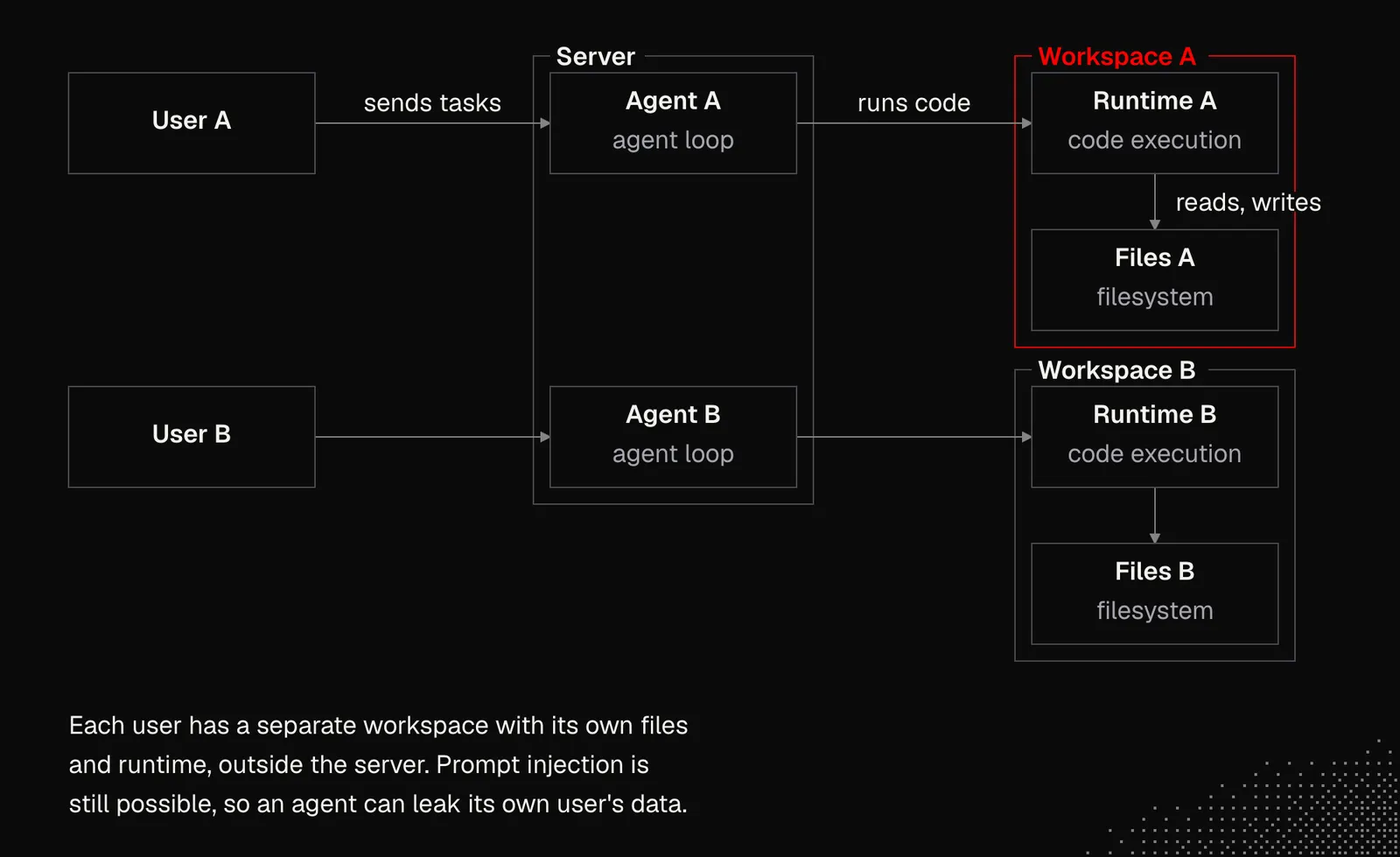
- Environment: in production, agents that can manage their own settings need access to clearly separated user workspaces. We need to be aware of the fact that agents can easily find a way to get around boundaries, which may lead them to access other users’ data
All this in practice may be limited or extended to the degree we need to either control the agent or let them operate more freely and self-configure to learn new things and have a way to solve novel issues without the need for us to develop new features for them.
Takeaways
We work with agents every day, sometimes even without realizing how much happens under the hood. After this lesson, whether we build our own agents or keep using existing ones, we have a better understanding of what we may expect from them and what makes them fail, for example when we ask for something they should recall but they claim they don't have it.
The last lesson here is to understand that building even a simple agent to learn how it works can make us much better at working with Claude, Pi or any other harness.