
S02E02 · Building an Agent: MEGA lesson
MEGA’s written lesson covers agent architecture, model and tool choices, context and memory, and workflows and controls. It describes shaping a durable, self-evolving agent’s environment with reusable primitives such as events, skills, documents, journals, channels, and schedules.
textMEGA · hq.mega.dev · Saved Nov 19, 2026
mega course, agent infrastructure, agent memory, proactive agents, agent skills
Written lesson S02E02 of the MEGA.dev course, by MEGA. Agenda: Framework · Models · Tool Design · Context and Memory · Workflows and Controls. Its lesson video is presented by Angie Jones and saved separately. (MEGA Student HQ, needs a login.)
S02E02 · Building an Agent
When thinking about building agents, we may ask ourselves: why would we want to build one if Devin, Grok Bot, or Claude are so good and our app or service can easily integrate with them, thanks to the Model Context Protocol?
Outline
- Framework: agent configuration, runtimes, execution environments, packages, storage, data structures, reusable artifacts
- Models: model selection, capability and cost tradeoffs, ordinary code versus model decisions
- Tool Design: tools versus APIs, focused responsibilities, descriptions, schemas, validated inputs, useful results, actionable errors, structured responses
- Context and Memory: context assembly, conversation history, working memory, persistent storage, retrieval, memory scope and lifecycle
- Workflows and Controls: steps, branches, graphs, jobs, queues, state transitions, side effects, execution budgets, isolation, approval, pause and recovery
Let's say we have an e-commerce platform where users sell their products. They may want to manage those products with the help of their agents, so they connect their accounts to Claude using MCP. But we want to offer our clients personalized recommendations for optimizing their campaigns, based on generalized insights from our entire platform. We need an agent here and we can't use the user's harness for that, so we need to build a custom one.
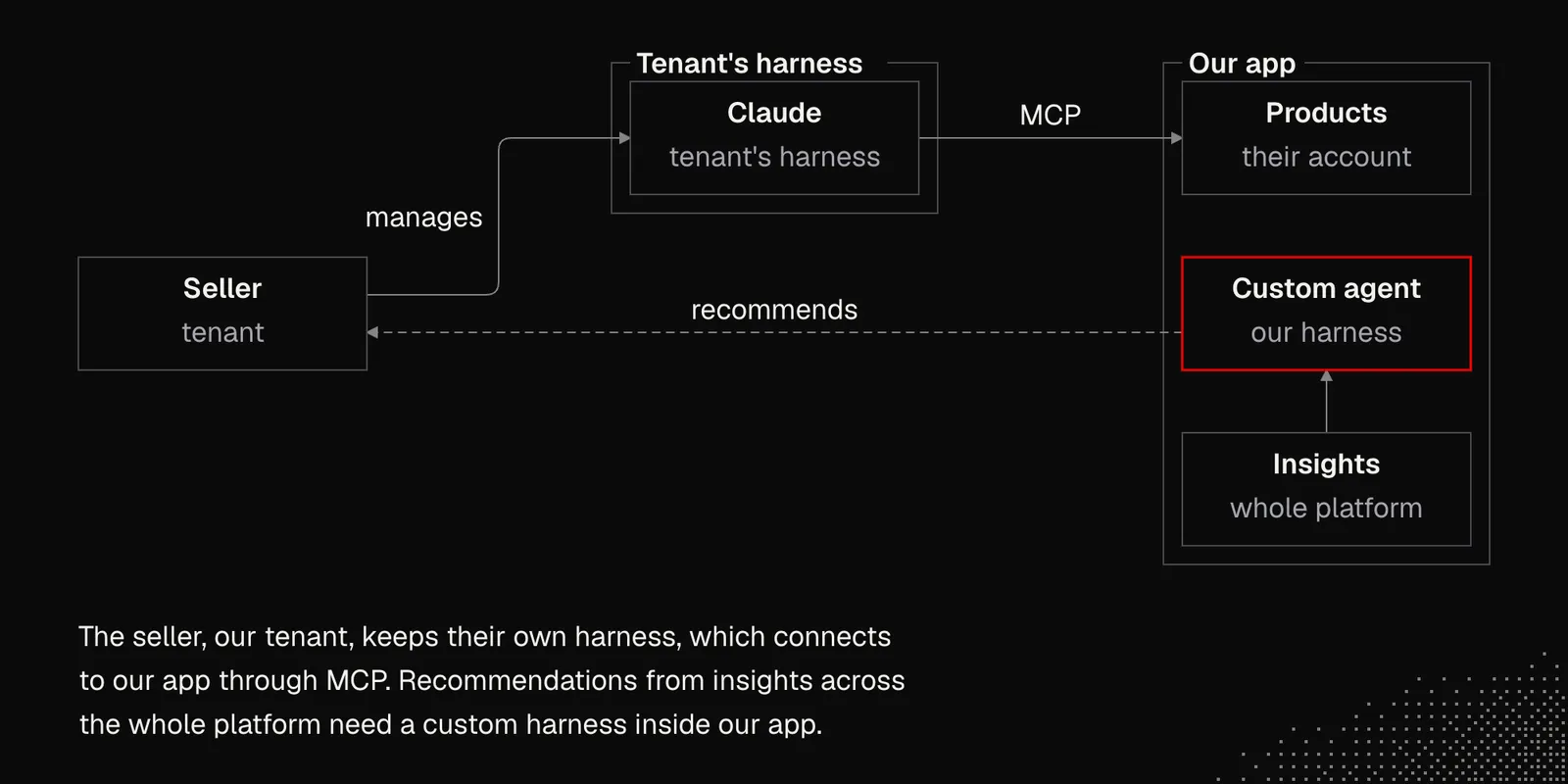
That's why today we cover what's needed to build our own agent. It is also worth watching Lee Robinson's lecture at Stanford CS146S "How always-on agents work".
Architecture
Agents can be built from scratch, and with today's coding agents, that's very feasible. We can also use agentic frameworks such as Mastra or Agents SDK to make this process easier, since they handle common mechanics we don't need to build ourselves. It's just worth keeping in mind that with AI frameworks, we may lock ourselves out of some "low-level" customization. And finally, as mentioned earlier, we may want to build on top of open-source harnesses such as Pi or Goose.
When designing an agent's architecture, we need to break away from some of the typical patterns we know from building apps and ask ourselves a few questions:
- Autonomy: what level of autonomy is needed, and what role do humans play?
- UI: do we need a full UI, just MCP Apps, or maybe generative UI?
- Profiles: do users need their own workspaces, or can this be centralized?
- Capabilities: does the agent need its own computer, browser, filesystem, or sandbox?
- Integrations: how does the agent handle integrations?
- Connectivity: does the agent need to connect with external systems?
- Memory: what kind of extraction and retrieval strategy do we want to use?
- Self-evolve: do we want the agent to configure itself, and to what degree?
- Context Management: what context management patterns do we want to have?
- Environment: what does the agent need to know about its environment?
- Cache: how do we optimize for a 99% cache hit rate? And that's critical!
- Communication: how will the agent ask for permissions or report on its work?
- Security: how do we ensure data safety and detect potential system abuse?
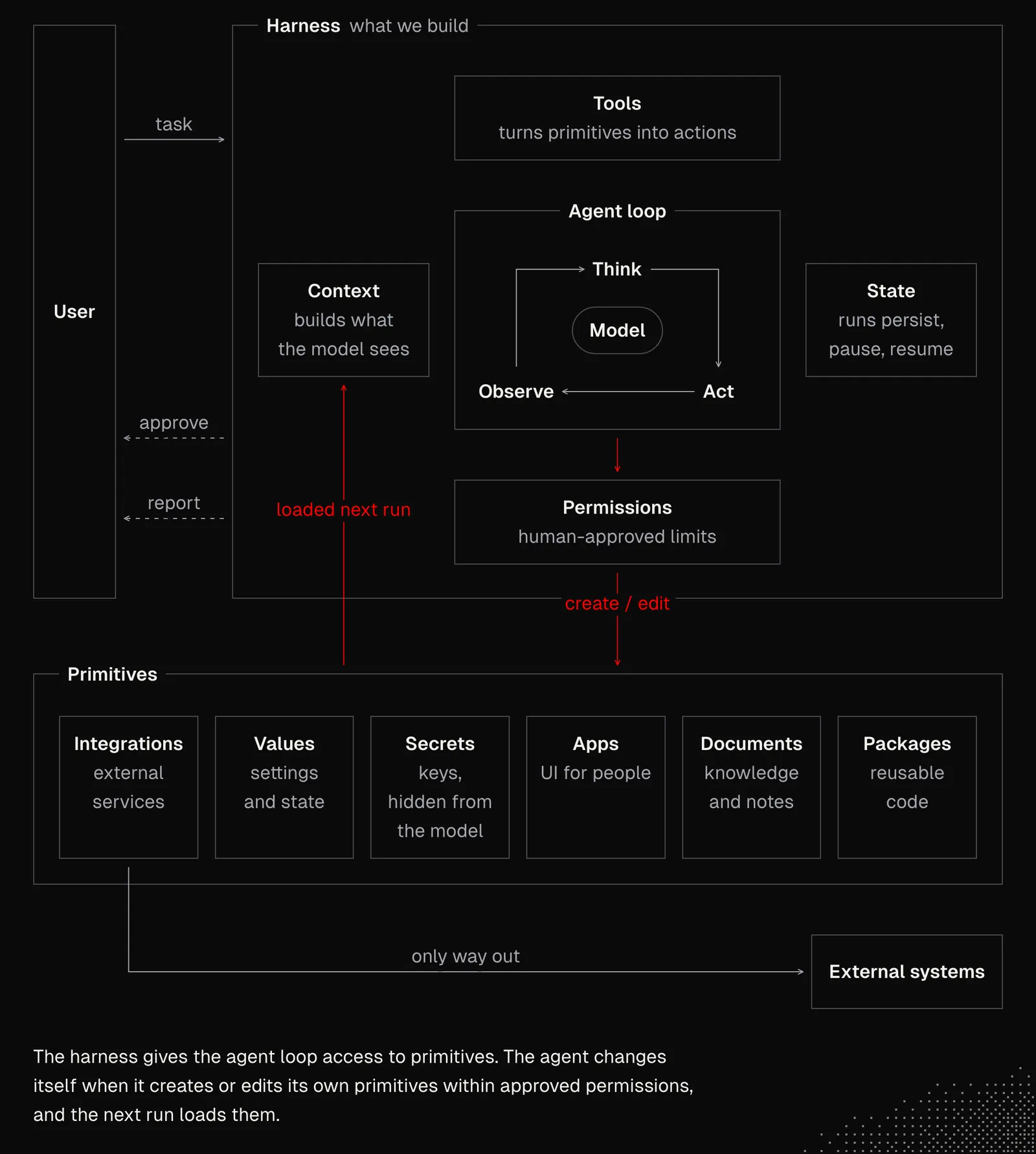
There are many decisions to make here, so we'll choose the path that's the most challenging but also brings the most value. We're talking about a self-evolving, primitive-based, durable agent. Obviously, we won't build the entire system here, but we'll discuss its aspects and the most important mechanics.
Core features
Designing agents is different from designing typical apps. As models get better, cheaper and faster, we can give them more freedom and space. That way, instead of building a narrow solution specialized in a single thing, we can let AI figure out how to handle cases we didn't think about.
For example, if we need to create a design tool for photo editing, it doesn't have to offer a predefined set of filters and options. Instead, it could give an agent a way to generate filters and options personalized for each user. Before AI, we had very limited ways to do things like this. Now, this brings a lot of flexibility to our app, but it also raises new challenges, such as: what happens to projects that used a filter the agent has since modified?
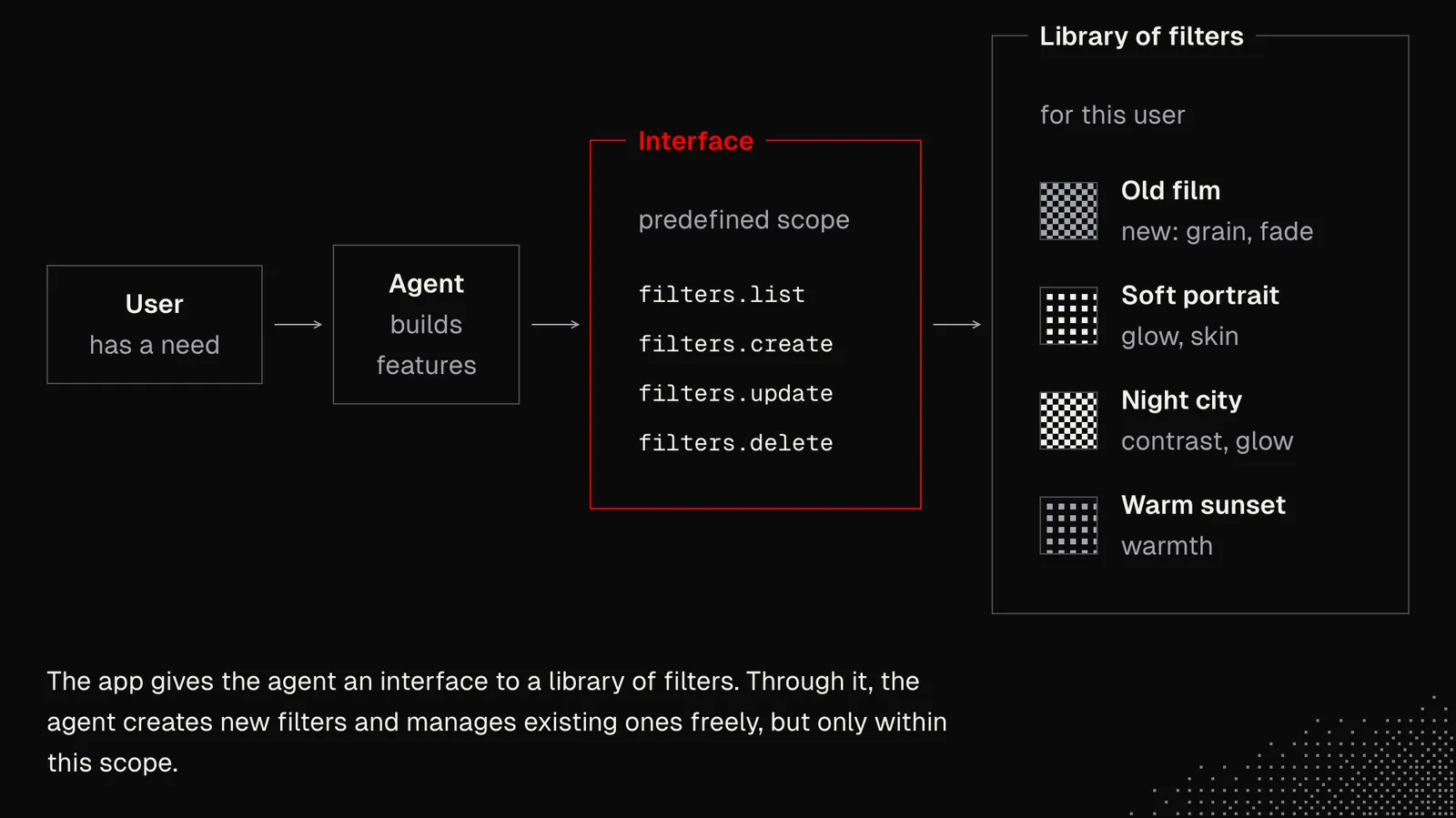
This example shows a new way of thinking about app architecture, but we can push it even further. Instead of generating only filters, the agent could create whole tools, panels and workflows suited to the way each user works. That way, our role changes from designing features to shaping the environment in which the agent builds them. In other words, we decide what interface the agent gets, what rules it follows and what limits it can't cross.
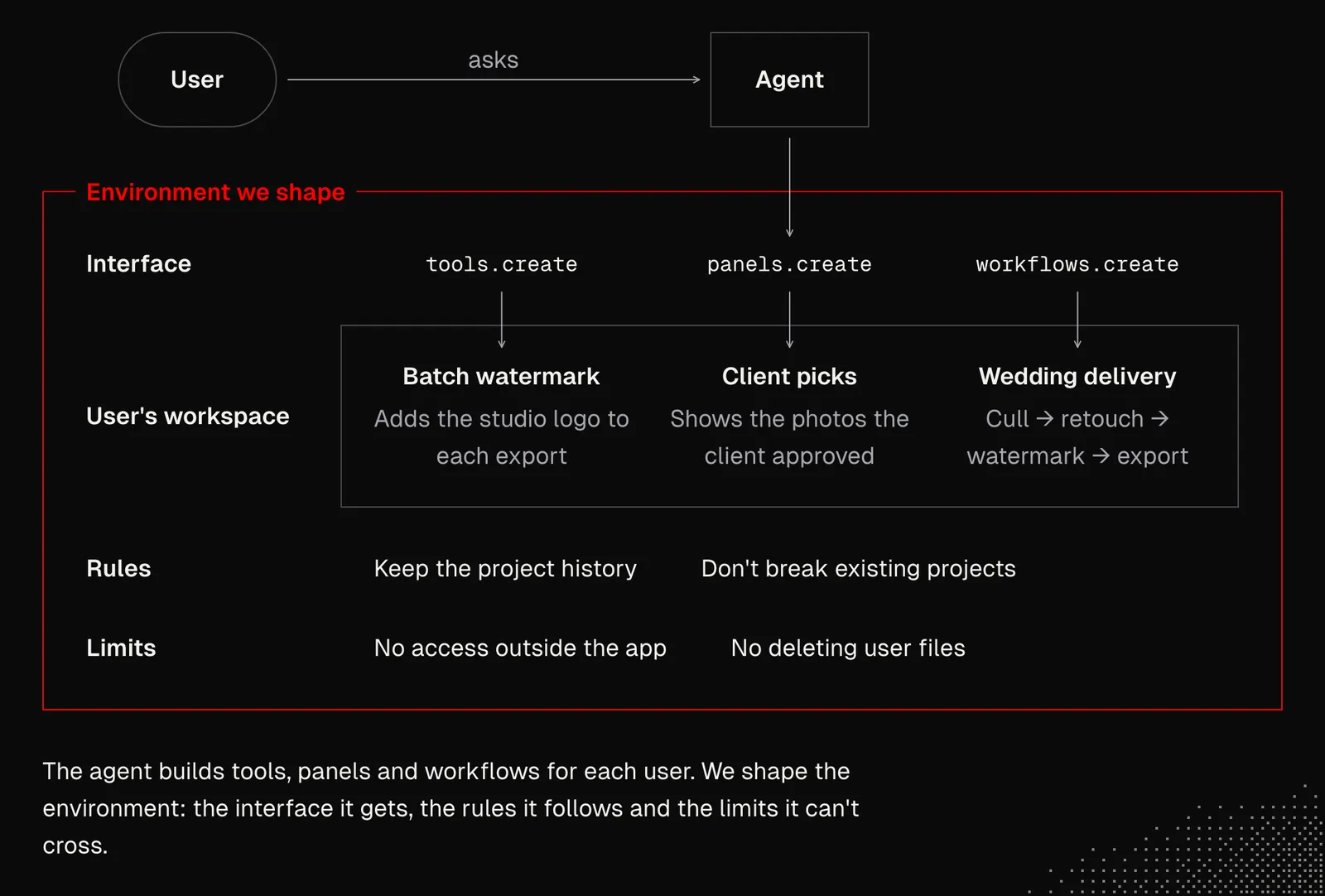
Such an environment is shaped through primitives: general building blocks that can be combined to achieve reliable, even deterministic, outcomes. Getting this right is hard, but together with AI we can easily iterate on prototypes and wireframes to see the architecture from different angles.
Let's say we want an evolving agent that lives in the background and helps us learn. It curates our knowledge base and researches what we're curious about, using only sources we trust. It has no interface of its own. Instead, it works inside the knowledge base and reaches us through channels we already use, such as a short note, a message or a weekly digest. Once configured, it needs a very little maintenance and minimal supervision.
It is proactive, but not because it follows a schedule set up once at the start. Instead, it reflects on its own work. It notices how active we are, what we're focused on now and which of its contributions we used or ignored. Then it adjusts what it does, how often and how loudly: it stays quiet during busy weeks and digs deeper when we're exploring. Every change it makes is logged in the knowledge base and can be undone, so running in the background never means losing control.
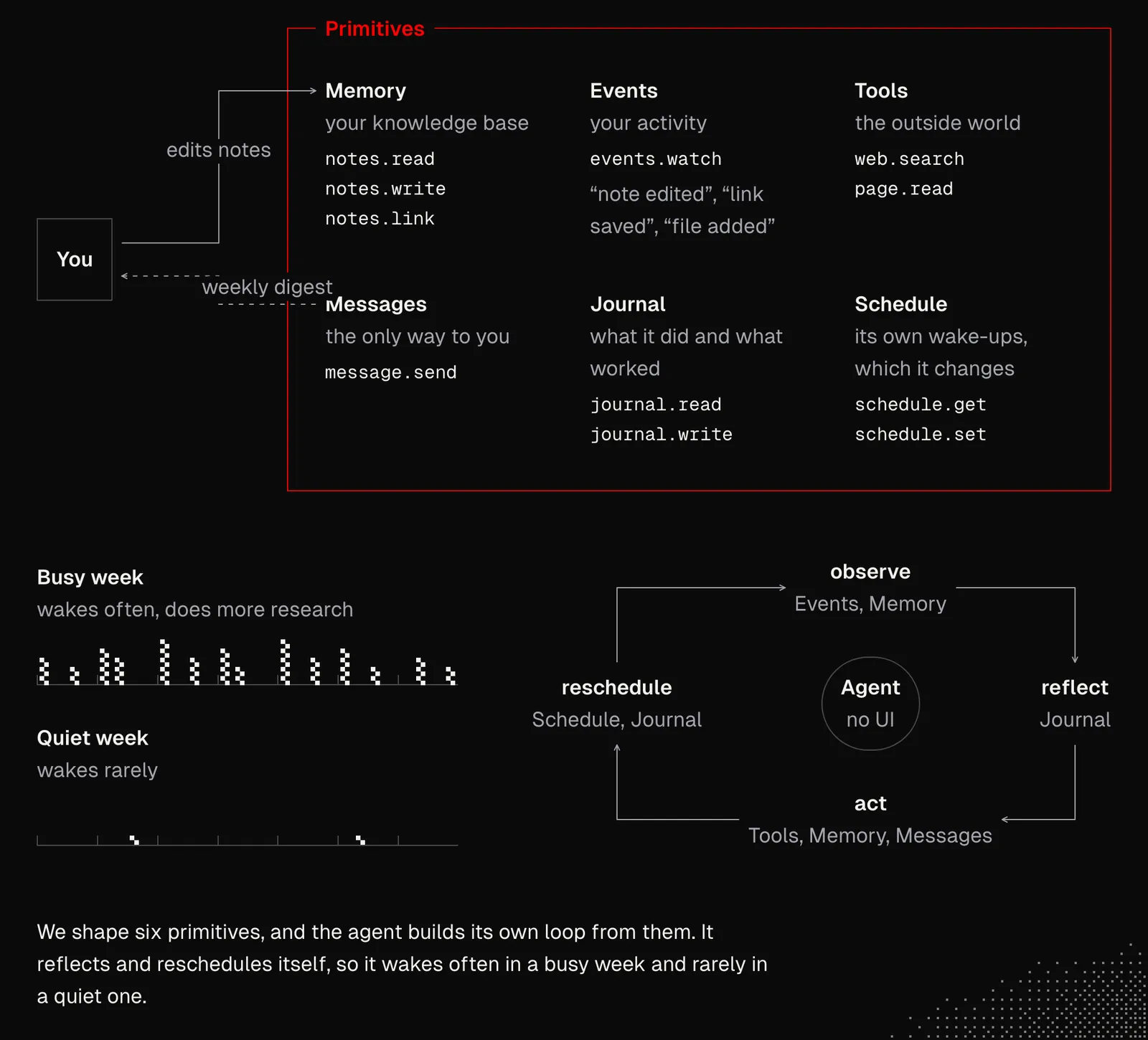
With this vision in mind, we can start thinking about the primitives that will shape the agent's environment. Combined, they will give us everything the agent needs to do its job, but also to adapt and manage itself.
Event: a signal about activities that may come from any source and shape documents. Schedule: wake-ups that the agent sets for itself. Document: everything the agent has written both for itself and for us. Skill: repeated work saved in a form the agent can reuse, also deterministically. Journal: everything the agent did. Entries are only added, never edited. Channel: the agent's only way to reach the user.
Now, such primitives can be combined together, so Event may trigger a particular Skill based on its type, Schedule may be associated with a given category of Documents and every action leaves an entry in the Journal. During reflection, the agent reads its Journal to decide when to wake up next, which work is worth saving as a new Skill and whether anything deserves our attention through a Channel.
That way, a few general blocks produce behavior we never had to design upfront, yet every step stays within the environment we shaped. And when something goes wrong, the Journal shows what happened and why.
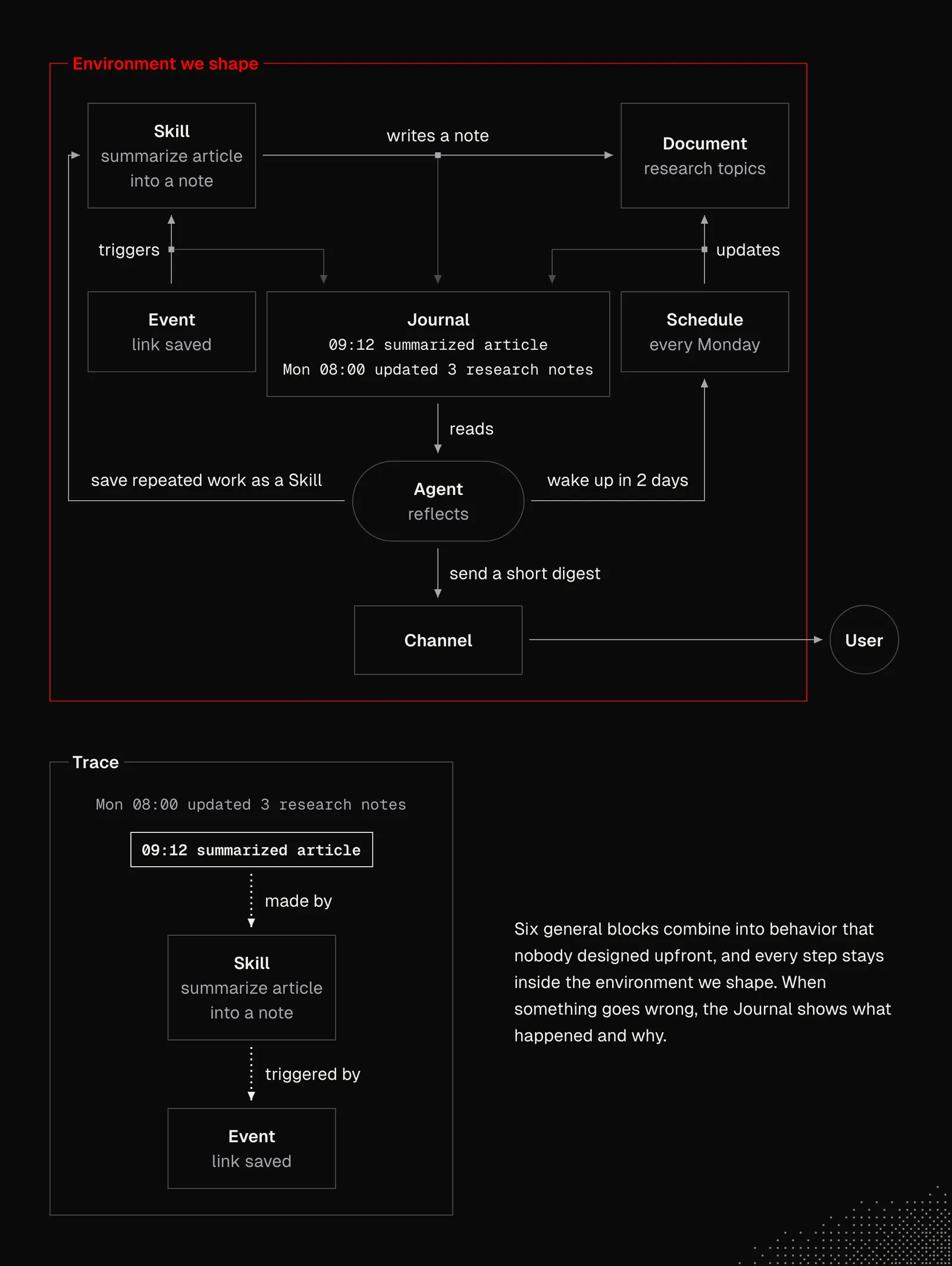
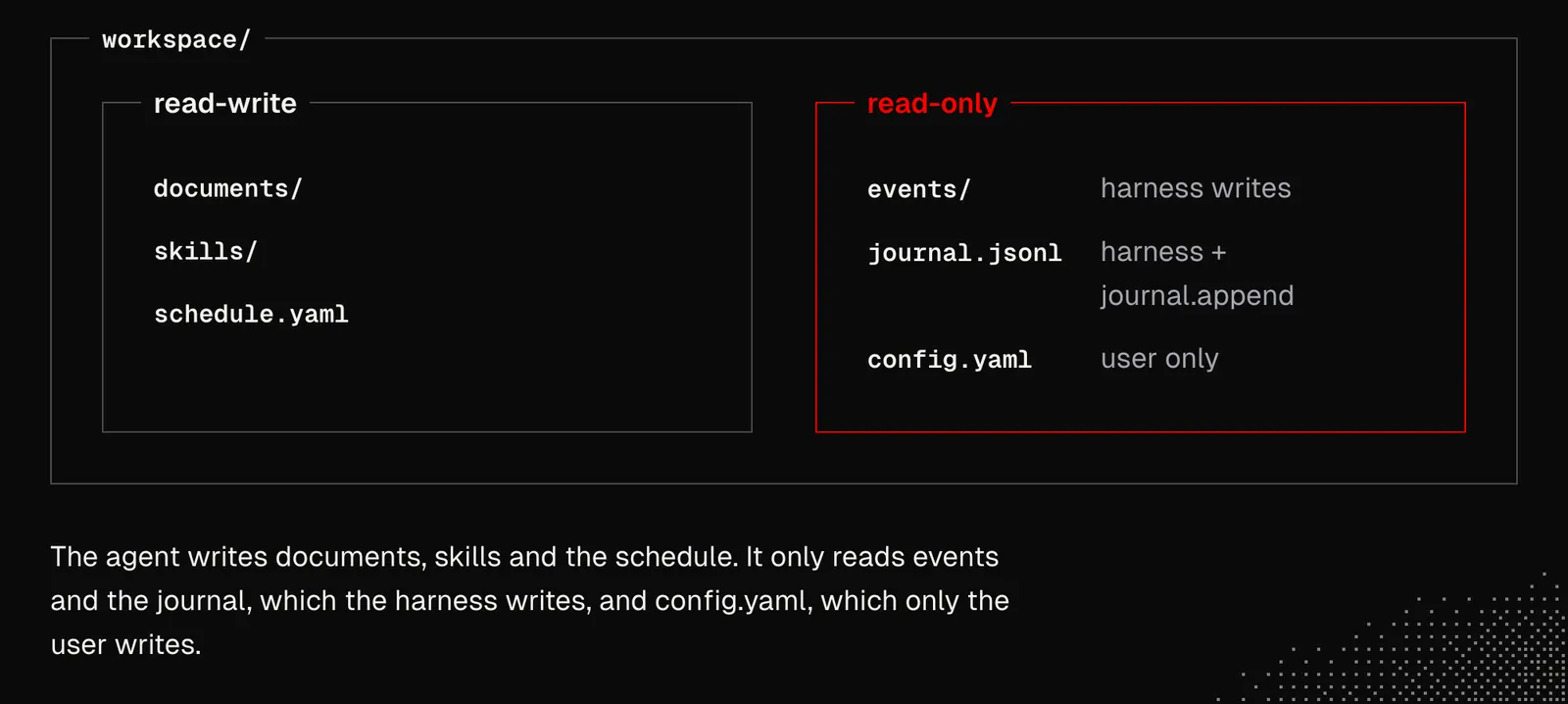
At this point, we can see that some primitives may live in a filesystem, so the agent can easily interact with them. Schedules, events, scripts, documents and the journal are all files. And to let the agent work with them freely, we need it to be able to write code, which means giving it a sandbox. At the same time, this doesn't mean that all primitives must live in a filesystem, because some of them may exist in a database and be accessed through a dedicated interface. It's also up to us to decide whether the agentic core will be based on our framework of choice or on entirely custom logic.
Providers and configuration
When building agents, we shouldn't really commit to a specific provider, not only because of vendor lock-in but also because we may want to use multiple models at once, or models that are specific to a given provider.
For example, we might use Gemini for image generation, a decision model from TypeSafe, or a mix of Anthropic and OpenAI models to get multiple perspectives or simply to access whichever model is currently the best. The easiest way to have all these is to use platforms such as OpenRouter, although it's worth keeping in mind that some native API features of the given provider may not be available there. When building products for B2B customers we may consider Amazon Bedrock or Microsoft Azure.
The architecture of our agent should include a gateway and adapters for the providers we want to support. In other words, we need to make sure that all providers speak the same language in our app and that adding or removing a provider won't be an issue.
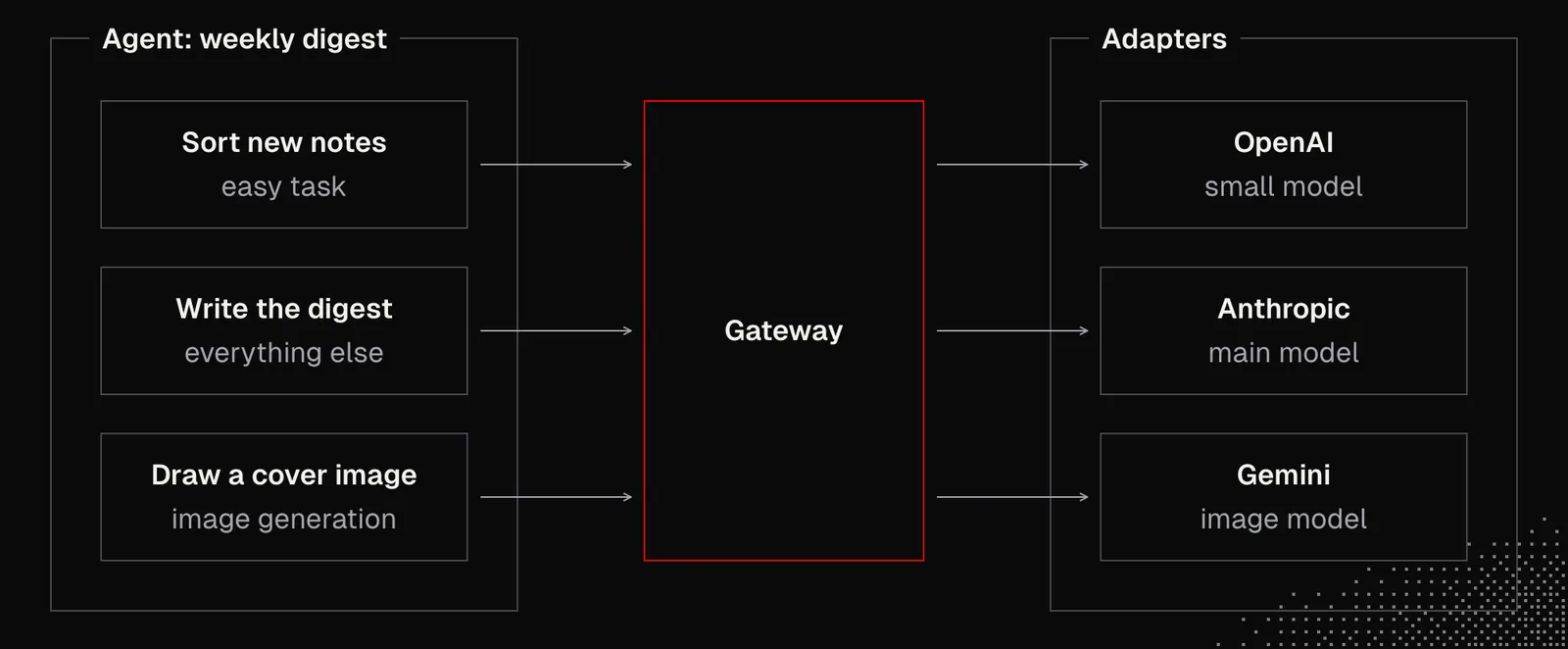
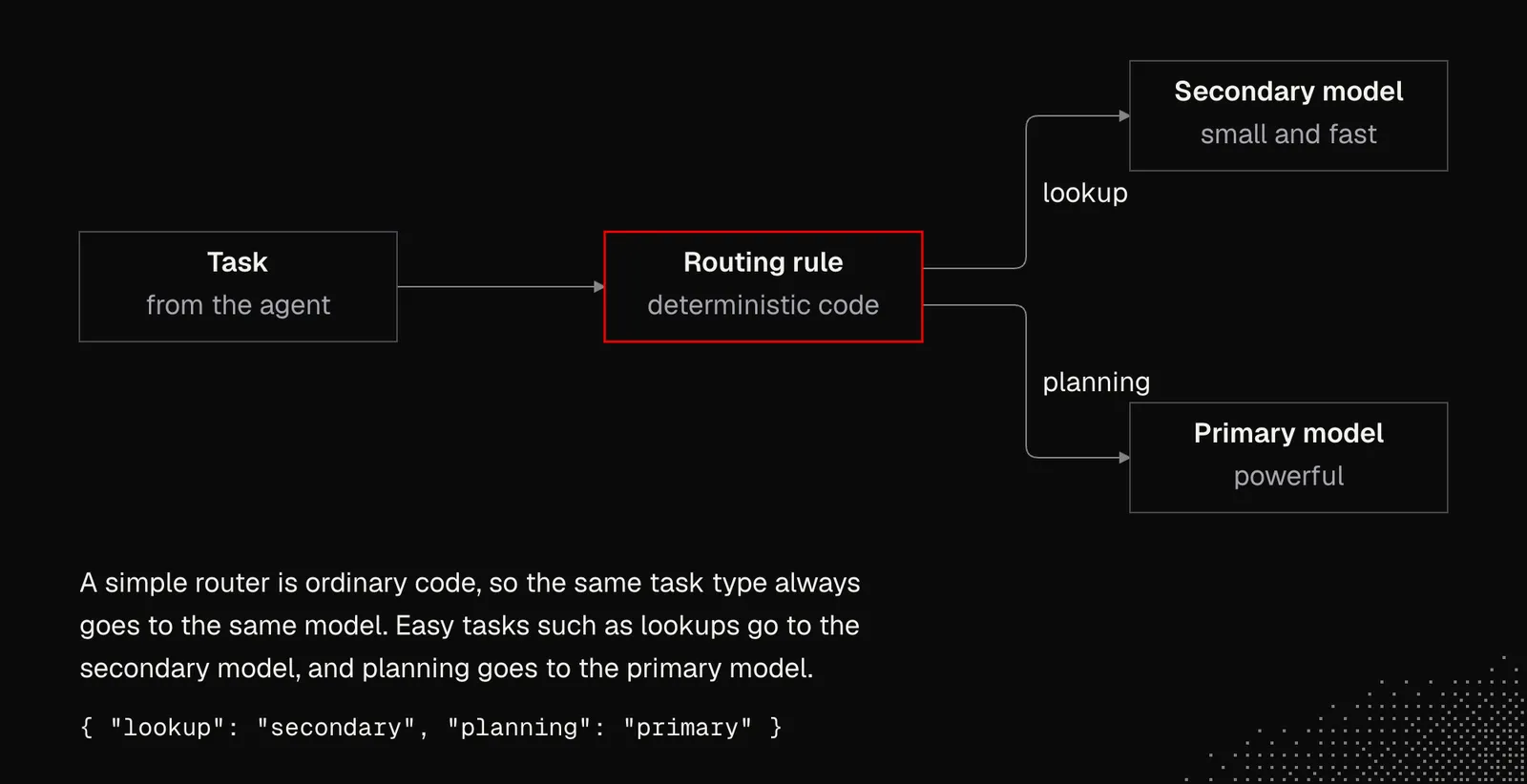
Having access to multiple models lets us think about model routing: handling easier tasks with a smaller, faster and cheaper model, or with lower reasoning settings. As a first step, configuring primary / secondary models for a given provider may make a noticeable difference in our agent's overall efficiency. There are also more sophisticated routers, such as Max from Arena AI, a model that routes each task to the best model to improve efficiency and accuracy, although this may be overkill for many cases.
As LLMs and their APIs evolve, our apps should avoid layers that make migration to newer versions harder than necessary. For example, if someone built an app with OpenAI's Chat Completions API and has no easy way to migrate to the Responses API, some models and features may not be available to them..
Designing tools
Agents can easily create tools for themselves, and all they need is documentation and some test requests. But if we look closer, there are some things we may want to consider to improve the efficiency and reliability of tools generated this way.
Agentic tools are mostly about schemas and callbacks, but the most important questions are whether a tool is really needed and whether the agent will know how to use it.
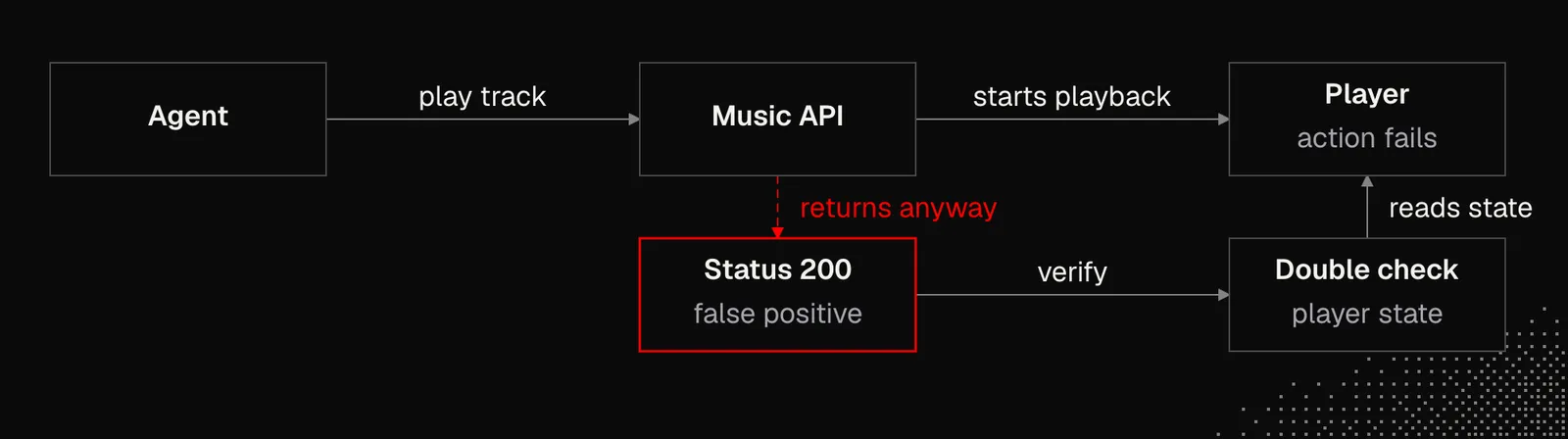
One may say that models are smart enough to use an API directly, and that's true for many cases, especially if the app or service falls within the model's base knowledge or its documentation is flawless. In practice, however, we will seek reliability, flexibility and efficiency. This isn't obvious as many APIs are poorly designed and agents often get false positives and believe an action succeeded when it didn't.
An example of this may be a music service that returns status 200 for interactions with the player whether the action succeeded or not.
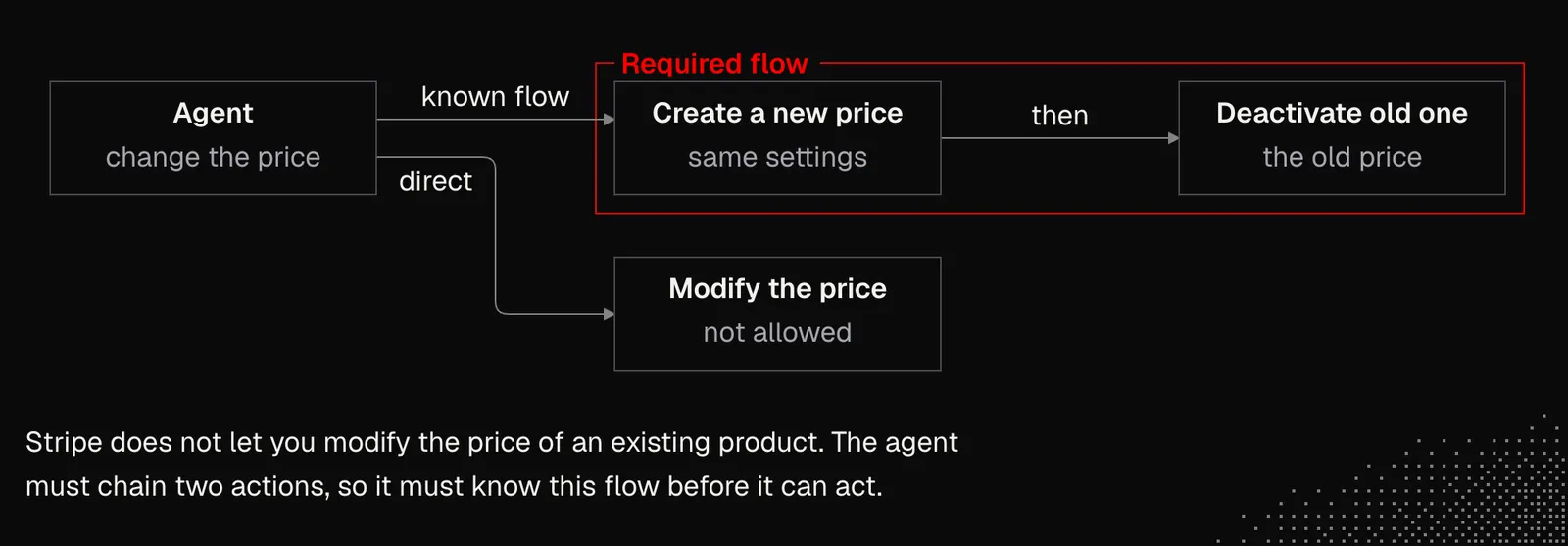
Some actions also have to be chained in a specific way or simply can’t be performed without following a particular flow. For example, Stripe doesn’t allow you to modify the price of an existing product. The only way to do so is to create a new price with the same settings and deactivate the old one. And here, Stripe is well known for LLMs, but when agents encounter an internal API that is new to them, they will simply fail.
Now, with this in mind, we need to design native tools ourselves. And if the agent is going to create tools autonomously, we need to give it some guidance on our preferences, recommendations, and a way to evaluate these tools and test their names, descriptions, schemas and output format.
So our agent may have four native tools:
- core.exec: to execute code in a sandbox in the workspace
- web.search: to search the web, but limited to the trusted sources
- web.fetch: to get the contents of a URL
- channel.send: to send a message to the user
Additionally, the harness will use journal.append and events.add, so the agent can clearly see what's happening, but will be physically prevented from modifying them.
In the case of this agent, tools aren't the only thing we should take care of, because the agent also has to know how to navigate the workspace, shape documents, understand the relationships between them, etc. So we may consider creating an initial guide in the form of Documents and Skills (native primitives). This would give us augmented tools that aren't rigid, because the agent would be free to modify them.
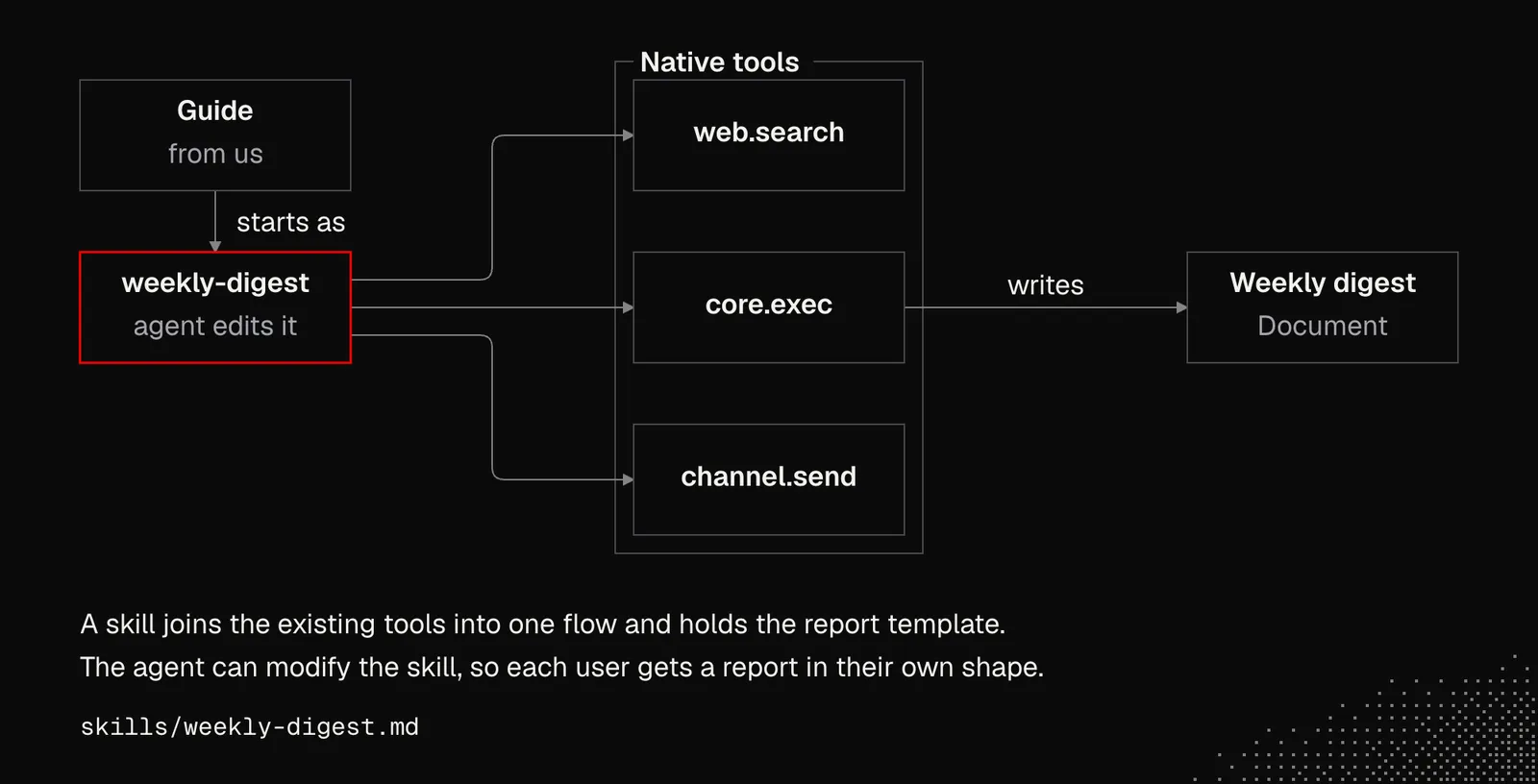
When all this is done well, our agent will be able to learn and evolve, as schedules such as "dreaming" may ask it to organize its documents and schedules.
Considering this, we should clearly see how we can balance deterministic and non-deterministic logic to engineer solutions that are specialized for specific use cases and more useful than general agents. To achieve this, we first need to consider everything we know about language models and AI agents, and then use our experience in software development to come up with the solution we need.
Context management
Here we're reaching the point where our harness can make a big difference compared to general agents, not because we teach the model what to do, but because we show it what's available, dynamically.
We know that cache hit rate is one of the most important metrics for agents, and we should keep it in mind whether we're designing an agent from scratch or extending an existing one with hooks or extensions. In our case, the goal is to inform the agent not only about its purpose but also about the current state of its environment, including Events, Schedules and other instances that are currently running. This means we can't simply "set our AGENTS.md", because we need to inject context mid-turn!
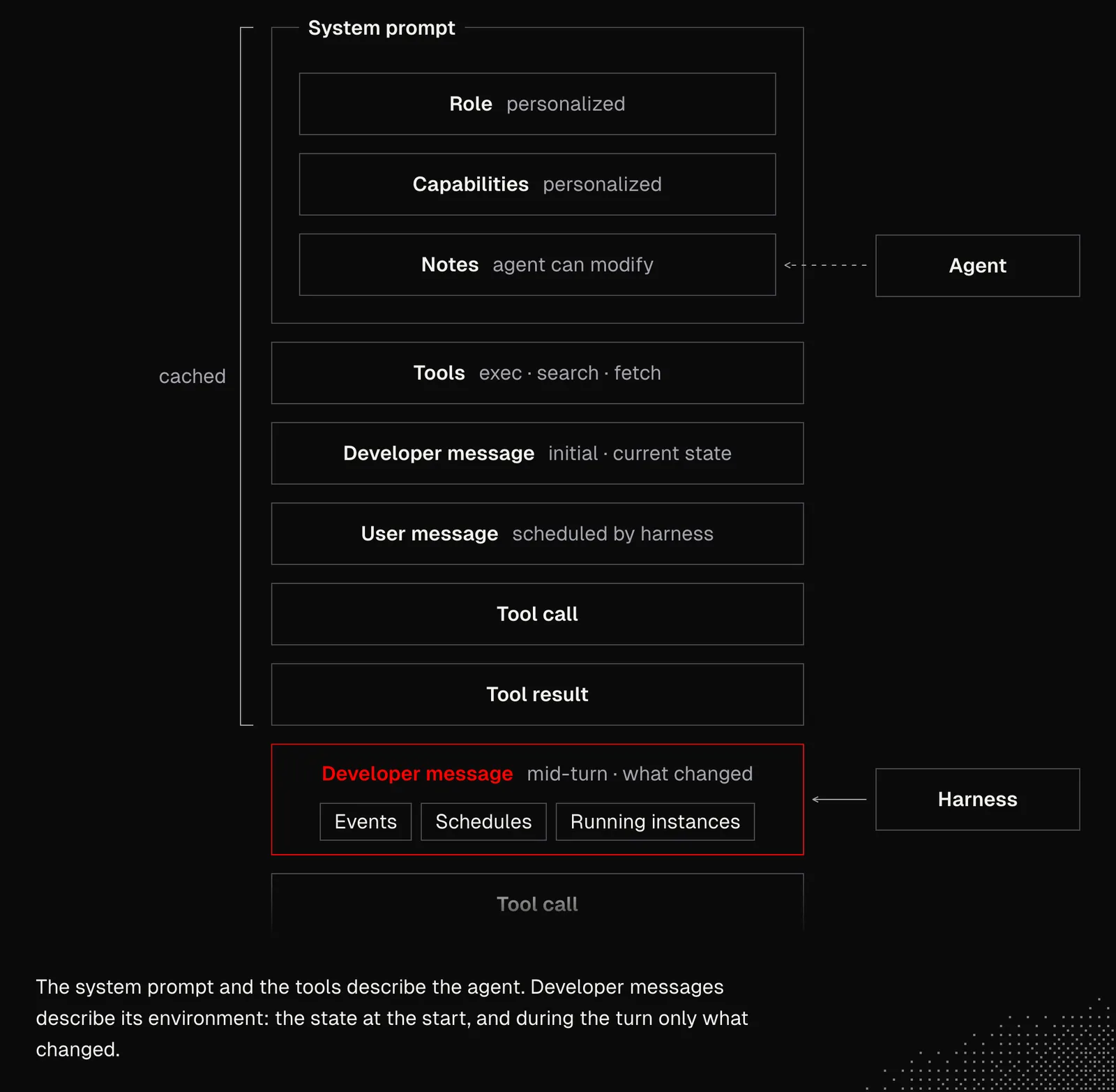
Context management for custom agents has no universal answers, but we can follow a few principles and iteratively get to the point where our system meets our expectations. In our case, we can look at things such as:
- System Prompt: it tells the agent its role and capabilities, so it does not spend too much time on exploration. It may also include a note that the agent can maintain for future sessions and improve through self-reflection.
- Tools: in code mode, the agent receives only the most important tools as schemas. In our case, that's exec, search and fetch, because all other capabilities are controlled from the code the agent writes.
- Initial Developer Message: right before the first message, we may add the current state of the system, so the agent immediately knows what's going on and whether anything needs to be considered before starting a task.
- User Messages: this agent will run autonomously, so the user message will often be a scheduled message that the harness sends to the agent. The agent has to be informed about this, because asking questions won't be possible. The only way to contact the user is through channel.send (unless we set it up differently).
- Mid-turn Developer Message: the environment changes, so during a turn, the agent has to receive notes only about what changed
- Tool Hooks: given how important proper organization and self-management will be, the agent may receive well-generalized, self-steering messages before and after it triggers a tool.
It's recommended to start simple and build an environment where the agents can reach their best form through self-play. Our role is to supervise this process, because models may lean towards complex logic, while we're looking for the simplest possible solution.
In the upcoming lessons, we'll explore how we can make custom evals, so the agents won't blindly make changes without clear feedback on the system's performance.
Workflows and long-horizon tasks
Building a good ambient agent is a great exercise of building reliable systems that involve non-deterministic logic. An additional challenge is to keep these systems lean by relying on primitives that AI can combine to go beyond the scenarios the agent was designed for.
This is not only about engineering and architecture, but also finding useful use cases that aren't always obvious. In the case of our agent, we can use Events to report our activity level and whether we opened its last email or read its message. Based on this information, the system may adjust its behavior or stop some actions.
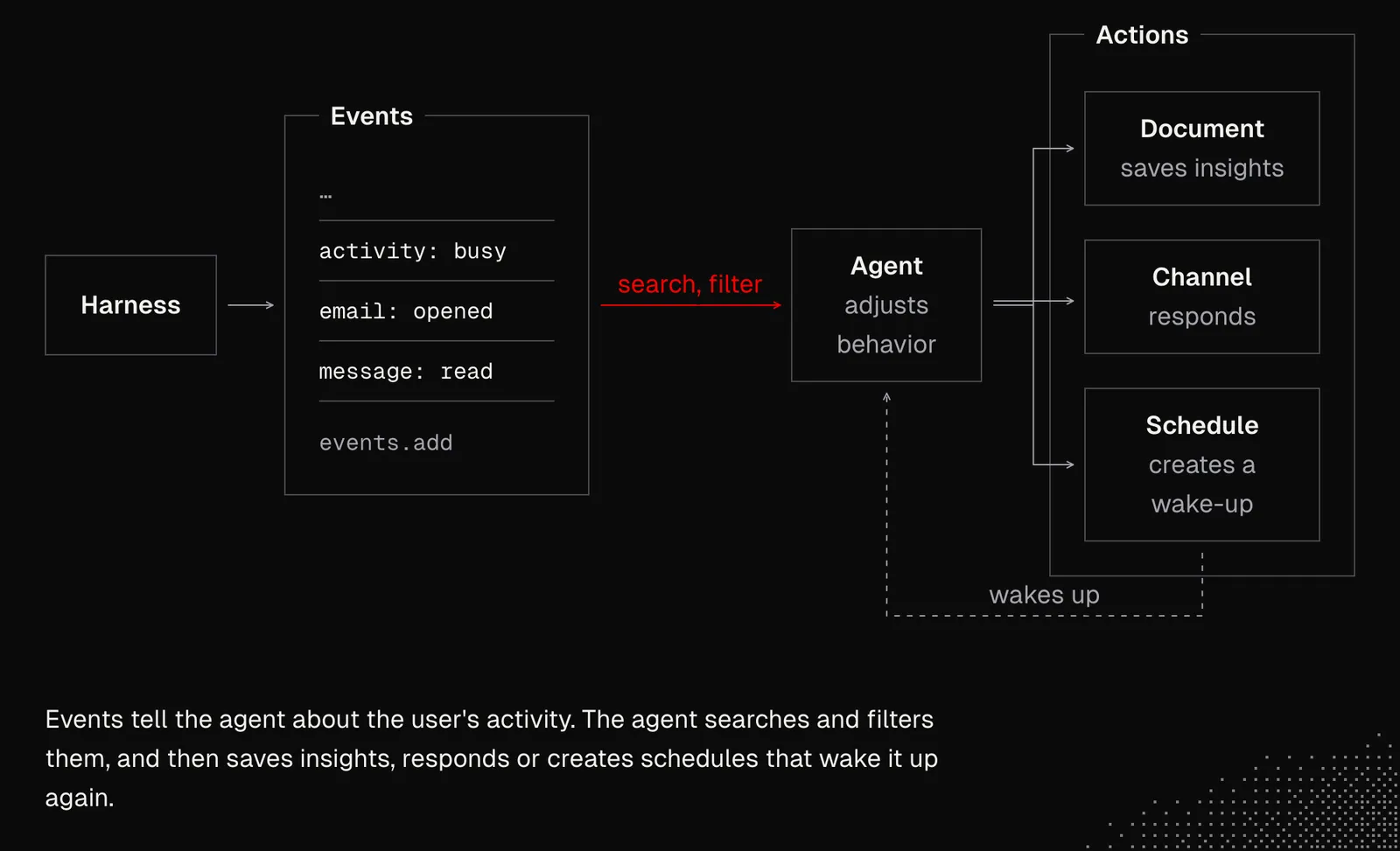
Another example could be a schedule that scans our activity on X, Raindrop, or any other app that may provide insight into our recent interests. In that case, we need to figure out how to make an agent remember its past runs, so it can actually observe and reflect on its findings. The most natural way here would be to ask the agent to filter out Journal entries and to save insights in some structured way.
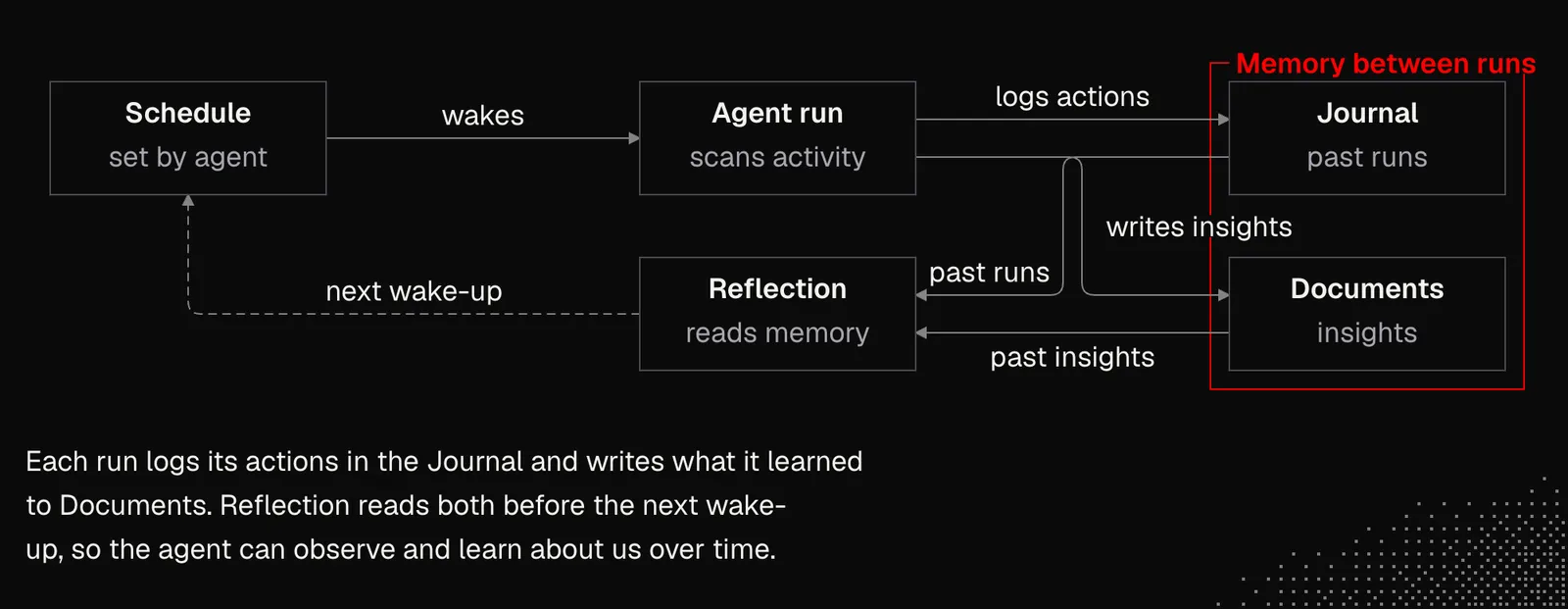
When we play with similar scenarios, we'll learn a lot about how agents work, how models make decisions and where they struggle and where our harness falls short. For example we may struggle with parallel updates that may even lead to data loss, so we need to introduce queues or versioning. Some tasks may require including logic such as one from pi-durable so the agent can easily recover from nearly any failure or pause the execution for as long as needed or concepts from pi-until to set up watchers and recurring wake-ups.
Takeaways
The example from this lesson should clearly present why we may want to build our custom harness or learn how to build extensions for existing ones to make them specialized for specific tasks.
And even if this leads us to stop working on the agent, or new models or harnesses replace it right away, we'll gain experience that may help us build even more advanced systems with future models.