
S02E03 · Agentic Capabilities: MEGA lesson
MEGA’s lesson on personalizing agent harnesses with instructions, MCP servers, skills and tools. It covers balancing guidance with agent autonomy and regularly improving or removing harness rules.
textMEGA · hq.mega.dev · Saved Nov 19, 2026
mega course, context engineering, model context protocol, agent skills
Written lesson S02E03 of the MEGA.dev course, by MEGA. Agenda: AGENTS.md · MCP · Agent Skills · Context Management. Its lesson video is presented by Angie Jones and saved separately. (MEGA Student HQ, needs a login.)
S02E03 · Agentic Capabilities
Harness personalization is about increasing the chance that agents will behave the way we need. At the same time, our instructions, plugins or extensions shouldn't limit the agent. In practice, it's about not telling agents how to do things and simply making it easy for them to explore their environment and figure out the best path on their own.
Considering how quickly frontier models are evolving, personalization isn't something you do once, but rather a process we need to keep improving and, to some extent, let improve on its own. It requires proper generalization and the right balance between supervision and autonomy, so the process can be trusted.
Outline
- Personalization: global instructions, explicit loading, scope, conventions, guidance
- Model Context Protocol: server and client, tools, resources, discovery, configuration, CLI and API tradeoffs, security, hosting and maintenance
- Designing a custom MCP: planning the integration, shaping tools, deployment
- Skills and Tools: procedures, discovery, progressive loading, references and scripts, augmented tools, reusable capabilities
Personalization
Personalization often happens through custom instructions (such as AGENTS.md), skills and tools, but we know it can also happen through harness modifications, extensions and sandboxes.
First, let's take a closer look at agents.md and some of its examples. Among them, we'll find highly detailed instructions or even a list of steps the agent has to follow. Even on the website we can find this:
Always run
pnpm lintandpnpm testbefore committing.
But we already know that such rules do not guarantee the agent will follow them, since it may get distracted by something else. And as programmers, we know about tools such as Husky that the agent can configure once so that particular scripts always run. This way, we may increase trust because the agent will be blocked. But in some cases, it may find a way around this rule or even disable it ... or a human may disable it, as both scripts may take a while, slowing down the entire process.
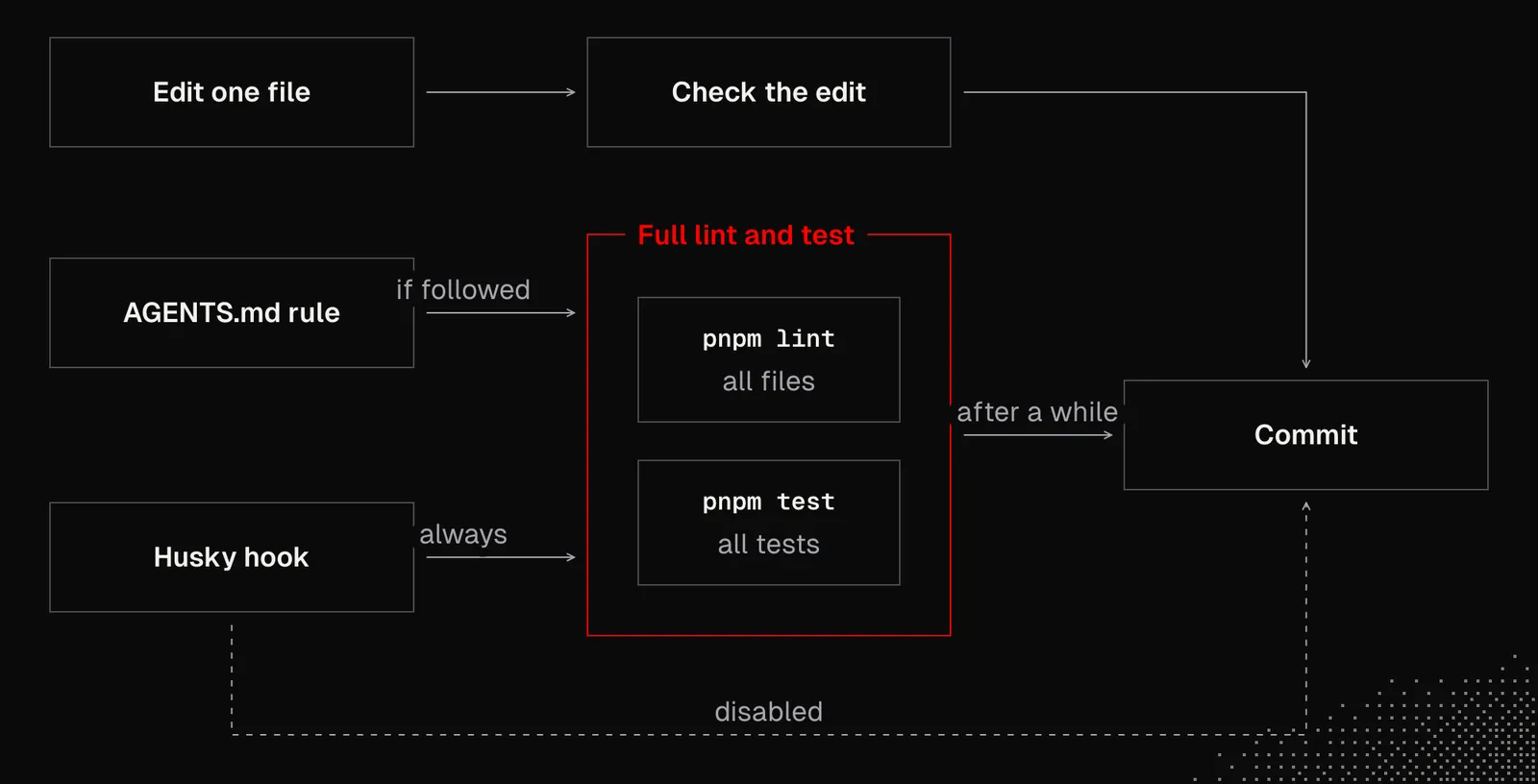
Today, LLMs know exactly how to handle focused code verification and select only the tests that actually need to run based on what's changed. So asking them to run the full lint / test before every commit isn't very useful and can even be harmful.
On second thought, we care about quality and moving the entire responsibility to an agent is not a good idea either. The goal here then, is to have a well-generalized instruction, but also deterministic logic configured in a way it supports agents without blocking them. For example:
Verify your changes in proportion to their impact. Report what you ran.
Notice how this sentence leaves the door open for the agent to figure out how to adapt to the current state of the environment, instead of following strict, predefined rules.
Then, together with an agent, we can discuss our project and figure out which hooks and rules we could configure to secure this process, and how to optimize it. Finally, as mentioned, this is not something we do just once. Instead we may have a schedule that will periodically see what can be improved or removed as harness and models may improve and our settings won't be needed anymore.
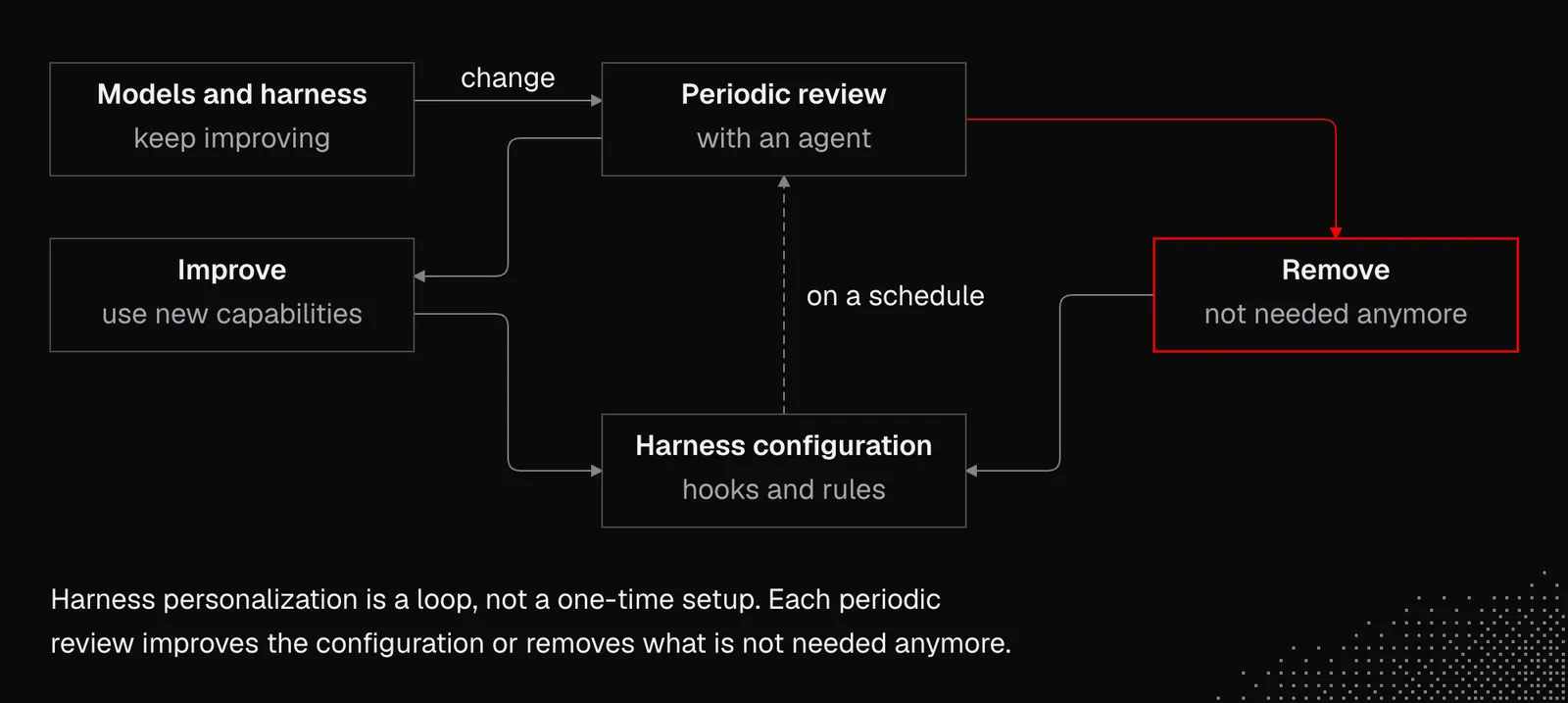
This way of thinking about generalization and the iterative process of optimizing the harness can be applied wherever we work with agents, whether we're designing them from scratch or working with existing ones.
Generalization is a skill we, as programmers, already have, but now we need to use it for both deterministic and non-deterministic logic. The latter is entirely new and, in many ways, contradicts what we already know. The level of generalization needs to be even higher for instructions that make up the core of an agent, because they have to be extended with user profiles, resources and skills.
In practice then, we need to keep in mind there's a difference between core instructions and user profile personalization because core instructions are often extended by others but shouldn't be overwritten.
Note: technically there is no way to "override" an instruction. Although Model Spec suggests that the system prompt is more important to the model than developer or user messages, experience shows the model does not always respect this.
When thinking about good instructions for an agent, we may consider:
- Principles over procedures: instead of telling the agent what to do, give it principles to follow and rely on the model's intelligence to apply them well
- Reason behind the principles: if the agent knows what's the underlying reason behind a given principle, it may better adapt to it or even explicitly ignore it if that will lead to better results.
- Dynamic boundaries: there are behaviors that are present in models by default, such as a need to confirm certain types of actions with the user. But as we learned in S02E02, there are situations, such as ambient agents, where models should avoid that. In practice, the agent's behavior may be steered by dynamically injected information about the current client. The agent will then behave differently when the user speaks to it through a mobile app and when the agent is triggered due to a schedule.
- Default behavior: every time we need a model to behave differently than it normally would, we need to give it an instruction. But, at least for now, putting that instruction in the system prompt isn't enough. We also have to repeat it throughout the interaction using hooks.
- Preferences: even the most intelligent models don't know our personal preferences or the context that may affect how the work needs to be done. We need to learn how to communicate them without guiding agents too strictly, so they still have space to find the best possible way to accomplish their tasks.
- Extensibility: this is about asking yourself the question, "How will our rules behave if, for example, skills introduce new behaviors?"
Even though instructions for the model are often generated today, generalization is still something we need to keep in mind. This matters because generalization is not only about extending harness instructions but also about augmenting tools so the agent uses them in a personalized way.
Model Context Protocol
We've mentioned MCP (Model Context Protocol) at least a couple of times so far and even had a chance to use it. Now it's time to take a closer look at the protocol and how it works under the hood.
MCP may be seen as a standard that aims to standardize the connection between an agent (or agentic harness) and external apps, services or even devices. In other words, it gives the agent new capabilities for interacting with the world.
Model Context Protocol is based on three core concepts:
- Host: an agentic harness such as Claude, Codex, or our custom application
- Client: a component that lives in the host and manages the connection to exactly one MCP server
- Server: a local or remote process that exposes tools and resources to the host
This may be visualized as follows:
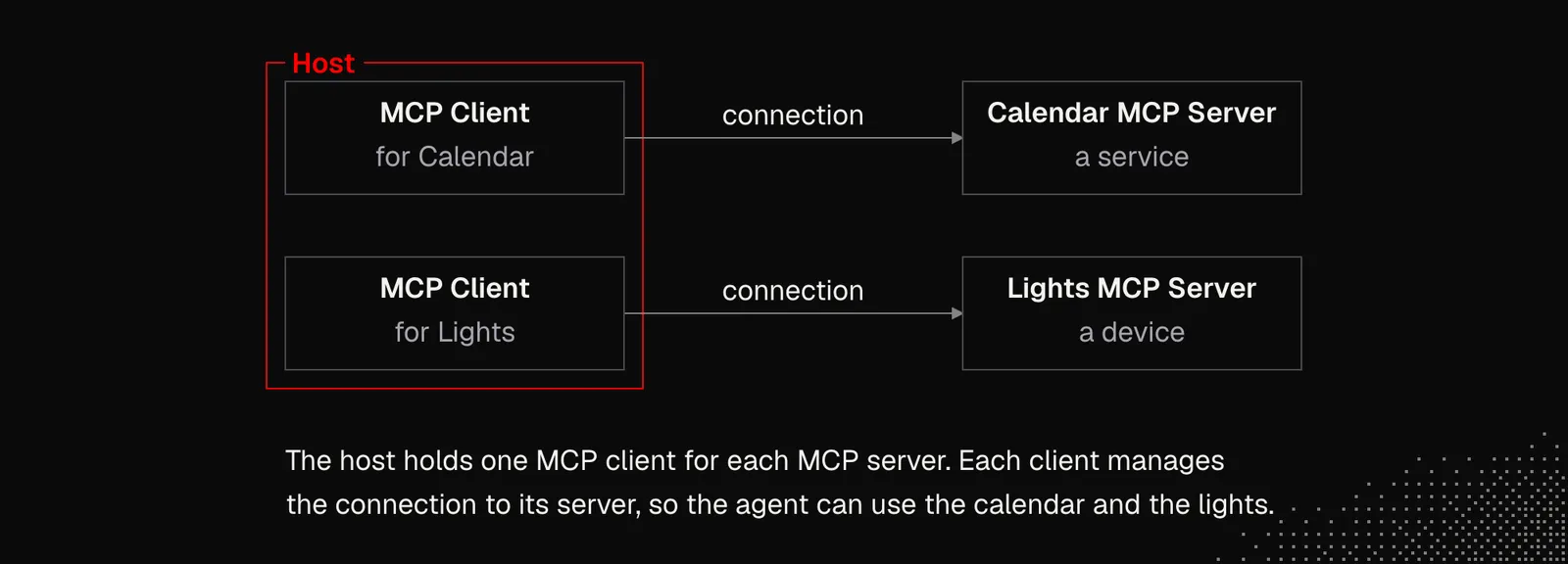
In practice, we'll mostly be interested in creating MCP servers that let popular harnesses access our services or devices. Creating MCP hosts / clients is rare, but to build good MCP Servers, we need to understand how the entire protocol works.
Below we have a minimal example of an MCP server. It has a name, which the harness uses to tell the agent what the server is about. Next, we have tools (schema and callback), which the harness handles. As we know, the schema may be presented to the agent right away, but more often it will be shown in a minimal form, such as name & description only.
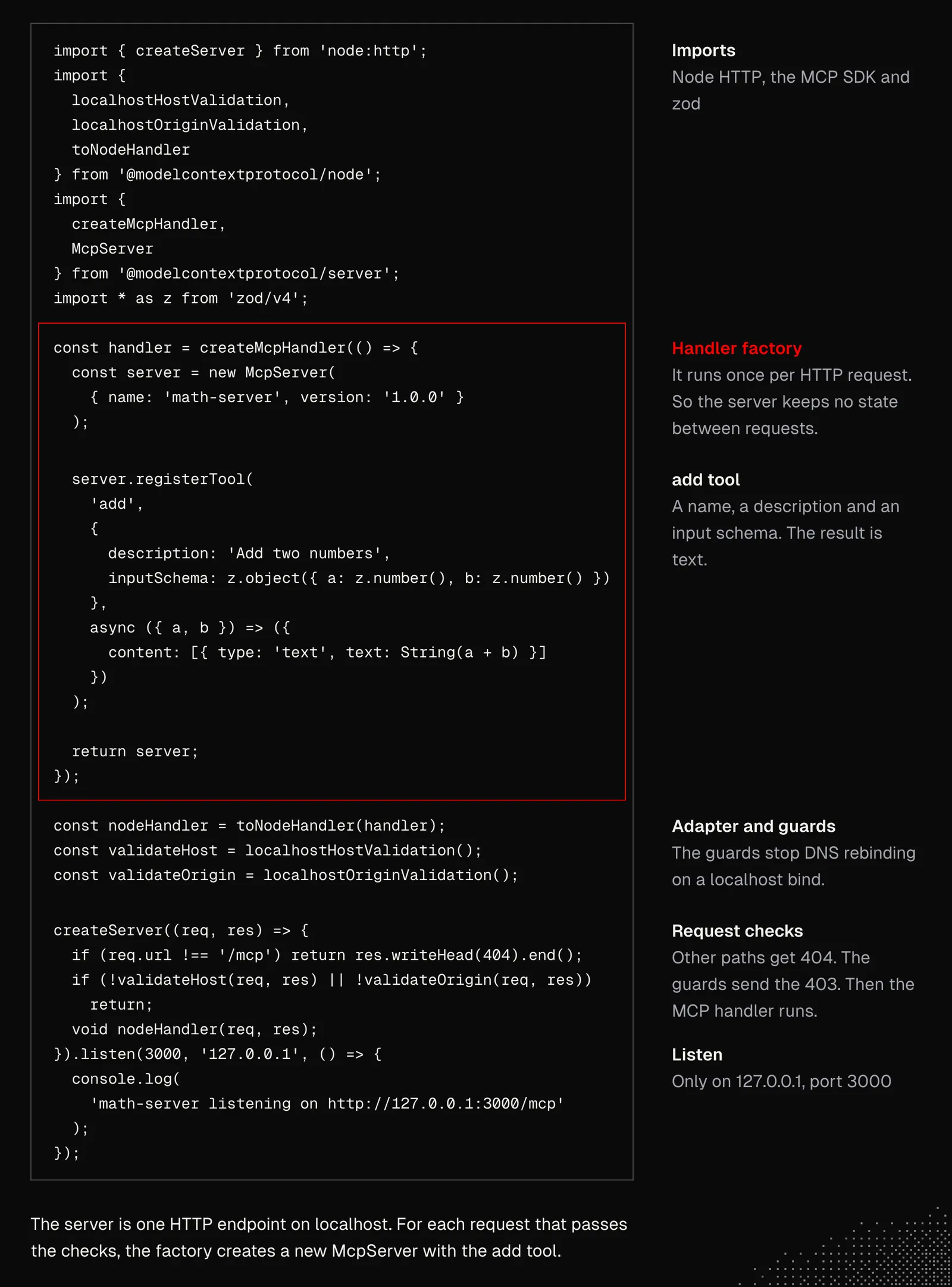
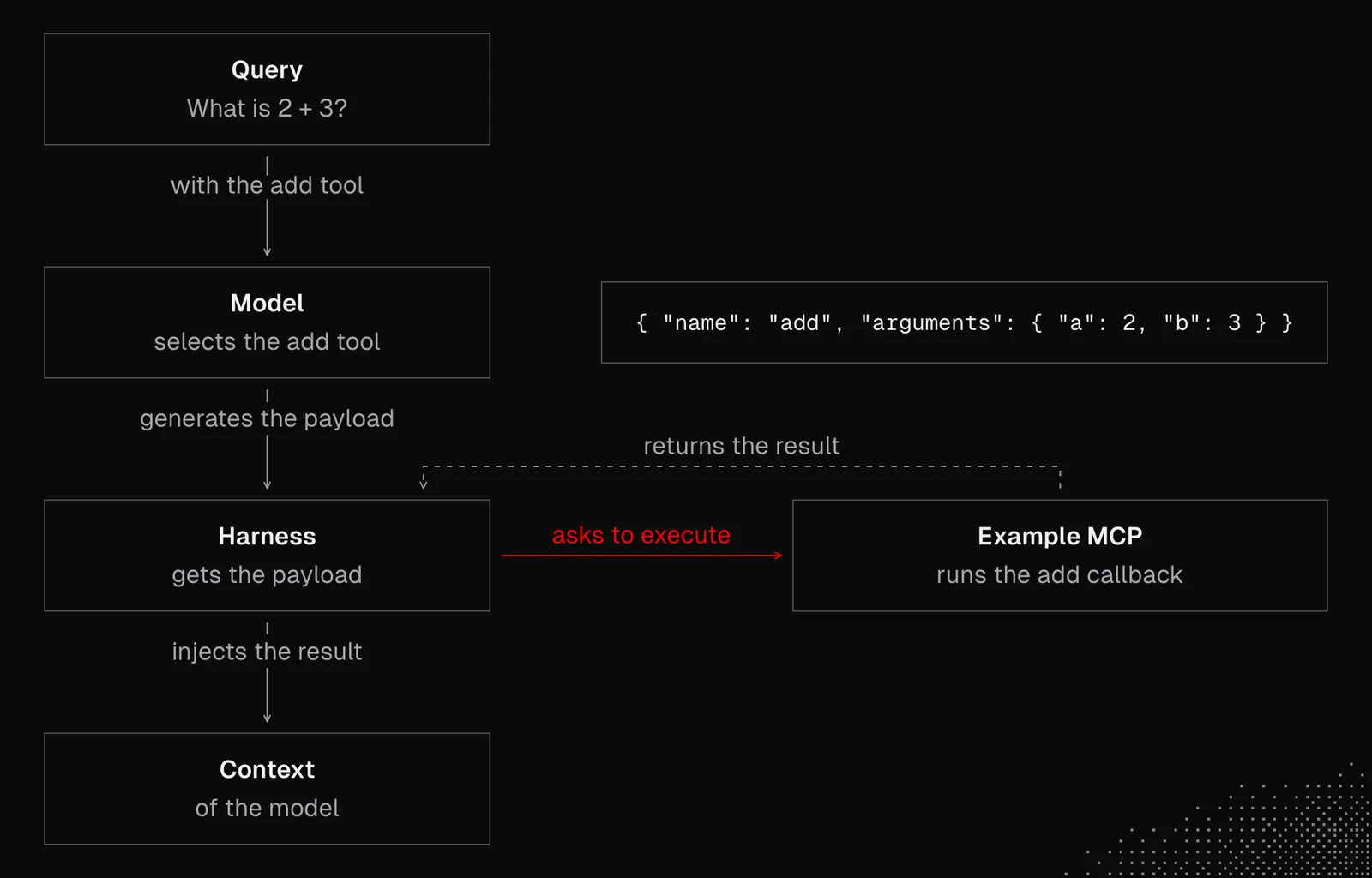
The code above is enough to simply pass our agent the MCP server's address (http://127.0.0.1:3000/mcp in this case) and ask them to connect with it. This way we expose the defined tool add for the agent that will decide on their own when to use it. If they do, the harness will ask the server to execute the callback associated with the selected tool.
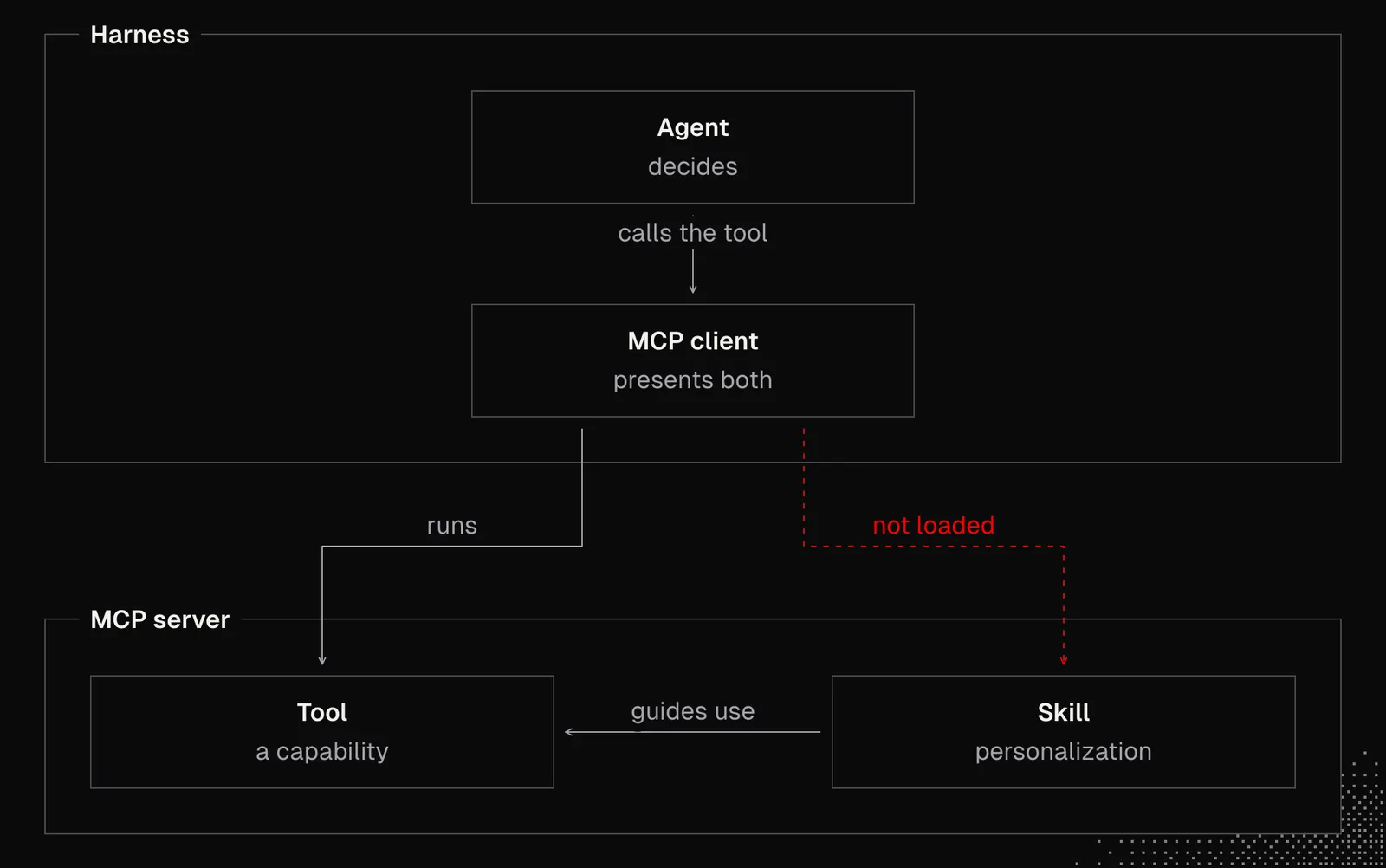
As the graph below shows, these are the same mechanics we've seen with native tools. The difference is that the schema comes from the MCP server, which is asked to execute the callback when needed.
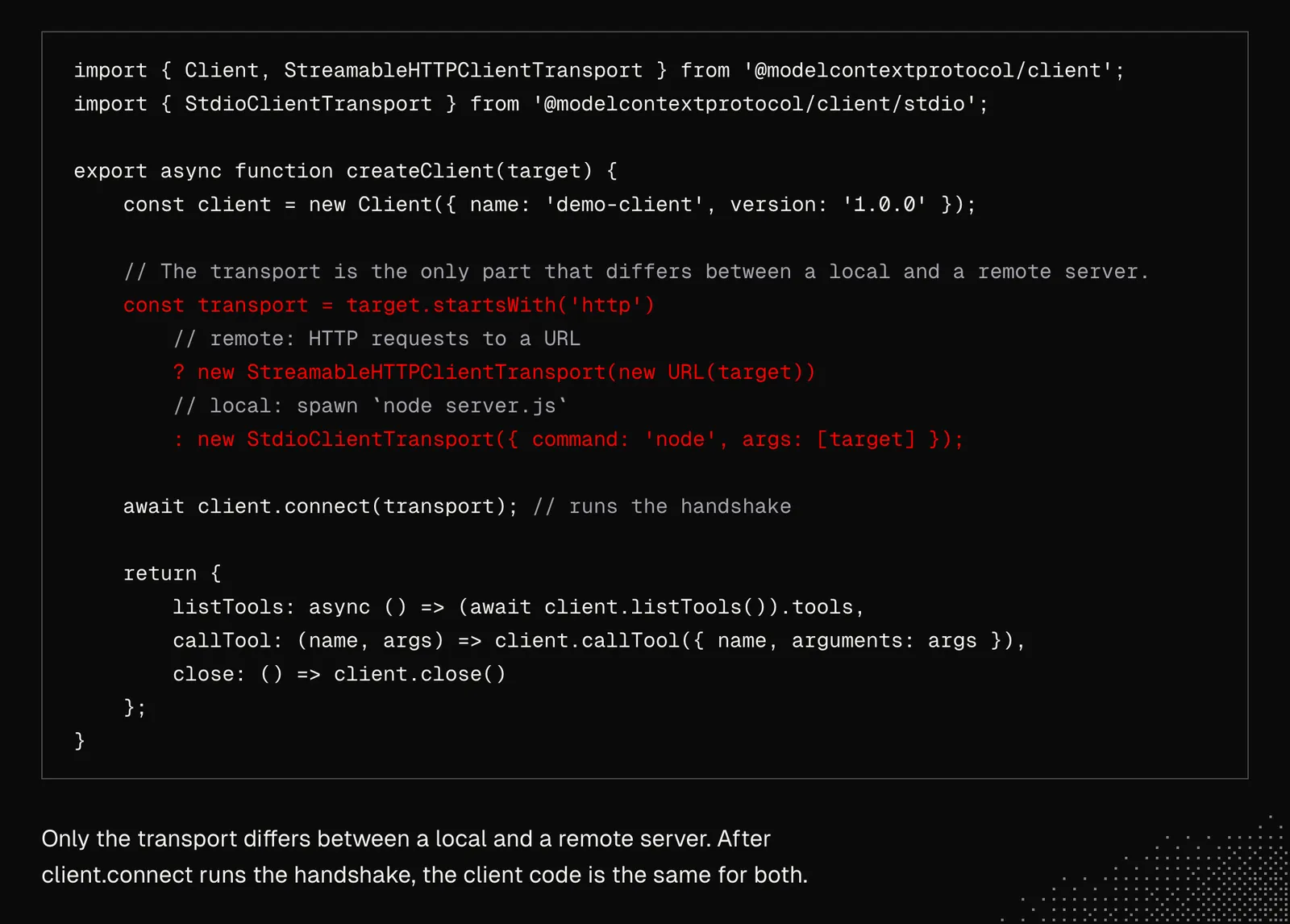
For the full picture, below is an MCP Client that connects to an MCP Server and provides a list of tools and an interface to call them. In the code below, the client handles two types of MCP servers: Streamable HTTP for remote servers and STDIO for local processes that often live on the host machine.
At first, Model Context Protocol was seen as hype, and soon after as a worse solution than CLI, which worked better in the context of a single user. The main reason for MCP's issues was that harnesses loaded all the tools into the context upfront, so even a single server exposing 50-90 tools bloated the context before any message was sent to the agent. But today we have code mode, so it's possible to load even 2500 tools.
MCP is not just about tools. It also simplifies authorization, provides a way to expose resources (such as files) and prompts, and even supports sampling, which lets the server ask the host to make LLM calls. Unfortunately, support for these features varies by client, so it's worth keeping in mind.
Today, the protocol is behind almost every integration we see in popular harnesses. At the same time, it has made huge progress, pushing towards stateless MCP Servers, skills over MCP and Events (draft).
To create our first server, we may start by choosing an SDK and asking an AI agent to generate one for us. As a reference you may also want to add this TypeScript template I've been developing for myself. MCP Server may be hosted on our VPS or on Cloudflare, depending on our preferences. All we need is to expose the address the harness will connect to.
When developing an MCP Server, we may want to keep in mind what we have discussed in S02E02 about tool design, but also:
- Server name should be possibly unique, because harnesses often present the tools in form of
server_name__tool_name, for examplespotify__play, orintegrations.spotify.play(). - Server instructions can be set although most harnesses either ignore them or trim. It is worth having them though, to briefly explain to the agent how to use the server effectively.
- MCP Servers may be used internally, to easily share integrations and knowledge between agents
- Evals: test the server within popular harnesses to see how changes in logic and tool shapes affect behavior. As always, we should aim to automate this process.
- MCP can be not only about exposing tools, but become a capability layer for the agent that will travel with the user and their harnesses. I wrote about this concept here: https://mega.dev/wrong-about-mcps - in short, MCP may expose tools for interacting with primitives that will cover memory, integrations, deterministic logic and more.
The last two points are the most interesting here as they can make MCP Servers extremely useful. It's also worth considering thinking not only of developing a single server but also of developing many of them. This is where the concept of global context comes in, where our coding agents will be aware of not only the MCP server we have but also all the others.
Designing a custom MCP
The agents we have today can build an entire MCP server and deploy it if we simply point them to the documentation of the service we want to build it for. Our job, then, is to make this process easier for them (suggesting the template I mentioned, etc.), more reliable, and adjusted to our needs. AI won't figure out things like the fact that we may want multiple servers, or our preferences for the final shape of the MCP, including skills we may want to have to augment the tools.
One of the best ways to start working on MCP Servers is to build one for fun, not necessarily for work or for clients, but just for ourselves. It has to be something that, once connected to our harness of choice, will become part of our lives. An example here may be Spotify, which at first may sound silly, because why we would want an MCP server for playing music. In practice though, there are many reasons, such as:
- Personalization: thanks to memory, the agent may learn our preferences not only within Spotify, but also connect them with time, places or people. Memories may help not only with current playback but also with shaping playlists and queues.
- Advanced Search: vast knowledge of language models and agentic web search may find music even based on vague descriptions or associations such as soundtracks from movies or games.
- Automation: an agent connected to our devices, calendars and location can be better at adjusting the music and managing it autonomously.
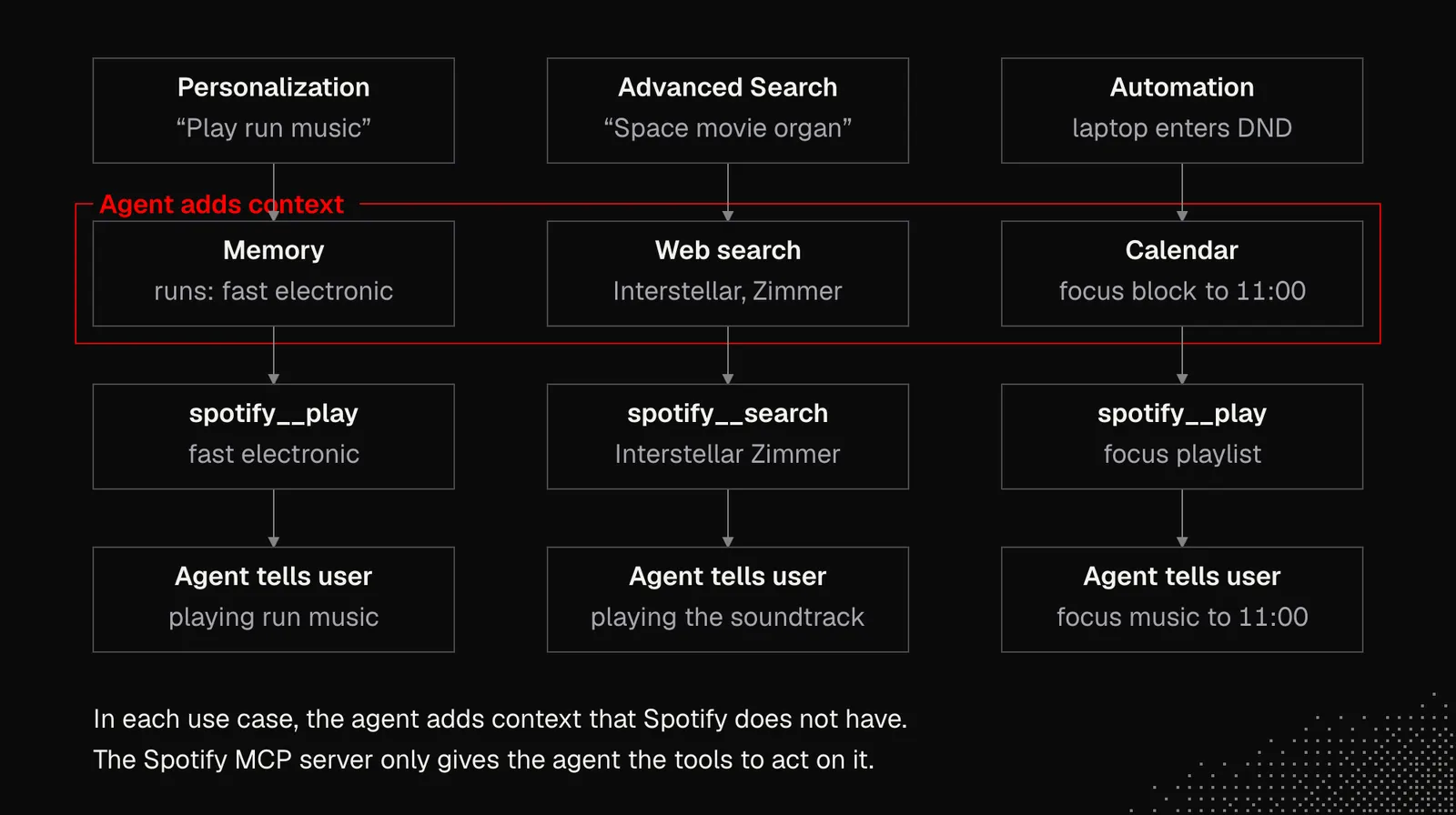
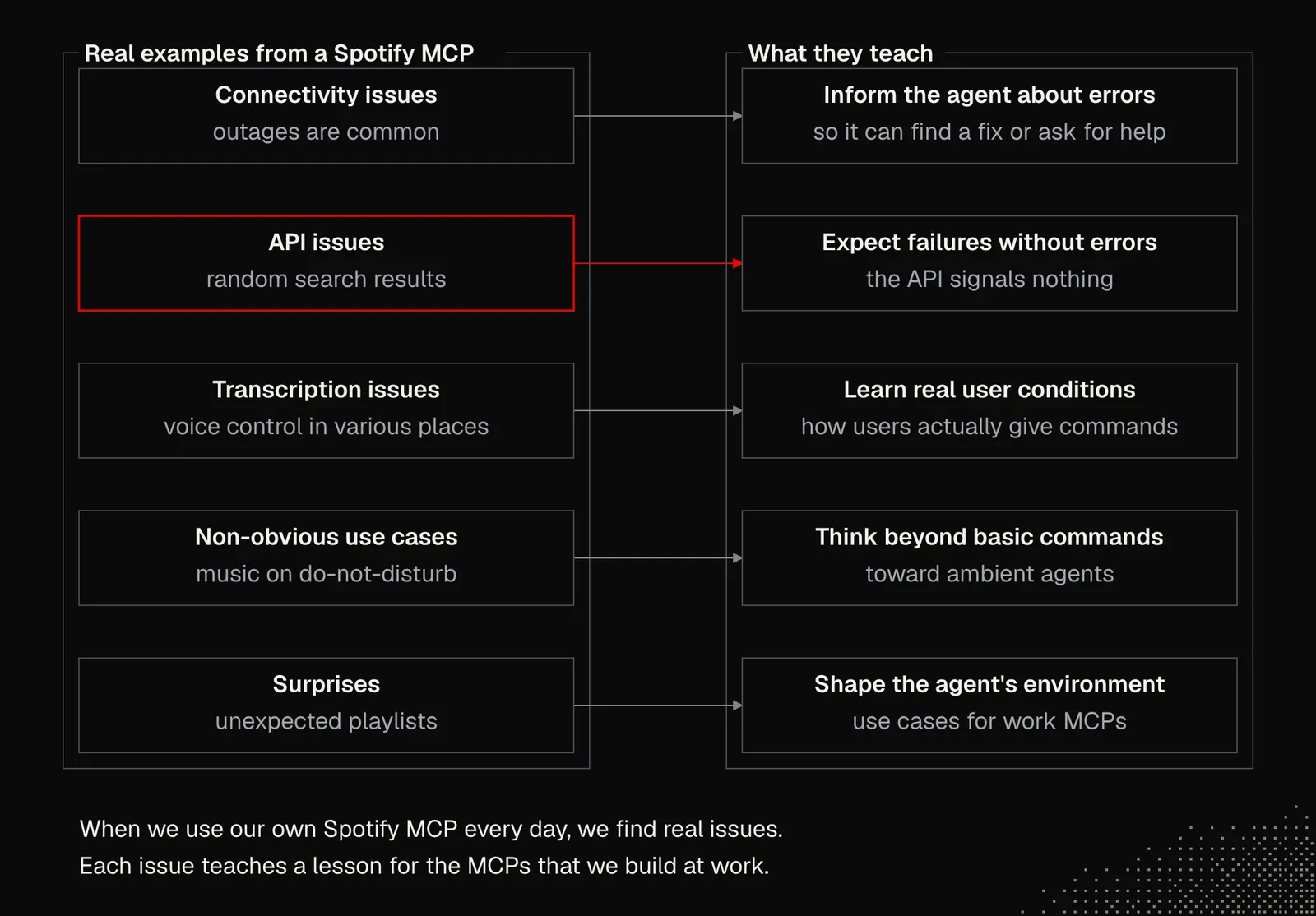
All these mechanics don't necessarily increase our productivity, but they can give us experience with real-world scenarios such as:
- Connectivity Issues: they are common, and our MCP server should handle outages properly and inform the agent about errors, so it can figure out a solution or ask for help.
- API Issues: sometimes an API behaves in unexpected ways without signaling any kind of error. Spotify, for example, occasionally returns entirely random search results for a query. Another example is playback getting locked when Spotify is connected directly to an external speaker (like Sonos).
- Transcription Issues: music is something we naturally control best by voice, often in various places and under conditions that may lead to transcription mistakes and issues with our intent recognition. Experiencing this will teach us about the real use cases users may have when using our products.
- Non-obvious use cases: automatically switching the music when the laptop goes into do-not-disturb mode, or recalling a track based on where and when it was played, are little details that teach us how to think beyond basic commands and push our reasoning toward ambient agents.
- Surprises: when the agent's memory grows and it's connected not only to services but also to devices and the event stream of our activity, it may surprise us with playlists we wouldn't have thought of. A detail like this encourages us to think about shaping the agent's environment to give it a better understanding of our context, and that leads to potential use cases for the MCPs we'll build at work.
Building MCP servers for the services or smart devices we use is easy. But there's no need to cover 100% of an API's functionality, because an agent will never need most of its features. That's why it's wise to review the API first and then design the MCP tools, deciding not only which actions to pick but also what shape they should take.
The trickiest parts are features like filtering and pagination, as well as returning results that have to be enriched with additional API calls to get the full details of each record. Our goal here is to make the interaction easier for the agent, as shown in the example below.
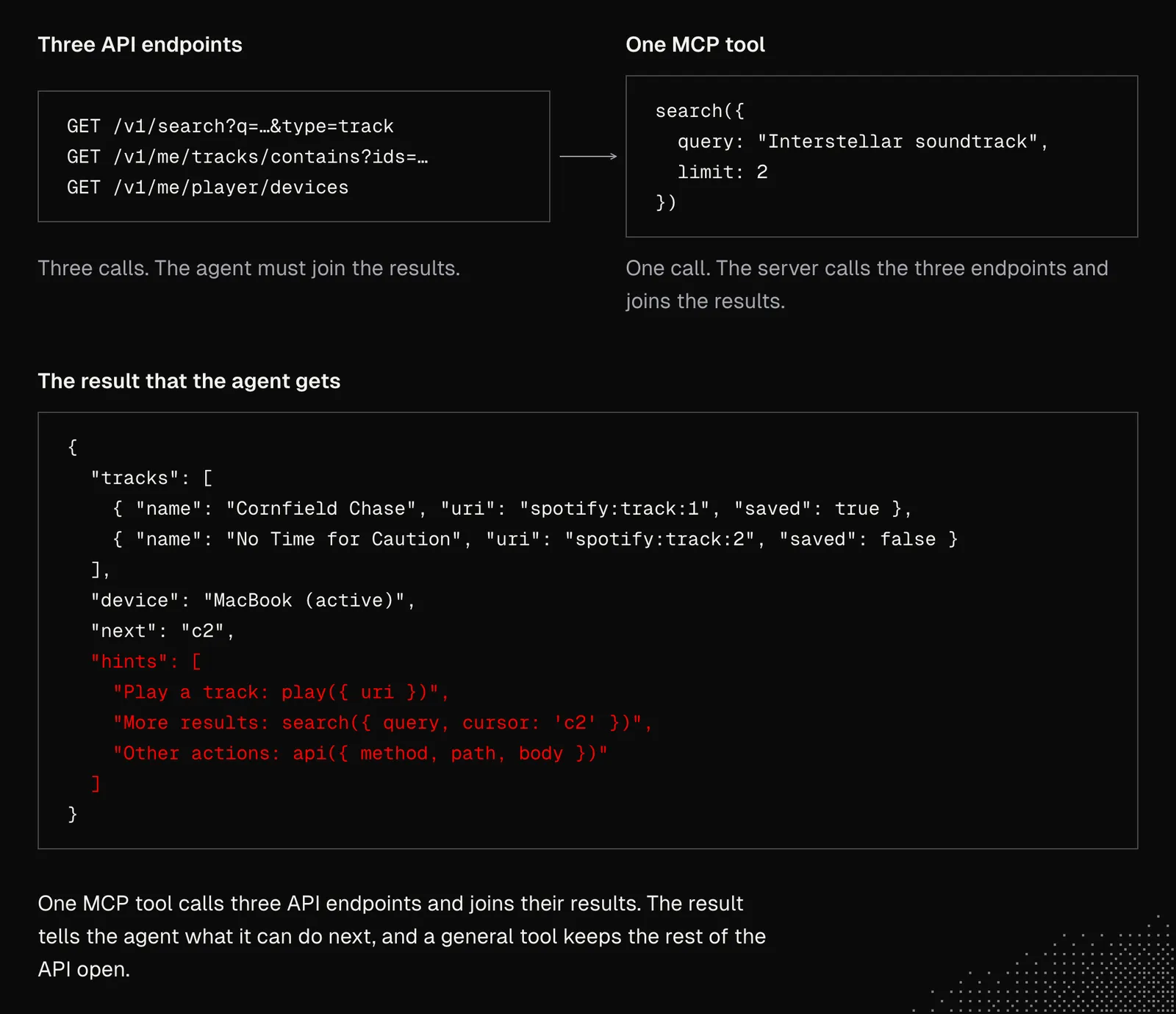
As we can see, MCP is not just an interface that allows communication between the agent and an external service, but also a way to shape that interaction to provide a better experience, including more control over it which is often required in a production environment.
Now, the best way to continue working on this lesson would be to pick a service or device we want our harness to integrate with, and use this template to generate the first version of the server. We may also consider going beyond a coding agent harness and trying Grok Bot, Hermes Agent, or any other alternative that we can customize and have available all the time.
It's also worth exploring the Spotify MCP I've created for my personal use and comparing it with the Spotify API to understand the differences. Then we can make our own decisions about the shape of the MCP we want to create. And as always, it's not about getting it right immediately, but about getting a first version out and iterating on it.
To make everything clear, the process goes like this:
- Type: for local processes, it's better to choose CLI over MCP.
- Scope: there's often no need to map 100% of an existing API to MCP tools, so we need to decide on at least the initial shape, considering use cases that AI can generate for us and present as an HTML / MDX file.
- Initial version: even though we can generate the entire MCP in a single prompt, it's better to keep it as lean as possible so we can quickly iterate on its core features. Once that's done, AI can implement the rest by following the existing patterns.
- Harness: as programmers, we may be familiar with local coding agents, and if that's still our default, it's worth considering moving some of them to the cloud.
- Iterations: iterating on an MCP's shape takes time, especially since we may have many servers. We could handle this with a global context / map that the agents will use to manage MCPs and evaluate the changes.
- Deployment: as mentioned, the easiest way to deploy an MCP is to use Cloudflare Workers, but we can also host it on our VPS and expose it on a subdomain. Whichever option we choose, agents need to be told how to access the instances, read their logs, and monitor possible issues.
Skills & Tools
So far, we've mostly discussed skills as a way to avoid repeating the same instructions and to align the agent's behavior with our preferences. By now it should be clear that we want to avoid skills that tell the agent exactly what to do, so we don't limit its native capabilities. The exception is procedures. They may include the exact steps the agent needs to take. Since these steps are specific to our individual case, the model simply needs to be informed about them.
Now, we want to focus on connecting skills with tools, based on a deep understanding of how harnesses handle both and on what we know about generalizing instructions, to keep the steering gentle and flexible enough for the agent to achieve the best possible results, regardless of the situation.
Today the best way to have tools augmented with skills is to use the skills extension for MCP, which lets a server expose both tools and skills and the harness will present their names and descriptions to the model, so the agent may discover and load them when needed.
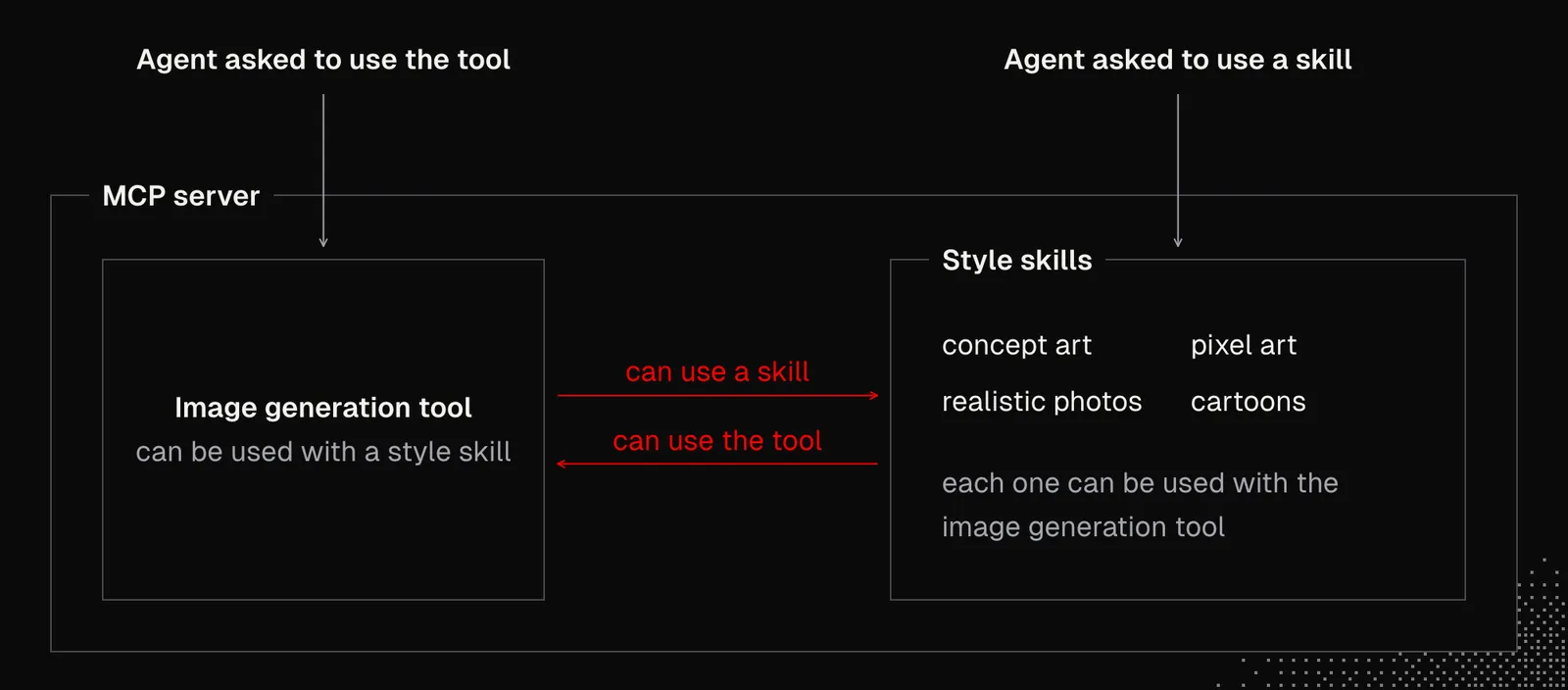
Let's say we have an image generation tool that relies on the Replicate API. The tool may also expose a set of skills that describe various styles, such as concept art, pixel art, realistic photos, or cartoons. To make this setup more reliable, the tool description should say that a skill can be used with it, and each skill should name the tool it can be used with. But that does not mean they have to be used together; the instructions may allow either to be used alone.
The next step is to connect skills by creating "router skills". Say the server exposes a set of tools for image, video, and audio manipulation, along with skills that guide how to stylize each one. Skills can also link to each other, which makes powerful workflows available directly through MCP.
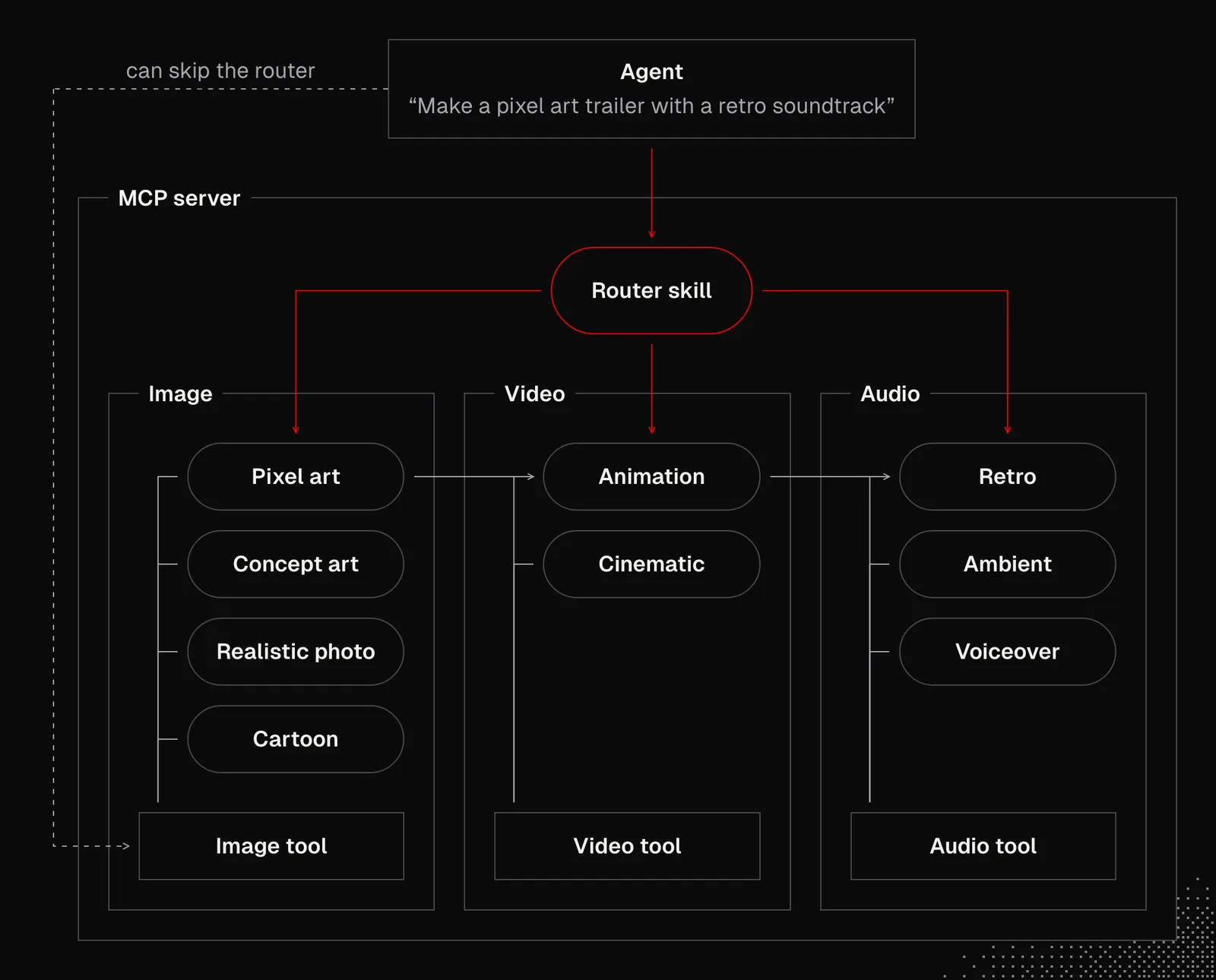
The conclusion: when we design an agent, we may want to keep its core clean and flexible, then specialize it with MCP tools and skills. The goal is not to teach the agent exactly how to do things. Instead, we give it capabilities so it can figure out the best way to use them, or procedures it can follow.
Takeaways
At this point it should be clear that generalization is one of the most important skills to develop if we want to build good agents. But generalization also has to be "embedded" in the agents themselves. In other words, we must avoid giving agents exact procedures. Instead, we should leave a little space for adaptation, so they can look for the best possible way to accomplish a task.
This generalization has to show up not just in prompts, but also in how we design agentic tools and skills, MCP servers, and CLI tools.
It is also very clear that, in general, a good agent should live in a dedicated sandbox, with free access to the filesystem and code execution. This unlocks advanced context management, because the agent can use its native abilities to write code and use the terminal. With those, it can easily access session history, tool results, and generated artifacts.
On the other hand, in some cases all the agent needs is easy, read-only access to documents and a restricted execution environment. It's up to us to decide which path is better for our use case.
And the most important takeaway for today is to create our own MCP server, even just for fun, to play with it and experience its strengths and weaknesses firsthand. Even if we don't use this server with our custom harness but with existing ones, it will still help us understand what makes a good MCP server. At some point, we may also build our own MCP Host to get the full picture of the protocol.