
S03E03 · AI-Native Product Development: MEGA lesson
MEGA’s lesson on using agents to explore, plan, execute and gather feedback while developing AI-native products. It covers Feature Maps, background agents and workflows that maintain and improve a product’s context over time.
textMEGA · hq.mega.dev · Saved Nov 19, 2026
mega course, context engineering, agent orchestration, agent memory
Written lesson S03E03 of the MEGA.dev course, by MEGA. Agenda: Exploration · Planning · Execution · Feedback · Engineering · Delivery. Its lesson video is presented by Kent C. Dodds and saved separately. (MEGA Student HQ, needs a login.)
S03E03 · AI-Native Product Development
Agents can handle both "greenfield" and "brownfield" projects almost natively. Without any special setup, they can answer questions and make changes with some degree of accuracy. But in both cases, moving fast with agents while also ensuring quality and alignment with business needs takes additional work. We've already seen many of the reasons for this, so now we'll look in detail at how our system can heal itself, recover from issues and get better over time.
The lessons so far have shown how agents' capabilities can expand through tools and knowledge, giving them a higher degree of autonomy. This lets them take care of things we normally have to keep in mind or are constantly asked about. The problem with this is that over time, the system gets overloaded: some tools are no longer needed, and old documents turn into noise. That's a problem, because "no document is better than the wrong one".
Another reason we may want meta-workflows for maintaining a system is that agents will often face the same problems during their work. When this happens to us, we remember it for next time. Agents need something similar so they can build and adjust their skills or create tools.
Having all this makes the product AI-native. In practice, however, we may want to start small, because building everything takes time, and we don't yet know what everything includes.
Outline
- Exploration: synthetic user flows, interactive maps, historical changes, architecture visualizations
- Planning: scope expansion and contraction, risk mapping, graphs, high-level implementation strategies
- Execution: direct work, handoffs, parallel agents, merge points, delegated work
- Feedback: system logs, visual feedback, human feedback, artifacts
Exploration
Agents start their work by exploring, because they need to gather the context to understand the task and make changes. Then they repeat this process every time, as if doing it for the first time. Sometimes they even fail, which hurts their work, and yet they don't leave any trail or take any notes about it unless we build a workflow for that.
Scenarios like that happen all the time, and they're not limited to the codebase. They also involve navigating external systems: remote repositories, issue trackers, communication channels, and infrastructure. The most straightforward solution is a map, which we mentioned in S02E01. The problem is, in systems that evolve fast, such a document quickly becomes outdated and adds more confusion than guidance. And that is the exact issue our workflow needs to address.
The problem is that we don't know the exact state of the map, or which variables we'll need to consider to improve it. But we already know that in such cases we should define principles, scope, and the schedule or trigger. Everything else should be left for an agent to figure out. The agent should also have access to the history of its actions, so it won't repeat the same mistakes and the system will actually "learn".
And to be clear, we're not talking about a codebase map or anything an agent can easily find. We're talking about context that isn't obvious from the code alone. It's more like a set of documents explaining the features: their role, how to interact with them, how to verify them, and what's worth keeping in mind about them.
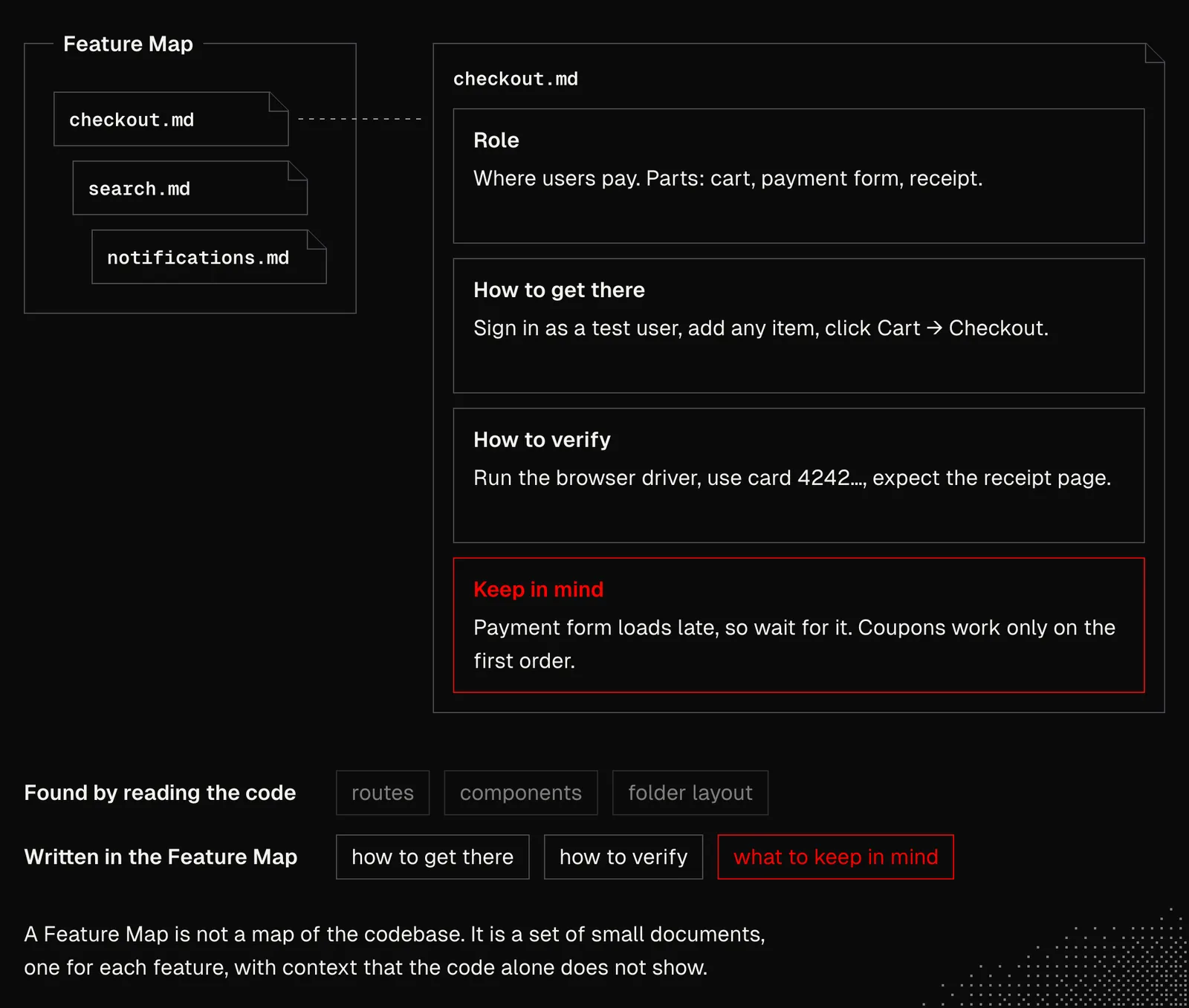
Lauren Tan described the Feature Map concept in relation to her agent skills for verification (generate, maintain). She uses them with Cursor Cloud Agents that run on a daily schedule. The two skills generate small files that describe the areas of her apps she wants her agents to understand. That's exactly what we need in production systems, where changing the behavior of one feature may have a non-obvious impact on another.
So our role here focuses mainly on crafting and iterating skills, but also on initializing maps, because a map's initial shape directly affects its reliability and usefulness, and it shapes the improvements agents make to it later.
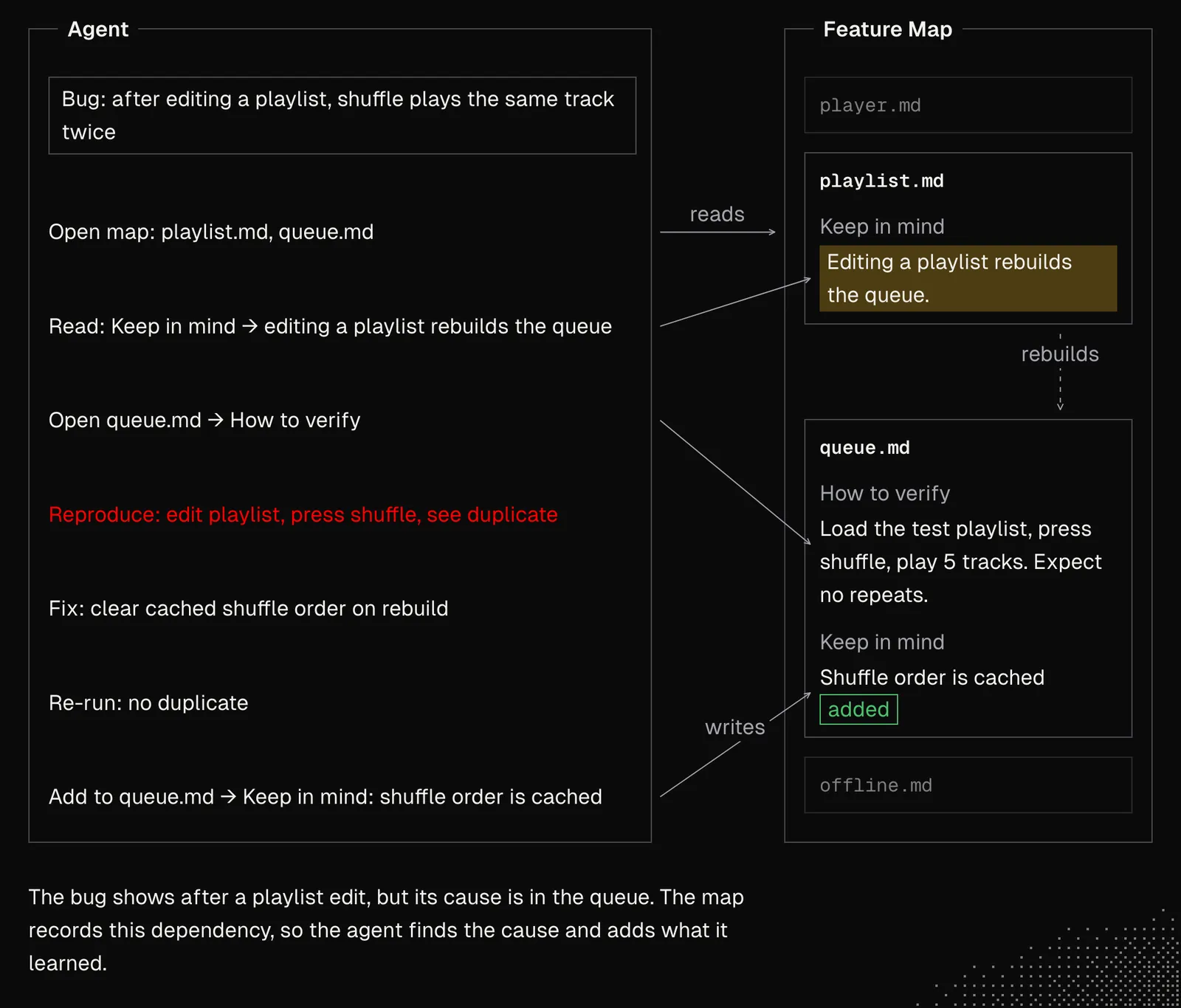
As a result, Feature Maps improve how agents go through the exploration phase, and not only that. Having this context also makes them better at implementing features and verifying them afterward. The example below shows how it may work in practice: in a music player app, solving a bug with playlists may affect queues. That's easy to miss, but thanks to the feature map, the agent takes care of it.
Schedules or triggers that maintain the maps must look for more than things to add. They must also look for things to modify and remove (archive). In fact, most background agents that handle maintenance should focus on cleaning up what's no longer needed. It's also worth considering an easy way for them to communicate with us not only when needed, but always, using visual artifacts that let us quickly scan the changes and spot issues.
Planning
Having a Feature Map along with the principles discussed in S03E02 makes conversations about changes and bug fixes much easier for us. We no longer need to describe every detail or keep it all in our heads. Even if we mention a feature only briefly, the agent connects it with everything that's needed and helps us reason about what to do. In fact, a conversation with an agent that has this knowledge is like a discussion with a teammate who has spent years on the project and knows the answers to nearly all questions.
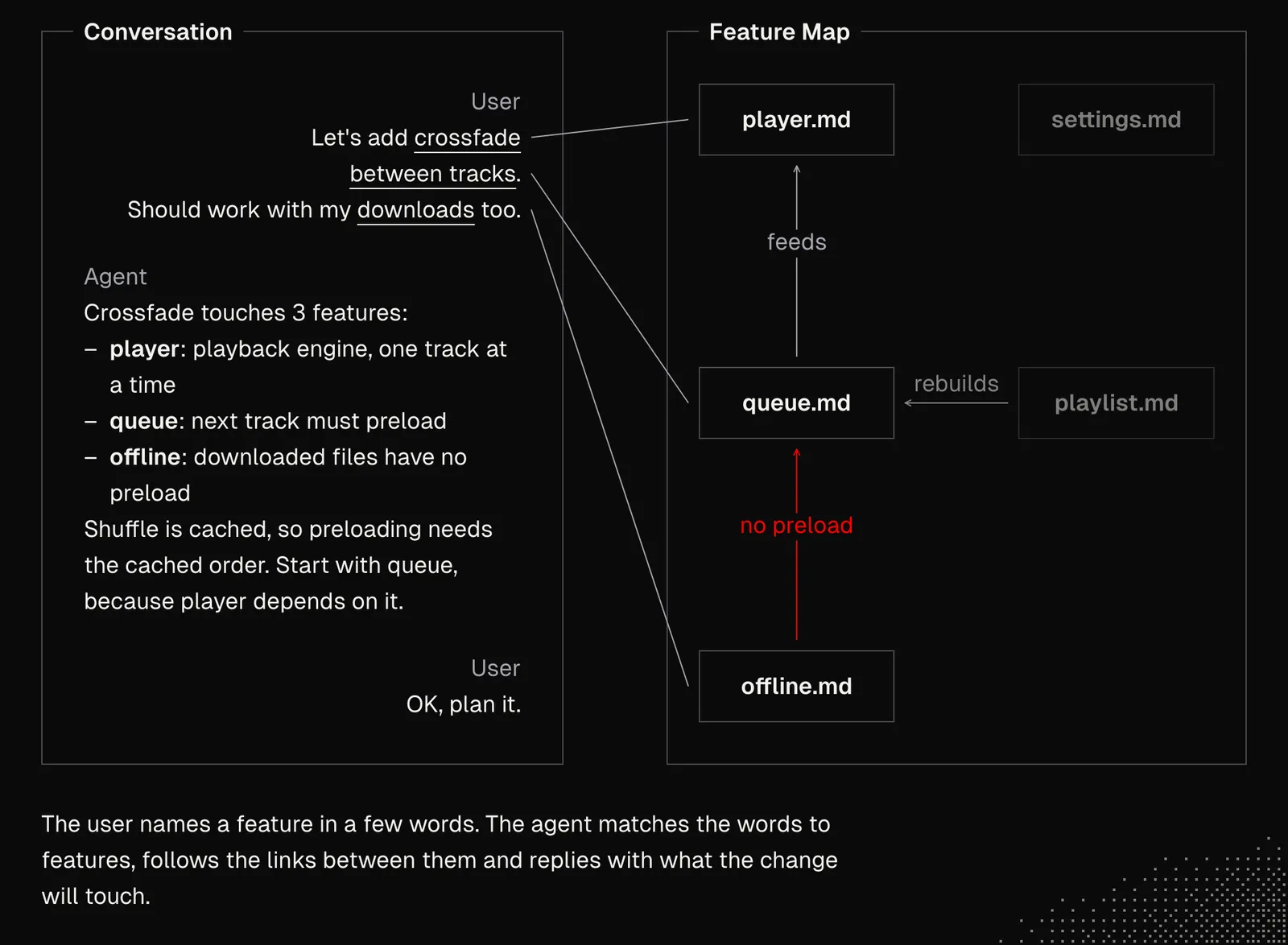
Discussing features is also a perfect moment for subagents or workers, because it is in our interest to keep the main thread focused on the most important aspects and also interactive. In the background, agents may focus on research, or on updating the graphs, visualizations or labs we discussed in S03E02.
But now we can push this much further, because agents can translate our intent into high-quality plans and apply, to some extent, a "common sense" that comes from "understanding" the system and the relationships between its components. And the best part is that the longer we work on the system, the better this process becomes, because the available context keeps improving.
In fact, this process can be easily delegated to background agents that can iterate on the shape of features, looking for edge cases and the best way to address them. This does not mean we're entirely excluded from the process, because the final decision is ours. But this approach lets us amplify our own knowledge, skills and judgment because the proposed plan would be hard for us to develop even in direct interaction with AI.
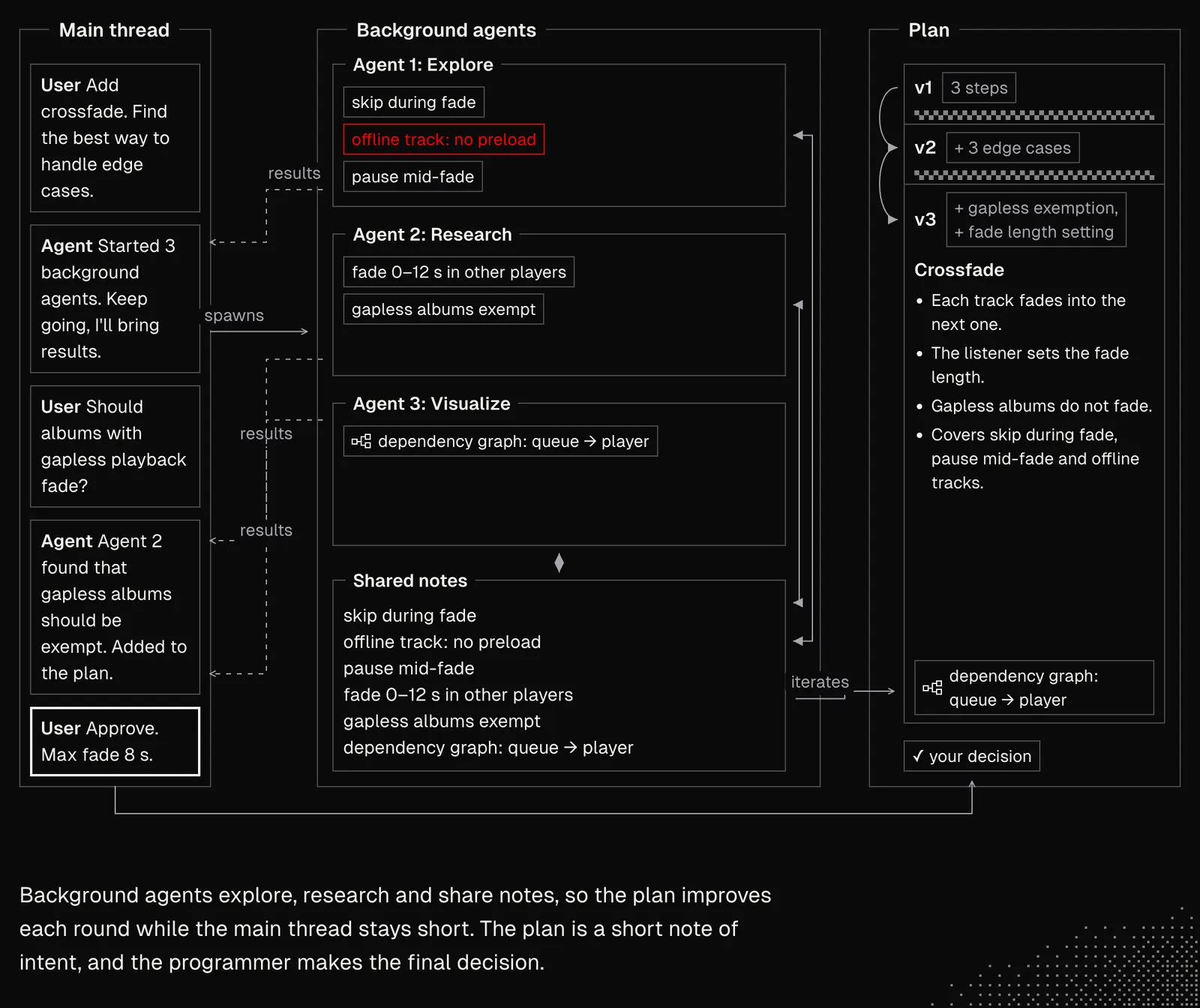
As we discussed, the plan shouldn't describe how things should be done. Instead, it should focus on what needs to be done and how the result will be proven. The document itself should be fairly short, although it can refer to external files. In general, it's in our interest to keep the feedback loops as quick as possible, at least until the system is ready to handle longer tasks without supervision.
Now, if we look at this through the lens of every lesson we've gone through, it should be clear how we can combine our knowledge with custom tools and setups to shape a system tailored to our product. And it's up to us to decide which parts we'd like to be involved in. That largely depends on the feature we're working on, but also on the level of trust we have in the system.
Execution
AI-native product development reduces, and sometimes eliminates, many of the processes we know not only from the pre-AI era but also from the early days of AI, when we worked with agents directly. Activities such as writing code, reading it, and even reviewing it are getting automated to the point where humans aren't involved at all. And if that doesn't sound crazy enough, agents are starting to manage other agents and make more and more decisions on their own. It feels like there isn't much left.
In practice, however, there are many things we need to take care of.
Research: Before AI, product development mostly depended on our current skills and what we were willing to learn in a reasonable amount of time. For example, if we were fluent in the JavaScript ecosystem, we rarely decided to build something in Rust. The same went for libraries (such as Three.js) or areas (such as functional programming) that were simply too demanding to grasp. But now these barriers are either gone or much easier to overcome.
This way, research and exploration have become part of our job. And the fact that AI can use almost any tool flawlessly does not mean there is no need for us to understand how it works. In fact, it's the opposite, but instead of learning everything, we need to dig down only as far as the task requires, and we need to learn how to recognize that point and build tools and workflows that will help us with it.
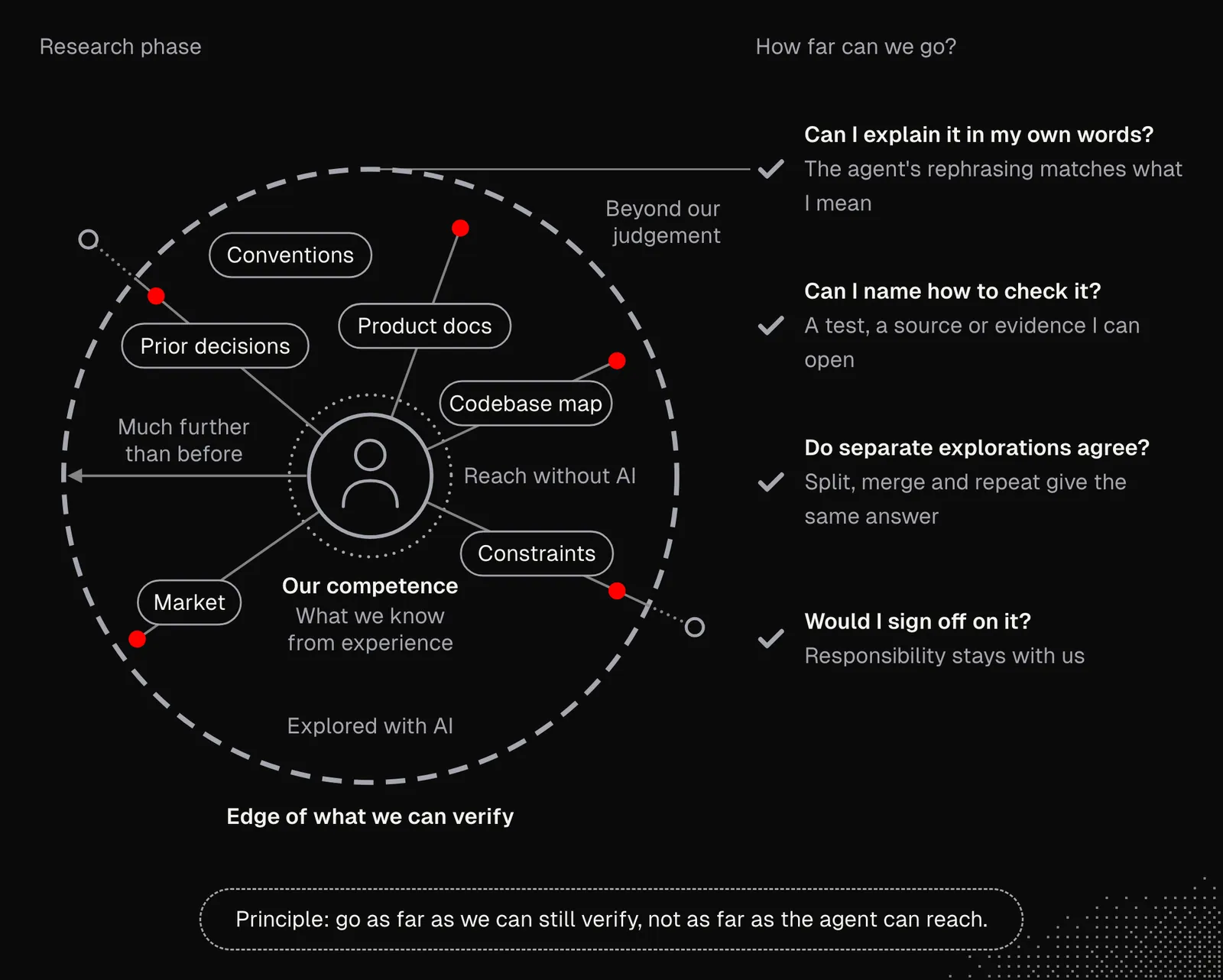
Structure: As engineers, part of our job was to manage things like architecture, documentation, external services and infrastructure. AI-native development keeps most of these in place, but agents are the ones doing the actual work. Our job now is to keep it all organized in terms of processes, schedules and efficiency, along with the mechanics behind the system's observability, stability and improvement. And as we saw, this requires working on a sort of "meta-level," because it's not about telling agents what to do, but making sure they know what to do and ensuring they can do it. There's a great read from Lauren about this in the section "the art of supervising someone smarter than you" in The Complete Guide to pstack.
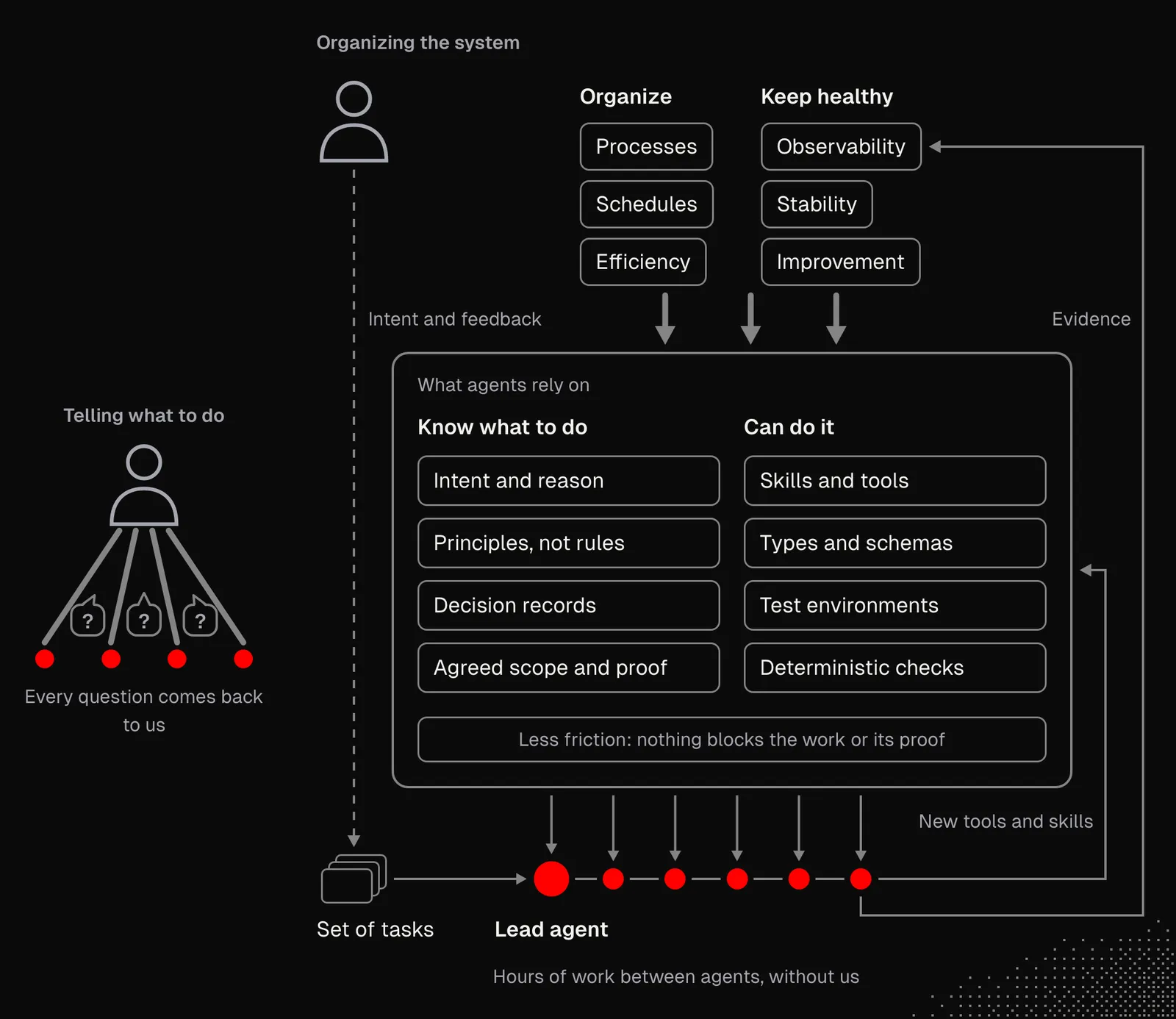
Doing this requires us to apply everything we've learned so far, but also to shift the way we think about and look at our work. That's because before AI, our default solution to a problem was fixing it ourselves. With AI, it's often telling an agent to fix it. But what we're trying to figure out is how to make an agent aware of the issue and able to respond to it properly.
Ecosystem: Let's say we're familiar with Axiom but know very little about Datadog and Better Stack. If our product needed observability, Axiom would be the obvious choice for us, even if its alternatives offered better features. Before AI, understanding and adapting to an entirely new platform took effort we rarely chose to make.
With agents on our side, we can have a report within an hour that compares our options and clearly explains their features in a way tailored to us, including a map of the architecture and the effort needed to integrate each option. This can be applied to literally every single service.
For example, below is the stack we use at mega.dev and MEGA HQ. We chose its components not because of our personal preferences or experience, but because of business opportunities and organizational factors. I'm not saying the stack is perfect, but even if any of its components needed to change, AI would make that effortless, especially thanks to good architectural decisions that keep integrations simple.
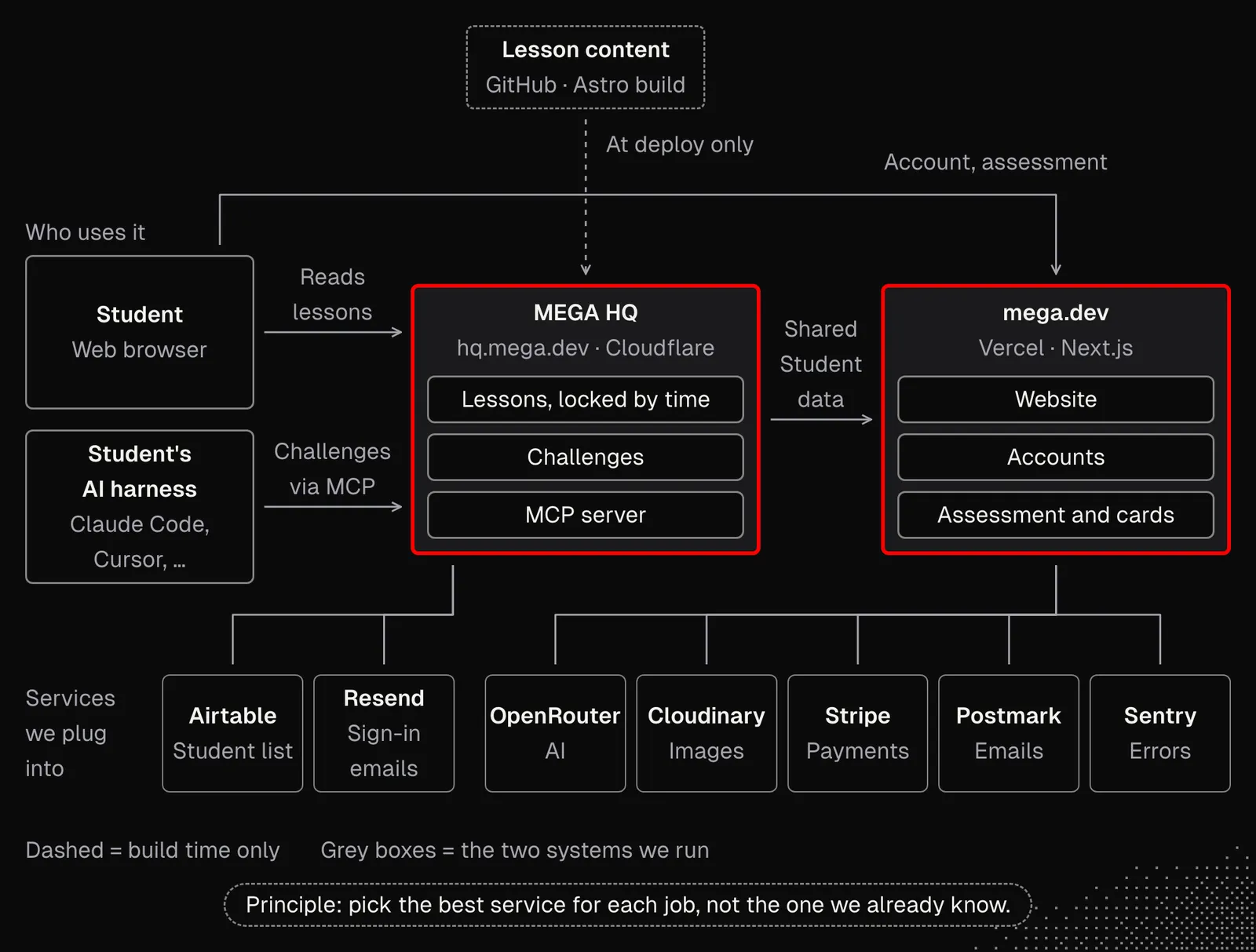
Even though we can generate personalized software today, there's often no point spending time on things we can get out of the box. And since we have agents that can build deeply personalized integrations that make full use of what external services offer, we should definitely use that to our advantage.
Schedules: AI-native product development brings challenges because many agents may work simultaneously. This quickly reveals that the tools we use weren't built for that, as agents spawn processes and run tests, compilers, or entire sandboxes and virtual machines. Suddenly, even 128 GB of RAM in a maxed-out MacBook is not enough.
The moment we start noticing that we're running out of resources (CPU, GPU, RAM, or storage), the first thing we can do is ask agents for an audit that identifies bottlenecks. Depending on the stack, the audit may find one-off solutions we can implement right away, or issues that need to be handled on a schedule, such as checking for stale processes or pruning leftovers. In some cases it is worth considering adding queues or throttling for the most demanding processes, such as compilation.
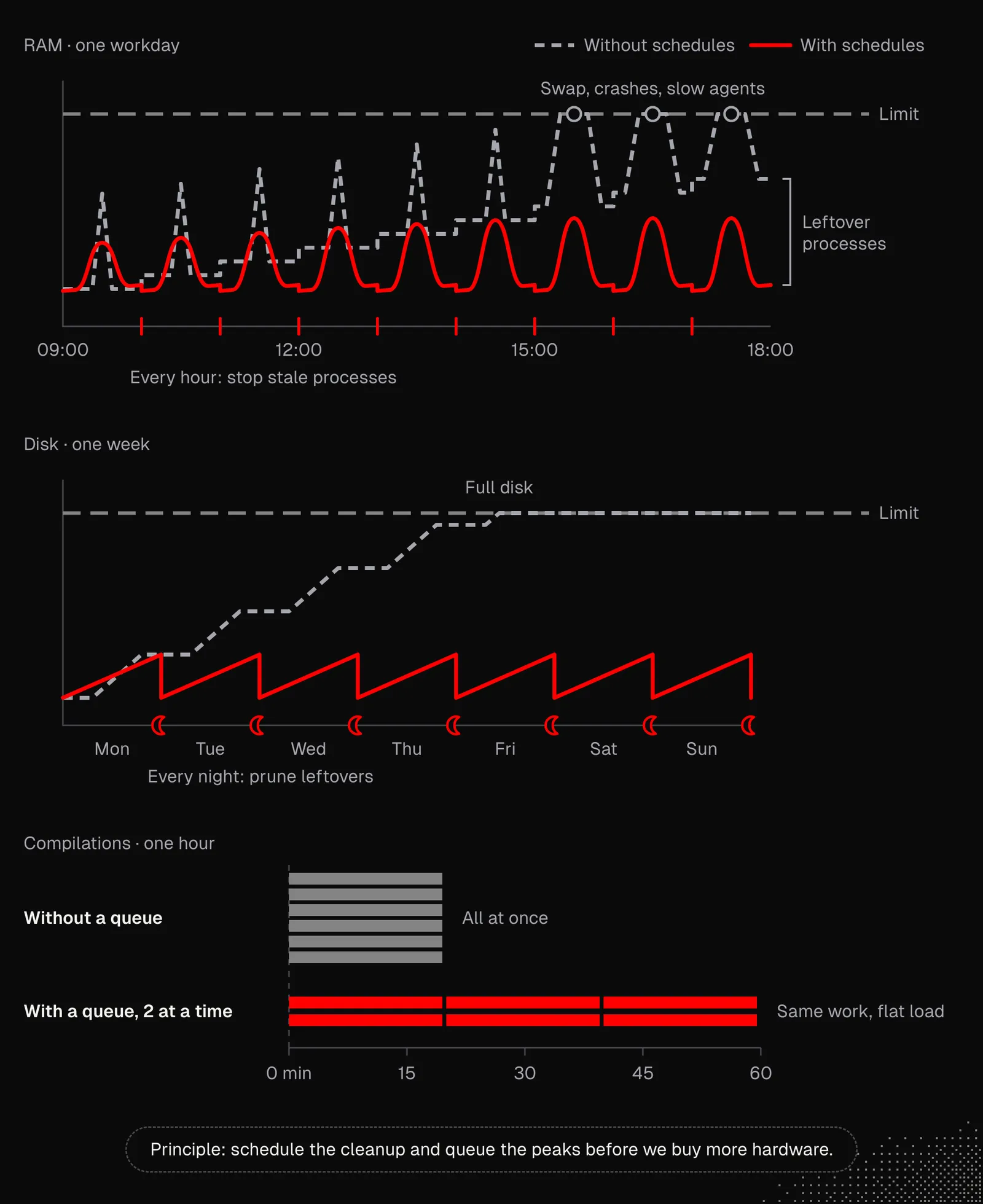
When optimization isn't enough, instead of buying additional hardware, we may consider cloud agents (Codex, Claude Code, etc.). They don't offer as much flexibility as a VPS or a physical machine, but scale very well.
Besides optimization, schedules are useful for system monitoring focused on anomalies, user behavior and security issues. These days, such schedules are a critical part of the system, as we may expect constant attacks that come not from dumb bots we can reliably fight off, but from dynamic agents that will look for a way into our system. It's worth considering skills such as security-audit and a proper Sentry setup that reports issues directly to agents.
And lastly, we have schedules for managing workflows that handle the actual work on the product: solving issues, fixing bugs, reviewing features, refactoring, etc. These are often set up in the cloud, so they don't depend on anyone's machine.
So overall, schedules are becoming an important area to cover in AI-native development. Getting them right can easily make a real difference and even become a competitive advantage.
Feedback
Agents need as much access to real-time environment data as possible. This data helps them understand the system, including both its current and historical state. To make that possible, the system itself has to be organized with this in mind. We might consider things like easy access to development and production logs, activity events, an easy way to interact with the app, the ability to take screenshots and record videos, and more.
Such an interactive, data-rich environment rarely exists in software. This means we first need to decide what information is needed and then rebuild or extend the system to actually deliver it. Not for us, but for agents.
Below is an example architecture of a system that includes a whole set of structures, tools and services dedicated to agents. They let agents interact with the app in the development environment and also give them easy access to almost anything about the production system. This diagram clearly shows we're not talking about a simple logger. And building this requires making it an actual priority.
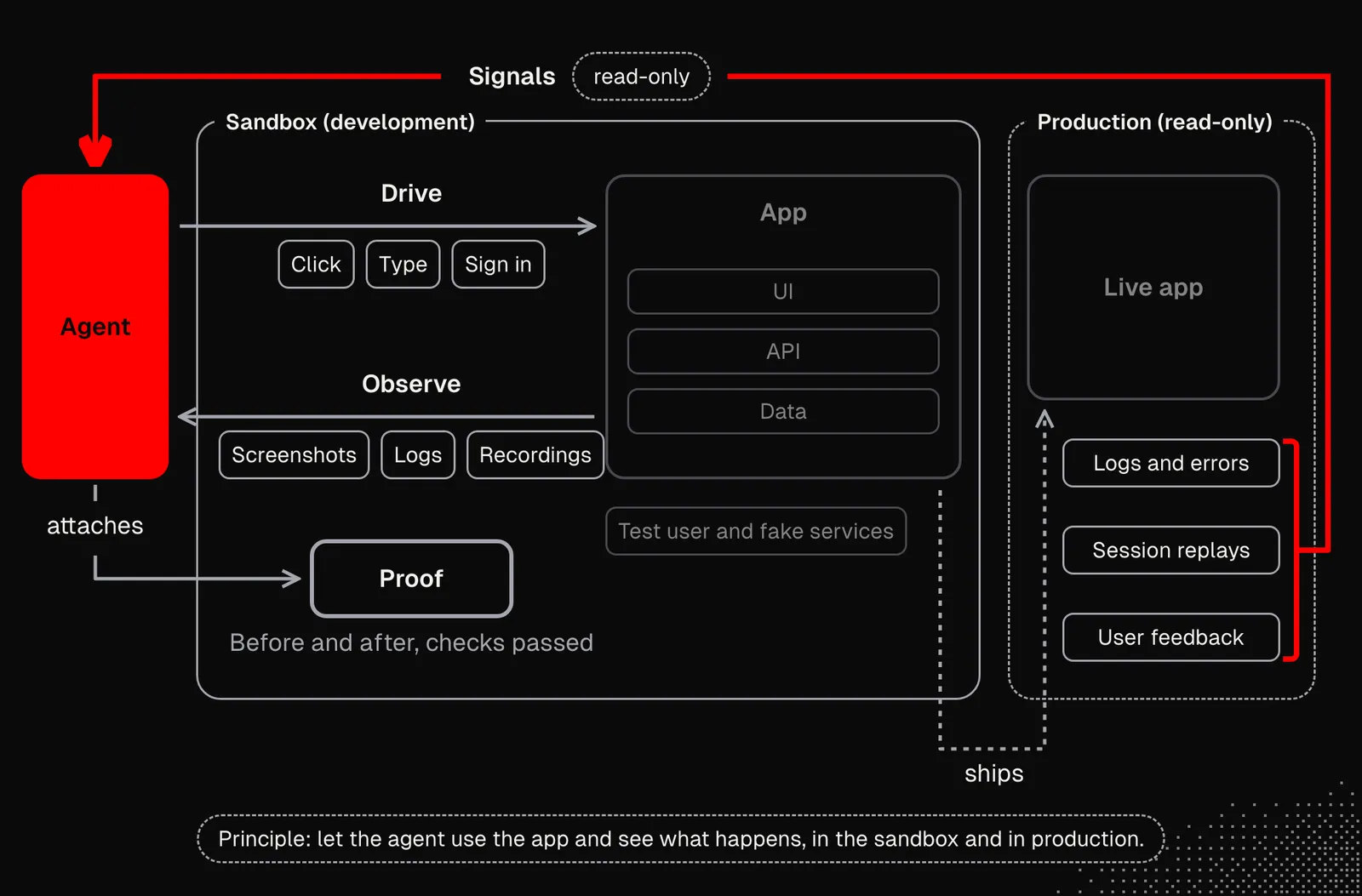
Building structures for agents to get valuable feedback is crucial and forms the foundation of the entire system, because these structures play a big role in building trust and letting agents reliably verify their work. Regardless of whether we have an existing system or build one from scratch, it is hard to tell upfront what exactly we need, so as always it's a good idea to start small and then set up useful schedules that let agents maintain the tools and improve based on the insights from available logs.
Takeaways
Going beyond working directly with agents and building a truly AI-native development lifecycle takes a lot of effort. And even though agents handle the actual work on the software and the system itself, our responsibilities still involve a lot of activities, decisions and understanding. And importantly, working this way requires a new way of thinking about building software, because we're not simply "moving to the next level of abstraction". We also need to expand our perspective and look way beyond code, into other areas of the entire product.
The last thing to consider after this lesson is that when we look back at what we've discussed today, we may realize that AI-native products can move much faster while maintaining quality, and products developed through direct work with agents have no chance of keeping up. And this may lead us to the conclusion that, in some scenarios, it's wiser to build an entire platform from scratch just to gain this advantage.