
S03E04 · Verifying Product Outcomes: MEGA lesson
MEGA’s lesson explains how to verify agent-built product changes by matching acceptance criteria and captured evidence to the change’s risk. It covers agentic testing labs, system diffs, reviews, quality gates, and routines for improving verification tools.
textMEGA · hq.mega.dev · Saved Nov 19, 2026
mega course, agent evaluation, acceptance testing, agent observability, agent infrastructure
Written lesson S03E04 of the MEGA.dev course, by MEGA. Agenda: Acceptance · Review · Verification · System Diff · Quality Gates. Its lesson video is presented by Kent C. Dodds and saved separately. (MEGA Student HQ, needs a login.)
S03E04 · Verifying Product Outcomes
Scaling multi-agent development and pushing it toward autonomy without first building trust won't work and should be avoided, even if it means slowing development for a while. It needs to be clear that agents will happily build the wrong things fast. That includes drifting away from the requirements, but also finishing too early or too late. What's more, in many cases this behavior won't be wrong at its core. It simply won't match our expectations and the processes specific to our product.
As in other areas of AI-native product development, verifying outcomes also has to rely heavily on agents. But depending on our preferences and the product's features, we can build verification around mechanisms that let us understand and see the results.
When this is done well, agents may provide valuable help even with the most critical parts of a system, where we're often uncomfortable deploying any changes. This also makes possible refactoring that wouldn't happen without AI due to its complexity and the risk that something will break.
The last thing to know before we start is that many activities we may want to consider for verifying product outcomes can be designed with agents in mind only. It means that notes, artifacts, evidence, tools and even entire modules may be built only for them. It's worth keeping in mind, because it is not always obvious.
Outline
- Acceptance: definition of done, requirements coverage, observable behavior, completion evidence
- Verification: regression tests, browser tests, synthetic scenarios, agent reviewers, deterministic checks
- System Diff: changes to behavior, user experience, data, architecture, complexity, operations
- Review: code, architecture, UX, accessibility, security, performance, maintainability
- Quality Gates: confidence thresholds, release blockers, known risks, rollback readiness, human approval
Acceptance
In lesson S03E02, we covered the concept of an agreement made before the work starts. Once this agreement is in place, acceptance seems straightforward. The problem is that even if an agent refers back to the agreement and reports that the tasks are finished, that doesn't mean the work described there was actually delivered. What's more, an agent can cheat us by generating evidence instead of capturing it.
Now, the question is: what do we need to accept finished work?
The answer is not obvious, because what we're looking for needs to be generalized and dynamic, but it also has to address the characteristics of each feature and take into account the capabilities and limitations of the model, the harness, and the tools we can build.
We already know that what's needed is a set of principles the agent will follow, but here we also need to take care of the deterministic aspect. It's tricky because we aim for the highest possible level of certainty before deployment, but we also want to avoid a complex review process for the simplest changes.
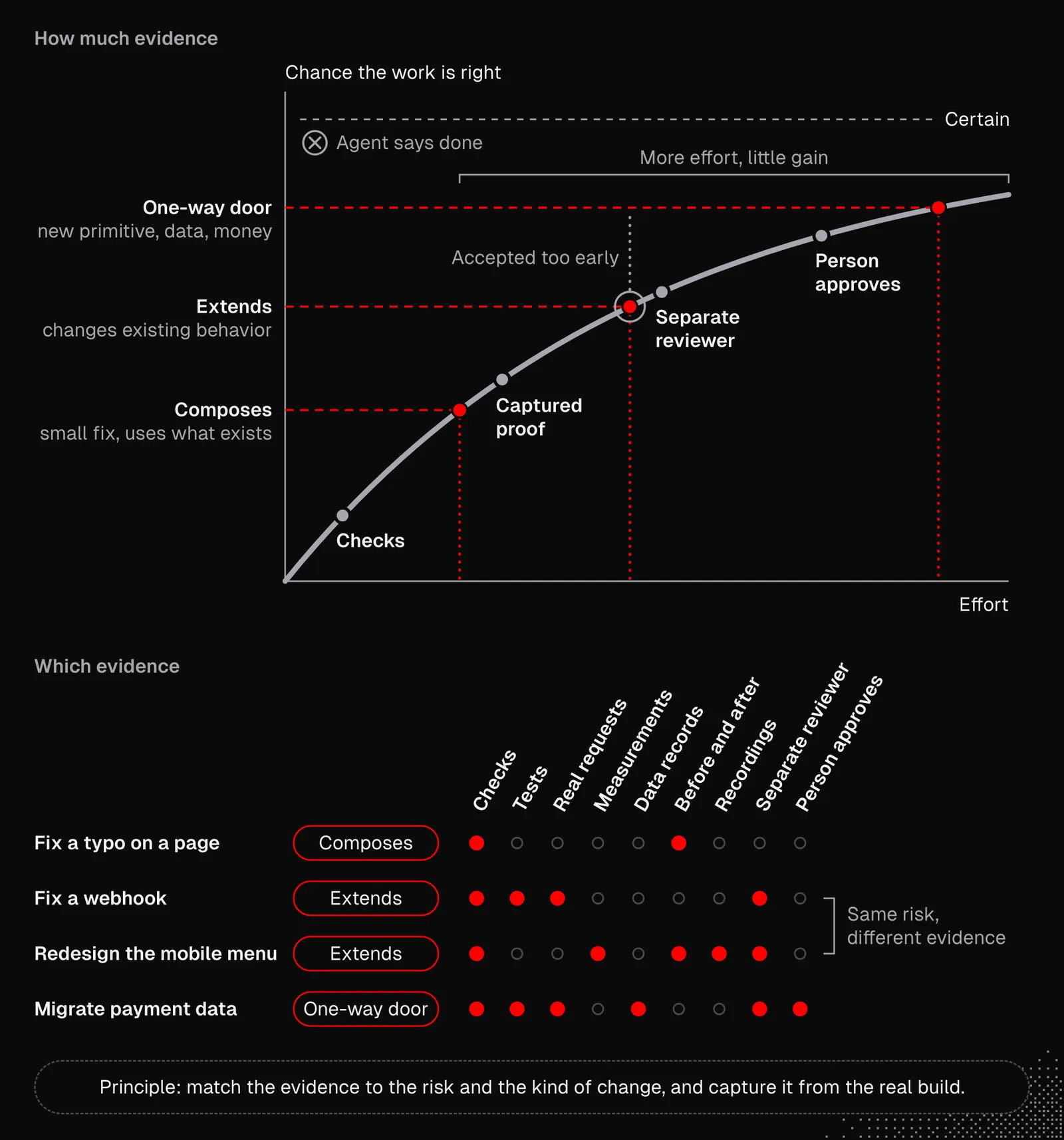
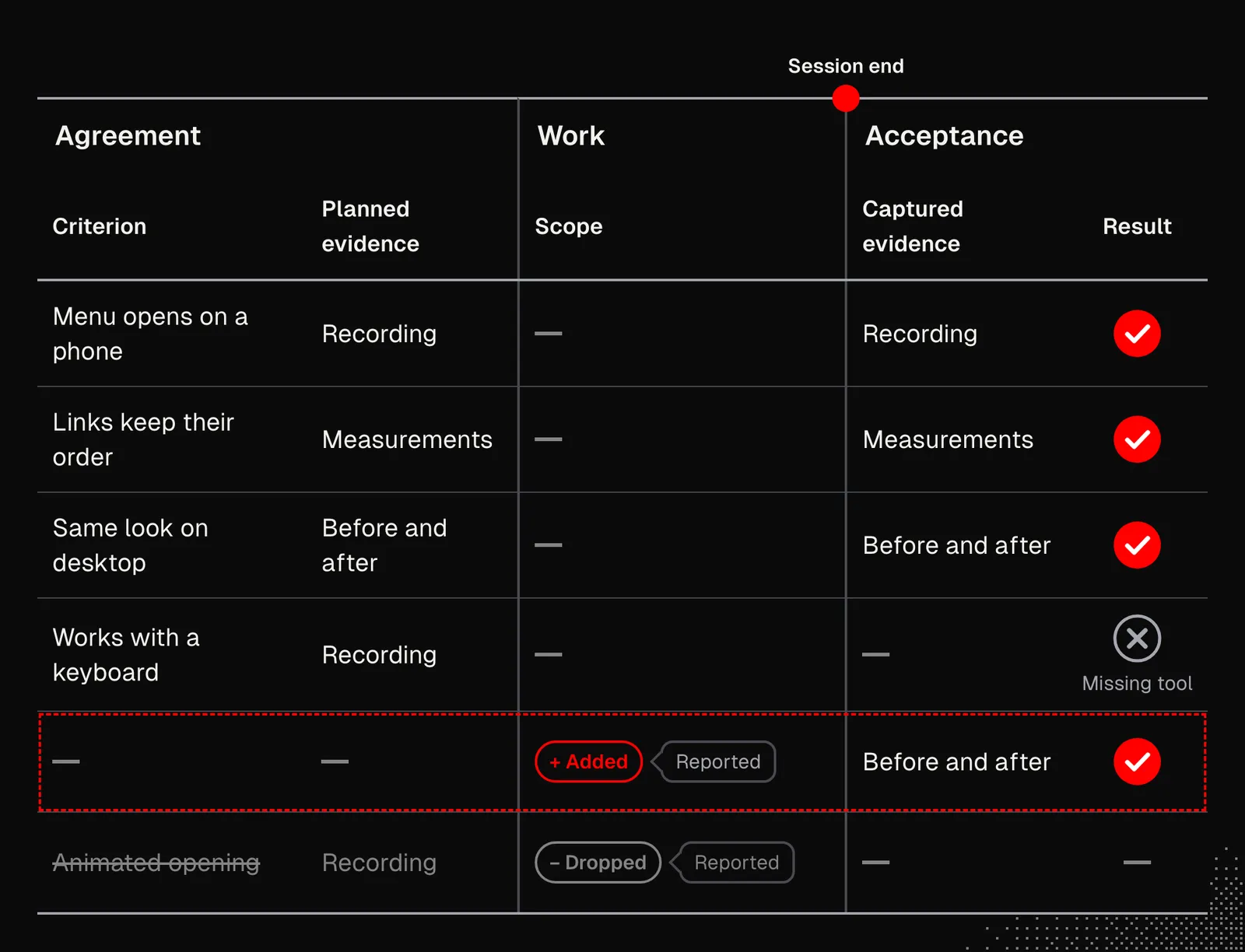
I mentioned that acceptance depends heavily on the agreement (from S03E02) we make before the work starts. By the time the agent finishes the task, it should already know what to do about verification and evidence. But agents need some degree of flexibility, because in the meantime the scope may change a little.
Once we shape an agreement, most of the missing tools and verification knowledge should surface. But this won't always happen, and we need to catch the cases when it doesn't. We can do that in two ways: either the agents will tell us, or it will be discovered during scheduled checks. We can also use both.
As a result, the agent may add a summary for us in the pull request, like this:
Verification
In previous lessons, we mentioned most kinds of verification strategies and tools that let agents collect evidence and confirmations, and actually see the results of their work, not only through code. If needed, go back to S03E03 and its "Feedback" section, which discusses how our system needs to be adjusted for agents.
What exactly this means depends on the product, the technology stack, the level of autonomy we want to achieve, and even business needs. The good news is that agents can build everything for us. The tricky part is that we need to tell them what to build, or rather, we need to help them figure it out. Since there's no universal way to think about this, we'll use one of my projects as an example.
For context: the app is a shared runtime with two thin clients, desktop and web, that share almost all their code. Its runtime can work either entirely on the user's device or in the cloud. The architecture looks as follows:
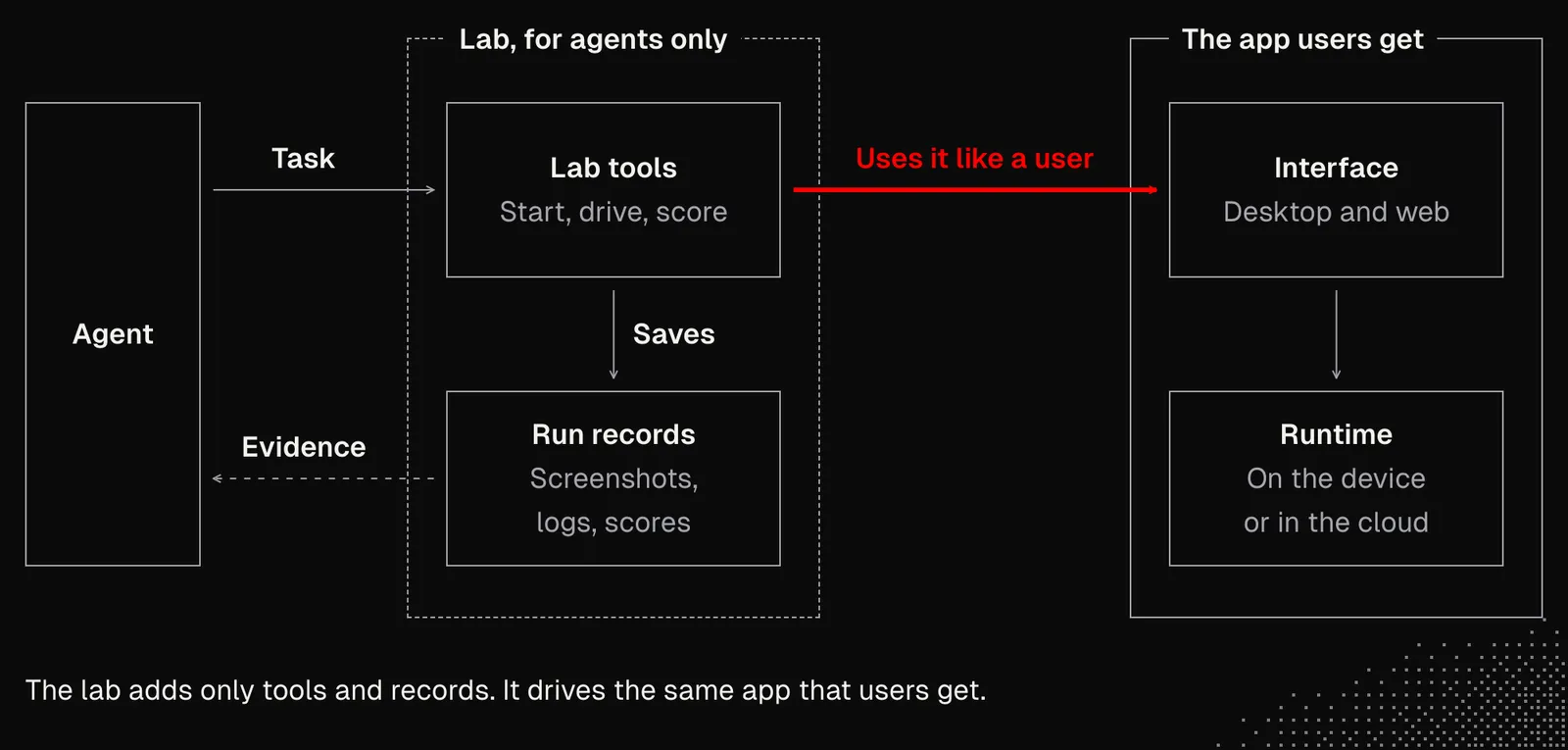
As the diagram shows, the agent has an "agentic lab". This is mainly a set of CLI scripts that let it use a browser to test the web version or run an instance of the desktop app. The available tools let it click, type, attach files, take screenshots, and record short videos. The results of these interactions land in a temporary folder.
That sounds easy, but it's all about the details:
- There's a limit on how many browsers or instances I can have open for debugging at any given moment, because CPU and RAM get exhausted, especially during tests, linting, and compilation (Rust, in my case).
- Every instance gets its own account and workspace, so agents don't interrupt each other. They can pick seeds for profiles to test various configurations. There's also a special mode for testing the Clerk authorization process and features related to cloud synchronization.
- There's a unified interface for logging, so agents can measure anything about data flow, user interface and performance.
- The desktop app can't be tested on a VPS. It also can't run directly on my laptop, because it would steal window focus, interrupt my writing, and so on. So it runs inside VMPal.
- The lab uses browser clips and Mac clips to record short videos.
- Some actions, especially those that make LLM API calls, are "faked" to avoid spending money on UI-focused tests that would otherwise make real requests. There is also a live mode that uses an actual API key, but with spending limits and a limited number of actions.
- Agents can write scripts to automate repetitive checks, including reports on those checks. Important note: these scripts need to be reviewed and cleaned up from time to time.
- Some actions depend on the platform, and the reviewer agent is told about this, so it does not report them as issues.
- There are also hard limits: agents can't touch my development environment, my workspace, or anything related to the instances I work with. At the same time, I have access to the debug mode available for my manual tests and interactions.
- Wherever possible, agents are blocked from taking actions that cannot be reversed, such as sending emails.
The list above applies, roughly, to any app, since most projects share similar challenges and needs. What differs from app to app is the architectural changes we need to make within the app itself, so that the lab is directly connected to the modules and faithfully reflects the actual interactions. In any case, creating an agentic lab isn't always easy, and it's not a one-time job, because the lab needs to evolve and its features have to be maintained. This is where background routines that scan the job history come in.
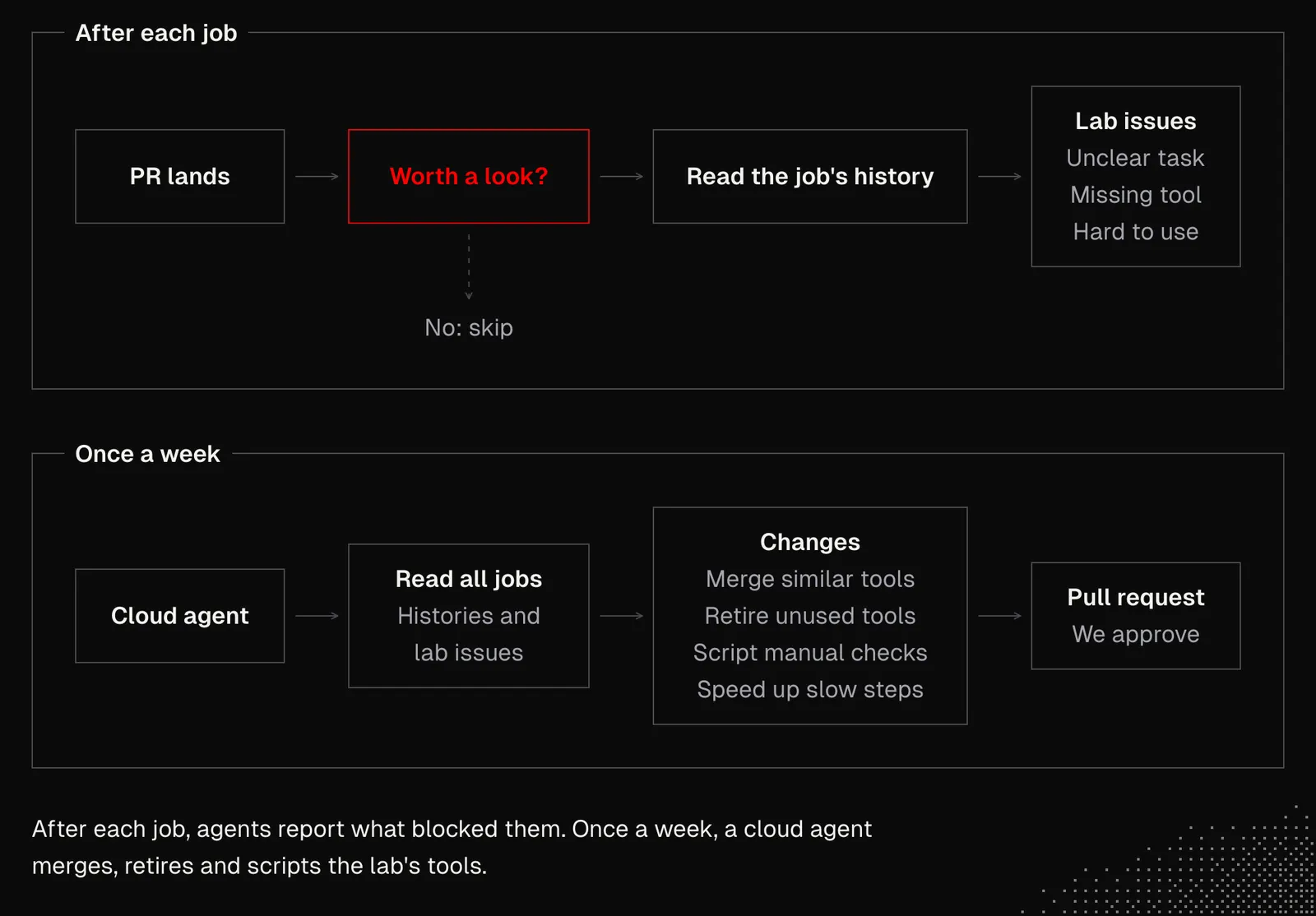
If you don't have any routines set up yet, you can create some in Grok Bot, Cursor, or Devin, depending on your setup. These are just a few examples of harnesses that come with automation features. Claude Code also offers cloud routines that can run on a schedule or be triggered by API calls and GitHub events. But as always, it's wise to start small and iterate. Creating a new routine is easy, but making a good one is a challenge.
One note about routines: ask agents to always keep track of which routines are active and where they were activated. There's nothing worse than seeing a routine trigger when no one knows where it came from.
Also, all the evidence that agents collect needs to be properly organized. This is simple, because agents will be the ones responsible for keeping it, but they need to be asked to do it. Otherwise, the evidence will end up stored in many different places, making it hard to find and easy to delete.
System Diff
A single agent can generate so much code that it's hard for us to follow. Once a team of agents works for us, there's no chance of keeping up with the changes. An agentic lab can help verify many aspects before deployment, but that doesn't mean everything was implemented the way we wanted. We always need to keep in mind that we're increasing the chance of getting the results we need, not guaranteeing them.
So, the question now is what we can do to keep up with the changes well enough to make good decisions about the results and what's coming next.
There are many ways to approach this, but the best one is undoubtedly the one tailored to our preferences, the type of work we do, and our project. That's why it's worth thinking about:
- Purpose: "system diff" can mean different things. It may be an architectural overview that tells us whether the direction is correct, a code diff that highlights the most critical parts of the logic, or an interactive dashboard that lets us see the changes.
- Format: it may be tables, charts, graphs, screenshots, videos, or audio files. In general, it takes the form of HTML or Markdown with components.
- Content: a good system diff often seeks a balance between broad and narrow perspectives, or includes both and lets us switch between them. Its main goal is to achieve the best possible signal-to-noise ratio while keeping enough context, so we can quickly understand what's going on.
Now, with this in mind, we can ask agents to scan our latest PRs and our history of working with agents, then prepare a first version of a skill for creating system diffs.
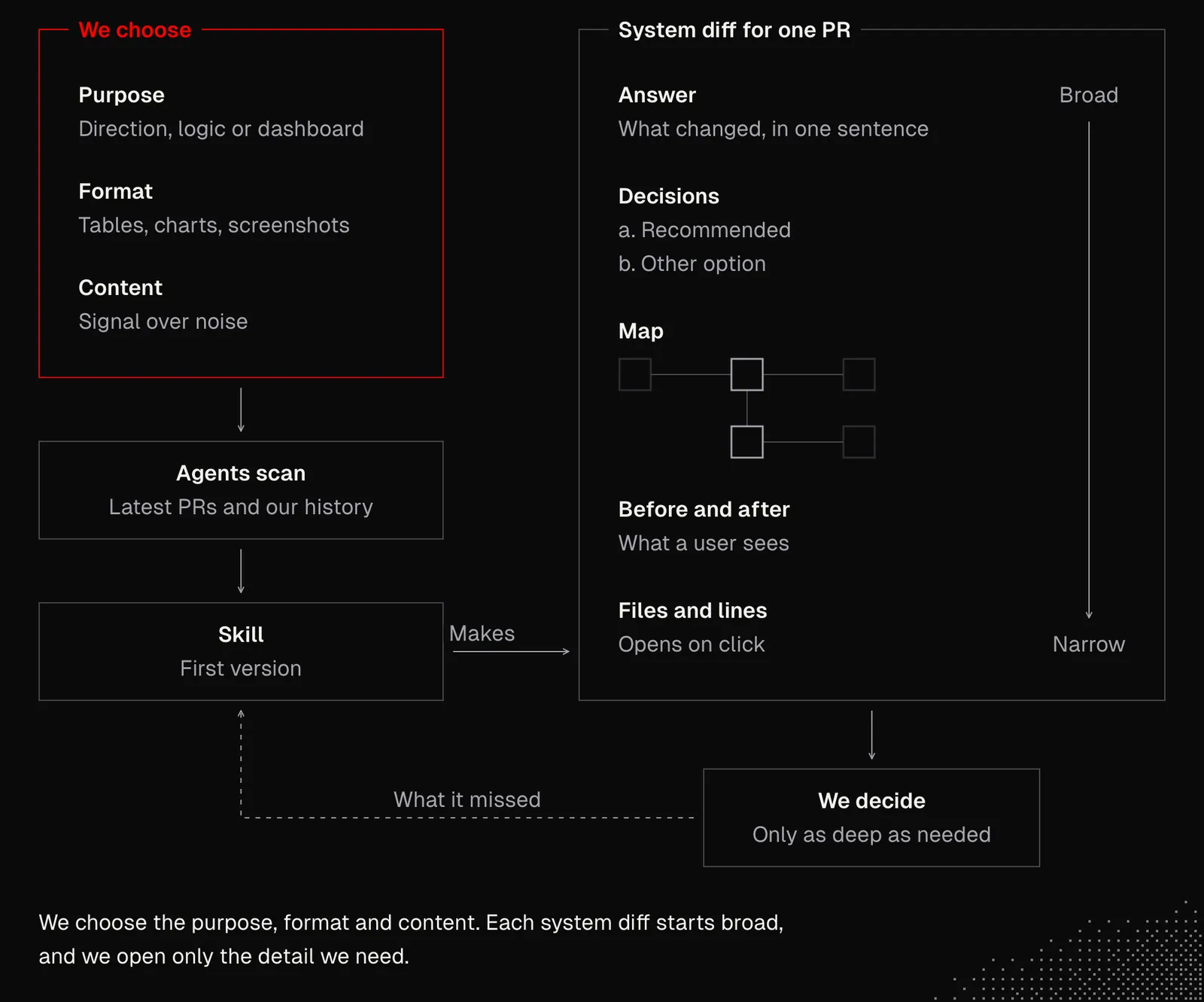
Looking at the diagram above, we may recall the feature maps discussed in S03E03, which helped agents navigate the system and make better decisions. Now they are also useful for creating system diffs.
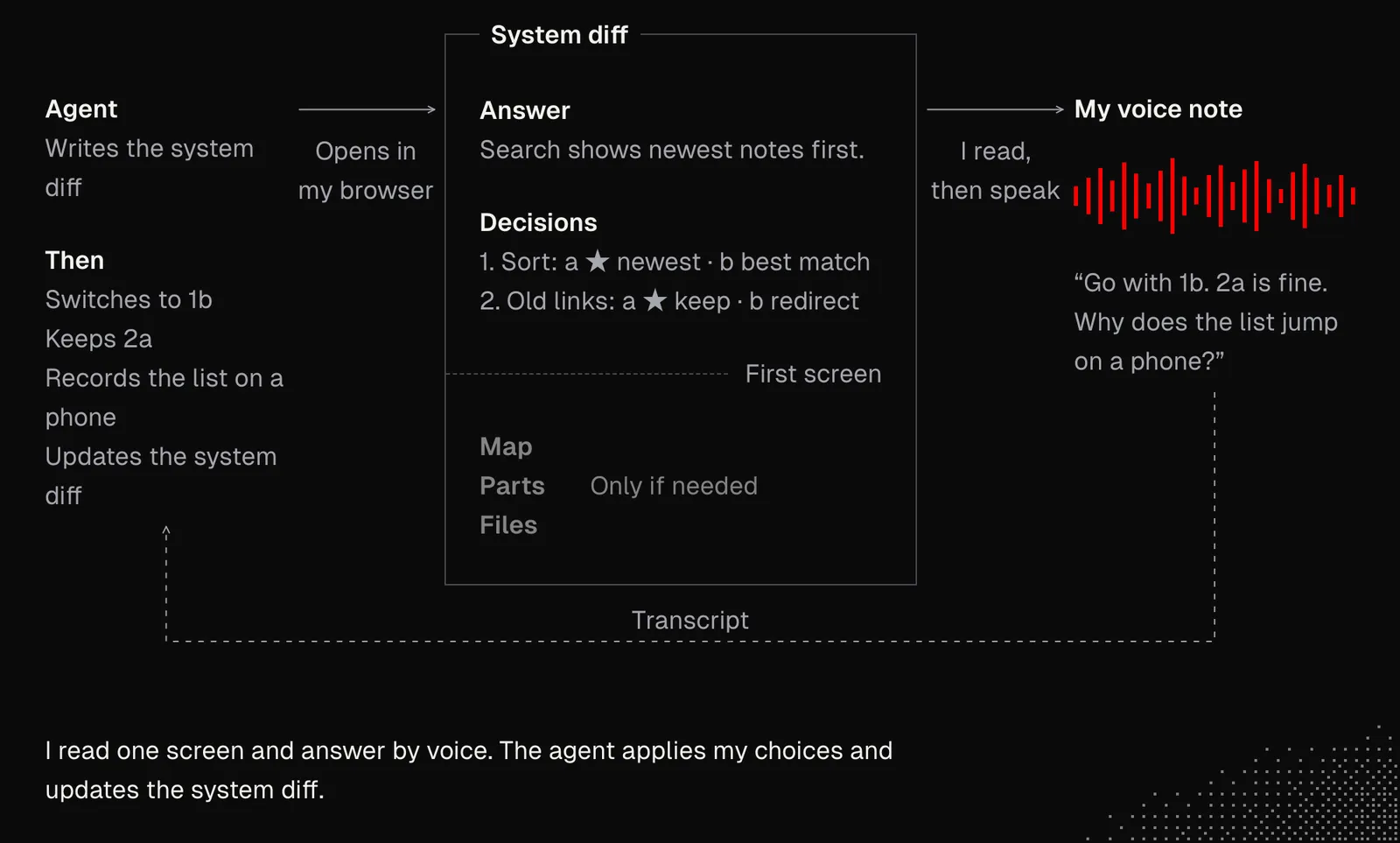
Now, just to give an example, my system diffs often come as .html or .svx files. You can see one here (it's just a demo). It was created with the /system-diff skill, which I keep iterating on. As soon as a system diff arrives, agents are sometimes allowed to open it in my browser. Then I use Superwhisper (any alternative works too) to record a freeform voice note with my comments on the document.
A good example of a pull request that surfaces the most important details about the changes comes from Matt's repository. It includes a summary focused on the most important changes, evidence showing the "before and after", and a merge danger section that draws our attention to potential issues.
System diffs can be useful not only for us but also for our agents, because AI can catch many potential issues in them, especially when it compares them with the product vision or similar documents that describe the long-horizon context. Agents can also consider user stories and synthetic flows, which can reveal gaps, conflicts, or opportunities for improvement.
Review
Even if we stop looking at the code, that doesn't mean we should stop caring about it, especially when it comes to organization, consistency, bad patterns, performance, and security issues. All of these can, and should, be addressed with agents. A good example is this Pull Request, which has comments from Bugbot, CodeRabbit, and Devin. That said, our custom app can handle these reviews as well (we discussed this in S01E05).
While the models we have today do a very decent job with general reviews and code improvements, it's easy to see that they often push too hard or not hard enough. Also, since reviews are done by separate agents, changes made by one agent can easily be overridden by another. All of these issues can be addressed with proper context that includes principles and sources, but also boundaries, such as the feasibility matrix mentioned in S03E01. Below is an example of a review flow we may have.
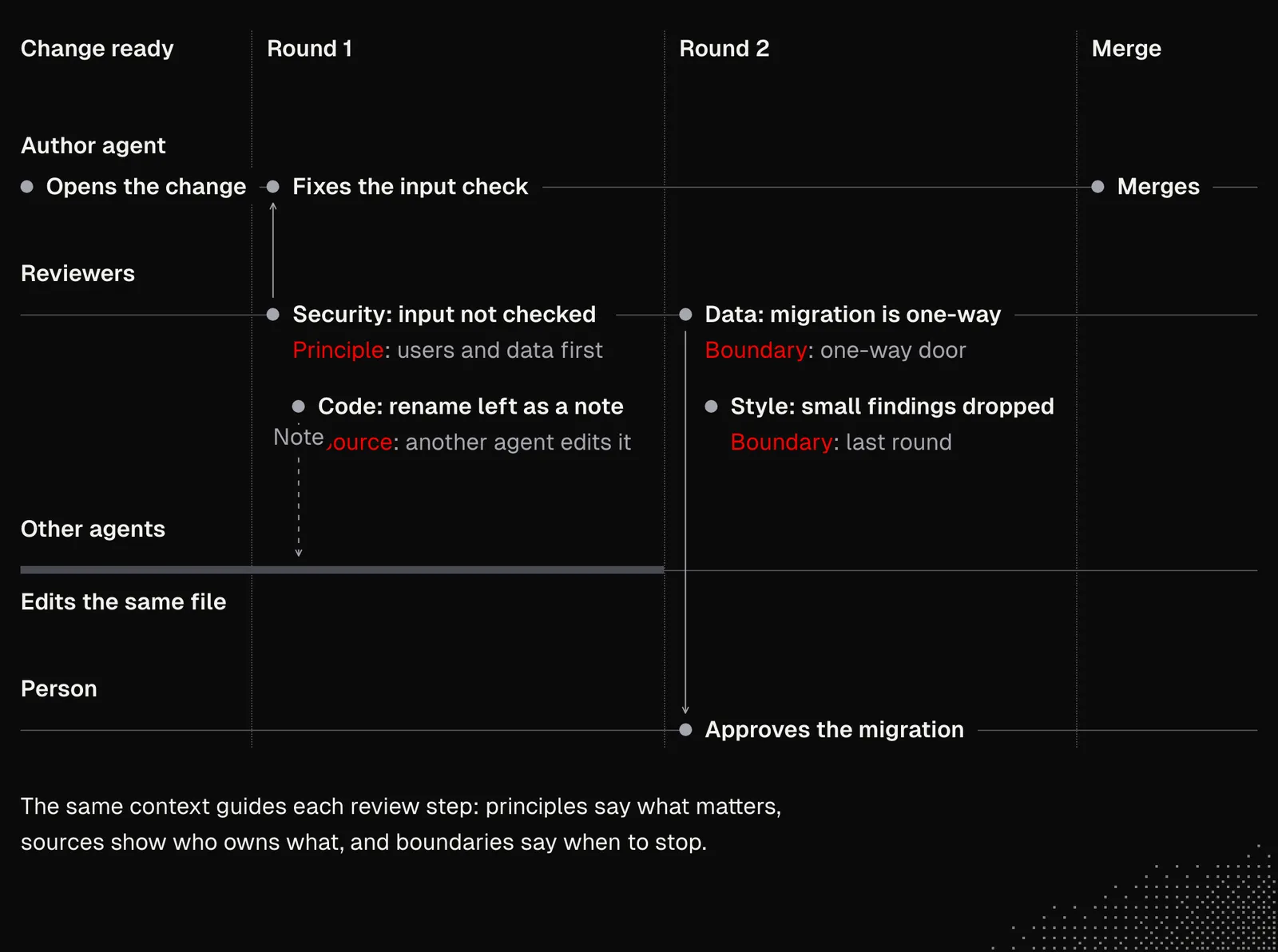
The review stage may cover activities that go beyond code. Agents may be asked for:
- Synchronization: in S01E03–S01E05 we mentioned that agents can take care of documentation and a knowledge base. The review stage is a good place for this, as the changes are already accepted and they can be reflected on a product website or internal knowledge base. Updates may include not only text but also images, animations and interactive components.
- Learnings: after each activity agents may update related notes, and receive them in future runs. This way they can improve and reduce the risk of repeating the same mistakes.
- Communication: updates on new features may be shared with marketing and sales teams, giving them context for social media, newsletters, or sales activities. And if a feature or bug fix was requested by specific clients or users, our team can be notified, giving us a chance to reduce the churn rate (the percentage of users who stop using the product over a given period) or upsell.
- Outcome check: Agents can create new schedules to monitor the new functionality in production or review it after some time, so we can see how the feature was adopted.
- Improvements: the review may focus on researching how the feature can be improved, and this research may reach well beyond the product, into market knowledge, alternative tools, libraries, and so on.
We can brainstorm similar ideas with agents and as a team. But the main idea here is to think about the leverage we can get from agents working in the background. When done well, these activities can drastically improve the quality of the entire product and, as the churn/upsell example shows, affect business results too!
Quality Gates
While the changes may be blocked at the acceptance or review stage, it's also worth considering some strict rules or principles. I stress rules here, not principles, because we need to decide how much freedom to give the agent. In fact, many (if not all) of our quality gates should be deterministic.
An example of a quality gate is the validate workflow Kent built for his project. When we open an example run there will be about 30 checks specific to his project, covering:
- formatting with oxfmt
- linting with oxlint
- TypeScript checks
- Wrangler dry runs (part of the Cloudflare stack)
- npm audit for dependency checks
- tests with Vitest
- worker unit tests (with @cloudflare/vitest-plugin)
- e2e browser tests with Playwright
- tsx --test for CLI tests
But that's not all, as there are plenty of custom scripts for checking primitives, feature maps, documentation drift, and more. All this runs on GitHub Actions and WarpBuild, which speeds up the process. The entire quality gate looks as follows:
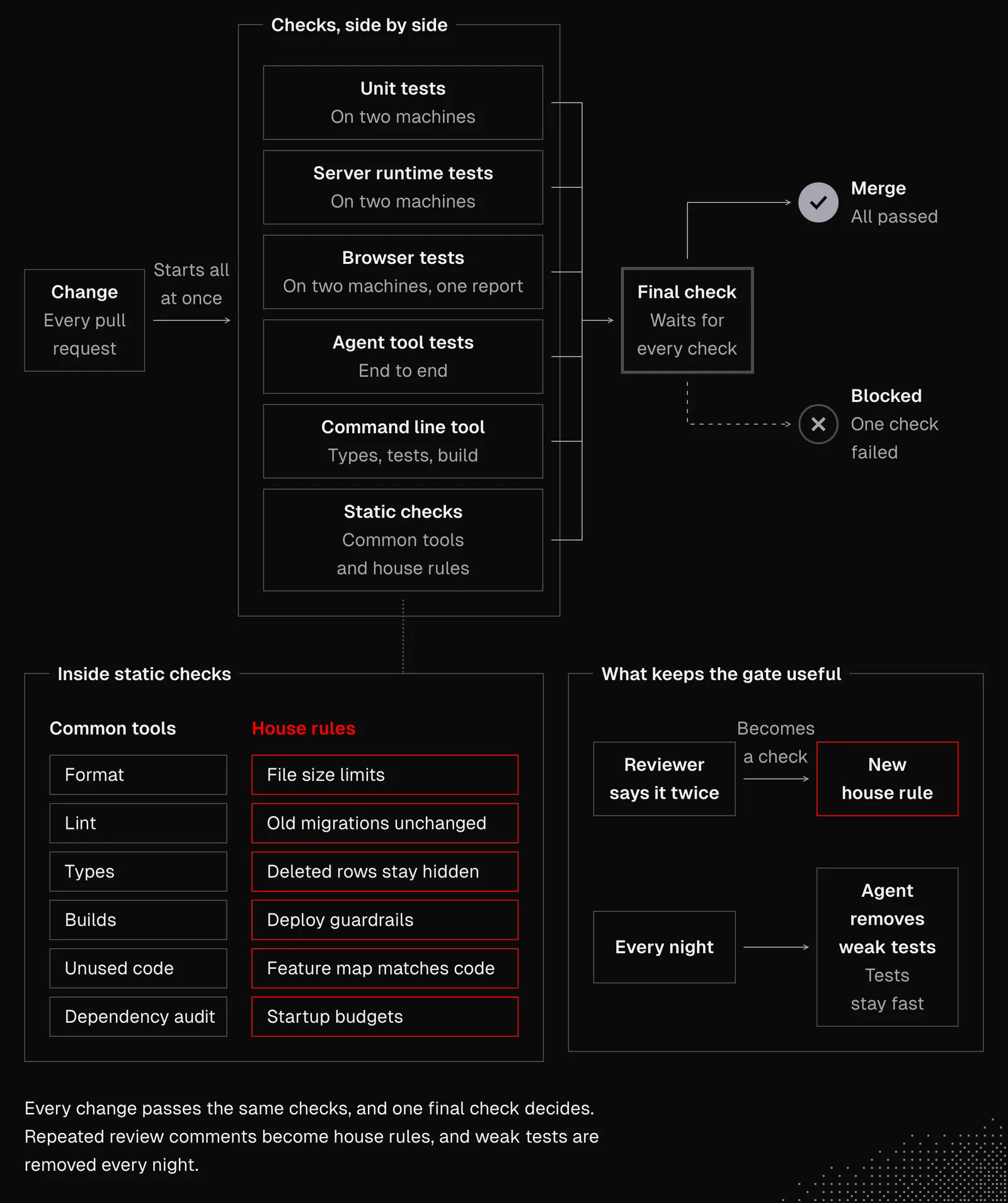
Just by looking at the diagram above and thinking about our projects, we should get the first ideas of what we may want to include. It is also a great exercise to download the repo and chat with an agent about the tools and their setup. After the conversation we may want to ask the agent to review our project and suggest the most important quality gates we may want to set up.
Takeaways
This lesson should show us that building a process around verifying product outcomes can increase the quality of the entire product, and our work can have a positive impact on other business areas, but first and foremost on the users.
And it is clear that the process must be optimized for the software we're building and the way we work. And even though today we discussed many aspects we may want to consider, it isn't recommended to rush to build all of this at once. Building even a few pieces, and building them well, is a good start, because it will show us how the gate behaves and whether it provides enough value or needs some tweaks.
When we think about this, verifying product outcomes with the workflows discussed today is only partly a technical challenge, as it also requires taking ownership of the outcome, and that leads us to the mindset of a Product Engineer.