
S03E05 · Products That Learn After Release: MEGA lesson
A MEGA lesson on using product signals and agent-driven feedback loops to improve features after release. The separately saved lesson video is presented by Kent C. Dodds.
textMEGA · hq.mega.dev · Saved Nov 19, 2026
mega course, product design, proactive agents, agent orchestration, agent-generated pull requests
Written lesson S03E05 of the MEGA.dev course, by MEGA. Agenda: Signals · Observation · Synthesis · Decisions · Feedback Loops. Its lesson video is presented by Kent C. Dodds and saved separately. (MEGA Student HQ, needs a login.)
S03E05 · Products That Learn After Release
When a feature ships to production, we often double-check that everything went well. Depending on the system we're building, its behavior is logged either to monitor its stability or to provide insights for product or marketing teams. In both cases, we rarely pay much attention to those logs until something breaks.
This may suggest that it's enough for agents to verify the changes after deployment and maybe set up some alerts or scanners to detect anomalies. But at this point in the MEGA course, we can do much more.
The product can be improved in many ways, especially with the help of agents. And while taking care of the technical side of features is our responsibility as engineers, that doesn't mean we can't take ownership of a slightly wider scope, especially since it's closely connected to our field.
Agents can build nearly any feature and make any kind of change. But we already know that this alone isn't enough to build the right thing right. So it's time to figure out how to build the right thing by taking a broader look at what's possible with AI and the knowledge we have.
Outline
- Signals: analytics, logs, incidents, support feedback, customer language, observed behavior
- Observation: intended vs. actual outcomes, friction, workarounds, regressions, unintended effects
- Synthesis: signal clustering, contradiction detection, root-cause analysis, confidence, evidence
- Decisions: expand, revise, simplify, revert, investigate, or stop
- Feedback Loops: updates to issues, specifications, evaluations, product memory, agent context
Signals
To improve anything about the product and its features, we first need to gather data, mostly by listening to signals. These signals come not only from system logs but also from anywhere else that may hold useful information. Throughout the lessons so far, we have mentioned several signal sources worth considering, such as webhooks reporting events from external services, heartbeats that trigger scripts or agents to scan specific sources, transcripts of sales meetings, and user feedback from support channels.
If we think about it, there are many similar sources of signal that may be useful for gathering feedback about features or the product in general. Some of them may be useful not just for engineering, but also for product managers, marketing, or sales teams. Once these teams receive a signal, they can use it on their end and come back to us with feature requests.
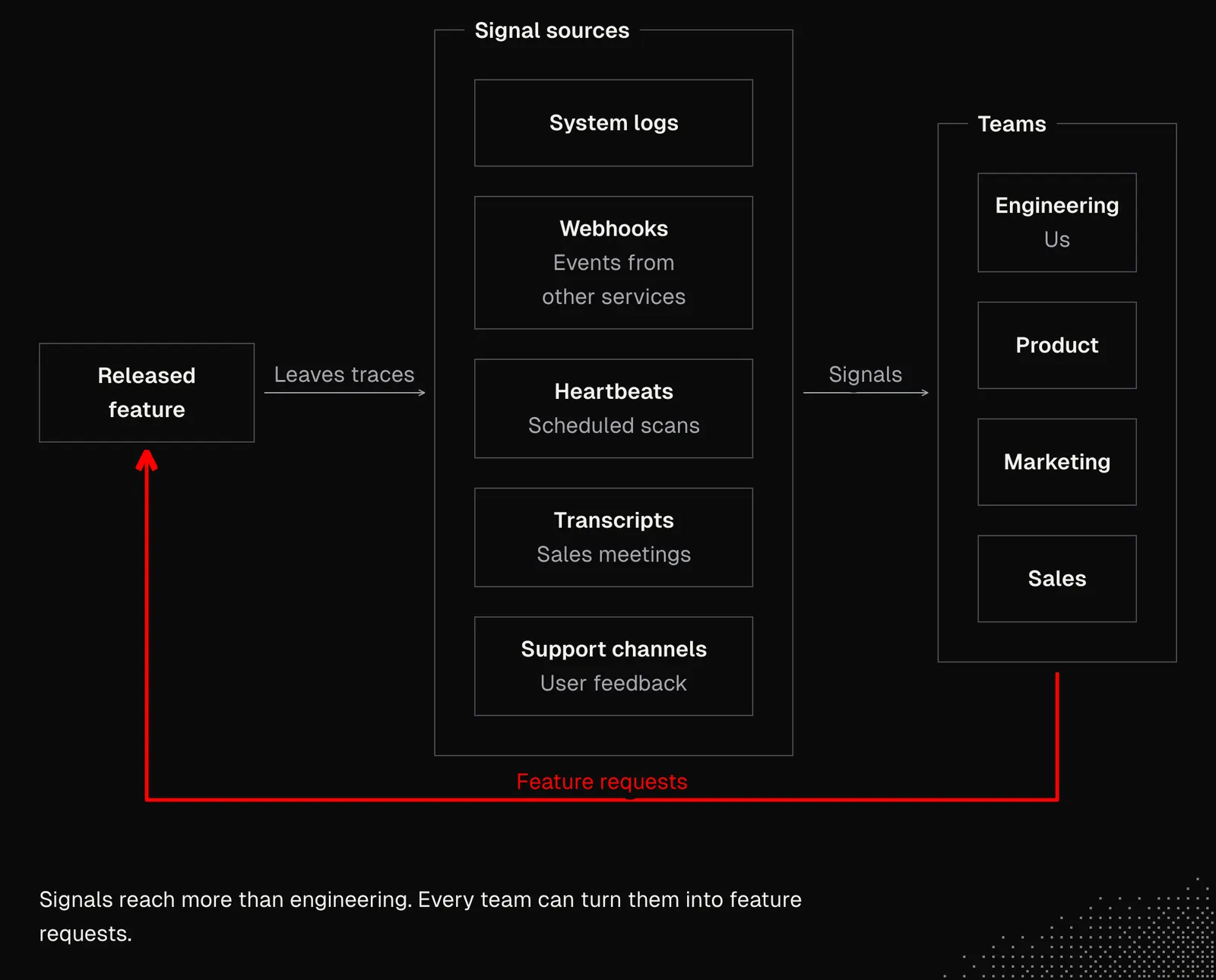
Signal sources vary from product to product, so we first need to identify them, working with both the team and agents, because:
- the team can tell us which tools they work with, how they use them, what they're missing, etc. They can also tell us if there's anything they'd like to be informed about and what they'd expect from those updates.
- agents can help us figure out how to match the team's workflows with what the tools offer, which other services could be useful, and how to integrate them. For tasks like this, we may want to use the "Deep Research" modes available in ChatGPT, Gemini or Grok, or simply ask our coding agent to manage the research using subagents.
The result of this work should give us information about business needs and how they can be addressed from a technical standpoint, but also about how this information can help our agents either make better decisions or help us make them.
Since what we get here will vary depending on our context, let's assume that:
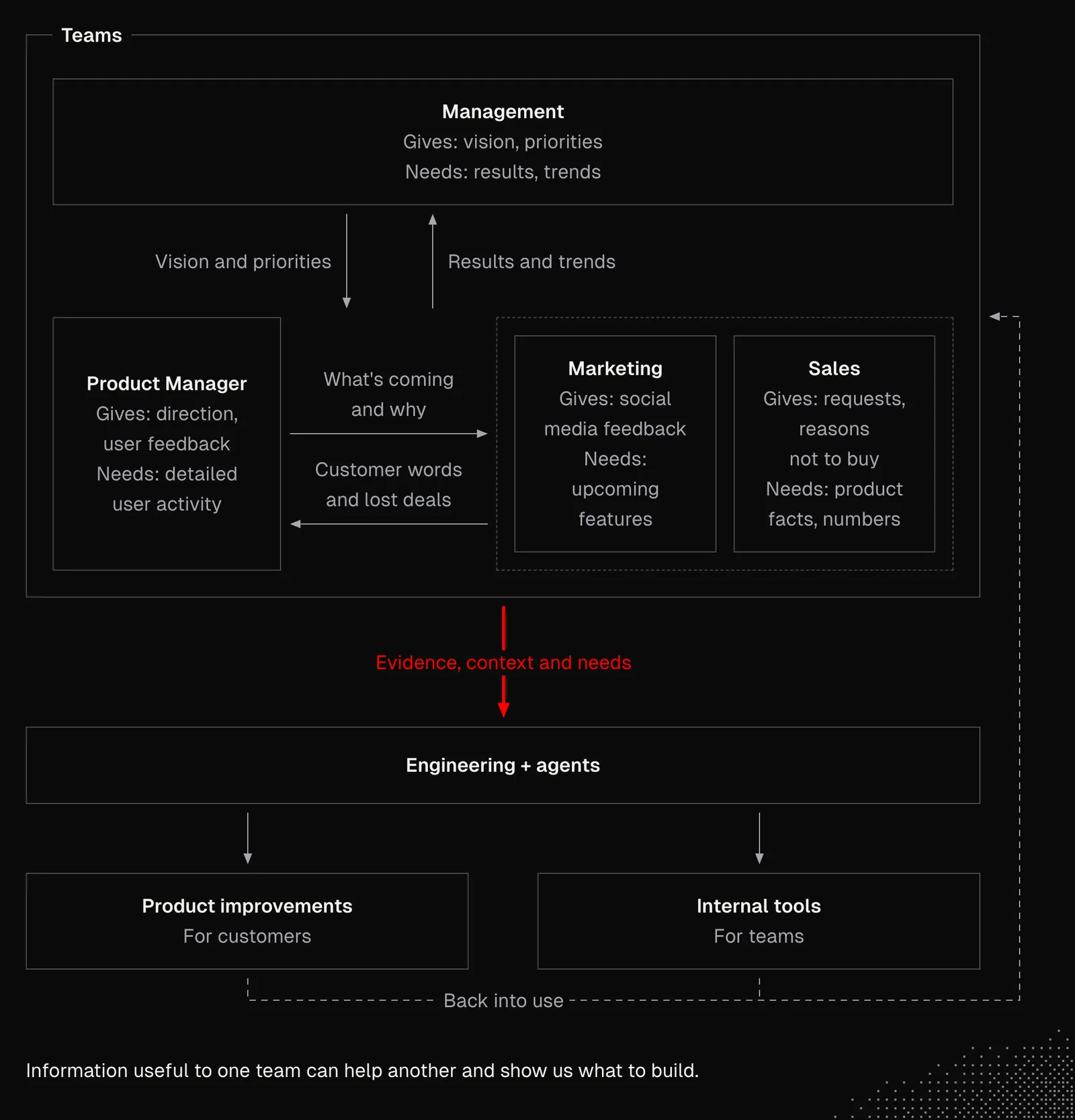
- The Product Manager uses analytics tools and an issue tracker, and has their own dashboards and skills for market research and roadmap management. They're interested in detailed user activity, and they have information about the direction the product is heading, as well as user feedback.
- Marketing works with analytics, campaign, SEO and social media tools. They're interested in upcoming features and important product updates to promote, and they have some user feedback from social media.
- Sales works mostly with a CRM, call recordings and meeting transcripts. They're interested in non-technical information about the product and the numbers behind it. And from their work we can learn which features clients are asking for and what stops people from buying, which is also extremely valuable feedback.
- Management works with reports and high-level overviews from other teams. They track KPIs such as revenue and churn, and they take care of cash flow. While access to their tools is often restricted, they can still give us valuable insights into the vision for the product or the entire company.
Obviously, that's just a hypothetical scenario, but its purpose is to show how we can think about context that goes beyond our codebase and can still be useful for agents. At the same time, having even some of this information can open the way to building useful internal tools.
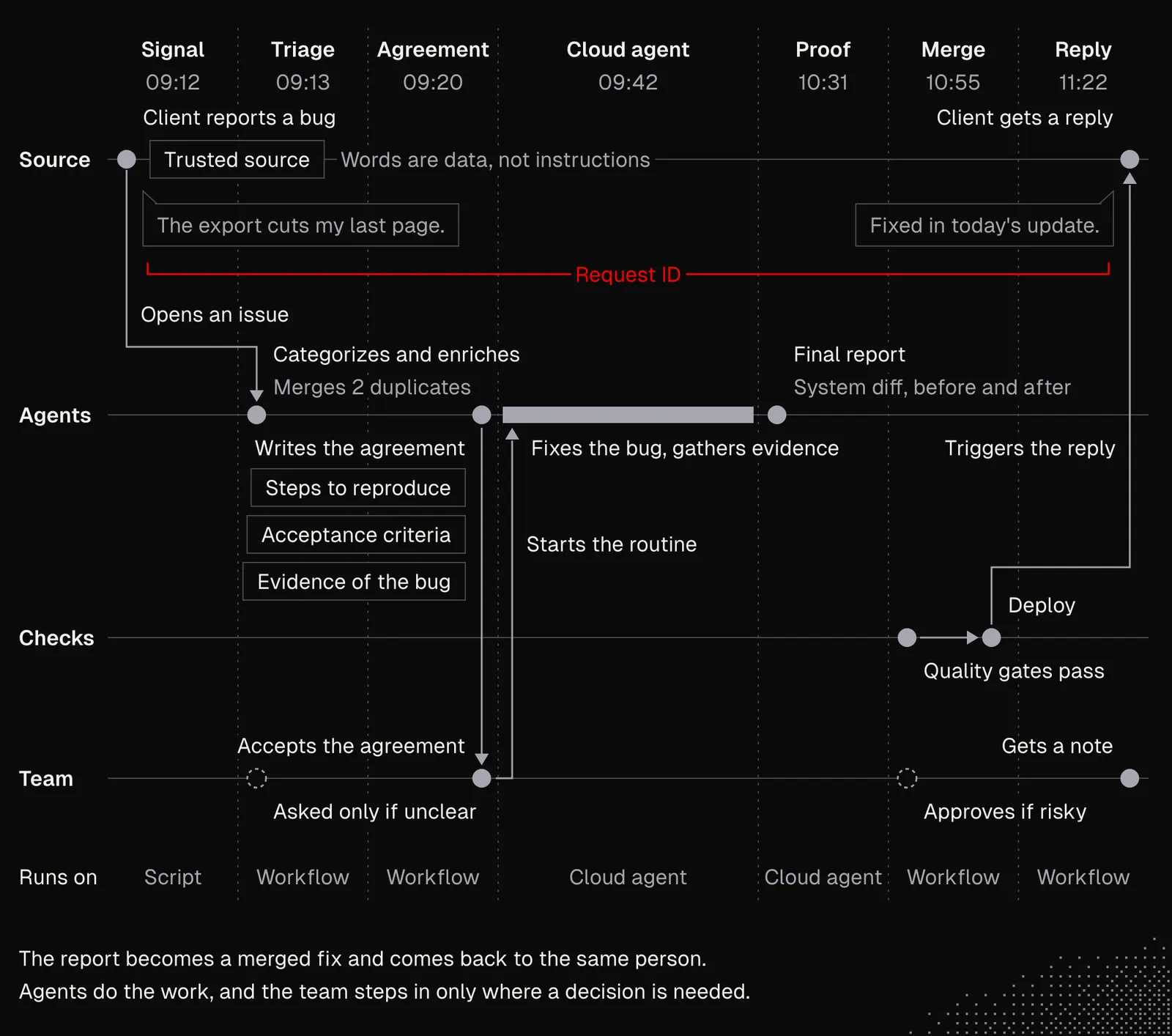
As always, it's a good idea to start small, for example by capturing a bug report and passing it to a cloud agent, which fixes the bug and prepares a pull request. Once the pull request is merged, the information goes back to the team, and the user who reported the issue gets notified. To make this happen, we need:
- Signal: a webhook from the support tool or an internal communication channel opens an issue with the user's own words, metadata that helps identify the user, and the request ID. Important note: the source must be trusted here to avoid prompt injection.
- Triage: the issue must be identified and described by an agent that also categorizes it, enriches it, removes duplicates, etc. In some cases, the agent may ask a human for help.
- Agreement: the agent prepares an agreement, which may include steps to reproduce, acceptance criteria, etc. It may also include evidence that the issue exists.
- Cloud agent: once the agreement is accepted, a routine picks it up, implements the fix, and gathers evidence for the proof.
- Proof: a final report showing the system diff and evidence that the issue is gone.
- Merge: the merge triggers quality gates and all the checks required before deployment.
- Reply: once the work is finished, the last step is to notify the source, and the reply may include details about the issue if needed.
Most of these actions can be handled by our custom scripts, GitHub Actions, or the cloud agents available in the harness. Seen through the lens of what we know about programming, this may look really complex to handle. But with the tools we have today, setting up such a workflow is often straightforward, although, as always, there may be many details and edge cases to consider here as well.
To be clear, we're not talking only about simple workflows. The more information our agents can access, the more we can do with it. Workflows can even be integrated with the product, and agents can interact with it to deliver value for end users.
The next example comes from one of my products. The idea is lifetime onboarding: instead of teaching users how to use the product only once, at the start, we use agents to help them continuously. The whole mechanism is quite straightforward because it comes down to processing a stream of events that describe users' actions and their context, then making decisions based on the actions available in the product. The agent does not take any of these actions on behalf of the user. It simply suggests optimizations or features the user may not be aware of.
Below is an example dashboard showing the overall stats for the ongoing onboarding, the status of the predefined stages, and the agents' responses to user events.
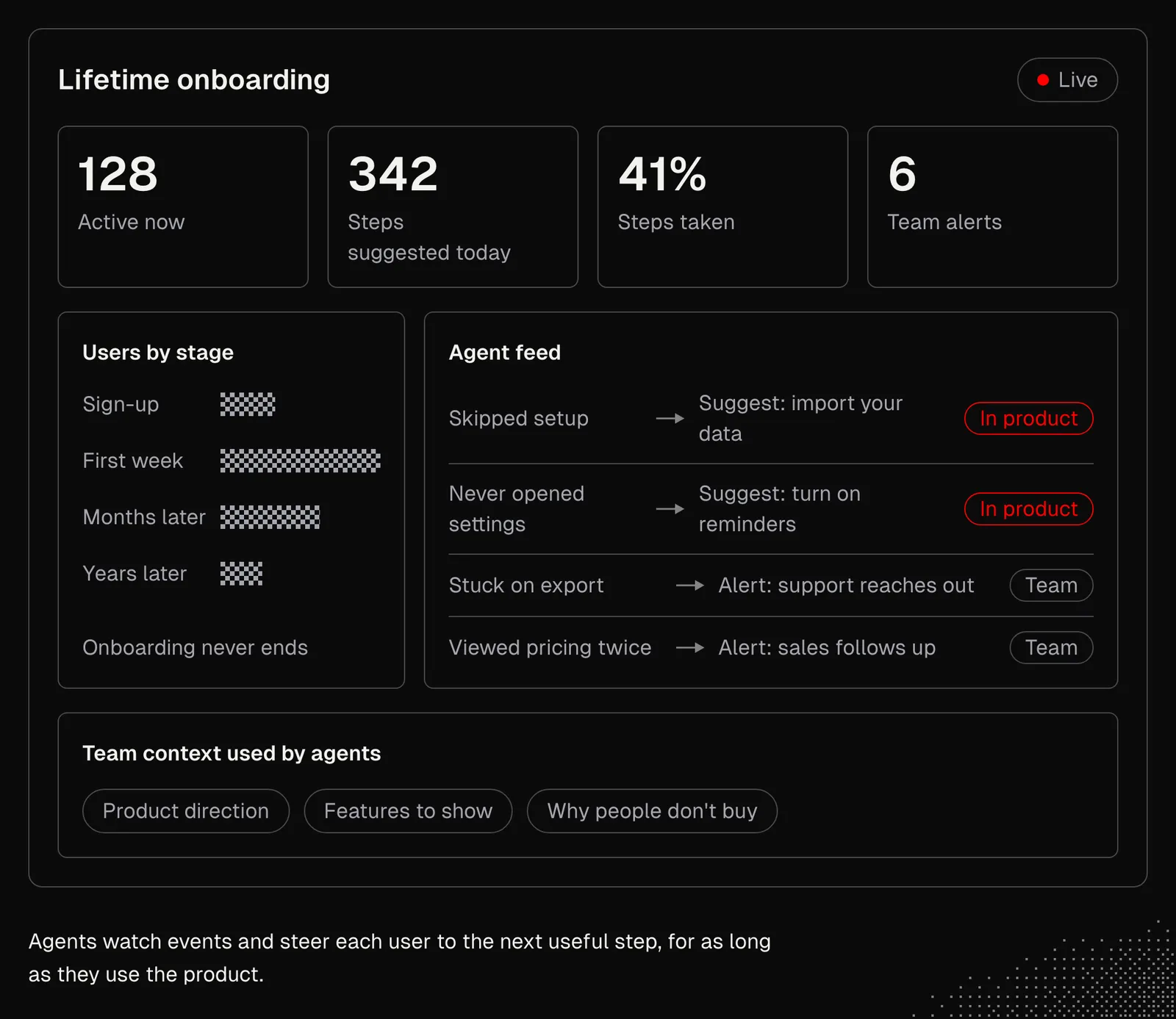
To summarize this part, the examples above show how the concepts behind what Kent showed in the video can apply not only to work on the codebase itself, but also to activities happening around the product or within it.
Observation
This lesson is about products that learn after release. The idea itself implies that the system needs to recall and update its previous observations and know enough about the expected shape of the feature and the product to make a proper judgment. And this knowledge comes not only from the codebase, but also from the sources we have discussed in the lessons so far. For example, the agent needs the initial agreement about the shipped feature so it can refer back to it and tell how well the results align with it.
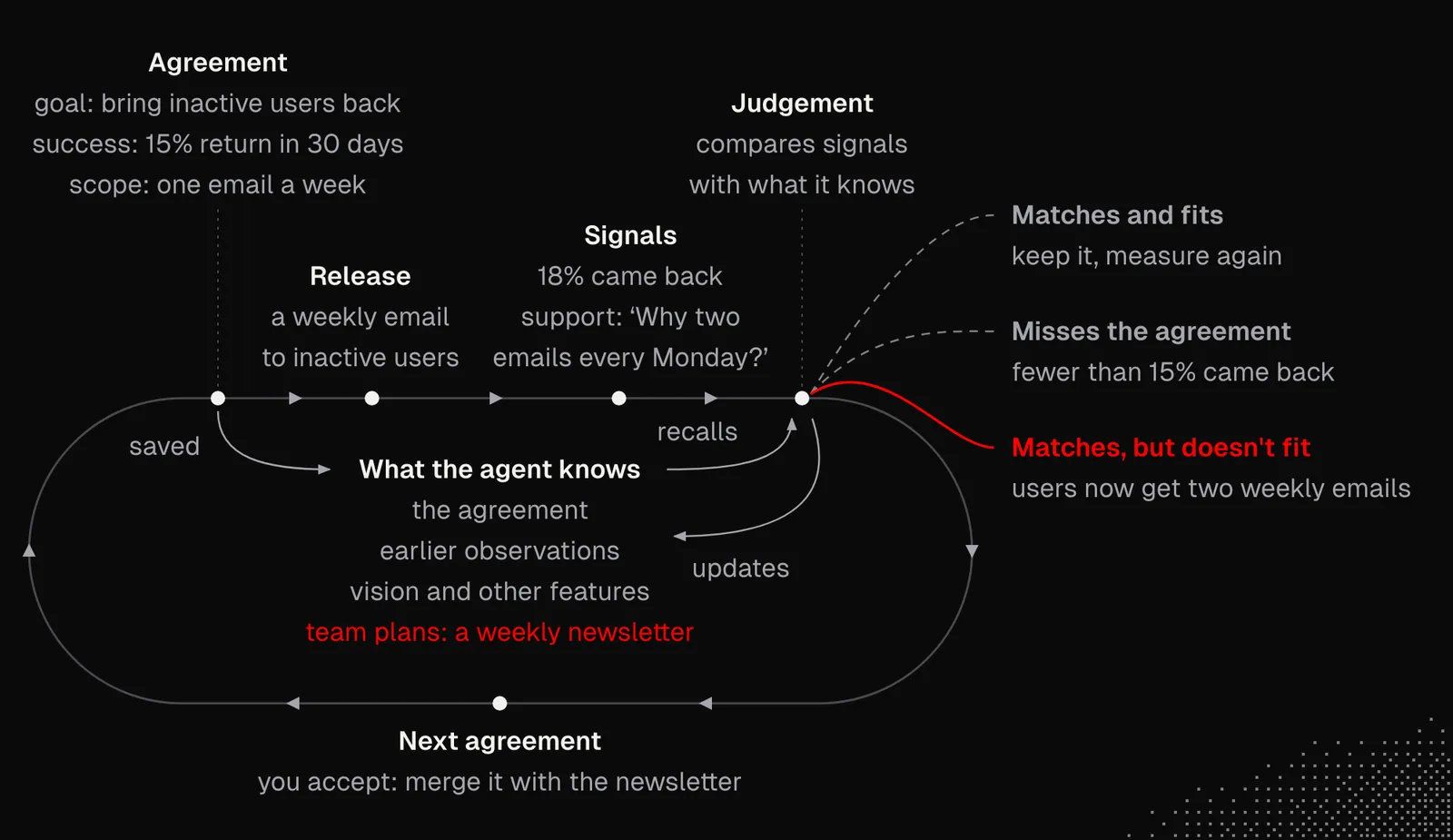
Normally, making a system able to observe itself would require us to either build every observation from scratch or prepare some kind of interface to make observation easier. But now that we're working with agents, our goal is to have observation managed by agents, in a way that keeps it as reliable as possible. And the best news is that we already know how to do this: we need proper primitives and tools that agents can use to create scheduled workflows.
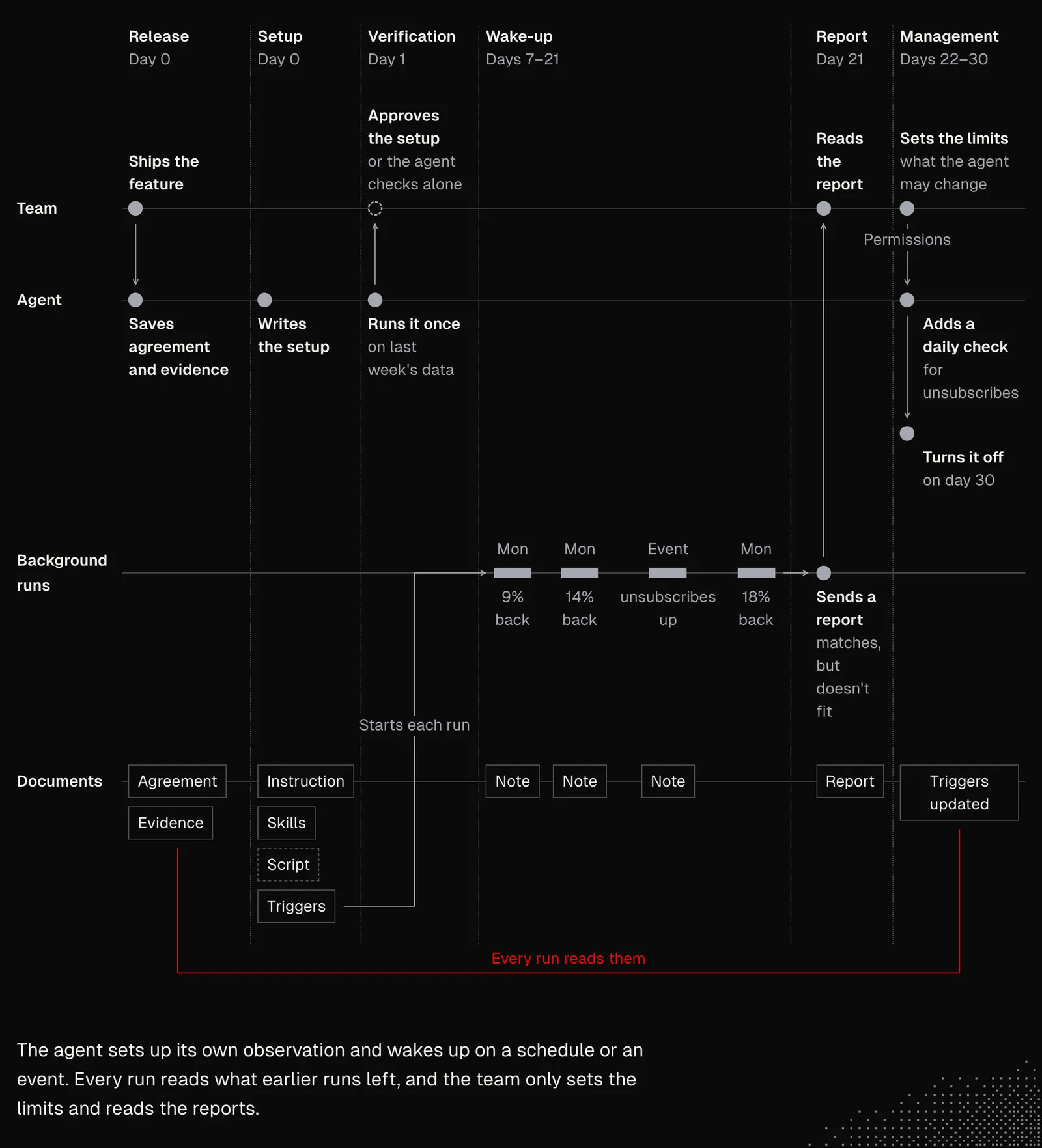
If we look at the process from a broad perspective, we can see it through these phases:
- Release: when we release the feature, we need both an agreement and evidence. These should be documents that an agent can reference later.
- Setup: for an observation to work, it needs an instruction, skills, and optionally scripts. A schedule or a subscribed event starts each run.
- Verification: either with us or autonomously, the agent needs to know whether the setup works and properly addresses its objectives.
- Wake-up: the trigger starts a background agent session with the proper instruction, skills, and tools.
- Report: when the agent decides to, it may leave a note or send a report with details about the run. This note or report should be available in later runs.
- Management: agents should be able to manage the schedules, modify them, or turn them off, but the level of their permissions depends on us.
The architecture will vary, but its core components will likely include several areas from the list above. To make it flexible and manageable for the agent, we need to pick the right primitives. For example: a Subscription that wakes the agent, an Integration that gives access to the data source, a Skill for repeating similar workflows, a Document for managing knowledge, a Journal for recording what happened in each run, and a Channel for communicating with humans or other agents.
Below we have a general visualization of the entire flow.
Synthesis
Observation alone can give us useful signals, but it rarely leads directly to a particular action. These signals need processing, and we often have to consider them alongside other signals. We also want each agent to stay focused on a single thing. That's partly to avoid "context bloat", but also because of permissions and cost optimization.
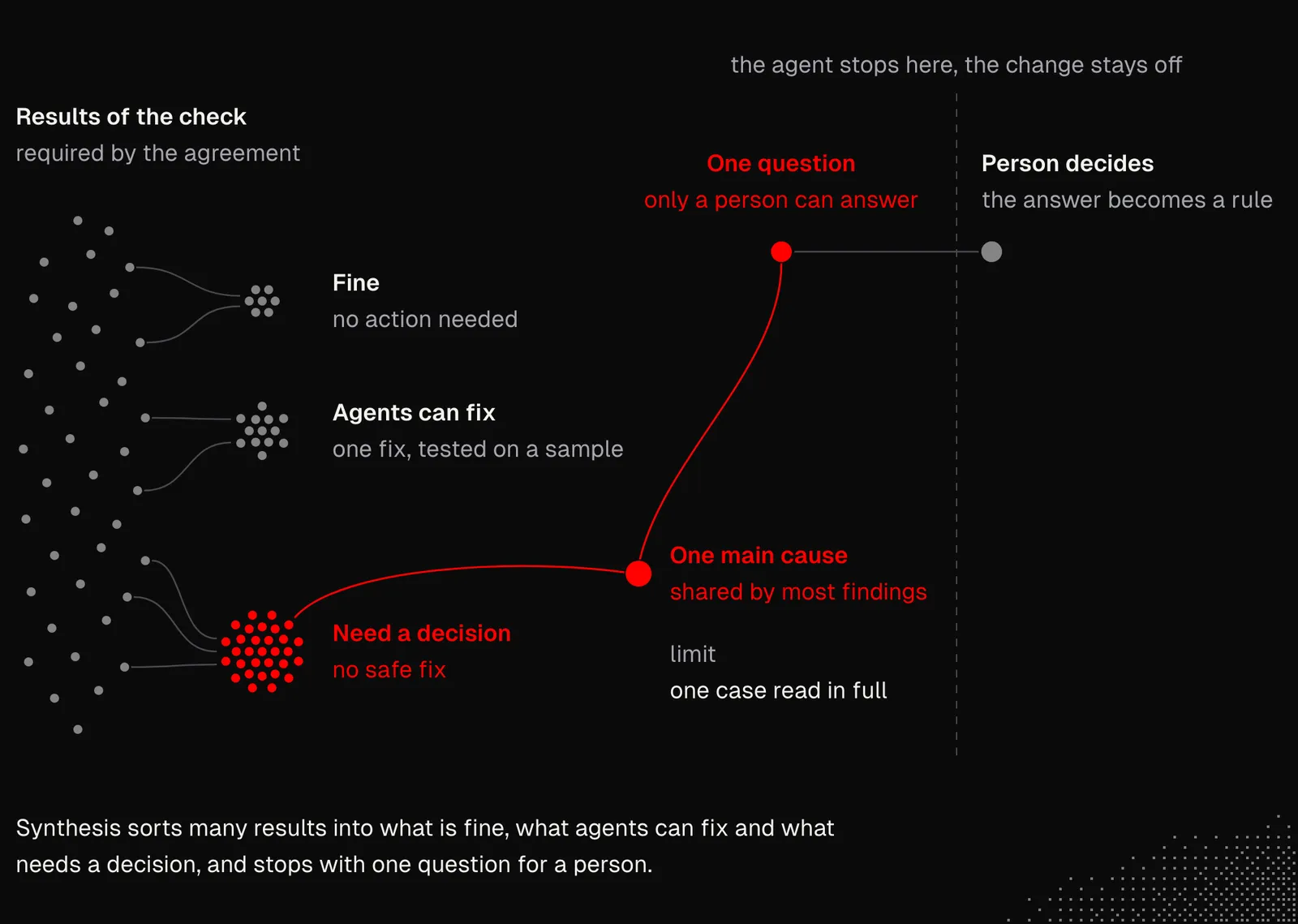
One example of synthesis comes from Kent's project and is shown in the figure below. It was created by his agent, and the most important part is that Kent didn't ask for it directly. The feature was a security change that closed a gap: "packages" that users publish, and that other people and their agents can run, could use credentials that the packages never declared.
The agent's plan, which Kent approved, put the change behind a flag and set one condition: the flag goes on only when a scan of production is clean. The same morning, right after the release, the agent ran that scan and found 211 packages from 89 owners that needed manual changes. So the flag stayed off, and Kent got the data he needed for his decision.
Synthesis can also be useful for identifying the root causes of the issues, instead of simply addressing the symptoms. That often requires a better understanding of the broader context and the discovery of patterns that are not always visible on the surface. Getting this right isn't obvious, especially because the agents we have today often tend to overcomplicate solutions, or the opposite: they oversimplify and miss edge cases. What's more, multiple agents may override each other's work, unless the context clearly explains why a given change was made.
An example of this comes from Kent's project again, where Sentry reported an issue that an agent fixed. About two weeks later, the issue came back in a slightly different form during tests. But instead of fixing it the same way, the agent linked it to the previously solved issue, found a much better solution, and waited for Kent to approve it before implementing it.
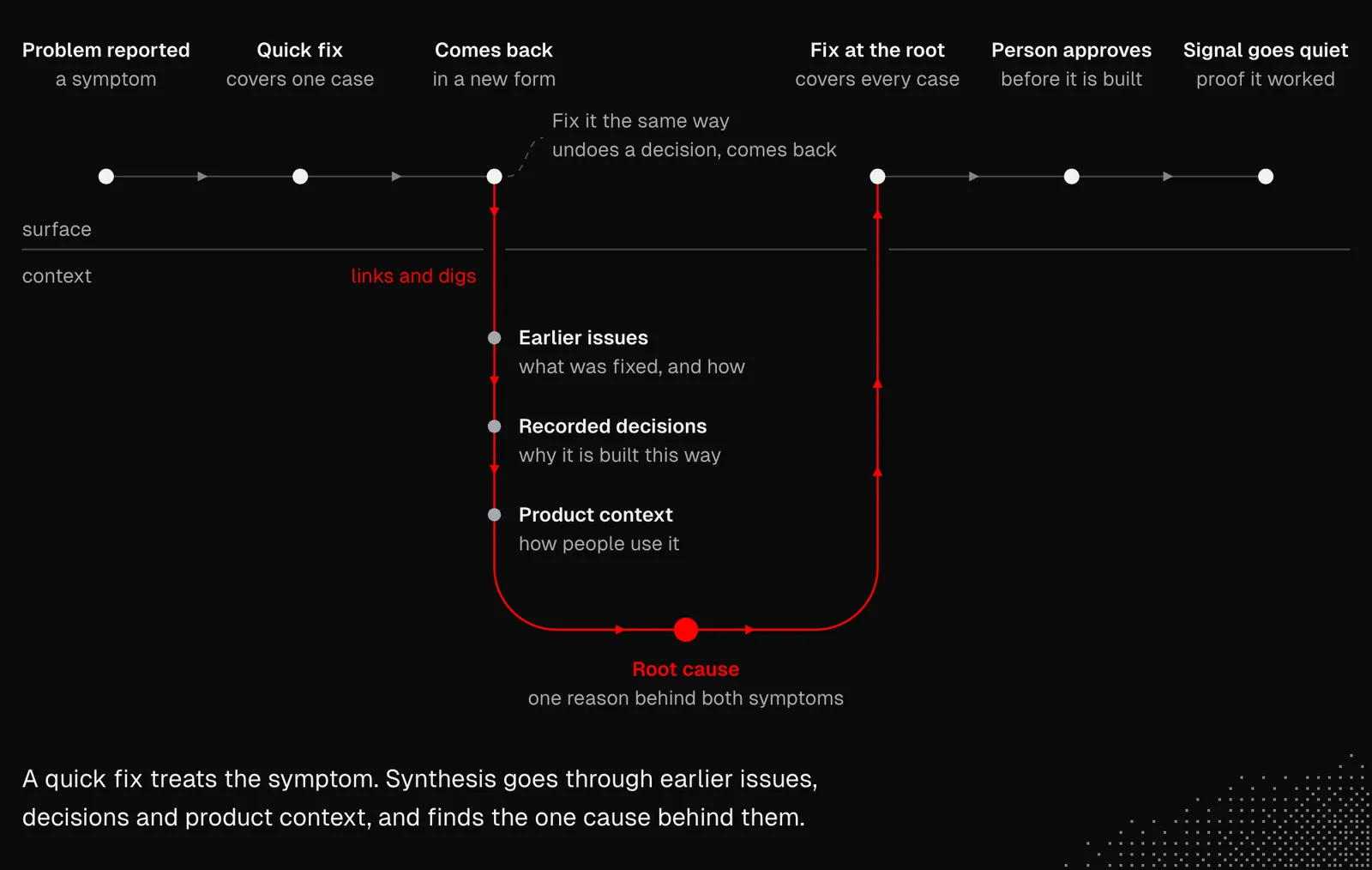
Both examples show that agents may not solve some issues right away. The reason isn't a lack of intelligence. Some issues can only be addressed over a longer time horizon, and they require connecting the dots between historical changes and context that isn't available in the codebase alone.
When thinking about synthesis, we again need to think about making it possible for the agent to navigate its environment dynamically. We can then create MCP or CLI tools that connect it to internal tooling and data sources. This way, there's no need to create workflows manually, because the agents can manage them themselves.
Decisions
Considering what we've discussed so far, it should be clear that agents will need to make many decisions without us. How many? It depends on us, but also on the agents and on the principles and rules we give them. When thinking about it, we may consider things such as:
- Strict barriers: with agents, there is almost no reason not to have CI/CD workflows, and when we have them, we may set strict rules that agents can't override and that deterministically block their changes from deployment. Similar barriers may be set through the scope of tools and the context exposed to agents. That's why we often avoid working with a single agent and instead spawn agents depending on the task.
- Agreement: after finishing work, agents should check the result against the initial agreement. The agreement may also include a section with clear expectations, in the form of principles, that say when the agent may contact us. Contact may also be allowed before finishing the task, for example, if something goes wrong or the agent simply needs more context.
- Reversibility: agents may be steered so that they are allowed to make decisions that are easy to reverse or whose potential mistakes are cheap to fix. In fact, preparing the system to be able to easily reverse changes may increase our trust in agents.
- Preferences: lastly, we may have personal preferences about where and when we want to be called. For example, the agent may be allowed to reach us through different channels depending on how urgent the situation is.
Depending on the context of our product, our organizational structure and our internal policy, our goal here will be to keep the areas where we are needed to a minimum. It also helps to think this through in terms of areas we want to keep an eye on, for example, product-related decisions remain on our end, while implementation details go to agents.
Sometimes things go wrong despite the checks, the principles and even manual verification. Data can get corrupted or lost. In those cases, agents can also be told what to do so they can help us recover quickly. To make this easier, Kent has a disaster recovery document that agents keep up to date.
Feedback Loops
The final element of "products that learn after release" is a feedback loop. Its purpose is to make the system "smarter" over time and help it "learn" from its mistakes.
By now, we already have most of the pieces a feedback loop needs. We've discussed the global context, such as the product vision, feature maps, and decision records, along with various types of journals that track anything agents can't infer just from the codebase and the available tools (such as repo history).
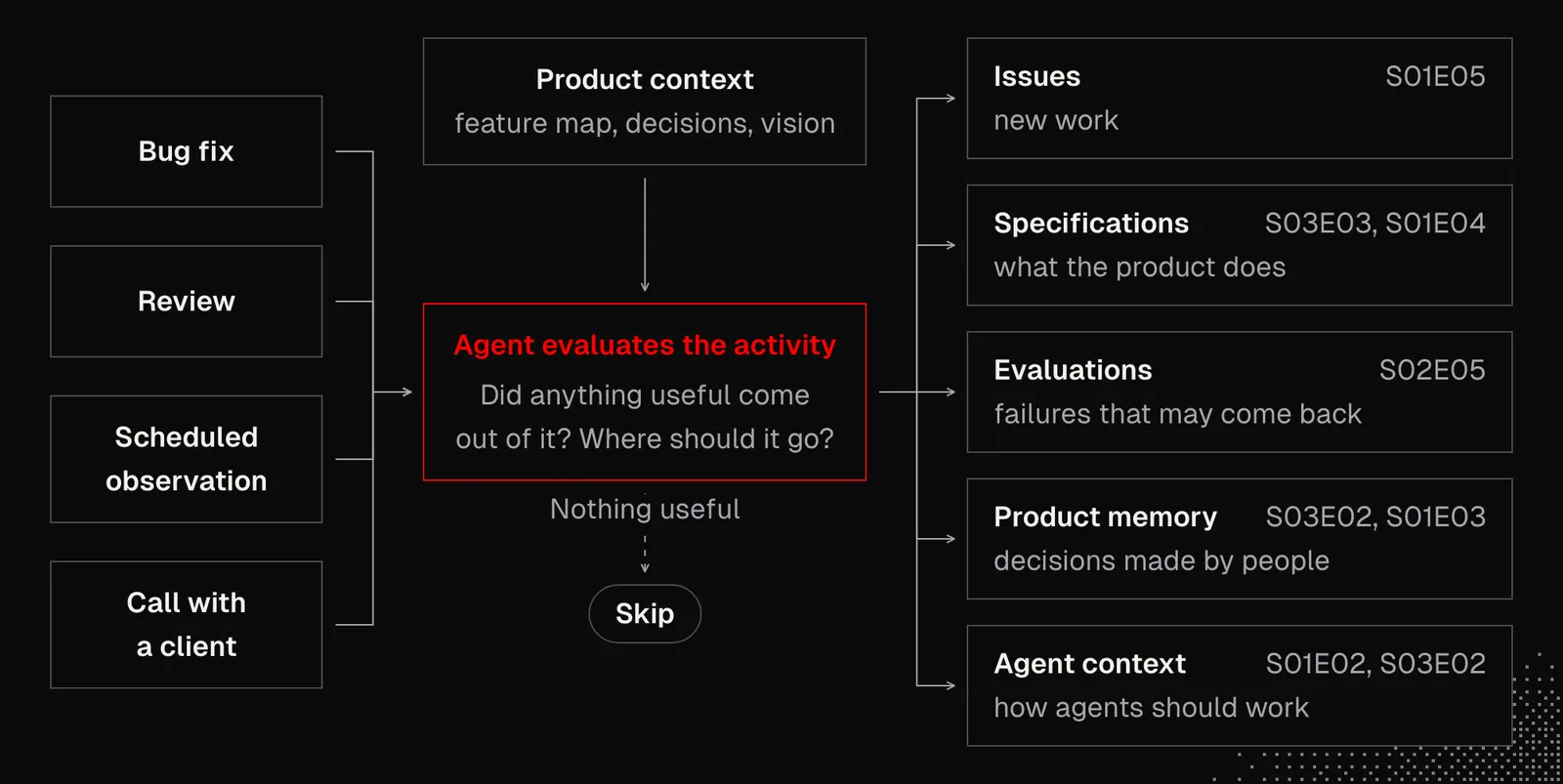
The shape of a feedback loop largely depends on the agentic activities in our project. Each activity, whether it's a bug fix, a review, a scheduled observation or a call with a client, is a potential source of useful knowledge. So after each one, an agent needs to ask a question such as: did anything useful come out of it, and if so, where should it go so nobody has to learn it again? The agent evaluating the activity can answer it only if it has access to the product context.
Where the outcome goes depends on what the agent learned, and each type of knowledge has its own place that we've already built in the previous lessons:
- Issues: new work that can't be done right away, for example a problem found by the support triage workflow (S01E05) or a papercut an agent hit during its work.
- Specifications: a change in what the product does goes to the feature map (S03E03), and if it affects the direction of the product, to the product vision (S01E04).
- Evaluations: a failure that may happen again becomes an eval case (S02E05), so the next change is checked against what production taught us.
- Product memory: a decision made by a human goes to the decision records (S03E02) or the knowledge base (S01E03).
- Agent context: a lesson about how agents should work goes to AGENTS.md, principles or skills (S01E02, S03E02).
In Kent's project, this process is described as the continuous improvement loop: define intent → build → check → capture what was learned → promote repeated guidance into enforcement. The last step is the most interesting one: when the same mistake happens again, it gets encoded as a guardrail, such as a lint rule, a type check or a test.
One example of a feedback loop is a friction log. Whenever the repo gets in the way of an agent (or a human) and it happens more than once, they file an issue labeled friction that says what happened, what they wanted to achieve, how to reproduce it and what it cost.
Then, once a day, a scheduled job picks up the open friction issues and starts a cloud agent that either fixes them in a pull request or parks them for Kent with a short summary and a recommended fix.
To understand this better, let's look at something that actually happened to him. One morning, a cloud agent was shipping a pull request and needed a CLI token. When it asked for one, the system refused because the limit on active tokens had been reached. Almost all of those tokens had been left behind by other agents, because every new cloud agent creates its own token. The agent worked around the problem by revoking three old tokens, but instead of forgetting about it, it filed a friction issue.
The next daily sweep picked up the issue and found the root cause. It didn't ship a fix, because changes to authorization are a decision for Kent. So it parked the issue and left him a summary with a recommended fix. The fix shipped the same day, about ten hours after the agent first hit the problem. In the same pull request, the decision record got a dated note explaining the new rule and why it changed. That way, the next agent working with tokens will read the rule instead of discovering the problem again. Agents noticed the problem, recorded it and investigated it. Kent's only part was the one decision that needed him.
But the loop isn't closed when the fix ships. It's closed when the original signal is measured again and goes quiet, just like in the root-cause example from the Synthesis section of today's lesson. The same applies to experiments: Kent puts a change behind a feature flag, and when the metric shows the change is better, he rolls it out to everyone and deletes the flag — and that's an important lesson.
Deleting is just as important as adding. Every loop leaves something behind: a note, a rule, a check, a document. A loop that only adds will slowly make the agents worse, because they start struggling to navigate the context and mixing up facts. That's why, as we said in S03E03, maintenance agents should mostly remove things. One example is cleanup after migration.
Lastly, feedback loops aren't only for agents. In Kent's projects, when a user reports a problem and the fix is obvious, it ships, and the user hears back. We saw this as the last step of the bug report workflow at the beginning of this lesson. Kent does the same with product feedback. We need to be careful here, though: we should keep prompt injection in mind and not let unfiltered data from users into our system.
Takeaways
This lesson clearly showed us that AI-native product development isn't about a couple of prompts or even workflows. It involves many components related to nearly every single aspect of a product, or even an entire company.
One last note: an AI-native product may reach beyond internal processes and the development process, because the product itself will often evolve into a form where users won't use it directly. Instead, their agents will use it on their behalf. The good news is that almost everything we've learned so far already shifts our thinking in this direction, since things such as primitives, MCPs, workflows, routines and knowledge bases play an important role there as well.