
S04E01 · Mechanics Behind Autonomous Systems: MEGA lesson
MEGA’s written lesson explores autonomy, runtime, state, control, observation, and recovery in autonomous systems. It uses Specter, a background research and knowledge-base agent, to illustrate the design principles; John Lindquist presents the lesson video.
textMEGA · hq.mega.dev · Saved Nov 19, 2026
mega course, agent infrastructure, always-on agents, agent memory, agent permissions
Written lesson S04E01 of the MEGA.dev course, by MEGA. Agenda: Autonomy · Runtime · State · Control · Observation and Recovery. Its lesson video is presented by John Lindquist and saved separately. (MEGA Student HQ, needs a login.)
S04E01 · Mechanics Behind Autonomous Systems
This lesson is extended. It has two parts. This part has John's video and explains the principles of autonomous systems. The Build guide is the written version of what John builds in the video, step by step, with the prompts and the checks for each tool. On this page, the notes that start with "In John's build" link each principle to its build.
Autonomous systems open up a wide range of new possibilities and engineering challenges. From an engineering perspective, they're built from almost the same blocks as any other software. Only one component differs: "intelligence" in the form of a language model, a decision model, or something similar. That alone forces us to rethink many aspects of software engineering. For example, our job is no longer to build features, but to build a system that can build them itself.
Throughout the upcoming week, John will show how to build a software factory, step by step. In the lessons, we'll take a closer look at the principles, mechanics, and tools worth considering when building autonomous software, whether it's a software factory, a personal agent, or a production-ready agentic system.
Before we begin, there's one thing worth keeping in mind. It's the question: what kind of autonomous system could I build for myself? This matters because there's probably no better way to learn than building things for ourselves. We'll use them daily, see where they fail, and figure out how to get them right. These lessons can then be used to build production systems, because even if we don't know all the answers, we will know "where to look" to find what we need.
Outline
- Autonomy: supervision levels, bounded independence, proactive behavior, trust calibration
- Runtime: events, triggers, jobs, queues, schedules, heartbeats, long-running loops
- State: persistent sessions, checkpoints, shared state, continuity across runs
- Control: permissions, budgets, approval gates, cancellation, escalation, human intervention
- Observation and Recovery: progress, traces, costs, failures, retries, rollbacks, repairs
Autonomy
Most software can run without supervision and reliably do its job. The autonomy we want to talk about now is different. It's about software that can perform tasks it wasn't designed to handle, adjust to a changing environment, recover even from critical errors, and evolve. In that case, there's no way to predict every possible scenario. What's more, the core of its logic relies on non-deterministic systems that, as we know, can perform the exact same task in many different ways, without a clear explanation. That sounds nothing like the production-grade systems we build every day.
But as S02E05 showed, it's possible to balance the logic so that the system is useful, efficient and secure, but also flexible. It's worth being careful, though, because as programmers, our default way of thinking (not necessarily a wrong one) may quickly lead us toward strict rules and guardrails.
When designing autonomous software, our goal should be to achieve full autonomy. Not because we always want to actually get there, but because aiming for it shifts our thinking toward what's really possible. A second goal should be simplicity, pushed as far as possible, to the level of "executable Markdown" or a simple skill. Again, not because we want all systems to be plain text, but to change our perspective.
From there, we can see what needs to be done to provide the level of reliability, efficiency and security that's needed. In many cases, we may find that the level of autonomy possible for a given system is much higher than we originally expected. And again, it's worth keeping in mind what we've already learned about "making logic that improves as models get better," and the fact that some of the rules and guardrails we add may be removed at some point.
In other words, what we seek is bounded independence, that is, a state where the agent can operate within the boundaries we set, with minimal loss of flexibility.
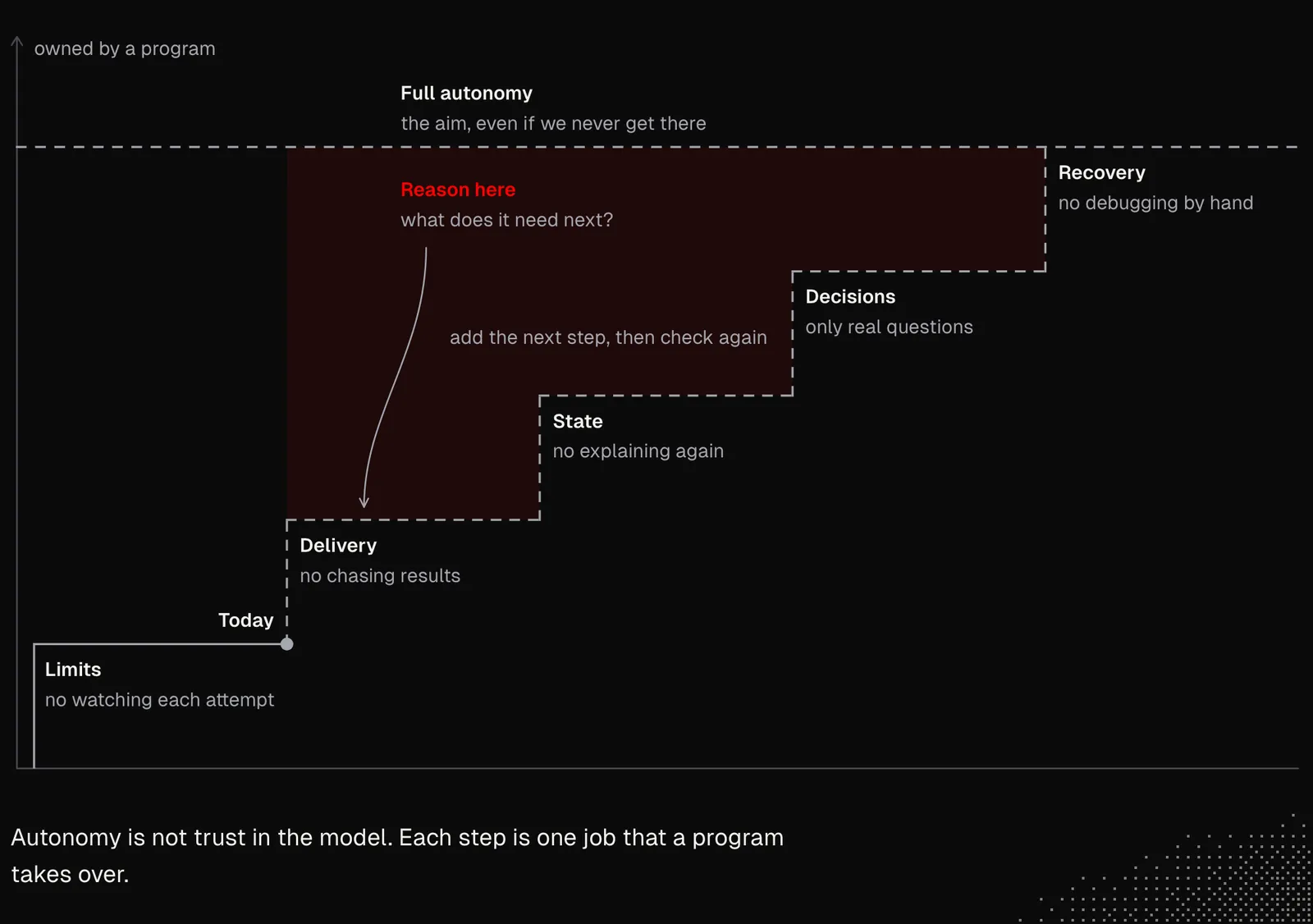
The autonomy we're talking about means getting agents to work without human involvement by default, while still giving them a way to reach us, and us a way to reach them. In fact, both are equally important, whether the system we're building is supposed to work in the background or be actively available in the user's harness or anywhere else.
Another feature of background agents worth considering is their proactivity, which we already discussed. We can achieve it only once all the other components are in place, so we'll leave it for later. I mention it now because we need to keep it in mind.
As mentioned, the best way to learn how to build autonomous agents is to actually build one and experience how it works in our daily lives. There are a couple of ways to do this:
- Cloud agents: a background agent can simply be skills + a cloud agent we may already have, either in our harness, such as Cursor, or as a standalone agent, such as Hermes, Grok Bot or Muse. This path works great for personal automations or optimizing internal business processes.
- Custom agents: apps we build entirely ourselves, with full control over their logic and customization. This path is often used to build production apps that aim to serve many users.
The examples include the source code of the Specter agent. It was designed to do research and manage a knowledge base in the background, both reactively and proactively, and it aims to be almost entirely ambient. To keep it simple, it works for just a single person.
Specter is asleep most of the time. It works only when something wakes it, and then it goes back to sleep. There are only two ways to wake it:
- User activity: the user saves a link, edits a note, or sends a message. This also includes what the user does with Specter's earlier output: linking, editing, or deleting it.
- Alarm: Specter set this alarm itself during an earlier run, for example, "send the digest in one hour."
Every user action and every alarm is written as one row in the log. A small, cheap model (or decision model) reads each user action and compares it with focus.md, which describes what matters to the user right now. If the action matters, Specter wakes up. If it doesn't, nothing happens. Alarms skip this check, because Specter set them itself. Once awake, Specter starts a new run and does the work, most of which lands quietly in the knowledge base. It contacts the user only when the result is worth the interruption, and before going back to sleep, it sets its next alarm.
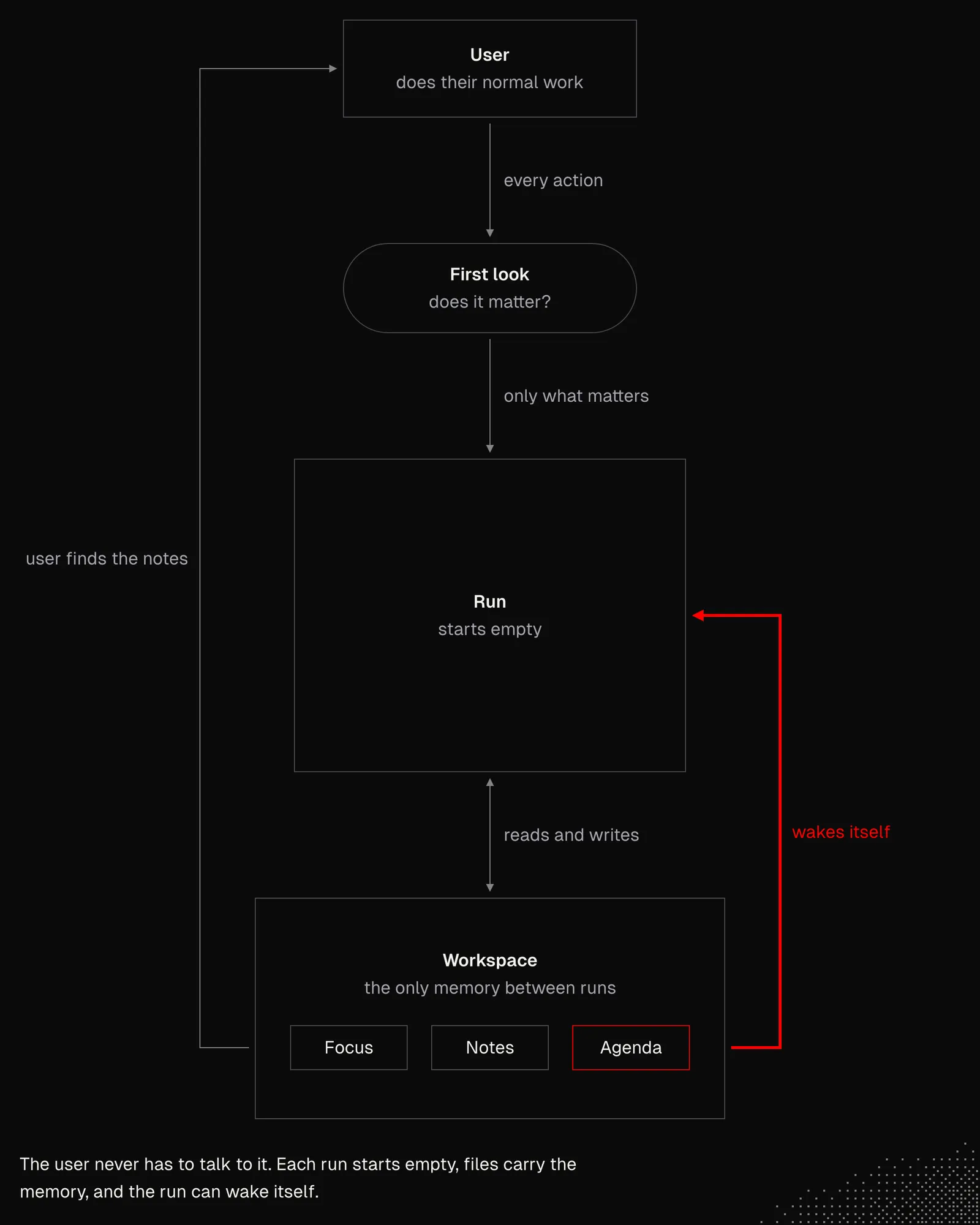
In this agent's case, autonomy relies on a few mechanics, including:
- Perception: external activities turn into events, but they aren't addressed unless they're relevant.
- Decision: relevance is determined by a small model that is laser-focused solely on comparing what has happened with what's written in focus.md.
- Loop: the main agent sits at the heart of the system, and its job is not only to perform tasks but also to manage itself.
- Reflection: alarms the agent sets for itself let it reflect not only on its recent actions but also on its actions in a broader context. The agent can also use them to set a "heartbeat" that lets it heal itself.
- Awareness: every action leaves a trail that can be accessed later, including decisions to do nothing, along with the reason for each. This way, the agent can recover even from previous failures.
And even though Specter is just an example, it shows us a way of thinking about autonomous system design. First, it shows that most of the architecture of such systems shares common traits with classic apps. On the other hand, it shows how AI-related concepts open up new possibilities and require us to see software through the lens of intelligence.
At this point, if I had to point to a single resource worth reading, I'd say it is DeepSeek Harness, especially the article "Exploring Super-agent Design: Towards a More Autonomous Agent System" as it has many great ideas. Some of them are already covered in MEGA, and some won't be.
In John's build: the Critic is a small example of bounded independence. It runs beside the main conversation on a small, fast model. It reads every prompt and reply without being asked, and it writes short findings in its own pane. Its boundary is clear: nothing goes back to the main conversation unless we send it. See Supporting Agents.
Runtime
Autonomous systems at their core are just back-end apps that often expose some kind of API. In the second week of MEGA we discussed how agents are built, what the role of primitives is and how to use them to navigate a dynamic environment. Now, when designing autonomous systems, most of these things come together.
Specter is a good example here again, as it involves many mechanics we may see in any kind of autonomous agent, such as events, triggers, jobs, queues, schedules, heartbeats and long-running loops.
Looking at its architecture, we have a celld node, which is a self-hosted runtime for Cloudflare Durable Objects. The agent's state is saved, and with pi-durable saving each step of a run, the agent continues after a restart from the last step it saved instead of starting over.
To put it simply, a Durable Object is a small server-side object with a fixed ID and its own SQLite storage. You can think of it as a serverless function, except it's a stateful "serverless object," so the data it saves will still be there the next time it's used. Every request to it reaches the same single instance, so two processes never change its state at the same time. It can also set an alarm to wake itself up even when no request comes in. In Specter, the whole agent lives in one such object: its log, its workspace, the current run and its next alarm. The outbox lives in a separate object, which ensures that a crash never sends the same email twice.
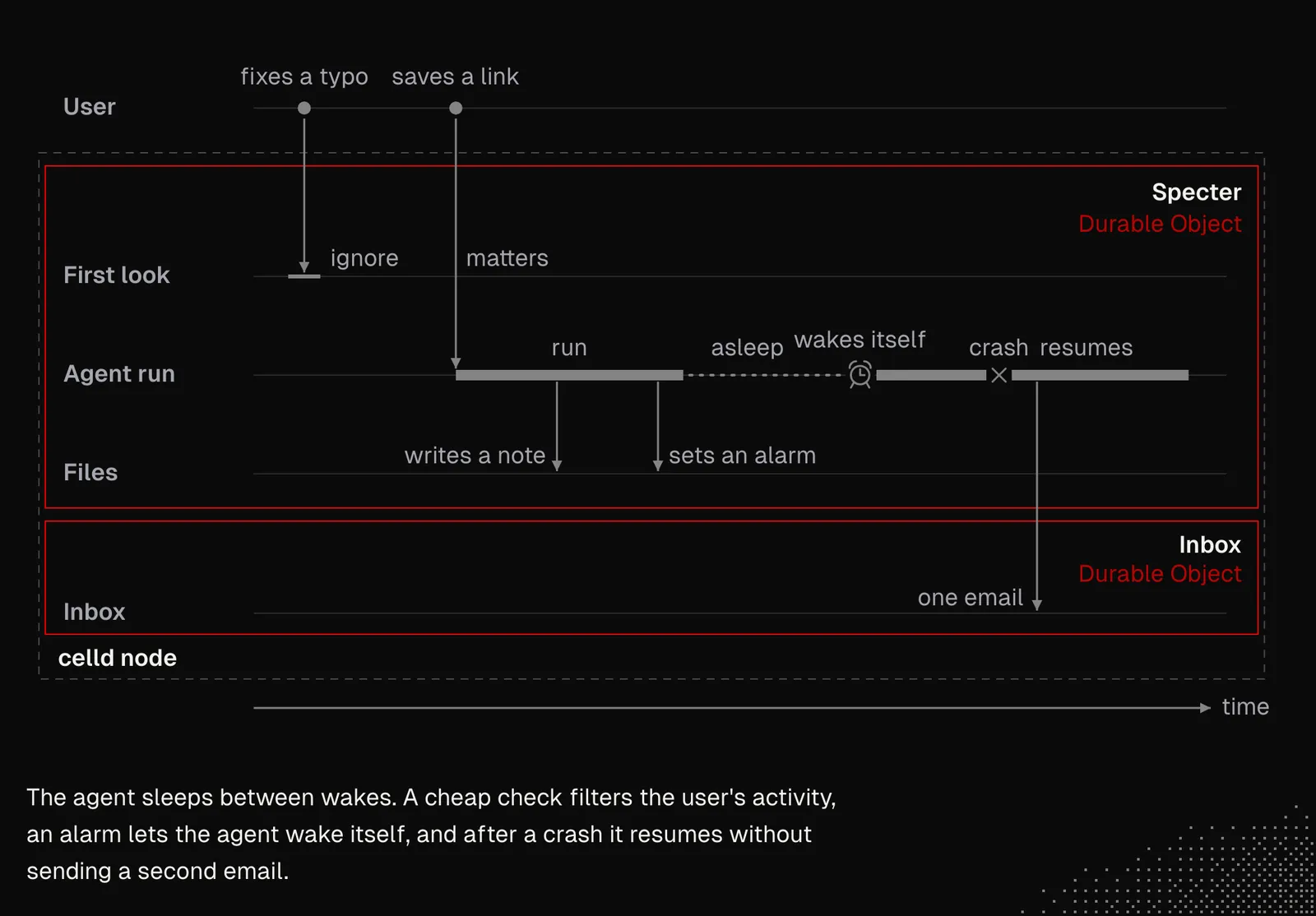
Specter's architecture includes components such as:
- Node: a celld process that runs Durable Objects, keeps their data on disk and wakes them when their alarms go off.
- Router: a thin worker that passes each request (an event, a dashboard read or an MCP call) to the right object and has no logic of its own.
- Log: an append-only list holding every event, decision, run step and receipt.
- Decision: a small model that reads new events and compares them with focus.md. Only what matters wakes the agent.
- Run: one agent conversation per wake, driven by pi-durable. It starts with no memory, saves each step as it goes and, after a crash, continues from the last saved step.
- Workspace: versioned files (focus, notes, agenda, skills). They are the agent's only memory between runs, and every change can be traced and reverted.
- Alarm: the object's single timer, set to the earliest time anything must happen: the next item on the agenda, a retry, or a heartbeat while a run is active.
- Checks: code, not the prompt, that checks what a run reads and what it sends out: trusted sources, allowed write paths, limits and a send key on every email.
- Outbox: a separate object that stands in for the user's mailbox. It keeps one email per send key, so a crash never delivers the same email twice.
All these components not only let the agent do its job but, first and foremost, help it survive issues. At the same time, they build trust, because the agent is less likely to repeat its actions, some of which are irreversible.
The Specter agent specializes in a single task, and while its architecture allows us to do many other things, its purpose remains clear.
To show what this might look like in a general agent, one that isn't specialized in anything but can flexibly adapt to the user and the environment, I'll use an example from one of my projects. It doesn't rely on Pi. It's entirely my own implementation, and it supports durable threads with their own journals, scheduled work, agents that start other agents on new threads, permission checks on every action, and recovery after a restart, with no effect ever repeated. All of this runs on one loop, which is the same for every agent.
The diagram below shows how the agent loop handles the entire interaction, including claiming the thread to lock it for the duration of a single slice of the interaction. The loop also assembles the context from multiple layers and calls the model, which picks the next action. The loop then checks whether that action is allowed (or asks the user) and dispatches it.
This agent also relies on primitives, all of which we've already discussed in various forms throughout the course, so there should be no surprises here. These primitives make the entire architecture extremely flexible, because nearly everything can be combined the way we want. And lastly, there's an entire durability layer that I built by hand, and that a runtime such as celld now gives us out of the box.
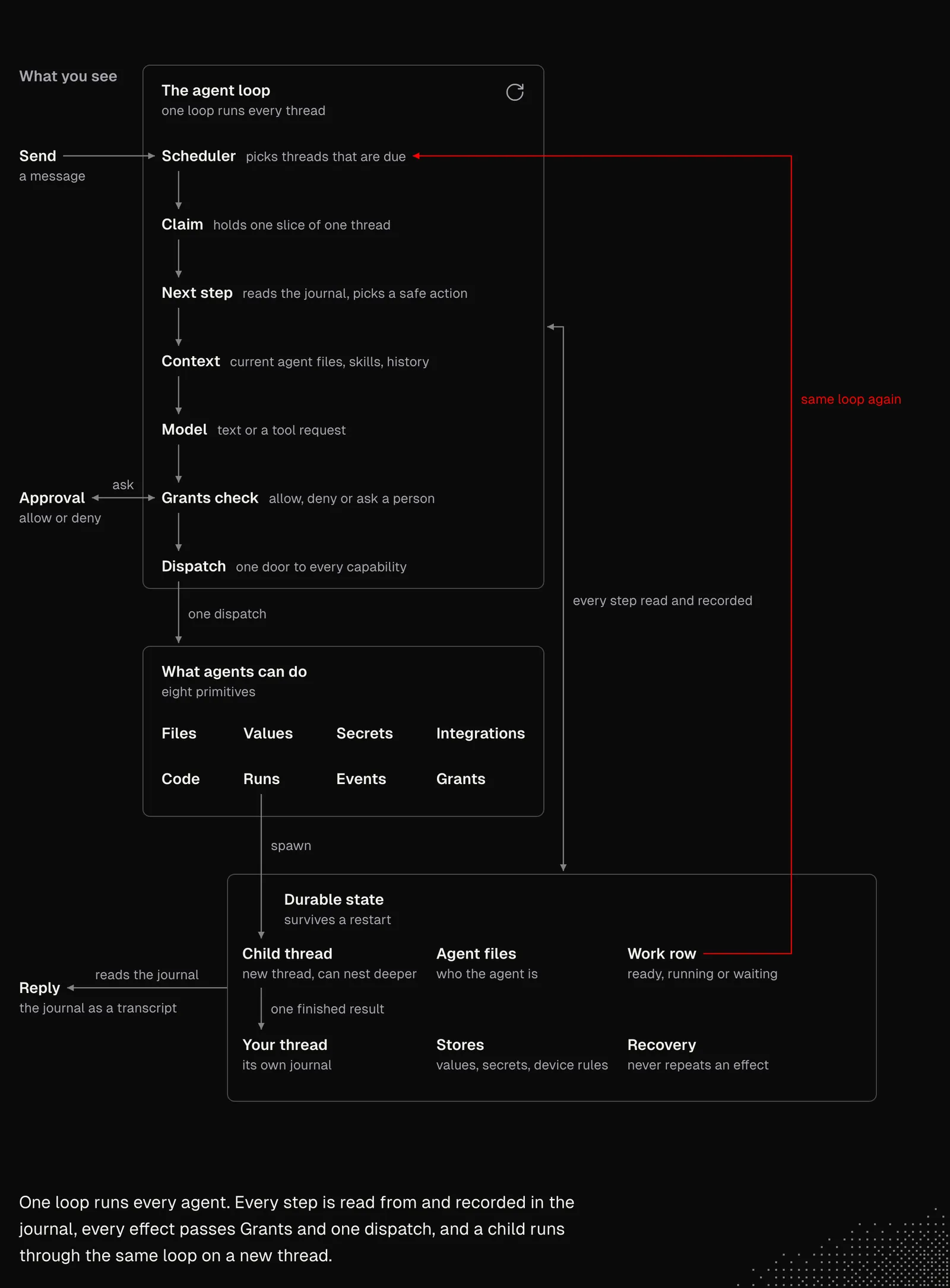
Both examples show how components we know from classic engineering can now be combined and wrapped around language models, so the models can navigate the real world effectively, balancing their non-deterministic nature with reliable structures. It is also worth keeping in mind that this knowledge can be useful not only for building entire systems, but also for small scripts and apps that can work for us in the background.
In John's build: the same idea appears at a small scale. Two events wake a supporting agent: a prompt is submitted, and a reply ends. The harness reports both through hooks or through the conversation file. His build has no alarms, queues or durable runs, so Specter stays our example for those. See Supporting Agents.
State
We know that LLM calls are stateless by default (although the Responses API offers a stateful mode). This means we need to keep the agent's state on our end, and there are a couple of types of state we may want to keep.
Most agents we're working with store their interaction history and often offer some kind of memory system. But Grok Bot recently introduced a UI without any threads, just one continuous conversation where a single bot simply figures out everything it needs. This shift shows us one thing: any pattern we learn about agents can be broken, especially because both models and tooling keep advancing.
In our Specter example, we don't store threads after a run finishes, because the long-lived thing is the agent itself, not a chat session. If the process dies in the middle of a run, pi-durable lets us pick up from the last saved state instead of starting over. These saved steps work as checkpoints. But once the run ends, its conversation is no longer needed. Continuity across runs comes from what the run wrote down: new rows in the log, new versions of files such as focus.md, the notes and the agenda, and the next alarm. The next run starts empty, reads the log rows it hasn't seen yet and the files it needs, and rebuilds its context from them. In other words, Specter doesn't remember anything. It only reads what it wrote earlier, which makes its memory easy to inspect, edit and undo.
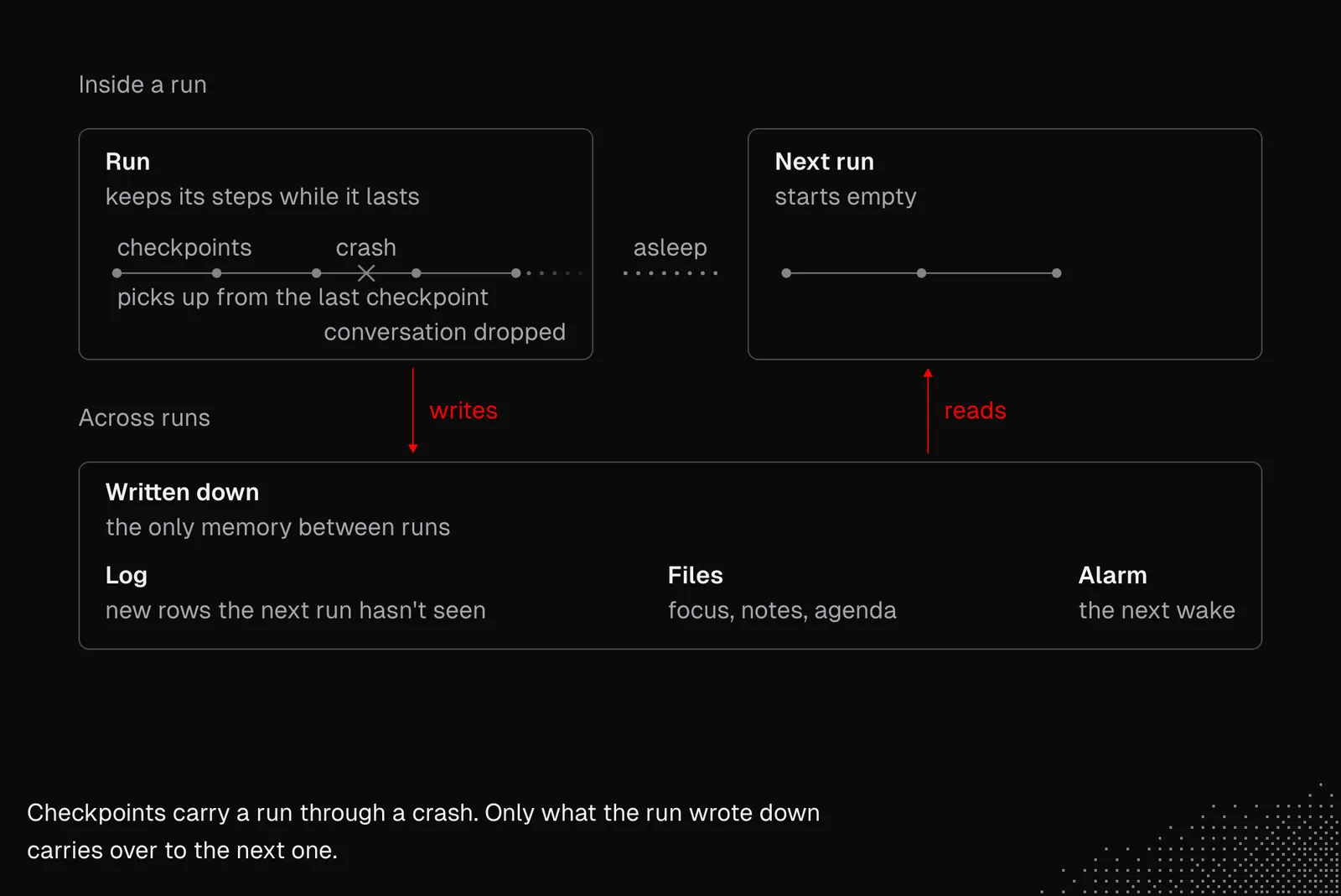
Specter's approach works great in its case, but that doesn't automatically mean it will work for any background agent. That's why, before we break such rules or patterns, we first need to understand the principles behind them.
The second example, the general agent, works differently. It has several types of state to keep track of: interactions, execution, workspace and temporary variables. To be exact:
- Journal: an append-only file that holds every detail of each interaction. The model uses these details as context, and they're also used for recovery after a crash. The journal also records approvals, repeated calls and the model used for each request, so we can always see what really happened.
- Observations: once the history gets too long, a model pulls the key facts out of it, and each fact keeps a link to the record it came from. This memory is rebuilt from the journal at every step, so the journal stays the only source of truth.
- Catalog: the thread list, search and the attachment index. It's built from the journals, so if anything goes wrong, we can simply rebuild it.
- Work rows: one row per thread showing whether it's due, running, waiting or finished, and how far the loop has read its journal. The scheduler also uses these rows to pick the next job.
- Schedules: work planned for later or repeated over time. When a schedule fires, the regular agent loop picks it up like any other job.
- Effect ledger: a short record of everything a single code mode run did, kept only while the run lasts.
- Agents and skills: each agent is a file with its name, rules, skills and model. These files are read again before every model call, so a change takes effect right away.
- Grants: permission rules that every action has to pass. A rule can allow an action, block it or ask the user. Rules about a device's own resources, such as linked folders, never leave that device.
- Documents: notes and files, with each attachment stored once under the hash of its content.
- Values / Secrets: values are typed rows for things like preferences, shared by every agent that has access to them. Secrets are for passwords and keys. Agents only get a handle, so they never see the actual value.
- Claims: which worker is running a slice of a thread right now, and which window is watching it.
- Events: live notices for the window. They're never stored, because after a reconnect the window simply reads the journal and the work rows again.
It's clear that building autonomous systems can be an entirely different game, depending on what we want to achieve. And when I was designing this architecture, it was hard to find any resource that described exactly what needed to be done. At the same time, none of the mechanics on our list is entirely new, and I figured them out together with AI by iterating on the logic of the agent's core, the kernel. By using the model's knowledge and my own experience in programming and designing agents, I got satisfying results.
I'm writing this because we engineers already have most of the knowledge needed to build agentic systems. And now, with all the knowledge from MEGA, we can start by building simple agents, like "smart cron jobs" that take care of some trivial tasks for us. The experience we gain from building them will quickly take us to the level where we can build more complex logic and, ultimately, autonomous systems.
In John's build: a supporting agent keeps its state in files too. The folder agents/critic/ holds the job in agent.md, the checks in expectations.md and the results in reports/. The agent is opened from these files and the lab tests it against them, so we can inspect and edit it the same way we inspect Specter's workspace. See Supporting Agents.
Control
How can we control a system that works autonomously? The answer isn't obvious, because we may even ask, "Is any control needed at all?" or "Should this be handled autonomously in the first place?" And even if we're clear about what a system can do and when it needs to ask us for permission, there's still the question of how it can reach us and how to make approvals useful, reliable, and convenient.
Like any other loop, an autonomous loop can be built so we can pause it and wait for some information or event to arrive before it continues. The most important part, though, is that when the loop waits for approval, that approval must be deterministic, meaning code, not the model, is responsible for letting the action through or rejecting it. This may sound obvious at this point, but it can be tricky to implement, because we need to know exactly which actions require permission, whether other actions can run in the meantime and how to handle a wait that may last for days. That's where durability helps us a lot, as we can easily restore the interaction after a long time, even if the connection was lost in the meantime.
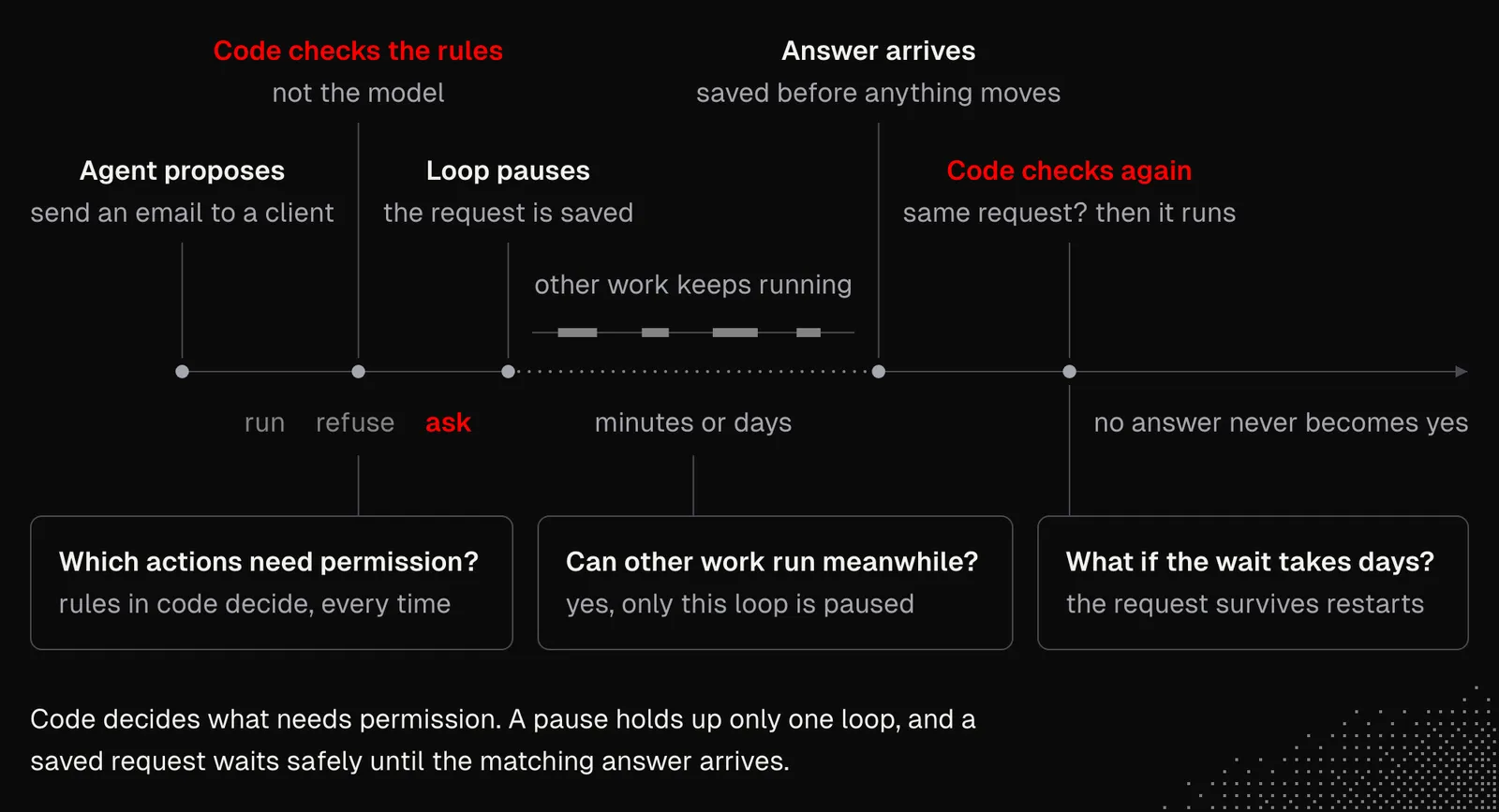
But controlling an autonomous system isn't just about approving tool calls, because agents can also manage resources, integrations and interactions with other users and agents. And all of this needs to be handled with proper primitives, often in a centralized way, so permissions are easier to manage.
The diagram below shows the permission rules (Grants) in one of my agents. They are complex because different rules apply depending on where the agent is operating: some rules depend on the device because they stay local, while others must be synchronized between users from the same organization.
Additionally, the rules must apply everywhere a primitive is used. For example, Integrations can be used in a Chat, but also in Apps. Once the user sets permissions for an integration, those permissions need to be respected everywhere.
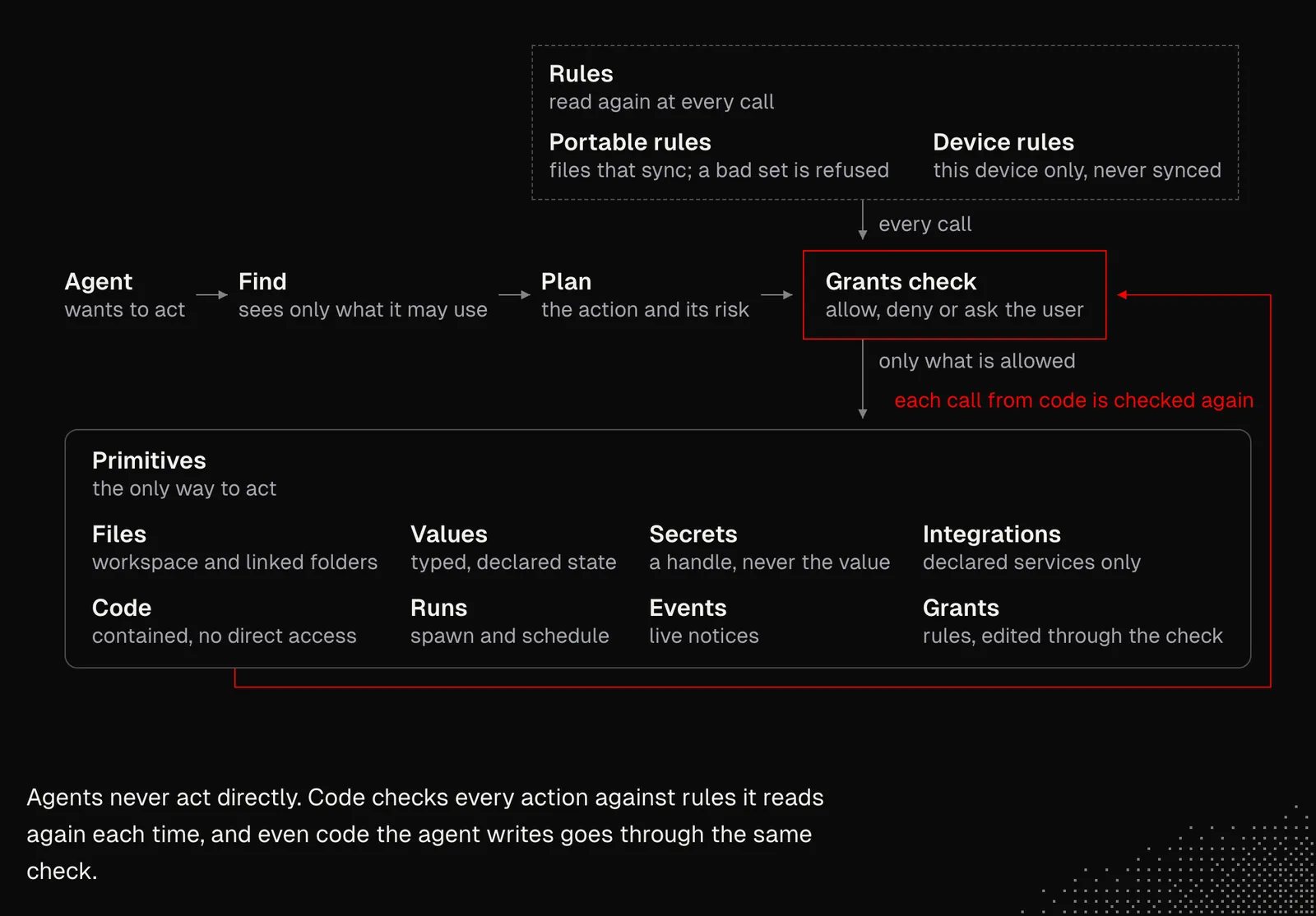
There are also certain types of actions the user cannot mark as trusted, so they always need explicit permission. One of them is creating an integration, which rarely happens but is potentially dangerous.
In practice, approvals are a problem. If we set the rules too strictly and the user has to confirm every action the agent takes, it defeats the purpose of an autonomous system. It also annoys the user so much that they stop reading what each request is about. That's why our policies may include time-limited approvals or context-limited approvals.
But policies and UX aren't the only things we need to address. As we discussed, modern agents interact with the world through code mode, so they write scripts and commands that the end user may not be able to understand. What's worse, it's nearly impossible to write all possible rules to catch dangerous actions deterministically, especially because what counts as dangerous may depend on the user's context. But here we may consider using decision models such as jev or the Decisions API.
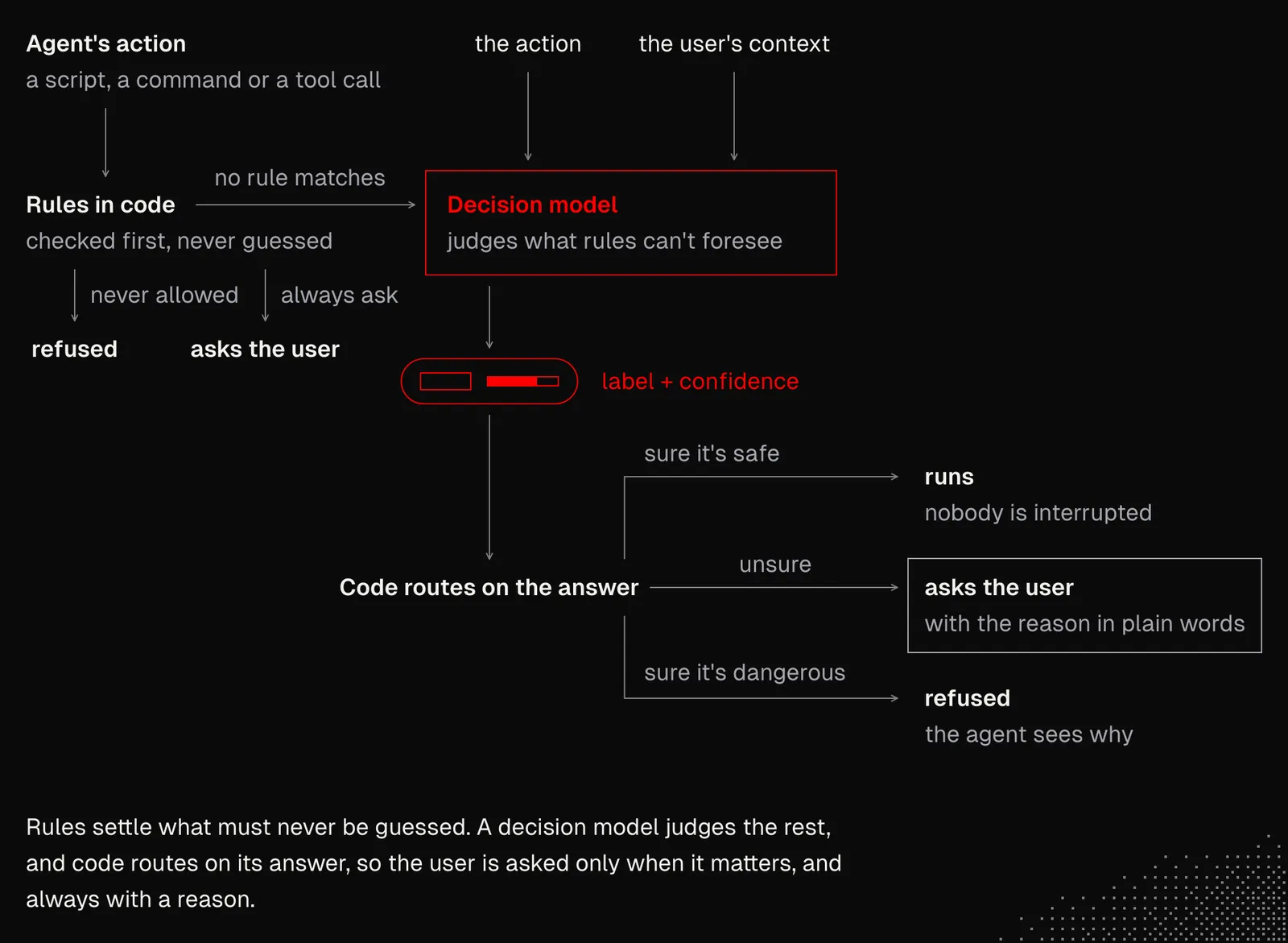
And lastly, some of the control may rely on the models themselves, especially the latest ones, which hallucinate less and are good at following instructions and using context. This won't guarantee that no unwanted actions are taken, but it will definitely reduce the risk.
In John's build: control is manual by default. The Critic shows numbered findings, and we choose the one to send to the main conversation. Sending it does not interrupt a running reply and does not change the text we typed. Automatic interruption is optional. It is only for destructive changes, and the lab must prove it first. See Bringing the Critic Home.
Observation and Recovery
In S02E05, we discussed observability and evals. That knowledge and those tools are even more useful now, because we want not only to keep an eye on the system and its condition, but also to add proactive mechanisms that autonomously iterate over the system and catch issues right after they happen.
Once we have autonomous agents working for us, it quickly becomes nearly impossible to monitor them all, especially as their activity grows and spreads across multiple devices. Instead of trying to manage all of this by hand, our goal is to have other agents observe, react and take action to fix issues the moment they happen.
We already know that platforms such as Langfuse provide not only advanced monitoring but also online evals, which can notify our agents when something goes wrong and give them the information they need to access the system and make changes. So we need to be thoughtful about what kind of data we store, not only from the user's perspective, but also from the perspective of a system that needs to understand itself well enough to iterate on its behavior.
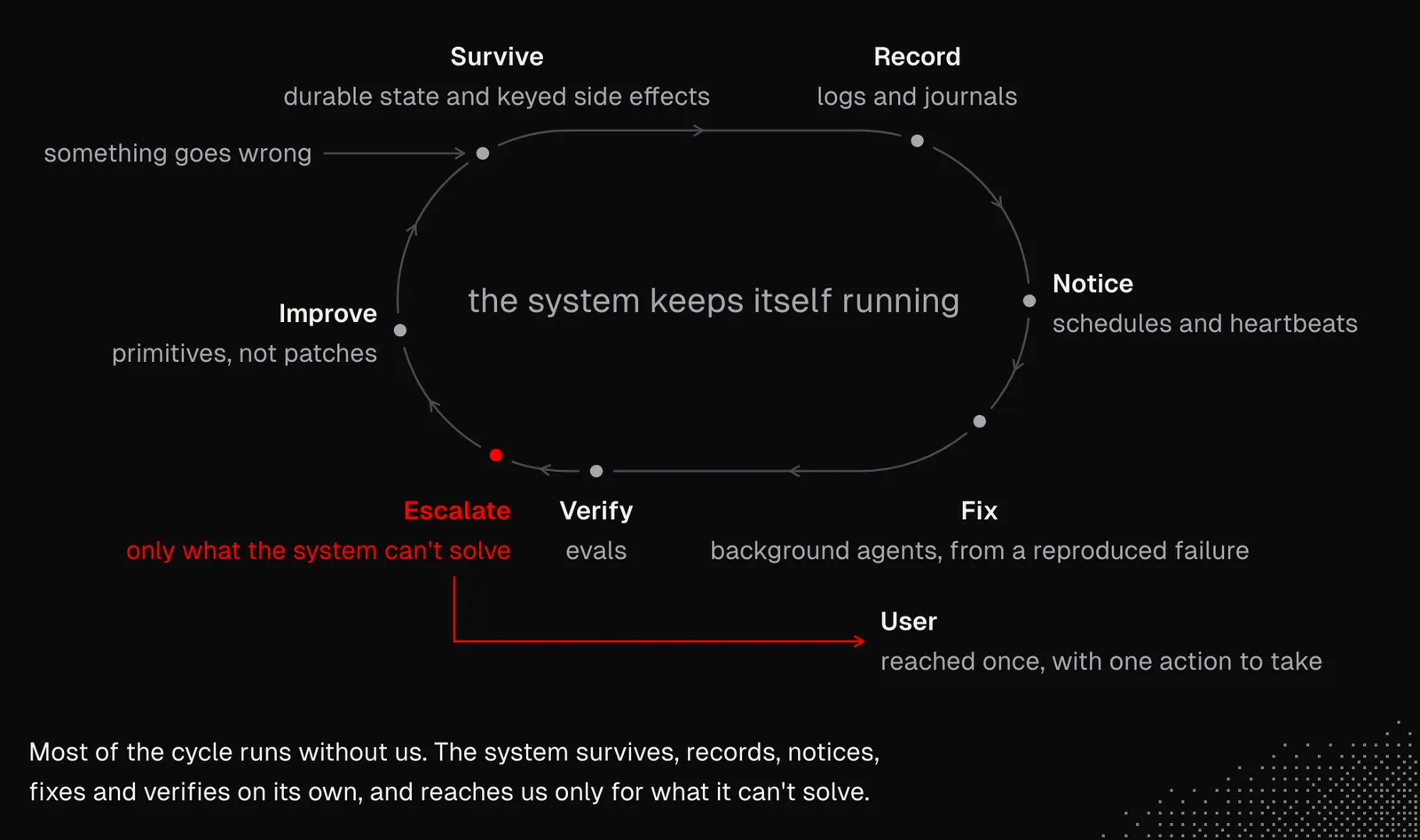
At this point, almost everything we've discussed so far comes together like this:
- Durable state and keyed side effects let the system recover and continue its work without repeating what's already done.
- Logs and journals keep a trail of every action and decision, including the decision to do nothing, so any behavior can be traced back to its cause.
- Schedules and heartbeats let the system observe itself and spot issues, even when nobody is watching.
- Background agents can fix at least some of those issues without us, as long as each fix starts from a reproduced failure.
- Evals show agents how a change affects the system before it's trusted.
- Escalation brings what the system can't solve to us once, with the one action we need to take.
- Primitives let agents address issues at the architecture level instead of patching symptoms.
In John's build: the lab is this section in practice. A second agent tests a tool from outside, in an isolated copy of the workspace. It types as a person types, reads only the screen, and reports "I tried X, expected Y, got Z". When a check fails, we change the agent's job and run the same check again. We never loosen an expectation. See The Lab.
Takeaways
The idea of autonomous systems that we first build for ourselves, delivering value without our involvement, is something we may want to focus on in the near future, especially because building them is one of the best ways to learn how to build autonomous systems, learn from failures, and discover new techniques we may later want to use in our work.
At the same time, looking at what we've discussed in this lesson alone should make it clear that even if autonomous systems operate without us, or with only minimal engagement from us, building them requires tons of effort, not only from an engineering perspective but from nearly every aspect of Product Engineering.