S04E02 · Building Portable Agent Control Planes: MEGA lesson
MEGA explains how to organize portable agent control planes across configurations, projects, services, and harnesses. The lesson connects these principles to a build by John Lindquist.
textMEGA · hq.mega.dev · Saved Nov 19, 2026
mega course, agent infrastructure, agent orchestration, agent permissions, company harness
Written lesson S04E02 of the MEGA.dev course, by MEGA. Agenda: Configuration · Portability · Knowledge Delivery · Operations. Its lesson video is presented by John Lindquist and saved separately. (MEGA Student HQ, needs a login.)
S04E02 · Building Portable Agent Control Planes
This lesson is extended. It has two parts. This part has John's video and explains the principles of a portable control plane for agents. The Build guide is the written version of what John builds in the video, step by step, with the prompts and the checks for each tool. On this page, the notes that start with "In John's build" link each principle to its build.
No matter whether we work with agents as users or design them from scratch, one thing stays the same: things change, and they change fast. Over the past few months, I've worked with Claude, then Pi, and now Grok Bot (which manages Pi). Switching between them was quite seamless because of a harness-agnostic setup and the fact that many settings simply do not matter anymore.
Autonomous systems are similar, because we need to be ready to refine them, rebuild them from scratch, or scale them. Once we start building, we quickly notice that agents can share most of their logic, configuration, and resources. But if we don't think about this early enough, it will be hard to separate what's specific to each agent from what they can share. And even when we do separate them, making any update may still be difficult, because unless we have observability and evals in place, we don't know how a change will affect each agent.
In week 3 of MEGA, Kent shared his approach to Product Engineering and showed us his project, Kody. In a nutshell, it's an MCP server that doesn't just provide tools to a harness. It brings a whole capability layer to any harness it connects to. That means every single integration, setting, memory, and resource travels with Kent. If you haven't had a chance to check out this project yet, discuss its source code with your agent. There are many ideas worth keeping in mind.
One of them is that a control plane is the layer that decides how agents work and stays separate from the runs themselves. In other words, it's about separating what defines an agent from where it runs.
With that in mind, let's talk about how to build the foundations of an autonomous system using first-principles thinking and what we've learned so far.
Outline
- Configuration: executable Markdown, profiles, skills, rules, hooks, tools, agent rosters
- Portability: durable workflow definitions with explicit adapters for different harnesses
- Knowledge Delivery: contextual loading, routing, push-based injection, code maps, documentation
- Operations: versioning, inspection, reuse, migration, rollback, Git-native recovery
Configuration
Popular harnesses aim to deliver a seamless experience by helping agents learn how to work with us, configure themselves, and build memories about us. Even if not all of these features work today the way we'd imagine, they're getting better, and at some point we may have truly general agents. If nothing changes, their capabilities will largely depend on the apps, services, devices, and other agents they connect with. And this is where configuration comes in.
Configuration can mean different things here. Some of us will want to build workflows on top of existing agents, while others will want to customize virtually any level of the system. In S01E02, we discussed harness personalization, which may still sound familiar. But here we're talking not only about how we work with coding agents, but also about how we set up autonomous systems around ourselves, a product, or an entire company.
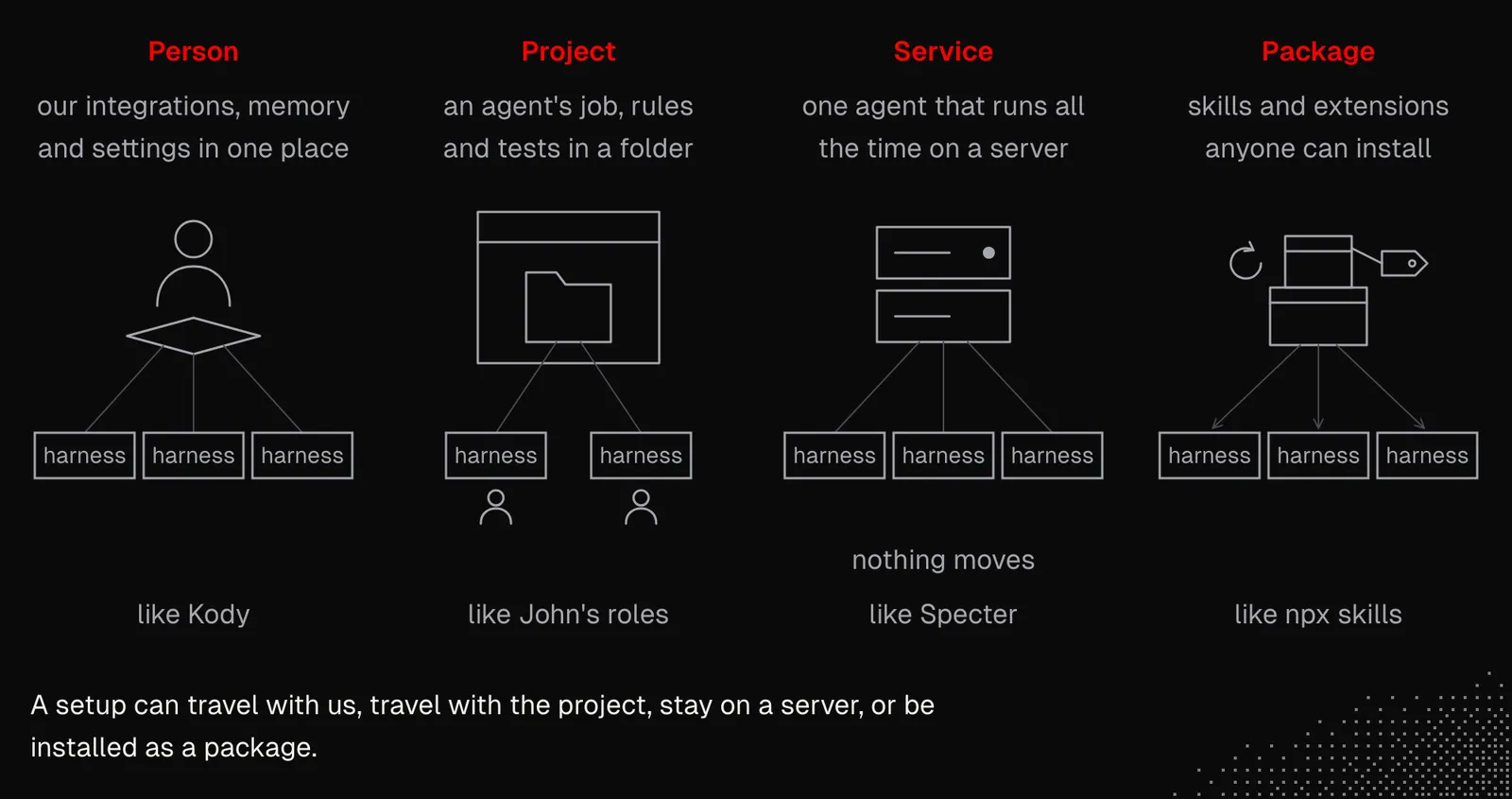
Looking at what we've learned so far, we can consider a few configuration strategies:
- Person: our integrations, memory, and settings live in one place, and any harness can use them. It's like Kent's Kody.
- Project: an agent's job, rules, and tests live in a folder, and everyone's agents can use them. It's like John's roles.
- Service: everything is managed by a separate agent that runs all the time on a server. It's like the Specter example from S04E01. In this strategy, nothing moves.
- Package: skills and extensions are shared through
npx skills, so anyone can install them and get updates.
And to be clear, it is not always a decision between those strategies, as we may want to mix them. For example, an agent defined in a project folder can use installed skills and connect to our MCP servers.
Skills, CLI, MCP, cloud agents, and A2A all matter here, and they matter together, not separately. Everything we've discussed comes into play: harness personalization, skills design, executable Markdown, code mode, getting remote, control, and security.
Let's consider what a setup for engineers like us might look like. Our contexts may differ, so to keep it simple, let's assume we work on some personal projects and have a couple of clients. So:
- We all have agents connected to our personal accounts, at least in minimal form: calendar, email, to-do list, notes, repositories, knowledge bases, and personal skills.
- Every project has its own resources, requires connections to specific accounts, services, and servers, and may have its own knowledge base, either inside its repository or outside it. In some cases, we may be authorized to use only the specific AI providers the client approves.
- Sooner or later, many of our agents will move to the cloud, where they will watch projects, handle repetitive activities, or help with our personal tasks. These agents cannot mix clients' projects, and this requires hard boundaries.
- And lastly, all secrets, connections, servers, accounts, reports, and knowledge must never leak to another client or to the outside world.
In practice, all of this is really hard to manage. Before AI, most of these aspects didn't matter as much, because we handled them directly, often on a small number of machines. But now that we're working with agents, all of it must be properly organized. The reason isn't only security (even though that should be the priority). Without organization, as we scale our setup, we'll end up fighting it more than working on the actual project.
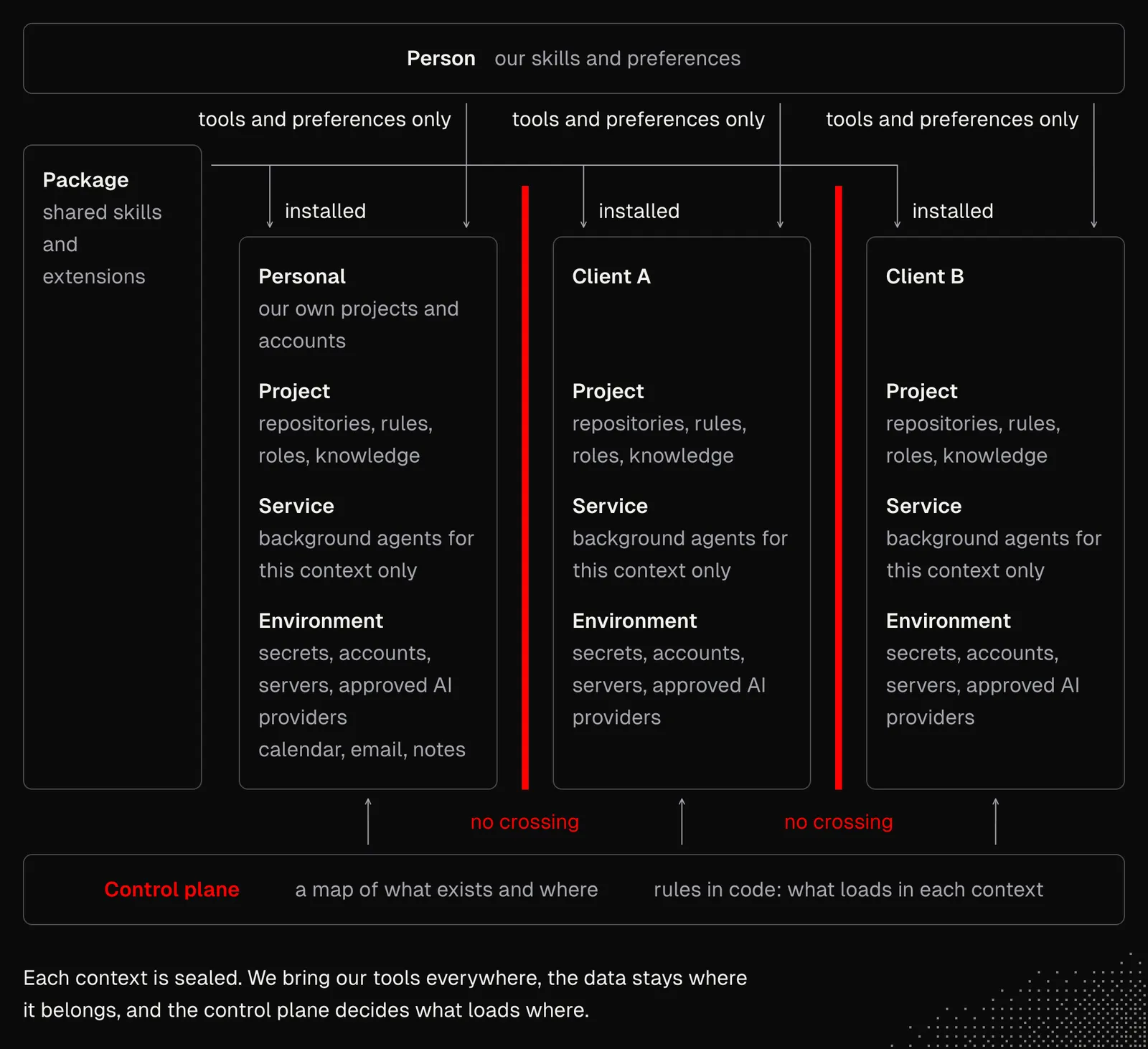
As we already discussed, agents are the ones who manage such configurations. But we're the ones who tell them what needs to be done and why. Once we take care of the foundations, it will be easier to scale everything up. And even if we already have a setup today, agents can scan it for us and visualize it, so we can decide whether to change anything. Here we may consider:
- Profiles: Almost every harness offers profile settings that the harness itself can easily configure. They include models, permissions, MCP connections, skills, and plugins/extensions.
- Global Context: We should have notes that help agents navigate the entire system, including our device, remote servers, and all the services. These notes shouldn't be written just once. They should also be kept up to date, for example with what we learn from sessions with agents.
- Observability: Platforms such as Langfuse can be integrated not only with our custom agents, but also with coding agents. Connecting such a platform across a team can help us understand how we work with agents and learn from it, and also keep the configurations up to date.
- Remote Filesystem: We talked about this before. Our global configuration should live in a separate repository and bring all the context that agents need to set themselves up on new machines.
- Sandbox: Sandboxes (sbx / boat) can be treated as defaults, but we always need to keep in mind that they often won't prevent an agent from receiving or sending information or performing unwanted actions. This may sound obvious, but it's often overlooked.
- Secrets: As mentioned in week 3, agents must have restricted access to services and never touch our secrets. Keeping secrets in .env files is often not safe enough, even if permission rules forbid reading them, because agents easily find workarounds.
There may also be project- or organization-specific aspects we need to keep in mind. But all this should give us a proper understanding of how to organize configurations. The most important part is that we need all of it so we can easily spawn agents.
In John's build: the widgets and the agents use the Project strategy from this section. Each one is a folder in the repository: widgets/issues/ holds the instructions and the expectations of the Issues widget, and rules.md holds the rules for work on an issue. The Memories widget keeps the global context of the project up to date. It suggests a rule, we press Keep, and it writes one line to MEMORIES.md, which AGENTS.md links for every new conversation. See Widgets.
Portability
There's one thing about automation worth knowing: if we do it well once, we can run it anywhere, as many times as we need. It sounds obvious, but the tricky part is doing it well. If even a single moving part needs to be adjusted manually by a human every time, there's friction. We already know some of this from tools such as Docker or Kubernetes, where the environment is declared once and then rebuilt the same way every time.
Autonomous systems can be built in many ways, and for now, there's no universal way to make them portable and manage them across multiple devices. The best thing we can do is to configure a system on a remote device and then ask it to clone itself to another one. If that succeeds, the clone should run the same task and get the same result, with no manual steps. The next step is running some tasks in parallel and seeing if anything goes wrong.
For my personal agents, I follow a very simple rule: everything is just a folder. It is worth noting that I'm the only user, but agents run in parallel. Moreover, almost all background work happens in the cloud, so everything stays synchronized, no matter where the work is done. The figure below shows the architecture and how primitives and cloud agents work together.
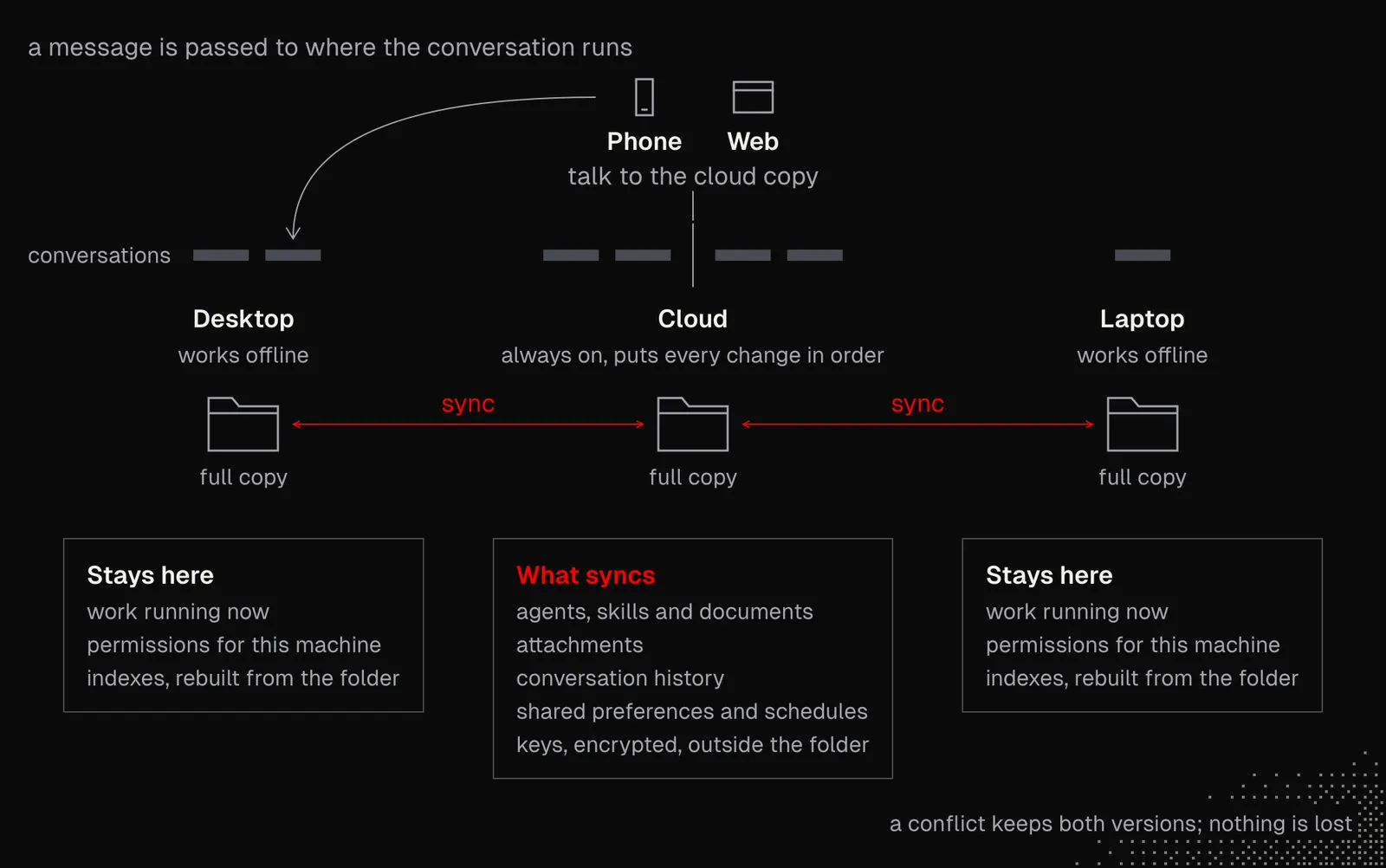
This system also shares the agent's kernel, which runs either directly on a device or in the cloud. Because the agent is non-deterministic, it won't act exactly the same everywhere, but its core behavior is shared across environments. But even if this weren't possible, we'd still have folders that any agent can manage.
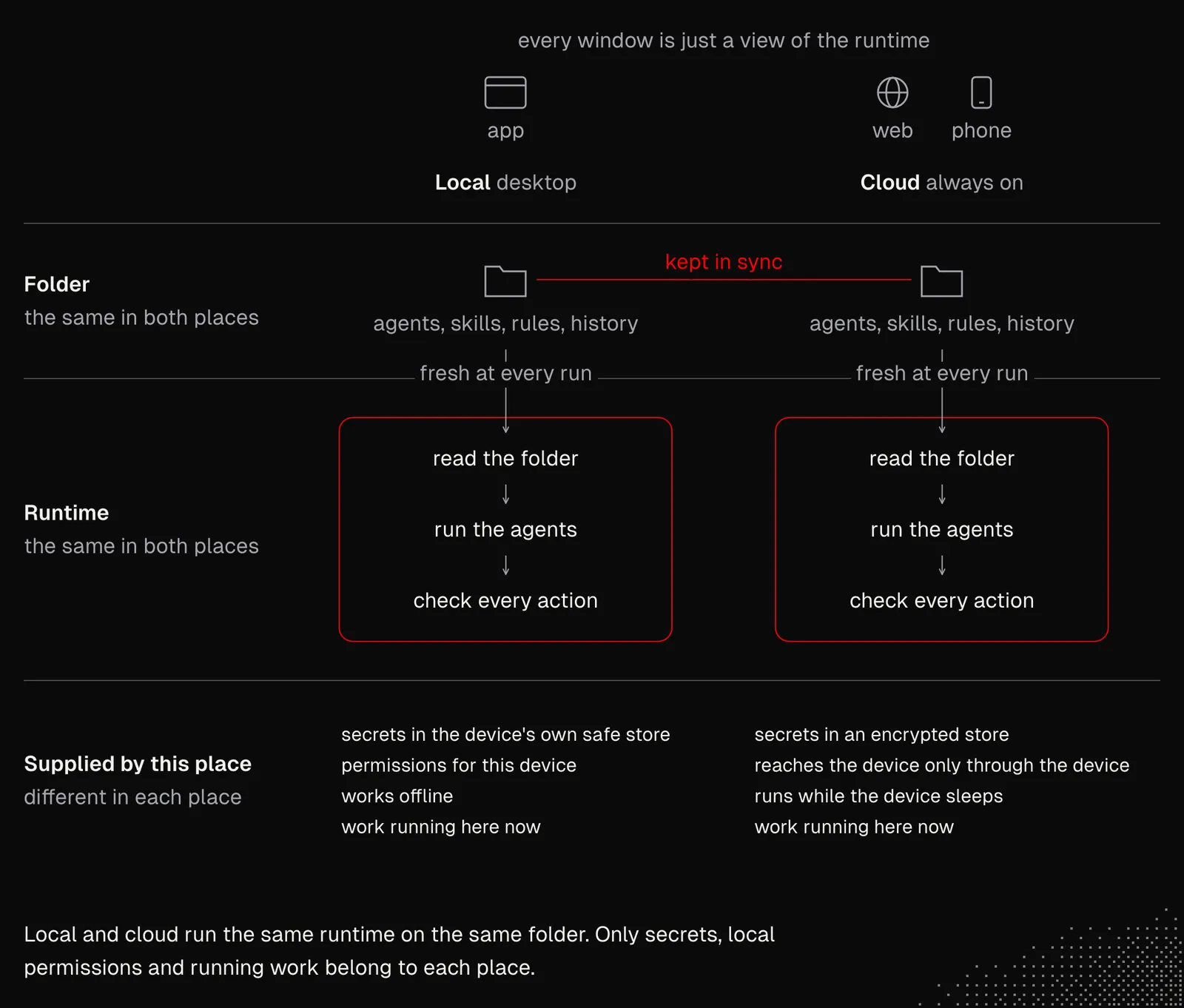
Even if the setup works today for a single user only, it can be expanded to support an entire team. This would need a shared folder with the capabilities and resources, and some access policies. Each person would still keep their own conversations, memory and secrets (the secrets could be accessed through the team's password manager).
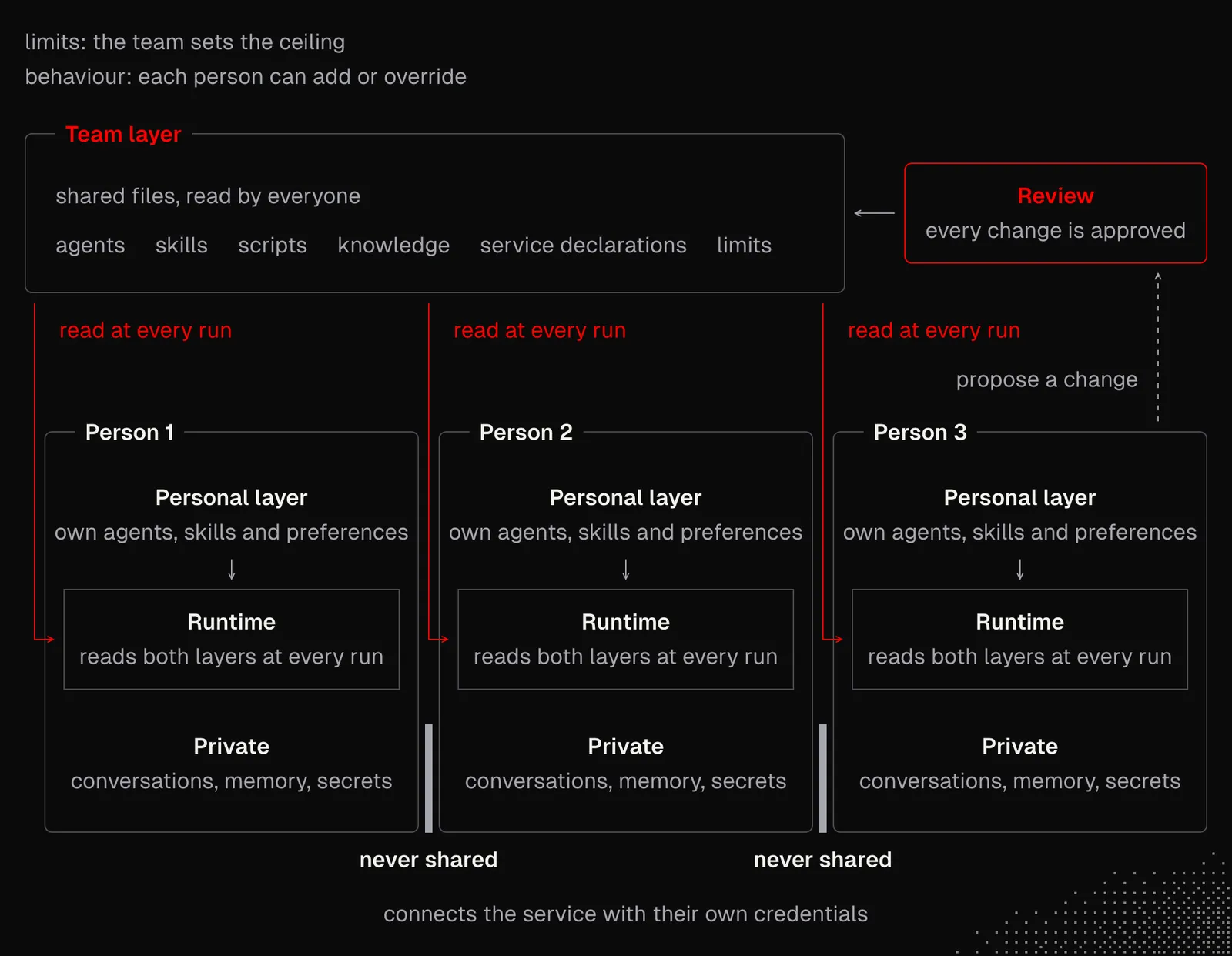
And to be clear, I'm not saying this is the best possible approach, as it still brings many challenges, such as synchronization issues. But many of these ideas can be carried over to other systems, including coding agents.
One thing to keep in mind: portability is possible in only some parts of our system. For example:
- Background agents can scale fully, and we can automate their deployment entirely. At the same time, you can limit their contact with users and restrict them to non-destructive actions such as research, reporting, testing, or monitoring.
- Internal MCP / CLI: instead of connecting each MCP server or CLI account separately, we can build an internal MCP server available only to our team or our clients. It would give them access to specific resources and actions.
- Agents over MCP: the Model Context Protocol lets us interact with agents that offer controlled access to specific actions or knowledge.
- Personal configurations can still be controlled by team members.
In short, portability means separating the shared components so you can manage them in one place and propagate them to agents, team members, and clients. Notice also how Kent was able to address nearly all of these problems simply by using MCP as a capability layer.
In John's build: portability appears at a small scale. Each tool is described by the capability it needs, not by a product: a widget needs a surface, a source, a model call and an action. Pi and Herdr are one labelled example, and the lists named "If something is missing" give the replacement for another harness or workspace. His build does not cover cloud agents or the cloning of a system to another device. See Widgets.
Knowledge Delivery
All the agents working for us need access to the latest data and an up-to-date configuration. When we work with agents directly, we take care of all this ourselves. For background agents, we need a systematic approach, not only for deployment but also for keeping their configuration up to date.
An agent's behavior can be entirely changed without modifying its source, simply by giving it different context and tools. This fact alone makes knowledge delivery one of the most important aspects of autonomous systems.
One approach is to rely on MCP as a capability layer, as mentioned above. In practice, this means building a separate app, either for internal use or as a service within our product. This app focuses entirely on agents and communicates with them through an MCP server. Even more interesting, it can also act as an MCP Host itself. As a result, this single MCP server can connect us with many others!
Below is a general overview of the idea behind Kent's Kody, which comes down to exactly that. He simply built a generalized app on well-thought-out primitives, so it can adapt dynamically to many scenarios while keeping its structure relatively lean. And in practice, the whole integration comes down to connecting a single MCP server, which brings any kind of harness fully up to date.
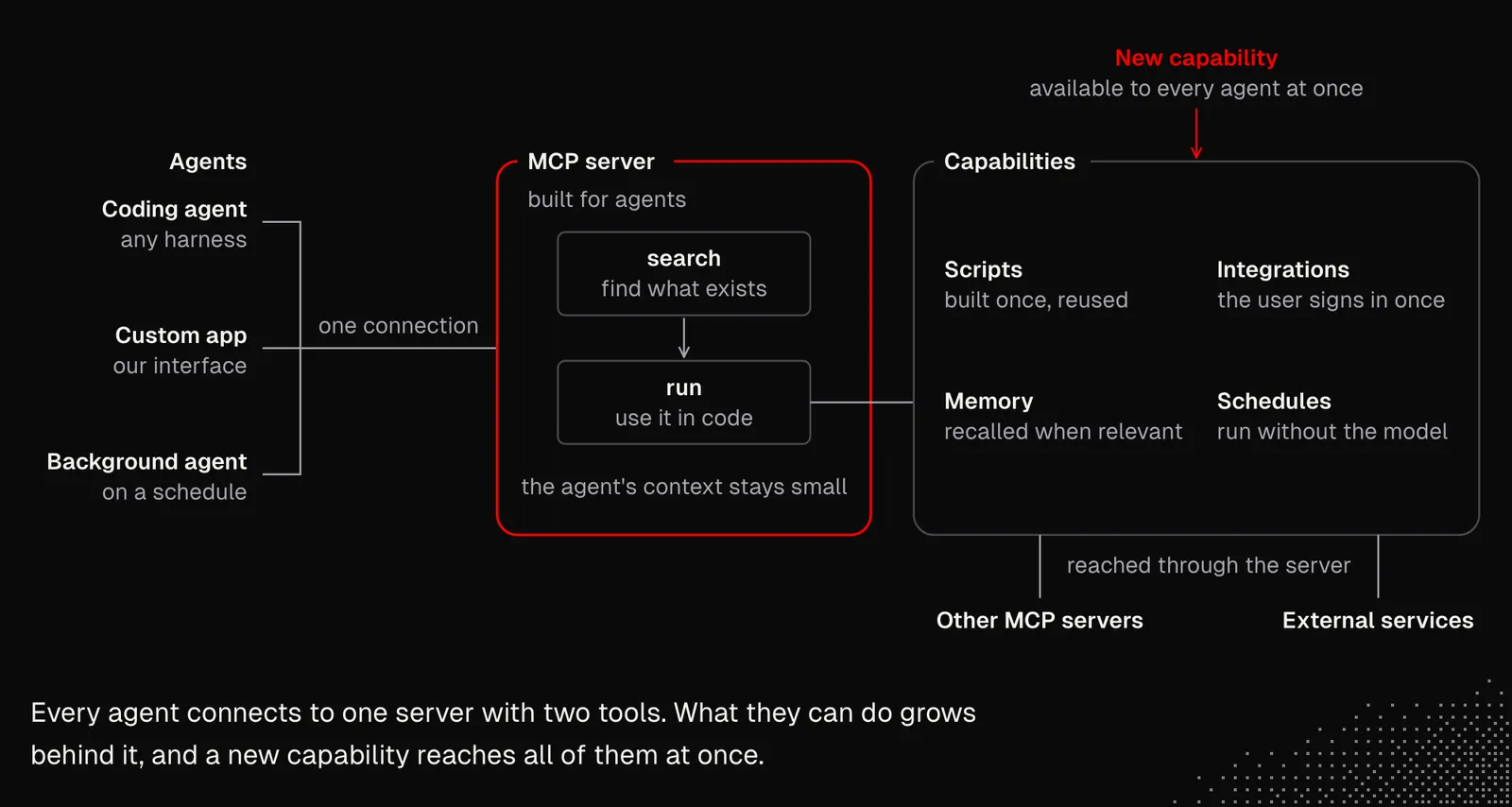
As the diagram shows, all agents use just two tools to interact with capabilities such as memory, schedules, integrations and scripts. This means that whatever a single agent changes is instantly available to the other agents, but they need to be aware of those changes, or at least be configured to always reach for up-to-date knowledge before taking any action.
Also, this kind of MCP server relies on the harness's native features and the models it provides. This means that whenever the harness gets an update or newer models come out, our entire setup gets better without us having to change anything on our end. This is a great example of relying on the native capabilities of the environment and of a flexible, primitive-based architecture. And Kent isn't the only one using this approach. It also appears in Uber's blog post about their gateway for internal agents, which suggests that it scales well within organizations. Before building our own gateway from scratch, it's a good idea to check whether Executor fits our needs.
In John's build: sending an issue to the main conversation is knowledge delivery in practice. A small model plans which gatherers to start. The gatherers then read the code and the tests, the history, related issues, package updates and past conversations, in parallel. The main conversation receives the issue, a brief in which every line names its source, and our rules, in one prompt. The context is pushed at the moment it is needed, so the main conversation does not search for it. See From Issue to Work.
Operations
When multiple agents work together, especially with shared resources and capabilities, there's a high chance of overlapping work, overwritten work and other kinds of conflicts. All of this already happens in our daily work, even without AI. This time, the challenge is getting agents to handle it almost entirely on their own.
We already know that autonomous systems require detailed observability, because most of their activity happens at runtime and can't be tracked just by reading the codebase. And since many agents can interact with the same resource, we also need to take care of claims, isolation, versioning, rollbacks and recovery. Agents can solve most of these issues natively, but for some, they'll need skills that tell them what to consider so they can make good decisions.
For observability to be useful in this case, it needs to capture not only what happened but also what the configuration was at the time and why it was changed. This is especially important in self-evolving systems, where agents are allowed to modify their own settings and extend their capabilities (although they shouldn't be allowed to widen their permissions without confirmation from a human).
In practice, each run should record the configuration version and its content hash, the model and tools it used, and who started it. Each change should record who made it, why, when, and the hash before and after.
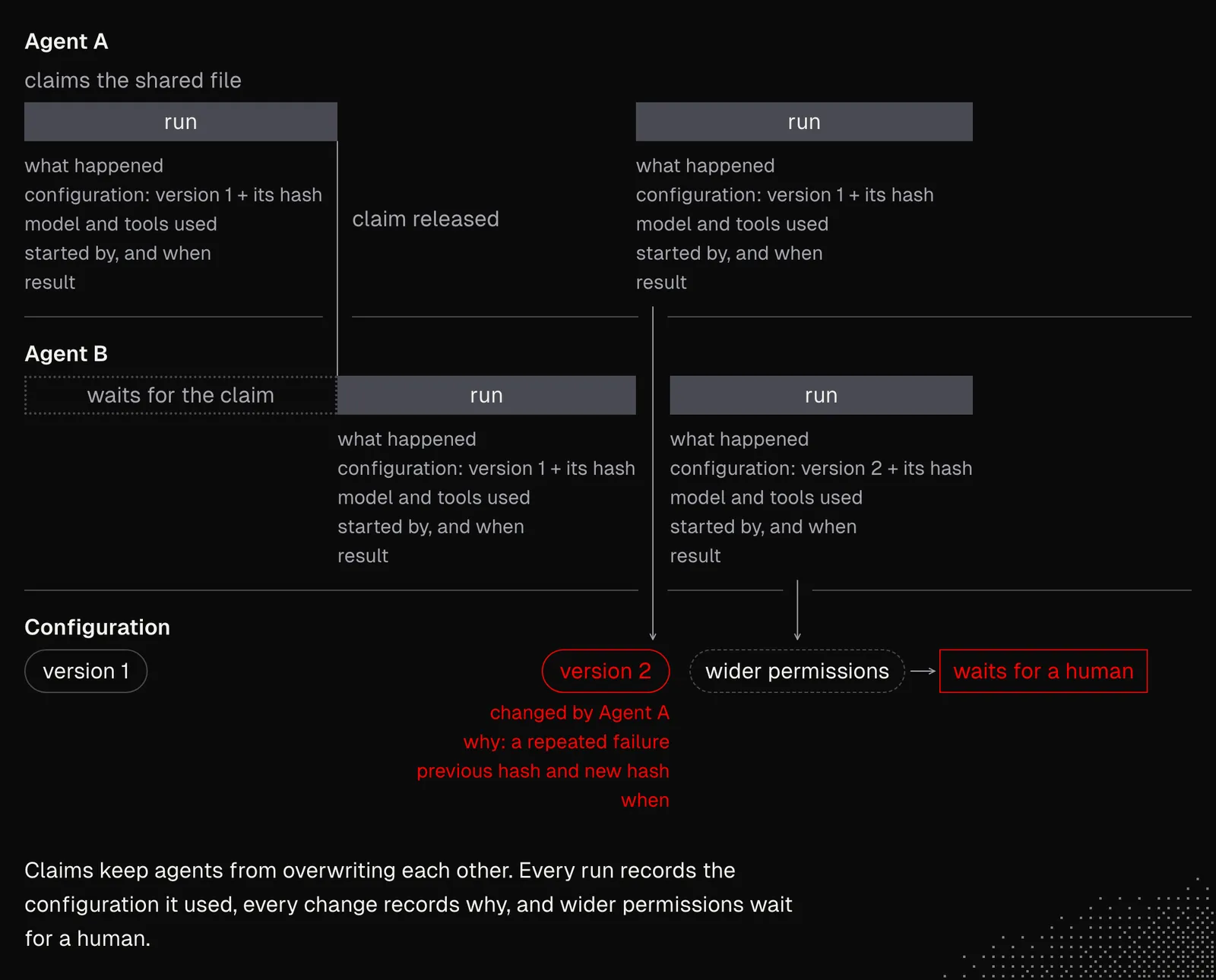
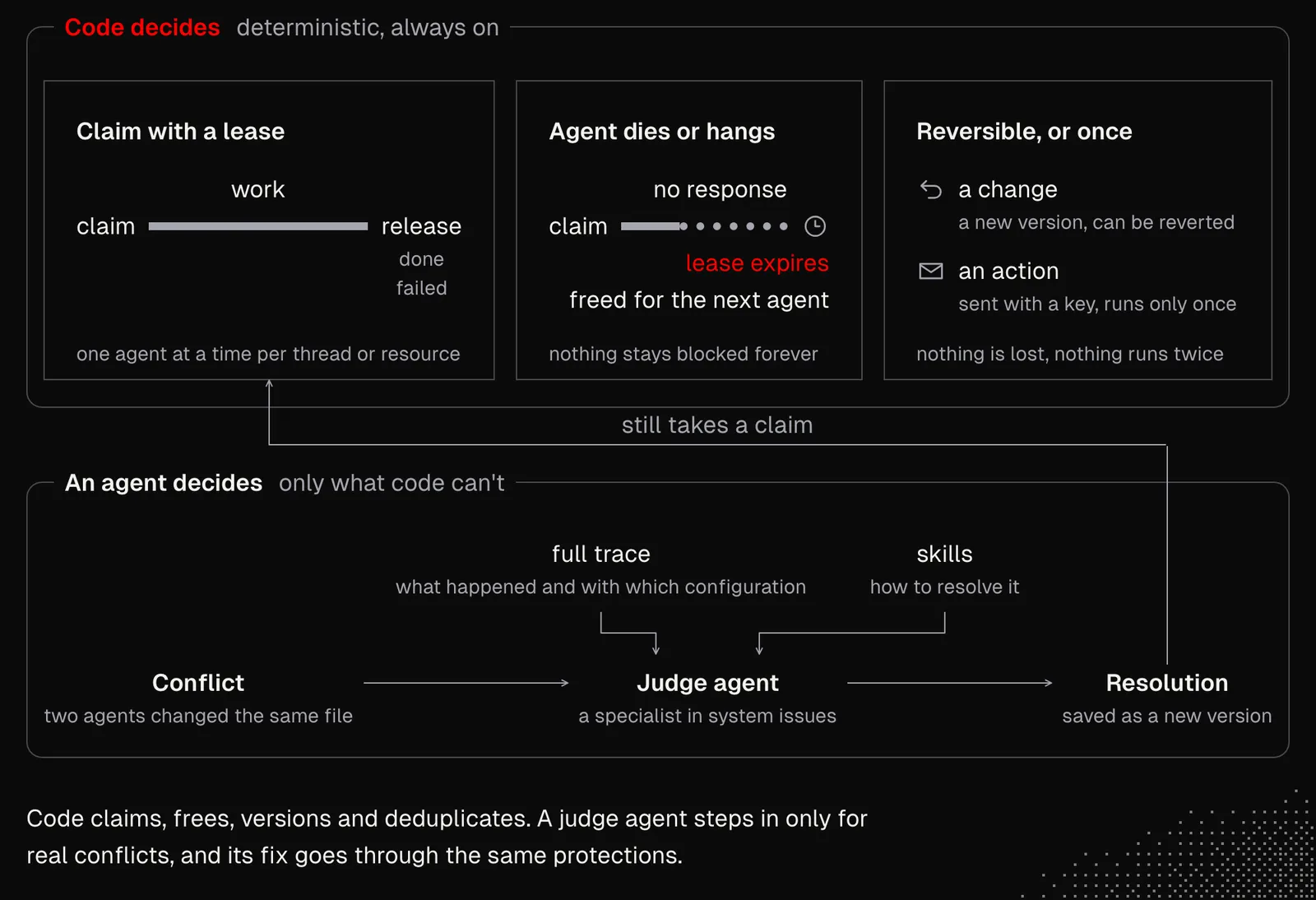
Since agents will have access to observability data with all these details, they'll see the full context, not just the cause or a simplified trail. At the same time, we need to consider whether they'll need any other information to better understand what happened and what to do next. For example, when agents modify the same file, what logic should they follow to resolve the conflict? The answer will often come from the skills available to a given agent, such as "a judge": an agent that specializes only in resolving system issues.
But wherever possible, operations should be protected by deterministic logic, such as claims with a lease that block a given thread or resource while the work is in progress and release it as soon as the work is done or has failed. The system should also handle cases where an agent simply dies or hangs for some reason. And lastly, all modifications, and even the actions taken, should be reversible. Here, we may want to rely on solutions that provide this out of the box, such as Git history. And actions that can't be undone, like sending an email, should at least never run twice.
There's no doubt, at least for now, that it's on us to figure out how to apply all this in our case. I'm not talking about the technical implementation, as agents can easily handle that now. It's more about deciding what kind of architecture and which mechanics are useful for the project we're working on.
When thinking about how multi-agent autonomous systems work, one good source of inspiration is the AgentFS project. It's in beta at the time of writing, so the best use for it is as a source of ideas for our own implementations, or for some experiments. In a nutshell, it's a sandboxed filesystem for agents. Each session's changes are stored in a single SQLite file, separate from our real files (like a virtual filesystem). This way, we can audit the changes, roll them back, fork them, or apply only the ones we want. And since all the changes live in a single database, they are portable and easy to observe out of the box. Moreover, the setup provides clear isolation per agent, with an option to share information with other agents.
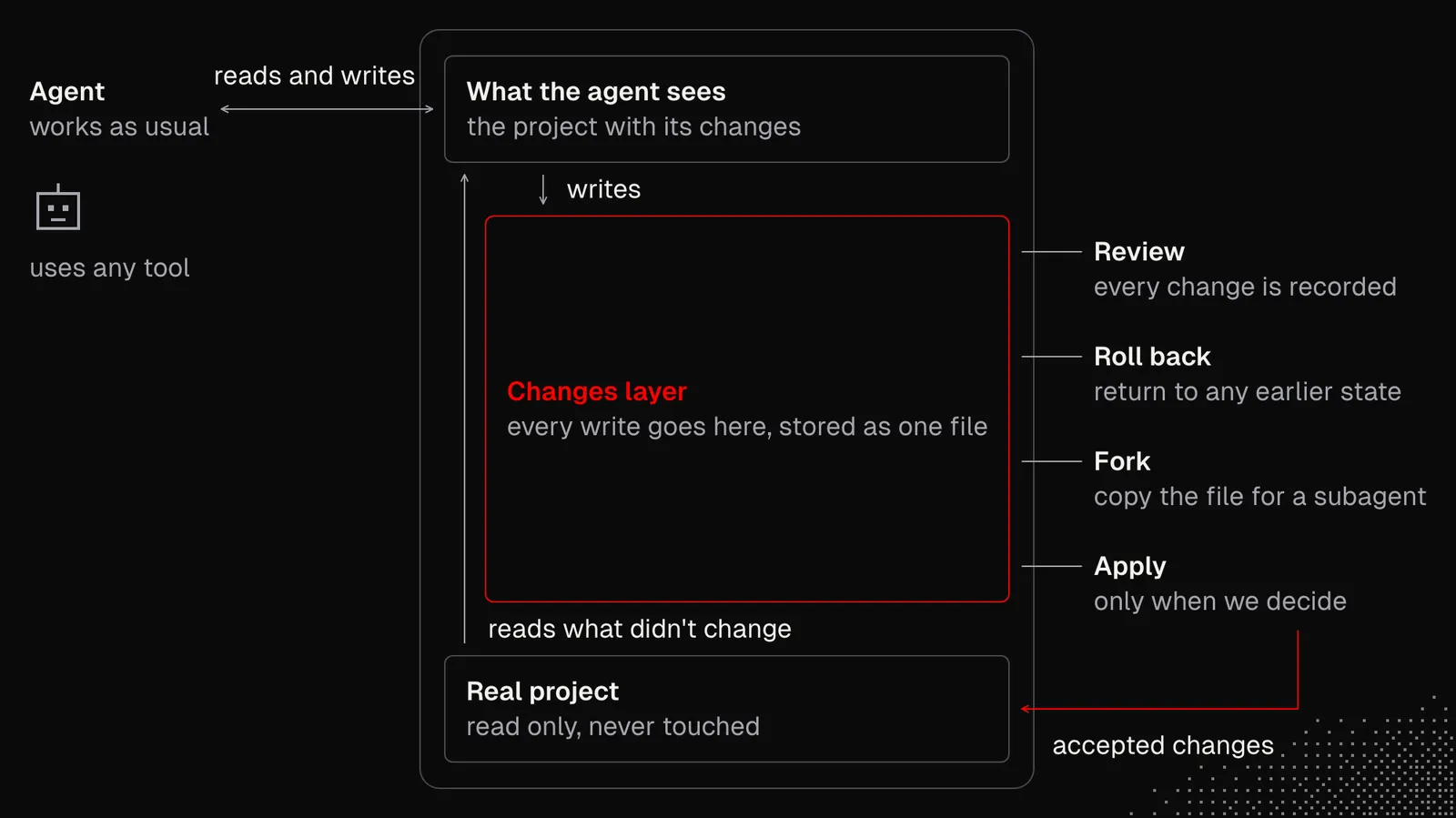
Similar to the concept of "MCP as a capability layer", this is a simple and flexible idea: keeping the agent's workspace as a SQLite file. This approach undoubtedly has drawbacks, and it leaves some issues unsolved (such as conflicts or isolating network calls). At the same time, it offers a specific way of thinking that is useful when designing autonomous systems. It generalizes the problem well enough and proposes a solution that addresses most of the issues in the simplest possible way.
In John's build: one idea from this section appears: a change to an agent's configuration is recorded with its effect. The hill-climbing loop changes one thing in the widget's instructions, runs the same check against a saved sample, and keeps the change only if fewer lines fail. Each change is shown with the number of failures before and after. His build has no claims, leases or rollback of actions, so Git and AgentFS stay our examples for those. See The Issues Widget.
Takeaways
Building autonomous systems and workflows comes down to designing logic that scales well. It requires a broad understanding of system design and of the mechanics behind agents and generative AI in general. All of this has to be grounded in real business needs and take the user's context into account. In other words, this is not a simple task, even for an experienced engineer. But the perspective shifts a lot the moment we have AI on our side, because agents can handle most of the implementation and many of the decisions.
At this point, it's worth going back to the first two weeks of MEGA and deciding, together with our agent, on something small, such as a "smart cron job" or a simple MCP server, that we'll use in more than one environment. This will reveal all the issues and start to shift our thinking toward autonomous systems while providing value for our personal life, our coding workflow, or the products we're working on.