S04E03 · Orchestrating Autonomous Agent Teams: MEGA lesson
MEGA’s written lesson, presented in its video by John Lindquist, explores how to organize, coordinate, route, and supervise autonomous agent teams. It discusses dynamic worker roles and spawning agents with task-specific tools, instructions, and environments.
textMEGA · hq.mega.dev · Saved Nov 19, 2026
mega course, agent orchestration, multi-agent systems, agent infrastructure
Written lesson S04E03 of the MEGA.dev course, by MEGA. Agenda: Organization · Coordination · Routing and Parallelism · Supervision. Its lesson video is presented by John Lindquist and saved separately. (MEGA Student HQ, needs a login.)
S04E03 · Orchestrating Autonomous Agent Teams
This lesson is extended. It has two parts. This part has John's video and explains the principles of orchestrating a team of agents. The Build guide is the written version of what John builds in the video, step by step, with the prompts and the checks for each tool. On this page, the notes that start with "In John's build" link each principle to its build.
Managing teams of autonomous agents is often associated with management skills, or even with roles such as product manager or tech lead. Most of these comparisons are correct. But since agents handle nearly the entire implementation, our job isn't just about managing and making decisions. It's also about shaping the entire system and thinking about it from both a broad and a narrow perspective. This requires broad knowledge and the ability to learn new things quickly, regardless of the area.
As with organizational structures, there's no single way to get the best possible outcomes. Too many variables make up the system. But we have knowledge, practices, techniques, and ways of thinking that we can apply to "increase the chance of getting the results we want". Sound familiar?
The second week of MEGA showed us how to build agents. That might seem pointless, since some agents already work for us out of the box, so why build our own? Well, many of us will build agents anyway, if only because of what S04E02 showed about the capability layer. And by now it should also be clear that S01E04 and the limen project need agent-building knowledge too, even though they're only about managing coding agents. To put it plainly: orchestrating autonomous agents requires knowledge and skills related to building them, even if we won't build them from scratch. At the same time, we need to remember that models such as Fable 5.2 can build an entire operating system while managing over 1,000 agents.
And in this lesson I'll show what this means.
Outline
- Organization: planner, researcher, builder, reviewer, validator roles with bounded access
- Coordination: shared goals, isolated contexts, task dependencies, bidirectional handoffs
- Parallelism: worktrees, branches, sessions, tiled panes, queues, merge points
- Routing: matching work to agents, tools, and models based on capability, risk, cost, and speed
- Supervision: progress visibility, collision detection, intervention, escalation, final human control
Organization
Agentic teams, like human ones, often have some kind of structure built around roles, scopes, and responsibilities. But we don't have to stop at concepts borrowed from physical organizations. We can also create dynamic teams made of "short-lived agents". This lets us follow some established rules for managing organizations while also pushing much further, because we can have "any kind of specialist" the moment we need one. So why wouldn't we use that?
For now, we can still think of agents either as chat interfaces or as specialized programs that work within a scope we define. Both are dynamic in some way, but they still depend entirely on their users, and there's nothing wrong with that. But we can make them adjust entirely on their own to the moment at hand while they still follow certain paths that keep them aligned with our needs.
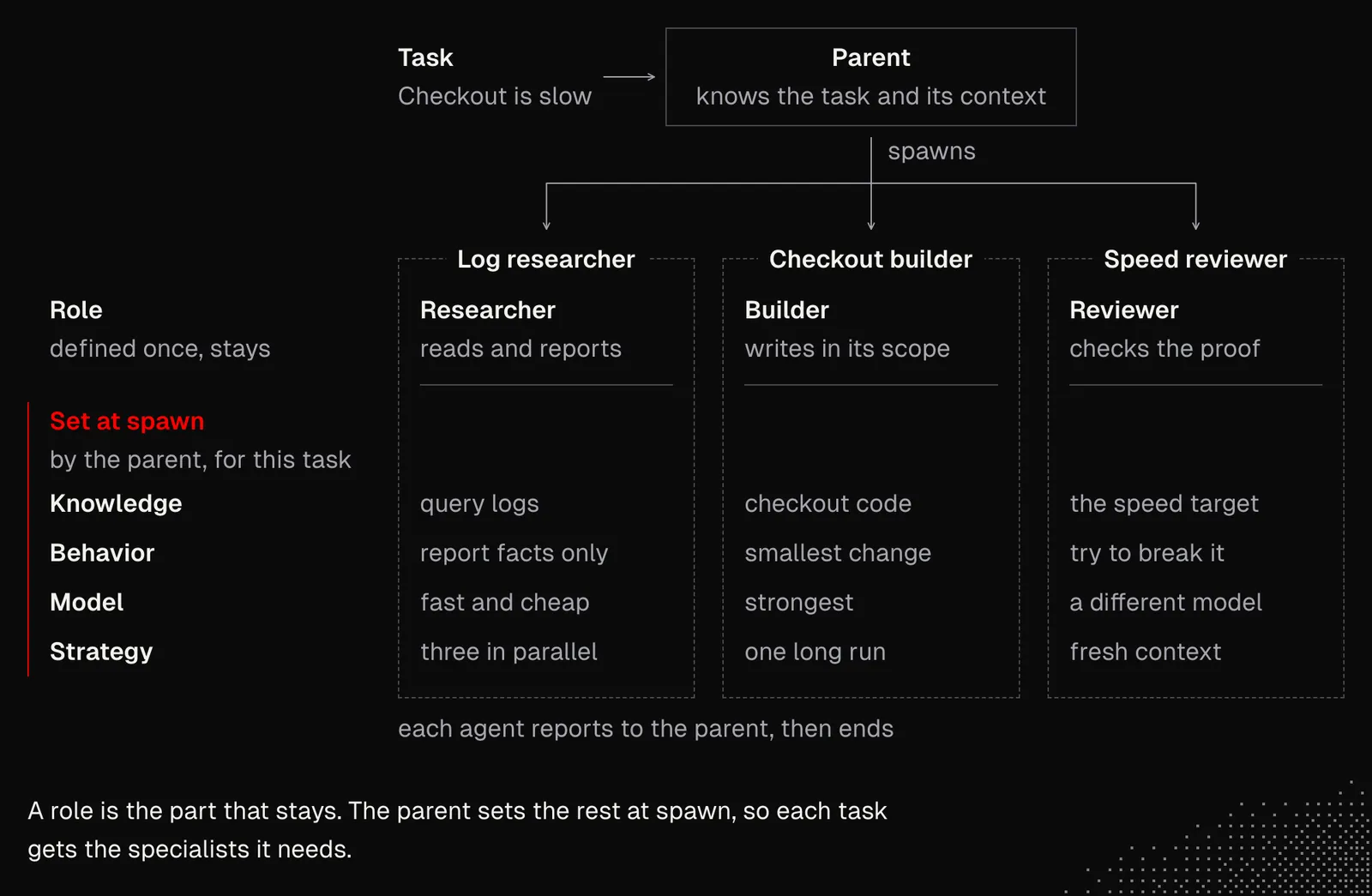
Dynamic structures and short-lived agents don't mean we're entirely out of the equation. In fact, we still play an important role. The problem is that right now, we as humans struggle to keep track of what's happening with dozens of agents at once. The good news is that we don't have to. But at the same time, we need to find a way to easily switch between broad and narrow perspectives.
Considering our limitations, we may want to focus on interacting with a single agent only in an efficient way, such as through voice, while still having the option to see the details. Not through walls of text or code, but through a well-balanced mix of visuals, animations, and text. Everything else should be managed by agents, with the option to see the details interactively by connecting directly to their sessions (in practice that's rarely needed).
Looking at what we've discussed during the first three weeks of MEGA, we have all the tools we need to make this possible or, if we're already doing it, to take the entire orchestration to the next level. Let's consider a scenario with strictly defined roles, such as Manager, Researcher, Reviewer and Engineer, that share some common knowledge about the project. In such a configuration, we speak with the Manager only.
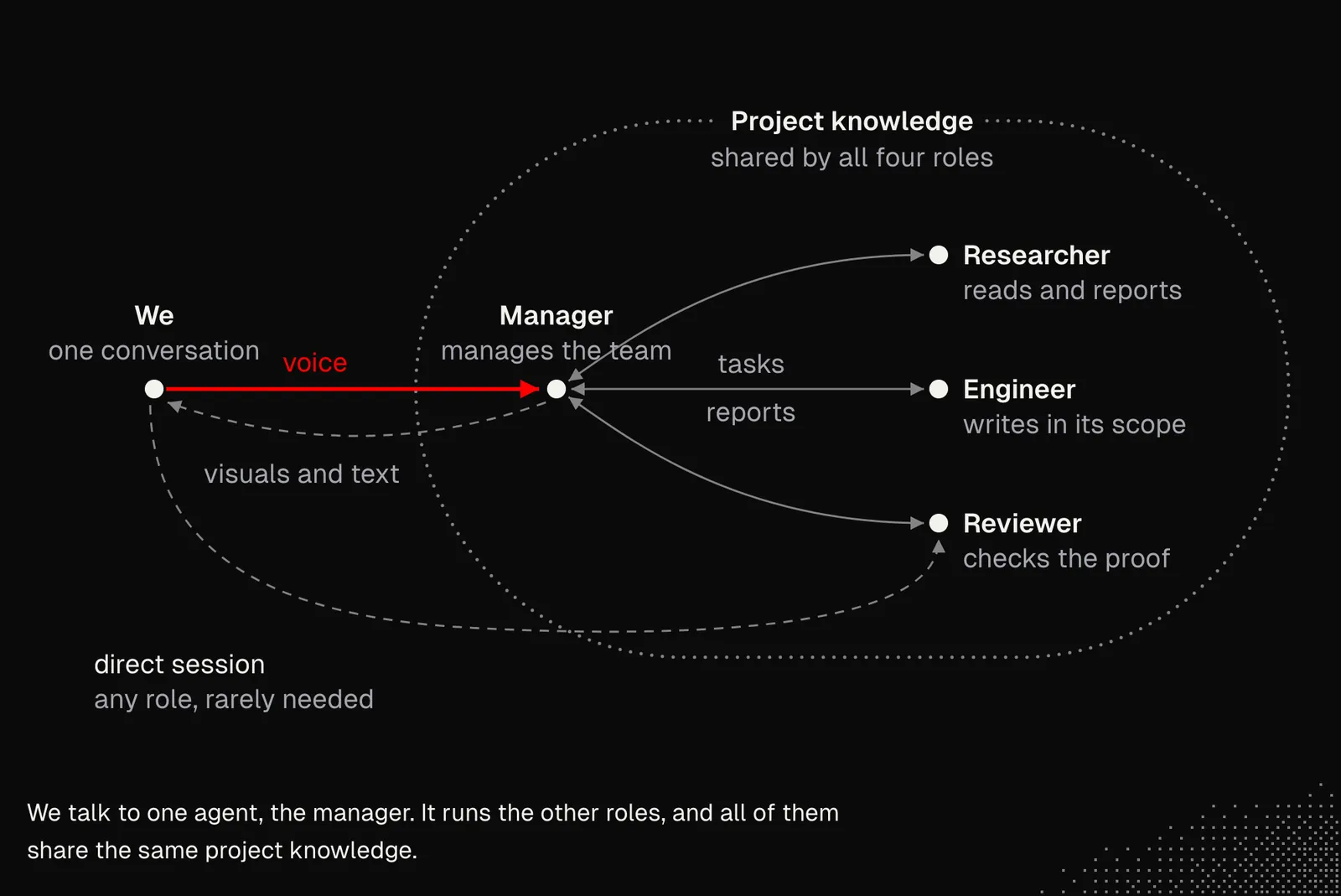
There are at least a couple of issues with the structure above. One is that a single manager can only handle so much. That's not because models can't handle it, but because the noise makes it hard to follow all the updates and properly encapsulate projects, permissions, resources, etc. Also, most of the activity between managers and other agents is irrelevant to us.
The second is that we have predefined roles, which prevents the manager from getting the team it needs, with entirely custom instructions, resources and relationships. Additionally, this is only a two-level-deep structure. And even if every agent can spawn subagents, this isn't what we're looking for, at least not in the form that popular harnesses offer us today.
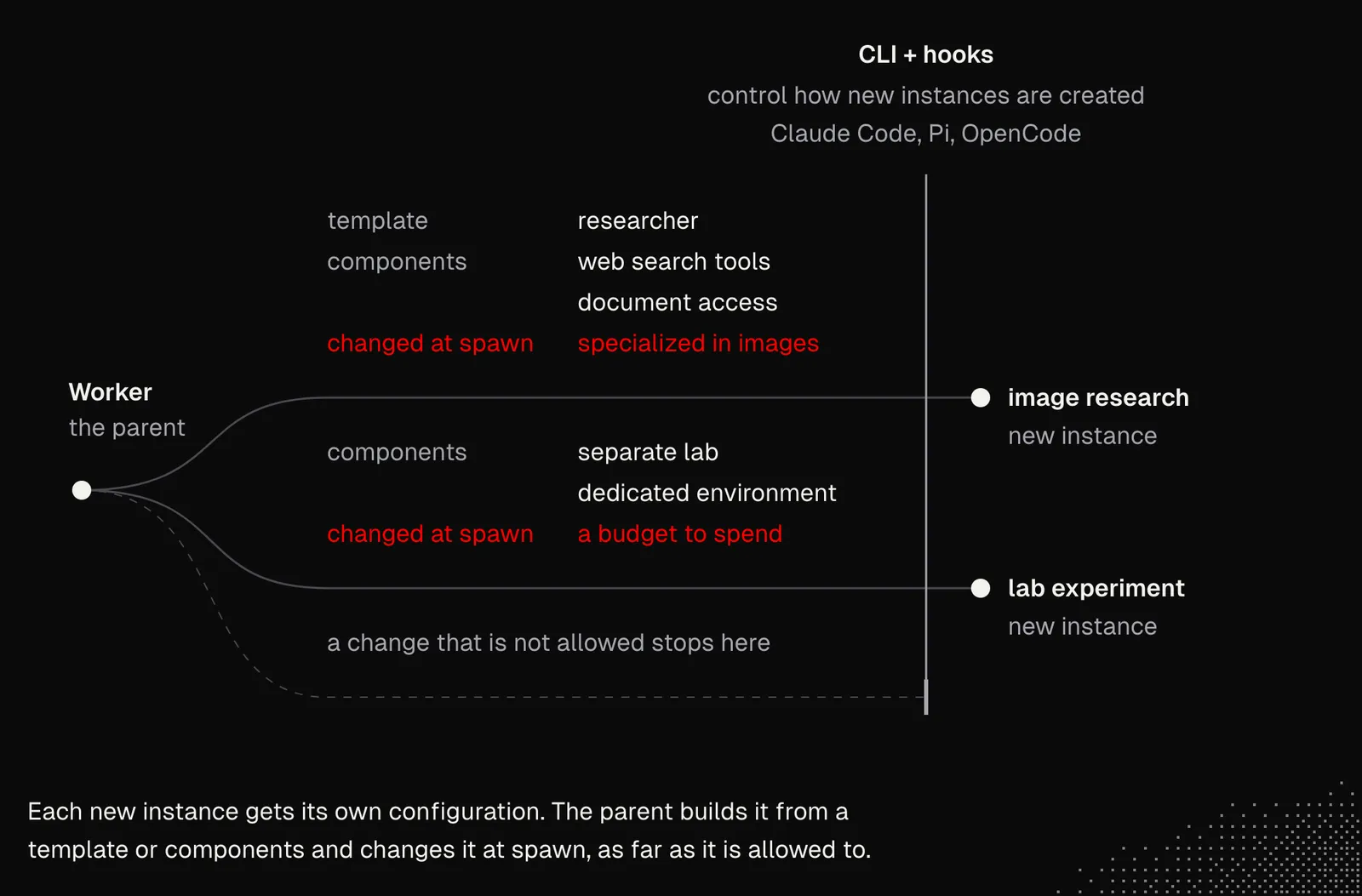
So our goal is to keep things simple while giving agents as much room to operate as possible. Instead of thinking about strict structures, we can think about dynamic ones, where roles such as Manager, Engineer or Researcher may still exist, but they won't be defined upfront, or at least not rigidly. They can be assembled using both templates or their components and dynamic instructions. The figure below shows how this can be designed.
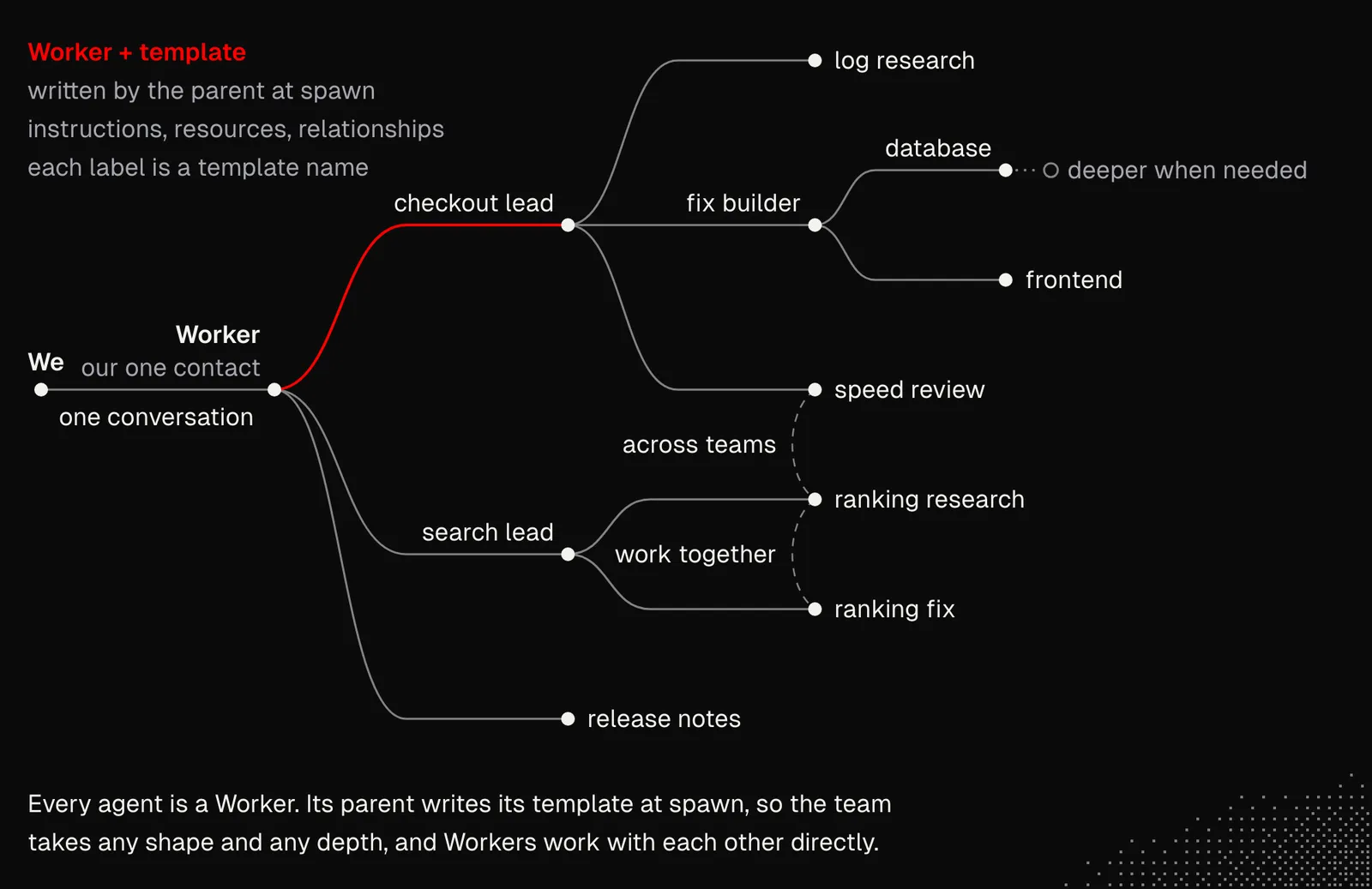
And from a technical standpoint, we're talking here about the idea of workers (separate sessions spawned dynamically) that we discussed in earlier lessons. But in practice, it is not just about creating a new instance, but about a setup that makes that instance efficient.
Spawning New agent instances receive their own configuration. It can be built from existing templates or their components, but it can also be modified dynamically, as far as the spawning agent is allowed to change it. For example, a researcher agent may receive custom web search tools and document access, while its instructions and settings specialize it in analyzing and searching images. Another agent may receive a separate lab and dedicated environment together with a budget to spend. Spawning like this works mainly through the CLI and hooks in Claude Code, Pi, and OpenCode, which control how new instances are created.
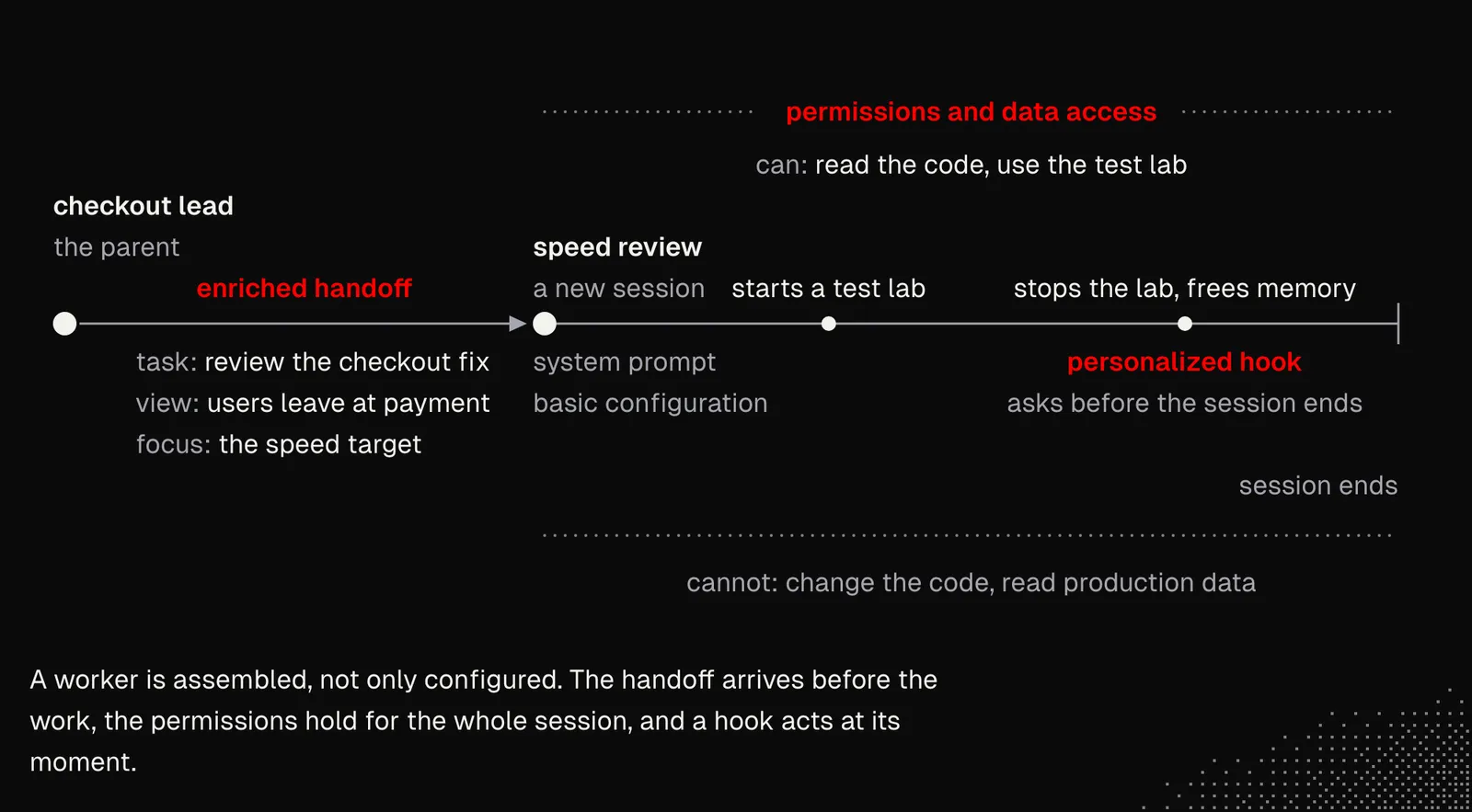
Assembling Spawning a worker takes more than a system prompt and basic configuration, especially if we care about proper permission management and data access. Workers also need enriched handoffs that broaden their perspective and focus them on what matters most. But that's not all: workers may also receive personalized hooks that make them more reliable and better aligned with our needs. For example, a hook can ask workers responsible for reviews to clean up and free resources before their session ends. Or the activity of a given type of worker can emit events that wake up other agents, for example to update the documentation the moment a relevant feature gets delivered.
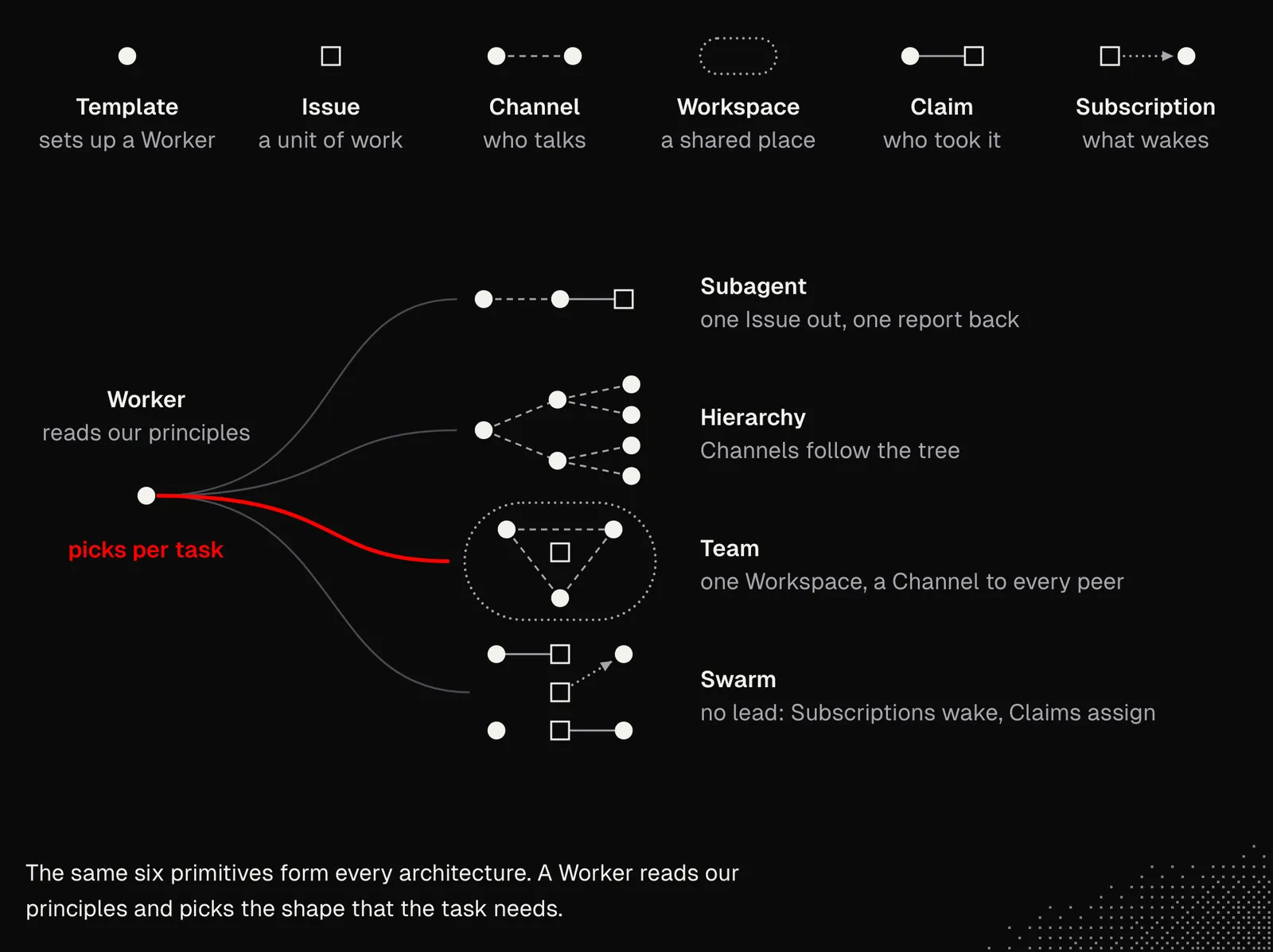
Collaboration In S02E04, we went through multi-agent architectures. Typically, such architectures are implemented directly in a system. But since models are now great at managing other agents, we may want a dynamic architecture. In it, agents themselves pick the architecture that fits the task, based on a set of our primitives, such as Template, Issue, Channel, Workspace, Claim, Subscription.
Most of the ideas in the figures above are already implemented in the limen project. If you look at its source code, you'll see that, apart from the HTML dashboard (which you can skip), there are just a couple of files that make the whole orchestration easier for agents. AI handles everything else, and as always, the better AI becomes, the better the system gets.
The entire setup gets way more complicated the moment we stop talking about coding agents and start building the whole system from scratch, or with a framework such as Mastra. Regardless, we may still want to keep the same primitives and push toward the flexibility described above.
In John's build: both kinds of agent from this section appear. The gatherers are short-lived: each one starts for one question and is gone when its answer is delivered. A Domain Agent is the opposite. It is a folder that owns a set of paths, keeps the memories of that area, and runs read-only on a small, fast model. It advises and reviews, and the main conversation writes the code. See Seeding a Domain Agent.
Coordination
This may sound weird, but technically, most development can now be done without a laptop or PC. Tools such as editors, terminals, or apps like Herdr remain useful, but they can simply work in the background, and we can check on them occasionally, just because we want to. In fact, this is how I've been working for the past 4 months. The reason is Grok Bot with its voice mode (or Superwhisper), and files or dashboards built with HTML / Markdown Components. But it isn't really about Grok Bot itself, because its job is simply to coordinate other agents that can handle most of their work and only need an easy way to reach us when necessary.
The core workflow looks like this:
- Grok Bot exposes a single, continuous chat per project.
- Every feature has its own folder holding its notes, evidence, and everything else related to it.
- A feature can be split into multiple folders if needed, and each folder can be claimed by a single agent.
- Grok Bot manages Pi and Claude Code instances in Herdr and exposes a webhook so that the instances can notify it.
- Pi instances can take on the role of coordinator or worker. A coordinator can spawn other instances, while a worker does the job itself and reports back to Grok Bot.
All of this makes Grok Bot aware of what's going on in the Herdr panes assigned to the instances it spawned, and it can also read the other panes when needed. While Pi and Claude manage the actual work themselves, that work can take the form of the dynamic structures we discussed earlier. And because agents write their progress and artifacts down in the folders, other agents can learn about this work more easily. They are even free to add their own notes.
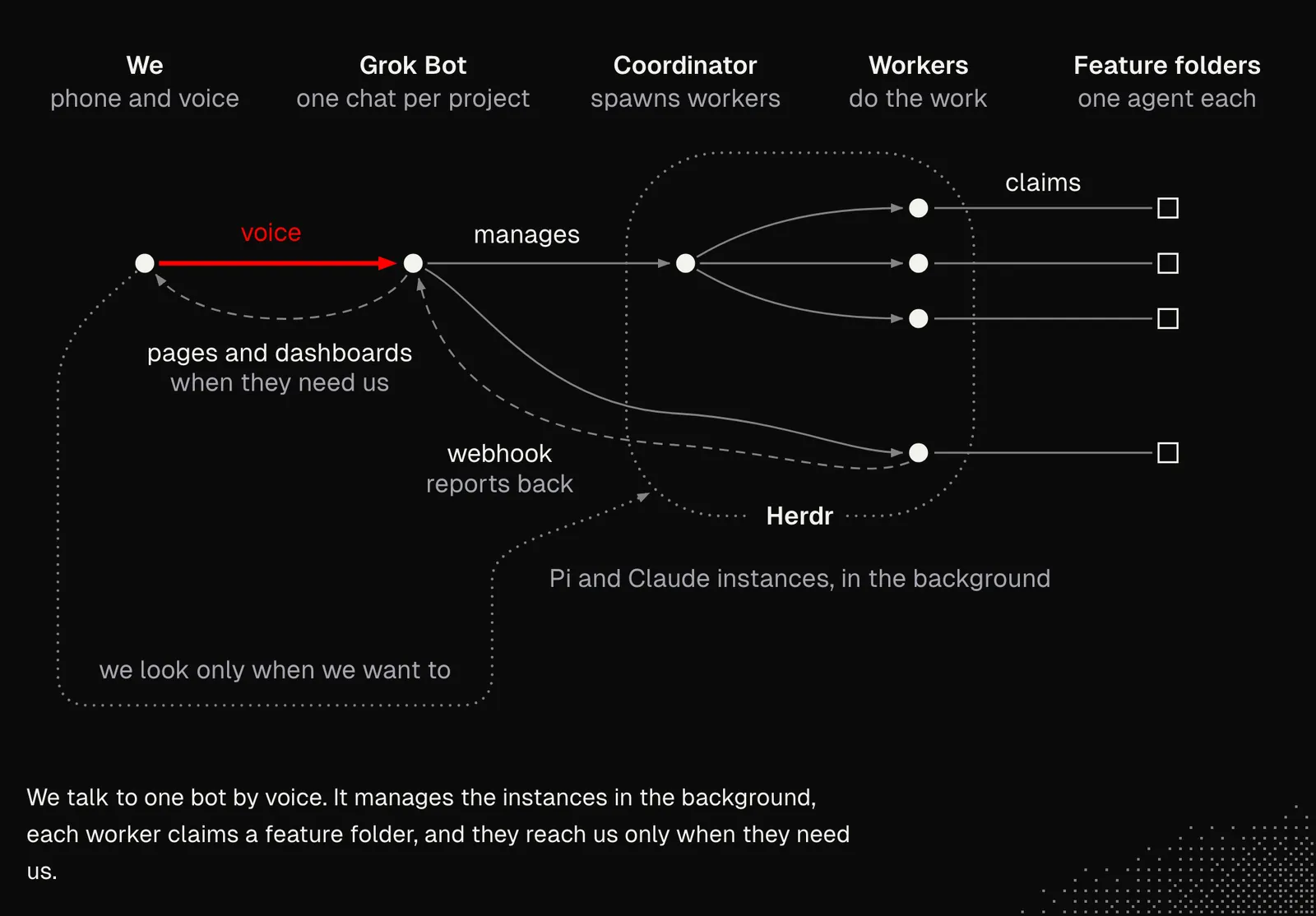
What we see here is a practical implementation of everything we've learned so far in MEGA, pushed to its limits through voice interaction and visual system diffs. Almost everything here relies on the models' capabilities and on cloud agents and tools that let them interact freely with each other and with their surrounding environment.
The most important aspect here is voice interaction, which also works on mobile. It matters not only because it's useful, but first and foremost because it's an artificial constraint. What I mean by this is that it is easy to interact with agents without looking at code. But having them deliver quality software without us needing to watch their every move is a sign of a well-designed system. And even if we decide not to use voice interaction every day, trying it may be a useful way to surface many potential issues in our workflow.
A very similar workflow can be achieved with custom multi-agent systems that don't rely on Herdr, Pi, or Grok Bot. All the principles remain the same: agents operate within their workspaces and communicate with other agents through them. This is especially important because the same knowledge applies not just to coding agents but to agentic systems in general. And while there are some differences in implementation, since production systems must be way stricter and more scalable, we can safely say that getting better at customizing coding agents teaches us a lot about autonomous systems design. And that's a really useful skill.
To visualize this, I show the core logic of my personal system in the figure below. It should already look familiar, since we've covered all its mechanics in the lessons so far. And here, as with Grok Bot, interaction can happen through a single, continuous chat, including by voice.
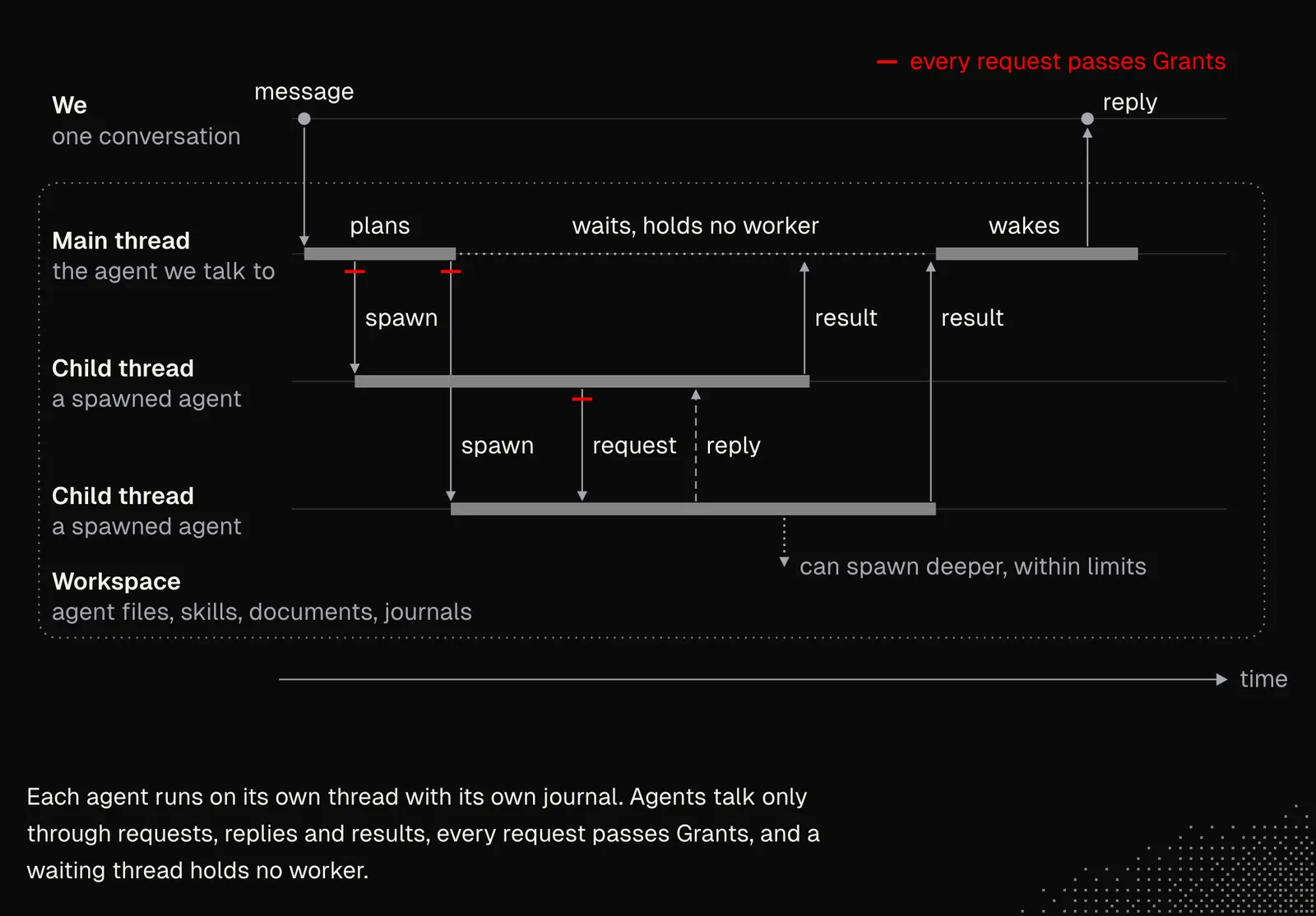
So, coordinating autonomous systems isn't really about keeping an eye on everything but rather about building a structure that manages itself, while still giving it a way to reach the right person as efficiently as possible.
In John's build: coordination happens before the first edit. For a feature that crosses two areas, the main conversation asks both Domain Agents in parallel and shows their answers side by side. A point where the two disagree, or where the feature forces a product decision, comes to us, and the agents do not pick an answer. After we decide, the decision goes into the memories of each agent as one dated rule with a receipt, so the next agent can read it. See Crossing Two Domains.
Routing and Parallelism
Autonomous systems should be designed with parallelism in mind, and this one fact creates challenges at nearly every layer. From the very first moment, the system has to decide how to handle the task to get the best results in the most efficient way. The problem is that agents won't know everything about the issue and the project upfront, so it is hard for them to decide. But there are many things we can do about it.
Agents need to be aware of the current state of the system, including all sessions that are running, waiting, stuck, failed, or finished. They need this for two reasons. The first is understanding what's going on around them, so they can collaborate effectively. The second is recovery, so they can catch issues early. It's worth thinking about which information is useful to agents. Some of it may be injected into their threads, while the details can be revealed only through additional queries.
Depending on our setup, information about sessions may come from tools such as Herdr or from any other source our system uses. We already know that such dynamic information must be presented in developer messages, but it should be done sparingly, to avoid repeating the same details.
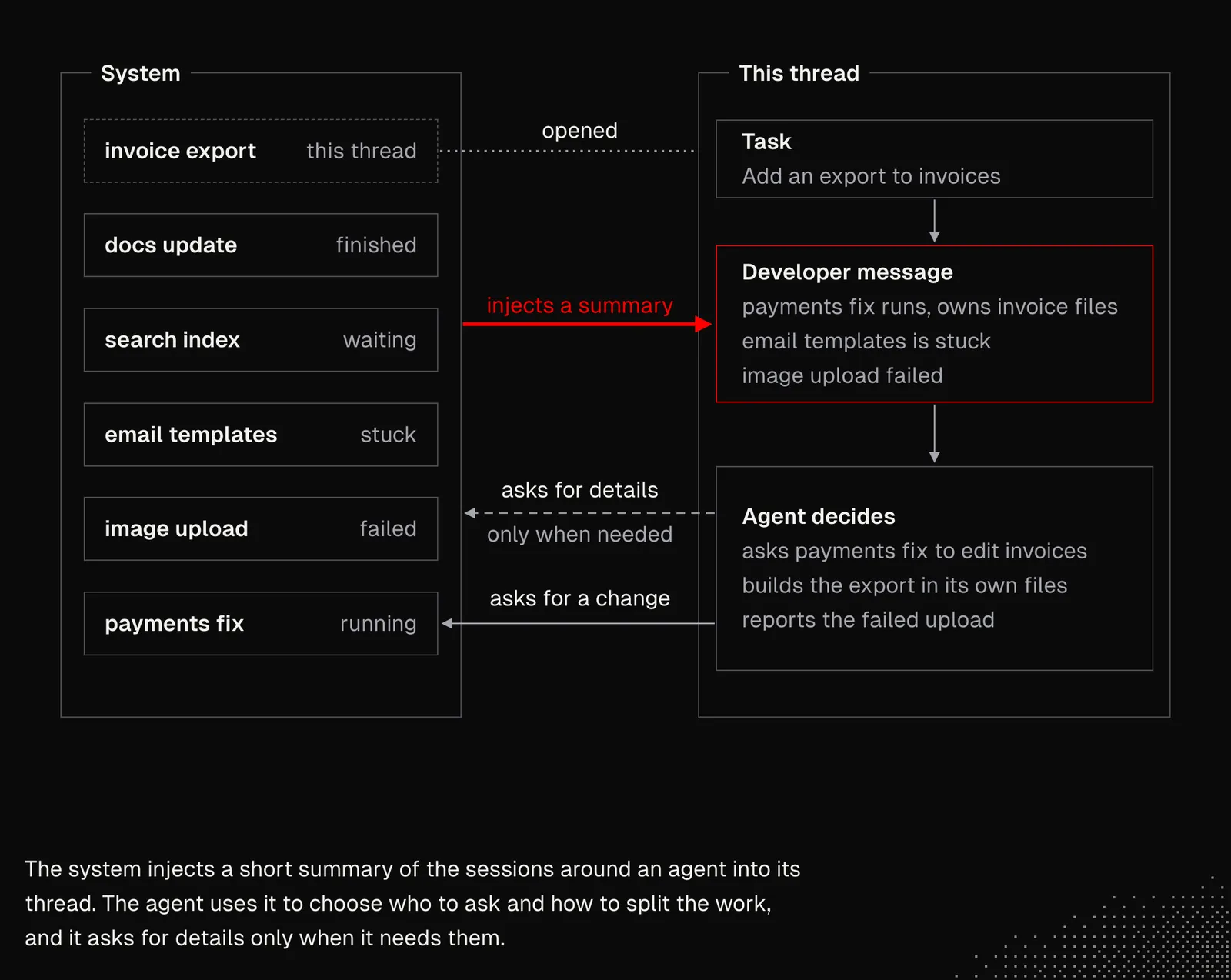
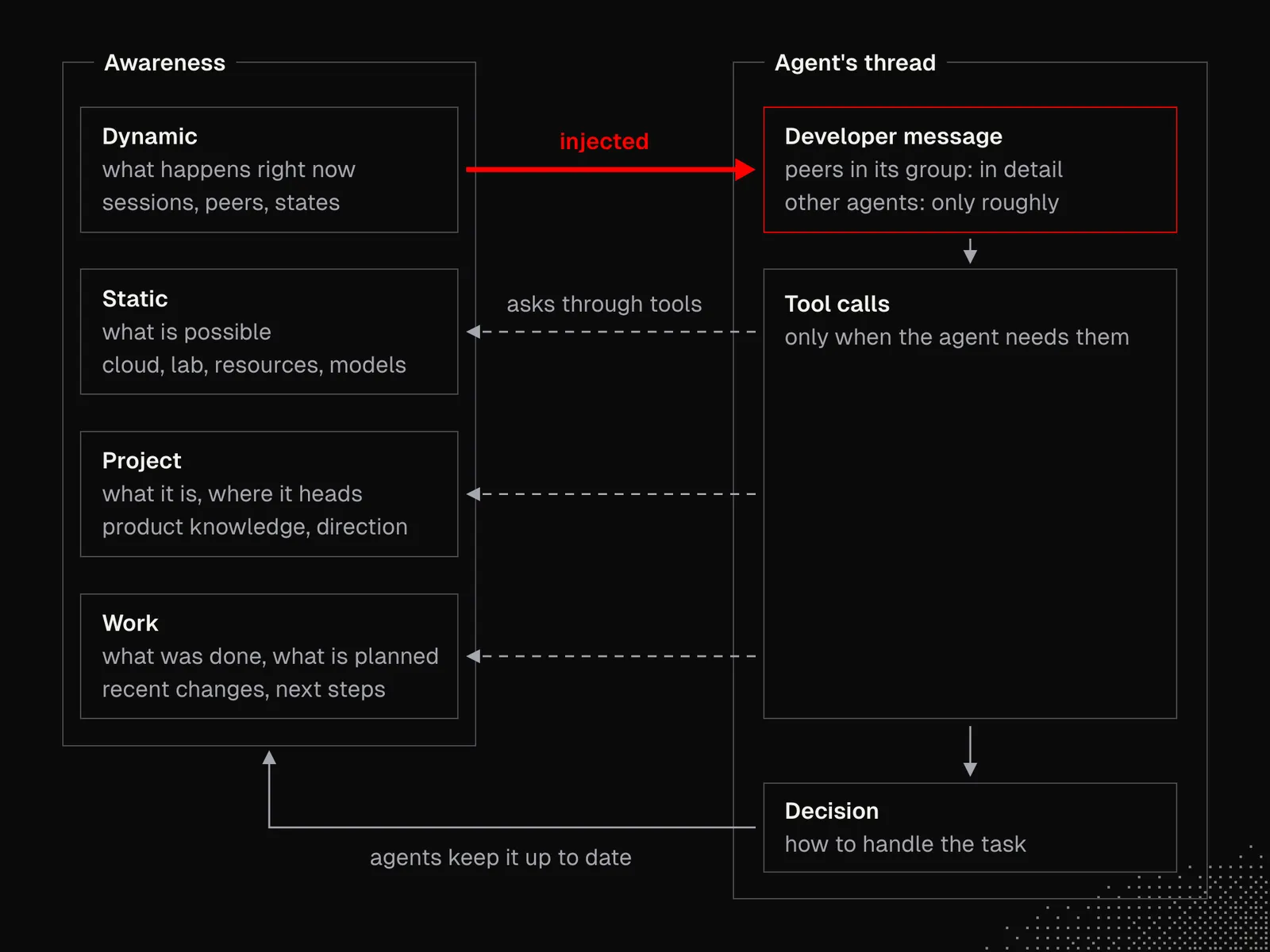
"Awareness" of the sessions is not the only thing that helps an agent decide what to do with a task. Another is knowledge about what's possible: whether we have a cloud environment or a lab, how many resources are available, what we know about the product, the recent changes, which models are available, and more. These questions may be specific to our system, so we should focus more on this one: "What does an agent need to know about the entire system to make good decisions?"
In my projects, there are four types of "awareness" knowledge:
- Dynamic: everything about what's going on within a system at a given moment
- Static: everything about the capabilities and resources available within a system
- Project: everything about what the project is about and where it's heading
- Work: everything about what was done and what's planned to be done
Static, Project, and Work are available through tools, while Dynamic is injected into threads. For example, agents working in a group know the details of their peers, but they are only roughly informed about the activities of other agents.
The whole configuration exists to deliver all the knowledge that agents, not humans, need. This matters because it lets the system hold much more information and evolve quickly. The agents manage and organize it. My job is mainly to set the direction and occasionally check for things the agents miss, which happens in direct chats with them about the system's condition.
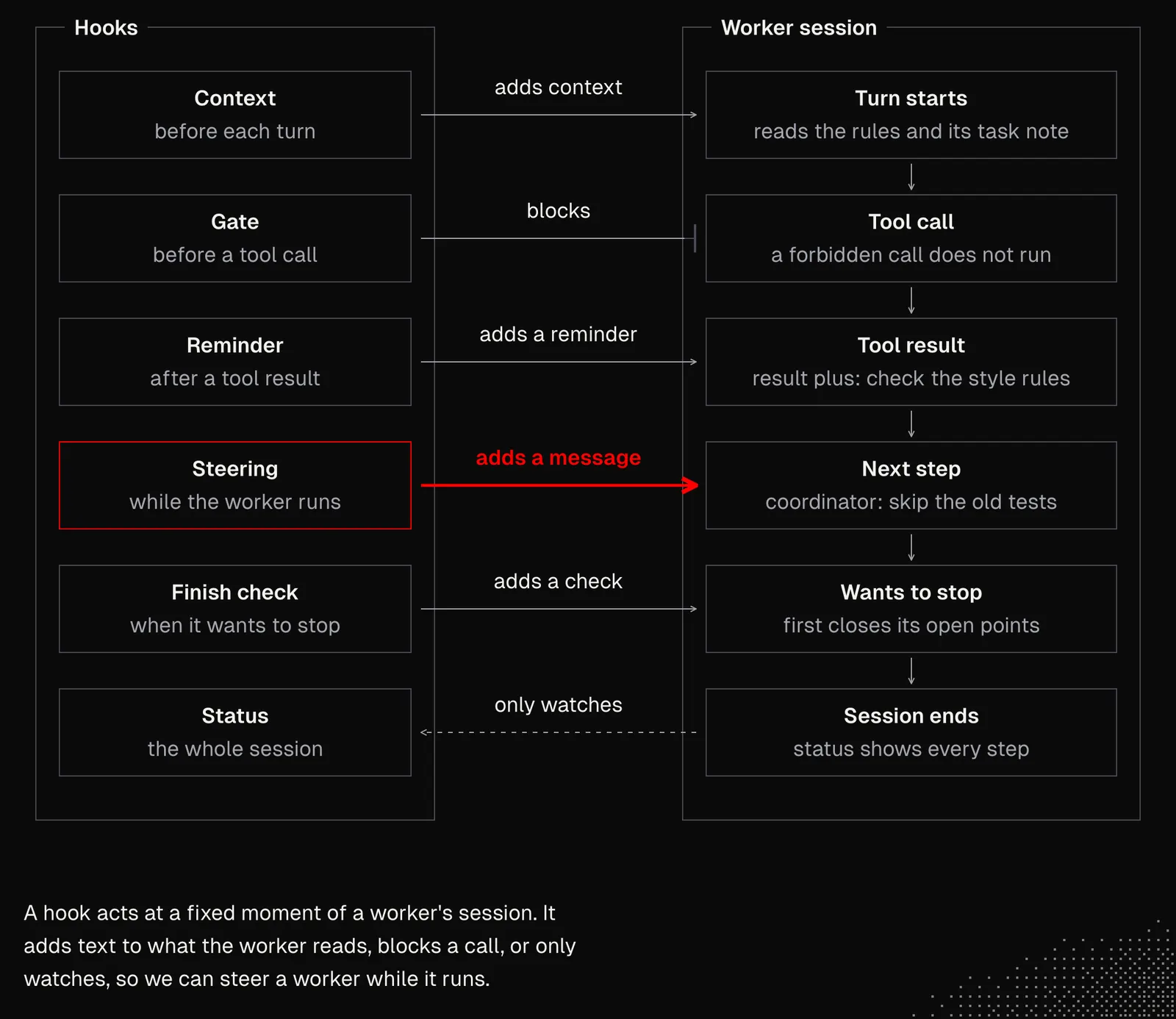
From a technical perspective, we're talking about a simple CLI (or MCP server) that gives us access to all the sessions, plus a set of folders (or, alternatively, an API). Lastly, we need either our own harness or a customizable one such as Pi, OpenCode, Claude Code, or DeepSeek. Everything else is up to an agent that is spawned directly for the given task and manages workers to deliver it. This way, it stays focused on the whole task, and the risk of something distracting it is relatively low. And since it's "short-lived", it can also be steered with dedicated hooks.
We already discussed generalized steering, so it should be clear by now that hooks are not about strict rules or deterministic scripts that must be executed. They are about reminders and context that help the agent. And again, it is not about designing everything upfront, but about giving "slots" that coordinators or managers can use to steer the workers.
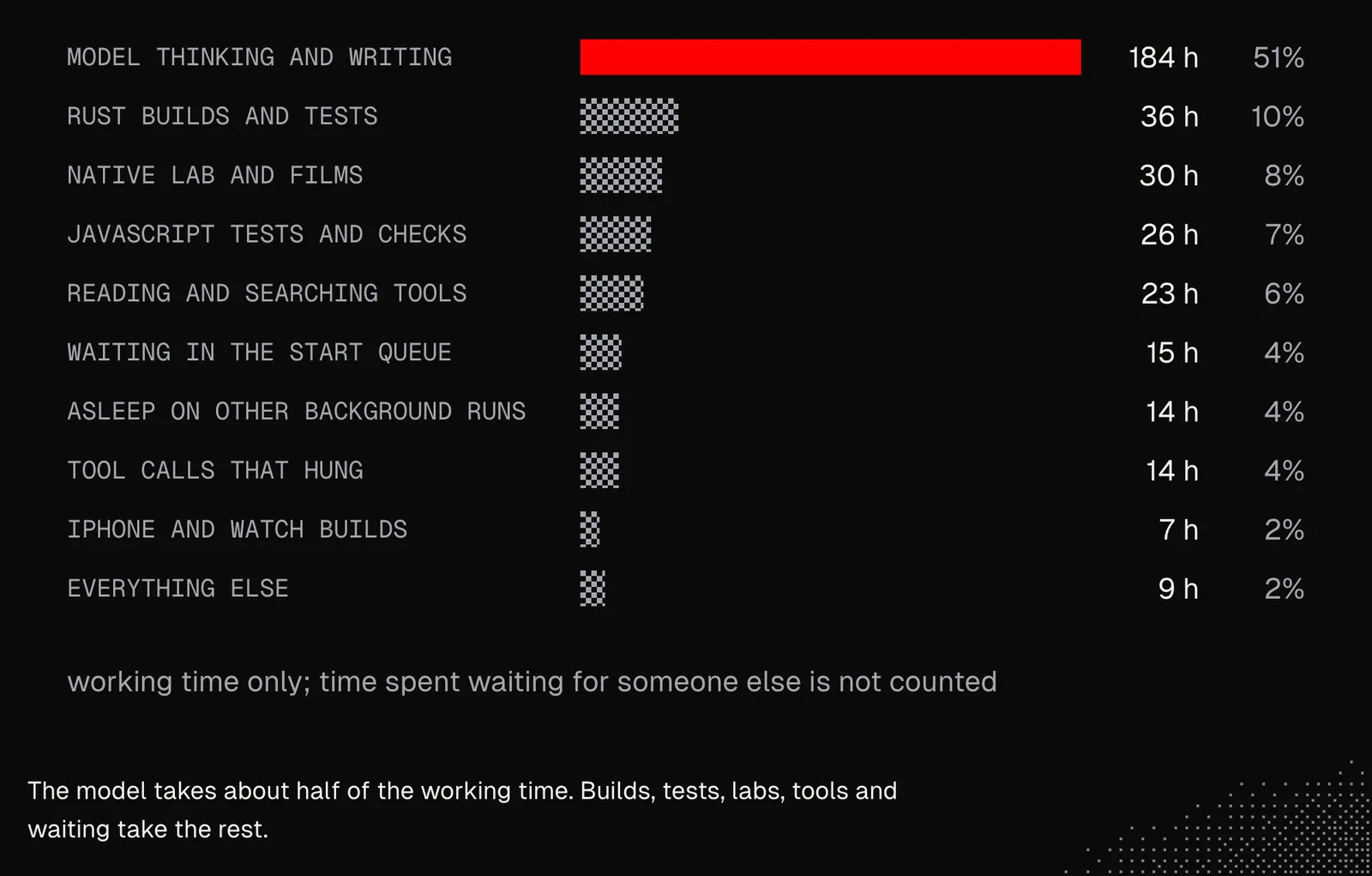
When you work with dozens or even hundreds of agents at the same time, even small issues add up quickly. This shows most clearly in the time the agents need to accomplish a task. Sometimes the cause is resources, queues, hitting limits, or communication problems. And sometimes agents start colliding or struggle to resolve conflicts that come from parallel work. That's why one of the best things we can do is set schedules for analyzing threads from the entire team, to find opportunities to optimize the process for the metrics we care about, not just for performance.
Below are real numbers from 7 days of my agents' work on one of my side projects. They reveal bottlenecks not only in the setup, but also in its configuration and available resources. We address most of the issues through experiments, and we compare the results after a couple of days. Some of the insights also lead us to consider increasing resources or switching to tools such as Depot, Browserbase, Browser Use, or Boat, but only where it's justified.
In John's build: routing is by file path. One hook reads the paths that each Domain Agent owns. When the main conversation touches a matching file, the hook wakes that agent and adds its short brief to the conversation. The brief is context, not a rule, which is the same use of hooks as in this section. On parallelism, John takes a different path. His agents run in parallel only to read and to advise, and one conversation writes all the changes. He refers to the essay "Don't Build Multi-Agents" for the reason: each parallel writer makes assumptions that the others cannot see. This lesson manages the collisions between parallel writers. John's build avoids them with a single writer. See Seeding a Domain Agent and Crossing Two Domains.
Supervision
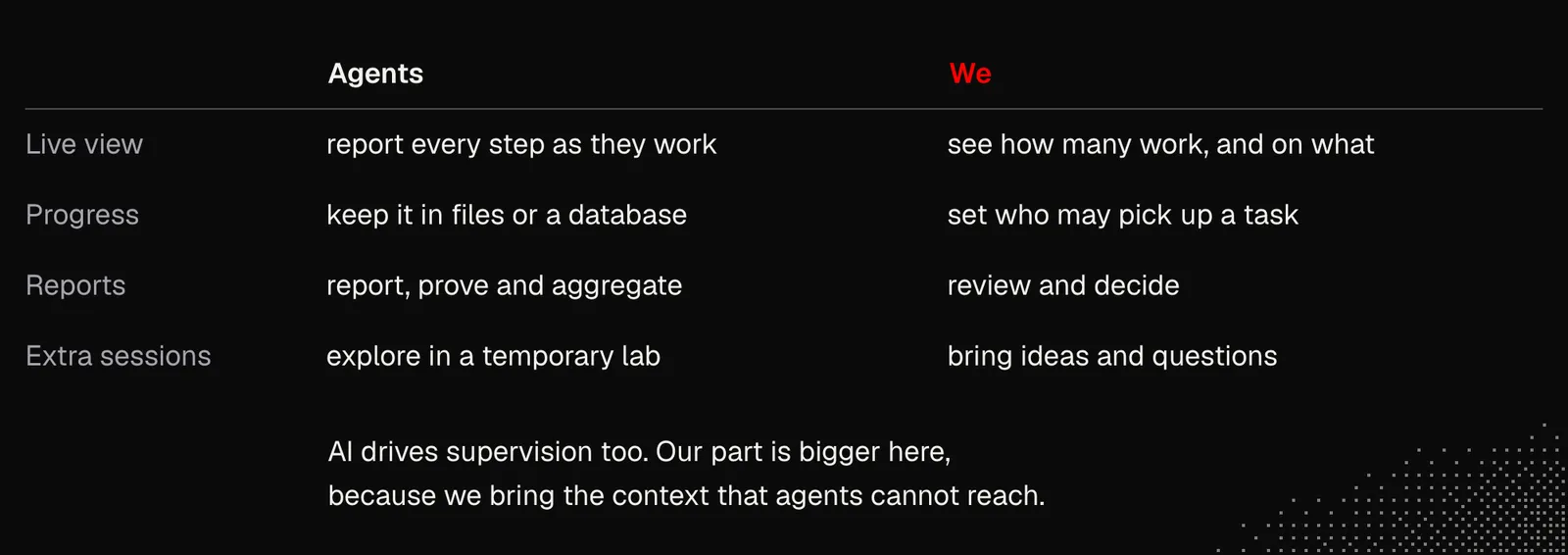
If agents handle almost everything in nearly every process we've discussed so far, what can we do about supervision, and where should we be involved? In fact, there are still many places where we're needed to keep the whole system improving.
First of all, even when agents operate in the background, we always need to know what's going on: how many agents are working and what they're working on. The easiest way is to observe this live with an observability platform, such as Langfuse, which we discussed earlier. We could also consider Macroscope for even better insight into agents' activity.
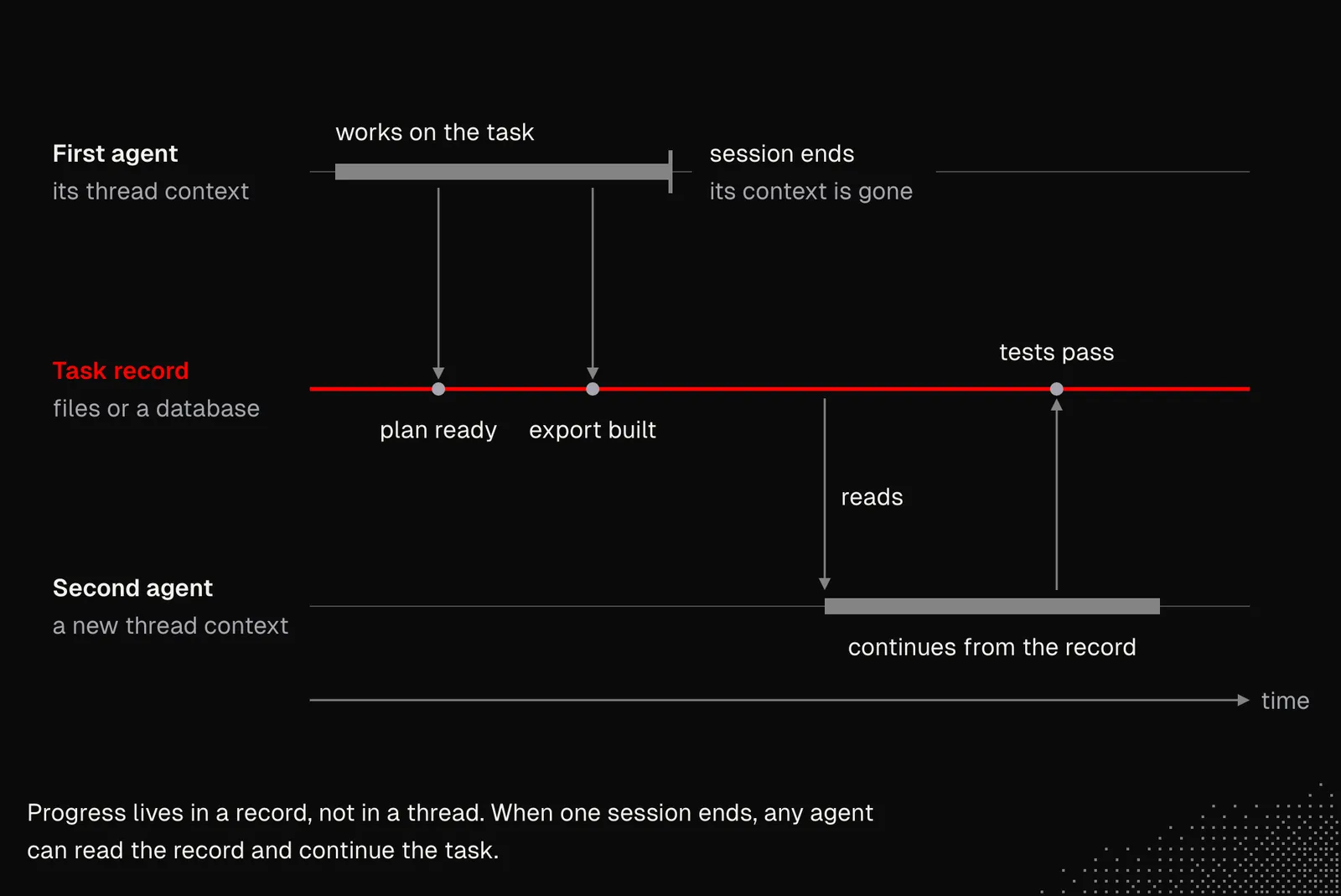
Another important factor is that agent activities and task progress must not live only in the thread context of any agent, including top-level coordinators. The reason is that any agent should be able to pick up any task, unless we have a policy that limits agents to certain permissions. Even then, all progress needs to be tracked in files or a database, not inside the thread context.
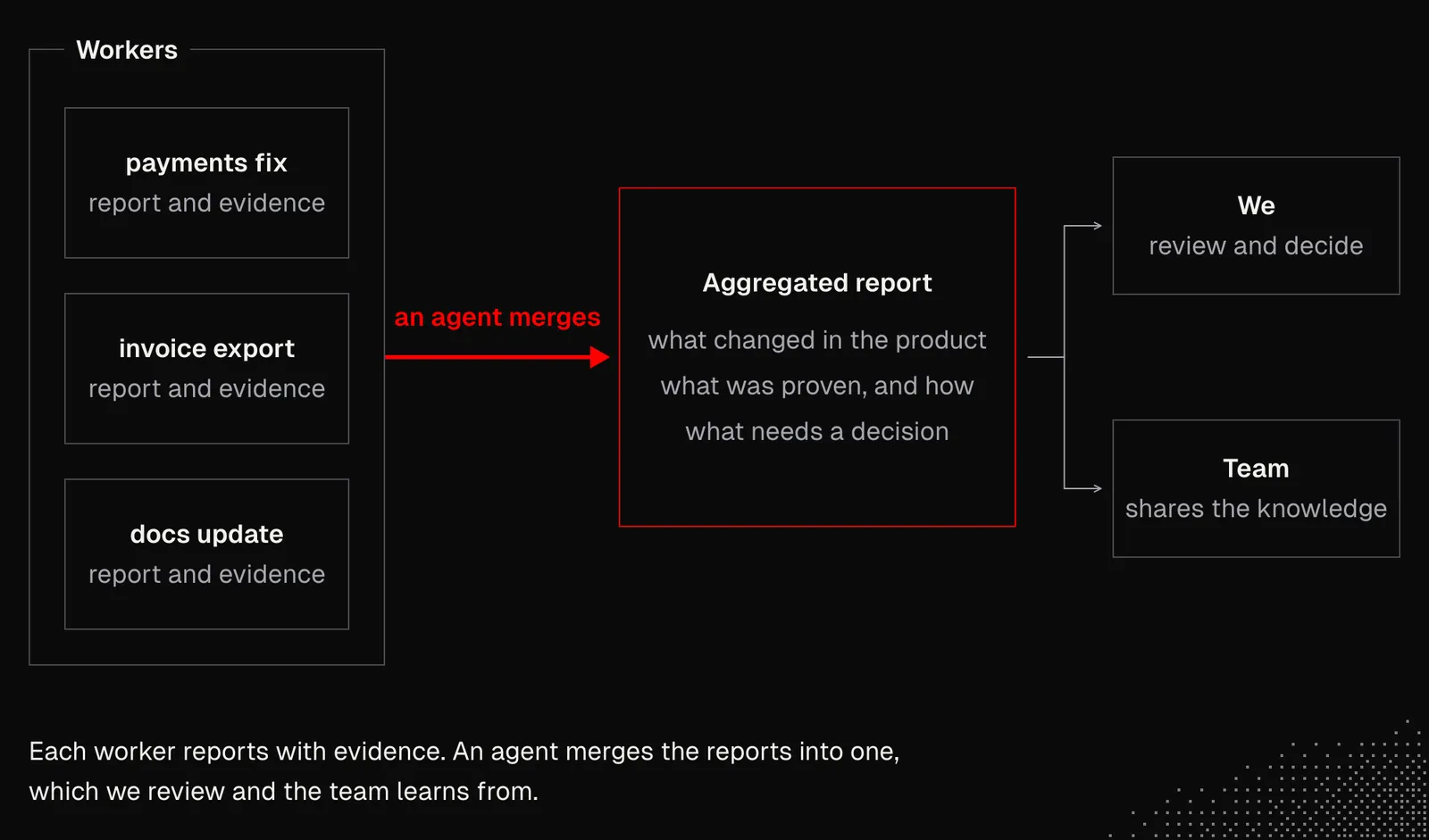
We already know that agents should produce reports on their work and evidence of the changes they made. Most of these reports will be reviewed by us, but in some cases we may want aggregated reports that show the changes made by several agents. Such reports could also help a team share knowledge, not only about the codebase but about the product in general.
And lastly, it's useful to have extra sessions with agents about concepts, ideas, or simply questions. In some cases, we may even want to spin up an entire fleet to create a temporary "lab" where we can explore the aspects of the product that interest us most. This way we can discover issues and things worth our attention, plan refactors, or iterate on ideas for upcoming features.
This may sound weird, but even supervision should be driven by AI. The difference is that our involvement should be much bigger here, because this area benefits the most from external context that agents often still can't reach.
At some point, we can expect platforms such as Factory to deliver features that help us manage large teams of agents. They may be useful even today, so it's worth trying them out, or at least keeping an eye on how they change. Alternatively, we may rely on tools generated just for us.
In John's build: supervision has two places. The first is the decision: a collision between two areas is a product question, and it comes to us in the main conversation. The second is the knowledge of the agents themselves. The agents/ folder is shared text, so the owners of an area review each change to it, and scenario checks run when its files change. A scenario is never deleted to make a check pass. See Glossaries and Scenario Checks.
Takeaways
As this lesson shows, orchestrating a team of agents is mostly about leveling up. We shift our focus from building software to building a system that builds software. Even if the term "software factory" is often overused or used in the wrong context, there is value in looking at the software development lifecycle through the lens of the dynamic structures agents use to find the best possible solutions.
If we decide to move toward this level of autonomy, we need to remember to use state-of-the-art models wherever possible, because the entire system depends mostly on their capabilities. At the same time, the responsibility for the software we build still rests with us, and we need to keep that in mind. In some cases, finding a good balance between autonomy and human supervision may still be important. But given the pace of progress in AI, it's a good idea to learn as much as we can about moving the entire process to AI. There's still a lot for us to do, even if we can "ask for nearly anything".