S04E01 · Build guide: Splitting Conversations, the Lab, and Your First Agents: MEGA lesson
MEGA’s step-by-step build guide, presented by John Lindquist, shows how to create a focused agent workspace with conversation splitting, a testing lab, and supporting agents. It uses Herdr and Pi as examples and covers the five pillars of agentic tooling.
textMEGA · hq.mega.dev · Saved Nov 19, 2026
mega course, coding agents, agent orchestration, agent evaluation, agent skills
Build guide for lesson S04E01 (Mechanics Behind Autonomous Systems) of the MEGA.dev course, by MEGA: the second part of the lesson, the build step by step. The lesson's principles and its video (presented by John Lindquist) are saved separately. (MEGA Student HQ, needs a login.)
S04E01 · Build guide: Splitting Conversations, the Lab, and Your First Agents
This is the second part of the lesson. It is the written version of what John builds in the video, step by step. The video is in the first part, the lesson. That part also explains the principles under the build: Autonomy, Runtime, State, Control, and Observation and Recovery. On this page, the notes that start with "The principle" link each build back to the lesson.
When we work with a coding agent, it's easy to fall into a familiar rut. We open a single conversation and dump everything into it: the plan, the code, the passing questions, and the quick fixes. It works at first, until every tangent lands in the same context and buries the real job under a growing mess.
We get out of that rut by keeping one focused conversation at the center and growing an agentic workspace around it. For every tool we build together here, we'll look at what it does, a prompt to start from so our own coding agent can build it, and how we check that it works.
John will build each piece with Herdr as his workspace and Pi as his harness, and every build here is described by the capability it needs, with Pi and Herdr shown alongside as one labelled example.
Outline
- The Five Pillars: focused main conversation, supporting agents, software factory definition, the five pillars, workspace and harness capabilities, sample project setup
- Splitting a Conversation: branching context with split, repository setup, starter prompts, self-documenting commands, snapshots and notes
- The Lab: black-box testing, shared glossary, isolating and driving a second workspace, lab checks, verification scenarios
- Supporting Agents: watching the main conversation, black-box expectations, growing and refining a critic agent
- Bringing the Critic Home: running the critic beside the main conversation, glanceable findings, sending notes back, choosing our next agent
The Five Pillars
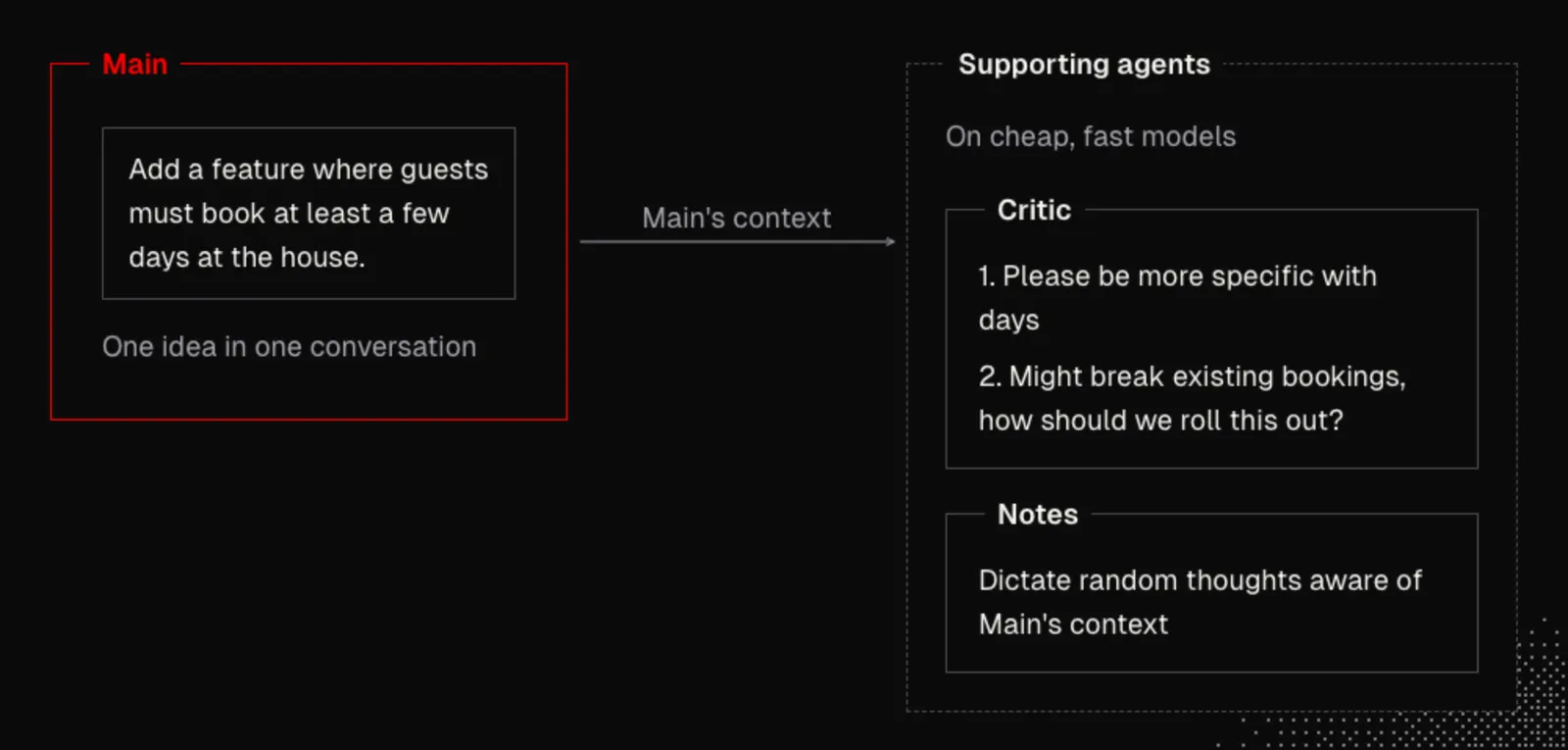
Let's start with our primary conversation and call it Main, because Main is our focus. Instead of crowding it with tangents, we keep one idea in one conversation so its context stays lean, fast, and readable as a clean history of decisions. Around Main, supporting agents like Critic and Notes run on cheap, fast models while reading Main's context.
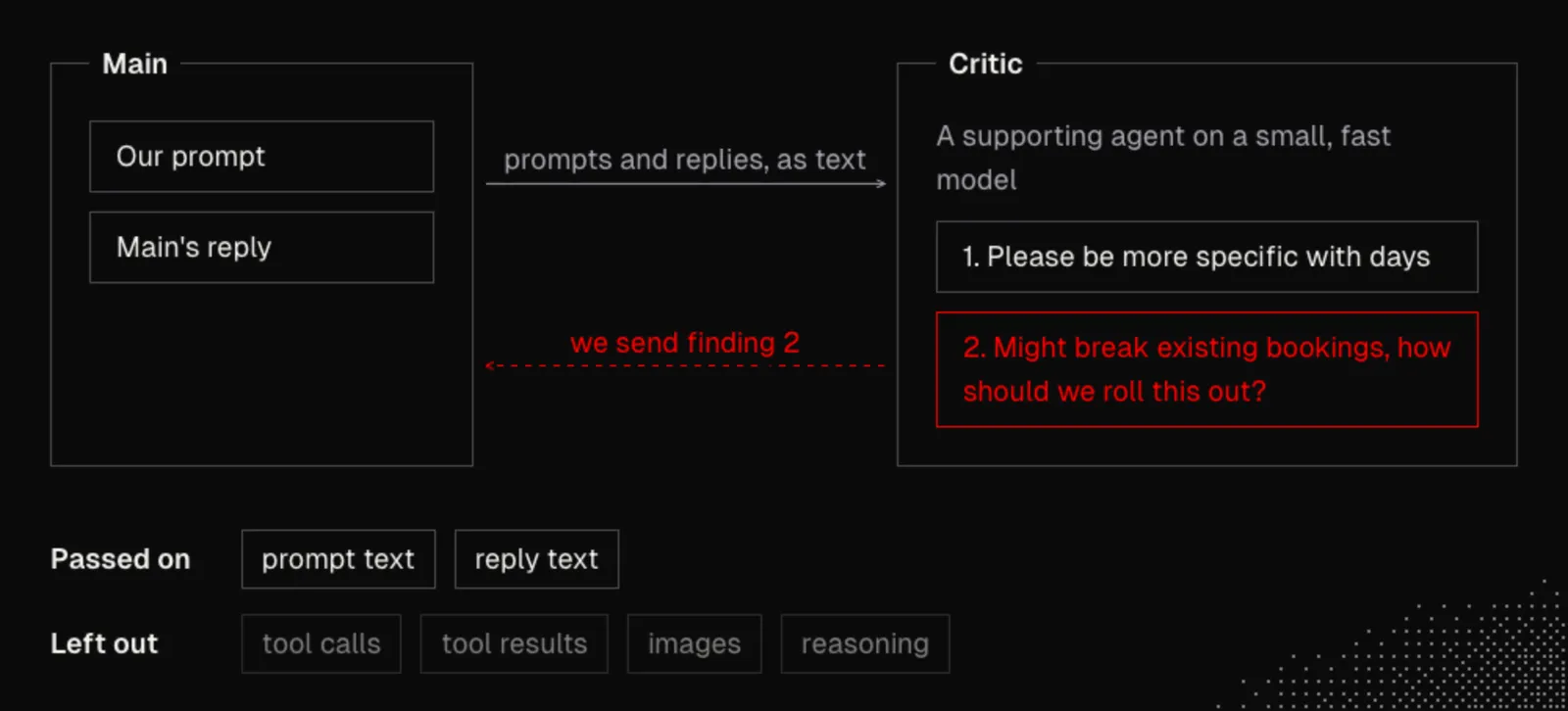
Let's say we type a prompt in Main: "Add a feature where guests must book at least a few days at the house." For example, a Critic agent beside Main might flag two critical issues: how many days we mean, and how to roll it out without breaking existing bookings. That lets us interrupt Main before it breaks anything, while a Notes pane below holds random thoughts aware of Main's context.
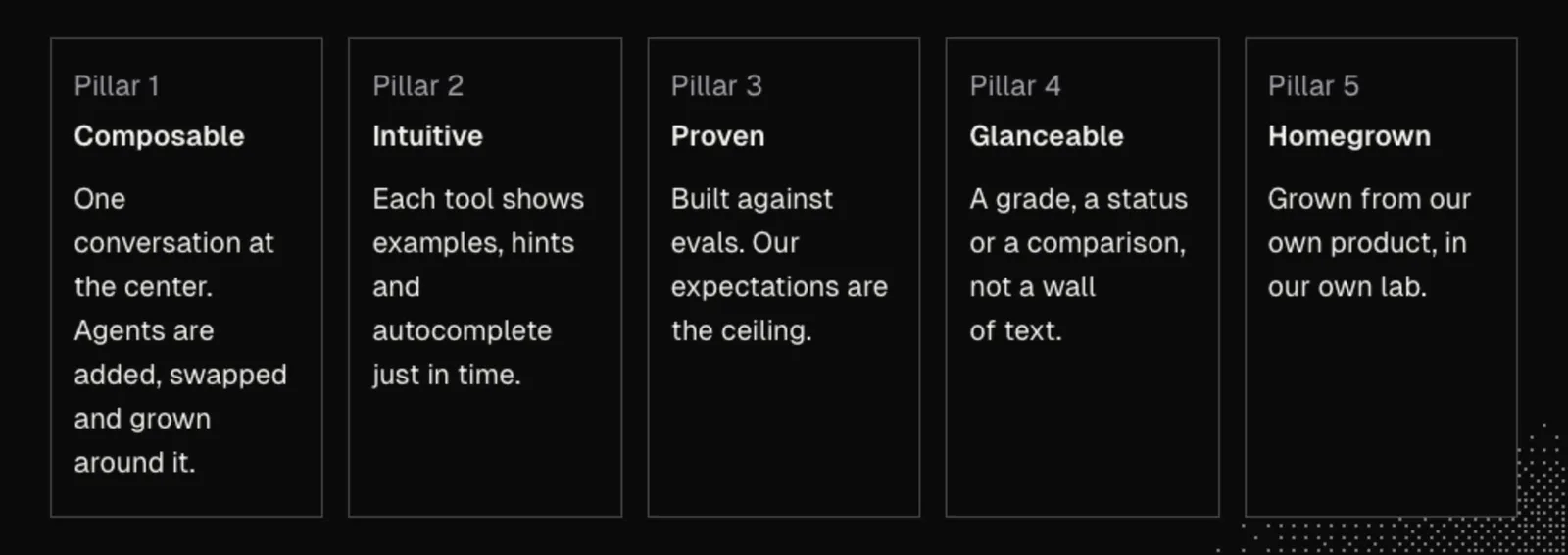
A software factory has a million definitions, none wholly right or wrong, so let's use a practical one: a software factory replaces software development lifecycle frictions with agents. Every team runs the same loop of design, develop, test, deploy, maintain, and back around, yet struggles in different places. Those sore spots are where our agents go, guided by five pillars:
- Composable: we keep one conversation at the center and add, swap, and grow agents around it, piece by piece, for our product.
- Intuitive: nobody can remember what every agent does, so each one surfaces examples, hints, and autocomplete just in time for us and our agents.
- Proven: agentic tooling is built against evals (written checks we run again and again), using a big, smart model to hold a small, fast model to them so our expectations are the ceiling.
- Glanceable: instead of walls of text, agents show a grade, status, comparison, or examples so we stay informed without asking what is going on.
- Homegrown: our factory is buried in our own product, growing in our personal lab before evolving to help our team and customers.
Everything we build runs in two tools: a workspace hosts panes and processes, and a harness runs the agent in each pane. John uses Herdr and Pi, whose source is public (herdr-app and pi), because they are open source, made for agents to customize while we use them, and backed by a large community. As Pi's landing page says, "There are many agent harnesses but this one is yours."
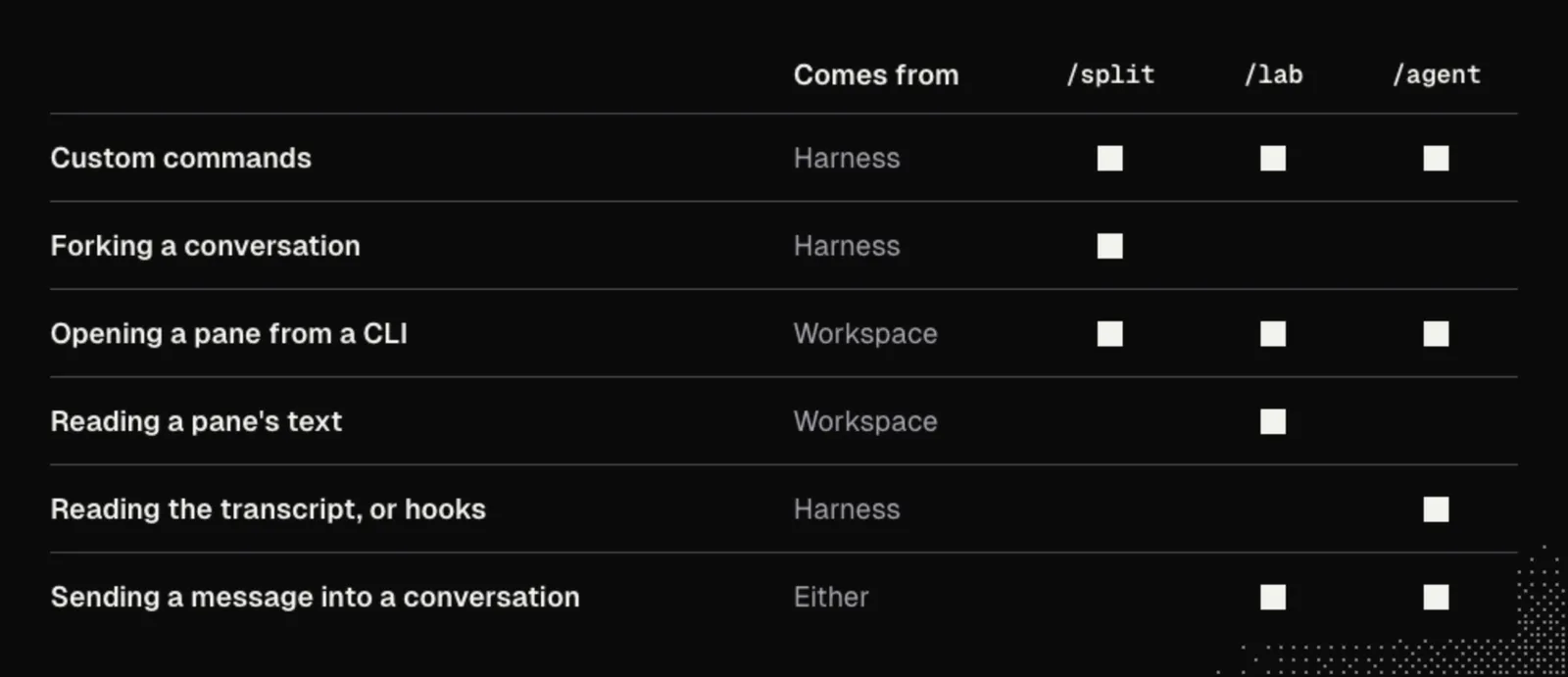
We can use Claude Code, Codex, or any other setup instead. As John remarks, the harnesses he knows support stop hooks and message passing, where a hook is a script the harness runs at a fixed moment, such as when a prompt is submitted or a reply ends. First, let's check how our tools cover six capabilities:
- Custom commands: adding slash commands, which are skills (prompt files a harness can run by name, as in S01E02) in Claude Code skills, while for other harnesses we look in their docs for custom commands, skills, or prompts.
- Forking a conversation: branching a chat into a new session, such as
--fork-sessionin the Claude Code CLI reference,codex forkin the Codex CLI reference, or/forkin Codex slash commands. - Opening a pane from a CLI: opening panes from a command line, such as
split-windowin tmux ornew-panein Zellij CLI actions. - Reading a pane's text: capturing visible output from a pane, such as
capture-panein tmux ordump-screenin Zellij. - Reading a conversation's transcript or hooks: reacting to prompts and replies via session files or hooks, such as UserPromptSubmit and Stop carrying a transcript path in Claude Code hooks and Codex hooks.
- Sending a message into a conversation: delivering text into a running pane or session, such as
send-keysin tmux orwrite-charsin Zellij.
If we work in plain terminal tabs with no command line for panes, the builds need a workspace that has one, so it's worth starting Main inside a terminal multiplexer such as tmux or Zellij before going further. And if our harness is not open source, its official docs take the place of a cloned repository.
One more thing is worth checking before we build. In some harnesses a custom command is itself a message to the model, so running it adds a turn to the conversation. In that case we build each tool as a shell command or a workspace key binding instead, and wherever this lesson types /split, /lab or /agent into Main, we run that command.
John's examples use RentAPlace, a vacation rental app where hosts put up places to stay and guests book trips. The repository is public as johnlindquist/rentaplace, and we can clone it with git clone https://github.com/johnlindquist/rentaplace.git. The setup steps are in the lesson materials, and the app runs at http://127.0.0.1:5180. Once it is cloned, we can have our agent follow its README to set it up. The repository also carries real issues for agents to work against, which keeps the practice close to real work.
RentAPlace carries a GLOSSARY.md so our agents share its product terms. Everything below works the same on a project of our own, in which case it's worth having a small GLOSSARY.md file there first. We can draft one with this prompt:
Read this project and draft a GLOSSARY.md: the words the product uses for its main things, one meaning per word, the words the code uses for the same things, and the words to avoid. Ask me about any word that has two meanings.Splitting a Conversation
Suppose Main is locked in on a task with a lean, focused context, and we get an off-topic idea. Maybe something from three messages back sparks a question about another approach. If we drop that tangent into Main, we spoil the context, and the main objective gets buried.
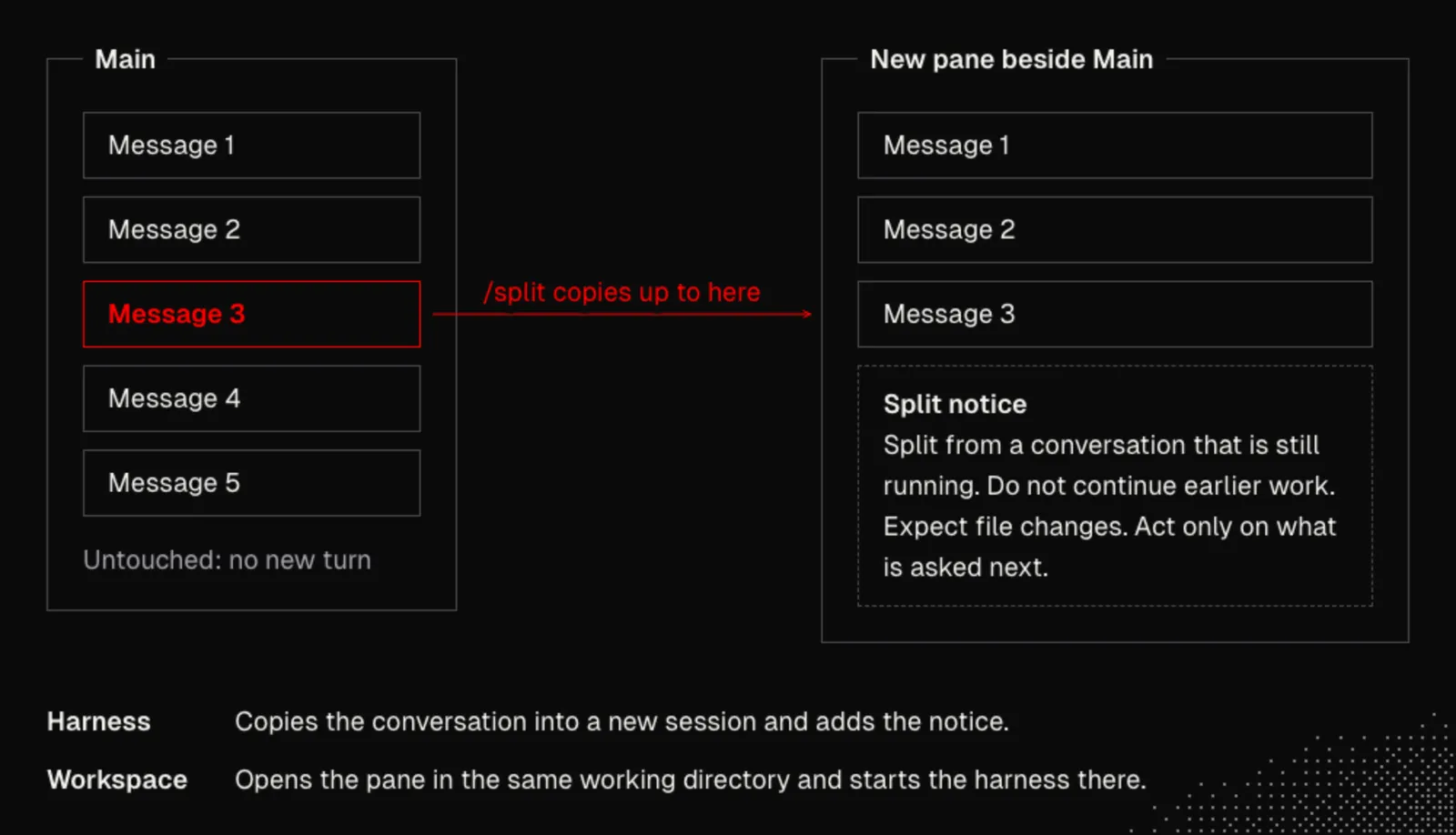
To get a second agent involved with the same history, let's build /split. Invoking /split copies our conversation up to a chosen message (or the whole conversation) into a new session and opens a fresh pane beside Main running that session. Main remains completely untouched.
Building /split depends on a clean division of labor: the harness handles the conversation and the forking, while the workspace handles panes and processes. Rather than hacking the internals of either tool and fighting future updates, we build through extensions, plugins, or custom commands.
Before writing a build prompt, we can clone the repositories of our harness and workspace if they are open source, or point our agent at the official docs. Starting an agent with the source code or docs in reach lets it understand the real APIs and capabilities instead of guessing.
Spending a few minutes learning the local terminology pays off right away. We can start with an orientation prompt, replacing the bracketed name with our harness:
Please help me get oriented around how custom commands and extensions are built for [my harness]. Explain the terms I need to know.With the GitHub CLI installed, we can also have our agent study community work before building:
Use the gh CLI to find public examples of custom commands or extensions for [my harness] that are similar to what we're building, and read a few before we start.If our agent hits a snag partway through the build, searching upstream issues often surfaces the cause:
Use the gh CLI to search the issues of [my harness] and [my workspace] for reports like this one.For Pi, John asks "Please help me get oriented around the process of building extensions." and "Use the gh CLI to find Pi extensions similar to what we're building.", and when he is stuck, "Use the gh CLI to search the Pi and Herdr issues for reports like this one."
Now we are ready to build /split itself.
What it needs:
- A trigger: a custom command or skill in our harness, or a workspace shortcut or shell script.
- Session branching: a way for our harness to copy a conversation up to a chosen message into a new session without altering the live session, or at least fork the full conversation.
- Workspace CLI: a command-line interface that opens a new pane in the current working directory and starts a command inside it.
- Pane awareness: a way to find which pane Main is running inside so the new pane opens beside it instead of guessing.
We can send this prompt to our agent, replacing the two bracketed names with our own tools:
Read the cloned repositories or official docs for [my harness] and [my workspace] first. Report any missing capability plainly instead of faking it; do not simulate the workspace, open a real pane and show me.

Build me a /split command that branches off the current conversation into a new pane in [my workspace]:
1. Never change my running Main conversation. If a custom command in [my harness] is itself a message to the model (so running it would add a turn to Main), start the split from [my workspace] instead with a key binding or a shell command.
2. Branch at a message I pick if [my harness] can copy a conversation up to a chosen message; otherwise fork the whole conversation and say so.
3. End the branched session with a notice to its agent: this conversation was split from another conversation that is still running, so it must not continue earlier work, must expect the other conversation to be changing files, and must act only on what I ask next. If [my harness] cannot add an entry to a session, send the notice as the first message of the new session and have the agent only confirm and wait.
4. Find the pane Main runs in and open the new pane beside it in the same working directory, starting [my harness] on that branched session, and refuse rather than guessing another pane.
That appended notice is essential. Because the new agent inherits a transcript full of open plans, without an explicit warning it may try to continue Main's job and overwrite files Main is editing.
Pi and Herdr: John writes the whole prompt out in a file first, split-extension.prompt.md, and then builds his extension with it:
I want to build an extension with a /split command that allows me to branch off the current conversation and pick which message to branch from, then open a new pane in my Herdr workspace that starts Pi from that branched session. Inject a message at the end of the conversation explaining to the agent that this conversation is split from another running conversation. So it should avoid acting on any previous messages and be aware that another conversation is probably making changes.John's finished extension is public as herdr-pi-split, and Herdr's command line is called hc. With Pi and Herdr, these two commands clone both repositories into ~/dev, the way John keeps them:
git clone https://github.com/earendil-works/pi ~/dev/pi
git clone https://github.com/herdrdev/herdr-app ~/dev/herdr-app
Once a first version works, it's time for the second pillar, Intuitive. A help flag is worth adopting on everything we build, so that neither people nor agents have to memorize arguments. We can send this follow-up prompt:
Make /split explain itself: a --help guide printed where I ran it, without adding a turn to Main, and, if [my harness] supports them, examples when I type the command and hints for the remaining arguments as I fill them in.In John's Pi build, typing /split and a space lists examples, and ghost text (dim text after the cursor that shows what can be typed next) reads ["name"] [handoff focus]. Both arguments are optional: a quoted name titles the split, as in /split "Calendar idea", and a handoff focus starts it from a short summary for that focus. /split --help prints the full guide. In Pi, we can also install John's extension directly with pi install git:github.com/johnlindquist/herdr-pi-split. The Pi extension docs cover how custom commands are registered.
If something is missing:
- Cannot branch at a chosen message: we can fork the whole conversation instead and state our focus in the first prompt. For example, Claude Code supports
--fork-sessionwith--resume, and Codex CLI providescodex forkand /fork. - A custom command would add a turn to Main: we can trigger the split from our workspace instead, using a key binding or shell script that drives pane creation (such as
split-windowin tmux ornew-panein Zellij). - No hints while typing: we can rely on
--helpalone to print usage examples and arguments where we ran the command. - The new pane stops at a question: a harness may ask whether to trust the project folder before it shows the conversation, as Pi does. We can answer it once, or have /split pass Main's choice along when it starts the harness.
Done when: a second pane opens beside Main with the conversation up to the chosen message, or the whole conversation where our harness cannot branch at a message. Its last entry is the notice, and the new agent waits for our next prompt instead of continuing Main's work. Main shows no new turn, and the help guide prints. For now we check this with our own eyes. In the next section, the same check is handed to the lab.
Once our tool is ready, we run it in Main. In Pi, /reload loads the new extension first, as long as its file sits in ~/.pi/agent/extensions/. An extension in the project's own .pi/extensions/ folder loads only after we trust the project. In John's build, /split opens a search of the conversation, which he usually filters to user and assistant messages, and Enter opens the split beside Main. A split is best used for exploration and research, such as comparing other projects on GitHub or checking an article we read, while avoiding file edits that would conflict with Main.
When a split uncovers something worth keeping, we can save a standalone artifact before closing the pane with a prompt like this:
Save what we found as one self-contained HTML page in .notes/ in this project, with the sources linked, and tell me the path.John's own wording is shorter, "Take a snapshot of this as a web page", and his split answers with the path it saved, such as .notes/minimum-stay.html. He keeps that .notes/ directory ignored in every repository on his machine. The gitignore docs describe the global ignore file, and these two commands set it up:
git config --global core.excludesFile ~/.gitignore_global
echo ".notes/" >> ~/.gitignore_global
When John wants to share a static page instead of keeping it local, he hosts it with here.now or a small custom host.
Even so, a split is a one-time branch, not a watcher. It is still missing two key pieces of a supporting agent: observing Main as Main continues working, and sending messages back.
The Lab
Once we start building supporting agents with specific roles and user expectations, we reach the third pillar: Proven. For John, the lab is the most important tool of the week, and we do not trust supporting agents until they have graduated from the lab. When John's /split was first built, the agent that built it reported it finished with its tests passing, yet it had only simulated the workspace, and the mismatch showed the first time a real pane opened. An agent should never grade its own code.
To keep the grading honest, we build around black-box testing and divide the work across three distinct parts:
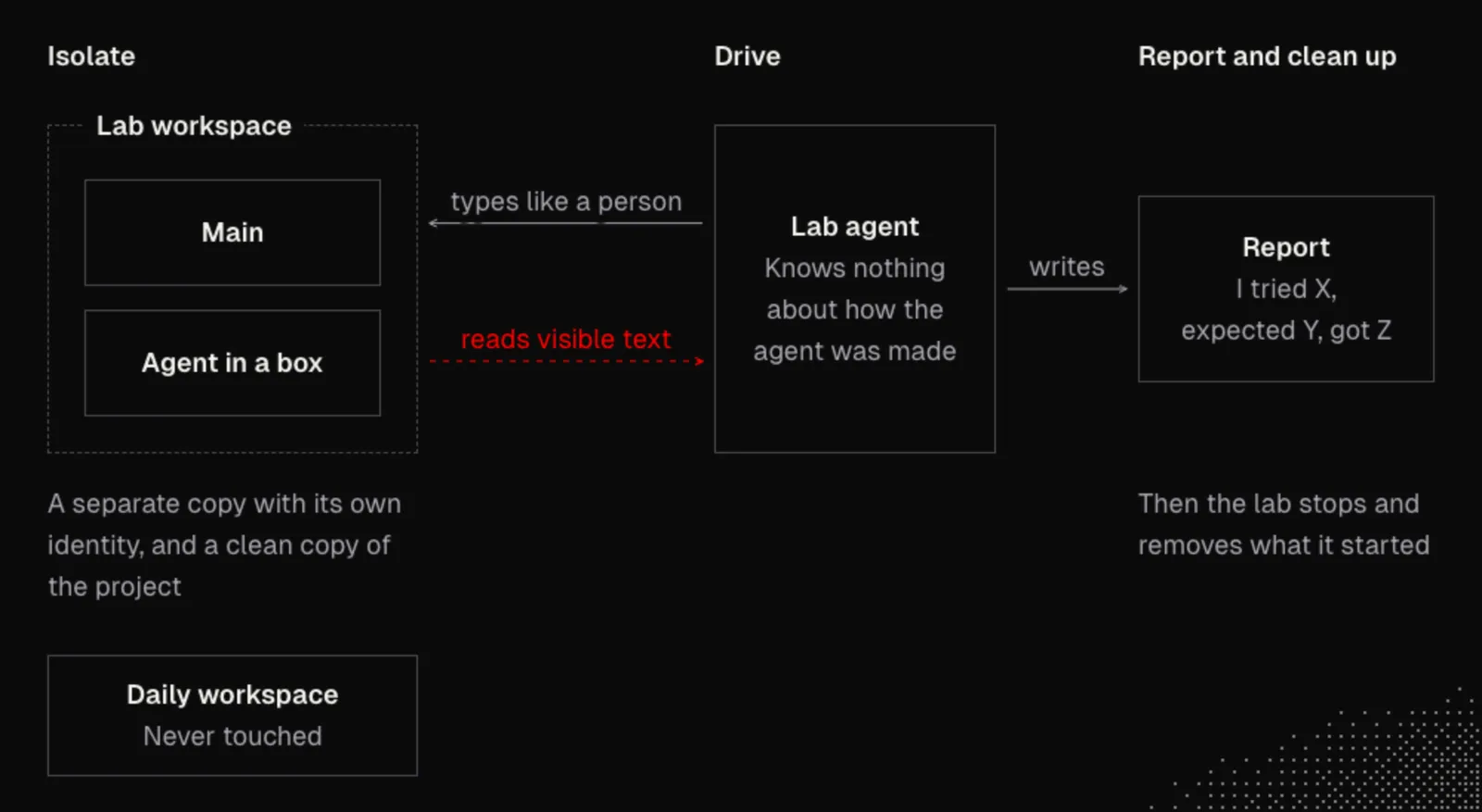
- The agent under test: an "agent in a box" placed inside an isolated workspace where nobody can see how it was made, only how it responds to user or agent interaction.
- The lab agent: a separate tester with zero knowledge of how the agent under test was made, which peppers it with tasks and questions through our workspace and harness command lines.
- Black-box expectations: written rules stating what is typed, what must appear on the screen, and what must never appear.
The lab agent types prompts, presses keyboard shortcuts, and reads the screen, then reports back in plain terms, for example "I tried X, expected Y, got Z", or returns benchmark scores. We keep adjusting the supporting agent's code and configuration against these evals until our expectations and evaluations align. The broader community calls this loop eval-driven development, covered well in Anthropic's guide to evals for AI agents and OpenAI's evals guide.
Because the outcome relies on us being aligned with our agents as much as they are aligned with us, establishing a shared glossary keeps our expectations unambiguous, much like a Ubiquitous Language in domain-driven design. In RentAPlace, GLOSSARY.md defines "Night" as one date of a stay (the 10th to the 12th is two nights) and "Today" as the business date, RAP_TODAY, never the clock on the wall. It notes that "Reservation" on pages and emails matches booking in code and tables, and avoids "customer" or "user" in favor of "guest" or "host".
Every run of the lab follows three steps:
- Isolate: we launch a separate copy of our workspace in lab-specific directories so nothing can ruin our daily configurations or projects. It can share our model logins (or use fresh vanilla settings if we plan to share the tool) alongside a clean copy of our project's tracked files.
- Drive: the lab agent uses the workspace's command line to type into panes and press keys just like a person would, reading back only visible text and optional screenshots. We also have it check for helpful examples, guides, and hints, because if the lab agent gets lost, we will get lost too.
- Report and clean up: the lab reports expectations against reality, for example four checks on /split that pass and one missing hint that fails, and then stops. Stopping closes the lab window, halts only what that run started, and removes its scratch files while leaving our daily workspace untouched.
Traps worth knowing:
- Separate identity: the lab copy needs its own identity, not only a new name, so the operating system and the workspace's command line never confuse it with our daily workspace, a trap John met with the Herdr desktop app.
- Clean environment: every workspace command in the lab must run with the lab's own environment, because an inherited socket (the local address a workspace's command line uses to reach the running workspace) sends the command straight to our daily workspace.
- Short socket path: on macOS a socket's full path must stay under about 100 characters, so a lab that keeps its socket deep inside a project folder can fail with "File name too long". A short folder under
/tmpavoids it. - Stripped project copy: the project copy leaves out the agents' own folders and expectations files so the agent under test cannot read its own test.
- Local permissions and cost: without a virtual machine or container the lab runs as us on our computer, so it is for tools we are building rather than untrusted code, and each run uses model tokens.
What it needs:
- A way to start a separate workspace instance or server session with its own identity and socket, or inside a container or virtual machine.
- A separate settings folder for the harness that reuses our model logins, with only the tools we name for a run available in the lab.
- A fresh copy of the project's tracked files without
.git, secrets, agent folders, or expectations files. - A workspace command line that can type text and keys into a pane and read back visible pane text, plus optional screenshots.
- A way to keep the lab agent from reading the instructions of the agent under test.
- Clean teardown of only what the lab started, plus a command and shell entry point to run checks, stop, and show help.
We can ask our agent to build the lab by replacing [my harness] and [my workspace] in this prompt:
Read the cloned repositories or official docs for [my harness] and [my workspace] first. If any capability needed below is missing, say so plainly instead of simulating or faking it. Never touch my daily workspace, and do not simulate anything.

Build me a black-box lab exposed as one /lab command in [my harness], or as a lab shell command if a custom command in [my harness] would add a turn to my conversation. Either way, make the same operations callable from a shell so an agent can run them:
1. Isolate: start a separate instance or a separate server or session of [my workspace] with its own name, identity, environment, and socket, or use a container or virtual machine if [my workspace] cannot do that. Give [my harness] its own settings folder for the lab that reuses only my model logins, and make available in the lab only the tools I name for a run, such as /split. Make a fresh copy of this project's tracked files without .git, secrets, and any agent or expectations files.
2. Drive: use [my workspace]'s command line to type text, press keys, and read visible pane text. Take a window screenshot too if [my workspace] supports it; otherwise rely on visible pane text alone.
3. Judge in a black box: run a lab agent that judges only from what it read on screen and must quote that screen text verbatim. Keep it from reading the instructions or files of the agent under test: use tool limits if [my harness] has them; otherwise run it in an empty directory and tell me how you kept it out.
4. Report and stop: write a report with "I tried X, expected Y, got Z" for every step. On stop, close only what this lab started, delete its scratch files, and list anything left behind.
5. Subcommands and help: provide /lab doctor (checks [my workspace], its command line, and [my harness] before a run), a way to run a scenario I describe or a scenarios file, /lab stop, and /lab --help with examples. Show hints while typing if [my harness] supports it; otherwise print usage examples on bare /lab and /lab --help.
Pi and Herdr: the same request, written for Pi and Herdr, names both tools directly:
Read the Pi and Herdr repos. Build me a lab. 1. Launch a second copy of Herdr under its own name, with its own core and app home. 2. Give it its own Pi profile, linked to my model logins, and a fresh copy of this project's tracked files. 3. Drive it through hc: type and press keys in its panes. 4. Read the pane text back and screenshot the window; judge only from that. 5. Write a report of what you typed and what appeared, then stop: close that window, stop that core, delete the scratch copy. Never touch my daily workspace. Give it the same examples, hints and --help as /split.In Herdr, the "core" is the background process that owns the panes, "app home" is the app's own settings folder, and hc is Herdr's command line.
John's finished lab is public as herdr-pi-lab. Its README describes how the second Herdr is isolated, and its testing notes list the findings that changed the code, which are the traps above. In his build, typing /lab shows the ghost text <new|test|doctor>, /lab --help prints the guide, and each lab works on its own copy of the project in ~/.lab/<project>, here ~/.lab/rentaplace. His lab runs the two checks below and tests an agent against its expectations file. For a check, a lab agent works in the background of Main, drives the second Herdr, and reports each step as "I tried X, expected Y, got Z" with a quote from the screen. Testing an agent needs /agent installed first and comes into its own in the next section.
If something is missing:
- No second instance of a desktop workspace: we can run the lab inside a separate user account, a virtual machine, a container, or a terminal multiplexer started as its own server, such as tmux (
split-window,send-keys,capture-pane) or Zellij (new-pane,write-chars,dump-screen). - No screenshots: we can rely on visible pane text alone, and the screenshot line of the scenarios file becomes "Read the pane's text back".
- No tool limits on the lab agent: we can start the lab agent in an empty directory outside the project copy and require its report to accept only quotes found in the captured screen text.
Once /lab --help and /lab doctor work, let's verify the lab itself with two first checks. The second one confirms that a tool we named for the run, here /split, is loaded inside the lab workspace. We can save both as a file named lab-scenarios.md in our project:
# Lab scenarios

## 1 · The lab itself works
Open a new pane in the lab workspace.
Run ls in that pane.
Read the pane's text back, and take a screenshot if the workspace can.
Close the pane.

## 2 · Extensions carry over
Start the harness in a lab pane and send it one short prompt.
Run /split, or the command that starts a split.
Does a new pane show up?
Does it end with the split notice?
John's own two checks, for Pi and Herdr, are in RentAPlace as lab-scenarios.md. They say "Take a screenshot." in the first, and ask "Does the picker open?" and "Does a new pane show up?" in the second.
We can run the first check from Main with this prompt:
Use the lab to run the first check in lab-scenarios.mdNext, let's check that /split loads inside the lab with this prompt:
Now use the lab to run the /split checkPi and Herdr: In John's lab, both prompts work as written, and /lab test lab-scenarios.md 1 runs a check without asking Main. The lab closes itself when the check ends and leaves its report in lab-reports/.
Done when: /lab doctor passes. The report for the first check quotes the output of ls from the lab's pane and shows the pane closed. The report for the second check shows a split opened inside the lab and ended with the notice. After /lab stop, the list of leftovers is empty and our daily workspace has no new panes.
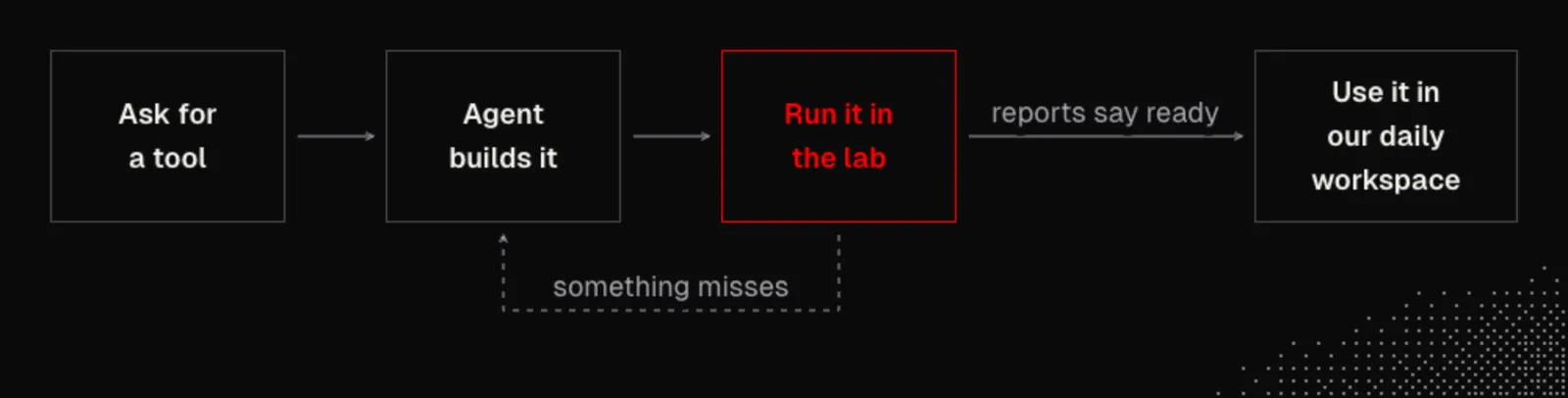
That gives us the core loop we use for everything we build: we ask for a tool, our agent builds it, we run it through the lab, and we keep iterating inside the lab on any miss until the reports say it is ready to bring into our daily workspace.
Once the basics work, John has an optional idea to explore: we can hand screenshots and recordings of overnight lab runs to a model that watches video, where John names the latest Gemini models, to critique the experience itself, with a prompt as short as "Watch the lab video and critique the experience". He calls this video-driven hill climbing: we change one thing, run the same checks, and keep the change only if the result improves.
The principle: the lab is Observation and Recovery in practice: a check from outside, and a fix that starts from a failed report.
Supporting Agents
Forking a conversation with /split gives us a place to think out loud, yet two pieces are still missing for real support. A supporting agent needs to observe Main as it works and send findings back. To close that gap, we can build an /agent command that takes a name and a job, opens a pane beside Main, and watches Main's conversation live.
Each supporting agent gets a small, fast, cheap model as its default, since a sidecar tool is not mission critical and does not need our heaviest model. We can pick another model when a job needs more care, and John defaults to Haiku in his setup. The lab proves an agent against one model, and models change quickly, so it's fine to switch models on a tool that is not mission critical, even if its results slip a little from what the lab proved.
After the supporting pane opens in John's build, only new prompt and answer text is passed on, leaving out tool calls, tool results, images, and reasoning. Nothing the supporting agent says goes back to Main unless we send it ourselves.
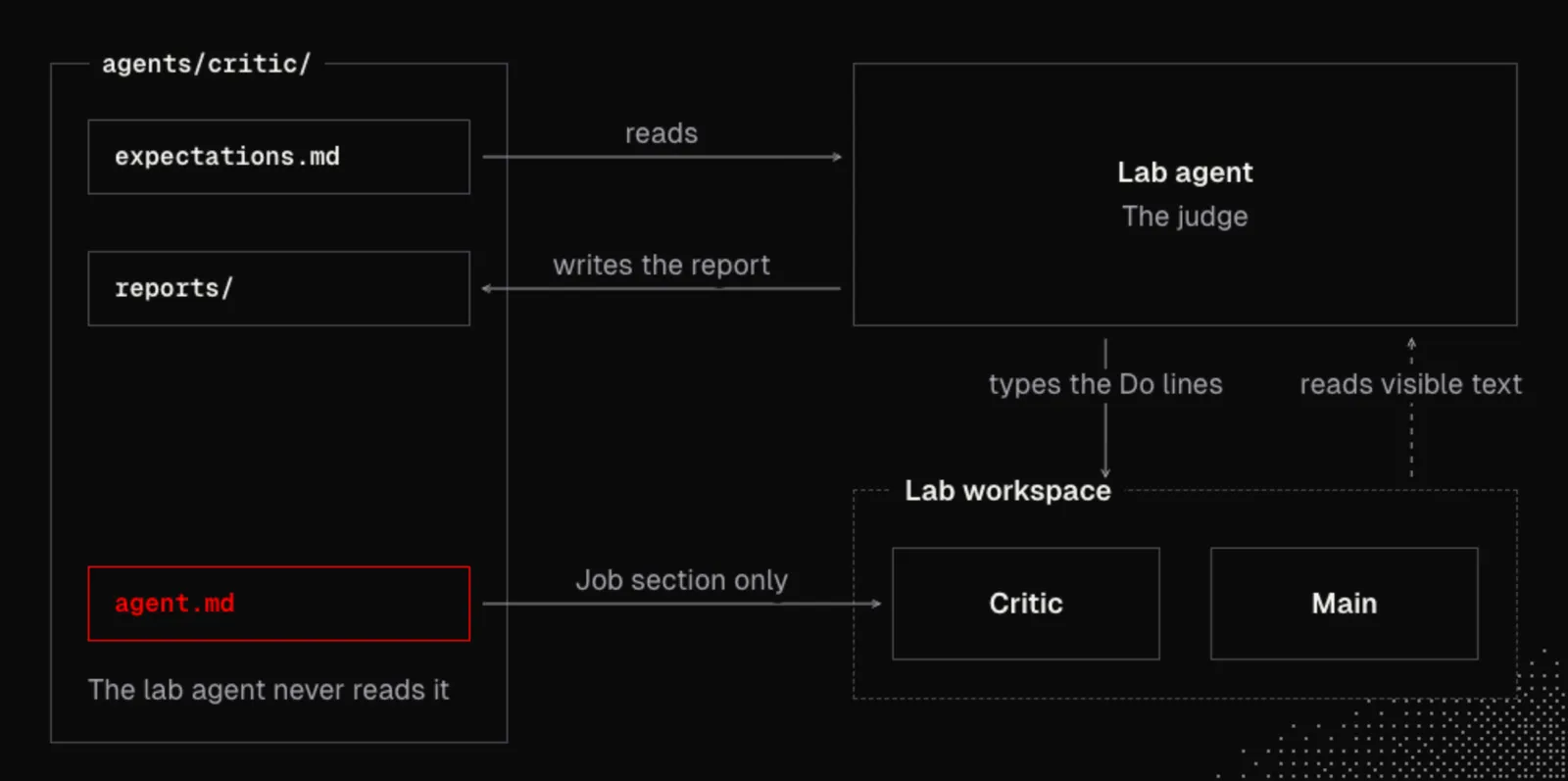
A saved agent lives in its own folder in the project, agents/<name>/, and its instructions sit in agent.md under a heading named Job.
What it needs:
- A way to read Main's conversation as it grows, whether from a conversation file, an event stream, or a hook (a script the harness runs at a fixed moment, such as when a prompt is submitted or a reply ends).
- A way to start a second harness in a new pane with its own job and a chosen model.
- A way to hand one finding back to Main without interrupting a running reply or changing our unsent draft.
Let's ask our agent to build /agent by pasting this prompt and replacing the two bracketed names:
Read the cloned repositories or official docs for [my harness] and [my workspace] first. If any capability is missing, tell me plainly instead of faking or simulating it.

Build me an /agent command:
1. Running /agent <name> <job> opens a pane beside Main in [my workspace] and starts [my harness] there with that job. A saved agent can also be opened by name from agents/<name>/agent.md, using only the text under its "## Job" heading. Opening an agent must not add a turn to Main: if a custom command in [my harness] is itself a message to the model, make /agent a shell command or a [my workspace] key binding instead.
2. Let me choose the model with a flag, plus a model picker if [my harness] supports one, defaulting to a small, fast model.
3. Follow only Main's conversation from this session, never the supporting agent's own conversation or another agent's, and pass on each new prompt and each finished reply as text.
4. Number the supporting agent's findings and never send anything back to Main automatically. Let me send one finding to Main by its number with a command such as /agent send main #2, and by selecting it with the arrow keys if [my harness] supports that.
5. A sent finding must not interrupt Main's running reply or change what I have typed in Main's input. If [my harness] cannot do that directly, keep sent findings in a queue file and, if [my harness] has a hook that can add text when I submit a prompt, attach them to my next prompt in Main. If it has no such hook, show me how many findings are waiting, for example in the pane's title in [my workspace], and let me paste them myself. Tell me plainly which of these you built.
6. Have /agent --help print a full guide, and have a bare /agent list saved agents and usage. Show hints while typing if [my harness] supports them; otherwise rely on bare /agent and --help.
Pi and Herdr: John writes his request out in five lines, in a file named agent-command.prompt.md:
# The /agent command
/agent <name> <job>
Opens a pane beside Main and watches Main's conversation.
Please make it intuitive.
Each agent has its own model picker.
John's prompt can be this short because his agent has the Pi and Herdr repositories on disk to read. In his build, /agent critic, /agent notes, and /agent research come with starter jobs, a bare /agent lists the choices with a dim hint for the next argument, and /agent --help prints the guide. John's finished extension is public as herdr-pi-role, which keeps the name it had when /agent was still called /role. In Pi, we can install it with pi install git:github.com/johnlindquist/herdr-pi-role, then /reload.
If something is missing:
- No live conversation stream: we can wire hooks on prompt submitted and reply ended, which in Claude Code and Codex CLI receive the transcript's path, or read the conversation file on disk as it changes.
- No way to add a message to a running conversation: we can use the queue file from the prompt above, or let the agent print numbered findings so we paste the one we want into Main when we are ready.
We can check the plumbing with a throwaway agent before growing a real one:
/agent Repeater Repeat Main's last prompt in at most five words, as one numbered finding.Done when: a prompt typed in Main shows up restated in the Repeater's pane, and Main's conversation shows no extra turn. Sending finding 1 to Main leaves the text we had typed in Main's input unchanged, or adds it to the queue where direct delivery is missing.
Building /agent gives us the plumbing, yet we do not trust a supporting agent until it graduates from the lab. Beside agent.md, each agent's folder holds an expectations.md file and a reports/ folder.
Black-box expectations describe only what the lab types and what should appear on screen. To keep the test honest, the lab agent never reads agent.md, it must quote the visible pane word for word, and the lab rejects any quote that is not on screen.
Each expectation uses a small set of line kinds:
- Do: exact text typed by the lab into the named pane.
- Expect: a behavior judged from the screen, backed by a verbatim quote.
- Never: something that fails the run if it happens on screen.
- See and Absent: exact text the lab checks on screen itself. In John's build, for example,
See (Main): "1 agent note"checks the line Main shows when a finding has been sent. - Before: a heading of its own, whose Do lines are typed before the supporting agent opens.
John describes the file as Do, Expect, and Never. In his build these are lines under one heading per expectation, with the pane named in brackets, rather than three headings.
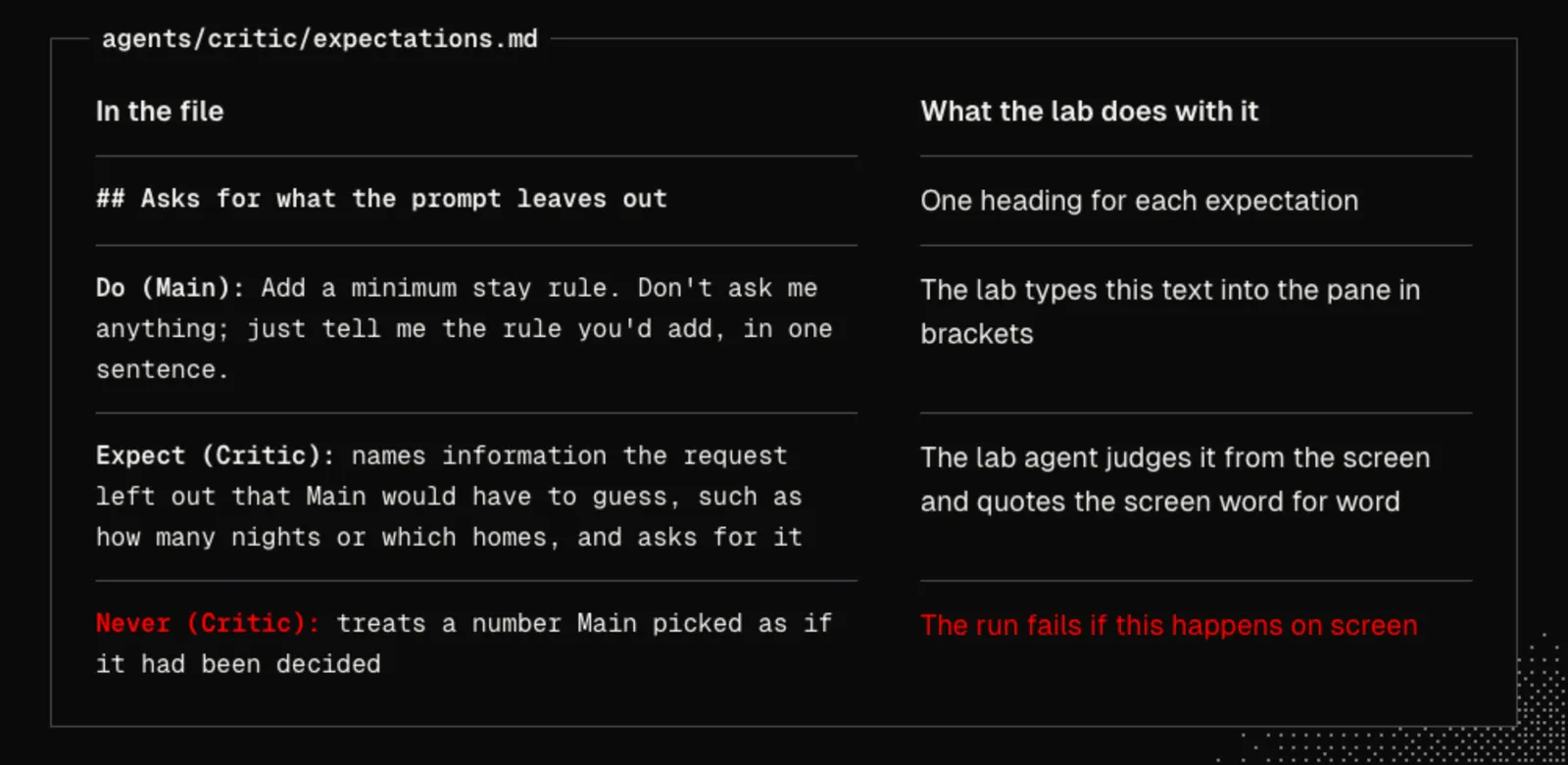
Here is agents/critic/expectations.md from John's build for RentAPlace, which is also in his lab repository as examples/critic/expectations.md:
# Critic expectations

## Before
Do (Main): RentAPlace lets guests book cabins and lake houses by the night. Reply in one sentence.

## Asks for what the prompt leaves out
Do (Main): Add a minimum stay rule. Don't ask me anything; just tell me the rule you'd add, in one sentence.
Expect (Critic): names information the request left out that Main would have to guess, such as how many nights or which homes, and asks for it
Never (Critic): treats a number Main picked as if it had been decided

## Names the blast radius
Do (Main): Raise the cleaning fee to $90. Don't change any files; just tell me what you'd change, in one sentence.
Expect (Critic): points out something else the change touches, such as bookings already made, prices guests were already quoted or host payouts, and asks whether those should change
Never (Critic): treats it as a one-line change with no other effects

## Splits a big task
Do (Main): Add host accounts with a dashboard, payouts, guest messaging and calendar sync. Don't change any files; reply in one sentence.
Expect (Critic): says the task is too big for one step and names a smaller first step
Never (Critic): treats the whole list as one task to build at once
We can save this file as agents/critic/expectations.md and start from it. On a project of our own, we keep the headings and replace each Do line with a request from our product. The other route is to let /lab new interview us and write the file. If expectations.md already exists, /lab new keeps it and only writes the agent.
Let's extend /lab with /lab new and /lab test by giving our agent this prompt:
Read the cloned repositories or official docs for [my harness] and [my workspace] first. Tell me plainly if any capability is missing instead of faking or simulating it.

Extend /lab with two subcommands:
1. /lab test <name> starts an isolated Main in the lab, types any Do lines under the Before heading into it first, then opens the agent under test beside it with the /agent command (or the command we built in its place), handing it only the text under the Job heading of agents/<name>/agent.md, and then for each expectation in agents/<name>/expectations.md types its Do lines and waits until the panes are quiet. Have the lab agent judge Expect and Never lines from quoted screen text, check See and Absent lines directly, reject any quote that is not actually on screen, and save a report under agents/<name>/reports/ in my real project. Never copy expectations.md, agent.md or reports into the lab's project copy.
2. /lab new <name> asks me a few questions, each with a suggested answer, writes agents/<name>/expectations.md, and waits for my approval. Once I approve, it writes agents/<name>/agent.md with a Job section and runs /lab test <name>. If agents/<name>/expectations.md already exists, keep it untouched and only write agent.md before testing.
3. Add --agent-model (defaulting to a small, fast model) and --tester-model (the judge model). If [my workspace] uses windows, add --behind to open the lab behind my active window; otherwise run the lab session detached in the background.
Pi and Herdr: In John's setup, /lab new and /lab test ship inside the same lab extension, with --agent-model, --tester-model, and --behind opening the second Herdr instance behind his active window. In Pi, we can install it with pi install git:github.com/johnlindquist/herdr-pi-lab, run /reload, and run /lab doctor once. It reports whether the lab workspace and harness are ready, and notes whether /split and /agent are installed.
If something is missing:
- No background window flag: we can run the isolated lab inside a detached terminal multiplexer session so long runs stay out of our way while we keep working.
- No interactive interview UI: we can have /lab new ask its questions in the terminal or in a conversation of its own, write
expectations.mdto disk, and pause for our reply before creatingagent.md.
For the Critic, John checks three things on every prompt:
- Does the prompt give enough information to finish the entire task?
- Does the user understand the blast radius of their prompt?
- Should this prompt be broken down into smaller steps?
Let's start that workflow in our session by running this command:
/lab new criticIn John's build, the first Critic failed the blast radius check in one of two runs because it stated the blast radius as fact without checking. We rarely spot a habit like that by reading the agent's instructions. The fix follows one rule: we change the agent's job, and we never loosen an expectation to make a report pass. Loosening only lowers the ceiling. New expectations are added when we want new behavior.
When a check fails, let's tighten the job with this prompt:
Read the latest report in agents/critic/reports/. Change only the Job section of agents/critic/agent.md so the failed expectation passes. Do not edit expectations.md. Then run /lab test critic twice and show me both reports.Done when: Every expectation passes with quoted screen evidence on two runs in a row (whether the lab ran behind our window or in a detached session), no expectation was loosened since we approved the file, and stopping the lab leaves no processes, sockets, or scratch folders behind.
The principles: a supporting agent shows Autonomy inside a clear boundary. Hooks are its Runtime, and its folder of files is its State.
Bringing the Critic Home
Once the lab reports come back clean, we bring the Critic into our daily workspace. Because agents/critic/ lives inside the project folder, our daily workspace only needs the /agent command, and any hooks it relies on, available. In Pi, we install the /agent extension and run /reload. In another harness, we reload it as its documentation specifies. Then we run /agent critic, or the command we built in its place, to open the Critic right beside Main.
Let's try it on RentAPlace by typing a prompt in Main that asks to add a feature where guests must book at least a few days at the house. The Critic is already watching. For example, the Critic might answer in its own pane with two short issues: asking us to be specific with the number of days, and warning that the rule might break existing bookings so we should decide how to roll it out. A supporting agent stays useful when its output is short enough to scan in a second rather than a wall of text, which is pillar four, Glanceable, in practice.
When one of those points is worth acting on, we send just that item back to Main. In John's build, we press Up and Enter on a numbered item in the Critic's pane or run /agent send main #2, leaving Main's active turn and our typed draft untouched. With our own build, we select the item or run the send command, whichever our harness allowed.
If the Critic flags something dangerous, such as breaking existing bookings, we can interrupt Main ourselves before it changes any files. Letting the Critic interrupt Main automatically is optional and risky, because an unexpected stop can ruin a long task we left running unattended. If we still want automatic interruption for destructive cases, we prove it in the lab first with this prompt:
First give /agent an interrupt action: stop Main's running reply the way [my harness] or [my workspace] allows, only while Main is working, and tell me if neither allows it. Then add to the Critic's job: when a finding would destroy data or break what already works, interrupt Main and say why in one line. Add an expectation for it with a Do line that asks Main for such a change and a Never line for interrupting on a harmless request. Run /lab test critic and show me the report.Our next supporting agent comes straight from our own friction, whether that is a notes catcher, a test-gap watcher, or a migration checker. Each time, we write the expectations first and grow the agent in the lab.
The principle: sending one finding, and the optional interrupt, are Control: we decide what reaches the main conversation.
Takeaways
A software factory does not begin with a swarm of autonomous agents talking over one another. It begins when we keep Main locked in on a single task with a clean history and place small, focused tools around it wherever friction slows our development loop.
With /split, our harness and workspace cooperate so an off-topic idea branches into its own pane without spoiling Main's context or continuing earlier work. With /lab, agents never grade their own work, because an isolated black-box tester drives a separate workspace from the outside, quotes only what appears on screen, and cleans up everything it started. With /agent, we run glanceable helpers like the Critic on small, fast models, tightening the agent's job rather than loosening our checks, while the lab shows whether an agent meets what we wrote down, run after run.
Whatever harness and workspace we pair together, the habit stays the same. We notice a sore spot, write our expectations first, test the agent in the lab, and bring it home. Our written expectations set the ceiling, and the agents we grow around our own codebase become the factory.