
S04E04 · Build guide: Wake the Team: Sort Tickets, Draft Replies, and Read Error Reports: MEGA lesson
MEGA’s step-by-step build guide, presented by John Lindquist, shows how to use background jobs to sort support tickets, draft replies, and read error reports. It covers event-driven watchers, human review, and durable execution.
textMEGA · hq.mega.dev · Saved Nov 19, 2026
mega course, durable execution, agent orchestration, automated ticket triage
Build guide for lesson S04E04 (Automating Work Beyond Code) of the MEGA.dev course, by MEGA: the second part of the lesson, the build step by step. The lesson's principles and its video (presented by John Lindquist) are saved separately. (MEGA Student HQ, needs a login.)
S04E04 · Build guide: Wake the Team: Sort Tickets, Draft Replies, and Read Error Reports
This is the second part of the lesson. It is the written version of what John builds in the video, step by step. The video is in the first part, the lesson. That part also explains the principles under the build: Events, Hooks, Pipelines, and Push Systems. On this page, the notes that start with "The principle" link each build back to the lesson.
A guest writes in overnight. By morning the ticket can already have an owner. But if the guest wants money back, the fact that the sorter was awake at three in the morning shouldn't mean it was allowed to give a refund. We'll give each job a place to stop as well as a reason to start.
John's example uses Pi for Main, the conversation where we ask for changes, and Herdr for the Issues and Hunts widgets. We need a local test copy of an app, its support inbox and request log, a way to look up prices, and the two domain agents from Day 3. If you're following John's example, use the RentAPlace Day 3 branch, not the default branch. Booking and Pricing are already there; today's jobs are what we'll add. Before trying a live ticket, check that your harness can reach the model you want to test. Without one you can still check the bookmark, amount and report rules with saved answers. Another harness can run the jobs. Another workspace can show the records. The Day 3 starter doesn't include today's sorter, drafter, durable host, Hunts reader or the extended Issues view. Treat those as things to build, not commands already installed by cloning the starter. The build excerpts below are from the worked example. Where John gives a direction aloud rather than typing a prompt, the block quotes the direction.
Outline
- Wake a job without making a guest wait for it.
- Sort new tickets, including the ones a person needs to read.
- Draft a reply from a lookup, not from memory.
- Read an error report and decide what Main should check next.
Wake a Job
In the earlier workspace you could see the moment work started. Somebody sent a request to Main, and a supporting agent could hear what happened. You'll recognize the request still sitting in the background of Main's window later in this lesson:
Add a feature where guests must book at least a few days at the houseThat's the earlier conversation, not the instruction to run overnight. The change today is where the event comes from. Nobody needs to ask Main whether a guest has written in. The guest has already done something that the app knows about. We want that fact to start a small piece of work even if there's no workspace window open to watch it. John's direction is:
So ask Main for a watcher: a small program that stays running, reads new lines as they land, and starts the work.A watcher isn't a second copy of the app. The app's responsibility is to finish serving the request and leave a record. The watcher's responsibility is to notice the record and start the right job. That's why a guest can get an answer from the support form before a model has decided who owns the ticket. And if the model service goes away, the original message still exists. We'll test that separation rather than assuming the two programs are independent because we gave them different names.
When a guest sends a ticket or a request fails, the app writes a line in its log and gets on with serving the guest. A watcher is a separate program that reads the new lines. Keeping the two apart means a slow model doesn't make a guest wait for the page.
Start local. A laptop is quick to test on, but it can't sort tickets in its sleep. Durable means work can survive a restart, not that the machine is always on. The sorter needs a bookmark: the last ticket it finished. A longer job needs a durable host that remembers the result of each finished step. If it stops during step four, it can use the saved results of steps one to three instead of doing them again.
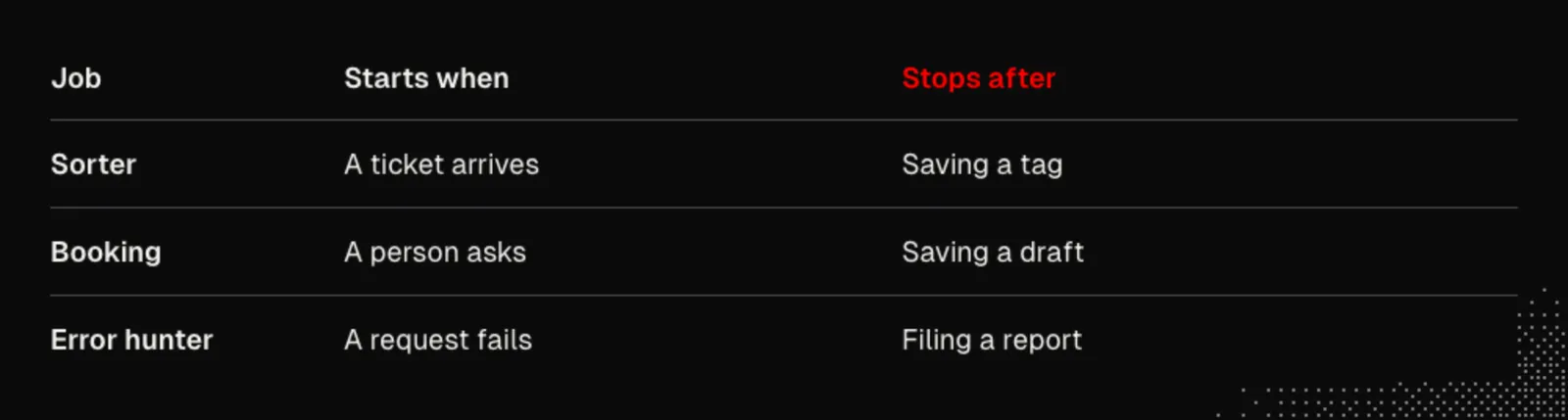
Decide how much work needs saving
A step means one action and its result. Imagine the lights go out while the worker is partway through a longer job. Knowing what it intended to do isn't enough. Did it finish the previous step? What came back? If the only record is the original instruction, restarting means asking the worker to start from scratch, even where nothing about the earlier work has changed. Durable execution saves the completed results so the next step can use them after the host comes back.
In the build's restart check the host was stopped while the job was underway. Here's the name of that check in its results file:
5 the host was killed mid-hunt; after a restart the same session finished with one reportRead the last three details carefully: after a restart, the same session, one report. Seeing a report after you restart isn't by itself proof of recovery. A brand-new job might have done the entire thing again. Keeping the original session and finishing with one result is the point. It is also deliberately not a test that the machine can turn itself back on. In this lesson a person or a test starts the host again. An always-on deployment is another decision.
We don't have to put every ticket on that host. A sorter has a smaller recovery question: which ticket did I finish? A draft is also a short job, and a person asks for it. The hunter has results from a number of steps to keep together. Match the storage to what you'd actually lose if the power went out. If a bookmark and a repeat-safe write are enough, use them. If a later step needs the results of several earlier ones, saving just the name of the last ticket won't bring those results back.
Follow one arrival through the app
Look at two consecutive lines from RentAPlace's app/logs/app.log. These are records, not commands to type:
{"time":"2026-11-09T12:00:00.000Z","event":"support.received","ticketId":"ae78ba92-2eae-4e2a-9033-d8e487554b28"}
{"time":"2026-11-09T12:00:00.000Z","event":"http.request","method":"POST","path":"/api/support","query":"","status":201,"ms":1.41,"requestId":"cbcfc802-b57b-4177-99a8-74829ec303c3"}
Which line should wake the sorter? The second one tells us the app handled a request to create a ticket. The first one tells us which ticket now exists. We can look that ticket up without copying the guest's message into the log. And we don't need to ask a model to read the traffic and guess which lines matter. Code can recognize support.received even if the next line is an ordinary page request.
Here's what came out the other end of that run, one line in support-tags.jsonl:
{"ticketId":"ae78ba92-2eae-4e2a-9033-d8e487554b28","owner":"pricing","money":true,"waitsFor":"a person","model":"anthropic/claude-haiku-5-5","at":"2026-11-15T07:06:16.517Z"}Follow the ticketId back to the first line. That's the connection the morning view needs. The ticket is still the guest's ticket. The sorter has added its own opinion alongside it, named the model that produced it, and recorded that someone needs to make a decision. Nothing in either record says the decision has already been made. Notice, too, that the at field and the app's test clock aren't the same clock. Subtracting those timestamps is not a measure of how long the sorter took.
Try the distinction on your own app. Pick an event your app already records. Can a second program tell what happened, find the original item, and leave a result a person can inspect without changing that item? If it can't, sort that out before choosing the model. A faster answer won't connect a result to the right ticket.
The principle: a record that the app already writes wakes the job, and the ticket ID keeps one arrival as one piece of work: Events.
Sort New Tickets
Give the model just two questions: Who owns this: Booking, Pricing, or nobody yet? Is it about money? Code finds the tickets and saves the tags. The model never changes the original ticket or moves any money.
Before choosing a model, make an answer key from past tickets. Include the guest who sees the same weekend twice on their card: the ticket is about money without saying charge or refund. Compare that with a guest asking whether street parking is free. The word free is there, but no payment needs review. A slow calendar can belong to nobody yet. If the heating was broken and the guest thinks you owe them something, the team might accept either of two owners. Put both in the key rather than marking one person's reasonable answer wrong.
Then ask Main to run each option through it, many times. Start with plain keyword rules. Then a cheap model. Then a stronger one. And read what comes back.At the keyboard you can catch a bad try. Overnight, a good try somewhere among several isn't enough. The bar here is pass to the k: pass all k runs. Start with the cheapest option that meets the money-review bar, not the one that tells the nicest story about its average.
John also tries Jev, a System One model from TypeSafe. A writing model gives us words that code then has to interpret. Jev takes a ticket and both typed questions in one pass. It returns an owner from our list with a confidence, and a number between zero and one for money. Near one means yes; near zero means no. It doesn't write the reply or calculate the price.
The card ticket was a useful miss: Jev missed it repeatedly, but its money answer sat near the middle. Code can use that uncertainty. If the money answer is in the middle or owner confidence is low, mark the ticket unsure and save the reason. Put both money and unsure tickets at the top of Issues. That costs a person a few more tickets to read; it doesn't silently turn doubt into approval. Set the bar on one set, then label fresh tickets before trying it again. John's fresh set let no money ticket slip through. That's a result on his tickets, not a threshold to copy into your inbox.
Now ask Main to make that model your sorter: a small loop that watches your inbox.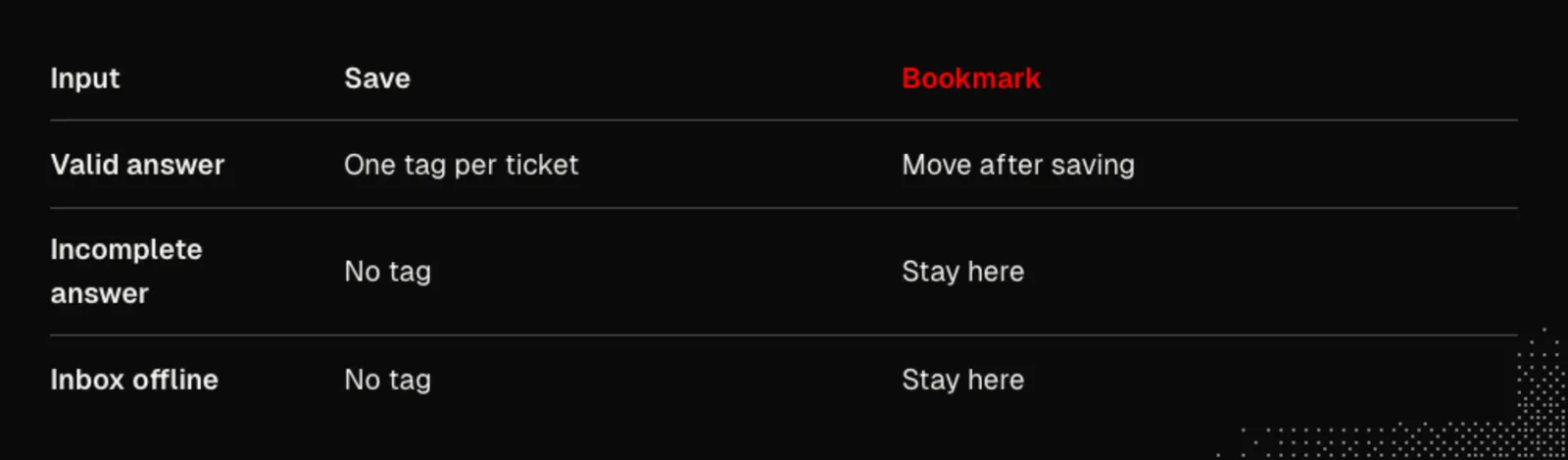
Check the order of writes. Deliver the same ticket twice: there should still be one tag. Disconnect the inbox: the sorter should say it's offline and wait. Restore the connection: the waiting ticket should get its tag. Finally stop the sorter completely, let tickets land, and start it again. Each waiting ticket should get one tag. Moving the bookmark last prevents a skipped ticket; saving by ticket identity prevents a second tag if the sorter stops after saving the first one but before moving the bookmark.
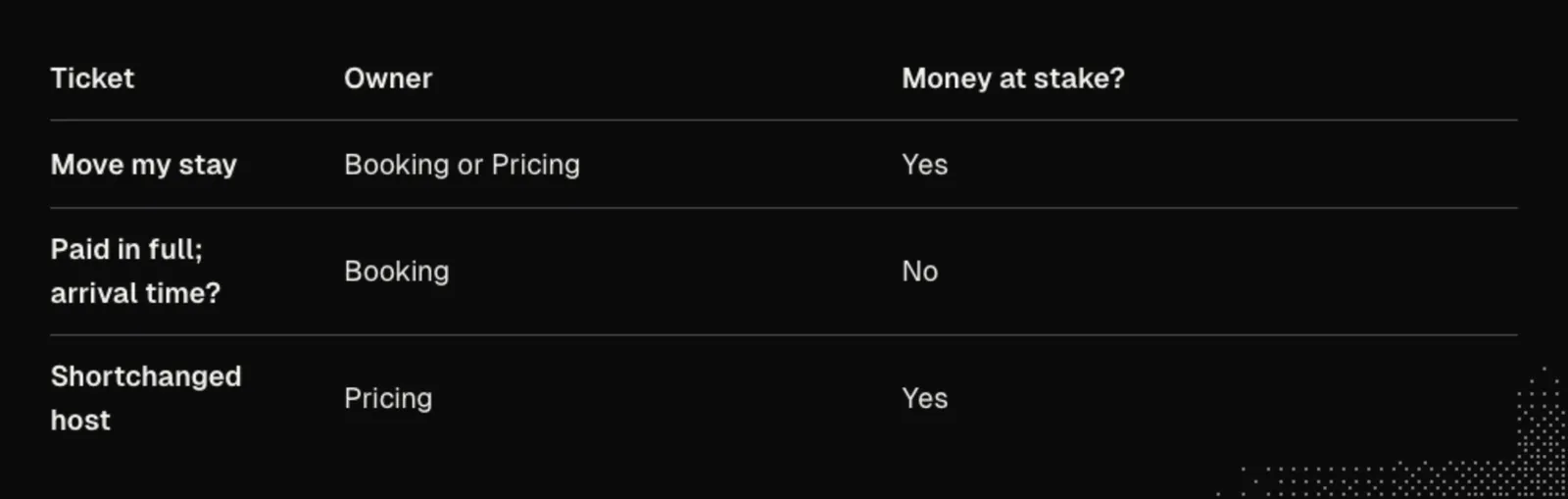
Build the answer key before the loop
What does it mean for a ticket to belong to Booking? In sorter/jev.mjs, the three menu descriptions say what each owner would look at first. Here's the actual menu, before the question is sent:
const OWNER_CRITERIA = {
  booking: 'The reservation itself: dates, status (pending, confirmed), the confirmation, arrival, the host accepting or declining, checkout as an action.',
  pricing: 'What a guest pays, what is refunded, what a host receives: prices, fees, tax, refunds, payouts.',
  nobody: 'Neither of those (site speed, amenities, listing settings, safety, anything else). Choose this rather than stretch a team to fit.',
};
The question is not which agent can write a plausible reply? Both might. The owner is who should look first. Notice that nobody is an ordinary answer. If Booking and Pricing are the only possible choices, the sorter has to assign a slow calendar to a team even if neither owns it. A confident choice on a bad menu isn't a good result.
The money question has its own instruction. Read it independently of the owner menu:
Is this ticket about money moving or owed: a refund, a charge, a payout, a price or total, compensation, a deposit? A ticket that only contains a money-sounding word is not.It would be tempting to drop that question and flag every Pricing ticket. Try that on a date change: Booking may be the right first stop even though the guest also wants to know what they owe. Or try it on a damage claim: neither team may own the damage, but the guest is being asked to pay. The answers go in different fields because they lead to different actions. One labels the ticket; the other decides whether a person must see it.
Here are four records from sorter/labelled-fresh.mjs. Read the subject and message before looking at the label. Where do you disagree about the owner? Where do you disagree about whether money is at stake?
{ id: 'f-01', kind: 'date change, price changes', subject: 'Move my stay', message: 'I need to move my stay at Cedar Ridge from the 14th to the weekend of the 21st. Will the total change, and do I pay the difference now?', owner: ['booking', 'pricing'], money: true },{ id: 'f-11', kind: 'money, no money word', subject: 'Shortchanged', message: 'Guests stayed four nights last month and what landed was for three.', owner: 'pricing', money: true },{ id: 'f-17', kind: 'money word, no money', subject: 'Arrival on Friday', message: 'We have paid in full and everything is confirmed. What time can we arrive on Friday?', owner: 'booking', money: false },{ id: 'f-24', kind: 'border', subject: 'Smoke alarm', message: 'The smoke alarm in the unit has no battery. The host is not answering and we arrive tomorrow.', owner: ['nobody', 'booking'], money: false },The first guest's question changes if you remove the last sentence; the third guest's question doesn't change if you remove the first sentence. A word list can't reliably make that distinction. The last ticket matters for another reason: not money doesn't mean not important. This is a sorter for a particular pair of questions, not a general judgment of urgency. Don't silently replace the workspace's existing assessment of what needs attention with a money flag.
Read the misses, not just the score
Compare like with like. On the original set the keyword control got 11 of 16 money flags right. Haiku 4.5 got all the owners right in every run, yet never got every money flag right in a run. The broken-heating complaint slipped by every time; the bank-transfer deposit was also regularly missed. Haiku 5.5 had the opposite trade: all 16 money flags right in all 15 runs, one owner consistently wrong. If you picked on owner accuracy you'd pick the wrong model for the stated requirement. Start by writing down which error you're unwilling to let through.
Here's how John adds the System One option to the comparison:
So ask Main to add it to the same trial. Same tickets. Same repeats.A fast writer and a fast picker might both produce the right label. The difference is what your code receives. The writer is generating text that somebody must parse and validate. Jev takes both typed questions at once; the owner must be one of the menu choices. It doesn't generate an explanation that might name a fourth team. Nor does picking from a menu make the answer correct. The question about the money and the test for uncertainty both still matter. Jev can also read an image, but this was a text trial. A good score on these tickets doesn't tell us how accurately it would sort photos of damaged homes.
In the fresh Jev trial the median call was 68 milliseconds and the 90th percentile was 97 milliseconds. The maximum was 214 milliseconds. That makes the spoken “well under a tenth of a second” useful as a sense of a usual answer, not a deadline every call met. The calls in that run used 176,670 input tokens, estimated at $0.0074. That measures answering the questions, not the whole time from a guest clicking Submit to a tag appearing in the workspace.
Keep each ticket's result from each run. If a model misses one ticket in every run, showing only one average hides the most useful thing you learned: which kind of guest will be let down consistently. In the first Jev trial there were 16 tickets and 15 runs. The money probability on the double-charge ticket ranged from 0.42 to 0.53. An answer in that range isn't a strong reason to decide there's no money at stake. It's a reason to look at the ticket.
In RentAPlace, the three constants live with the question and the answer checks:
export const MONEY_AT = 0.30;
export const MONEY_SURE = 0.70;
export const OWNER_SURE = 0.70;
The money probability and the owner's confidence don't mean the same thing. A low money probability is a vote for no. A low owner confidence means don't trust this choice of owner. If you treated both low numbers alike, the sorter would send clear non-money tickets to a person because the model had strongly answered no. Here is the actual decision function from sorter/jev.mjs; its input is an answer that has already passed validation:
export function decide(got) {
  if (!got) return null;
  const why = [];
  if (got.moneyP >= MONEY_AT && got.moneyP < MONEY_SURE) why.push(`money probability ${got.moneyP.toFixed(2)} is between ${MONEY_AT.toFixed(2)} and ${MONEY_SURE.toFixed(2)}`);
  if (got.ownerConfidence < OWNER_SURE) why.push(`owner confidence ${got.ownerConfidence.toFixed(2)} is under ${OWNER_SURE.toFixed(2)}`);
  return { owner: got.owner, money: got.moneyP >= MONEY_AT, unsure: why.length > 0, why, moneyP: got.moneyP, ownerConfidence: got.ownerConfidence };
}
Read the boundaries literally. A money answer of 0.30 counts as money and unsure; 0.70 counts as money without the money reason for doubt. At either value, low confidence in the owner still adds its own reason. Code can tell you why a ticket waits without asking a second model to explain the first one. A missing answer isn't money: false or an uncertain vote. There is no usable answer; don't write a tag.
Now freeze the rule. The fresh set had 24 tickets: 14 about money and 10 not. Over 15 runs, that gives 210 opportunities for a money ticket to escape review. None did. That doesn't mean every owner was right. The host who wrote that four nights had landed as three was assigned to Booking in 13 of the 15 runs. All 13 of those choices were marked unsure. If you only check the tickets that slipped through, you miss a real cost: someone still has to decide who owns this one.
There is a second limit worth spotting in those results. No fresh ticket had a money answer between 0.30 and 0.50. The fresh run would have got the same money flags with a cut at 0.50. It supports the outcome on these tickets, not the claim that 0.30 is the right number for somebody else's inbox. In your own trial, label the new tickets before running them. Keep the tickets the team argues about. Don't keep moving the bar and calling another pass over the same answers a fresh test.
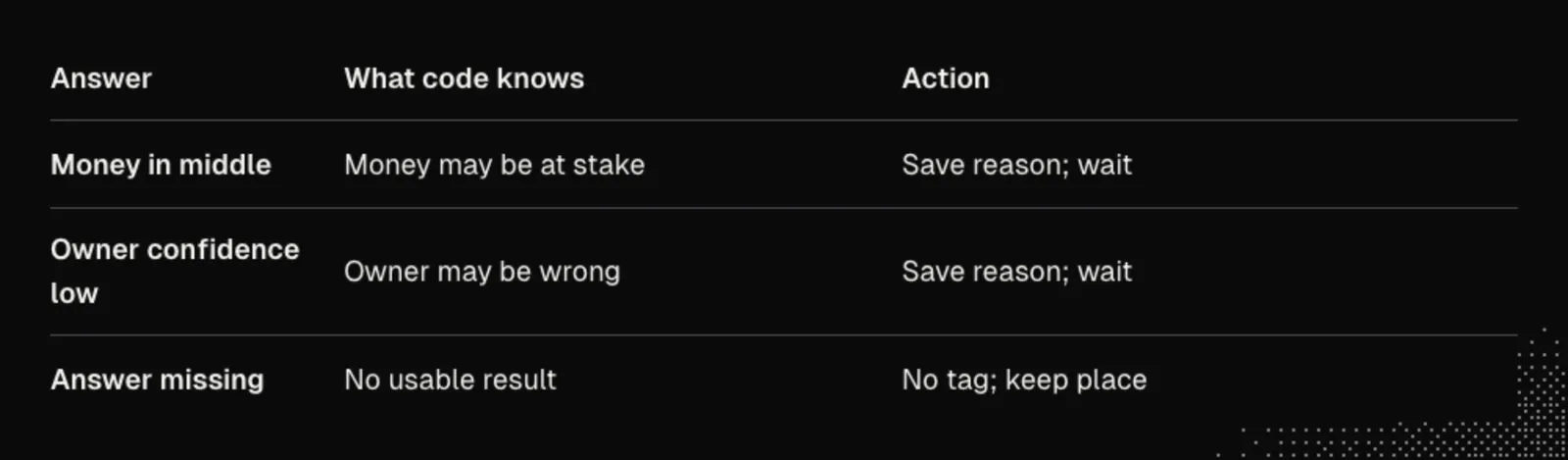
Test the watcher, not just the model
Start a single watcher and leave it running. In a separate test, post a ticket to the app. Don't call the sort command from the test after posting: that would show that sorting works when you start it, not that a new ticket wakes it. Start with a control where the watcher is running and nothing arrives. Nothing should be tagged. Then space out the arrivals and read the output file without asking the watcher to run again.
The repeat test in the build writes the same arrival line to the log again. That's different from creating a second ticket with the same message. Two guests can ask the same question and each deserves a result. It is the same ticket identity, not the same wording, that must not produce a second tag.
The offline test has two halves. While the API is down and a ticket is waiting, look at what's missing: no new tag, no change to the saved place. Then bring the API back and look for the positive result. Leaving the bookmark alone is only half a recovery if nothing comes back to read it. The same issue came up on the model side. An earlier sorter reported a ticket as unsorted and moved on when it couldn't reach the model. It looked like a working queue until you asked where that one ticket had gone. The corrected behavior keeps the place; the unreachable-model case was checked in a unit test, not with a live service outage.
In the restart check, two tickets land while the watcher is dead. They get no tags until somebody starts it again. Both then get tagged once. A separate check puts the saved place back after a tag exists. Now the watcher rereads old input but adds nothing. Those are the two outcomes you care about around a crash. Neither check proves two watchers can safely write to the same file at once.
Finally, compare the records that were never supposed to change. The arrival checks found six tags for six posted tickets and no changed ticket, reservation or payout row. The clock matters here too: a two-second polling interval is not a promise of a tag within two seconds. The watcher has to notice the ticket and then wait for an answer. In the three Jev watcher runs the slowest of the timed new arrivals took 2.37 seconds. Don't hold the guest's request open for that wait.
Open the morning list
John's direction for the view:
Ask Main to show it in your Issues widget: each new ticket with its owner. And anything about money, or anything the sorter wasn't sure of, sits at the top, waiting for your call.In the Herdr example, the saved files, not another model call, add the owner and waiting reason to Issues. Seven new tickets were sorted. Five waited for a person, and 28 older tickets had never been sorted. No owner on an old ticket means we have no tag, not the model chose nobody. The widget can show both states without pretending the sorter was running before you started it.
Challenge. Find the ticket that looks least like a money question in your own set but still has money at stake. Put it next to one that talks about money without asking anyone to move it. Can you explain why the two should end up in different places without naming a keyword? That's a useful test to keep when the model or menu changes.
The principles: code finds the tickets and saves the tags, and the model only answers two questions. These are the classify and route steps of Pipelines. A money ticket or an unsure ticket waits for a person, the way a threshold in Hooks changes the default path of a job.
Draft Replies from Lookups
Sorting a price question isn't answering it. When you ask for drafts, code reads the stay from the ticket and asks the app for the dates, price and total. That's a lookup. Booking gets the resulting facts, its customer-facing notes, and no tools. Code leaves the internal half of its notes out altogether.
Why not just tell Booking to keep a secret? A guest asked what happens if they click reserve twice. Given both halves of the notes, the model explained the internal double-booking mechanism in friendly words. It hadn't copied a line that a word filter could catch. Without those notes it could instead say it couldn't confirm what happens.
Ask Main to draft the pricing questions. Plain code looks up each stay, Booking writes the reply, and each draft shows up beside its ticket: the question, the facts code looked up, and the reply.John's Issues view puts “How much would Lakeside A-Frame be for three nights, for 2 guests?” beside its lookup: dates open, $110.00 nightly, $60.00 cleaning, $46.80 service fee, $31.20 taxes, $468.00 total. Read the draft against that record; don't ask the model to do the arithmetic. Copy the facts below into a plain-text test fixture. With these facts present, a draft may quote the total. Replace the total with unknown and ask again: it mustn't quote the old total.
Facts code looked up: dates open · 3 nights · nightly rate $110.00 · cleaning $60.00 · service fee $46.80 · taxes $31.20 · total $468.00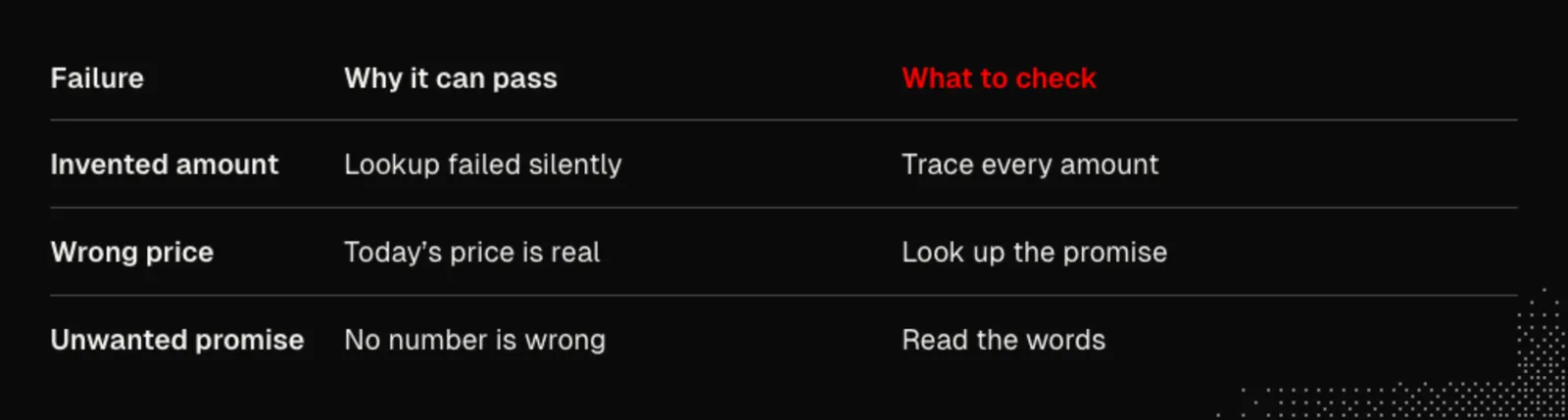
Try a missing stay. The facts should say unknown and the draft should say the price couldn't be checked. Now try a guest promised a price before rates went up. Leave out the promise lookup on purpose. Today's price is a real number, so the amount check can pass a draft that quotes the wrong price for this guest. Restore the lookup and compare. Finally, read the sentences that have no numbers. An unsolicited policy or a promise the app can't keep can get through every amount check. That's why the person who asked for a draft still decides whether to send it.
Put the guest's question next to the evidence
Open the selected ticket before reading the draft. What would you need to know to answer it yourself? Here is the question in Issues:
How much would Lakeside A-Frame be for three nights, for 2 guests?And here is the shortened reply shown beside the facts. The ellipsis is part of the on-screen excerpt, not an invitation to fill in the rest from memory:
The reply, written by Booking: Hi there, thanks for reaching out about the Lakeside A-Frame! Here’s the price for your stay … Total: $468.00Booking isn't a second pricing engine. The app has already priced the stay. The writing job is to turn that result into something a guest can read. Don't judge a draft by whether you can arrive at the same number with a calculator. Ask which lookup returned the number, for which guest and which stay. The writer has no tools for going back to get a fact it wasn't given. It's the code that gathers the facts that has to change when you discover a missing lookup.
Take the two halves of agents/booking/memories.md. The names of the sections matter because one is deliberately left out:
## Internal engineering## Customer-facingA team member trying to understand a checkout retry needs to know why the app recognizes a repeated request before checking availability. That lets Booking warn the engineer about a change that would break retries. A guest asking what happens on a double click hasn't asked how a transaction works. If the drafter already has the engineering answer, asking it to be friendly can make the leak harder to recognize: it translates an internal mechanism rather than quoting it. Comparing strings after the fact won't catch a paraphrase. Leave that section out when building the writer's input. Check the input itself, not just one polite answer that happened not to disclose anything.
A customer-facing note also isn't an instruction to recite every policy to every guest. Here is one line Booking actually has:
A pending reservation is always refunded in full when the guest cancels or the host declines. (`GLOSSARY.md`, Refund; commit 374848f)It's useful for a question about a pending reservation. Read a price draft with that in mind. Did the guest ask about cancelling? Do we know the reservation is pending? The line can be true and still lead to an unsolicited or misleading promise. Removing confidential notes and checking money amounts solve different problems; neither establishes that every sentence belongs in this reply.
Test a price that has changed since the promise
The hold test starts with a real hold on a copy of the app, raises the price for new quotes, and then asks about the held stay. Here's the setup record, not a prompt or a value to hard-code into the writer:
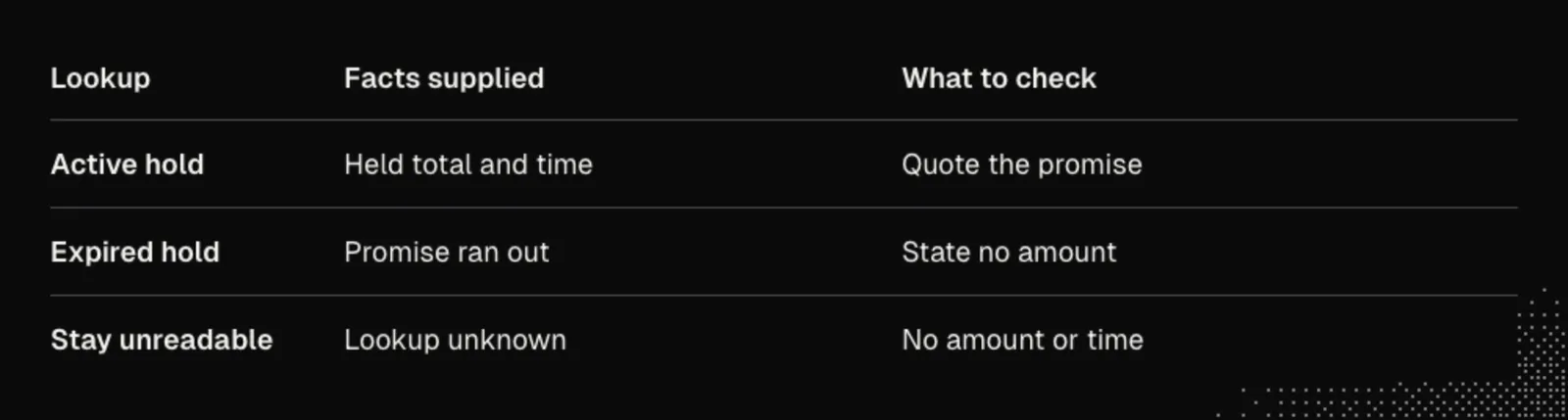
{"reference":"HOLD-E54ED0AC","heldTotal":"$468.00","expiresAt":"2026-11-10T12:00:00.000Z","sameLengthStayQuotedNow":"$864.00"}There are two plausible numbers here. If the question is about a new stay, today's price is relevant. If the guest already holds the stay, the promise is relevant. Don't try to teach the writer that the lower price is always right. The job of code is to work out which record answers the question. Check that the draft states both the looked-up time and the held total. Then move the clock past the end of the hold. The next draft should say it ran out, with no amount. It mustn't repeat yesterday's reassurance because the words of the ticket are still the same.
Next, take away the database the lookup needs. Watch the fact record as well as the reply. In the run it said:
not tried: the stay could not be readNo amount and no time appeared in the resulting draft. Compare that with hiding the lookup: without a fact saying the price was unknown, five of ten control drafts supplied an unsupported amount. All five were rejected. With the failure made explicit, none of ten gave an amount or time. With the lookup present, all ten gave the looked-up time and held price. These are repeated tries on this particular question. They don't replace the after-writing check or a person reading the draft.
Read without sending
In the example widget, selecting a ticket with a draft brings up the guest's question, the facts and the reply. In the real Issues pane, Enter opens the whole draft, ↑/↓ scroll it, and Enter or Esc closes it. None of those keys sends anything to the guest. The existing handoff to Main is a different action: handing the issue to your coding agent isn't sending a customer reply. In another workspace, keep that separation even if the draft is just a file beside the saved tag.
Challenge. Take one draft and check it twice. First cover up the prose and read the question against the facts. Was the right stay looked up? Now uncover the prose and ignore the numbers. Has the writer promised anything nobody looked up or nobody agreed to do? You need both readings even on a draft that passed the amount check.
The principle: code looks up the facts and gives them to Booking, which has no tools, and the internal half of its notes stays out. This is Push Systems: the context that must be present, and nothing that leads to a wrong reply.
Read an Error Report
A guest can hit an error and close the tab without opening a ticket. In John's example a failed request wakes the error hunter on a copy of the app. Its contract is report, never fix. A repeated event carries the same ID, so it should lead to one report, not two. The log needs enough information to identify the failed quote, but never a guest's email or card number.
There's a difference between “a quote failed” and “the guest's quote failed the same way.” In the first run the log didn't say what the guest had asked. The hunter found a failure, but couldn't establish it was the original one. In the later report, the boundary mattered more than the error message: stays touching one month failed, even at a different home; stays just outside it worked.
There is a privacy test alongside the accuracy test. The direction John gives is:
So ask Main to log enough to replay a failed request: what the guest asked for. And never the private parts, like an email or a card number.Use a test booking with synthetic details and inspect what the app actually recorded. A log can be useful for engineering and still be the wrong place for a guest's personal or payment details. Checking one deliberately chosen test value didn't appear is a useful check on that path, not proof that every log the app writes is safe.
The next request is for a reader, not for Main to find and fix the bug:
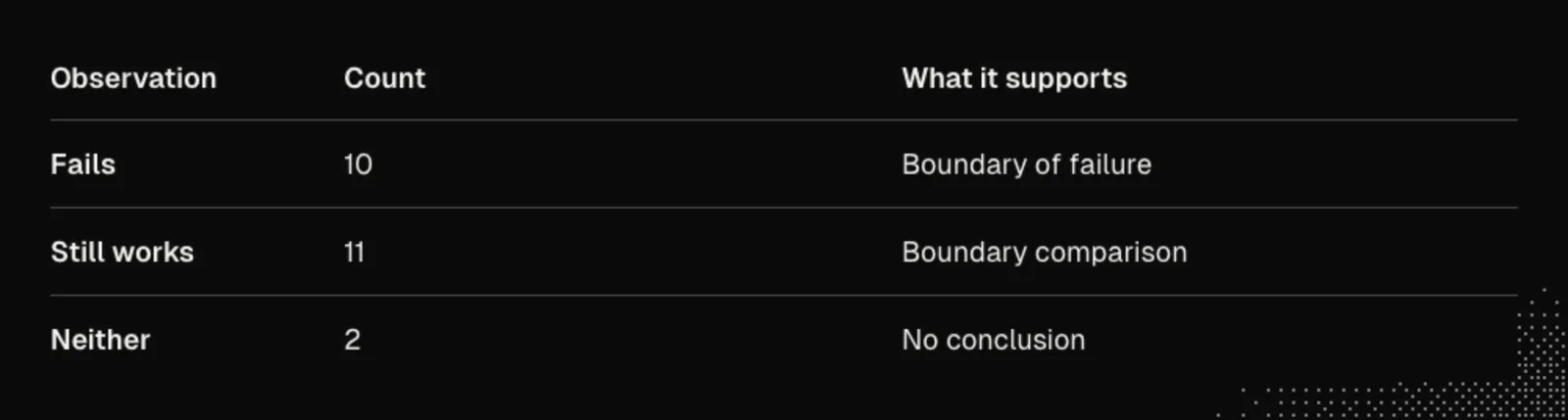
Then ask Main for a Hunts widget that shows each hunt as a card. One short box: what fails, what still works, with a numbered request behind every line.Build the reader against saved results. Let code keep the request numbers and outcomes, not a model writing them back from memory. If a summary cites a number that isn't in the record, drop it. Count the outcomes in code. John's selected Hunts card has 23 requests: 10 failed, 11 still worked, and 2 were neither. Don't squeeze those last two into a more convenient category.
Read it and tell me what you would check first. Do not change any code yet.In Herdr, ↑/↓ selects a card, Enter sends the selected card to Main, and R reads now. Selecting isn't sending. The handoff ends: “Read it and tell me what you would check first. Do not change any code yet.” In another workspace, give the reader the same choice: inspect the evidence, then explicitly send the selected report for advice.
Follow the evidence on the selected card
The Hunts view reads a saved report; opening it isn't permission to run another hunt. A short name identifies the hunt. The count beside it is the number of requests in that investigation, not the number of tickets from guests. This is the selected card's replay line:
Replayed the logged error: same failureRead that separately from the rows below. It tells you whether the report connects to the error that woke the job. The rest tells you what the investigation learned. A failed request somewhere in the same app is not enough to justify the replay line. In the early run the log mentioned a failure but didn't preserve the question, so the hunter couldn't make that connection. The useful fix was to change what the app recorded, not to make the model sound more certain about what it thought the guest had done.
The display groups the numbered observations. Here are the three lines in the course's selected card, including the shortened end of the middle row:
Fails 10 · 44 46 48 52 55 57 61 62 64 66
Still works 11 · 45 47 50 53 54 56 58 59 60 63…
Neither 2 · 49 51
Try reading only the first row. It tells you where to look, but not where the problem stops. Now read the second: those are comparisons that didn't fail the same way. They are what makes a boundary more useful than a pile of red errors. The last row matters just as much. If a request didn't demonstrate either outcome, changing it into a success would make the summary neater and the evidence worse. Ten plus eleven plus two accounts for all 23. You don't need a language model to do that count.
Give the reader a bad saved report as a control. If the text mentions a request that isn't in the stored record, does the reader show it as evidence? A person should be able to go from a claim to an observation, not merely to another sentence from the same writer. Count from the stored outcomes. Keep the unverified sentence out of the evidence list. That way a good-looking card can't lend authority to a reference that goes nowhere.
Here is the excerpt the card shows going to Main; the bracketed ellipsis stands for the report left out of the slide:
The error hunter filed this report for hunt 12f6b365-… It worked on a copy and reports only; it did not fix anything. […] Read it and tell me what you would check first. Do not change any code yet.Compare the end of Main's reply:
Should I start by reading the quote endpoint code and checking for error logs?That's a question, not a fix. The person at the keyboard now has a much better starting point than a single line saying something failed. They can decide whether to investigate, who should do it and what should be allowed to change. Asking Main not to change code is a request, not a lock on its tools. Don't confuse the handoff's wording with the hunter's narrower job on the copy.
Challenge. Read a saved card without its summary. Can you tell which observation connects it to the original failure, which observations narrow the boundary, and which ones don't justify a conclusion? Then read the summary again. If its claim goes further than those observations, keep the observations and narrow the claim.
The principles: a failed request is the event that wakes the hunter, and the hunter reports but never fixes. The card counts its outcomes in code and drops a reference that is not in the record. These are the verify and communicate steps of Pipelines.
Takeaways
An event starts work; it doesn't decide what that work is allowed to do. The sorter leaves a tag you can question, Booking leaves a draft you can compare with its facts, and the hunter leaves a report whose numbers you can follow. When you sit down, start with the money, the uncertainty, and the decisions that still belong to you.